z-index Stacking Context 쌓임 맥락
Problem
z-index 조절했는데 의도한 데로 img가 아래로 안가거나 input이 위로 안 올라온다.
/* tailwind css */
<div id="wrapper" className="relative">
	<div className="z-10 absolute -translate-x-1/2 -translate-y-1/2">
		{photo ? <img id="photo" className="-z-10 absolute">
      	: <input type="file" className="z-40 absolute">}
	</div>
	<img id="frame" className="z-10 absolute -translate-x-1/2 -translate-y-1/2">
	<img id="sticker" className="z-10 absolute -translate-x-1/2 -translate-y-1/2">
</div>
photo 가 전혀 frame과 sticker 밑으로 안갔다
what is z-index
z-index는 값으로: auto, integer을 가질 수 있다.
[auto](https://developer.mozilla.org/ko/docs/Web/CSS/z-index#auto) 기본값으로 박스가 새로운 쌓임 맥락을 생성하지 않습니다. 현재 쌓임 맥락에서의 위치는 부모 요소와 동일합니다.
[<integer>](https://developer.mozilla.org/ko/docs/Web/CSS/integer)현재 쌓임 맥락에서의 위치로 이 값을 사용합니다. 또한 자신만의 쌓임 맥락을 생성하고, 해당 맥락에서 자신의 위치를 0으로 설정합니다. 이로 인해 자손의 z-index를 자기 외의 바깥 요소와 비교하지 않습니다.
Stacking Context
기본 쌓임 맥락
- 배경(html, body, 최상단 태그 등)이 맨 뒤, 자식 요소는 앞으로.
- 자식 요소들은 먼저 생성된 순서(코드상 위에서부터 선언된 순서)대로 뒤에 쌓이고, 차례차례 앞으로.
- position을 할당받은 요소들은 z-index가 없더라도 할당받지 않은 다른 요소들보다 앞으로 온다.3-1. position을 할당받은 요소끼리도 먼저 생성된 순서대로 뒤에 쌓이고, 차례차례 앞으로.
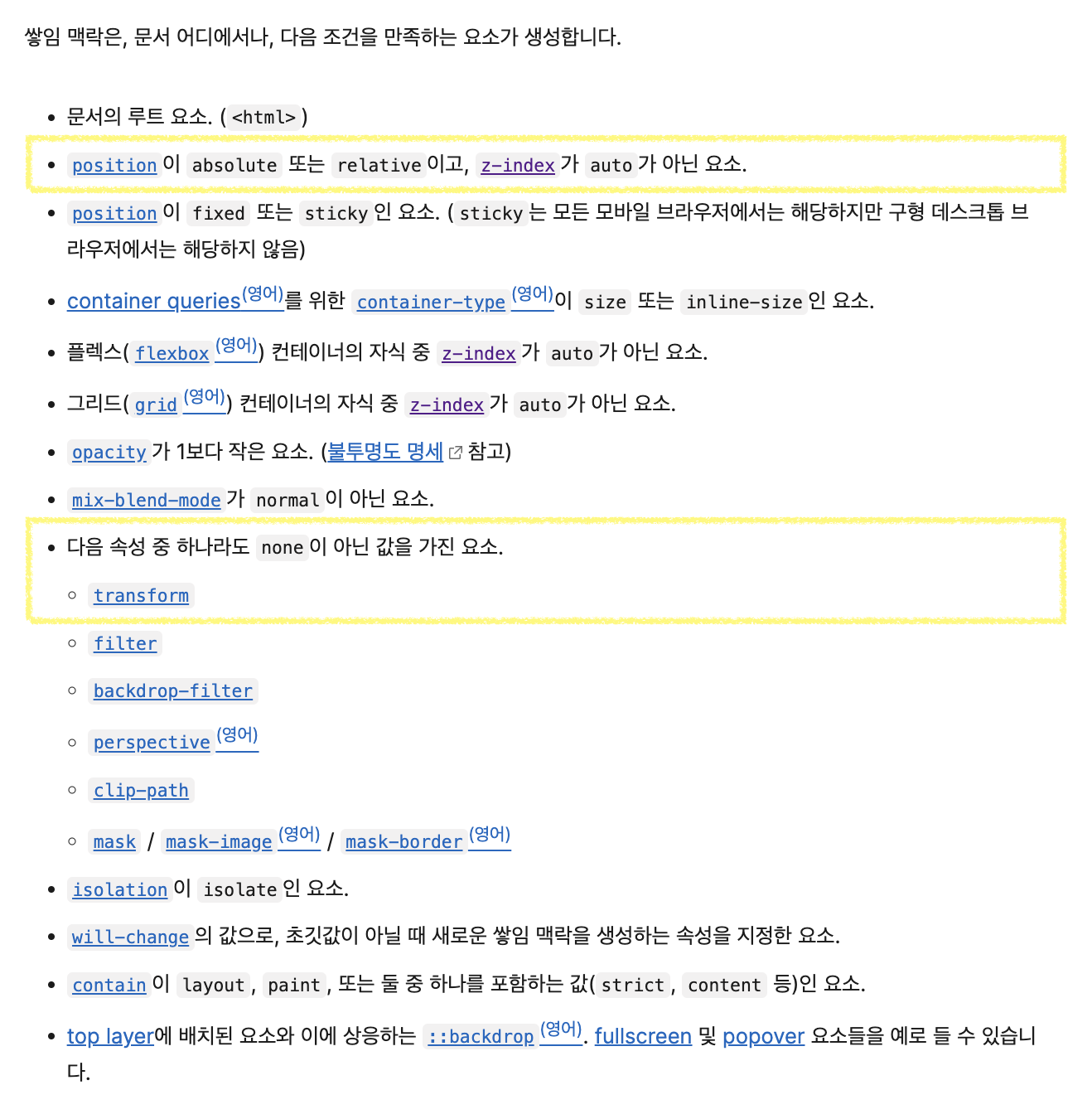
쌓임 맥락 생성 조건
아래 조건을 하나라도 만족하면, 브라우저는 새로운 쌓임 맥락을 생성한다.
SOLUTION
문제 코드 분석
쌓임 맥락이 이미 밑으로 쌓인 요소는 일반적으로는 부모의 쌓임 맥락을 벗어날 수 없다.
z-index는 부모의 쌓임 맥락에 따른 상대적인 값이다.
부모의 쌓임 맥락에 따라서 현재 요소의 쌓임 맥락 내에서의 위치를 정한다.
/* tailwind css */
<div id="wrapper" className="relative">
	<div className="z-10 absolute -translate-x-1/2 -translate-y-1/2">
		{photo ? <img id="photo" className="-z-10 absolute">  : <input type="file" className="z-40 absolute">}
	</div>
	<img id="frame" className="z-10 absolute -translate-x-1/2 -translate-y-1/2">
	<img id="sticker" className="z-10 absolute -translate-x-1/2 -translate-y-1/2">
</div>
html -- 쌓임 맥락 0️⃣
wrapper
div -- 쌓임 맥락 1️⃣
photo || input
img -- 쌓임 맥락 2️⃣
img -- 쌓임 맥락 3️⃣각각 따로 생긴 3개의 쌓임 맥락을 없애고 단 1개의 쌓임 맥락으로 통일해야한다. 그리고 그 안에서 z-index를 조작해 순서를 조절해야한다.
해결 코드
-translate-x-1/2 -translate-y-1/2 가 쌓임 맥락을 만들고 있다고 판단하였으므로
가운데 정렬을 위해 margin을 이용하도록 하여 새롭게 수정하였다.
/* tailwind css */
<div id="wrapper" className="relative">
	<div className="absolute mx-[-w/2] my-[-h/2]">
		{photo ? <img id="photo" className="absolute">  : <input type="file" className="z-10 absolute">}
	</div>
	<img id="frame" className="absolute mx-[-w/2] my-[-h/2]
">
	<img id="sticker" className="absolute mx-[-w/2] my-[-h/2]
">
</div>
html -- 쌓임 맥락 0️⃣
wrapper
div
photo || input
img
img 참고