N:M 2
- 팔로우 기능 구현
- 프로필 페이지 구현
-
URL 주소 작성
# 문자열을 추가로 받는다 path('profile/<str:username>/', views.profile, name='profile'), -
views.py 작성
from django.contrib.auth import get_user_model def profile(request, username): User = get_user_model() person = User.objects.get(username=username) context = { 'person': person, } return render(request, 'accounts/profile.html', context) -
profile.html 만들기
{% extends "base.html" %} {% block content %} <h1>{{ person.username }} 님의 프로필</h1> <hr> <h2>{{ person.username }}가 작성한 게시글</h2> {% for article in person.article_set.all %} <div>{{article.title}}</div> {% endfor %} <hr> <h2>{{ person.username }}가 작성한 댓글</h2> {% for article in person.comment_set.all %} <div>{{ comment.content }}</div> {% endfor %} <hr> <h2>{{ person.username }}가 좋아요를 누른 게시글</h2> {% for article in person.like_articles.all %} <div>{{ article.title}}</div> {% endfor %} <hr> {% endblock content %} -
index.html에 하이퍼링크 넣기
{% extends 'base.html' %}

{% block content %}
  <h1>INDEX</h1>
  {% if request.user.is_authenticated %}
    <p>Hello, {{ user.username }}</p>
    <a href="{% url "articles:create" %}">CREATE</a>
    <form action="{% url "accounts:logout" %}" method="POST">
      {% csrf_token %}
      <input type="submit" value="로그아웃">
    </form>
    <form action="{% url "accounts:delete" %}" method="POST">
      {% csrf_token %}
      <input type="submit" value="회원탈퇴">
    </form>
    <a href="{% url "accounts:update" %}">회원정보 수정</a>
    <a href="{% url "accounts:profile" request.user.username %}">내 프로필</a>
  {% else %}
    <a href="{% url "accounts:login" %}">로그인</a> |
    <a href="{% url "accounts:signup" %}">회원가입</a>
  {% endif %}

  <hr>

  {% for article in articles %}
    <div>
      <div>작성자:
        <a href="{% url "accounts:profile" article.user.username%}">{{ article.user.username }}</a>
      </div>
      {% comment %} <div>작성자: {{ article.user }}</div> {% endcomment %}
      <div>글 번호: {{ article.pk }}</div>
      <div>
        글 제목: <a href="{% url "articles:detail" article.pk %}">{{ article.title }}</a>
      </div>
      <div>
        <form action="{% url "articles:likes" article.pk %}" method="POST">
          {% csrf_token %}
          {% if request.user in article.like_users.all %}
            <input type="submit" value="좋아요 취소">
          {% else %}
            <input type="submit" value="좋아요">
          {% endif %}
        </form>
      </div>
    </div>
    <hr>
  {% endfor %}
{% endblock content %}
-
- 모델 관계 설정
-
User(M) - User(N)
from django.db import models from django.contrib.auth.models import AbstractUser class User(AbstractUser): # 팔로우 기능을 위한 MTM 필드 정의 followings = models.ManyToManyField('self', related_name='followers', symmetrical=False) # def __str__(self): # return self.username -
url 작성
urlpartterns = [ path('<int:user_id>/follow/', views.follow, name='follow'), ] -
view함수 작성
def follow(request, user_id): me = request.user User = get_user_model() you = User.objects.get(pk=user_id) # 나 자신을 팔로우 할 수 없다. if me != you: # 내가 너의 팔로워 목록에 있다면 관계 제거 if me in you.followers.all(): you.followers.remove(me) # me.followings.remove(you) # 아니라면 관계 추가 else: you.followers.add(me) # me.followings.add(you) return redirect("accounts:profile", you.username) -
profile.html에 버튼 추가하기
{% extends "base.html" %}

{% block content %}
  <h1>{{ person.username }} 님의 프로필</h1>
  {% if request.user != person %}
  <div>
    <form action="{% url "accounts:follow" person.pk %}" method="POST">
        {% csrf_token %}
        {% if request.user in person.followers.all %}
            <input type="submit" value="언팔로우">
        {% else %}
            <input type="submit" value="팔로우">
        {% endif %}
    </form>
  </div>
  {% endif %}
  <hr>

  <h2>{{ person.username }}가 작성한 게시글</h2>
  {% for article in person.article_set.all %}
    <div>{{article.title}}</div>
  {% endfor %}

  <hr>

  <h2>{{ person.username }}가 작성한 댓글</h2>
  {% for article in person.comment_set.all %}
    <div>{{ comment.content }}</div>
  {% endfor %}
  <hr>

  <h2>{{ person.username }}가 좋아요를 누른 게시글</h2>
  {% for article in person.like_articles.all %}
    <div>{{ article.title}}</div>
  {% endfor %}
  <hr>

{% endblock content %}
-
- Fixtures
Django 개발 시 데이터 베이스 초기와 및 공유를 위해 사용되는 파일 형식
- Fixtures 사용 목적 초기 데이터 세팅 테스트 샘플 데이터 준비 협업 시 동일한 데이터 환경 맞추기
- 관련 명령어
- dumpdata : 데이터베이스에서 데이터를 내보낼 때 사용
- loaddata : 데이터베이스에 데이터를 불러올 때 사용
아래 키워드들은 migrate이후에 로드 가능하다.
- dumpdata
python manage.py dumpdata [앱이름.모델이름] [옵션] > 추출파일명.json

python manage.py dumpdata --indent 4 articles.article > articles.json
(결과)
[
{
    "model": "articles.article",
    "pk": 1,
    "fields": {
        "user": 1,
        "title": "ffff",
        "content": "ffffffffffff",
        "created_at": "2026-05-07T00:15:50.241Z",
        "updated_at": "2026-05-07T00:15:50.241Z",
        "like_users": [
            1
        ]
    }
},
{
    "model": "articles.article",
    "pk": 2,
    "fields": {
        "user": 1,
        "title": "ffffffffff",
        "content": "fffffffffffffffffffffffffffffffffffffffffffffffffffffffffffffffffffffffff",
        "created_at": "2026-05-07T00:16:12.170Z",
        "updated_at": "2026-05-07T00:16:12.170Z",
        "like_users": [
            1
        ]
    }
},
{
    "model": "articles.article",
    "pk": 3,
    "fields": {
        "user": 2,
        "title": "����",
        "content": "����",
        "created_at": "2026-05-07T01:14:56.366Z",
        "updated_at": "2026-05-07T01:14:56.366Z",
        "like_users": []
    }
}
]
- loaddata
python manage.py loaddata 파일경로

python manage.py loaddata articles.json users.json comments.json
Fixtures 파일의 기본경로 : app_name/fixtures/
파일 한 번에 작성하면 장고가 자동으로 우선순위 높은 파일 불러옴
대신 한 번에 실행하지 않고 별도로 실행한다면 모델 관계에 따라 load 순서가 중요할 수 있다.
근데 한글의 경우 인코딩 문제 때문에 깨져서 에러가 난다.
메모장으로 열어서 다른이름으로 저장 → UTF-8형식으로 저장하면 해결된다.
- Improve query
같은 과를 얻기 위해 DB 측에 보내는 query의 개수를 점차 줄여 조회하기 (N+1 Problem 해결 가능)
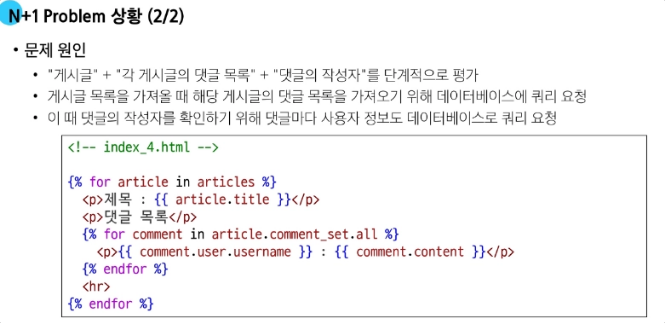
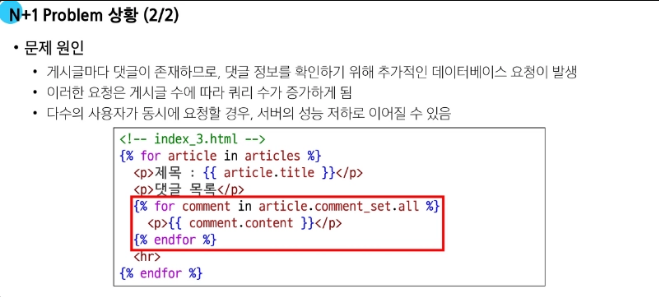
- N+1 Problem
1개의 쿼리로 데이터를 가져왔더라도 관련 데이터를 추가로 가져오기 위해 추가 쿼리 N개 더 실행되는 상황
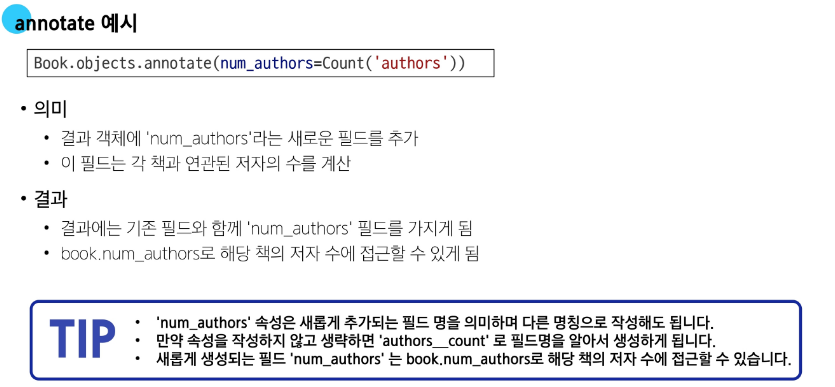
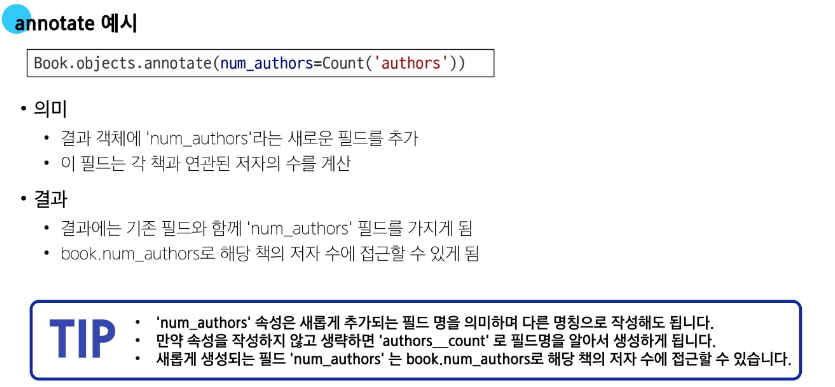
- annotate
-
Sql의 GROUP BY 사용
-
집계 합수 (count, sum, avg, max, min 등) 과 함께 사용
-
위 코드는 Book.objects.all() + count를 모두 한번에 하겠다는 뜻
- N+1 예시
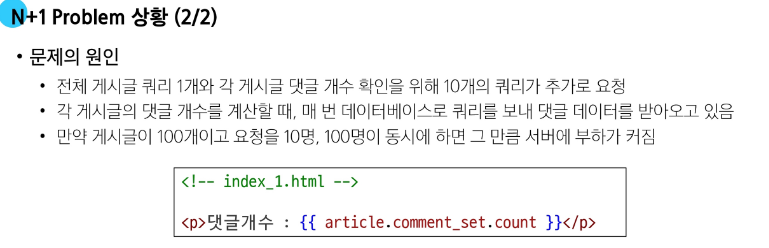
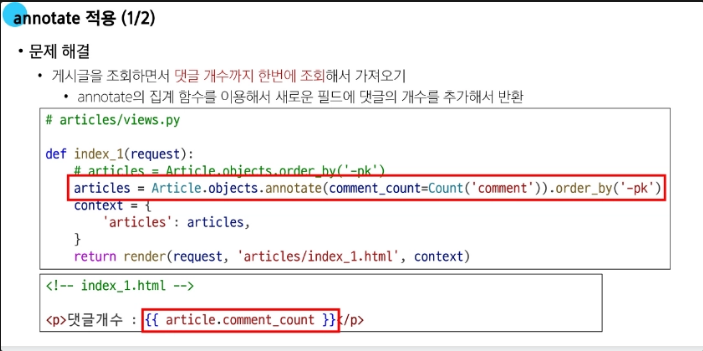
def index_1(request):
    articles = Article.objects.order_by('-pk')
    # articles = Article.objects.annotate(comment_count=Count('comment')).order_by('-pk') 이렇게 바꿔야 함!!!!!!!!!!!!!!
    context = {
        'articles': articles,
    }
    return render(request, 'articles/index_1.html', context)
{% extends 'base.html' %}
{% block content %}
<h1>Articles</h1>
{% for article in articles %}
<p>제목 : {{ article.title }}</p>
<p>댓글개수 : {{ article.comment_set.count }}</p>
{% comment %} <p>댓글개수 : {{ article.comment_count }}</p> {% endcomment %}
<hr>
{% endfor %}
{% endblock content %}주석 해제해서 수정하면 11개의 쿼리가 1개로 줄어든다.
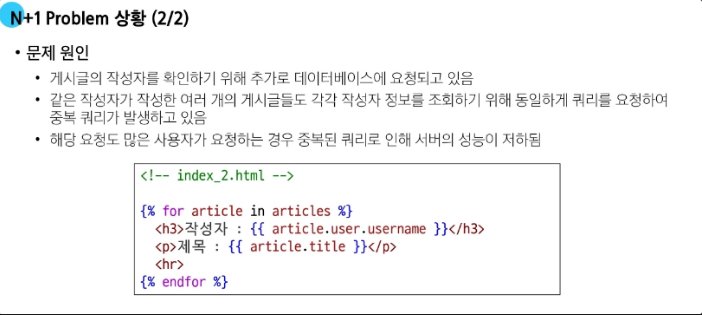
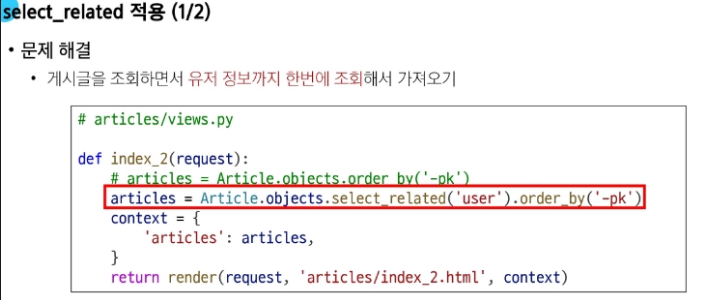
- select_related
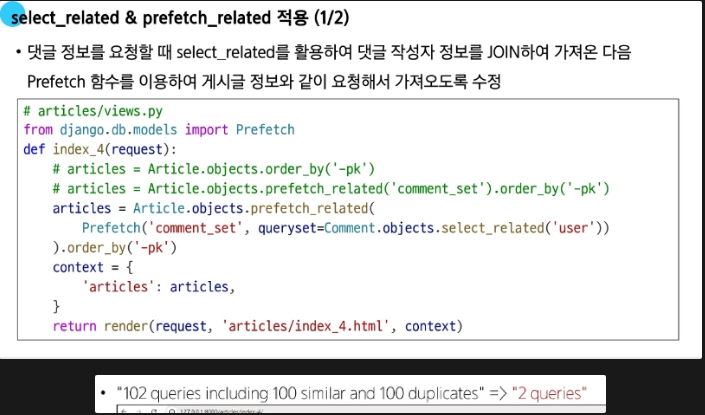
1대 1 관계에서 사용되는 장고 오알엠 메서드, 내부적으로 inner join 사용해서 관련 객체를 한 번에 불러옴
다른 예시

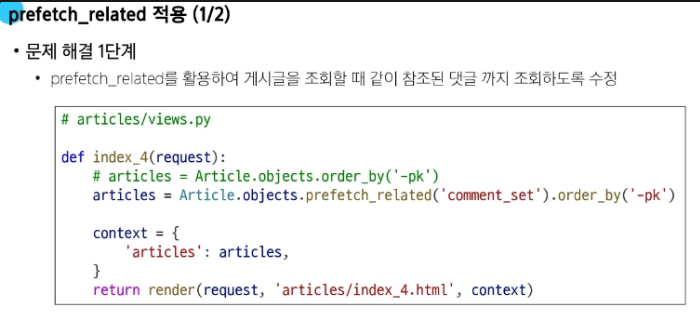
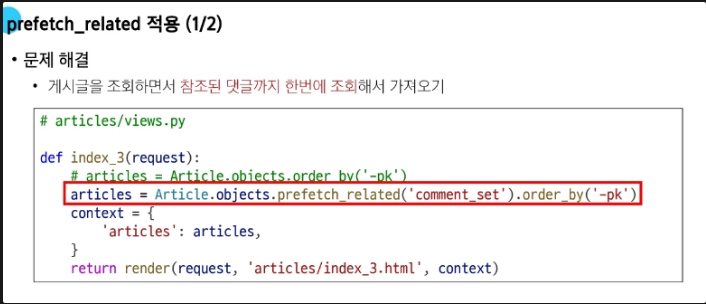
- prefetch_related
-
sql이 아닌 python을 사용한 jpoin 진행
-
M:N 혹은 N:! 역참조 관계에서 사용
-

- select_related & prefetch_related
-