오토스케일링의 기본 개념
오토스케일링(Auto Scaling) 이란 시스템 부하(트래픽, 리소스 사용량 등)에 따라
자동으로 리소스를 늘리거나 줄이는 기능을 말합니다.
즉, 시스템이 과부하가 걸리면 리소스를 자동으로 확장(Scale Out)하고,
사용량이 줄면 축소(Scale In)하는 구조입니다.
Kubernetes 오토스케일링 개념
쿠버네티스에서는 오토스케일링이 크게 3가지 레벨로 나뉩니다.
- Horizontal Pod Autoscaler (HPA) : CPU/메모리 부하에 따라 파드 개수 조절
- Vertical Pod Autoscaler (VPA) : 파드 자체의 리소스 요청/제한(CPU, Memory) 자동 조정
- Cluster Autoscaler (CA) : 노드 리소스가 부족할 때 EC2 같은 노드 자체를 증감
Horizontal Pod Autoscaler (HPA)
- 확장 단위: Pod
- 확장 기준: 평균 CPU/메모리 사용량
- 주요 역할: 트래픽 증가 시 파드 수를 자동으로 늘려줌
Vertical Pod Autoscaler (VPA)
- 확장 단위: Pod의 “리소스 설정값” (CPU/메모리 request, limit)
- 주요 역할: 파드 자체의 스펙을 조정 (예: CPU 500m → 800m)
- 주의점: 리소스 변경 시 Pod 재시작이 필요하므로 실시간 조정에는 부적합
- 주로 ML 배치나 비동기 처리 워크로드에 사용
Cluster Autoscaler (CA)
- 확장 단위: Node (즉, EC2 같은 워커 노드)
- 주요 역할: 파드가 스케줄되지 못하면 자동으로 노드 추가
반대로 파드가 적을 경우 유휴 노드를 제거
예시 상황
- HPA가 Pod를 10개로 늘렸는데 현재 노드에 공간이 부족 →
Cluster Autoscaler가 새 EC2 노드 1개 자동 생성
AWS EC2 오토스케일링
AWS EC2의 Auto Scaling Group (ASG) 은
쿠버네티스 이전부터 존재하던 전통적인 인프라 오토스케일링 방식입니다.
- 확장 대상 : EC2 인스턴스 (VM 단위)
- 확장 기준 : CPU 사용량, 네트워크 트래픽, CloudWatch 지표
- 운영 방식 : Auto Scaling Group(ASG)에 최소·최대 인스턴스 개수 지정
- 확장 트리거 : CloudWatch 알람에 따라 자동으로 Scale Out / Scale In
예시
- CPU 사용률이 70% 이상 → EC2 인스턴스 1대 추가
- CPU 사용률이 30% 이하 → EC2 인스턴스 1대 제거
쿠버네티스 오토스케일링(HPA) 적용
Metrics Server 설치
HPA는 파드의 CPU / 메모리 사용량 등 리소스 메트릭을 기반으로 동작합니다.
이를 위해 클러스터에 Metrics Server가 설치되어 있어야 합니다.
kubectl apply -f https://github.com/kubernetes-sigs/metrics-server/releases/latest/download/components.yamlDocker Desktop 환경 추가 설정 (-kubelet-insecure-tls)
Docker Desktop의 클러스터는 인증서 검증 이슈로 메트릭 조회가 실패하는 경우가 많습니다.
아래 옵션을 Deployment에 추가합니다.
kubectl edit deployment metrics-server -n kube-system그리고 아래 라인을 spec.template.spec.containers.args에 추가:
- --kubelet-insecure-tls이후 자동으로 metrics-server 파드가 재시작됩니다.
설치 후 정상 동작 확인:
kubectl get deployment metrics-server -n kube-systemRollout 및 카나리 전략 (rollout.yaml)
Rollout은 HPA의 스케일링 대상이며, 여기에 카나리 배포 단계를 정의합니다.
apiVersion: argoproj.io/v1alpha1
kind: Rollout
metadata:
  name: my-app-rollout
spec:
  replicas: 1
  revisionHistoryLimit: 1
  selector:
    matchLabels:
      app: my-app
  template:
    metadata:
      labels:
        app: my-app
    spec:
      containers:
        - name: my-app-container
          image: <username>/spring-cicd-k8s-demo:develop-latest
          env:
            - name: SPRING_PROFILES_ACTIVE
              value: develop
          ports:
            - containerPort: 8080
          resources:
            requests:
              cpu: "100m"
              memory: "128Mi"
          readinessProbe:
            httpGet:
              path: /actuator/health/readiness
              port: 8080
            initialDelaySeconds: 60
            periodSeconds: 10
            timeoutSeconds: 10
            failureThreshold: 3

  strategy:
    canary:
      stableService: my-app-stable-service
      canaryService: my-app-canary-service

      trafficRouting:
        nginx:
          stableIngress: my-app-ingress
          canaryIngress: my-app-ingress

      steps:
        - setWeight: 50
        - pause: { duration: 30s }
        - setWeight: 100
setWeight: 50
- 전체 트래픽의 50%를 새로운 Canary 버전으로 전환합니다.
- 나머지 50%는 기존 Stable 버전으로 전달됩니다.
- 이 시점에서 두 ReplicaSet이 공존합니다.
- Stable RS: 약 절반의 Pod
- Canary RS: 새 버전의 Pod
이 단계에서 Argo Rollouts는 NGINX, ALB, Istio 등의 트래픽 라우터와 연동해 정확히 50% 비율로 요청을 분산시킵니다.
② pause: { duration: 30s }
- 30초간 배포를 일시 정지(pause) 합니다.
- 이 시간 동안 Canary 버전의 안정성을 관찰할 수 있습니다.
analysisTemplate을 추가하면 이 구간에서 자동 분석(자동 승인/롤백)도 가능합니다.
③ setWeight: 100
- 모든 트래픽을 Canary 버전으로 전환합니다.
- 이제 Stable 버전은 더 이상 요청을 받지 않으며,
Rollout이 Canary를 새로운 Stable 버전으로 승격(promote) 시킵니다.
이 단계를 완료하면 Rollout은 “배포 완료(Successful)” 상태가 됩니다.
오토 스케일링 정책 (hpa.yaml)
HPA는 Rollout 리소스를 바라보며 파드의 개수를 1개에서 5개 사이로 유지합니다.
apiVersion: autoscaling/v2
kind: HorizontalPodAutoscaler
metadata:
  name: my-app-hpa
  annotations:
    autoscaling.kubernetes.io/downscale-stabilization: "5m"
spec:
  scaleTargetRef:
    apiVersion: argoproj.io/v1alpha1
    kind: Rollout
    name: my-app-rollout
  minReplicas: 1
  maxReplicas: 5
  metrics:
    - type: Resource
      resource:
        name: cpu
        target:
          type: Utilization
          averageUtilization: 50
서비스 (service.yaml)
Rollout의 대상이 되는 두 Service는 외부 접근용이 아니므로 모두 ClusterIP로 유지합니다. 외부 접근은 Ingress를 통해 이루어집니다.
apiVersion: v1
kind: Service
metadata:
  name: my-app-stable-service
spec:
  type: ClusterIP
  selector:
    app: my-app
  ports:
    - port: 80
      targetPort: 8080
---
apiVersion: v1
kind: Service
metadata:
  name: my-app-canary-service
spec:
  type: ClusterIP
  selector:
    app: my-app
  ports:
    - port: 80
      targetPort: 8080
Ingress.yaml
Rollout 컨트롤러가 이 Ingress 리소스를 직접 수정하여 트래픽을 stable과 canary 서비스로 분산합니다.
apiVersion: networking.k8s.io/v1
kind: Ingress
metadata:
  name: my-app-ingress
  annotations:
    kubernetes.io/ingress.class: nginx
spec:
  rules:
    - host: develop.localtest.me
      http:
        paths:
          - path: /
            pathType: Prefix
            backend:
              service:
                name: my-app-stable-service
                port:
                  number: 80
Argo CD Application 설정
위 Kubernetes 매니페스트를 GitOps 방식으로 배포하도록 Argo CD Application을 정의합니다.
apiVersion: argoproj.io/v1alpha1
kind: Application
metadata:
  name: my-app-develop
  namespace: argocd
spec:
  project: default
  source:
    repoURL: https://github.com/your-org/your-repo.git
    targetRevision: HEAD
    path: k8s2/develop # Git 저장소 내 k8s 설정 파일 경로
  destination:
    server: https://kubernetes.default.svc
    namespace: develop # 배포 대상 네임스페이스
  syncPolicy:
    automated:
      prune: true
      selfHeal: true
    syncOptions:
    - CreateNamespace=true
테스트
배포 후 HPA 상태 확인:
kubectl get hpa -n develop결과 예시:
NAME                       REFERENCE                        TARGETS   MINPODS   MAXPODS   REPLICAS   AGE
spring-cicd-k8s-demo-hpa   Rollout/spring-cicd-k8s-demo     45%/50%   3         10        3          2m
이후 부하 테스트를 통해 CPU 사용량이 50%를 넘으면 HPA가 자동으로 파드를 확장합니다.
예를 들어 kubectl get pods -n develop 명령을 반복적으로 실행하면 다음과 같은 변화를 볼 수 있습니다.
spring-cicd-k8s-demo-xxxx   1/1   Running
spring-cicd-k8s-demo-xxxx   1/1   Running
spring-cicd-k8s-demo-xxxx   1/1   Running
spring-cicd-k8s-demo-xxxx   1/1   Running   ← 자동 확장된 Pod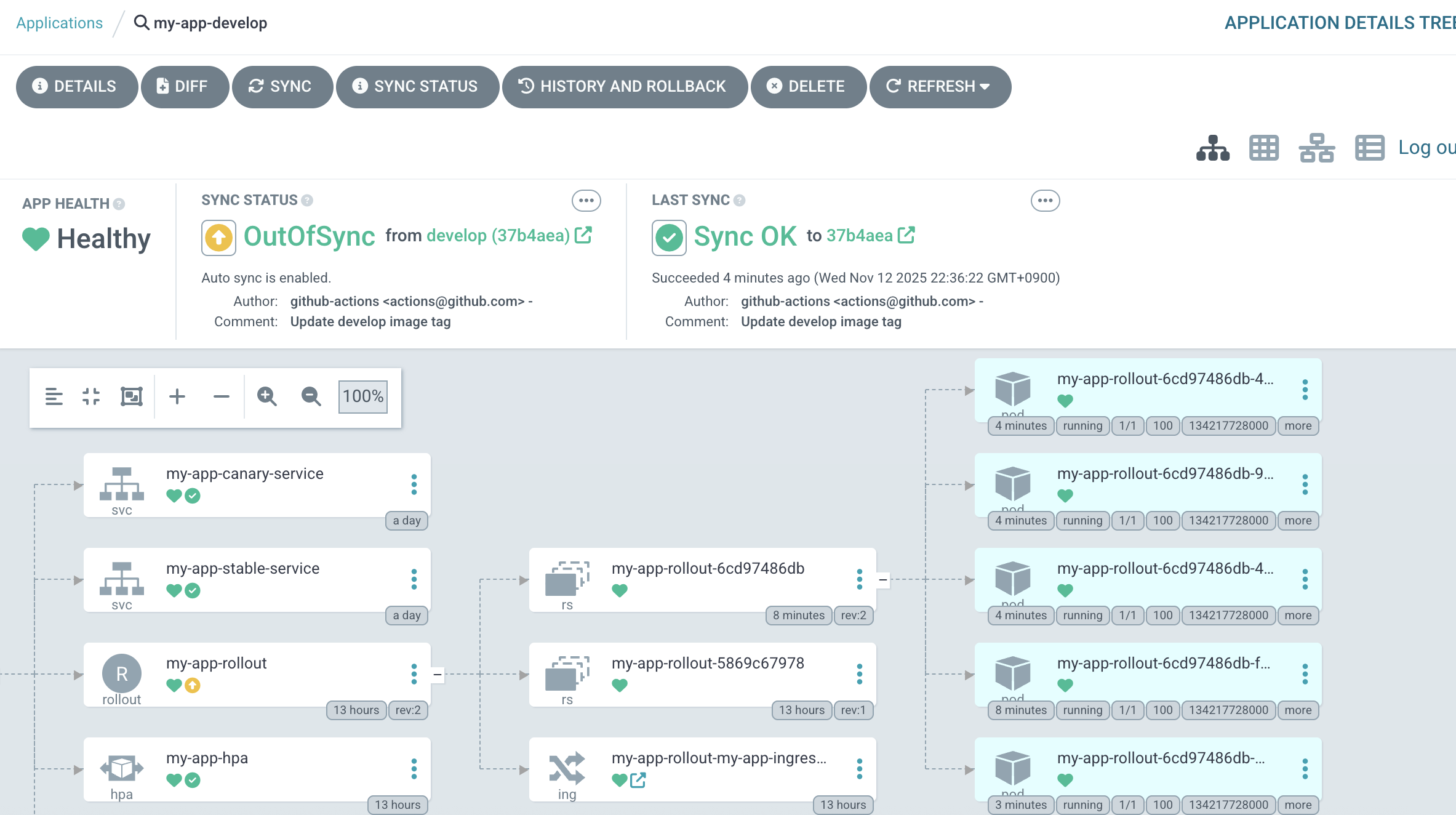
TARGETS가 50%를 초과하면 REPLICAS가 점진적으로 5개까지 증가하는 것을 확인할 수 있습니다.
부하가 사라져도 HPA의 downscale-stabilization: 10m 설정 덕분에 파드는 최소 10분 동안 5개로 유지됩니다.
마무리
변경된 전체 아키텍처
이번 단계에서는 기존 Canary 배포 구조 위에 자동 확장 기능(HPA) 을 추가했습니다.
이제 시스템은 다음과 같은 특성을 가집니다.
- 코드 변경 시 자동 배포 (GitHub Actions + ArgoCD)
- Canary 전략으로 점진적 롤아웃 (Argo Rollouts)
- CPU 부하 기반 자동 확장 (HPA)
