const activeUsers: string[] = [];빈 배열을 구성할 때, 어떤 데이터 타입이 들어올 지 모르기 때문에 타입을 정해준다
배열의 타입
const ageList: number[] = [45, 56, 13];
ageList[0] == 99;
ageList[0] = "asdf"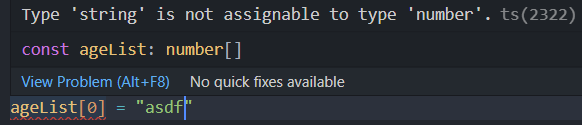
문자열 타입은 숫자 타입에 할당할 수 없다
const bools: Array<boolean> = []
const bools: boolean[] = [];
두 구문이 의미하는 것이 같다
배열의 커스텀 타입 선언
type Pointt = {
  x: number;
  y: number;
};
타입을 선언하고,
const coords: Pointt[] = [];
coords.push({ x: 23, y: 8 });
coords.push({ x: 23, y: "8" });
빈 배열에 Pointt 객체의 패턴을 갖는 타입을 설정한다

역시나 y는 number로 설정했기 때문에 타입스크립트는 에러를 감지한다
다차원 배열
const board: string[][] = [
  ["X", "O", "X"],
  ["X", "O", "X"],
  ["X", "O", "X"],
];
배열을 나타내는 대괄호를 한 쌍 더 추가한다
연습문제
문제 1
Create an empty array of numbers called "ages"
정답
const ages: number[] = [];문제 2
Create an array variable called gameBoard that starts as an empty array.
It should be typed to hold a 2 dimensional array of strings
빈 배열로 시작하는 gameBoard라는 배열 변수를 만들어라
문자열을 갖는 2차원 배열이 되도록
정답
const gameBoard: string[][] = [];문제 3
Create a Product type that contains a name and a price.
An example product could be:
{name: "coffee mug", price: 11.50}
이름과 가격 정보를 갖는 프로덕트 type을 만들어라
정답
type Product = {
  name: string;
  price: number;
};
문제 4
Write a function called getTotal that accepts an array of Product types
It should return the sum of all the products' prices
Product 타입 배열을 갖는 getTotal 함수를 만들어라
정답
function getTotal(products: Product[]): number {
  let total = 0;
  for (let product of products) {
    total += product.price;
  }
  return total;
}