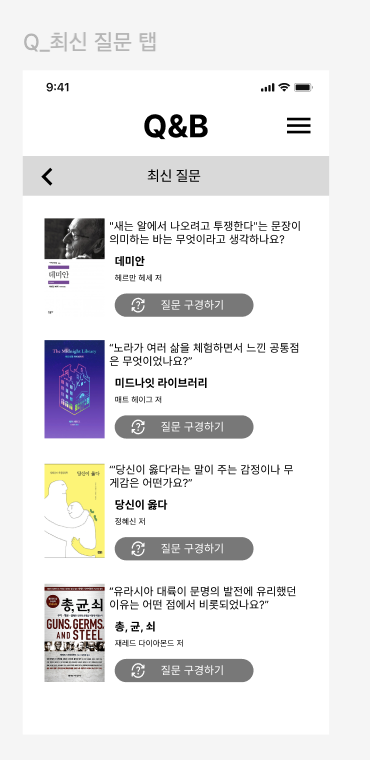
해당 UI에 적용해야하는 최신질문 전체 조회 API를 만들겠다.
우선 책에 관계없이 최신순으로 질문을 뽑아낼 수 있어야한다.
해당 request는 아래와 같다. 페이징화를 시킬 예정이라 쿼리parameter로 page,size를 기본값으로 설정했다.
- Request
    - Headers
        - `Authorization: Bearer {AccessToken}` (필수)
    - Query Parameters (옵션)
        - `page` : 페이지 번호 (기본값 1)
        - `size` : 한 페이지당 질문 수 (기본값 5)
'질문 구경하기' 버튼을 통해서 질문 상세 페이지로 넘어가야하기 때문에 API success response는 아래처럼 구성했다.
{
  "questions": [
    {
      "questionId": 1,
      "book": {
        "bookId": 100,
        "isbn13": 123,
        "title": "채식주의자",
        "author": "한강",
        "imageUrl": "https://example.com/image1.jpg"
      },
      "userId": 2,
      "userNickname": "사용자1",
      "userProfileUrl": "https://example.com/profile1.png",
      "questionContent": "당신에게 억압은 피해자일까요, 저항자일까요?",
      "createdAt": "2025-04-27T09:00:00Z",
      "scrapCount": 10,
      "likeCount": 25
    },
    {
      "questionId ": 2,
      "book": {
        "bookId": 101,
        "isbn13":124,
        "title": "아몬드",
        "author": "손원평",
        "imageUrl": "https://example.com/image1.jpg"
      },
       "userId":3,
      "userNickname": "사용자2",
      "userProfileUrl": "https://example.com/profile2.png",
      "questionContent": "윤재는 '결함'이라기보다 다르게 느끼는 존재일까?",
      "createdAt": "2025-04-26T15:30:00Z",
      "scrapCount": 10,
      "likeCount": 25
    }
  ],
  "pageInfo": {
    "currentPage": 1, //현재 응답된 페이지 번호
    "totalPages": 5, //전체 페이지수
    "totalElements": 45 //전체 질문 개수
  }
}
해당 화면에서는 사용자의 닉네임,프로필 사진, 스크랩/좋아요수는 필요없지만 질문 상세페이지에는 필요하므로 넣었다.
1. Controller
@RestController
@RequestMapping("/api/questions")
@RequiredArgsConstructor
public class QuestionGetController {

    private final QuestionService questionService;

    //최신 질문 조회
    @GetMapping("/recent")
    public ResponseEntity<QuestionPageResponseDto> getRecentQuestions(
            @RequestParam(defaultValue = "1") int page, //page 기본값 1
            @RequestParam(defaultValue = "5") int size, //page당 질문수 기본값 5
            @AuthenticationPrincipal UserDetailsImpl userDetails) {


        QuestionPageResponseDto response = questionService.getRecentQuestions(page, size);
        return ResponseEntity.ok(response);
    }
}
2. Service
//최신 질문 조회 메소드
    public QuestionPageResponseDto getRecentQuestions(int page, int size) {
        Pageable pageable = PageRequest.of(
                page-1, //Spring은 0부터 시작하므로 1 빼줌
                size,
                Sort.by(Sort.Direction.DESC, "createdAt") //최신순 정렬
        );
        Page<Question> questionPage = questionRepository.findAll(pageable);

        if (questionPage.isEmpty()) {
            throw new QuestionNotFoundException();
        }

        List<QuestionResponseDto> questions = questionPage.getContent().stream()
                .map(question -> QuestionResponseDto.from(question, 0))
                .collect(Collectors.toList());
        //이 부분에서 answeCount는 반환되지 않으므로 해당값 0으로 변환시킴

        PageInfo pageInfo = new PageInfo(
                questionPage.getNumber() + 1,  // 1-based
                questionPage.getTotalPages(),
                questionPage.getTotalElements()
        );

        return new QuestionPageResponseDto(questions, pageInfo);
    }
3. DTO 구성
QuestionResponseDto
public class QuestionResponseDto {
    private final BookResponseDto book;    // 도서
    private final Long userId;             // 질문 작성자 ID
    private final Integer questionId;      // 질문 ID
    private final String userNickname;     // 질문 작성자 닉네임
    private final String profileUrl;       //사용자 프로필
    private final String questionContent;  // 질문 내용
    private final Integer answerCount;     //답변 수
    private final Integer likeCount;       // 좋아요 수
    private final Integer scrapCount;      // 스크랩 수
    private final LocalDateTime createdAt; // 생성일시

    public QuestionResponseDto(
            BookResponseDto book, Long userId, Integer questionId,
            String userNickname, String profileUrl, String questionContent,
            Integer answerCount, Integer likeCount, Integer scrapCount,
            LocalDateTime createdAt) {

        this.book = book;
        this.userId = userId;
        this.questionId = questionId;
        this.userNickname = userNickname;
        this.profileUrl = profileUrl;
        this.questionContent = questionContent;
        this.answerCount = answerCount;
        this.likeCount = likeCount;
        this.scrapCount = scrapCount;
        this.createdAt = createdAt;
    }

    public static QuestionResponseDto from(Question question, int answerCount) {
        return new QuestionResponseDto(
                BookResponseDto.from(question.getBook()),
                question.getUser().getUserId(),
                question.getQuestionId(),
                question.getUser().getUserNickname(),
                question.getUser().getProfileUrl(),
                question.getQuestionContent(),
                answerCount,
                question.getLikeCount(),
                question.getScrapCount(),
                question.getCreatedAt()
        );
    }
}
이 부분에서 조금 큰 변화가 있었다. 원래는 Question.java에서는 bookId만 불러오고 있었다. 하지만 이 API에서 책에 대한 정보가 bookId로만 불러오는 것으로는 부족해 book 엔티티 자체를 만드는 것이 나을 것이라고 판단했다. 그래서 Question.java를 수정했다
Question.java
@Data
@Entity
@Table(name = "question")
public class Question {

    //@Column(nullable = false)
    //private Integer bookId; // 도서 ID (Book과의 연관관계 설정 가능)

    @ManyToOne(fetch = FetchType.LAZY)
    @JoinColumn(name = "book_id")
    private Book book;

    @Id
    @GeneratedValue(strategy = GenerationType.IDENTITY) // Auto Increment
    private Integer questionId;

    @ManyToOne(fetch = FetchType.LAZY)
    @JoinColumn(name = "user_id", nullable = false)
    private User user; //userId,userNikckname,profileurl 대체

    @Column(columnDefinition = "TEXT")
    private String questionContent; // 질문 내용

    //안정적으로 사용하기 위해 0으로 초기화
    private Integer likeCount=0; // 좋아요 수

    private Integer scrapCount=0; // 스크랩 수

    @CreationTimestamp //작성일시 save()할 때 자동으로 시간 넣어주는 어노테이션
    private LocalDateTime createdAt; // 작성일시

}
맨위에 주석 쳐놓은 bookId를 아래와같이 book 엔티티 생성으로 변경했다.
PageInfo
@Data
public class PageInfo {

    private int currentPage; //현재 응답된 페이지 번호
    private int totalPages; //전체 페이지수
    private long totalElements; //전체 질문 개수

    public PageInfo(int currentPage, int totalPages, long totalElements) {
        this.currentPage = currentPage;
        this.totalPages = totalPages;
        this.totalElements = totalElements;
    }
}
이 부분은 다른 곳에서도 쓰일 듯하여 common 디렉토리에 저장했다.
QuestionPageResponse
@Getter
public class QuestionPageResponseDto {
    private List<QuestionResponseDto> questions;
    private PageInfo pageInfo;

    public QuestionPageResponseDto(List<QuestionResponseDto> questions, PageInfo pageInfo) {
        this.questions = questions;
        this.pageInfo = pageInfo;
    }
}

안녕하세요! 백다현입니다