Ghidra Study
Headless Script
Ghidra의 Headless Script는 GUI를 사용하지 않고 CLI 환경에서 Ghidra의 분석 기능을 실행할 수 있는 도구다.
실행 파일 위치는 Ghidra 폴더 내 support/analyzeHeadless.bat을 사용하면 된다.
실습
실행 명령어다.
.\analyzeHeadless.bat C:\Users\Administrator\Desktop\Ghidra\Prac Ghidra -process crash.exe -noanalysis -scriptPath C:\Users\Administrator\Desktop\Experiment\testCode -postScript decompile.py
./analyzeHeadless <프로젝트경로> <프로젝트이름> \
-(import/process) <분석할파일> \
-postScript <실행할스크립트_이름> \
-deleteProject
C 코드
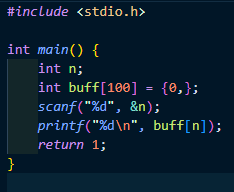
이전에 사용하였던 C 코드를 사용하였다.
Script Code
# @author
# @category Analysis
# @runtime Jython
# -*- coding: utf-8 -*-

import os
from ghidra.app.decompiler import DecompInterface

def _decompile_func(decompiler, func):
    decomp_status = decompiler.decompileFunction(func, 0, monitor)
    if decomp_status and decomp_status.decompileCompleted():
        decompiled_func = decomp_status.getDecompiledFunction()
        if decompiled_func:
            return decompiled_func.getC()
    return None

def decompile():
    decompiler = DecompInterface()
    decompiler.openProgram(currentProgram)
    pseudo_c_list = []

    funcs = currentProgram.getListing().getFunctions(True)

    for func in funcs:
        if monitor.isCancelled():
            break

        if func.isExternal() or func.isThunk():
            continue

        entry_point = func.getEntryPoint()
        block = currentProgram.getMemory().getBlock(entry_point)
        if block is None or block.getName() != ".text":
            continue

        if func.getName().startswith("_"):
            continue

        print("[*] Decompiling: {}".format(func.getName()))
        decomp_result = _decompile_func(decompiler, func)
        if decomp_result:
            pseudo_c_list.append(decomp_result)
            pseudo_c_list.append("\n\n")

    return "".join(pseudo_c_list)

def main():
    args = getScriptArgs()
    if len(args) > 1:
        print('[!] Wrong parameters.')
        return

    if len(args) == 0:
        exec_path = currentProgram.getExecutablePath()
        base_name = os.path.basename(exec_path)
        output = '{}_decompiled.c'.format(base_name.rsplit('.', 1)[0])
    else:
        output = args[0]

    print("[*] Starting analysis...")
    pseudo_c = decompile()

    try:
        with open(output, 'wb') as fw:
            fw.write(pseudo_c.encode('utf-8'))
        print('[*] Success! Saved to -> {}'.format(os.path.abspath(output)))
    except Exception as e:
        print('[!] Error saving file: {}'.format(str(e)))
    # ------------------------------

if __name__ == '__main__':
    main()
언어는 Jython으로 하여 작성하였다. 책에 있는 코드를 활용하였다.
실행 결과
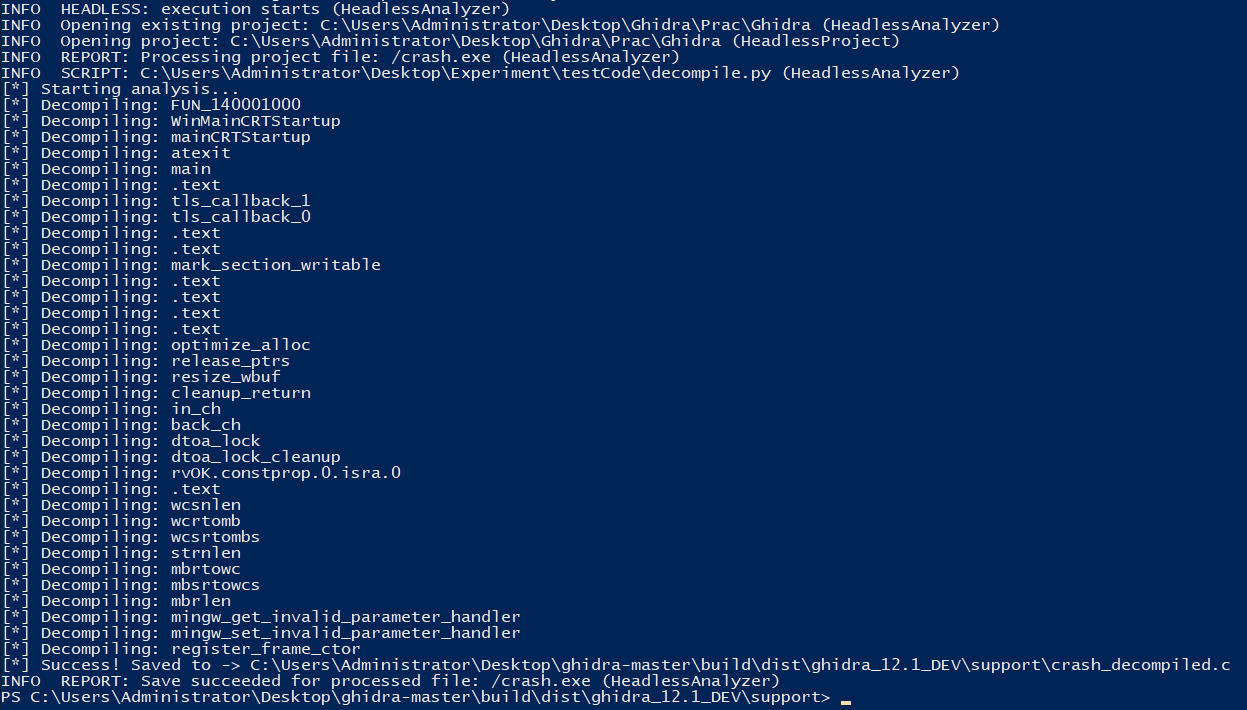
실행하게 되면 디컴파일 되는 다양한 함수들을 볼 수 있다.
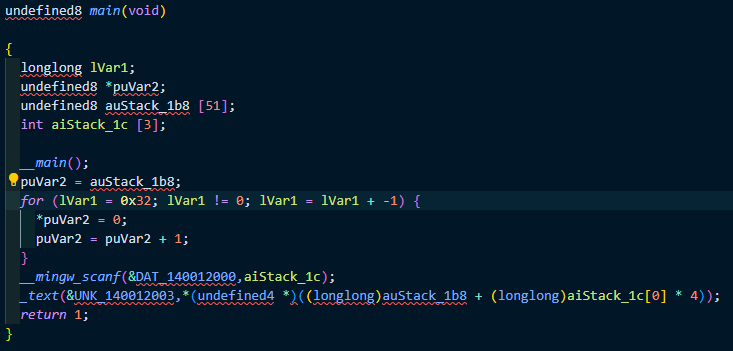
디컴파일 된 결과 내에서 코드가 실행되는 main 함수 부분을 가져와 보았다.
컴파일러를 MinGW를 사용하였다. __main()함수를 호출하는 것을 볼 수 있는데 이는 컴파일러가 프로그램이 시작되기 전에 필요한 환경을 구축하기 위해 호출을 삽입한 것이라 한다.
그리고 다음 for문이 보이는데, 이는 배열을 초기화 하는 코드가 기계어 수준에서 구현된 결과물 때문이다. 배열은 결국 메모리 공간이기 때문에, 반복문을 통해 해당 메모리 공간을 0으로 초기화를 하는 동작을 한다.
scanf함수도 다른 것을 확인할 수 있다. 이건 이전에 script 작성할 때도 보았던 부분인데, MinGW 컴파일러를 사용하면 msvcrt.dll에 바로 연결하지 않고, 자체적으로 구현한 __mingw_scanf를 사용하도록 바꾼다고 한다.
그렇다면 printf 함수의 이름이 이상하게 변경된 이유는 심볼 정보의 부재라고 한다. 컴파일 과정에서 함수 이름 정보가 제거되면, Ghidra는 해당 함수가 어떤 주소를 가리키는지 분석한다. 이 때 함수가 .text영역의 특징 지점을 호출한다고 판단했지만 정확한 이름을 찾지 못했다면 임의로 _text 이름을 붙인다고 한다. __mingw_vprintf(MinGW) -> _text
후에는 MSVC로 컴파일 한 코드를 대상으로 분석해볼 예정이다.