📌 ConfigMap이란?
- 컨테이너 안에서 사용하는 구성 파일이나 구성 정보들
- 운영에 필요한 구성 정보 (DB 이름, 패스워드, 인터벌, 계정정보)
- 컨테이너 안에 이런 정보들을 넣어두면 추후 수정시 컨테이너 마다 접근하여 수정해야하는 번거로움이 발생
- 즉 컨테이너 구성정보를 한곳에 모아서 관리
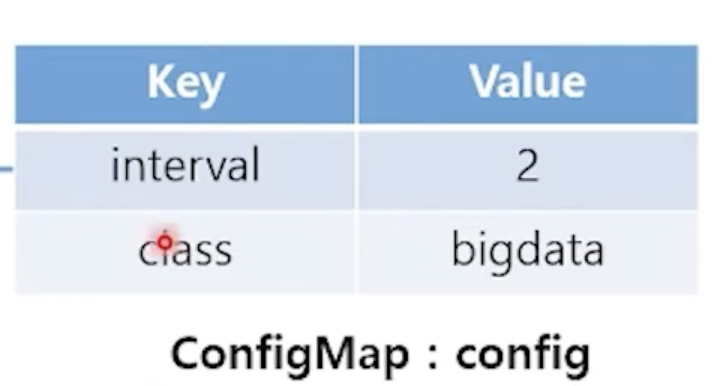
- key-value 형태의 테이블
$ kubectl create configmap NAME [--from-file=source] [--from-literal=key1=value1]
$ kubectl create configmap CONFIG_NAME --from-file=text.file // 파일이름이 key 가되고 내용이 value가 됨
$ kubectl create configmap CONFIG_NAME --from-file=mydata=text.file // mydate가 key가되고 text.file의 내용이 value
$ kubectl create configmap CONFIG_NAME --from-file=/configmap.dir/ // 디렉토리 안에 파일 이름이 key, 파일 내용이 value로 채워짐
💡 value의 길이 제한은 없는가?
👉🏻 필요한 만큼 텍스트를 사용가능 단, 1MiB 초과 불가능
⌨️ ConfigMap 생성 실습
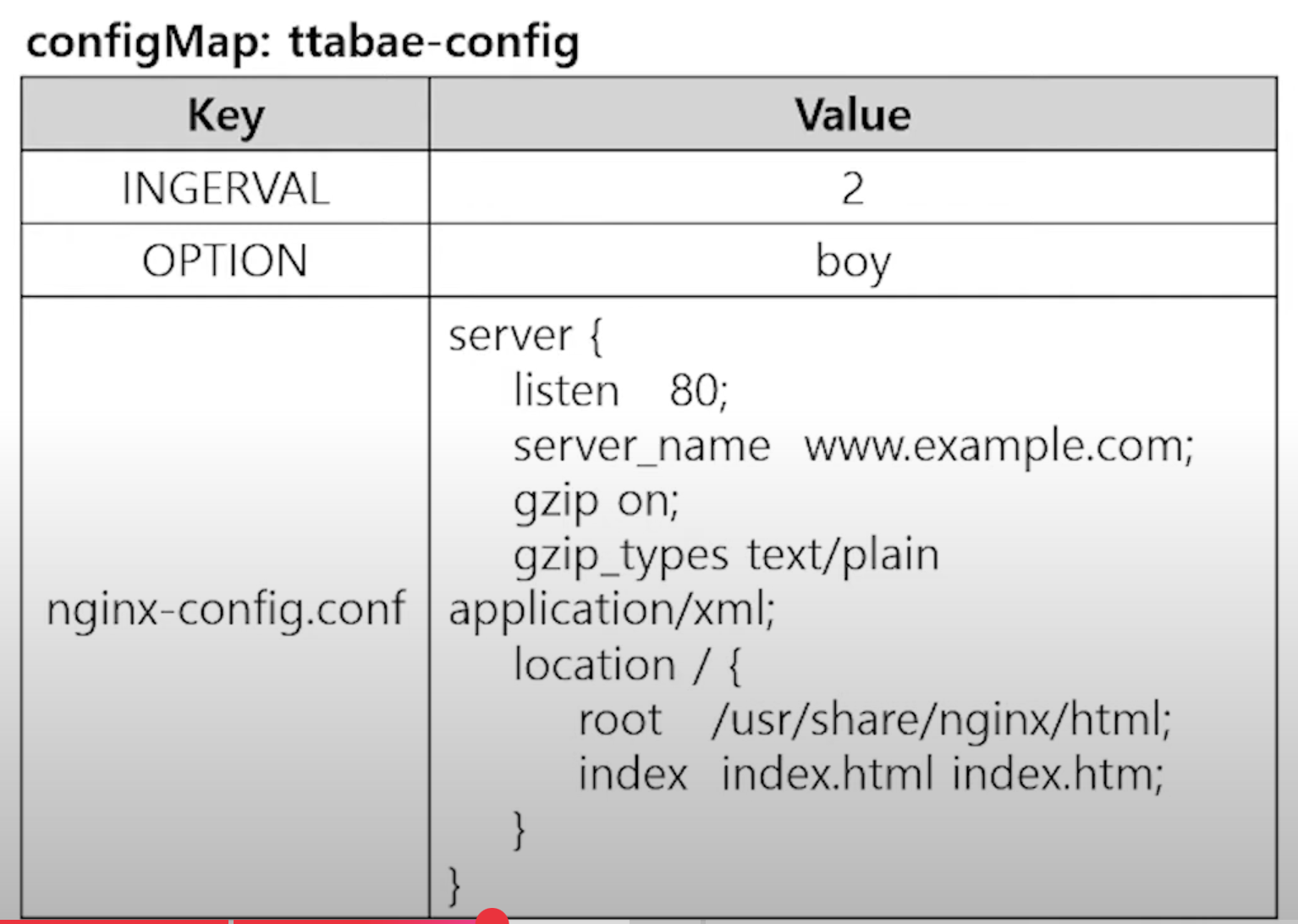
👆 위와 같이 구성파일을 key-value 타입의 configmap 으로 만들어보기
$ kubectl create configmap ttabae-config --from-literal=INTERVAL=2 --from-literal=OPTION=boy --from-file=config.dir/

# 이미 만들어진 configMap 수정하기

$ kubectl edit configmap <configMap 이름>
ConfigMap의 일부분을 적용하기
# build/
Dockerfile genid.sh
$ cat Dockerfile
FROM ubuntu:18.04
RUN apt-get update ; apt-get -y install rig boxes
ENV INTERVAL 5
ENV OPTION stone
ADD genid.sh /bin/genid.sh
RUN chmod +x /bin/genid.sh
ENTRYPOINT ["/bin/genid.sh"]

$ cat genid.sh
#!/bin/bash
mkdir -p /webdata
while true
do
  /usr/bin/rig | /usr/bin/boxes -d $OPTION  > /webdata/index.html
  sleep $INTERVAL
done

$ cd /
$ ls
genid.yaml

$ cat genid.yaml
apiVersion: v1
kind: Pod
metadata:
  name: genid-stone
spec:
  containers:
  - image: smlinux/genid:env
    env:     // confinMap 적용 구문
    - name: INTERVAL
      valueFrom:
        configMapKeyRef:
          name: ttabae-config
          key: INTERVAL
    name: fakeid
    volumeMounts:
    - name: html
      mountPath: /webdata
  - image: nginx:1.14
    name: web-server
    volumeMounts:
    - name: html
      mountPath: /usr/share/nginx/html
      readOnly: true
    ports:
    - containerPort: 80
  volumes:
  - name: html
    emptyDir: {}

$ kubectl apply -f genid.yaml
$ kubectl describe pod genid-stone
$ curl <PodIP>
# 2초마다 한번씩 허수 아이디를 박스모양으로 찍는다.
ConfigMap의 전체를 적용하기
$ cat genid-whole.yaml
apiVersion: v1
kind: Pod
metadata:
  name: genid-boy
spec:
  containers:
  - image: smlinux/genid:env
    envFrom:
    - configMapRef:     // configKeyMapRef가 아님 주의
        name: ttabae-config
    name: fakeid
    volumeMounts:
    - name: html
      mountPath: /webdata
  - image: nginx:1.14
    name: web-server
    volumeMounts:
    - name: html
      mountPath: /usr/share/nginx/html
      readOnly: true
    ports:
    - containerPort: 80
  volumes:
  - name: html
    emptyDir: {}

$ kubectl create -f genid-whole.yaml
$ kubectl describe configmap ttabae-config
Name:         ttabae-config
Namespace:    default
Labels:       <none>
Annotations:  <none>

Data
====
INTERVAL:
----
10

OPTION:
----
boy

nginx-config.conf:
----
server {
    listen   80;
    server_name  www.example.com;

    gzip on;
    gzip_types text/plain application/xml;

    location / {
        root   /usr/share/nginx/html;
        index  index.html index.htm;
    }
}


BinaryData
====

Events:  <none>

$ kubectl exec genid-boy --env // 컨테이너의 환경변수 보는 명령어
Defaulted container "fakeid" out of: fakeid, web-server
PATH=/usr/local/sbin:/usr/local/bin:/usr/sbin:/usr/bin:/sbin:/bin
HOSTNAME=genid-boy
INTERVAL=10
OPTION=boy
nginx-config.conf=server {
    listen   80;
    server_name  www.example.com;

    gzip on;
    gzip_types text/plain application/xml;

    location / {
        root   /usr/share/nginx/html;
        index  index.html index.htm;
    }
}

KUBERNETES_SERVICE_PORT=443
KUBERNETES_SERVICE_PORT_HTTPS=443
KUBERNETES_PORT=tcp://10.96.0.1:443
KUBERNETES_PORT_443_TCP=tcp://10.96.0.1:443
KUBERNETES_PORT_443_TCP_PROTO=tcp
KUBERNETES_PORT_443_TCP_PORT=443
KUBERNETES_PORT_443_TCP_ADDR=10.96.0.1
KUBERNETES_SERVICE_HOST=10.96.0.1
HOME=/root
ConfigMap을 볼륨으로 적용하기
$ cat genid-volume.yaml
apiVersion: v1
kind: Pod
metadata:
  name: genid-volume
spec:
  containers:
  - image: smlinux/genid:env
    env:
    - name: INTERVAL
      valueFrom:
        configMapKeyRef:
          name: ttabae-config
          key: INTERVAL
    name: fakeid-generator
    volumeMounts:
    - name: html
      mountPath: /webdata
  - image: nginx:1.14
    name: web-server
    ports:
    - containerPort: 80
    volumeMounts:
    - name: html
      mountPath: /usr/share/nginx/html
      readOnly: true
    - name: config
      mountPath: /etc/nginx/conf.d   // 마운트 포인트(컨테이너 내부)
      readOnly: true
  volumes:
  - name: html
    emptyDir: {}
  - name: config      // 마운트 할 볼륨
    configMap:
      name: ttabae-config
      items:
      - key: nginx-config.conf
        path: nginx-config.conf

$ kubectl exec -it genid-volume -c web-server -- /bin/bash

root@genid-volume:/# cd /etc/nginx/conf.d
root@genid-volume:/etc/nginx/conf.d# ls
nginx-config.conf

root@genid-volume:/etc/nginx/conf.d# cat nginx-config.conf
server {
    listen   80;
    server_name  www.example.com;

    gzip on;
    gzip_types text/plain application/xml;

    location / {
        root   /usr/share/nginx/html;
        index  index.html index.htm;
    }
}

root@genid-volume:/etc/nginx/conf.d# ls -al
total 12
drwxrwxrwx 3 root root 4096 May 12 12:47 .
drwxr-xr-x 3 root root 4096 Mar 26  2019 ..
drwxr-xr-x 2 root root 4096 May 12 12:47 ..2025_05_12_12_47_18.3715921441
lrwxrwxrwx 1 root root   32 May 12 12:47 ..data -> ..2025_05_12_12_47_18.3715921441
lrwxrwxrwx 1 root root   24 May 12 12:47 nginx-config.conf -> ..data/nginx-config.conf  // 실제 파일이 아닌 심볼릭 링크가 있는 것으로 보아 configMap 의 data를 받아 온다는 것을 확인 가능
결론: ConfigMap이라는건 컨테이너의 구성정보를 한곳에 모아두었다가 각기 다른 컨테이너에 다른 구성정보를 적용 할 수 있게 하는것 모아둔 구성정보를 일부, 전체, 볼륨 마운트 방식으로 적용 가능하다.

React, Node.js, AWS, Git, Github, Github Action, Docker, K8S