Next.js

Assets, Metadata, and css
각종 컴포넌트를 import 하여 사용 할 수 있다
ex) import Image from "next/image";
import styles from "./layout.module.css";
- 여기서 styles 는 module.css 에 styles 라는 이름을 부여하여 className={styles.container} 와 같이 사용 가능하게 함
Global Styles
-
pages/_app.js 파일을 생성하여 전역 스타일링을 할 수 있다.
-
전역으로 반영시킬 global.css (names can be random) 을 생성 한 후에,
import '../styles/global.css'

export default function App({ Component, pageProps }) {
  return <Component {...pageProps} />
}
다음과 같이 _app.js 에서 import 해줘야 한다.
Pre-rendering
- Next.js pre-renders every page
- pure React app does not pre-render anything.
Next JS has Two Forms of Pre-rendering
- Static Generation and Server-side Rendering
Static Generation
- HTML 을 build time 에 생성한다. Pre-rendered HTML is then reused on each request.
Server-side Rendering
- 각 요청 시 마다 HTML 을 생성한다.
--> static and server-side could both be used in the same project!!!!
--> user's request 가 있기 이전에 페이지를 render 해도 된다면 static, 데이터가 지속적으로 업데이트 되어야 하는 페이지라면 server-side rendering 이 좋다.
getStaticProps
export default function Home(props) { ... }

export async function getStaticProps() {
  // Get external data from the file system, API, DB, etc.
  const data = ...

  // The value of the `props` key will be
  //  passed to the `Home` component
  return {
    props: ...
  }
}-
위의 예시와 같이 getStaticProps function 에서 data fetching이 가능하다.
-
getStaticProps 는 server-side rendering dp 에서만 사용 할 수 있기 때문에, client-side 에서는 절대 access 가 불가능 하다.
-
gray-matter 라는 외부 데이터를 통해 markdown file 의 metadata 를 parse 할 수 있다.
-
getStaticProps를 통하여 external API의 fetch 가 가능 해 진다..
export async function getSortedPostsData() {
  // Instead of the file system,
  // fetch post data from an external API endpoint
  const res = await fetch('..')
  return res.json()
}
SSR 을 위해서는 getServerSideProps 를 import 해야만 한다.
export async function getServerSideProps(context) {
  return {
    props: {
      // props for your component
    }
  }
}- getServerSideProps는 요청시 불려지므로 해당 parameter context 는 특정한 요청 파라미터를 가지고 있다.
SWR - recommended for fetching data on the client side
ex)
import useSWR from 'swr'

function Profile() {
  const { data, error } = useSWR('/api/user', fetch)

  if (error) return <div>failed to load</div>
  if (!data) return <div>loading...</div>
  return <div>hello {data.name}!</div>
}
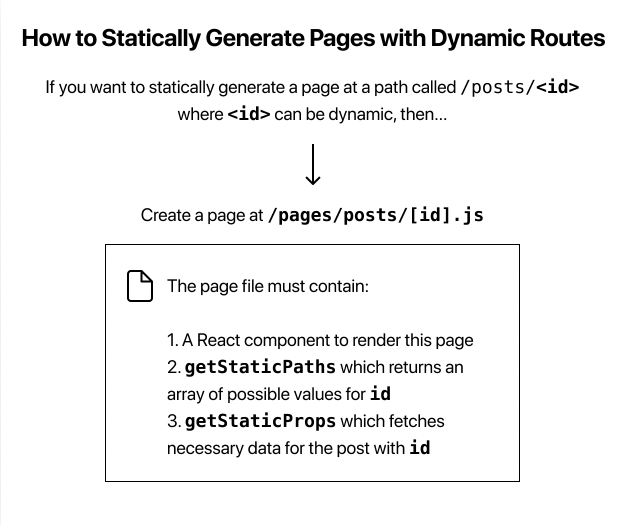
Dynamic Routes in Next js
- [ID].js 와 같은 파일을 생성하여 dynamic routes 를 구현할 수 있다.