
데이터 조회 과정
- 클라이언트가 URL 요청
- 서버의 컨트롤러 -> 해당 URL에서 찾으려는 데이터 정보를 리파지터리에 전달
- 리파지터리 -> DB에 데이터 조회 요청
- DB -> 해당 데이터를 엔티티로 변환
- 엔티티 -> 모델을 통해 뷰 템플릿으로 전달
- 뷰 페이지 화면에 출력
단일 데이터 조회
URL 요청 받기
DB에 저장한 데이터를 웹 페이지에서 보기 위해 출력 페이지를 접속해야 함. -->> URL 요청!
게시글 1번 id 조회 -> localhost:8080/articles/1
게시글 2번 id 조회 -> localhost:8080/articles/2 로 접속하는 방법
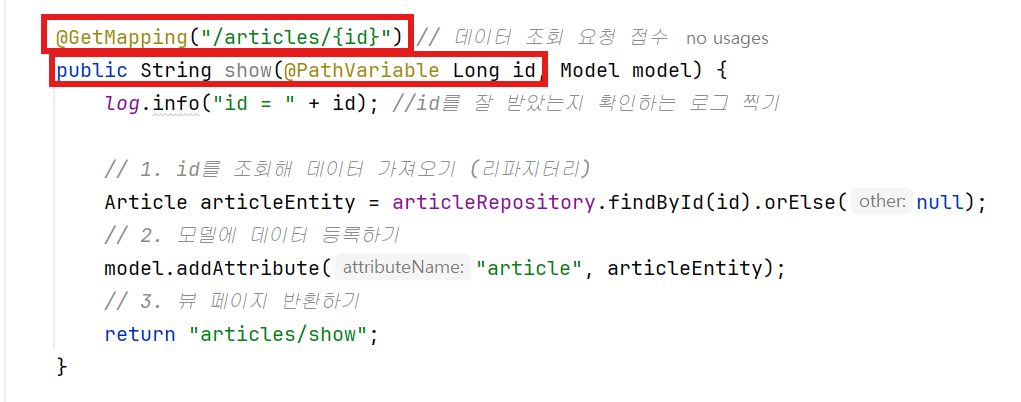
- ArticleController에 코드 추가하기
@GetMapping("/articles/{id}")어노테이션 작성- show() 메서드, 매개변수로 id 가져오기
- 매개변수 id 앞에
@PathVariable어노테이션 키워드 작성
- 추가로 컨트롤러가 id를 잘 받았는지 확인하기 위해 log.info() 추가하기
DB에서 데이터 가져오기 & 데이터 -> 엔티티 변환
- 컨트롤러에 리파지터리 구현 객체를 주입하는
@Autowired어노테이션을 작성함. - 해당 리파지터리를 이용해서 DB에서 데이터를 가져와보자.
Article articleEntity = articleRepository.findById(id).orElse(null);
- 위 코드 한 줄에서 DB에서 데이터를 가져옴과 동시에 데이터를 엔티티를 변환한다.
- Aritcle은 엔티티이고, articleEntity는 엔티티 객체.
해당 객체 안에 리파지터리.findById 메서드를 사용해 가져온 데이터를 넣음.
findById(): CrudRepository가 제공하는 메서드, 실제 반환형은Optional<Article>- 따라서 Article articleEntity 를
Optional <Article>로 변경하거나, 위 코드처럼 맨 뒤에.orElse(null)을 추가한다. .orElse(null)은 해당 id가 없으면 null을 반환하라는 뜻
엔티티를 모델에 등록
- 컨트롤러에서 URL 요청을 받을 때 만들었던 show() 메서드의 매개변수에 모델을 추가한다.
public String show(@PathVariable Long id, Model model)
- addAttribute() 메서드를 이용해서 모델에 데이터를 등록한다.
model.addAttribute("article",articleEntity);- article이라는 이름으로, articleEntity 객체를 추가 한다는 의미
뷰 페이지 만들고 반환하기
- 뷰 페이지 반환을 위해 메서드 return 값 수정
return "/articles/show";리턴 페이지를 /articles/show 로 지정 했으니 실제로 보여질 show 뷰 페이지를 만들자.
- templates -> articles 에서 show.mustache 생성
- 부트스트랩에서 table 소스 코드를 가져와서 테이블 페이지를 완성한다.
{{>layouts/header}}

<table class="table">
    <thead>
    <tr>
        <th scope="col">Id</th>
        <th scope="col">Title</th>
        <th scope="col">Content</th>
    </tr>
    </thead>
    <tbody>
    {{#article}}
        <tr>
            <th>{{id}}</th>
            <td>{{title}}</td>
            <td>{{content}}</td>
        </tr>
    {{/article}}

    </tbody>
</table>

{{>layouts/footer}}- 모델 데이터를 넣을 부분의 시작 지점과 종료 지점에 {{#article}} {{/article} 을 추가한다.
- 데이터가 들어가는 자리는 {{id}} {{title}} {{content}} 로 변경
- Article 엔티티 파일에서
@NoArgsConstructor어노테이션 추가.
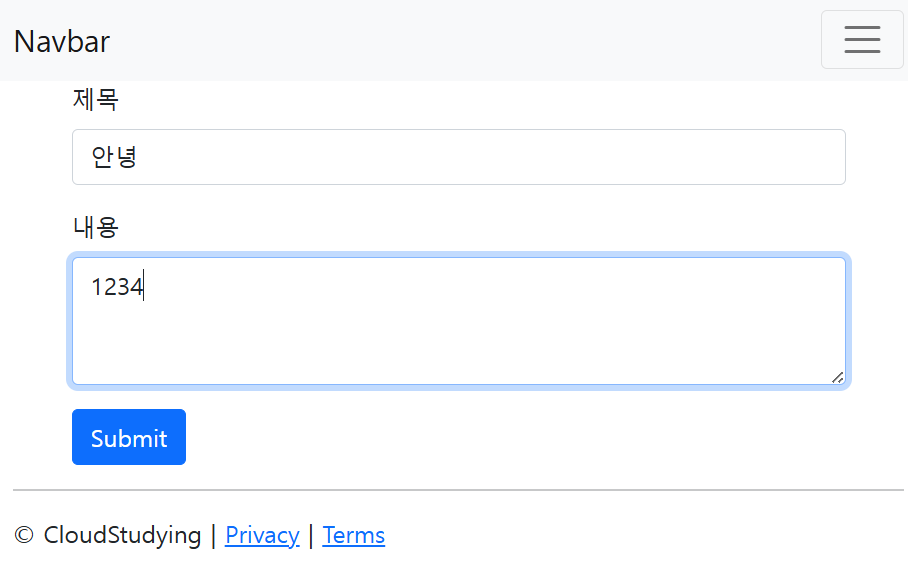
<웹 페이지에서 입력>
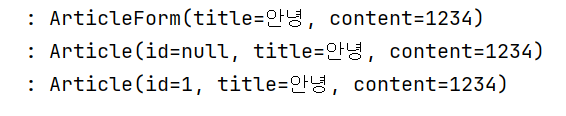
<로그 창>
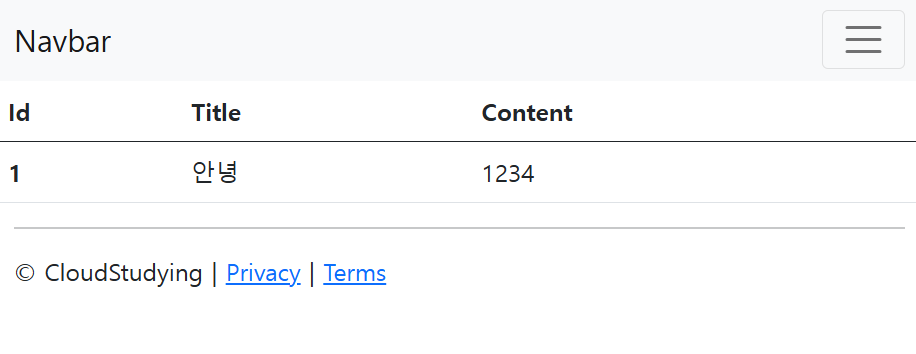
<localhost:8080/articles/1 접속>
데이터 목록 조회
- 단일 데이터 조회는 해당 id 페이지에 들어갔을 때 해당 id와 함께 저장된 데이터를 조회하는 것.
- 이번에는 저장된 모든 데이터 목록을 한 페이지에서 조회하기!
- 이 때 모든 데이터 목록을 조회하기 위해 저장된 데이터들의 묶음을 리스트로 반환한다.
URL 요청받기
- 데이터 목록 조회는 "localhost:8080/articles" URL 요청이 들어왔을 때 페이지가 반환되도록 하기
	@GetMapping("/articles") // URL 요청 받기
    public String index()성ex() 메서드 생성
    	return "";
    }
DB에서 데이터 가져오기 & 데이터 -> 엔티티 변환
- DB에서 데이터를 가져와야 한다. (이때 사용하는건
Repository) - 저장된 모든 데이터를 가져와야 하니까
findAll()메서드 사용 - 단일 데이터를 가져올 때는
Article articleEntity = articleRepository.findById()로 작성했지만
데이터 묶음을 리스트로 받아올 것이기 때문에
List<Article> articleEntityList = articleRepository.findAll()
DB에서 조회한 데이터 묶음을 리스트에 담긴 Article (엔티티) 타입으로 가져온다는 뜻
findAll()메서드가 반환하는 데이터 타입은 Iterable이지만 현재 List 타입으로 데이터를 받고 있음.
- 다운캐스팅 (형변환)
findAll() 메서드가 반환하는 데이터 타입Iterable<Article>에서List<Article>로 다운캐스팅하기List<Article> articleEntityList = (List<Article>) articleRepository.findAll()
- 업캐스팅
articleEntityList의 타입을Iterable<Article>로 업캐스팅 하기Iterable<Article> articleEntityList = articleRepository.findAll()
- ArrayList 사용하기
ArticleRepository 파일에서 CrudRepository의 findAll() 메서드를 오버라이딩
해서 반환 타입을 ArrayList로 변경한다.
ArrayList<Article> articleEntityList = articleRepository.findAll()

데이터를 모델에 등록
- DB에서 가져온 데이터를 리스트 엔티티로 변경 했으니 모델을 사용해서 뷰 페이지로 전달해야 한다.
- 컨트롤러에서 index() 메서드에 매개변수에 모델을 추가한다.
- model.addAttribute 메서드를 사용해서 모델에 articleEntityList를 "articleList"라는 이름으로 등록한다.
- index.mustache 파일이 뷰 페이지로 반환되도록 return 값에 "/articles/index"로 작성한다.
    @GetMapping("/articles")
    public String index(Model model) {
        ArrayList<Article> articleEntityList = articleRepository.findAll();
        model.addAttribute("articleList", articleEntityList);
        return "/articles/index";
    }
}
뷰 페이지 만들고 반환하기
- 새로운 index.mustache 파일 만들기
- 단일 데이터 조회할때 사용한 뷰 페이지와 똑같지만 {{#article}} 을 {{#articleList}}로 변경하면 됨.
{{>layouts/header}}

<table class="table">
    <thead>
    <tr>
        <th scope="col">Id</th>
        <th scope="col">Title</th>
        <th scope="col">Content</th>
    </tr>
    </thead>
    <tbody>
    {{#articleList}}
        <tr>
            <th>{{id}}</th>
            <td>{{title}}</td>
            <td>{{content}}</td>
        </tr>
    {{/articleList}}

    </tbody>
</table>

{{>layouts/footer}}
<실행 확인 하기>
/articles/new 페이지를 통해 3개의 데이터를 저장함.
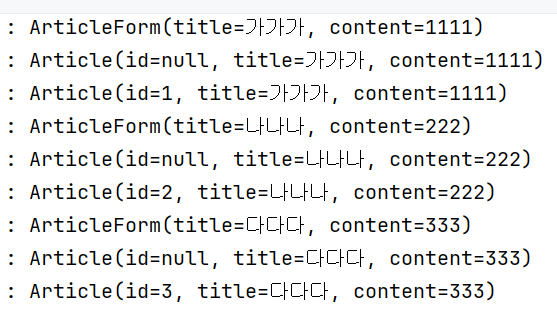
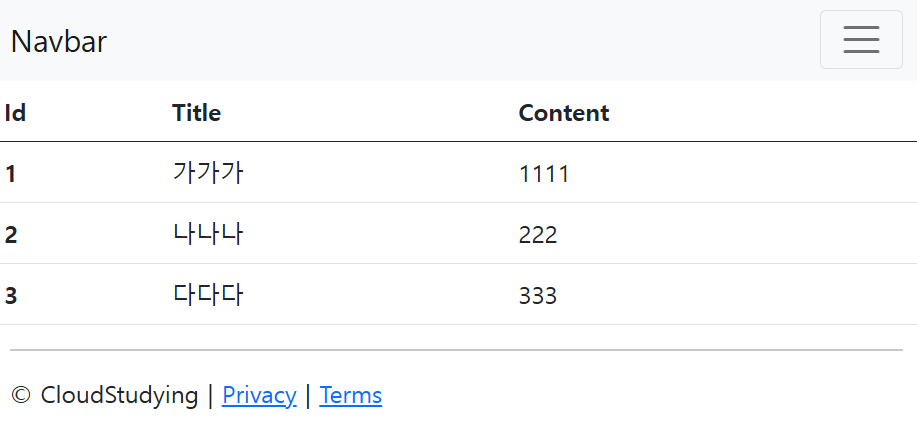
데이터가 잘 저장되고 목록으로 잘 출력되는 것을 확인하였다!

헤맨 만큼 내 땅