Jupyter를 이용한 파이썬 환경설정
- Jupyter란 웹 브라우저를 통해 코드를 단계적으로 실행하고, 실행 결과, 마크다운, 이미지 등을 함께 포함한 문서를 생성 및 공유할 수 있다
miniconda
- 파이썬 및 관련 패키지를 쉽게 설치하고 관리하기 위한 경량화된 배포판
chrome 기본 웹브라우저 설정
- chrome을 기본 웹브라우저로 설정할 것
- (윈도우ver) 환경설정 - 앱 - 기본앱 - 웹브라우저 - chrome으로 지정
miniconda 설치
- chrome에서 miniconda 공식 웹에서 다운로드
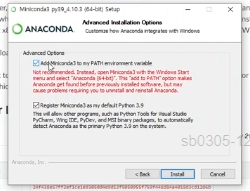
- 다운로드시 아래와 같이 체크하고 설치 진행 (어느 위치에서든 파이썬을 실행할 수 있게 해줌)
- 컴퓨터에 Anaconda Prompt(miniconda3) 실행
- (base)가 c/user/(본인영어계정)이어야 된다
#conda가 제대로 설치되어 있는지 확인
conda --version
#최신버전 유지
conda update conda
conda 가상환경
-
conda 버전 확인
conda --version -
conda 환경 생성
# base 상태에서 명령어 입력 # ds_study 자리에 원하는 이름으로 지정 가능 # python은 본인 버전에 맞는거나 원하는 버전으로 지정 가능 conda create -n ds_study python=3.8 -
conda 환경 삭제
# base 상태에서 명령어 입력 conda env remove -n ds_study -
conda 환경 활성
conda activate ds_study -
conda 환경 비활성
# 비활성은 base로 빠져나옴 conda deactivate -
conda 환경 목록보기
# base 상태에서 명령어 입력 conda env list -
conda 환경 지우기
# base 상태에서 명령어 입력
conda env remove -n ds_study(환경이름)
Jupyter Notebook 및 패키지(Package) 설치
-
만들어둔 연습용 환경(ds_study)에서 설치진행함
-
데이터분석에 자주 사용되는 도구들 설치
-
연습용 환경에 설치하기 위해선 반드시 활성화 된 상태로 진행($ conda activate 환경이름)
conda activate ds_study conda install jupyter -
패키지 설치
conda install ipython
conda install matplotlib
conda install seaborn
conda install pandas
conda install scikit-learn
conda install xlrd- -y를 추가하면설치할 때 일일이 y 누를 필요 없이 바로 설치
conda install -y ipythonJupyter notebook 실행
(ds_study) ~> jupyter notebookmatplotlib 란?
- 파이썬 프로그래밍 언어에서 데이터를 시각화하기 위한 라이브러리
- 선 그래프, 산점도, 히스토그램, 막대 그래프 등 다양한 종류의 2D 그래프와 일부 3D 그래프를 생성
- 주로 파이썬의 수학 확장 라이브러리인 NumPy와 함께 사용, 엑셀과 유사한 기능을 제공하여 복잡한 데이터를 시각화하는 데 매우 유용
matplotlib 한글 문제 해결
- Jupyter notebook 실행 후 아래와 같이 코드 입력
import matplotlib.pylot as plt
%matplotlib inline
plt.title("데이터사이언스")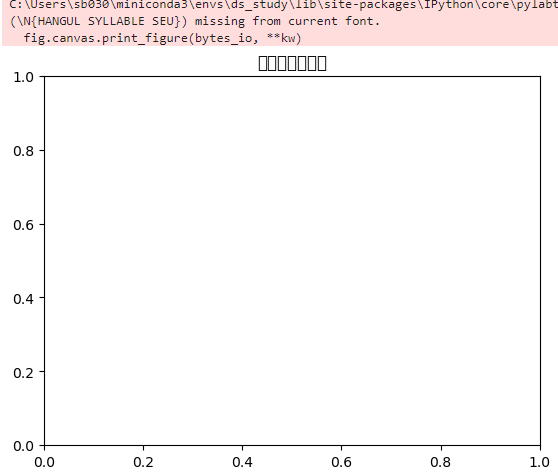
- matplotlib은 기본적으로 한글을 지원하지 않아 한글 입력시 폰트가 깨지는 현상을 해결하고자 한다
import matplotlib.pyplot as plt
%matplotlib inline
from matplotlib import rc
rc("font", family = "Malgun Gothic")
plt.title("데이터사이언스")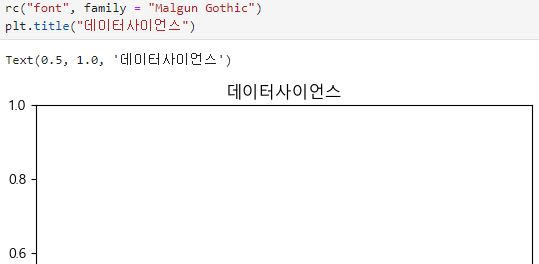

시리즈별로 봐주시길