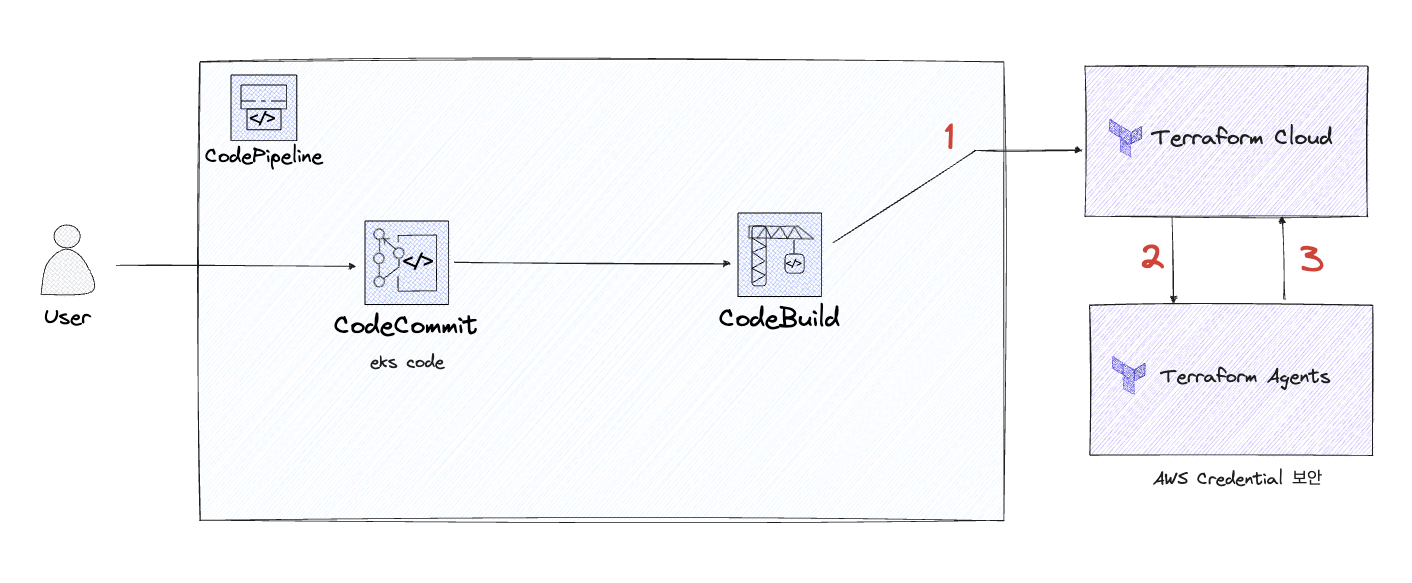
구성도
파일 구성
├── code_pipeline
│   ├── codebuild.tf
│   ├── codecommit.tf
│   ├── codepipeline.tf
│   └── variables.tf
├── main.tf
├── provider.tf
└── variables.tf
Cloud 와 Agent의 역할
-
Terraform Cloud
- CodePipeline에 있는 .tf 파일의 소스코드를 읽어오는 역할
-
Terraform Agents
- Terraform Cloud의 Run을 돌려주는 역할 (VCS처럼 Trigger를 받는 역할)
- AWS Credential 정보를 Cloud의 Variables에 넣지 않아도 AWS 자원을 생성시켜주는 보안강화 역할
Root (module)
main.tf
module "code_pipeline" {
    source = "./code_pipeline"

    count = var.num
    branch = var.branch
    user_name = var.user_name
    tfc_token = var.tfc_token

    #codecommit
    aws_codecommit_repository_name = "${var.user_name}-${count.index}-codecommit-repository"


    #codebuild
    aws_codebuild_project_name = "${replace("${var.user_name}", ".", "")}-${count.index}-codebuild"
    codebuild_role_name = "${var.user_name}-${count.index}-codebuild-role"

    #codepipeline
    s3_bucket_name = "${var.user_name}-${count.index}-codepipeline-s3"
    codepipeline_role_name = "${var.user_name}-${count.index}-codepipeline-role"
    codepipeline_trigger_role_name = "${var.user_name}-${count.index}-codepipeline-trigger-role"
    codepipeline_name = "${var.user_name}-${count.index}-code-pipeline"

}
#codecommit#codebuild#codepipeline의 각 변수들은
code_piepline - variables.tf에서 지정되어 있다.
variable.tf
variable "access_key" {
  type = string
  default = "<AWS_ACCESS_KEY>"
}
variable "secret_key" {
  type = string
  default = "<AWS_SECRET_ACCESS_KEY>"
}

variable "branch" {
    type = string
    default = "main"
}

variable "user_name" {
    type = string
    default = "<AWS IAM 이름 (credential과 동일해야함)>"
}

# Terraform Cloud User Token
variable "tfc_token" {
    type= string
    default = "<Terraform Cloud User Token>"
}

#codecommit repo 갯수
variable "num" {
  type = number
  default = <codecommit repo 갯수>
}
provider.tf
terraform {
  required_providers {
    aws = {
      source = "hashicorp/aws"
      version = "5.12.0"
    }
  }
}

provider "aws" {
  region = "ap-northeast-2"
  access_key = var.access_key
  secret_key = var.secret_key
}
code_pipeline
variables.tf
variable "user_name" {
    type = string
}

variable "tfc_token" {
    type= string
}

#codecommit
variable "branch" {
    type = string
}

variable "aws_codecommit_repository_name" {
    type = string
}

#codebuild
variable "codebuild_role_name" {
    type = string
}

variable "aws_codebuild_project_name" {
    type = string
}


#codepipeline
variable "s3_bucket_name" {
    type = string
}

variable "codepipeline_role_name" {
    type = string
}

variable "codepipeline_trigger_role_name" {
  type = string
}

variable "codepipeline_name" {
  type = string
}
CodeCommit.tf
- Github의 레포지토리 역할
resource "aws_codecommit_repository" "mwrepo" {

	# Root - main.tf 에서 설정한 aws_codecommit_repository_name 이 적용됨
  repository_name = var.aws_codecommit_repository_name
  default_branch  = var.branch


  description     = "${var.aws_codecommit_repository_name}"

}
CodeBuild.tf
- CodeCommit의 소스코드를 컴파일 및 실행시켜주는 역할
## codebuild role
### codebuild에 적합한 권한 생성
resource "aws_iam_role" "codebuild_role" {
  name               = var.codebuild_role_name
  assume_role_policy = jsonencode(
  {
    "Version": "2012-10-17",
    "Statement": [
        {
           "Effect": "Allow",
           "Principal": {
              "Service": "codebuild.amazonaws.com"
           },
           "Action": "sts:AssumeRole"
        }
    ]
  })
}

## codebuild policy
### codebuild에 적합한 정책 생성 (로그, S3 읽어오기 등)
resource "aws_iam_policy" "codebuild_policy" {
  description = "${var.codebuild_role_name}-codebuild-policy"
  policy      = jsonencode(
  {
    "Version": "2012-10-17",
    "Statement": [
      {
        "Action": [
          "logs:CreateLogGroup", "logs:CreateLogStream", "logs:PutLogEvents",
          "ecr:GetAuthorizationToken"
        ],
        "Effect": "Allow",
        "Resource": "*"
      },
      # s3 관련 권한이 없으면 Pipeline arn : Access Denied 발생함
      {
        "Action": [
          "s3:GetObject", "s3:GetObjectVersion", "s3:PutObject"
        ],
        "Effect": "Allow",
        "Resource": "${aws_s3_bucket.code_bucket.arn}/*"
      }

    ]
  })
}


## codebuild role-policy attach
### 위에서 생성한 권한-정책 연결
resource "aws_iam_role_policy_attachment" "codebuild_attachment" {
  role       = aws_iam_role.codebuild_role.name
  policy_arn = aws_iam_policy.codebuild_policy.arn
}


## codebuild project 생성
resource "aws_codebuild_project" "mwbuild" {
  name          = var.aws_codebuild_project_name
  service_role  = aws_iam_role.codebuild_role.arn
  # codebuild가 codecommit repo에 접근할 수 있는 권한이 있는 IAM의 ARN

  description   = "${var.aws_codebuild_project_name}-codebuild-project by terraform"

  artifacts {
    type = "CODEPIPELINE" # must be CODEPIPELINE
    }

  environment {
    compute_type = "BUILD_GENERAL1_MEDIUM"
    image = "hashicorp/terraform"
    type = "LINUX_CONTAINER"
    privileged_mode = true
    image_pull_credentials_type = "CODEBUILD"

    environment_variable {
      name = "TF_TOKEN_app_terraform_io"
      value = var.tfc_token
        }
    }

source {
    type = "CODEPIPELINE" # CODECOMMIT ?
    buildspec= <<EOF
    version: 0.2

    phases:
      build:
        commands:
          - terraform init
          - terraform apply --auto-approve

    EOF
    }
}
CodePipeline.tf
- Gitlab의 Trigger 역할 (CI/CD)
## s3 생성
resource "aws_s3_bucket" "code_bucket" {
  bucket = var.s3_bucket_name
  force_destroy = true  # 파일이 있어도 버킷 강제삭제
}


## codepipeline role
resource "aws_iam_role" "codepipeline_role" {
  name = var.codepipeline_role_name
  assume_role_policy = jsonencode(
  {
    "Version": "2012-10-17",
    "Statement": [
      {
        "Action": "sts:AssumeRole",
        "Principal": {
          "Service": "codepipeline.amazonaws.com"
        },
        "Effect": "Allow"
      }
    ]
  })
}

## codepipeline policy
resource "aws_iam_policy" "codepipeline_policy" {
  description = "${var.codepipeline_role_name}-policy"
  policy      = jsonencode(
  {
    "Version": "2012-10-17",
    "Statement": [
      {
        "Action": [
          "s3:GetObject", "s3:GetObjectVersion", "s3:PutObject",
          "s3:GetBucketVersioning"
        ],
        "Effect": "Allow",
        "Resource": "${aws_s3_bucket.code_bucket.arn}/*"
      },
      {
        "Action" : [
          "codebuild:StartBuild", "codebuild:BatchGetBuilds",
          "iam:PassRole"
        ],
        "Effect": "Allow",
        "Resource": "*"
      },
      {
        "Action" : [
          "codecommit:CancelUploadArchive",
          "codecommit:GetBranch",
          "codecommit:GetCommit",
          "codecommit:GetUploadArchiveStatus",
          "codecommit:UploadArchive"
        ],
        "Effect": "Allow",
        "Resource": "${aws_codecommit_repository.mwrepo.arn}"
      }
    ]
  })
}

## codepipeline role-policy 연결
resource "aws_iam_role_policy_attachment" "mwjo_codepipeline_attach" {
  role       = aws_iam_role.codepipeline_role.name
  policy_arn = aws_iam_policy.codepipeline_policy.arn
}


## codepipeline trigger role 생성 (자동화)
resource "aws_iam_role" "codepipeline_trigger_role" {
  name               = var.codepipeline_trigger_role_name
  assume_role_policy = jsonencode(
  {
    "Statement": [
      {
        "Action": "sts:AssumeRole",
        "Effect": "Allow",
        "Principal": {
          "Service": "events.amazonaws.com"
        }
      }
    ]
  })
}

## codepipeline trigger policy 생성
resource "aws_iam_policy" "codepipeline_trigger_policy" {
  description = "${var.codepipeline_trigger_role_name}-policy"
  policy      = jsonencode(
  {
    "Version": "2012-10-17",
    "Statement": [
      {
        "Action": [
          "codepipeline:StartPipelineExecution"
        ],
        "Effect": "Allow",
        "Resource": "${aws_codepipeline.mw_code_pipeline.arn}"
      }
    ]
  })
}

## codepipeline trigger role-policy 연결
resource "aws_iam_role_policy_attachment" "trigger-attach" {
  role       = aws_iam_role.codepipeline_trigger_role.name
  policy_arn = aws_iam_policy.codepipeline_trigger_policy.arn
}


## codepipeline 생성
resource "aws_codepipeline" "mw_code_pipeline" {
  name     = var.codepipeline_name
  role_arn = aws_iam_role.codepipeline_role.arn

  artifact_store {
    location = aws_s3_bucket.code_bucket.bucket
    type     = "S3"
    }

    stage {
        name = "Source"

        action {
        name             = "Source"
        category         = "Source"
        owner            = "AWS"
        provider         = "CodeCommit"
        version          = "1"
        output_artifacts = ["source_output"]

        configuration = {
            RepositoryName = aws_codecommit_repository.mwrepo.repository_name
            PollForSourceChanges = "true"
            BranchName       = "${var.branch}"
      }
    }
  }

   stage {
    name = "Build"

    action {
      name             = "Build"
      category         = "Build"
      owner            = "AWS"
      provider         = "CodeBuild"
      input_artifacts  = ["source_output"]
      output_artifacts = ["build_output"]
      version          = "1"

      configuration = {
        ProjectName = aws_codebuild_project.mwbuild.name
      }
    }
  }
}PollForSourceChanges: codecommit의 변경을 감지하여 자동빌드
Terraform Agents Settings
terraform cloud agent 설치 링크 : https://releases.hashicorp.com/tfc-agent/
- 서비스파일 만들기
sudo vi /etc/systemd/system/tfc-agent.service[Unit]
Description=Service to automatically start TFC/E Agent
After=network.target
[Install]
WantedBy=multi-user.target
[Service]
EnvironmentFile=<환경 설정 파일 tfc_agent_env 경로>
Type=simple
ExecStart=<tfc-agent binary 파일 경로>
KillSignal=SIGINT
Restart=always
RestartSec=5
StandardOutput=syslog
StandardError=syslog
SyslogIdentifier=%n
User=mwubt
Group=mwubtsudo systemctl start tfc-agent-
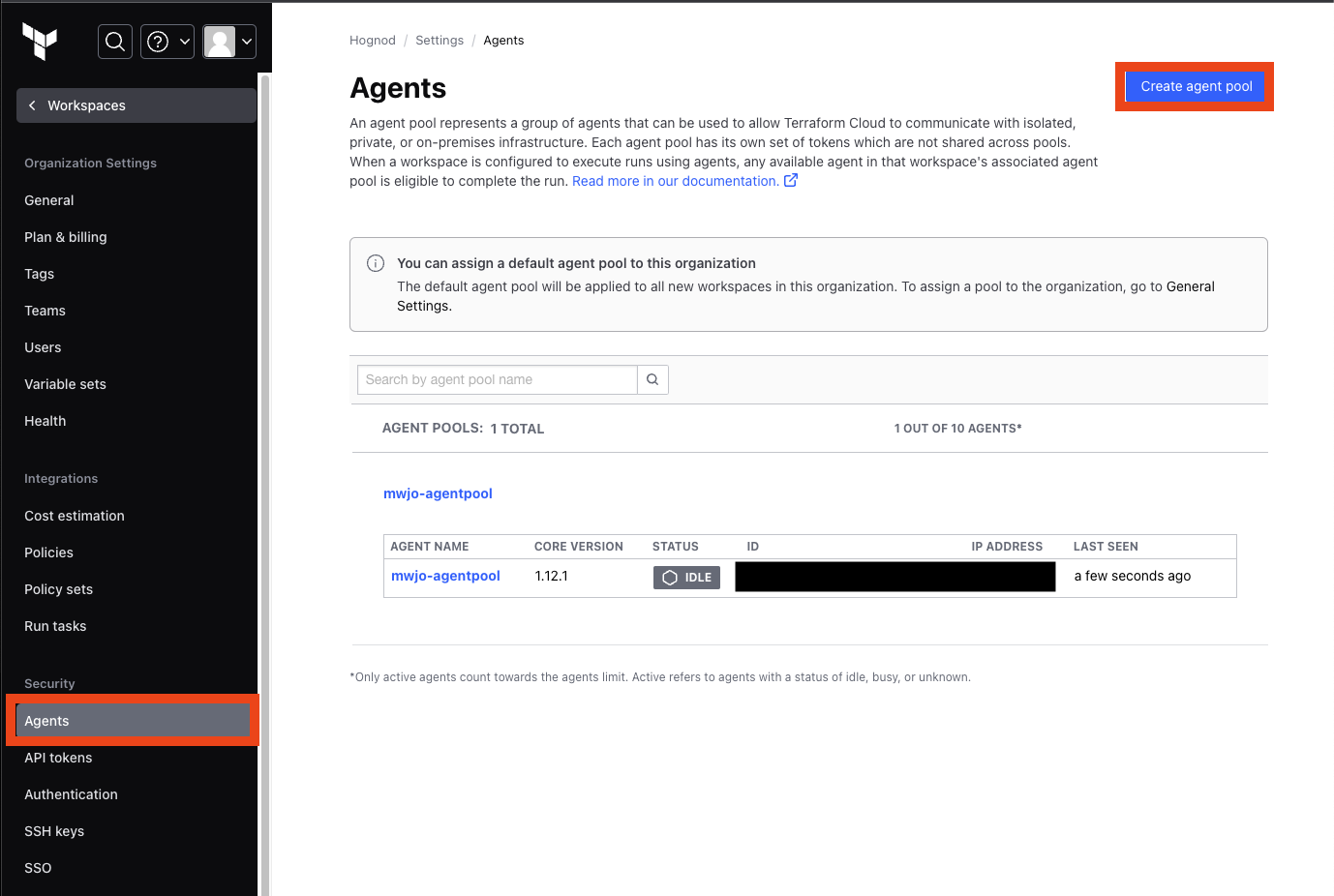
Terraform Cloud 에서 설정
2-1.
Organization - Settings - Agents에서 create agent pool 선택하여 agent 생성
2-2. tfc_agent_env 작성
tfc-agent실행파일과 같은 경로에 있어야 한다.
TFC_AGENT_NAME=<agent pool name>
TFC_AGENT_TOKEN=<agent token>
AWS_ACCESS_KEY_ID=<Access Key>
AWS_SECRET_ACCESS_KEY=<Secret Key>
AWS_DEFAULT_REGION=<Region>
sudo systemctl restart tfc-agent- agent를 통해 실행하려면 다음 코드의 내용이
main.tf에 포함되어야 한다.
terraform {
   required_providers {
    aws = {
      source = "hashicorp/aws"
      version = "5.12.0"
    }
  }

  cloud {
    organization = "<Org 명>"

    workspaces {
      name = "<Workspace 명>"
    }
  }
}
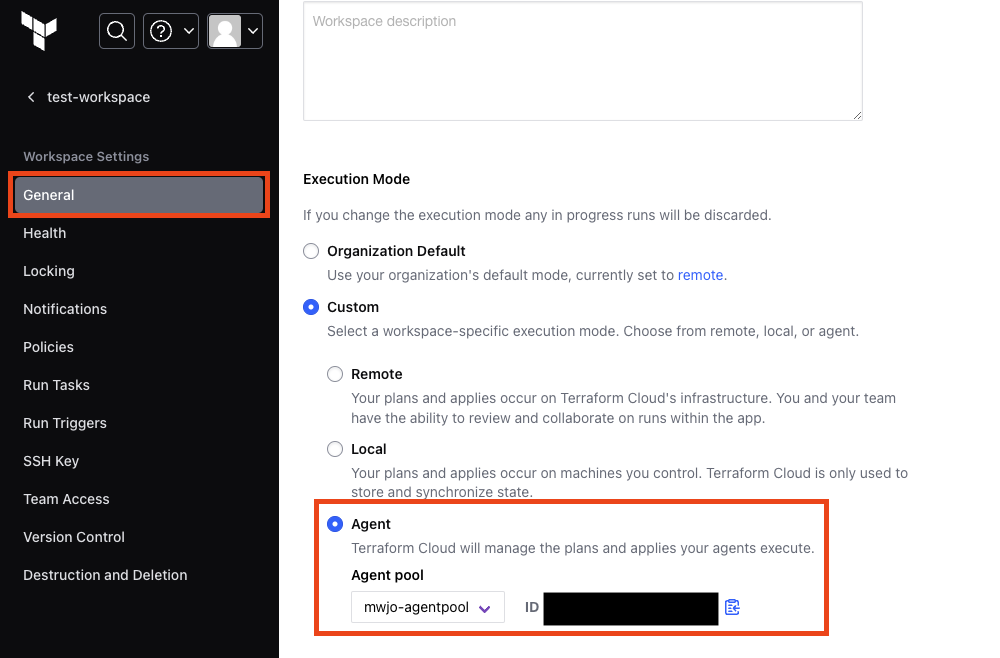
Terraform Cloud Settings
Workspace - General - Execution Mode에서 agent로 설정