안녕하세요.
이 공간은 제가 프론트엔드를 처음 접하며 배운 것을 주저리주저리 쓰는 공간입니다.
이번 내용은 html, css 5편입니다.
배치 prat.2
요소쌓임순서(Stack order)
어떤 요소가 사용자와 더 가깝게 있는지를 결정되는 걸 말합니다.
1번 순위. 요소에 position 속성이 있으면 위에 쌓입니다. (단, 기본값 static은 제외)
2번 순위. 1번 조건이 같을 때, z-index 속성의 숫자 값이 높을 수록 위에 쌓입니다.
3번 순위. 1번과 2번 조건까지 같으면, html의 구조상 다음 구조일수록 위에 쌓입니다.
예시를 볼게요.
.container {
  width: 300px;
  background-color: royalblue;
  position: relative;
}
.container .item {
  width: 100px;
  height: 100px;
  border: 4px dashed red;
  background-color: orange;
}
.container .item:nth-child(1) {
  position: relative;
}
.container .item:nth-child(2) {
  position: absolute;
  top: 50px;
  left: 50px;
}
.container .item:nth-child(3) {

}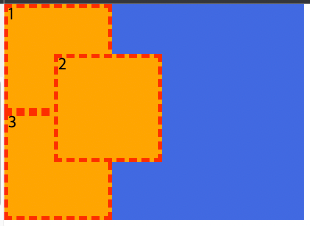
위 예시에서는 1번 박스와 2번 박스 조건을 볼게요.
우선 position 값은 두 요소 다 존재합니다.
그리고 z-index 값도 둘 다 없네요?
그럼 세 번째 조건, html에서 나중에 작성된 요소가 위에 쌓인다를 볼게요.
  <div class="bontainer">
    <div class="container">
      <div class="item">1</div>
      <div class="item">2</div>
      <div class="item">3</div>
    </div>
  </div>
2번 박스가 3번 박스보다 뒤에 작성되었으므로, 2번이 위에 쌓였습니다.
그런데 1번에 z-index값이 존재하면요?
.container {
  width: 300px;
  background-color: royalblue;
  position: relative;
}
.container .item {
  width: 100px;
  height: 100px;
  border: 4px dashed red;
  background-color: orange;
}
.container .item:nth-child(1) {
  position: relative;
  z-index: 1;
}
.container .item:nth-child(2) {
  position: absolute;
  top: 50px;
  left: 50px;
}
.container .item:nth-child(3) {

}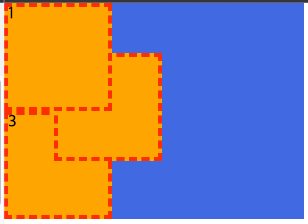
1번 박스가 2번 박스보다 위에 쌓인 모습입니다.
그럼 3번째 박스도 올려주기 위해 z-index에 2를 입력해보겠습니다.
.container {
  width: 300px;
  background-color: royalblue;
  position: relative;
}
.container .item {
  width: 100px;
  height: 100px;
  border: 4px dashed red;
  background-color: orange;
}
.container .item:nth-child(1) {
  position: relative;
  z-index: 1;
}
.container .item:nth-child(2) {
  position: absolute;
  top: 50px;
  left: 50px;
}
.container .item:nth-child(3) {
  z-index: 2;
}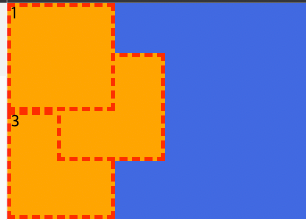
왜 2번 박스 아래에 들어갔을까요?
3번 박스에는 1번 순위인 position값이 없기 때문입니다.
그래서 다시 작성해보려 해요.
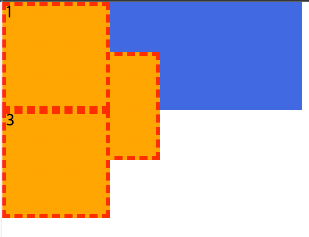
1번 박스와 3번 박스가 동일선상에 있는 것 같지만, 사실 3번이 제일 위에 쌓인 모습입니다.
position값도 존재하고, z-index값도 동일하지만,
html에서 가장 마지막에 작성되었으니까요.
z-index
요소의 쌓임 정도를 지정합니다.
z-index는 두번째 순위에 해당해요.
기본요소는 auto(0)이며, 숫자를 지정해줄 수 있어요.
-1 까지는 사용할 수 있어요.
요소 display 변경
position 속성의 값으로,
absolute와 fixed가 지정된 요소는
display 속성이 block으로 변경됩니다!