[언리얼 C++] Enhanced Input System
< Player Controller >
1. Player Controller란?
- 사용자가 입력한 값을 해석하여 캐릭터나 다른 오브젝트가 동작하게 명령하는 클래스
- 멀티플레이 환경에서는 각 플레이어마다 개별 PlayerController가 생성되므로, 여러 사용자의 입력을 충돌없이 분리하고 관리할 수 있음
2. Player Controller 기능
▸ 입력 처리
- 다양한 입력 장치의 이벤트를 처리
- 언리얼 엔진5 에서 제공하는 Enhanced Input 시스템을 사용하면, 액션/축 매핑을 보다 체계적으로 설정할 수 있음
- C++에서는
SetupInputComponent()함수로, 블루프린트에서는 이벤트 그래프를 통해 입력 로직을 구현
▸ 카메라 제어
- 마우스나 게임패드의 축 입력을 받아 캐릭터의 시점 회전이나 줌 인/아웃 같은 카메라 동작을 수행할 수 있음
▸ HUD 및 UI와의 상호작용
- 언리얼의 UMG(언리얼 모션 그래픽) 기반 UI를 통해 버튼 클릭, 드래그, 터치 등의 이벤트를 받을 수 있음
▸ Possess / UnPossess
- PlayerController는 특정 Pawn에 빙의(Possess)하여 해당 Pawn을 제어함
UnPossess()함수를 통해 Pawn과의 연결을 해제할 수 있음
3. Player Controller 적용
플레이어 컨트롤러가 실제로 사용되려면 GameMode에 등록해야 함
▸ 게임모드 cpp 파일
#include "SpartaGameModeBase.h"
#include "SpartaCharacter.h"
#include "SpartaPlayerController.h"

ASpartaGameModeBase::ASpartaGameModeBase()
{
	DefaultPawnClass = ASpartaCharacter::StaticClass();
    // 언리얼 엔진이 ASpartaPlayerController 클래스의 정보를
    // 런타임에 참조할 수 있도록 제공하는 정적 함수
	PlayerControllerClass = ASpartaPlayerController::StaticClass();
}
< Enhanced Input System & Input Action>
1. Enhanced Input System이란?
- 언리얼 엔진5에는 이전 버전등에서 사용하던 전역 Input 시스템을 대체하거나 확장하기 위해 Enhanced Input 시스템을 제공함
- 입력 설정을 입력 맵(Input Mapping Context, IMC)과 입력 액션(Input Action, IA)이라는 개념으로 나누어 관리
2. Input Action (IA)
▸ Input Action이란?
캐릭터의 이동, 점프, 발사, 줌 등과 같이 특정 동작을 추상화한 단위
▸ IA 생성 방법
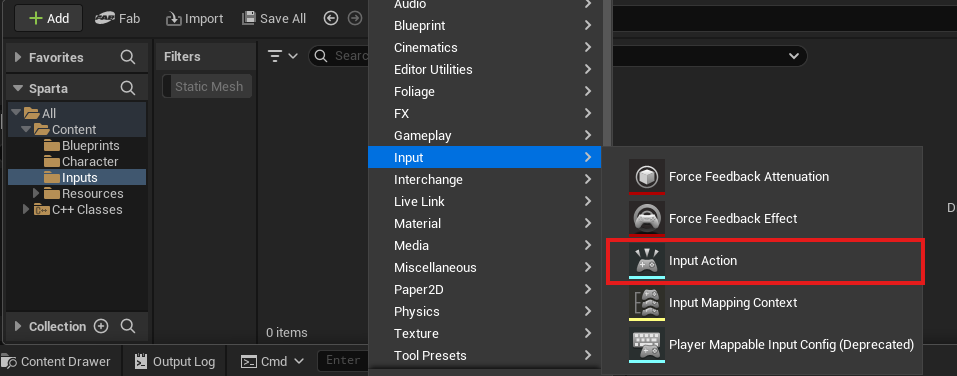
-
생성
-
Value Type
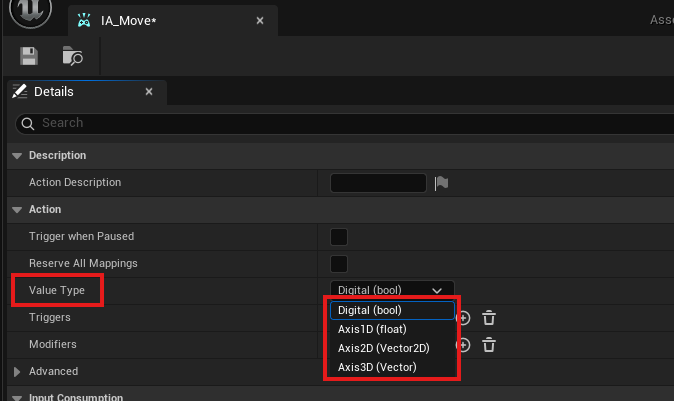
- Bool
단순 On/Off 토글 입력에 사용됨
ex) 점프(스페이스바), 공격(마우스 왼쪽 버튼)- Axis1D (1차원 축값)
단일 축(-1 ~ 1 범위)의 입력에 사용됨
ex) 게임 패드 트리거(가속 페달), 전진/후진(W/S)- Axis2D (2차원 축값)
X, Y 두 축을 동시에 처리할 때 사용됨
ex) 캐릭터 이동(WASD), 마우스 이동(가로+세로)- Axis3D (3차원 축값)
X, Y, Z 세 축을 동시에 처리함
ex) 비행 시뮬레이션에서 3축 제어 -
Trigger
입력이 활성화되는 특정 조건
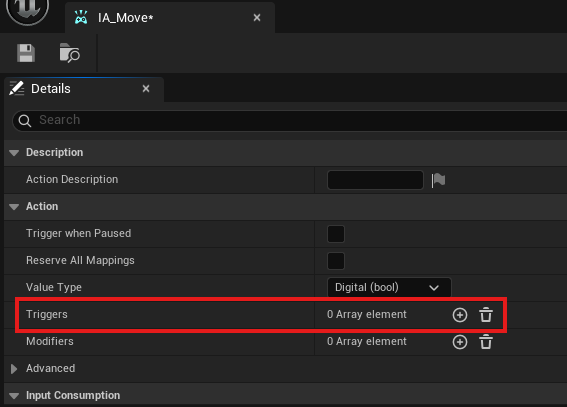
- Pressed Trigger
키를 누르는 순간에만 작동- Hold Trigger
키를 일정 시간 눌렀을 때 작동- Released Trigger
키를 뗄 때 작동
-
Modifier
입력 값을 수정하거나 변환하기 위한 설정
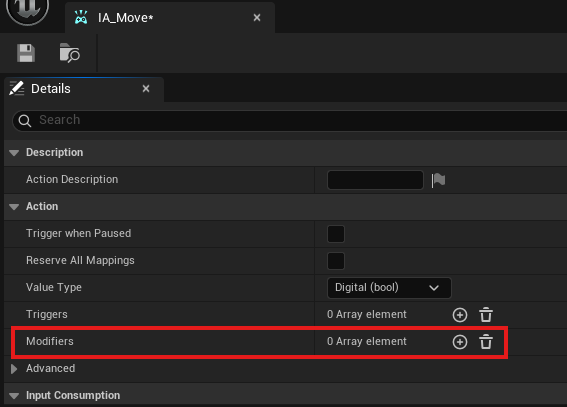
- Scale
입력 값에 일정 배율을 곱해줌
ex) 마우스 이동 속도 2배- Invert
입력 값을 반전
ex) 상하 반전 카메라- Deadzone
일정 임계값보다 작은 입력은 무시
ex) 게임패드 조이스틱 미세 떨림 방지
3. Input Mapping Context (IMC)
▸ Input Mapping Context란?
- 여러 개의 IA들을 한데 모아놓은 매핑 설정 파일
ex) '플레이어 기본 이동, 점프, 시점 전환'을 하나의 IMC에 넣고, 'UI전용 입력'을 다른 IMC로 분리하는 식으로 관리할 수 있음 - 게임 진행 중 특정상황에서 IMC를 활성하거나 비활성하여 입력을 제어할 수 있음
▸ IMC 생성 방법
-
IMC 생성
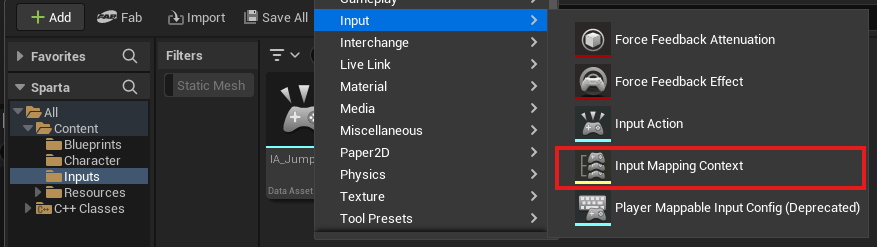
-
IMC 매핑
- IA_Move- W키 (전진)
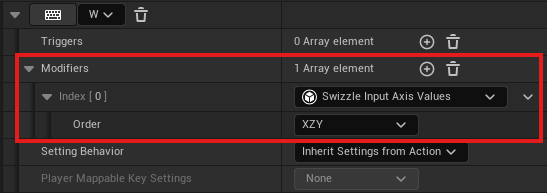
W 키를 누르면 입력 값이 X축 (앞뒤 방향)에 맞춰 정렬됨
전진은 X축 +1 방향 - S키 (후진)
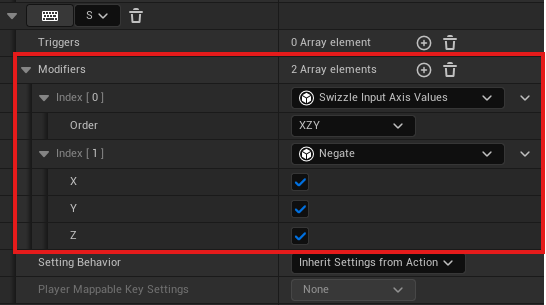
S 키를 누르면 입력 값이 X축 (앞뒤 방향)에 맞춰 정렬됨
후진은 전진의 반대 방향이므로 Negate를 사용해 입력값을 뒤집어줘야 함 (X축 -1 방향) - D키 (오른쪽 이동)
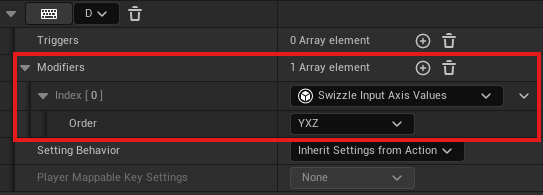
D 키를 누르면 입력 값이 Y축 (좌우 방향)에 맞춰 정렬됨
오른쪽 이동은 Y축 +1 방향 - A키 (왼쪽 이동)
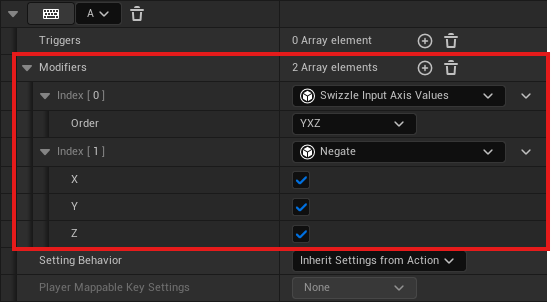
A 키를 누르면 입력 값이 Y축 (좌우 방향)에 맞춰 정렬됨
왼쪽 이동은 오른쪽 이동의 반대 방향이므로 Negate를 사용해 Y축의 값을 반전 (Y축 -1 방향)
- W키 (전진)
💡 Swizzle Input Axis Values란?
입력 축(Axis)을 변환하거나 재구성하는 기능
언리얼 엔진의 입력 시스템에서는 입력 데이터를 X, Y, Z축 중 하나로 매핑
Swizzle은 이 입력값이 올바른 축에 맞지 않는 경우, 특정 축으로 재배치하거나 변환할 수 있게 도와줌
- IA_Move

점프는 스페이스바를 눌렀을 때 On/Off형태로 동작
- IA_Look
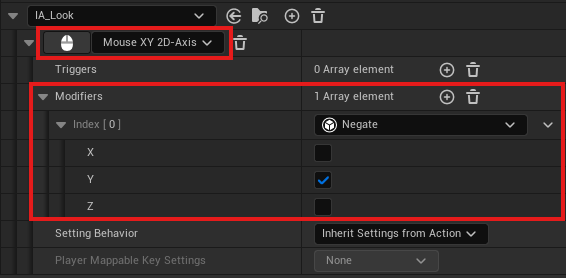
마우스 움직임을 통해 Yaw와 Pitch 값을 동시에 전달받음
Axis2D로 지정한 X축, Y축 값을 게임 내 좌표계에 맞춰 회전에 반영
기본적으로 마우스 Y축의 움직임은
위로 움직임 = 양수
아래로 움직임 = 음수 로 작동
∴ Y축 값을 Negate를 통해 반전해야 함
- 위로 움직임 → 음수 (카메라 위로)
- 아래로 움직임 → 양수 (카메라 아래로)
- IA_Sprint

스프린트는 왼쪽 Shift 키를 눌렀을 때 On/Off 형태로 동작
4. PlayerController에서 IMC 활성화
▸ PlayerController 헤더 파일
#pragma once

#include "CoreMinimal.h"
#include "GameFramework/PlayerController.h"
#include "SpartaPlayerController.generated.h"

UCLASS()
class SPARTA_API ASpartaPlayerController : public APlayerController
{
	GENERATED_BODY()

public:
	ASpartaPlayerController();

    // IMC
	UPROPERTY(EditAnywhere, BlueprintReadWrite, Category="Input")
	class UInputMappingContext* InputMappingContext;

	//IA_Move를 지정할 변수
	UPROPERTY(EditAnywhere, BlueprintReadWrite, Category = "Input")
	class UInputAction* MoveAction;

	//IA_Jump를 지정할 변수
	UPROPERTY(EditAnywhere, BlueprintReadWrite, Category = "Input")
	UInputAction* JumpAction;

	//IA_Look을 지정할 변수
	UPROPERTY(EditAnywhere, BlueprintReadWrite, Category = "Input")
	UInputAction* LookAction;

	//IA_Sprint를 지정할 변수
	UPROPERTY(EditAnywhere, BlueprintReadWrite, Category = "Input")
	UInputAction* SprintAction;
};
▸ PlayerController cpp 파일
#include "SpartaPlayerController.h"

ASpartaPlayerController::ASpartaPlayerController()
	: InputMappingContext(nullptr),
	MoveAction(nullptr),
	JumpAction(nullptr),
	LookAction(nullptr),
	SprintAction(nullptr)
{
}- 이렇게 설정해두면 각각의 변수들은 Details 패널에 추가되지만 아무것도 매핑되어 있지 않은 상태가 됨 (해당 변수에 .uasset 파일을 할당해주기 위해)
▸ 언리얼 에디터의 플레이어 컨트롤러에서 설정
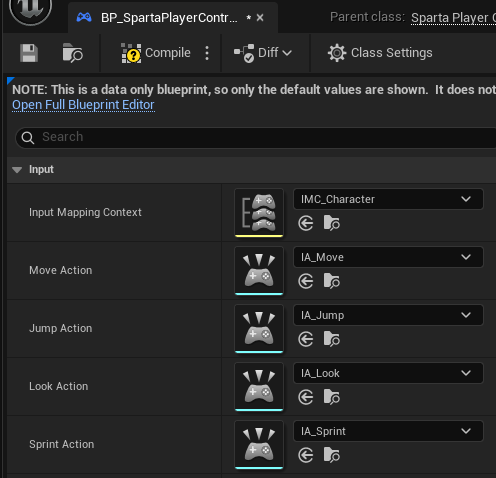
아무것도 매핑되어 있지 않은 상태이므로 위의 사진처럼 설정해줘야 함
▸ IMC 활성화 코드 구현
언리얼5의 Enhanced Input System은 Local Player Subsystem을 통해 Input Mapping Context를 활성화하거나 비활성화함
💡 Local Player Subsystem이란?
- 게임이 실행되며 언리얼은 각 플레이어를 표현하기 위해 플레이어 수 만큼 Local Player 객체를 생성함
- UEnhancedInputLocalPlayerSubsystem은 Local Player에 부착되어, 해당 플레이어가 사용할 입력 매핑(IMC)을 관리함
ex) 전투 중(IMC_Character) → UI창 열림(IMC_UI) → 전투 종료 후 다시(IMC_Character)
- Player Controller 클래스 cpp 파일
#include "SpartaPlayerController.h"
#include "EnhancedInputSubsystems.h"

ASpartaPlayerController::ASpartaPlayerController()
	: InputMappingContext(nullptr),
	MoveAction(nullptr),
	JumpAction(nullptr),
	LookAction(nullptr),
	SprintAction(nullptr)
{
}

void ASpartaPlayerController::BeginPlay()
{
	Super::BeginPlay();

	// 현재  PlayerController에 연결된 Local Player 객체를 가져옴
	if (ULocalPlayer* LocalPlayer = GetLocalPlayer())
	{
		// Local Player에서 EnhancedInputLocalPlayerSubsystem을 획득
        // 이를 통해 AddMappingContext나 RemoveMappingContext 등을 호출하여
        // 입력 매핑을 동적으로 제어할 수 있음
		if (UEnhancedInputLocalPlayerSubsystem* Subsystem = LocalPlayer->GetSubsystem<UEnhancedInputLocalPlayerSubsystem>())
		{
			if (InputMappingContext)
			{
				// Subsystem을 통해 우리가 할당한 IMC를 활성화
				// 우선순위는 0 (0이 가장 높은 우선순위)
				Subsystem->AddMappingContext(InputMappingContext, 0);
			}
		}
	}
}