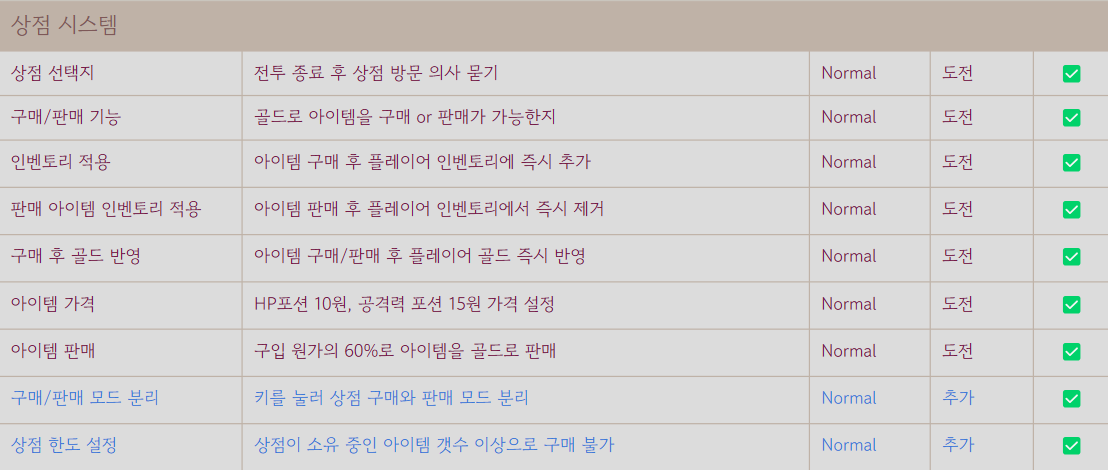
< 상점 기능 구현 >
1. 플레이어 아이템 판매
▸ CPlayer::SellItem
string CPlayer::SellItem(ITEM_TYPE Item_t)
{
	CItem* Item = Inventory[Item_t]; // 플레이어 인벤토리에서 해당 아이템 객체를 받아옴

    // 아이템이 없을때
	if (Item->GetCnt() == 0)
	{
		//doesn't have
		return "You don't have that item !";
	}

	// 판매할 아이템이 있다면
    // 상점의 BuyItem을 호출하여 판매가격을 받아옴
	int SalePrice = CShopManager::GetInst()->BuyItem(Item_t);

    // 만약 판매가격이 0이라면 상점측에서 아이템을 구매할 수 없다는 의미
	if (SalePrice == 0)
	{
		//can not sell(shop problem)
		return "You can't sell any more !";
	}

	// 판매가격이 0이 아니라면 판매를 할 수 있다는 의미이므로
    // 플레이어의 해당 아이템의 갯수를 감소시키고, 판매가격만큼의 골드를 빼줌
	Item->ReduceCnt();
	ReceiveGold(SalePrice);
	return "";
}
▸ CShopManager::BuyItem
int CShopManager::BuyItem(ITEM_TYPE Item_t)
{
	CItem* Item; // 해당 아이템
	int SalePrice; // 판매 가격
	bool isSale = true; //is not sold in shop

	//items not sold in shop
	if (Stuff.find(Item_t) == Stuff.end())
	{
		switch (Item_t)
		{
        // 몬스터 가죽의 가격을 가져오기위한 객체 생성
		case ITEM_TYPE::MONSTER_LEATHER:
			Item = new CMonsterLeather("Monster Leather", 0);
			isSale = false;
			break;
		default:
			//non type
			return 0;
		}
		SalePrice = Item->GetPrice();
        delete Item;
	}
	//items sold in shop
	//resale percent of pirce (60%)
	else
	{
		Item = Stuff[Item_t];
		SalePrice = round(Item->GetPrice() * ResalePercent);
	}

	//not enough shopcoin
	if (ShopCoin - SalePrice < 0)
	{
		//can not buy
		return 0;
	}
	ShopCoin -= SalePrice;

    // 상점에서 팔고있는 품목이라면 해당 품목의 재고를 증가시켜줌
	if (isSale)
	{
		Item->IncreaseCnt();
	}

	return SalePrice;
}
플레이어가 아이템 판매를 시도하면 Player클래스의 SellItem함수를 호출하게 됨
Player::SellItem에서는 플레이어가 해당 아이템이 없을 때, 상점 재화 부족으로 판매할 수 없을 때, 정상적으로 판매할 수 있을 때를 구분하여 처리하게 구현함
판매시도가 성공했을 때는 빈 문자열을 반환하고, 실패했을 경우에는 해당 안내문을 반환함
ShopManger::BuyItem에서는 상점의 재화가 부족할 때 플레이어가 해당 아이템을 팔 수 없도록 제한해놓고, 정상적으로 아이템을 가져올 수 있다면 해당 값만큼 재화를 감소시키고, 상점 판매 품목 중 하나인 아이템이라면 재고를 증가시켜줌
2. 상점 아이템 구매
▸ CPlayer::BuyItem
string CPlayer::BuyItem(ITEM_TYPE Item_t)
{
	// 구매할 아이템의 가격을 저장함
	int ItemPrice = Inventory[Item_t]->GetPrice();

	// 구매할 돈이 충분하지 않을때
	if (Gold - ItemPrice < 0)
	{
		//not enough money
		return "You don't have enough gold !";
	}

	// 상점의 SellItem을 호출하여 구매시도 결과를 받음
	bool SellResult = CShopManager::GetInst()->SellItem(Item_t);
	if (!SellResult)
	{
		return "That item is out of stock !";
	}

	AddItem(Item_t);
	PayGold(ItemPrice);
	return "";
}
▸ CShopManager::SellItem
bool CShopManager::SellItem(ITEM_TYPE Item_t)
{
	CItem* Item = Stuff[Item_t];

    // 판매할 아이템의 재고가 부족할 때
	if (Item->GetCnt() == 0)
	{
		//out of stock
		return false;
	}

	ShopCoin += Item->GetPrice();
	Item->ReduceCnt();

	return true;
}
플레이어가 아이템 구매를 시도하면 Player클래스의 BuyItem함수를 호출하게 됨
Player::BuyItem에서는 플레이어가 아이템을 구매할 돈이 충분할 때와 충분하지 않을때를 구분하여 처리하게 구현함
구매시도가 성공했을 때는 빈 문자열을 반환하고, 실패했을 경우에는 해당 안내문을 반환함
ShopManager::SellItem에서는 상점에 해당 품목의 재고가 부족할 때는 false를 반환, 아닌 경우에는 상점 재화를 해당값만큼 증가시키고, 재고를 감소시켜주고 true 반환
< 상점 스테이지에 기능 연결 >
1. 아이템 선택 & 판매/구매
▸ CShopStage::StageTick
// 일정 시간마다 호출되는 Tick함수
void CShopStage::StageTick()
{
	if (bCallRender)
	{
		StageRender();
		bCallRender = false;
	}

    // ''' 중략

	// 스페이스바를 눌러 판매/구매를 시도했을 때
	if (CKeyManager::GetInst()->GetKeyState(KEY_TYPE::SPACE) == KEY_STATE::TAP)
	{
    	// Buy 모드일 때
		if (CurPlayer_Mode == BUYSELL_MODE::BUY)
		{
        	// Player의 BuyItem을 호출하여 현재 선택된 아이템(CurrItem)을 넘겨줌
			Notification = CPlayer::GetInst()->BuyItem(static_cast<ITEM_TYPE>(CurrItem));

            // BuyItem의 반환값이 빈 문자열이라면 구매 성공!
			if (Notification.size() == 0)
			{
				ColorOfNotify = 6; // 출력 문자 색을 노란색으로
				Notification = "Your purchase was successful !";
			}
            // 구매 실패일 경우
			else
			{
				ColorOfNotify = 4; // 출력 문자 색을 빨간색으로
			}
		}
        // Sell 모드일 때
		else
		{
        	// Player의 SellItem을 호출하며 현재 선택된 아이템(CurrItem)을 넘겨줌
			Notification = CPlayer::GetInst()->SellItem(static_cast<ITEM_TYPE>(CurrItem));

            // SellItem의 반환값이 빈 문자열일 경우 판매 성공!
			if (Notification.size() == 0)
			{
				ColorOfNotify = 6;
				Notification = "Your sale has been successful !";
			}
            // 판매 실패일 경우
			else
			{
				ColorOfNotify = 4;
			}
		}

		SpaceMaker(Notification, 60); // 상점 화면 틀을 맞추기위한 공백문자 생성기
		bCallRender = true; // 화면을 업데이트하기 위해 true값으로 바꿈
	}

	// 오른쪽 방향키를 눌렀을 때 다음 아이템을 선택한것처럼 보이는 화면 렌더
    // 현재 아이템을 업데이트
	if (CKeyManager::GetInst()->GetKeyState(KEY_TYPE::RIGHT) == KEY_STATE::TAP)
	{
		CurrItem++;
		if (CurrItem == ItemList.size())
		{
			CurrItem = 0;
		}
		CurrItemRender();
	}

	// 왼쪽 방향키를 눌렀을 때 이전 아이템을 선택한것처럼 보이는 화면 렌더
    // 현재 아이템을 업데이트
	if (CKeyManager::GetInst()->GetKeyState(KEY_TYPE::LEFT) == KEY_STATE::TAP)
	{
		CurrItem--;
		if (CurrItem < 0)
		{
			CurrItem = ItemList.size()-1;
		}
		CurrItemRender();
	}
}
StageTick함수는 일정 시간마다 계속 호출되는 함수로 플레이어가 입력한 키 값을 실시간으로 반영할 수 있음
▸ CShopStage::CurrItemRender
// 아이템을 선택한 것처럼 보이게 만드는 화면 렌더
void CShopStage::CurrItemRender()
{
	switch (CurrItem)
	{
	case static_cast<int>(ITEM_TYPE::HEALTH_POTION):
		if(CurPlayer_Mode == BUYSELL_MODE::BUY)
		{
			//BUY HEALTH POTION RENDER
			BuyRenderPotion();
		}
		else {
			//SELL HEALTH POTION RENDER
			SellRenderPotion();
		}
		break;
	case static_cast<int>(ITEM_TYPE::ATTACK_BOOST):
		if (CurPlayer_Mode == BUYSELL_MODE::BUY)
		{
			//BUY ATTACK BOOST RENDER
			BuyRenderBooster();
		}
		else {
			//SELL ATTACK BOOST RENDER
			SellRenderBooster();
		}
		break;
	case static_cast<int>(ITEM_TYPE::MONSTER_LEATHER):
		//MONSTER LETHER RENDER
		SellRenderMonLeather();
		break;
	default:
		break;
	}
}
구매모드일 때 아이템, 판매 모드일 때 아이템들의 화면을 각각 만들어서 현재 선택된 아이템과 상점 모드를 확인하여 화면을 렌더해줌
< 기능 체크 리스트 >
1. 플레이어 ID 입력

2. 상점