CLI (Command Line Interface)
커맨드 라인 인터페이스 어플리케이션을 만들 때 기본이 되는 라이브러리를 만들어서 활용 해보자~!
[0621] V0 ~ V3
[0625] V3 ~ V4
[0626] V5 ~ V6
[0627] V7
V0
App.java
import java.util.Scanner;

public class App_V0 {
    public static void main(String[] args) {
        boolean run = true;
        int studentNum = 0;
        int[] scores = null; //학생수 입력 받아서 배열 크기 정함

        Scanner scanner = new Scanner(System.in);

        while (run) {
            System.out.println("-------------------------------------------------");
            System.out.println("1.학생수 | 2.점수입력 | 3.점수리스트 | 4.분석 | 5.종료");
            System.out.println("-------------------------------------------------");

            System.out.print("선택> ");
            int selectNo = Integer.parseInt(scanner.nextLine());

            if (selectNo == 1) {
                System.out.print("학생수> ");
                studentNum = Integer.parseInt(scanner.nextLine());
                scores = new int[studentNum];
            } else if (selectNo == 2) {
                for (int i = 0; i < scores.length; i++) {
                    System.out.print("scores[" + i + "]> ");
                    scores[i] = Integer.parseInt(scanner.nextLine());
                }
            } else if (selectNo == 3){
                for (int i = 0; i <scores.length; i++) {
                    System.out.println("scores[" + i + "]: " + scores[i]);
                }
            } else if (selectNo == 4){
                int max = 0;
                int sum = 0;
                double avg = 0;
                for (int i = 0; i < scores.length; i++) {
                    max = (max < scores[i]) ? scores[i] : max;
                    sum += scores[i];
                }
                avg = (double) sum / studentNum;
                System.out.println("최고 점수: " + max);
                System.out.println("평균 점수: " + avg);
            } else if (selectNo == 5) {
                run = false;
            }
        }

        System.out.println("프로그램 종료");
    }
}
[문제점]
- 객체 지향 X, 절차 중심
- 단일 책임의 원칙 (SRP) 위반
V1
- ✅단일 책임의 원칙
- 기능별로 메서드 화
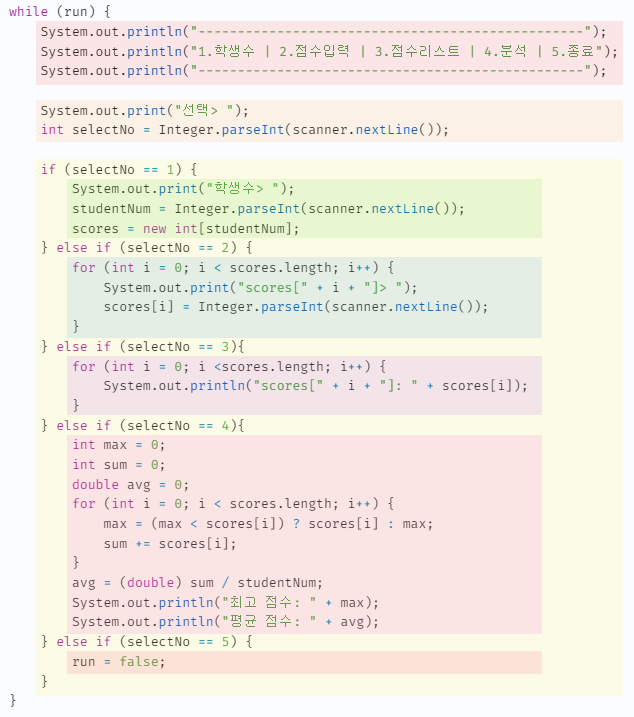
import java.util.Scanner;

public class App_V1 {
    boolean run = true;
    int studentNum = 0;
    int[] scores = null; //학생수 입력 받아서 배열 크기 정함

    Scanner scanner = new Scanner(System.in);

    // 1. 메뉴 출력
    public void printMenu() {
        System.out.println("-------------------------------------------------");
        System.out.println("1.학생수 | 2.점수입력 | 3.점수리스트 | 4.분석 | 5.종료");
        System.out.println("-------------------------------------------------");
    }

    // 2. 선택
    public int getSelect() {
        System.out.print("선택> ");
        return Integer.parseInt(scanner.nextLine());
    }

    // 3. 학생수
    public void getStudentNum() {
        System.out.print("학생수> ");
        studentNum = Integer.parseInt(scanner.nextLine());
        scores = new int[studentNum];
    }
    // 4. 점수 입력
    public void getScores() {
        for (int i = 0; i < scores.length; i++) {
            System.out.print("scores[" + i + "]> ");
            scores[i] = Integer.parseInt(scanner.nextLine());
        }
    }

    // 5. 점수 리스트
    public void printScore() {
        for (int i = 0; i <scores.length; i++) {
            System.out.println("scores[" + i + "]: " + scores[i]);
        }
    }

    // 6. 분석
    public void analize() {
        int max = 0;
        int sum = 0;
        double avg = 0;
        for (int i = 0; i < scores.length; i++) {
            max = (max < scores[i]) ? scores[i] : max;
            sum += scores[i];
        }
        avg = (double) sum / studentNum;
        System.out.println("최고 점수: " + max);
        System.out.println("평균 점수: " + avg);
    }

    // 7. 프로그램 종료
    public void exit() {
        run = false;
    }

    // 8. 메뉴 선택
    public void executeCommand (int selectNo) {
        if (selectNo == 1) {
            getStudentNum();
        } else if (selectNo == 2) {
            getScores();
        } else if (selectNo == 3) {
            printScore();
        } else if (selectNo == 4) {
            analize();
        } else if (selectNo == 5) {
            exit();
        }
    }

    // 9. 운영 - 흐름제어
    public void run() {
        while (run) {
            printMenu();
            int selectNo = getSelect();
            executeCommand(selectNo);
        }
        System.out.println("프로그램 종료");
    }

    // 해당 클래스를 인스턴스화
    public static void main(String[] args) {
        App_V1 app = new App_V1();
        app.run();
    }
}
[문제점]
- 단일 책임의 원칙 (SRP) 위반
- 메서드 레벨 - 단일 책임 원칙 준수
- 클래스 레벨 - 단일 책임 원칙 위배
- 개방-폐쇄 원칙 (OCP) 위반
- if~문 -> 전략 패턴을 통해 형태 단일화
V2, V3 - Singleton, Command 패턴
- 기능별로 클래스 재정의
- 기존 App 역할 : 운영 (run)
- 필요 클래스
- 입력 (Input) - Façade(파사드) 패턴 적용하여 간결화
- 메뉴 관리 (Menu)
- 데이터 관리 - 싱글톤 패턴 적용
- 출력
- 각 명령을 클래스로 추상화 - Command 패턴(전략 패턴 확장) 적용 ⇨ OCP
Façade(파사드) 패턴
Input.java (입력 클래스)
// 인스턴스 안 만들고 그냥 운영하는 클래스
public class Input {
    static Scanner scanner = new Scanner(System.in);

    public static int getInt(String title) {
        System.out.print(title);
        return Integer.parseInt(scanner.nextLine());
    }
}
Menu.java (메뉴 클래스)
public class Menu {
    String menus[] = {"학생수", "점수입력", "점수리스트", "분석", "종료"};

    public void printMenu() {
        System.out.println("-------------------------------------------------");
        for (int i = 0; i < menus.length; i++) {
            System.out.printf("%d.%s | ", i + 1, menus[i]);
        }
        System.out.println();
        System.out.println("-------------------------------------------------");
    }

    public int getSelect() {
        int selectNo = Input.getInt("선택> ");
        return selectNo;
    }
}
싱글톤 패턴
StudentScores.java
// 데이터 관리 클래스
public class StudentScores {
    int studentNum = 0;
    int[] scores = null;

    // Singleton 패턴
        // 생성자-private
        // static 멤버로 딱 한 번 초기화 - private (Null 대입 못하게 하려고)
        // getInstance() - public
    private StudentScores() {}
    private static StudentScores instance = new StudentScores();
    public static StudentScores getInstance() {
        return instance;
    }

    // 학생수 리턴
    public int getStudentNum() {
        return studentNum;
    }

    // 학생수 설정
    public void setStudentNum(int studentNum) {
        this.studentNum = studentNum;
        this.scores = new int[studentNum];
    }

    // 점수 리턴
    public int[] getScores() {
        return scores;
    }
}
Command 패턴
- 메뉴 하나 당 Command 객체 1개
- 실행 해야 할 명령을 추상화 시켜서 실행
Command.java
- 인터페이스
public interface Command {
    void execute();
}
InitScoresCommand.java
- selectNo == 1 > getStudentNum()
public class InitScoresCommand implements Command{
    StudentScores studentScores = StudentScores.getInstance();

    // 1) getStudentNum()
    @Override
    public void execute() {
        int studentNum = Input.getInt("학생수> ");
        studentScores.setStudentNum(studentNum);
    }
}
GetScoresCommand.java
- selectNo == 2 > getScores()
public class GetScoresCommand implements Command{
    StudentScores studentScores = StudentScores.getInstance();

    // 2) getScores
    @Override
    public void execute() {
        int[] scores = studentScores.getScores();

        for (int i = 0; i < scores.length; i++) {
            scores[i] = Input.getInt("scores[" + i + "]> ");
        }
    }
}
PrintScoreCommand.java
- selectNo == 3 > printScore()
public class PrintScoreCommand implements Command{
    StudentScores studentScores = StudentScores.getInstance();

    // 3) printScore()
    @Override
    public void execute() {
        int[] scores = studentScores.getScores();

        for (int i = 0; i < scores.length; i++) {
            System.out.println("scores[" + i + "]: " + scores[i]);
        }
    }
}
AnalizeCommand.java
- selectNo == 4 > analize()
public class AnalizeCommand implements Command{
    StudentScores studentScores = StudentScores.getInstance();

    // 4) analize()
    @Override
    public void execute() {
        int[] scores = studentScores.getScores();
        int max = 0;
        int sum = 0;
        double avg = 0;

        for (int i = 0; i < scores.length; i++) {
            max = (max < scores[i]) ? scores[i] : max;
            sum += scores[i];
        }

        avg = (double) sum / studentScores.getStudentNum();

        System.out.println("최고 점수: " + max);
        System.out.println("평균 점수: " + avg);
    }
}
ExitCommand.java
- selectNo == 5 > exit()
public class ExitCommand implements Command{
    // 5) exit()
    @Override
    public void execute() {
        System.out.println("프로그램 종료");
        System.exit(0);
    }
}
운영 클래스
App_V2_V3.java
package v2_v3;

import v2_v3.command.*;

public class App_V2_V3 {
    // printMenu(), getSelect() 제거 -> Menu 클래스가 담당
    Menu menu;
    Command[] commands;

    // if 구문 제거 -> Command 객체 사용
    public App_V2_V3() {
        menu = new Menu();
        // command 배열에 메뉴들 넣기
        commands = new Command[] {
                new InitScoresCommand(),
                new GetScoresCommand(),
                new PrintScoreCommand(),
                new AnalizeCommand(),
                new ExitCommand()
        };
    }
    public void executeCommand(int selectNo) {
        Command command = commands[selectNo - 1];
        command.execute(); // Command 패턴
    }

    // 운영 - 흐름제어
    public void run() {
        while (true) {
            menu.printMenu();
            int selectNo = menu.getSelect();
            executeCommand(selectNo);
        }
    }


    // 해당 클래스를 인스턴스화
    public static void main(String[] args) {
        App_V2_V3 app = new App_V2_V3();
        app.run();
    }
}
[문제점]
- 개방-폐쇄 원칙 (OCP) 위반
- 기능이 추가 된다면
- 추가 기능 Command 구현체 작성
- 메뉴에 항목 추가
- 메뉴 / Command 분리되어 운영
V4 - 캡슐화
- V3
- 메뉴가 하드 코딩
- 주입(injection)을 통해 구성
- 메뉴 타이틀 / Command 분리 운영
- 캡슐화 - MenuItem 클래스 사용
- 메뉴가 하드 코딩
캡슐화
MenuItem.java
- 메뉴 / Command 따로 노는 것 해결~!
// 캡슐화
public class MenuItem {
    String title; // 메뉴 문자열
    Command command; // 메뉴 명령

    public MenuItem(String title, Command command) {
        this.title = title;
        this.command = command;
    }

    public String getTitle() {
        return title;
    }

    public Command getCommand() {
        return command;
    }
}
Menu.java
// 메뉴 클래스 일반화
public class Menu {
    MenuItem[] menus;

    public Menu(int size) {
        menus = new MenuItem[size];
    }

    // ★메뉴 항목 주입 (DI)
    public void add(int idx, MenuItem item) {
        menus[idx] = item;
    }

    public void printMenu() {
        System.out.println("-------------------------------------------------");
        for (int i = 0; i < menus.length; i++) {
            System.out.printf("%d.%s | ", i + 1, menus[i].getTitle());
        }
        System.out.println();
        System.out.println("-------------------------------------------------");
    }

    // Command 리턴
    public Command getSelect() {
        int selectNo = Input.getInt("선택> ");

        return menus[selectNo - 1].getCommand();
    }
}
App_V4.java
public class App_V4 {
    Menu menu;

    public App_V4() {
    }

    public void init(int menuSize) {
        menu = new Menu(menuSize);
        createMenu(menu);
    }

    public void createMenu(Menu menu) {
        menu.add(0, new MenuItem("학생수", new InitScoresCommand()));
        menu.add(1, new MenuItem("점수입력", new GetScoresCommand()));
        menu.add(2, new MenuItem("점수리스트", new PrintScoreCommand()));
        menu.add(3, new MenuItem("분석", new AnalizeCommand()));
        menu.add(4, new MenuItem("종료", new ExitCommand()));
    }

    public void run() {
        init(5);
        while(true) {
            menu.printMenu();
            Command command = menu.getSelect();
            command.execute();
        }
    }

    public static void main(String[] args) {
        App_V4 app = new App_V4();
        app.run();
    }

}
[문제점]
- 기본 동작 순서를 부모 클래스에서 결정
V5 - 템플릿 패턴
- Template 패턴
: 자식 클래스는 커스터마이징을 통해 수정 운영 가능 (메뉴 수 / 메뉴 구성)
App_V5.java
// 추상클래스
public abstract class App_V5 {
    Menu menu;

    public App_V5() {}

    public void init(int menuSize) {
        menu = new Menu(menuSize);
        createMenu(menu);
    }

    // ★아무일도 안함 - 부모는 형태만 잡는다~! => 자식이 오버라이딩 (커스터마이징)
    public void createMenu(Menu menu) {

    }

    public void run() {
        //init(5); 제거
        while(true) {
            menu.printMenu();
            Command command = menu.getSelect();
            command.execute();
        }
    }
}
MyApp.java
public class MyApp extends App_V5{
    @Override
    public void createMenu(Menu menu) {
        super.createMenu(menu);

        menu.add(0, new MenuItem("학생수", new InitScoresCommand()));
        menu.add(1, new MenuItem("점수 입력", new GetScoresCommand()));
        menu.add(2, new MenuItem("점수 리스트", new PrintScoreCommand()));
        menu.add(3, new MenuItem("분석", new AnalizeCommand()));
        menu.add(4, new MenuItem("종료", new ExitCommand()));
    }

    public static void main(String[] args) {
        App_V5 app = new MyApp();
        app.init(5);
        app.run();
    }
}
[문제점]
- app.init(5)
- 배열을 쓰고 있기 때문에 사용해야함ㅠ ➞ 크기 정보 필요 없는 List 사용
- 너무 많은 Command 객체
- 메서드 참조를 통해 해결
V6 - ArrayList MenuItem
- 메뉴
- 배열로 관리 (크기 고정) ⇨ ArrayList로 관리
Menu.java
public class Menu {
    List<MenuItem> menus;

    public Menu() {
        menus = new ArrayList<>();
    }

    public void add(MenuItem item) {
        menus.add(item);
    }

    public void printMenu() {
        System.out.println("-------------------------------------------------");
        for (int i = 0; i < menus.size(); i++) {
            System.out.printf("%d.%s | ", i + 1, menus.get(i).getTitle());
        }
        System.out.println();
        System.out.println("-------------------------------------------------");
    }

    public Command getSelect() {
        int selectNo = Input.getInt("선택> ");
        return menus.get(selectNo - 1).getCommand();
    }
}
App_V6.java
// 추상클래스
public abstract class App_V6 {
    Menu menu;

    public App_V6() {

    }

    public void init() {
        menu = new Menu();
        createMenu(menu);
        menu.add(new MenuItem("종료", new ExitCommand()));
    }

    // ★아무일도 안함 - 부모는 형태만 잡는다~! => 자식이 오버라이딩 (커스터마이징)
    public void createMenu(Menu menu) {

    }

    public void run() {
        init();
        while(true) {
            menu.printMenu();
            Command command = menu.getSelect();
            command.execute();
        }
    }
}
MyApp_V6.java
public class MyApp_V6 extends App_V6 {
    @Override
    public void createMenu(Menu menu) {
        super.createMenu(menu);
        menu.add(new MenuItem("학생수", new InitScoresCommand()));
        menu.add(new MenuItem("점수입력", new GetScoresCommand()));
        menu.add(new MenuItem("점수리스트", new PrintScoreCommand()));
        menu.add(new MenuItem("분석", new AnalizeCommand()));
    }

    public static void main(String[] args) {
        App_V6 app = new MyApp_V6();
        app.run();
    }
}
[문제점]
- 동일한 구조로 다른 프로젝트에서 사용하기 힘듦 ➞ MyApp을 제외한 나머지부분 라이브러리화
V7 - Library / Scoula Framework
-
Scoula 프레임 워크 만들어서 사용하기~!
-
ScoulaLib - scoulacli(모듈)
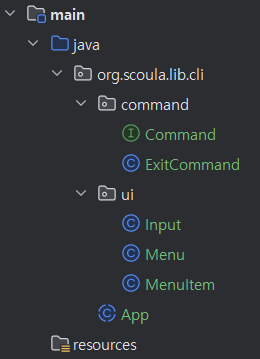
- StudentScore
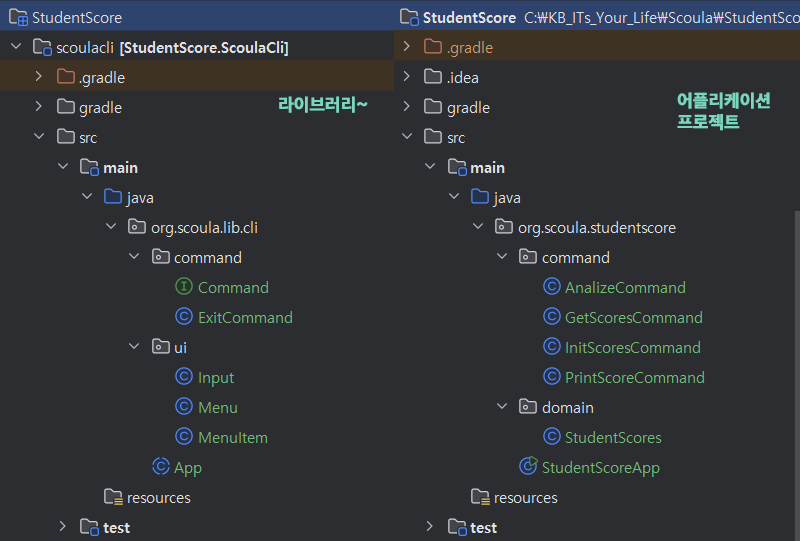
[문제점]
- 너무 많은 Command 객체 정의해야 함 ➞ 서비스 객체 생성, 매서드 참조 이용해 메뉴에 설정
