Servlet 구조 패턴
1) 파라미터 추출 - DTO 객체 준비
2) 비니지스 로직 실행 - 출력 DTO 객체 ➔ Command pattern으로 추상화
3) 결과를 request scope에 저장
4) forward / redirect ➔ 정형: 추상화
- EL : only 값 출력
- JSTL : 태그를 써서 로직 처리를 지원
EL (Expression Language)
- JSP Expression tag
<%=값(request.getAttribute(키))%>➞ 불편하다🤔
⇨ EL이 해결해줌돠
✅ 최종적인 결과가 값 (표현식, Expression) - 이것을 출력하기 위한 언어
✅ JSP에서 변수를 출력할 때 사용
- 처리 가능한 데이터형
- 프리미티브
- Map, List, 배열, 자바빈 등..
* JavaBean
- 기본 생성자
- 속성(필드, property)은 private으로 선언
- Getter / Setter
- Serializable 인터페이스를 구현
➞ (For 객체를 파일에 저장하거나 네트워크를 통해 전송, 요즘은 필수X) - 주로 데이터 보관 및 전달 목적, 복잡한 비즈니스 로직 포함X
* EL 내장 객체
pageScoperequestScopesessionScopeapplicationScope
* EL 연산자
.: 자바빈, Map에 접근[]: 배열, List 접근(): 우선 순위empty: null인지 판단산술, 논리, 비교 연산자~
* EL 기본 문법
🔸 ${표현식}
- 내장 객체이거나 scope에 저장된 속성 지정
${member.name}- 자바빈 ⇨
member.getName(): 'member' 인스턴스의 'name' property 출력~ - Map ⇨
member.get("name"): 키
- 자바빈 ⇨
${member["name"]}- 배열
- 자바빈 ⇨
member.getName() - 맵 ⇨
member.get("name")
🔸 EL vs <%= %>
<%
    int age = 10; //지역변수
    request.setAttribute("age", 40);
   	request.setAttribute("agenull", null);
%>

<html>
<head>
    <title>Title</title>
</head>
<body>
변수 age : <%=age%> <br>
EL age: ${age} <br>
변수 null : <%=agenull%> <br>
EL null: ${agenull}
</body>
</html>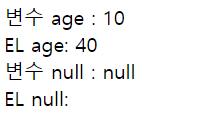
- age 의미
<%=age%>: 변수 age${age}: scope의 key 명 (scope에서 해당 key를 찾음)
- null 일 때
- EL은 null이거나 해당 키가 없으면 아무것도 출력 X
Scope
- 키 찾는 순서
: Page < Request < Session < Application
🔸 실습) 로그인
- MVC
JPS[login_form] : userid & passwd 전송
➔ Servlet[LoginServlet] : userid & passwd를 request scope에 저장, forward
➔ JSP[login] : EL을 써서 출력
<!--login_form.jsp-->
<form action="login" method="get">
    <fieldset>
        <legend>로그인 폼</legend>
        <ul>
            <li>
                <label for="userid">아이디</label>
                <input type="text" id="userid" name="userid">
            </li>
            <li>
                <label for="passwd">비밀번호</label>
                <input type="password" id="passwd" name="passwd">
            </li>
            <li>
                <input type="submit" value="로그인">
            </li>
        </ul>
    </fieldset>
</form>
//LoginServlet
@WebServlet("/login")
public class LoginServlet extends HttpServlet {
@Override
protected void doGet(HttpServletRequest request, HttpServletResponse response)
throws ServletException, IOException {
// 1) 파라미터 추출
String userid = request.getParameter("userid");
String passwd = request.getParameter("passwd");
// 2) 비지니스 로직 실행 (로그인 체크) - 했다 치고
// 3) 결과 request scope에 저장
request.setAttribute("userid", userid);
request.setAttribute("passwd", passwd);
// 4) forward or redirect
request.getRequestDispatcher("login.jsp").forward(request, response);
}
}<!--login.jsp-->
<body>
사용자 아이디 : ${userid}<br>
사용자 비밀번호 : ${passwd}
</body>
- 데이터 개별 저장 안좋음 ⇨ 캡슐화(DTO)하여 하나로 넘기는 게 좋음
//LoginServlet
LoginDTO loginDTO = new LoginDTO(userid, passwd);
request.setAttribute("login", loginDTO);

//login.jsp
DTO 아이디: ${login.id} <br>
DTO 비밀번호: ${login.passwd}
VO 객체 vs DTO 객체
- VO : 데이터베이스 테이블과 일치시키는 클래스 (DAO에서 사용)
- DTO : 테이블과 상관X, 비니지스 로직을 수행하기 위해 운영하는 객체 (Controller, Service 에서 사용)
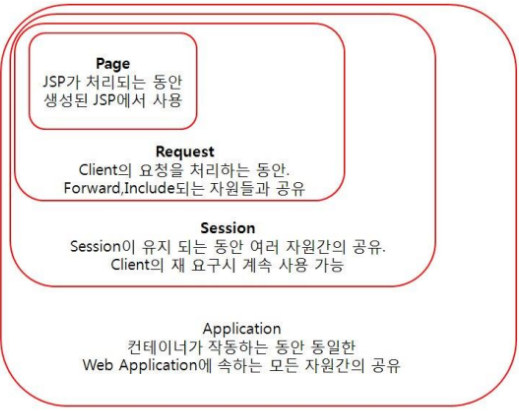
* Scope
🔸 pageScope
- 한 페이지(servlet, jsp) 내에서
- 일종의 지역 변수
🔸 requestScope
- request 객체에 저장되는 속성
- 접속이 끊길 때까지 유지
🔸 sessionScope
- session 객체에 저장되는 속성
- session 만기되기 전까지 유지
🔸 applicationScope
- application context에 저장되는 속성
- 어플리케이션이 종료할 때까지 유지
//ScopeServlet
@WebServlet("/scope")
public class ScopeServlet extends HttpServlet {
    ServletContext sc; //application scope

    @Override
    public void init(ServletConfig config) throws ServletException {
        sc = config.getServletContext();
    }

    @Override
    protected void doGet(HttpServletRequest request, HttpServletResponse response)
            throws ServletException, IOException {
        //Application Scope
        sc.setAttribute("scopeName", "application scope값");

        //Session Scope
        HttpSession session = request.getSession();
        session.setAttribute("scopeName", "session scope값");

        //Request Scope
        request.setAttribute("scopeName", "request scope값");
        //DTO 캡슐화
        Member member = new Member("홍길동", "hong"); // name, userid
        request.setAttribute("member", member);

        request.getRequestDispatcher("scope.jsp").forward(request, response);
    }
}
<!--scope.jsp-->
<body>
<h1>Scope 데이터 보기</h1>
page scope : ${pageScope.scopeName} <br>
request scope : ${requestScope.scopeName} <br>
session scope : ${sessionScope.scopeName} <br>
application scope : ${applicationScope.scopeName}<br>
<br>
\${scopeName} 자동 찾기 : ${scopeName} <br>
VO객체-Member name : ${member.name} <br>
VO객체-Member userid : ${member.userid}
</body>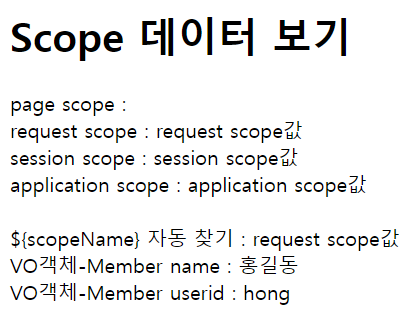
JSTL
✅ 로직 처리를 위한 라이브러리
✅ 액션 태그를 사용자가 직접 제작 가능 - 커스텀 태그
✅ 커스텀 태그들 중 자주 사용되는 태그들 묶어서 아파치 그룹에서 제공 ⇨ JSTL
- 설치
taglibs-standard-impl-1.2.5.jar
C:\apache-tomcat-9.0.89\lib 넣기
* JSTL 라이브러리

- taglib 지정자로 설정
<%@ taglib uri="http://java.sun.com/jsp/jstl/core" prefix="c" %>
<%@ taglib uri="http://java.sun.com/jsp/jstl/fmt" prefix="fmt" %>
🔸 Core
- 문자열 출력, if문, for문과 같은 제어문 기능 포함
out: 지정된 값 출력if<c:if test="조건식" (var="저장할 변수명" scope="저장할 scope")> 문장 </c:if>- else 없음 ⇨ 부정 표현으로 if 추가
forEach(ex.목록보기)<c:forEach var="변수명" items="객체명"> 문장 </c:forEach><c=forEach begin="시작인덱스" end="끝인덱스" step="증가값" varStatus="other변수"> 문장 </c:forEach>
choose-when-otherwise≒ switchurl: url 생성forTokens: StringTokenizer 클래스 기능
🔸 I18N formatting
- 국제화/지역화 및 데이터 포맷과 관련된 기능 제공
- 국제화/지역화 ➔ 다국어 처리
- 데이터 포맷 ➔ 날짜와 숫자 관련된 기능
formatNumber- 수치 데이터를 특정 포맷으로 설정
<fmt:formatNumber value="값" typ="타입" pattern="패턴" />
formatDate- 날짜 데이터를 특정 포맷으로 설정
<fmt:formatDate value="값" typ="타입" pattern="패턴" />
<fmt:formatDate value="${today}" pattern="YYYY-MM-dd a hh:mm:ss"/><br>
<fmt:formatDate value="${today}" pattern="YYYY-MM-dd hh:mm:ss"/><br>
