
CloudNet@ 가시다님이 진행하는 단기 CI/CD 과정 Study 내용을 실습한 내용과 개인적인 경험을 정리하고자 합니다. 2주차 학습한 내용은 GitHub Actions CI/CD 입니다.
1. GitHub Actions 이해
1.1 GitHub Actions은 ?
GitHub Actions은 GitHub에서 제공하는 CI/CD 도구로, 코드의 빌드, 테스트, 배포와 같은 작업을 자동화할 수 있는 플랫폼입니다. 이를 통해 개발자는 코드를 푸시하거나 풀 리퀘스트(Pull Request)를 생성할 때 자동으로 워크플로우를 실행하여 생산성을 높일 수 있습니다.
GitHub Actions은 빌드, 테스트 및 배포 파이프라인을 자동화할 수 있는 CI/CD(연속 통합 및 지속적인 업데이트) 플랫폼입니다. 리포지토리에 대한 모든 풀 리퀘스트를 빌드 및 테스트하거나 병합된 풀 리퀘스트 프로덕션에 배포하는 워크플로를 만들 수 있습니다.
GitHub Actions은 단순한 DevOps 수준을 넘어 리포지토리에서 다른 이벤트가 발생할 때 워크플로를 실행할 수 있도록 합니다. 예를 들어 누군가가 리포지토리에서 새 이슈를 만들 때마다 워크플로를 실행하여 적절한 레이블을 자동으로 추가할 수 있습니다.
GitHub에서 워크플로를 실행할 Linux, Windows, macOS 가상 머신을 제공하거나, 사용자 고유의 데이터 센터 또는 클라우드 인프라에서 자체 호스트형 실행기를 호스트할 수 있습니다.
1.2 Github Actions 주요 기능
- 자동화된 워크플로우
- 코드 커밋, PR 생성, 병합 등 이벤트 발생 시 작업 실행
- YAML 파일(.github/workflows/)로 간단하게 설정 가능
- 유연한 환경 제공
- 자체 호스트 러너 또는 GitHub 호스트 러너 사용 가능
- 다양한 운영 체제(Windows, macOS, Linux) 지원
- 광범위한 통합
- 다양한 오픈소스 및 커뮤니티 제작 액션(Action) 사용 가능
- AWS, Azure, Google Cloud와 같은 클라우드 배포 연동
1.3 GitHub Actions의 구성 요소
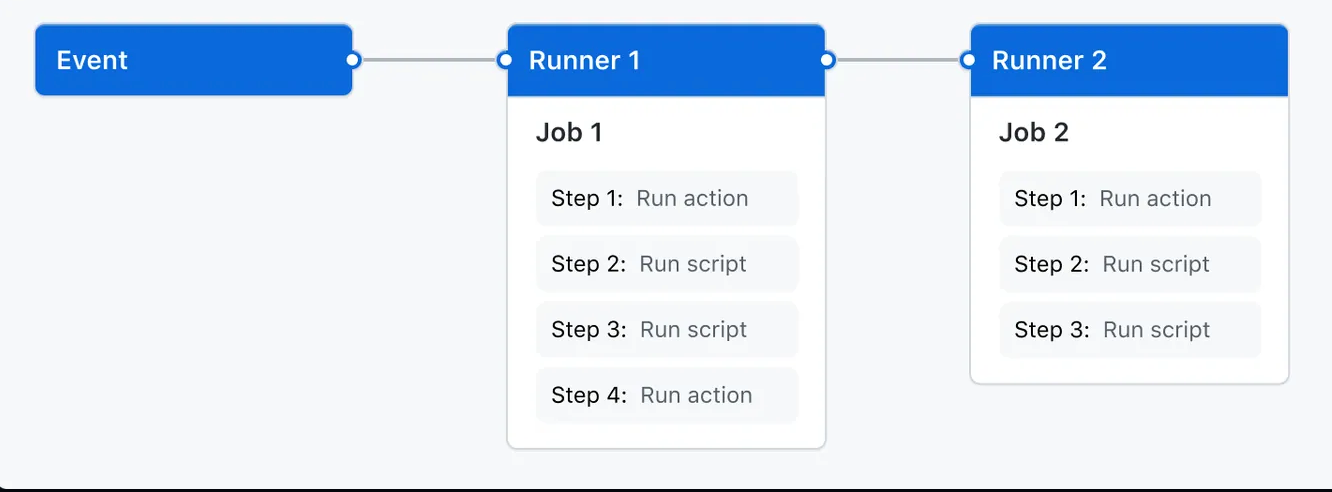
끌어오기 요청(PR)이 열리거나 이슈가 생성되는 것과 같은 Event가 리포지토리에서 발생할 때 트리거 되도록 GitHub Actions Workflow를 구성할 수 있습니다.
- 워크플로는 순차적 또는 병렬로 실행될 수 있는
Job을 하나 이상 포함합니다.- 각 작업은 자체 가상 머신
Runner또는컨테이너내에서 실행되며,- 정의한 스크립트를 실행하거나 워크플로를 간소화할 수 있는 재사용 가능한 확장인
Job을 실행하는Step를 하나 이상 포함합니다.
-
Workflows
워크플로는 하나 이상의 작업을 실행하는 구성 가능한 자동화된 프로세스입니다. 워크플로는 리포지토리에 체크인된 YAML 파일에 의해 정의되며 리포지토리의 이벤트에 의해 트리거될 때 실행되거나 수동으로 또는 정의된 일정에 따라 트리거될 수 있습니다.
워크플로는 리포지토리의 디렉토리(.github/workflows)에 정의됩니다. 리포지토리에는 여러 워크플로가 있을 수 있으며, 각각은 다음과 같은 다양한 작업 세트를 수행할 수 있습니다.- 풀 리퀘스트 빌드 및 테스트.
- 릴리스가 생성될 때마다 애플리케이션을 배포합니다.
- 새로운 이슈가 열릴 때마다 라벨을 추가합니다.
다른 워크플로 내에서 워크플로를 참조할 수 있습니다.
-
Events
이벤트는 워크플로 실행을 트리거하는 저장소의 특정 활동입니다 . 예를 들어, 누군가가 풀 리퀘스트를 만들거나, 이슈를 열거나, 저장소에 커밋을 푸시할 때 활동이 GitHub에서 시작될 수 있습니다. 또한 REST API에 게시 하거나 수동으로 일정에 따라 실행되도록 워크플로를 트리거할 수도 있습니다. -
Jobs
작업은 동일한 러너에서 실행되는 워크플로의 단계 집합입니다 . 각 단계는 실행될 셸 스크립트이거나 실행될 동작 입니다 . 단계는 순서대로 실행되며 서로 종속됩니다. 각 단계는 동일한 러너에서 실행되므로 한 단계에서 다른 단계로 데이터를 공유할 수 있습니다. 예를 들어, 애플리케이션을 빌드하는 단계 다음에 빌드된 애플리케이션을 테스트하는 단계가 있을 수 있습니다.
다른 작업과의 작업 종속성을 구성할 수 있습니다. 기본적으로 작업은 종속성이 없고 병렬로 실행됩니다. 작업이 다른 작업에 종속성을 취하는 경우 종속된 작업이 완료될 때까지 기다린 후 실행합니다.
예를 들어, 작업 종속성 없이 다른 아키텍처에 대해 여러 빌드 작업을 구성하고 해당 빌드에 종속된 패키징 작업을 구성할 수 있습니다. 빌드 작업은 병렬로 실행되고, 성공적으로 완료되면 패키징 작업이 실행됩니다. -
Actions
액션은 복잡하지만 자주 반복되는 작업을 수행하는 GitHub Actions 플랫폼용 사용자 지정 애플리케이션입니다. 액션을 사용하면 워크플로 파일에서 작성하는 반복 코드의 양을 줄이는 데 도움이 됩니다. 액션은 GitHub에서 Git 저장소를 가져오거나, 빌드 환경에 맞는 올바른 툴체인을 설정하거나, 클라우드 공급자에 대한 인증을 설정할 수 있습니다. -
Runners
러너는 트리거 될 때 워크플로를 실행하는 서버입니다. 각 러너는 한 번에 하나의 작업을 실행할 수 있습니다. GitHub은 워크플로를 실행하기 위한 Ubuntu Linux, Microsoft Windows 및 macOS 러너를 제공합니다 . 각 워크플로 실행은 새롭고 새로 프로비저닝된 가상 머신에서 실행됩니다.
GitHub은 또한 더 큰 구성으로 제공되는 더 큰 러너를 제공합니다.
다른 운영 체제가 필요하거나 특정 하드웨어 구성이 필요한 경우에는 자체 러너를 호스팅할 수 있습니다.
1.4 act 이용 로컬에서 Github Action을 실행 방법
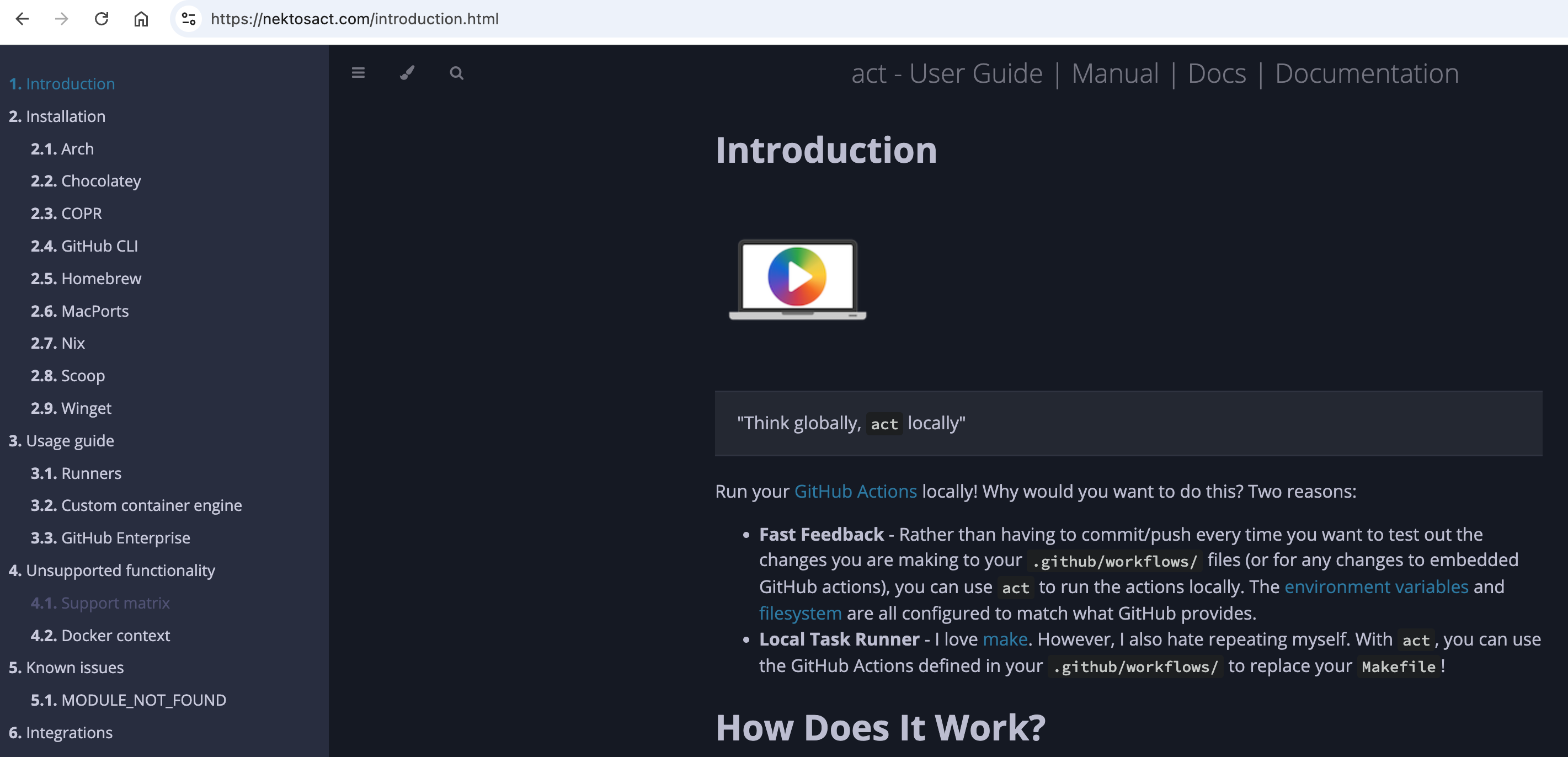
- nektos/act : Run your GitHub Actions locally
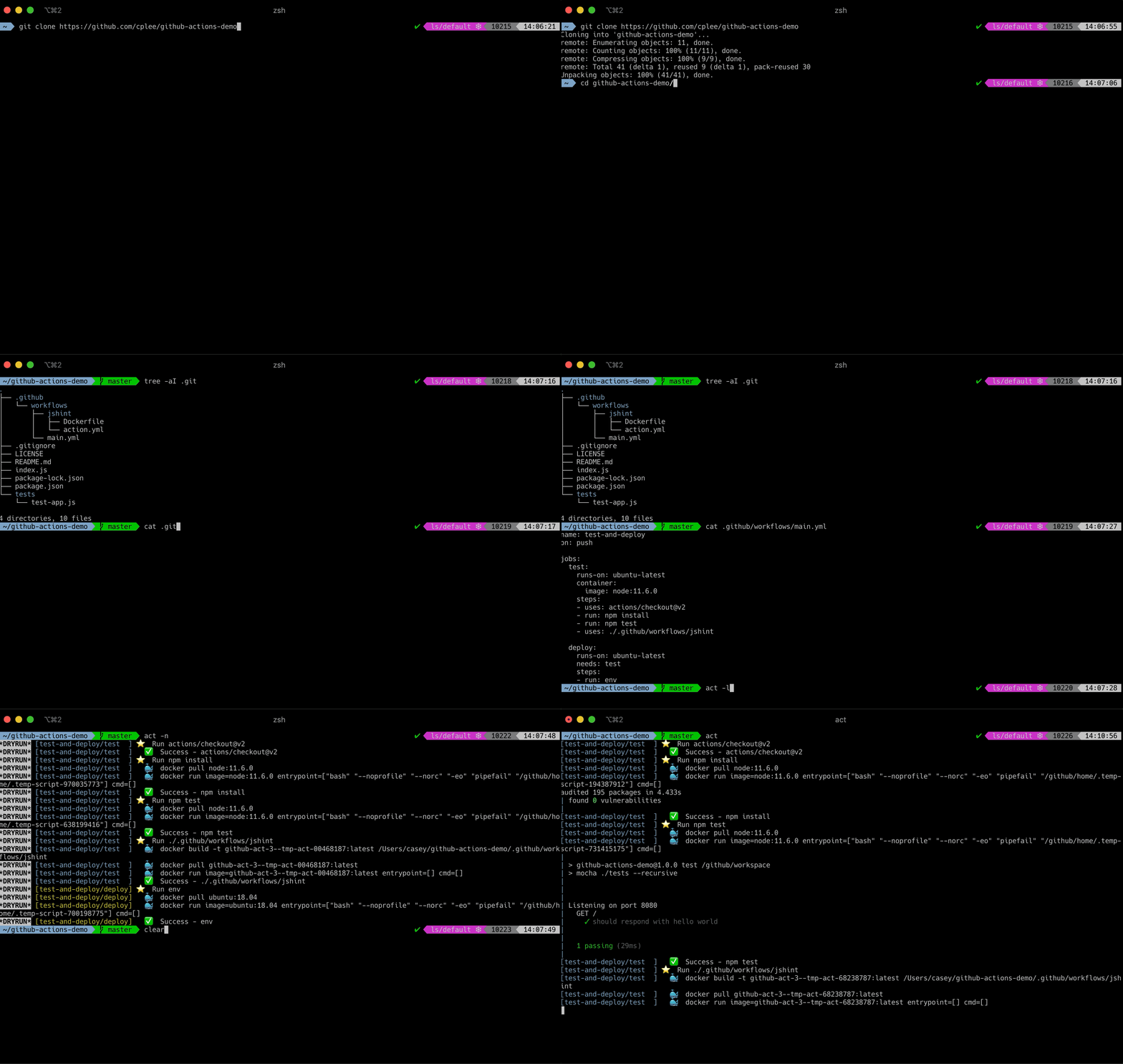
❯ act
INFO[0000] Using docker host 'unix:///var/run/docker.sock', and daemon socket 'unix:///var/run/docker.sock'
WARN ⚠ You are using Apple M-series chip and you have not specified container architecture, you might encounter issues while running act. If so, try running it with '--container-architecture linux/amd64'. ⚠
[CI/test] 🚀 Start image=catthehacker/ubuntu:act-latest
[CI/test] 🐳 docker pull image=catthehacker/ubuntu:act-latest platform= username= forcePull=true
[CI/test] using DockerAuthConfig authentication for docker pull
[CI/test] 🐳 docker create image=catthehacker/ubuntu:act-latest platform= entrypoint=["tail" "-f" "/dev/null"] cmd=[] network="host"
[CI/test] 🐳 docker run image=catthehacker/ubuntu:act-latest platform= entrypoint=["tail" "-f" "/dev/null"] cmd=[] network="host"
[CI/test] 🐳 docker exec cmd=[node --no-warnings -e console.log(process.execPath)] user= workdir=
[CI/test] ☁ git clone 'https://github.com/actions/setup-node' # ref=v1
[CI/test] ⭐ Run Main actions/checkout@v2
[CI/test] 🐳 docker cp src=/Users/sjkim/Labs/CloudNeta/cicd/github-actions-demo/. dst=/Users/sjkim/Labs/CloudNeta/cicd/github-actions-demo
[CI/test] ✅ Success - Main actions/checkout@v2
[CI/test] ⭐ Run Main actions/setup-node@v1
[CI/test] 🐳 docker cp src=/Users/sjkim/.cache/act/actions-setup-node@v1/ dst=/var/run/act/actions/actions-setup-node@v1/
[CI/test] 🐳 docker exec cmd=[/opt/acttoolcache/node/18.20.5/arm64/bin/node /var/run/act/actions/actions-setup-node@v1/dist/index.js] user= workdir=
[CI/test] 💬 ::debug::isExplicit:
[CI/test] 💬 ::debug::explicit? false
[CI/test] 💬 ::debug::isExplicit: 10.24.1
[CI/test] 💬 ::debug::explicit? true
[CI/test] 💬 ::debug::evaluating 1 versions
[CI/test] 💬 ::debug::matched: 10.24.1
[CI/test] 💬 ::debug::checking cache: /opt/hostedtoolcache/node/10.24.1/arm64
[CI/test] 💬 ::debug::Found tool in cache node 10.24.1 arm64
| [command]/opt/hostedtoolcache/node/10.24.1/arm64/bin/node --version
| v10.24.1
| [command]/opt/hostedtoolcache/node/10.24.1/arm64/bin/npm --version
| 6.14.12
[CI/test] ❓ add-matcher /run/act/actions/actions-setup-node@v1/.github/tsc.json
[CI/test] ❓ add-matcher /run/act/actions/actions-setup-node@v1/.github/eslint-stylish.json
[CI/test] ❓ add-matcher /run/act/actions/actions-setup-node@v1/.github/eslint-compact.json
[CI/test] ✅ Success - Main actions/setup-node@v1
[CI/test] ⚙ ::add-path:: /opt/hostedtoolcache/node/10.24.1/arm64/bin
[CI/test] ⭐ Run Main npm install
[CI/test] 🐳 docker exec cmd=[bash -e /var/run/act/workflow/2] user= workdir=
| added 280 packages from 643 contributors and audited 280 packages in 2.521s
|
| 24 packages are looking for funding
| run npm fund for details
|
| found 44 vulnerabilities (7 low, 14 moderate, 20 high, 3 critical)
| run npm audit fix to fix them, or npm audit for details
[CI/test] ✅ Success - Main npm install
[CI/test] ⭐ Run Main npm test
[CI/test] 🐳 docker exec cmd=[bash -e /var/run/act/workflow/3] user= workdir=
|
| > github-actions-demo@1.0.0 test /Users/sjkim/Labs/CloudNeta/cicd/github-actions-demo
| > mocha ./tests --recursive
|
|
|
| GET /
| ✓ should respond with hello world
|
|
| 1 passing (9ms)
|
[CI/test] ✅ Success - Main npm test
[CI/test] Cleaning up container for job test
[CI/test] 🏁 Job succeeded
❯ act -l
INFO[0000] Using docker host 'unix:///var/run/docker.sock', and daemon socket 'unix:///var/run/docker.sock'
WARN ⚠ You are using Apple M-series chip and you have not specified container architecture, you might encounter issues while running act. If so, try running it with '--container-architecture linux/amd64'. ⚠
Stage Job ID Job name Workflow name Workflow file Events
0 test test CI main.yml push
1.5 Your first GitHub Actions workflow
-
GitHub Actions is a computer that runs code on your behalf based on your repo-level workflow-definition file(s).
- The process for it is as follows:
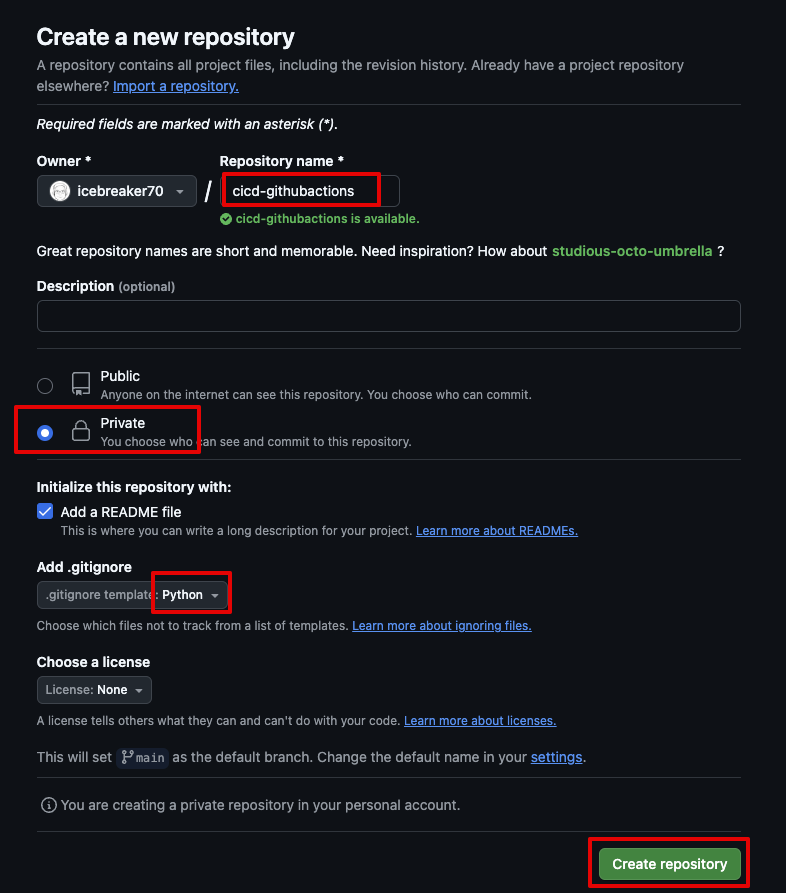
1. Create a GitHub.com repo for your project. : https://github.com/icebreaker70/cicd-2w.git
2. Create a workflow-definition file (or multiple files) in your repo following a specific file path and format (more on this shortly).
3. Commit the workflow file(s) and push your code to GitHub.
4. Run workflows on demand or automatically based on your workflow definition file(s).
- The process for it is as follows:
-
My First Hello world github action !!!
- 나를 대신하여 코드를 실행하기 위해 서버리스 CI/CD 파이프라인을 사용해 봅시다.
❯ git clone https://github.com/icebreaker70/cicd-githubactions.git
❯ cd cicd-githubactions.git
❯ mkdir -p .github/workflows/
❯ touch .github/workflows/hello-world.yaml
❯ code .github/workflows/hello-world.yaml- hello-world.yaml (Github Actions Manifest, Yaml 형식으로 작성)
name: Hello World # Github 웹 사이드바 이름
on:
  workflow_dispatch:  # 깃헙 웹 페이지에서 수동으로 워크플로우 실행 가능
  push:               # 저장소에 코드 푸시할 때 마다 워크플로 실행, scope 범위 설정 가능

jobs:
  build: # Jobs 이름
    runs-on: ubuntu-latest # ubuntu가 가장 유연한 러너
    steps:
      - uses: actions/checkout@v3 # 사용하려는 액션 이름, 위에서는 내장된 액션으로 코드 체크아웃, 거의 모든 워크플로에 필수적인 단계.
      - name: Hello World # Step 이름
run: echo "Hello World" # 명령 실행, (예. echo “my text”, “python3 my_script.py)- 소스 push
❯ git add .github/workflows/hello-world.yaml
❯ git commit -m "Create hello-world.yaml workflow"
[main 5f8550b] Create hello-world.yaml workflow
 1 file changed, 12 insertions(+)
 create mode 100644 .github/workflows/hello-world.yaml
❯ git push origin main
Enumerating objects: 6, done.
Counting objects: 100% (6/6), done.
Delta compression using up to 8 threads
Compressing objects: 100% (3/3), done.
Writing objects: 100% (5/5), 902 bytes | 902.00 KiB/s, done.
Total 5 (delta 0), reused 0 (delta 0), pack-reused 0 (from 0)
To https://github.com/icebreaker70/cicd-githubactions.git
cadeb4a..5f8550b main -> main-
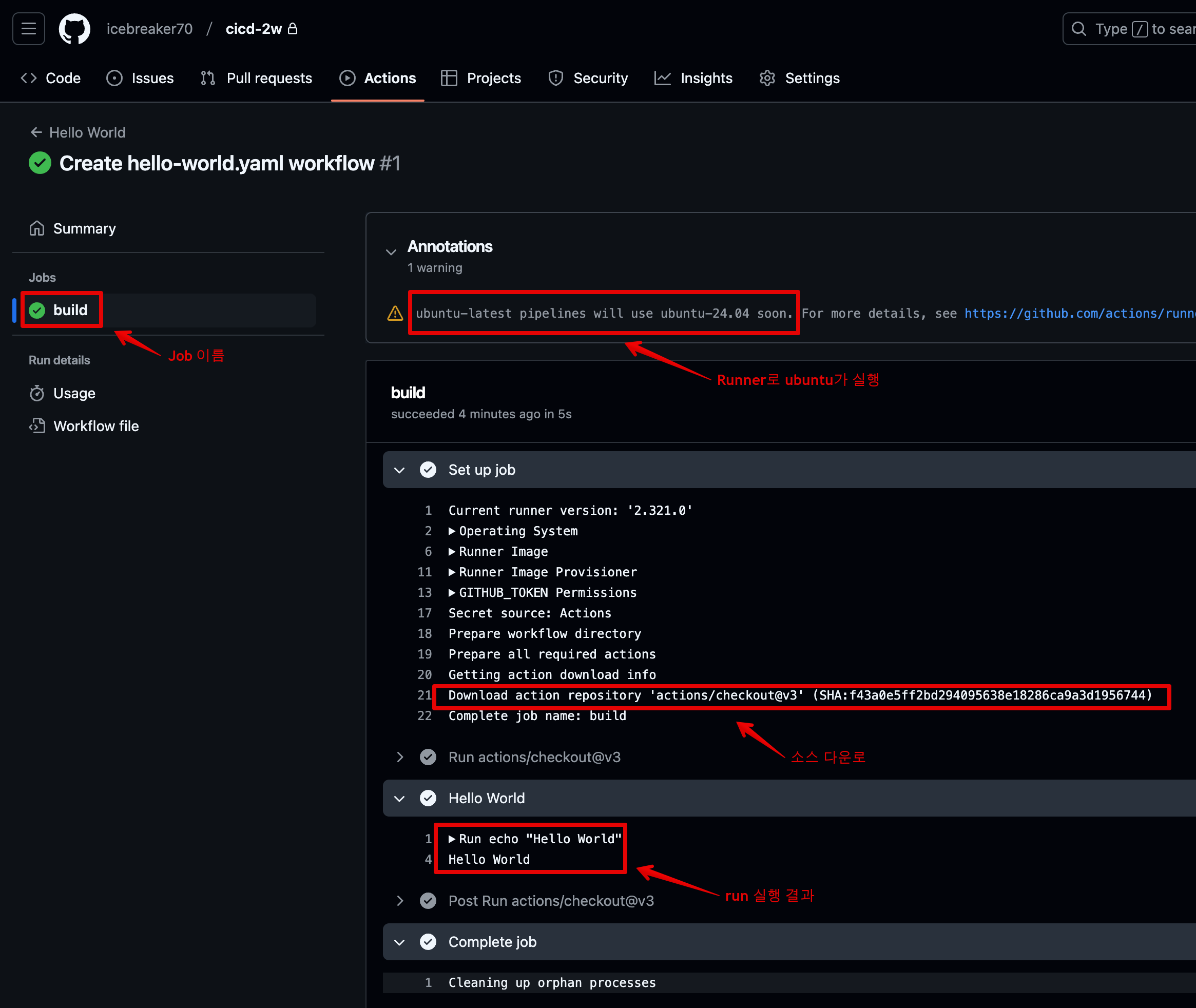
Github Actions 실행결과
- 사이드바 이름(Hello World 확인), 커밋 내용
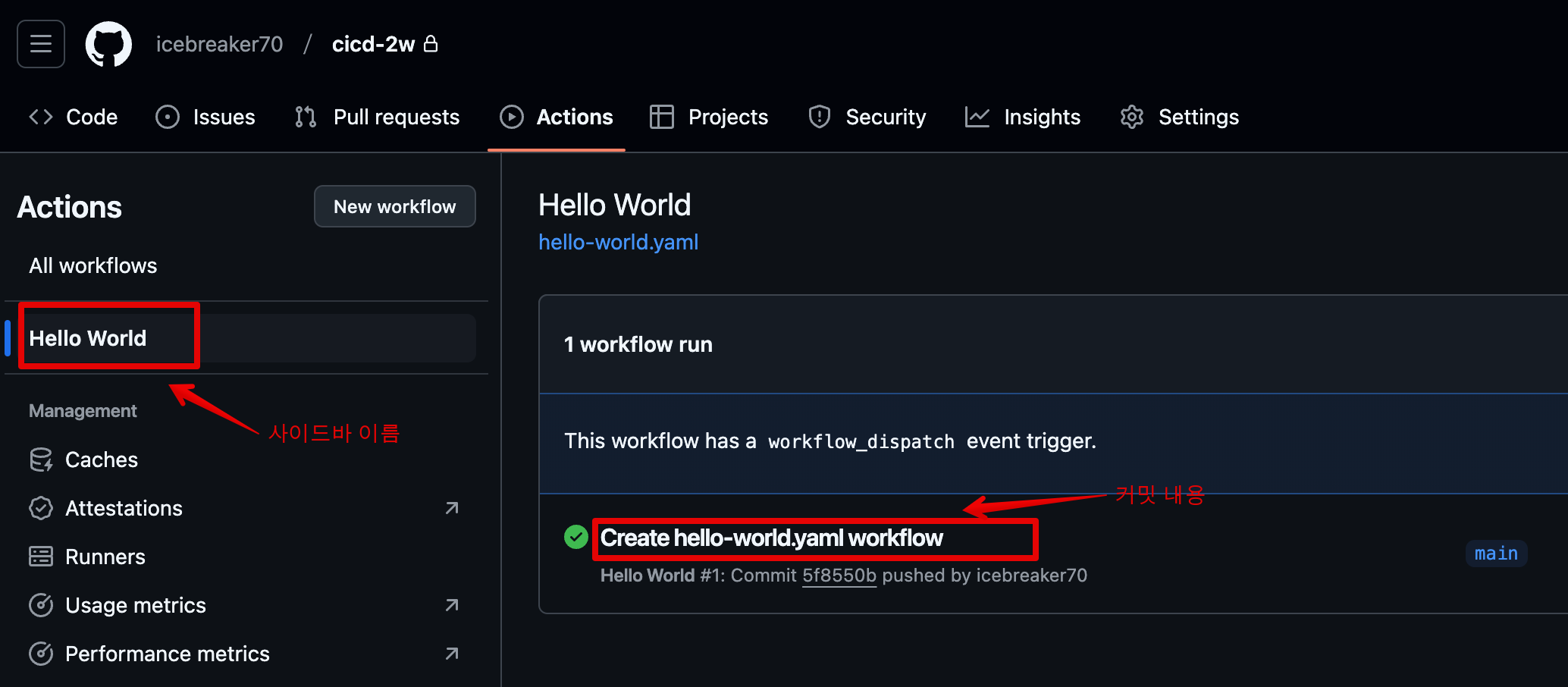
- Job 이름, use 스텝 확인, run 스텝 이름과 실행 확인
- 사이드바 이름(Hello World 확인), 커밋 내용
-
Github에서 제공하는 환경변수 확인해 보기
name: Hello World
on:
  workflow_dispatch:
  push:

jobs:
  build:
    runs-on: ubuntu-latest
    steps:
      - uses: actions/checkout@v3
      - name: Print Env
        run: env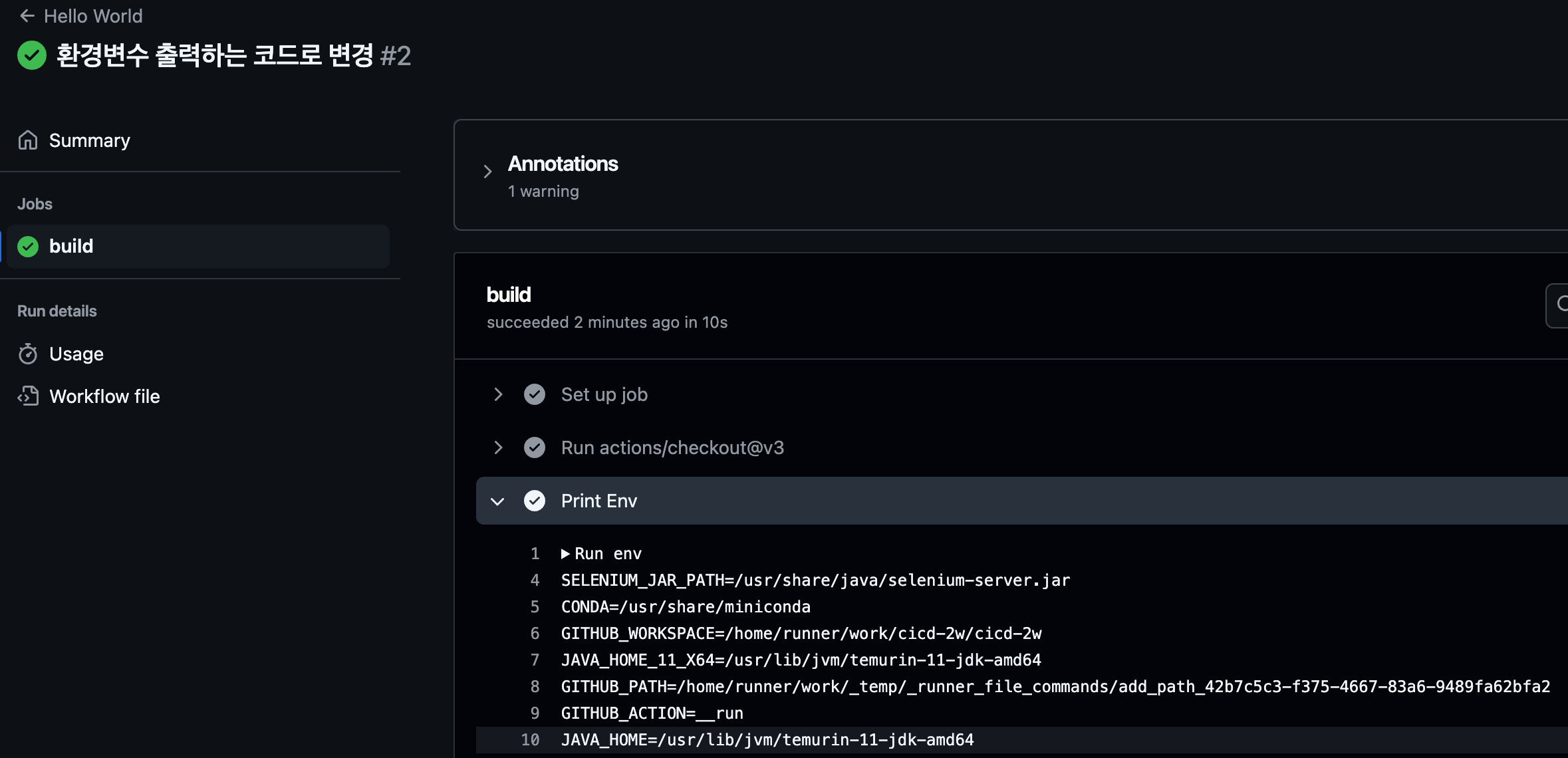
SELENIUM_JAR_PATH=/usr/share/java/selenium-server.jar
CONDA=/usr/share/miniconda
GITHUB_WORKSPACE=/home/runner/work/cicd-2w/cicd-2w
JAVA_HOME_11_X64=/usr/lib/jvm/temurin-11-jdk-amd64
GITHUB_PATH=/home/runner/work/_temp/_runner_file_commands/add_path_42b7c5c3-f375-4667-83a6-9489fa62bfa2
GITHUB_ACTION=__run
JAVA_HOME=/usr/lib/jvm/temurin-11-jdk-amd64
GITHUB_RUN_NUMBER=2
RUNNER_NAME=GitHub Actions 6
GRADLE_HOME=/usr/share/gradle-8.11.1
GITHUB_REPOSITORY_OWNER_ID=41236393
ACTIONS_RUNNER_ACTION_ARCHIVE_CACHE=/opt/actionarchivecache
XDG_CONFIG_HOME=/home/runner/.config
DOTNET_SKIP_FIRST_TIME_EXPERIENCE=1
ANT_HOME=/usr/share/ant
JAVA_HOME_8_X64=/usr/lib/jvm/temurin-8-jdk-amd64
GITHUB_TRIGGERING_ACTOR=icebreaker70
GITHUB_REF_TYPE=branch
HOMEBREW_CLEANUP_PERIODIC_FULL_DAYS=3650
ANDROID_NDK=/usr/local/lib/android/sdk/ndk/27.2.12479018
BOOTSTRAP_HASKELL_NONINTERACTIVE=1
***
PIPX_BIN_DIR=/opt/pipx_bin
STATS_TRP=true
GITHUB_REPOSITORY_ID=903057346
DEPLOYMENT_BASEPATH=/opt/runner
GITHUB_ACTIONS=true
STATS_VMD=true
ANDROID_NDK_LATEST_HOME=/usr/local/lib/android/sdk/ndk/27.2.12479018
SYSTEMD_EXEC_PID=477
GITHUB_SHA=53a51157fe0d1340ff001e3676c8fbcac307030f
GITHUB_WORKFLOW_REF=icebreaker70/cicd-2w/.github/workflows/hello-world.yaml@refs/heads/main
POWERSHELL_DISTRIBUTION_CHANNEL=GitHub-Actions-ubuntu22
RUNNER_ENVIRONMENT=github-hosted
STATS_EXTP=https://provjobdprod.z13.web.core.windows.net/settings/provjobdsettings-latest/provjobd.data
DOTNET_MULTILEVEL_LOOKUP=0
GITHUB_REF=refs/heads/main
RUNNER_OS=Linux
GITHUB_REF_PROTECTED=false
HOME=/home/runner
GITHUB_API_URL=https://api.github.com
LANG=C.UTF-8
RUNNER_TRACKING_ID=github_8a738e01-484a-4eb9-9366-89b1d44d7cdf
RUNNER_ARCH=X64
GOROOT_1_21_X64=/opt/hostedtoolcache/go/1.21.13/x64
RUNNER_TEMP=/home/runner/work/_temp
GITHUB_STATE=/home/runner/work/_temp/_runner_file_commands/save_state_42b7c5c3-f375-4667-83a6-9489fa62bfa2
STATS_PIP=false
EDGEWEBDRIVER=/usr/local/share/edge_driver
JAVA_HOME_21_X64=/usr/lib/jvm/temurin-21-jdk-amd64
GITHUB_ENV=/home/runner/work/_temp/_runner_file_commands/set_env_42b7c5c3-f375-4667-83a6-9489fa62bfa2
GITHUB_EVENT_PATH=/home/runner/work/_temp/_github_workflow/event.json
INVOCATION_ID=18102143e2904c2a87330add5dc14e51
STATS_D=true
GITHUB_EVENT_NAME=push
GITHUB_RUN_ID=12330788308
JAVA_HOME_17_X64=/usr/lib/jvm/temurin-17-jdk-amd64
ANDROID_NDK_HOME=/usr/local/lib/android/sdk/ndk/27.2.12479018
GITHUB_STEP_SUMMARY=/home/runner/work/_temp/_runner_file_commands/step_summary_42b7c5c3-f375-4667-83a6-9489fa62bfa2
HOMEBREW_NO_AUTO_UPDATE=1
GITHUB_ACTOR=icebreaker70
NVM_DIR=/home/runner/.nvm
SGX_AESM_ADDR=1
GITHUB_RUN_ATTEMPT=1
STATS_RDCL=true
ANDROID_HOME=/usr/local/lib/android/sdk
GITHUB_GRAPHQL_URL=https://api.github.com/graphql
RUNNER_USER=runner
ACCEPT_EULA=Y
STATS_UE=true
USER=runner
GITHUB_SERVER_URL=https://github.com
STATS_V3PS=true
PIPX_HOME=/opt/pipx
GECKOWEBDRIVER=/usr/local/share/gecko_driver
STATS_EXT=true
CHROMEWEBDRIVER=/usr/local/share/chromedriver-linux64
SHLVL=1
ANDROID_SDK_ROOT=/usr/local/lib/android/sdk
VCPKG_INSTALLATION_ROOT=/usr/local/share/vcpkg
GITHUB_ACTOR_ID=41236393
RUNNER_TOOL_CACHE=/opt/hostedtoolcache
ImageVersion=20241211.1.0
DOTNET_NOLOGO=1
GOROOT_1_23_X64=/opt/hostedtoolcache/go/1.23.4/x64
GITHUB_WORKFLOW_SHA=53a51157fe0d1340ff001e3676c8fbcac307030f
GITHUB_REF_NAME=main
GITHUB_JOB=build
XDG_RUNTIME_DIR=/run/user/1001
AZURE_EXTENSION_DIR=/opt/az/azcliextensions
PERFLOG_LOCATION_SETTING=RUNNER_PERFLOG
STATS_VMFE=true
GITHUB_REPOSITORY=icebreaker70/cicd-2w
CHROME_BIN=/usr/bin/google-chrome
ANDROID_NDK_ROOT=/usr/local/lib/android/sdk/ndk/27.2.12479018
GOROOT_1_22_X64=/opt/hostedtoolcache/go/1.22.10/x64
GITHUB_RETENTION_DAYS=90
JOURNAL_STREAM=8:18130
RUNNER_WORKSPACE=/home/runner/work/cicd-2w
LEIN_HOME=/usr/local/lib/lein
LEIN_JAR=/usr/local/lib/lein/self-installs/leiningen-2.11.2-standalone.jar
GITHUB_ACTION_REPOSITORY=
PATH=/snap/bin:/home/runner/.local/bin:/opt/pipx_bin:/home/runner/.cargo/bin:/home/runner/.config/composer/vendor/bin:/usr/local/.ghcup/bin:/home/runner/.dotnet/tools:/usr/local/sbin:/usr/local/bin:/usr/sbin:/usr/bin:/sbin:/bin:/usr/games:/usr/local/games:/snap/bin
RUNNER_PERFLOG=/home/runner/perflog
GITHUB_BASE_REF=
GHCUP_INSTALL_BASE_PREFIX=/usr/local
CI=true
SWIFT_PATH=/usr/share/swift/usr/bin
ImageOS=ubuntu22
STATS_D_D=true
GITHUB_REPOSITORY_OWNER=icebreaker70
GITHUB_HEAD_REF=
GITHUB_ACTION_REF=
STATS_D_TC=true
GITHUB_WORKFLOW=Hello World
DEBIAN_FRONTEND=noninteractive
GITHUB_OUTPUT=/home/runner/work/_temp/_runner_file_commands/set_output_42b7c5c3-f375-4667-83a6-9489fa62bfa2
AGENT_TOOLSDIRECTORY=/opt/hostedtoolcache
_=/usr/bin/env- github runner 플랫폼과 OS버전 확인 : Azure에서 VM으로 실행 / x86 / Ubuntu 22.04.05 LTS
- uname -a, cat /etc/os-release 명령어로 변경
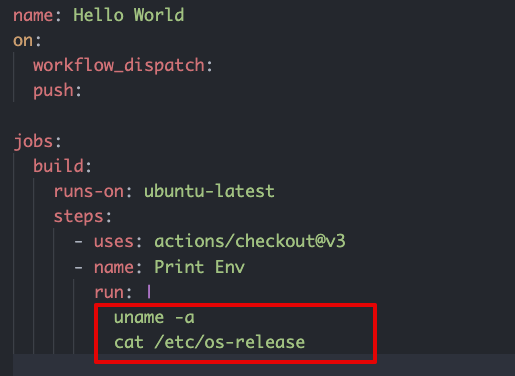
- actions 실행결과
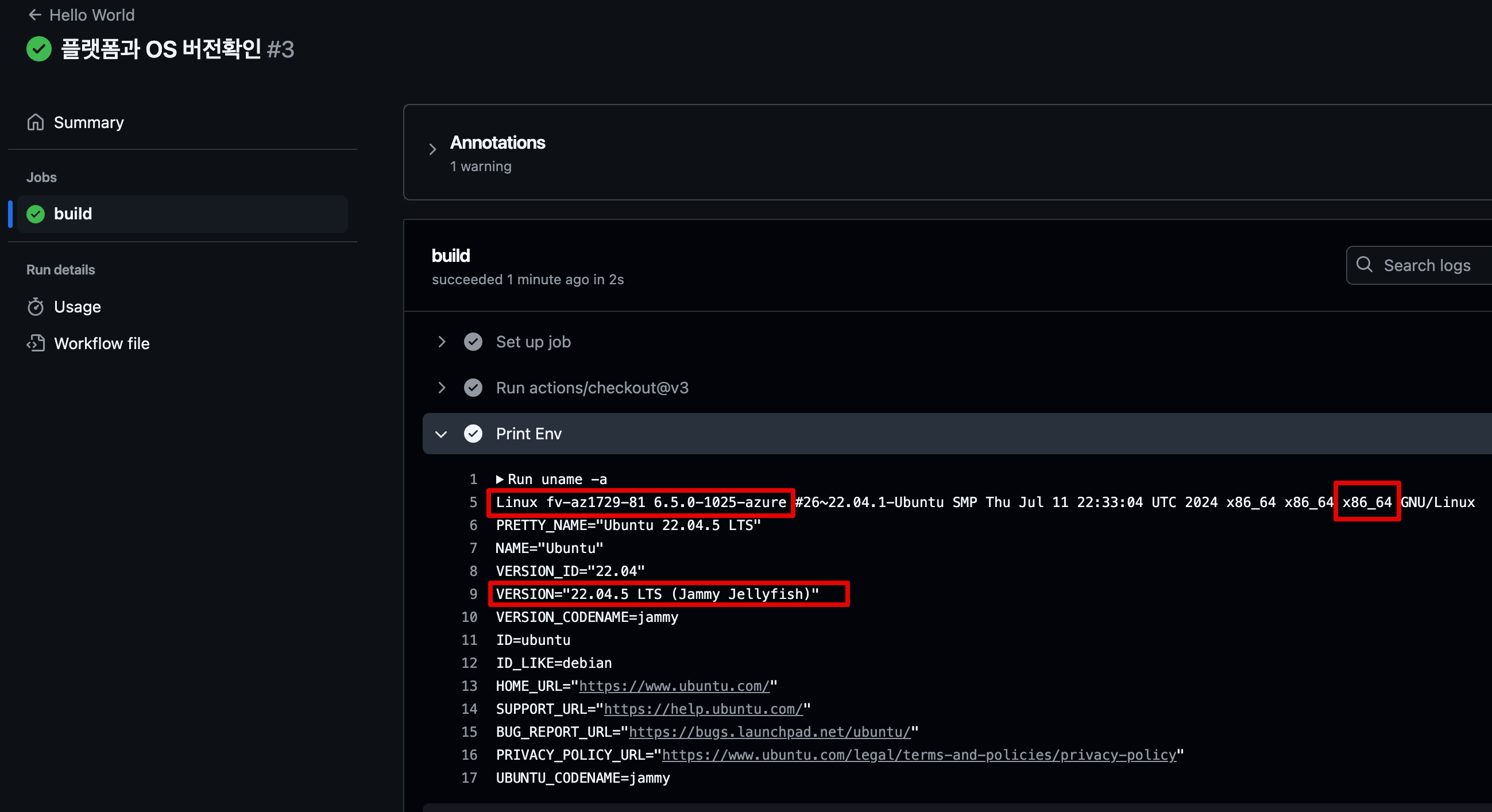
- uname -a, cat /etc/os-release 명령어로 변경
2. AWS에 테스트용 EC2 배포
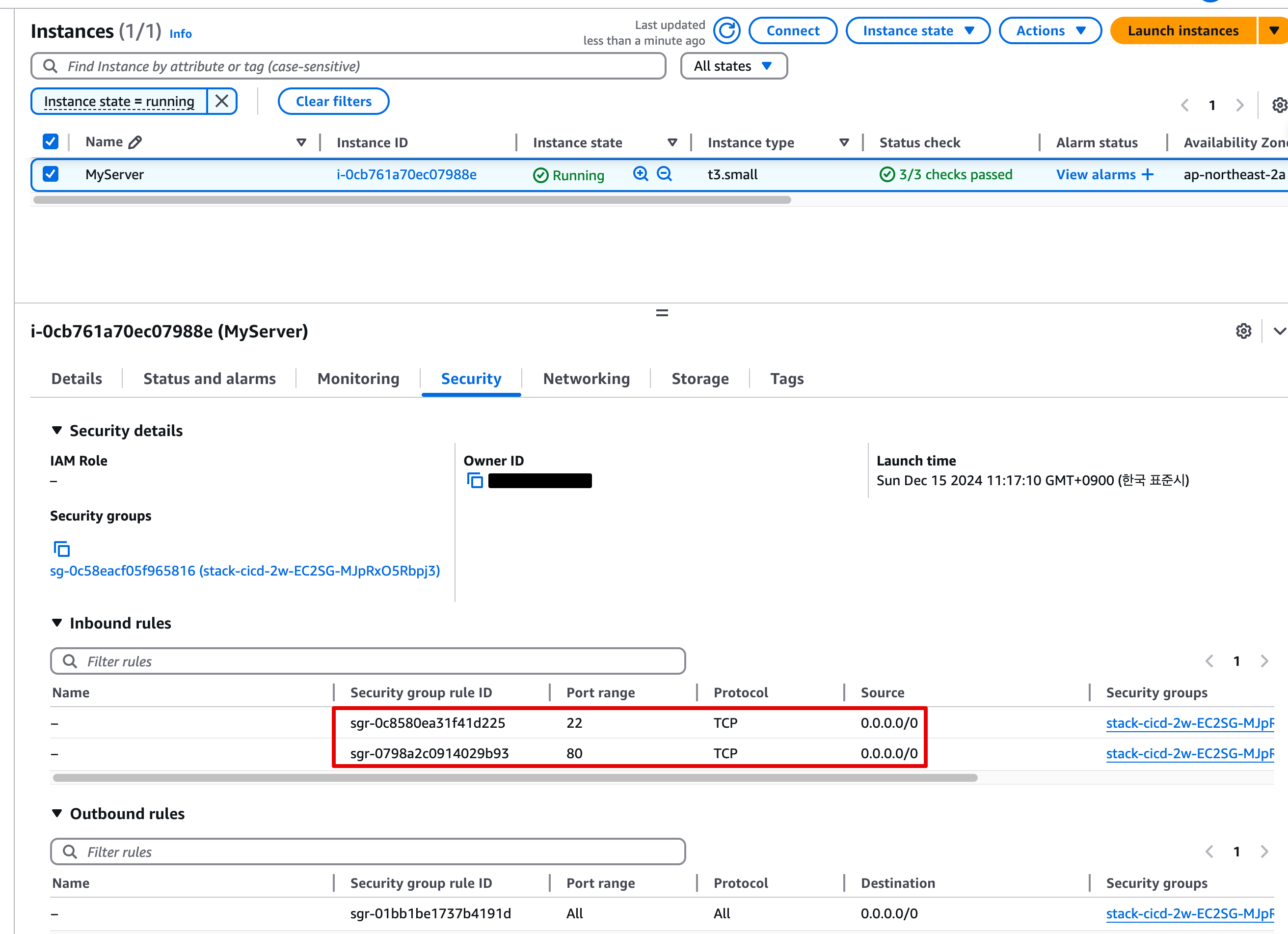
tcp 22, 80에 대해 any IPv4 허용
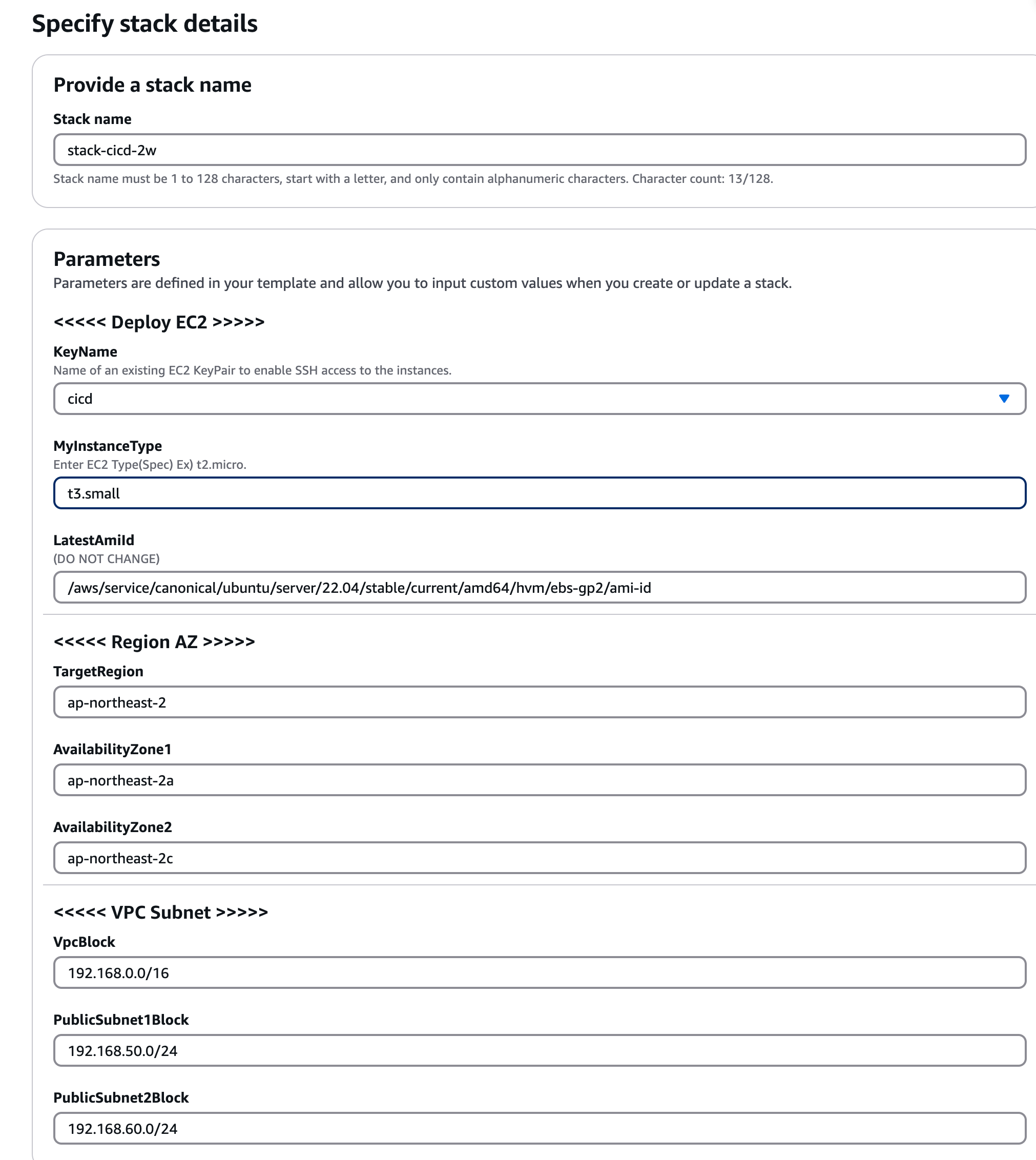
- CloudFormation 소스 : cicd-2w.yaml
- EC2 생성 User Data 내용
#!/bin/bash

# Hostname 변경
hostnamectl --static set-hostname MyServer

# Config convenience
systemctl stop ufw && systemctl disable ufw
systemctl stop apparmor && systemctl disable apparmor
ln -sf /usr/share/zoneinfo/Asia/Seoul /etc/localtime

# Install packages
apt update -qq && apt install tree jq net-tools -y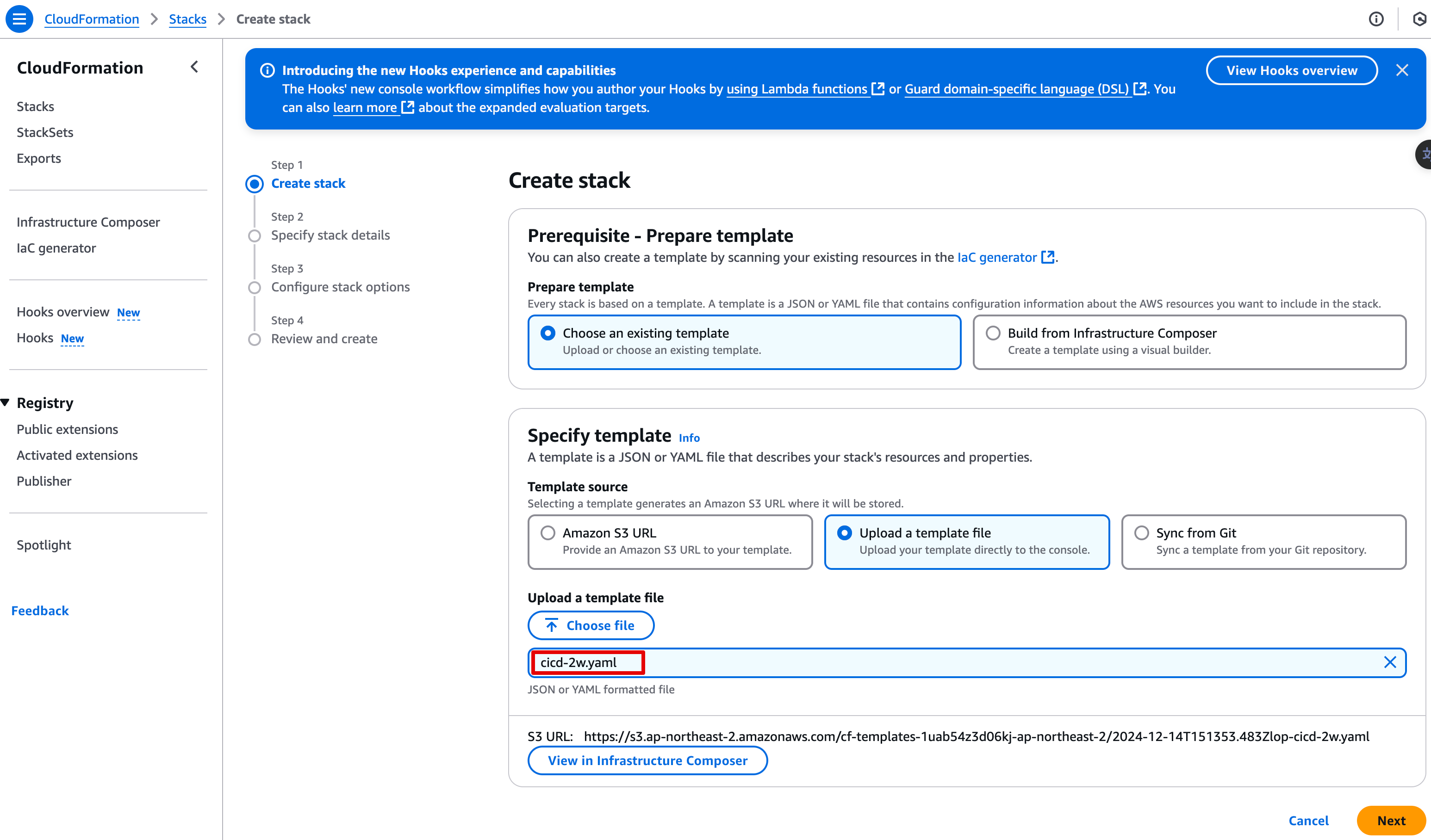
3. GitHub Actions 실습
3.1 EC2 에서 코드 실행 → 코드 수정 후 재실행
- AWS EC2 접속 후 아래 작업 ➡️ ssh -i mykey.pem ubuntu@EC2_Public_IP
# 파이썬 버전 확인
python3 -V
> Python 3.10.12

# 시간과 문자열 출력하는 단순 웹서버용 파이썬 코딩
cat > server.py <<EOF
from http.server import ThreadingHTTPServer, BaseHTTPRequestHandler
from datetime import datetime

class RequestHandler(BaseHTTPRequestHandler):
    def do_GET(self):
        self.send_response(200)
        self.send_header('Content-type', 'text/plain')
        self.end_headers()
        now = datetime.now()
        response_string = now.strftime("The time is %-I:%M:%S %p, CloudNeta Study.\n")
        self.wfile.write(bytes(response_string, "utf-8"))

def startServer():
    try:
        server = ThreadingHTTPServer(('', 80), RequestHandler)
        print("Listening on " + ":".join(map(str, server.server_address)))
        server.serve_forever()
    except KeyboardInterrupt:
        server.shutdown()

if __name__== "__main__":
    startServer()
EOF

# 코드 실행
sudo python3 server.py
## 아래 확인 후
CTRL+C 로 실행 취소

# (신규터미널) 서버1 SSH 접속
curl localhost
sudo ss -tnlp
State        Recv-Q       Send-Q             Local Address:Port              Peer Address:Port       Process
LISTEN 0 5 0.0.0.0:80 0.0.0.0:* users:(("python3",pid=3065,fd=3)) 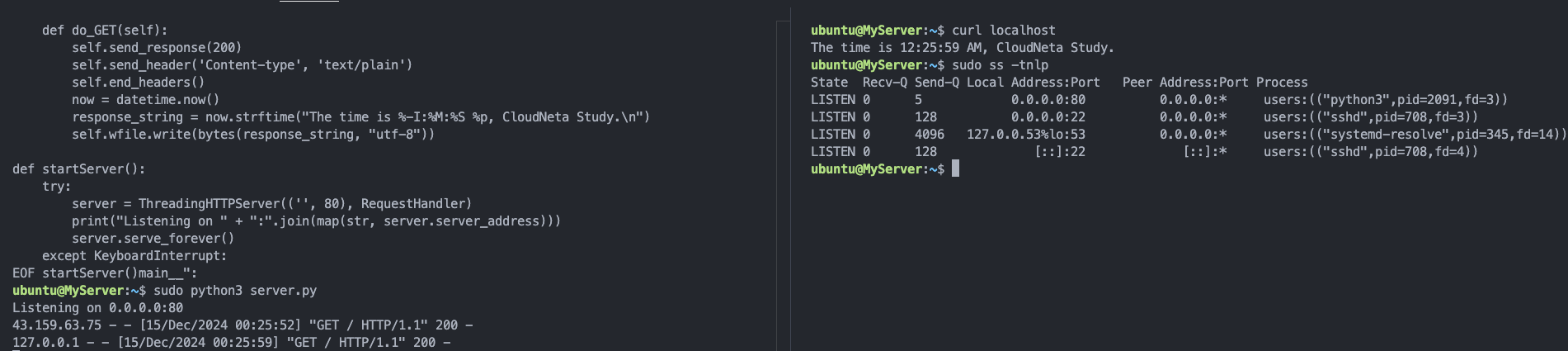
-
Github에서 작업
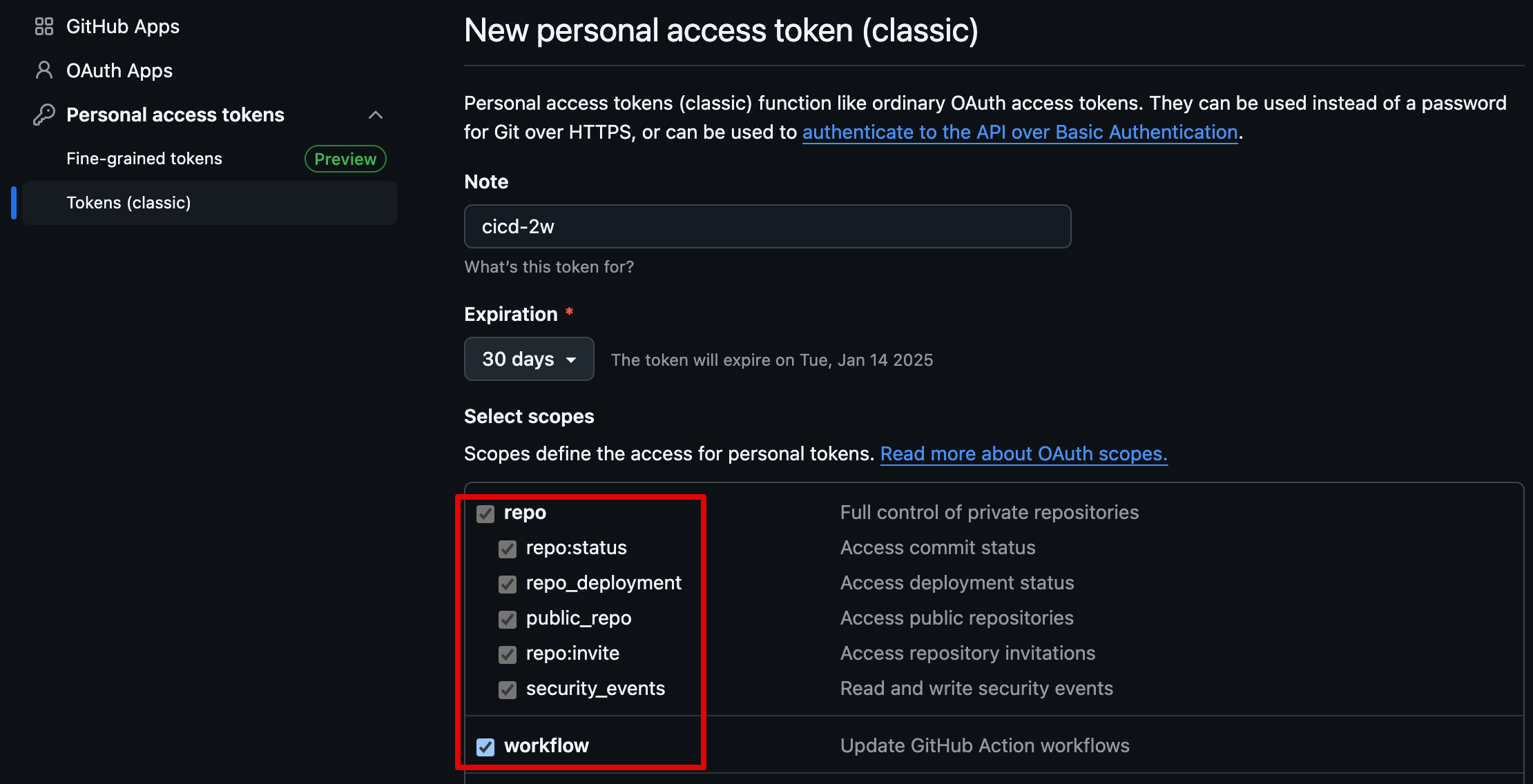
- 토큰 발급해두기 : scopes (repo, workflow)
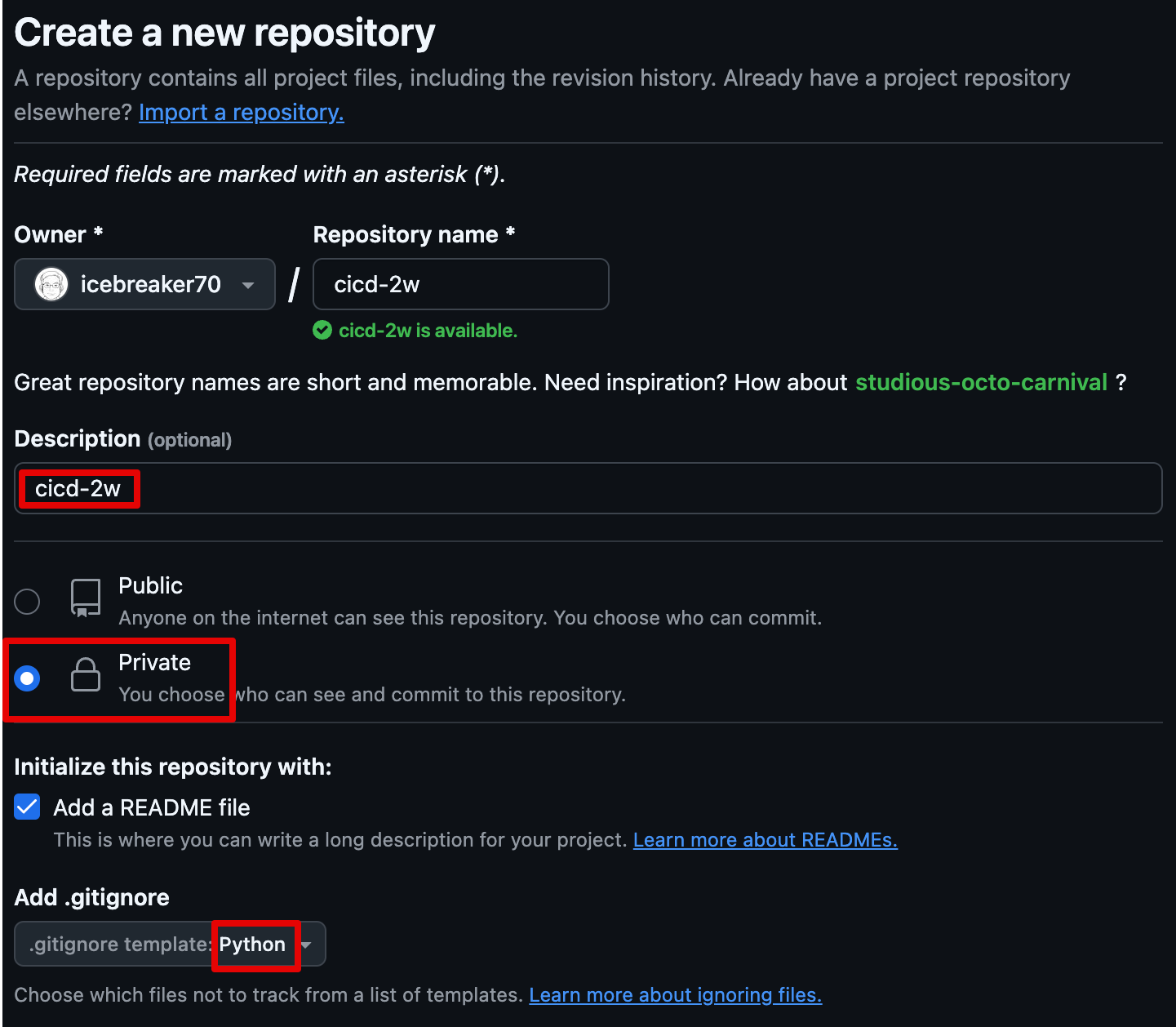
- cicd-2w repository 생성
- 토큰 발급해두기 : scopes (repo, workflow)
-
EC2에서 직접 Git 작업
# GIT UserID
ubuntu@MyServer:~$ GITUSER=icebreaker70
ubuntu@MyServer:~$ git clone https://github.com/$GITUSER/cicd-2w.git
Cloning into 'cicd-2w'...
Username for 'https://github.com': icebrekaer70
Password for 'https://icebrekaer70@github.com':
remote: Enumerating objects: 4, done.
remote: Counting objects: 100% (4/4), done.
remote: Compressing objects: 100% (3/3), done.
remote: Total 4 (delta 0), reused 0 (delta 0), pack-reused 0 (from 0)
Receiving objects: 100% (4/4), done.

ubuntu@MyServer:~$ tree cicd-2w/
cicd-2w/
└── README.md

0 directories, 1 file

cp server.py cicd-2w/
cd cicd-2w/

# Github으로 Push

ubuntu@MyServer:~/cicd-2w$ git add .
ubuntu@MyServer:~/cicd-2w$ git commit -m "first commit"
[main a54f242] first commit
 1 file changed, 22 insertions(+)
 create mode 100644 server.py

ubuntu@MyServer:~/cicd-2w$ git push origin main
Username for 'https://github.com': icebreaker70
Password for 'https://icebreaker70@github.com':
Enumerating objects: 4, done.
Counting objects: 100% (4/4), done.
Delta compression using up to 2 threads
Compressing objects: 100% (3/3), done.
Writing objects: 100% (3/3), 703 bytes | 703.00 KiB/s, done.
Total 3 (delta 0), reused 0 (delta 0), pack-reused 0
To https://github.com/icebreaker70/cicd-2w.git
   33146a2..a54f242  main -> main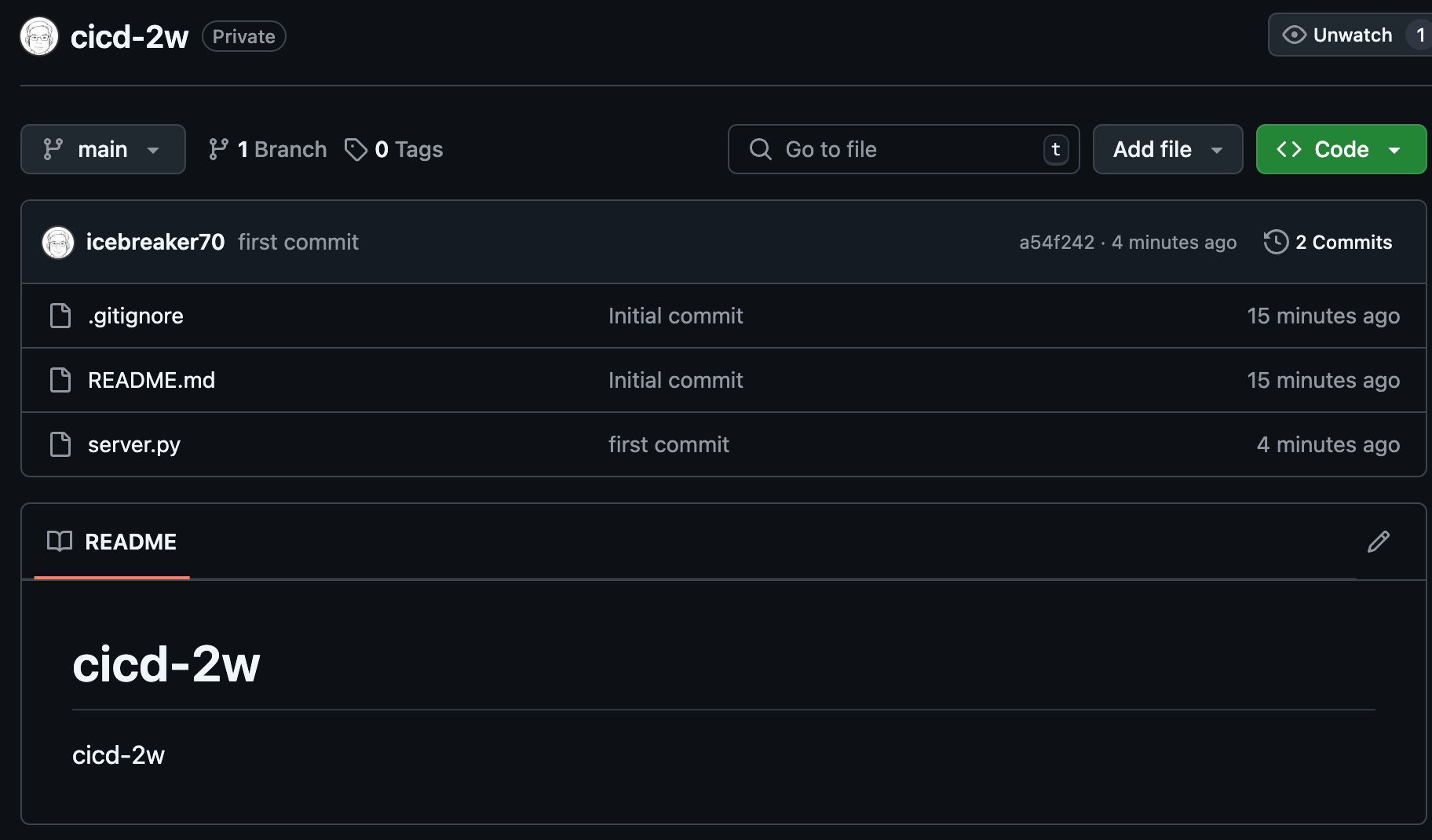
- .log 파일이 Github에 업로드 되는지 테스트
➡️ .log 파일은 .gitignore 설정에 의해 Github에 업로드 되지 않음
# server.py nohub으로 background로 실행
ubuntu@MyServer:~/cicd-2w$ nohup sudo python3 server.py > server.log 2>&1 &
[1] 2355
ubuntu@MyServer:~/cicd-2w$ curl localhost
The time is 1:26:21 AM, CloudNeta Study.
ubuntu@MyServer:~/cicd-2w$ cat server.log
nohup: ignoring input
127.0.0.1 - - [15/Dec/2024 01:25:58] "GET / HTTP/1.1" 200 -
127.0.0.1 - - [15/Dec/2024 01:26:21] "GET / HTTP/1.1" 200 -

ubuntu@MyServer:~/cicd-2w$ grep log .gitignore
# Installer logs
pip-log.txt
*.log

ubuntu@MyServer:~/cicd-2w$ git add .
ubuntu@MyServer:~/cicd-2w$ git commit -m "add log file"
On branch main
Your branch is up to date with 'origin/main'.

nothing to commit, working tree clean

ubuntu@MyServer:~/cicd-2w$ git status
On branch main
Your branch is up to date with 'origin/main'.

nothing to commit, working tree clean```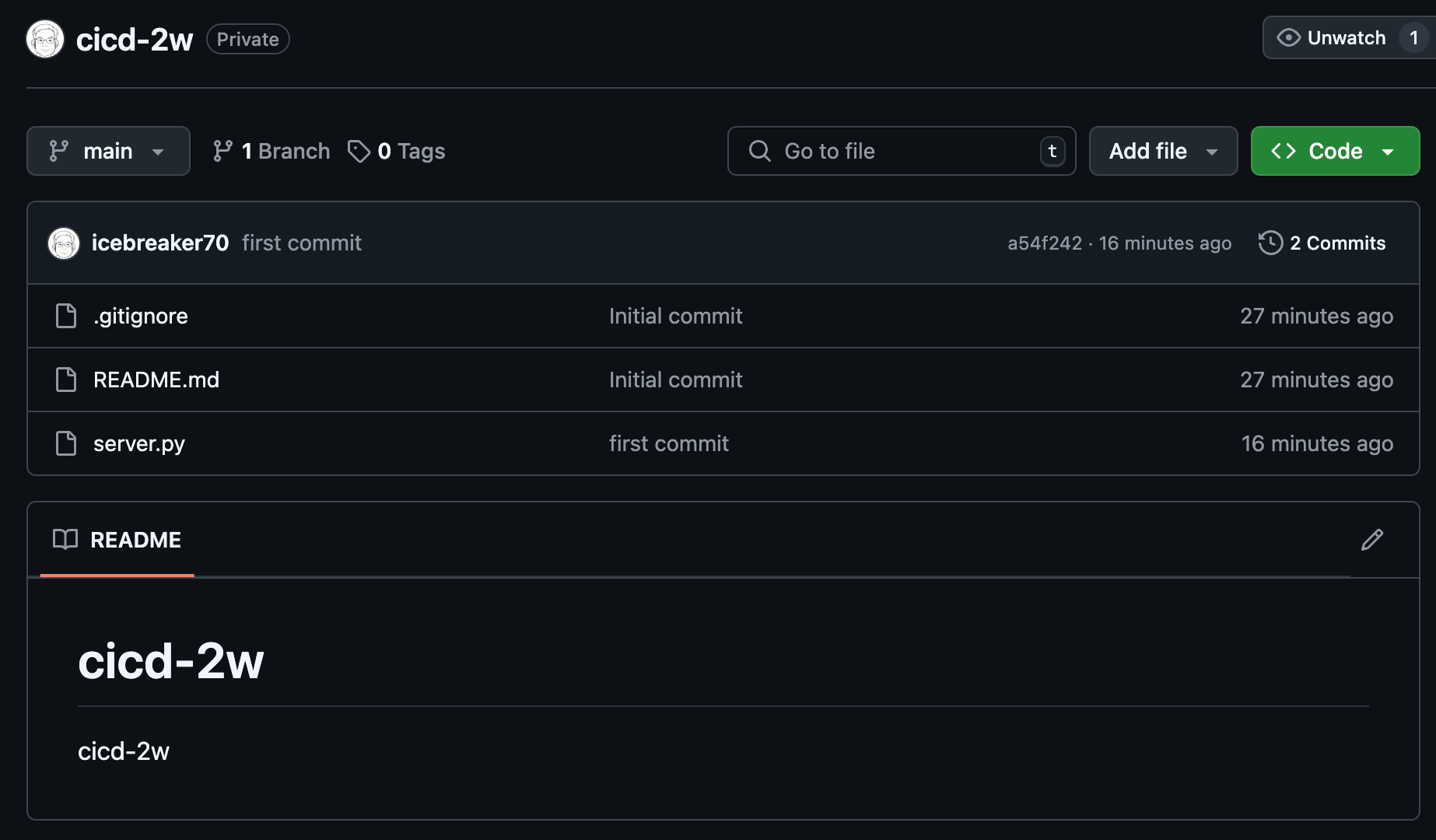
- 코드 수정 후 재실행
# sed로 문자열 수정
ubuntu@MyServer:~/cicd-2w$ sed -i "s/CloudNeta/CICD/g" server.py

# 프로세스 종료
ubuntu@MyServer:~/cicd-2w$ sudo ss -tnlp
State  Recv-Q Send-Q Local Address:Port  Peer Address:Port Process
LISTEN 0      5            0.0.0.0:80         0.0.0.0:*     users:(("python3",pid=2357,fd=3))
LISTEN 0      128          0.0.0.0:22         0.0.0.0:*     users:(("sshd",pid=708,fd=3))
LISTEN 0      4096   127.0.0.53%lo:53         0.0.0.0:*     users:(("systemd-resolve",pid=345,fd=14))
LISTEN 0      128             [::]:22            [::]:*     users:(("sshd",pid=708,fd=4))

💘 fuser 명렬어로 80 port 실행하는 프로세스 중지
ubuntu@MyServer:~/cicd-2w$ sudo fuser -k -n tcp 80
80/tcp:               2357

ubuntu@MyServer:~/cicd-2w$ sudo ss -tnlp
State  Recv-Q Send-Q Local Address:Port  Peer Address:Port Process
LISTEN 0      128          0.0.0.0:22         0.0.0.0:*     users:(("sshd",pid=708,fd=3))
LISTEN 0      4096   127.0.0.53%lo:53         0.0.0.0:*     users:(("systemd-resolve",pid=345,fd=14))
LISTEN 0      128             [::]:22            [::]:*     users:(("sshd",pid=708,fd=4))
[1]+  Killed                  nohup sudo python3 server.py > server.log 2>&1

# 재실행
ubuntu@MyServer:~/cicd-2w$ nohup sudo python3 server.py > server.log 2>&1 &
ubuntu@MyServer:~/cicd-2w$ curl localhost
The time is 1:36:33 AM, CICD Study.- 코드 push ⇒ 장점과 단점? 소스 형상관리하기는 좋지만 매번 개별서버 접속하여 실행하여야 함
# git config 설정 (매번 비번 입력되지 않도록 함)
ubuntu@MyServer:~/cicd-2w$ git config --global user.name "Kim Seong Jung"
ubuntu@MyServer:~/cicd-2w$ git config --global user.email icebreaker70@gmail.com
ubuntu@MyServer:~/cicd-2w$ git config --global credential.helper store

#
ubuntu@MyServer:~/cicd-2w$ git add . && git commit -m "version update" && git push origin main
[main 4c25e15] version update
 1 file changed, 1 insertion(+), 1 deletion(-)
Username for 'https://github.comicebreaker70
Password for 'https://icebreaker70@github.com':
Enumerating objects: 5, done.
Counting objects: 100% (5/5), done.
Delta compression using up to 2 threads
Compressing objects: 100% (3/3), done.
Writing objects: 100% (3/3), 296 bytes | 296.00 KiB/s, done.
Total 3 (delta 2), reused 0 (delta 0), pack-reused 0
remote: Resolving deltas: 100% (2/2), completed with 2 local objects.
To https://github.com/icebreaker70/cicd-2w.git
   a54f242..4c25e15  main -> main

ubuntu@MyServer:~/cicd-2w$ git push origin main
Everything up-to-date
🍇 코드 수정 후 대상 서버에 배포까지 해당 절차를 매번 반복해야 된다. (심지어, 현재 빌드나 테스트 과정도 없는 상태)
이 과정을 최대한 자동화 해보자!
3.2 GitHub Actions 으로 CI/CD 자동화
❤️ Github Actions에서는 Variable 선언을 통해 자동화할 수 있고, Secrets 유형으로 민감정보 보호 가능
-
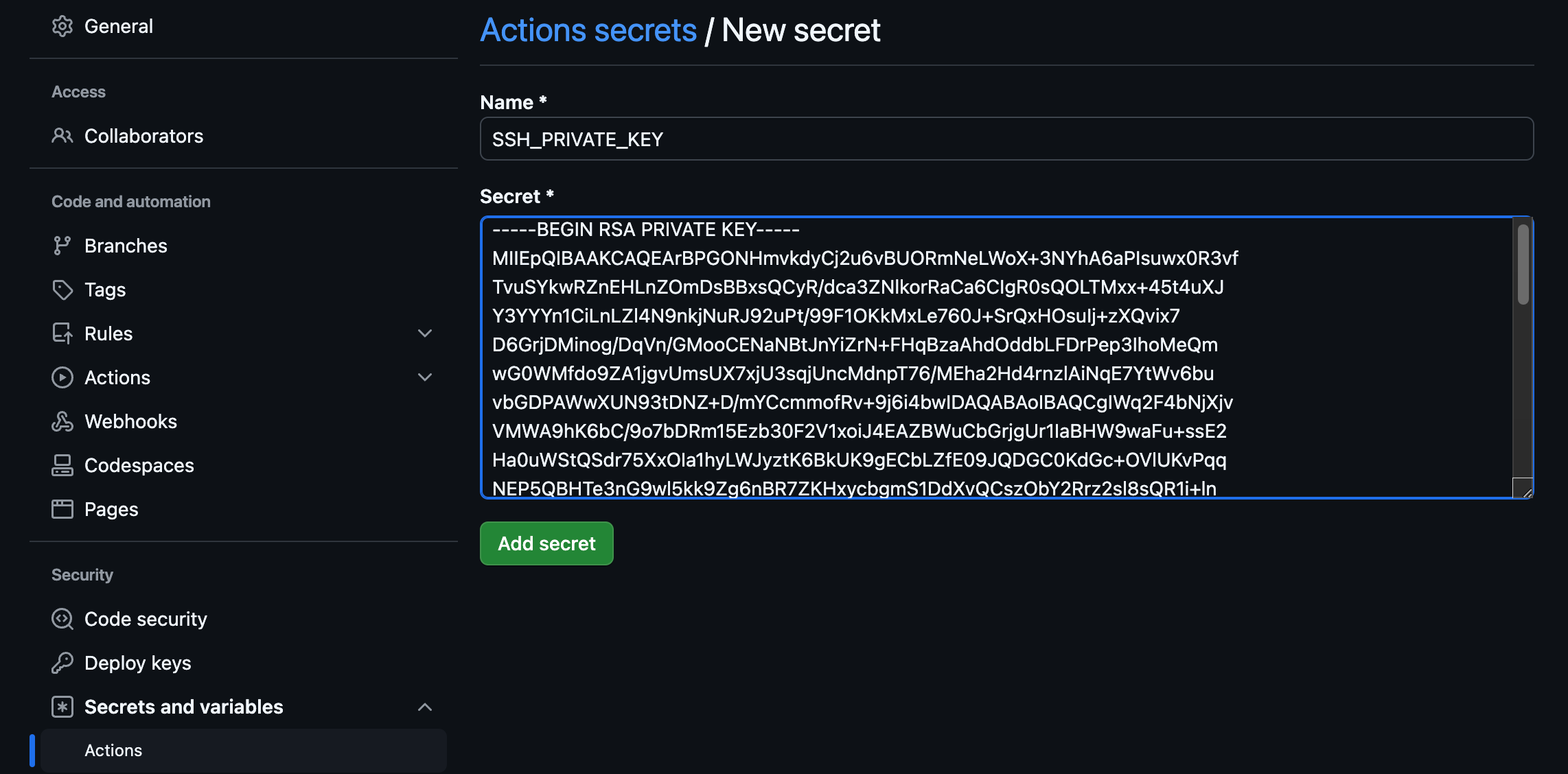
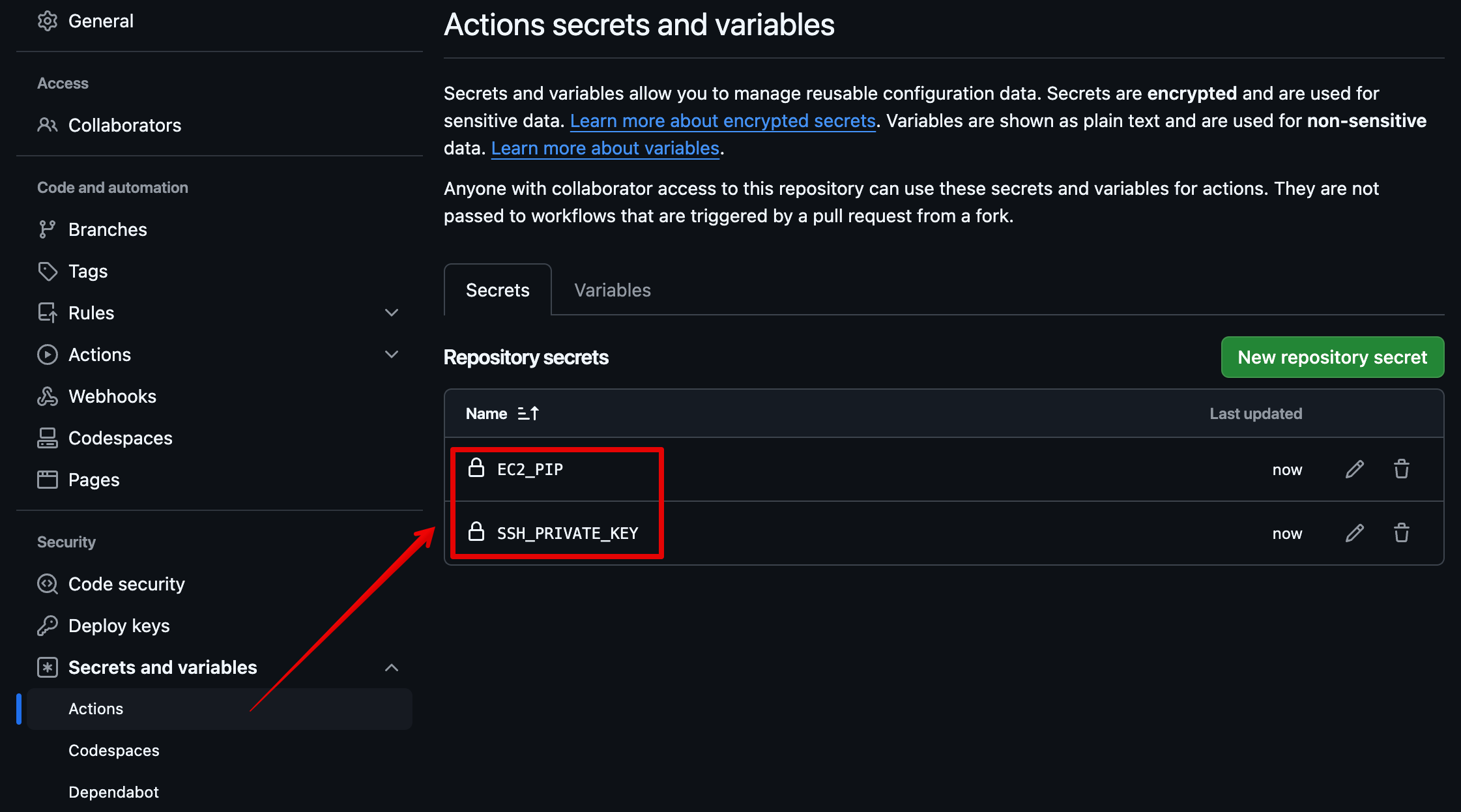
- Github에 SSH_PRIVATE_KEY, EC2_PIP 값은 노출되지 않도록 Secrets 유형으로 변수 설정
- EC2 접속을 위한 Keypair : SSH_PRIVATE_KEY
- EC2 Public IP : EC2_PIP
-
- 자신의 PC에서 아래 작업
❯ git clone https://github.com/icebreaker70/cicd-2w.git

Cloning into 'cicd-2w'...
remote: Enumerating objects: 10, done.
remote: Counting objects: 100% (10/10), done.
remote: Compressing objects: 100% (7/7), done.
remote: Total 10 (delta 3), reused 6 (delta 2), pack-reused 0 (from 0)
Receiving objects: 100% (10/10), done.
Resolving deltas: 100% (3/3), done.
❯ cd cicd-2w
❯ mkdir -p .github/workflows/
❯ touch .github/workflows/deploy.yaml
❯ ls
README.md server.py
❯ sed -i -e "s/CICD/CICD 2w/g" server.py- .github/workflows/deploy.yaml
name: CICD1
on:
  workflow_dispatch:
  push:
    branches:
      - main

jobs:
  deploy:
    runs-on: ubuntu-latest
    steps:
      - name: Configure the SSH Private Key Secret
        run: |
          mkdir -p ~/.ssh/
          echo "${{ secrets.SSH_PRIVATE_KEY }}" > ~/.ssh/id_rsa
          chmod 600 ~/.ssh/id_rsa

      - name: Set Strict Host Key Checking
        run: echo "StrictHostKeyChecking=no" > ~/.ssh/config

      - name: Git Pull
        run: |
          export MY_HOST="${{ secrets.EC2_PIP }}"
          ssh ubuntu@$MY_HOST << EOF
            cd /home/ubuntu/cicd-2w || exit 1
            git pull origin main || exit 1
          EOF

      - name: Run service
        run: |
          export MY_HOST="${{ secrets.EC2_PIP }}"
          ssh ubuntu@$MY_HOST sudo fuser -k -n tcp 80 || true
ssh ubuntu@$MY_HOST "nohup sudo -E python3 /home/ubuntu/cicd-2w/server.py > /home/ubuntu/cicd-2w/server.log 2>&1 &"- Git push
❯ git add . && git commit -m "add workflow" && git push origin main

[main 89b3e2c] add workflow
 3 files changed, 56 insertions(+), 1 deletion(-)
 create mode 100644 .github/workflows/deploy.yaml
 create mode 100644 server.py-e
Enumerating objects: 8, done.
Counting objects: 100% (8/8), done.
Delta compression using up to 8 threads
Compressing objects: 100% (4/4), done.
Writing objects: 100% (6/6), 927 bytes | 927.00 KiB/s, done.
Total 6 (delta 1), reused 0 (delta 0), pack-reused 0 (from 0)
remote: Resolving deltas: 100% (1/1), completed with 1 local object.
To https://github.com/icebreaker70/cicd-2w.git
   4c25e15..89b3e2c  main -> main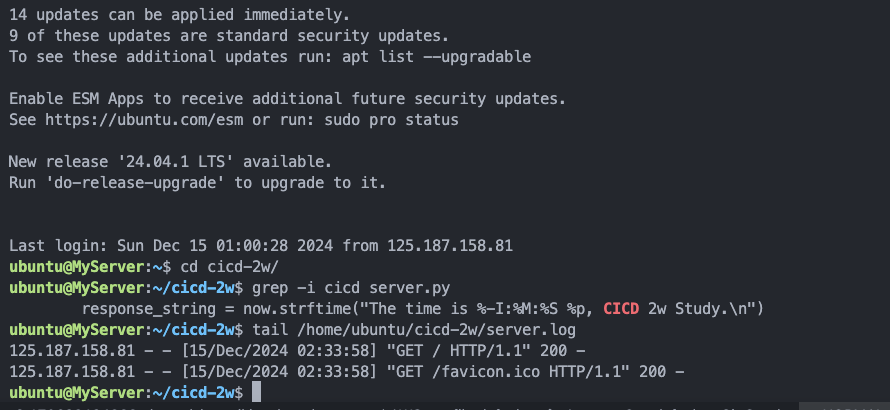
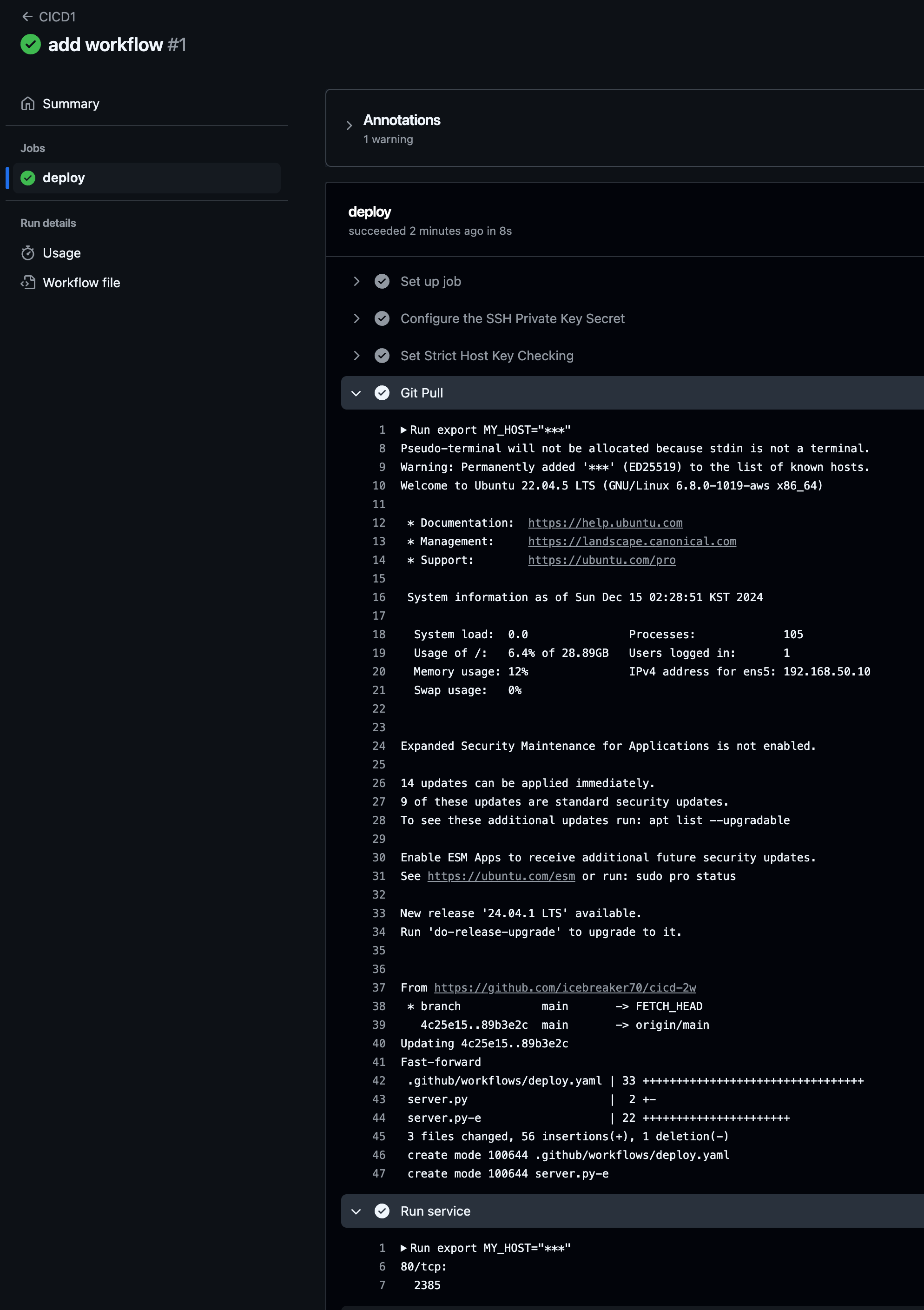
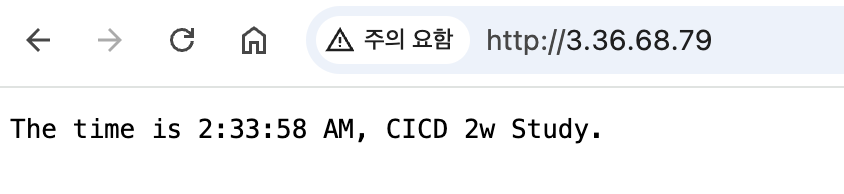
- 코드 수정 후 동작 확인
sed -i -e "s/CICD 2w/CICD1 End/g" server.pyname: CICD1 End
on:
workflow_dispatch:
push:
branches:
- main
jobs:
deployfinal:
runs-on: ubuntu-latest
steps:
- name: Configure the SSH Private Key Secret
run: |
mkdir -p ~/.ssh/
echo "${{ secrets.SSH_PRIVATE_KEY }}" > ~/.ssh/id_rsa
chmod 600 ~/.ssh/id_rsa
- name: Set Strict Host Key Checking
run: echo "StrictHostKeyChecking=no" > ~/.ssh/config
- name: Git Pull
run: |
export MY_HOST="${{ secrets.EC2_PIP }}"
ssh ubuntu@$MY_HOST << EOF
cd /home/ubuntu/cicd-2w || exit 1
git pull origin main || exit 1
EOF
- name: Run service
run: |
export MY_HOST="${{ secrets.EC2_PIP }}"
ssh ubuntu@$MY_HOST sudo fuser -k -n tcp 80 || true
ssh ubuntu@$MY_HOST "nohup sudo -E python3 /home/ubuntu/cicd-2w/server.py > /home/ubuntu/cicd-2w/server.log 2>&1 &"
# [Local PC]
git add . && git commit -m "edit workflow" && git push origin main

# [서버1]
grep -i cicd server.py
sudo ps -ef |grep server.py
tail /home/ubuntu/cicd-2w/server.log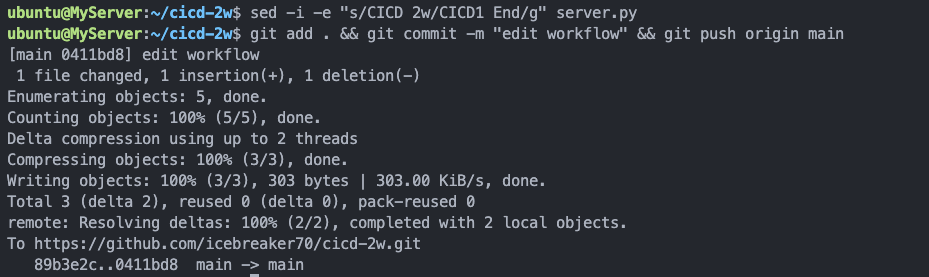
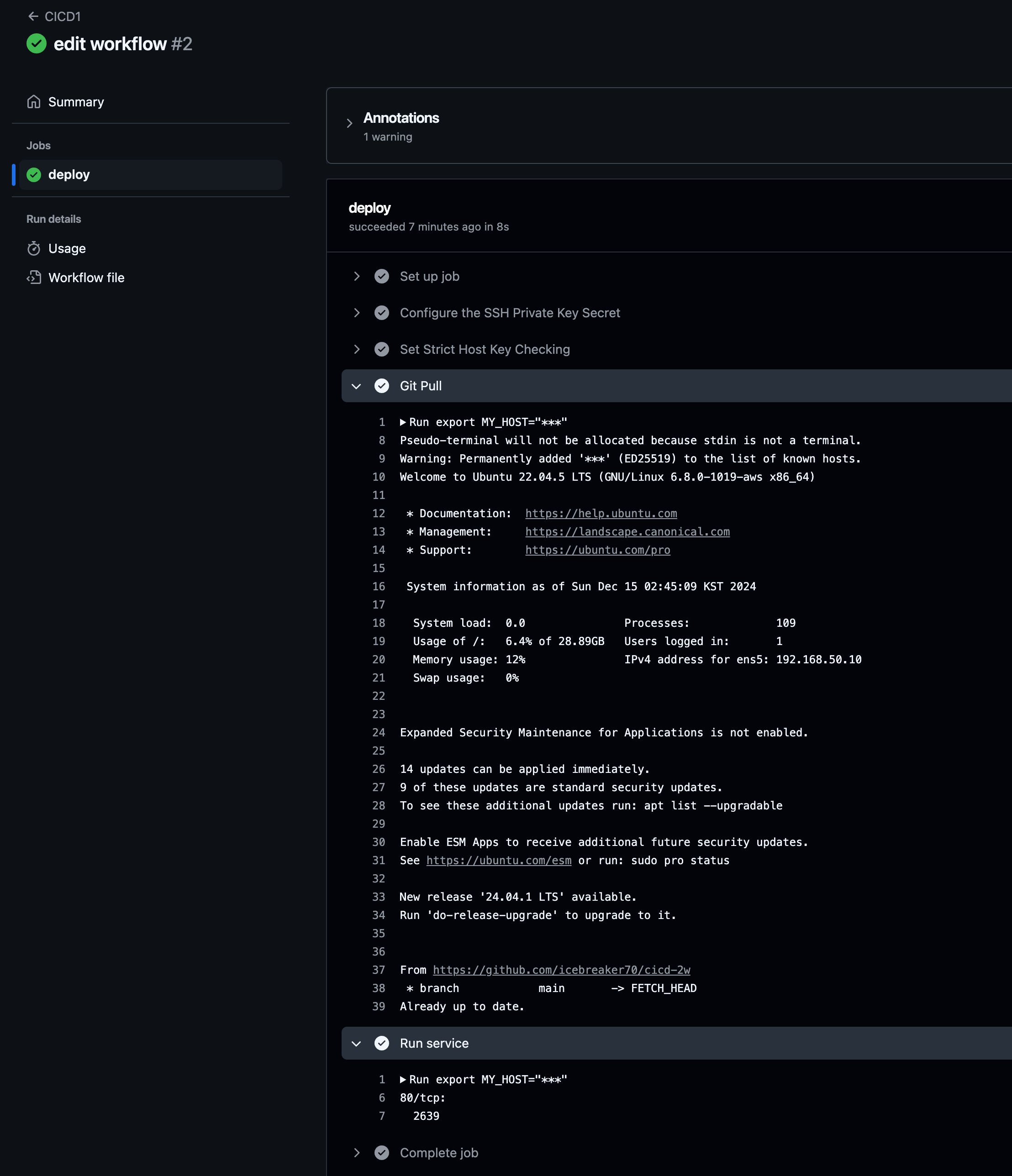
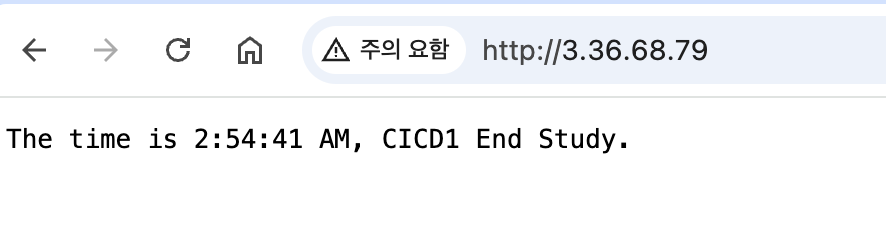
대상 서버에서 코드 최신화 및 (빌드-테스트) 후 서버 재기동을 진행합니다.
‘코드-빌드-테스트’를 서비스 운영 중인, 대상서버에서 작업을 같이 진행 시 장단점? →
GitHub Action 혹은 CI서버에서 해당 작업을 해보자!
3.3 GitHub Actions에서 ‘코드→빌드→테스트’ 후 대상서버에 전달 후 실행
- 🎯 목표
- GitHub Actions에서 코드 가져오기
- GitHub Actions에서 .gitignore 제외된 민감 파일 내용을 을 안전하게 가져와서 사용하기 ⇒ 매번 수동으로 가져오기 불편하다!
- scp로 대상 서버 ec2에 py 파일 전송
- 대상 서버 ec2에 기존 서비스 중지하고 다시 실행
- Github Actions에서 파이썬 버전 확인
name: CICD2
on:
  workflow_dispatch:
  push:
    branches:
      - main

jobs:
  deployfinal:
    runs-on: ubuntu-latest
    steps:
      - name: Test
        run: |
          python -V || true
          python3 -V || true
          which python || true
          which python3 || true
          env
git add . && git commit -m "echo env" && git push origin main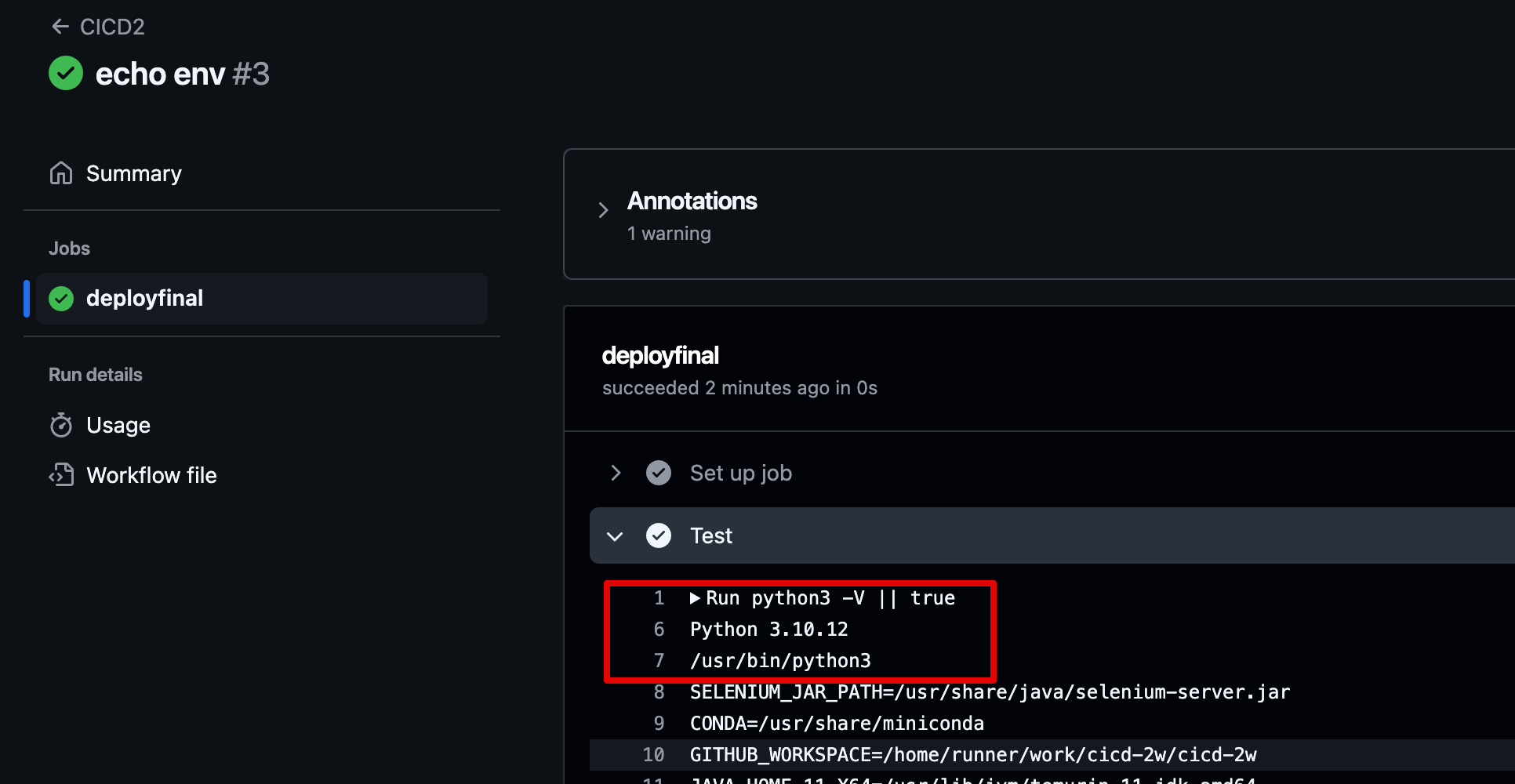
- GitHub Actions에서 .gitignore 제외된 민감 파일 내용을 을 안전하게 가져와서 사용하기 ⇒ 매번 수동으로 가져오기 불편하다!
- env 파일 github에 업로드 가능한지 테스트
❯ grep env .gitignore

# pyenv
#   intended to run in multiple environments; otherwise, check them in:
# pipenv
#   According to pypa/pipenv#598, it is recommended to include Pipfile.lock in version control.
#   having no cross-platform support, pipenv may install dependencies that don't work, or not
.env
.venv
env/
venv/
env.bak/
venv.bak/

❯ cat > .env <<EOF
ACCESSKEY : 1234
SECRETKEY : 5678
EOF

❯ git add .env

The following paths are ignored by one of your .gitignore files:
.env
hint: Use -f if you really want to add them.
hint: Disable this message with "git config advice.addIgnoredFile false"

❯ git status      # 🍎 .gitignore 설정에 의해 .env 파일은 git관리에서 제외 됨

On branch main
Your branch is up to date with 'origin/main'.

nothing to commit, working tree clean
❯ rm -f .env- Secret 생성 : MYKEYS ⇒ 아래 SSH for GitHub Actions 에서 env 전달 방식 활용
ACCESSKEY : asdf1234
SECRETKEY : qwer1234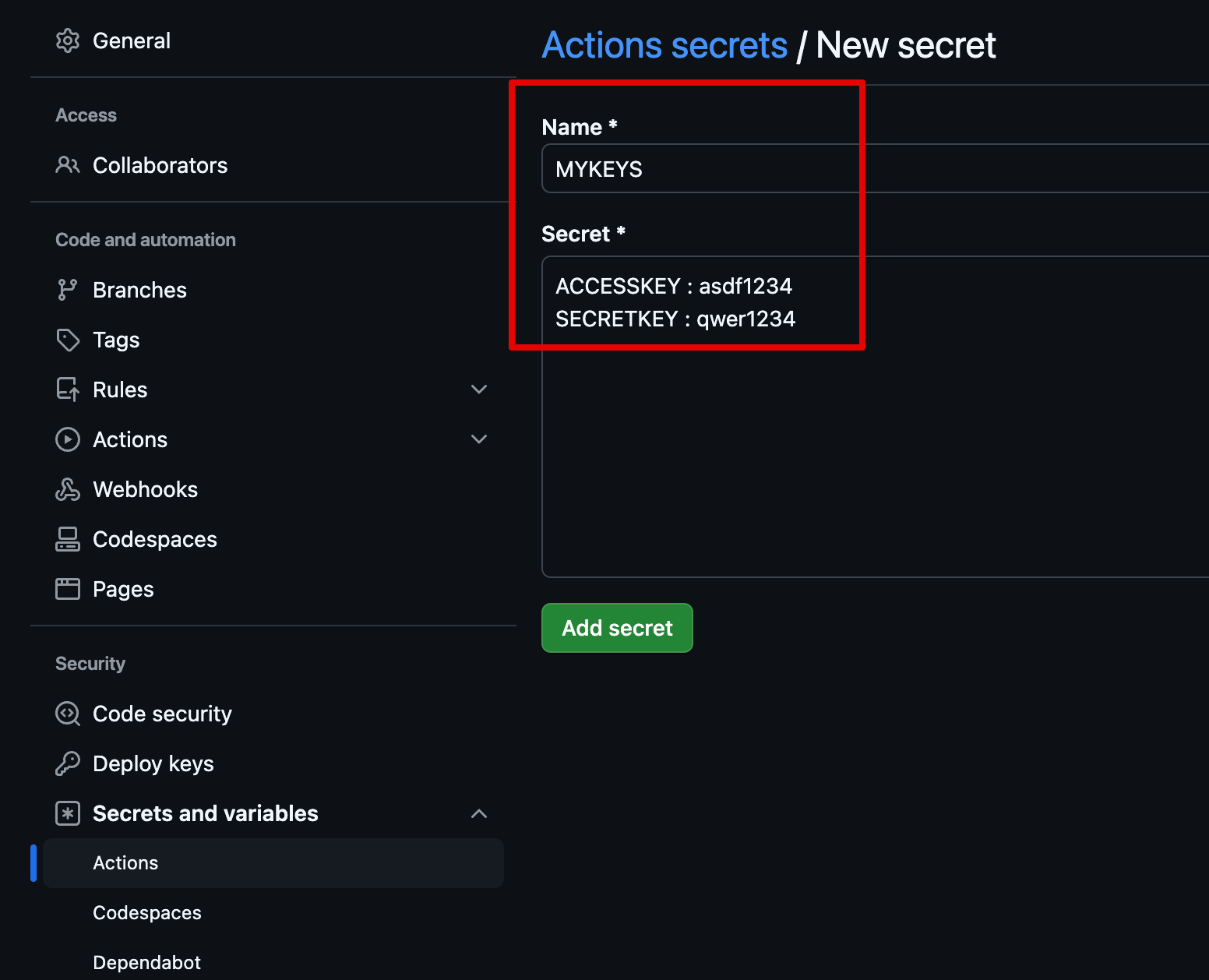
-
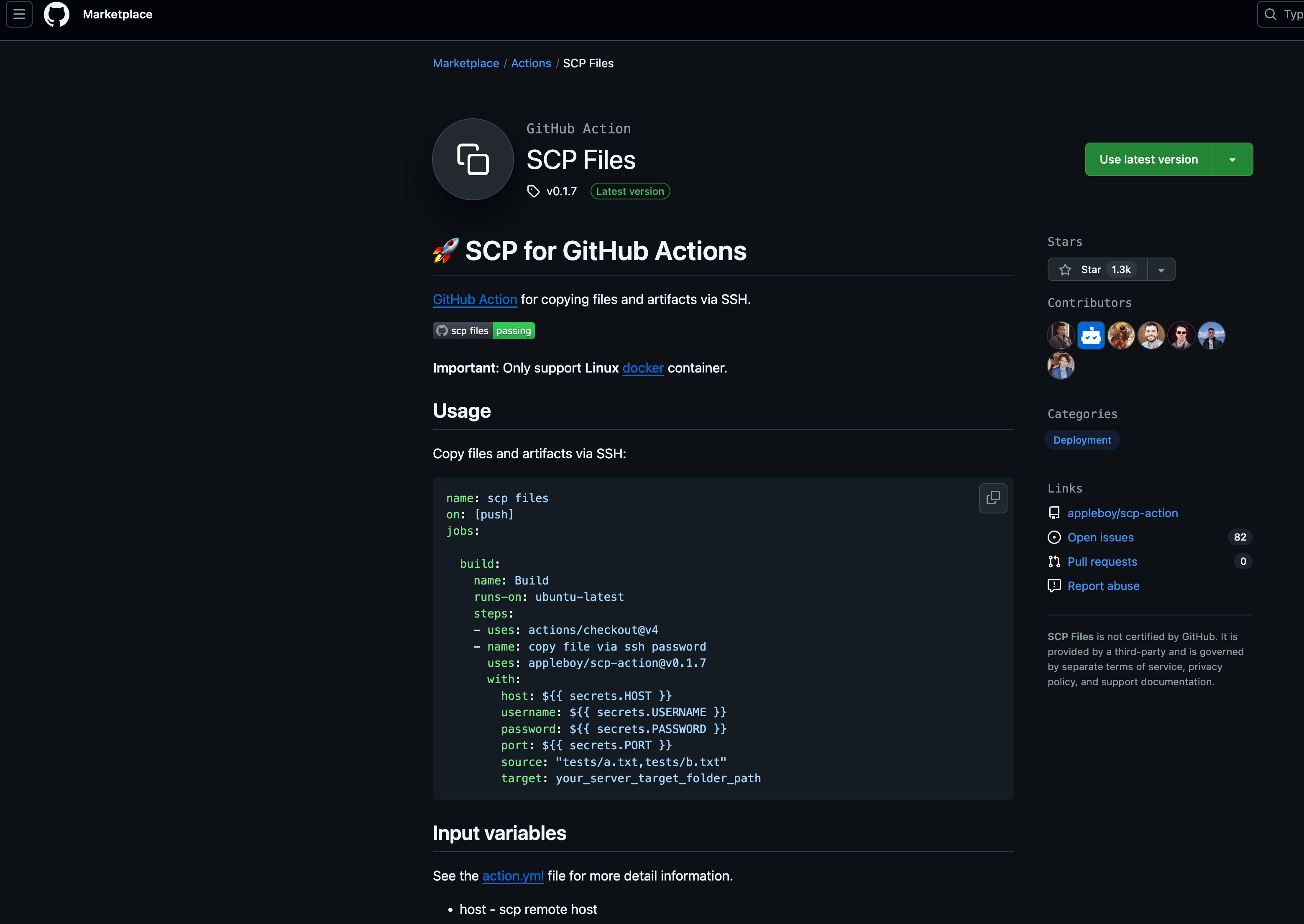
GitHub Actions Marketplaces : Enhance your workflow with extensions - to simplify tasks and automate processes
-
ssh command 예시 : Using PASSWORD
# Using PASSWORD name: remote ssh command on: [push] jobs: build: name: Build runs-on: ubuntu-latest steps: - name: executing remote ssh commands using password uses: appleboy/ssh-action@v1.2.0 with: host: ${{ secrets.HOST }} username: linuxserver.io password: ${{ secrets.PASSWORD }} port: ${{ secrets.PORT }} script: whoami -
ssh command 예시 : Using private key
# Using private key - name: executing remote ssh commands using ssh key uses: appleboy/ssh-action@v1.2.0 with: host: ${{ secrets.HOST }} username: ${{ secrets.USERNAME }} key: ${{ secrets.KEY }} port: ${{ secrets.PORT }} script: whoami -
ssh command 예시 : Using Multiple Commands
# Multiple Commands - name: multiple command uses: appleboy/ssh-action@v1.2.0 with: host: ${{ secrets.HOST }} username: ${{ secrets.USERNAME }} key: ${{ secrets.KEY }} port: ${{ secrets.PORT }} script: | whoami ls -al -
ssh command 예시 : Pass environment variable to shell script
# Pass environment variable to shell script - name: pass environment uses: appleboy/ssh-action@v1.2.0 + env: + FOO: "BAR" + BAR: "FOO" + SHA: ${{ github.sha }} with: host: ${{ secrets.HOST }} username: ${{ secrets.USERNAME }} key: ${{ secrets.KEY }} port: ${{ secrets.PORT }} + envs: FOO,BAR,SHA script: | echo "I am $FOO" echo "I am $BAR" echo "sha: $SHA" -
워크플로우 설정 후 테스트
name: CICD2
on:
  workflow_dispatch:
  push:
    branches:
      - main

jobs:
  ssh-deploy:
    runs-on: ubuntu-latest
    steps:
      - name: Github Repository Checkout
        uses: actions/checkout@v4

      - name: executing remote ssh commands
        uses: appleboy/ssh-action@v1.2.0
        env:
          AWS_KEYS: ${{ secrets.MYKEYS }}
        with:
          host: ${{ secrets.EC2_PIP }}
          username: ubuntu
          key: ${{ secrets.SSH_PRIVATE_KEY }}
          envs: AWS_KEYS
          script_stop: true
          script: |
             cd /home/ubuntu/cicd-2w
             echo "$AWS_KEYS" > .env
❯ git add . && git commit -m "ssh action test" && git push origin main [main 3e0bf24] ssh action test 1 file changed, 17 insertions(+), 6 deletions(-) Enumerating objects: 9, done. Counting objects: 100% (9/9), done. Delta compression using up to 8 threads Compressing objects: 100% (3/3), done. Writing objects: 100% (5/5), 697 bytes | 697.00 KiB/s, done. Total 5 (delta 1), reused 0 (delta 0), pack-reused 0 (from 0) remote: Resolving deltas: 100% (1/1), completed with 1 local object. To https://github.com/icebreaker70/cicd-2w.git 155e3a4..3e0bf24 main -> main -
서버단 확인
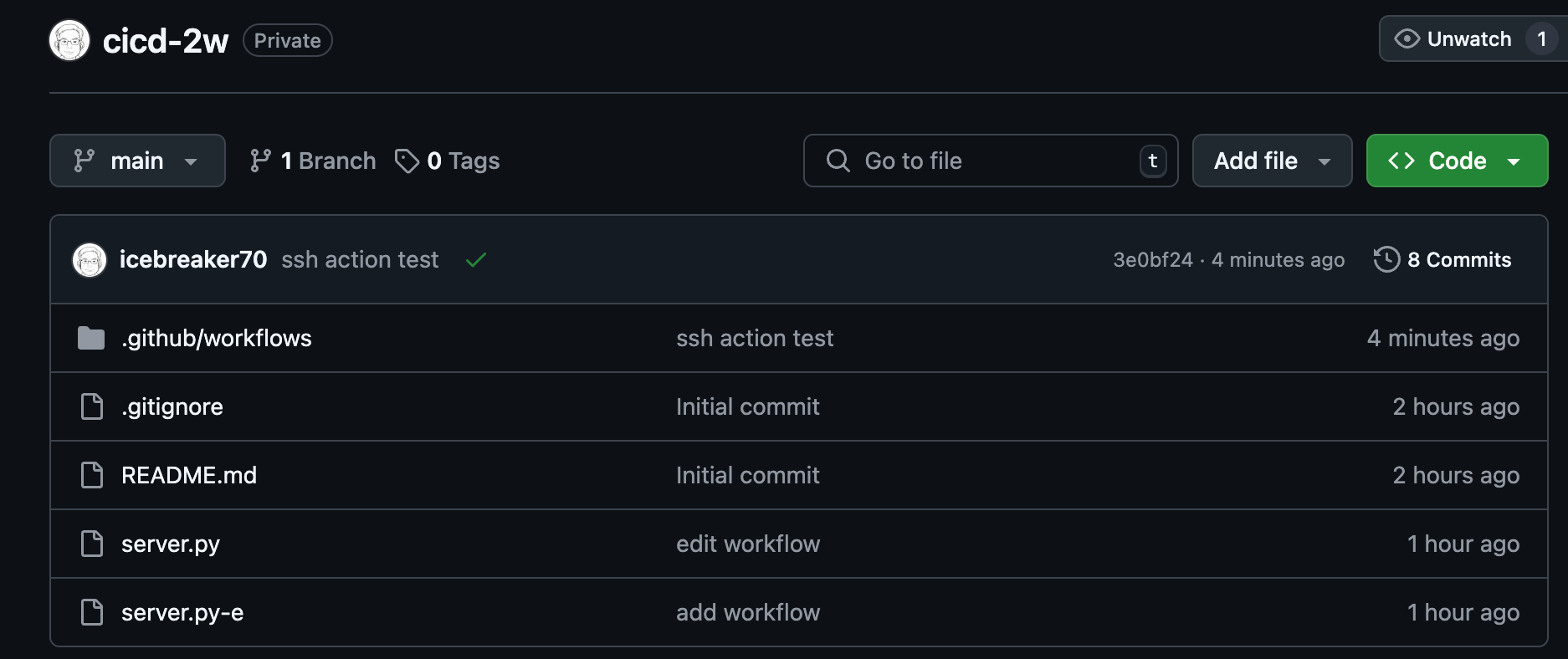
ubuntu@MyServer:~$ ls -al ~/cicd-2w/.env -rw-rw-r-- 1 ubuntu ubuntu 42 Dec 15 03:48 /home/ubuntu/cicd-2w/.env ubuntu@MyServer:~$ cat ~/cicd-2w/.env ACCESSKEY : asdf1234 SECRETKEY : qwer1234 -
Github에는 없음 .env 없음
-
scp : GitHub Action that copy files and artifacts via SSH - Github , marketplace
- server.py 수정 해두기
response_string = now.strftime("The time is %-I:%M:%S %p, SCP Test\n")- 수정
name: CICD2 on: workflow_dispatch: push: branches: - main jobs: scp-ssh-deploy: runs-on: ubuntu-latest steps: - name: Github Repository Checkout uses: actions/checkout@v4 - name: executing remote ssh commands uses: appleboy/ssh-action@v1.2.0 env: AWS_KEYS: ${{ secrets.MYKEYS }} with: host: ${{ secrets.EC2_PIP }} username: ubuntu key: ${{ secrets.SSH_PRIVATE_KEY }} envs: AWS_KEYS script_stop: true script: | cd /home/ubuntu/cicd-2w echo "$AWS_KEYS" > .env sudo fuser -k -n tcp 80 || true - name: copy file via ssh uses: appleboy/scp-action@v0.1.7 with: host: ${{ secrets.EC2_PIP }} username: ubuntu key: ${{ secrets.SSH_PRIVATE_KEY }} source: server.py target: /home/ubuntu/cicd-2w- 확인
ubuntu@MyServer:~$ ls -al ~/cicd-2w/
total 40
drwxrwxr-x 4 ubuntu ubuntu 4096 Dec 15 03:59 .
drwxr-x--- 5 ubuntu ubuntu 4096 Dec 15 03:59 ..
-rw-rw-r-- 1 ubuntu ubuntu   42 Dec 15 03:59 .env
drwxrwxr-x 8 ubuntu ubuntu 4096 Dec 15 03:04 .git
drwxrwxr-x 3 ubuntu ubuntu 4096 Dec 15 02:28 .github
-rw-rw-r-- 1 ubuntu ubuntu 3139 Dec 15 01:11 .gitignore
-rw-rw-r-- 1 ubuntu ubuntu   18 Dec 15 01:11 README.md
-rw-rw-r-- 1 ubuntu ubuntu  408 Dec 15 03:53 server.log
-rw-r--r-- 1 ubuntu ubuntu  747 Dec 15 03:59 server.py
-rw-rw-r-- 1 ubuntu ubuntu  750 Dec 15 02:28 server.py-e
ubuntu@MyServer:~$ cat ~/cicd-2w/server.py | grep SCP
        response_string = now.strftime("The time is %-I:%M:%S %p, SCP Test\n")
-
최종 : github action 에서 코드 가져오고 변경된 py 파일을 전송 후 기존 서비스 중지 후 재기동
-
server.py 수정 해두기
response_string = now.strftime("The time is %-I:%M:%S %p, CICD2 End\n")``name: CICD2 on: workflow_dispatch: push: branches: - main jobs: deploy: runs-on: ubuntu-latest steps: - name: Github Repository Checkout uses: actions/checkout@v4 - name: copy file via ssh uses: appleboy/scp-action@v0.1.7 with: host: ${{ secrets.EC2_PIP }} username: ubuntu key: ${{ secrets.SSH_PRIVATE_KEY }} source: server.py target: /home/ubuntu - name: executing remote ssh commands uses: appleboy/ssh-action@v1.2.0 env: AWS_KEYS: ${{ secrets.MYKEYS }} with: host: ${{ secrets.EC2_PIP }} username: ubuntu key: ${{ secrets.SSH_PRIVATE_KEY }} envs: AWS_KEYS script_stop: true script: | cd /home/ubuntu/cicd-2w echo "$AWS_KEYS" > .env sudo fuser -k -n tcp 80 || true rm server.py cp /home/ubuntu/server.py ./ nohup sudo -E python3 /home/ubuntu/cicd-2w/server.py > /home/ubuntu/cicd-2w/server.log 2>&1 & echo "test" >> /home/ubuntu/text.txtgit add . && git commit -m "Deploy CICD2 Final" && git push origin main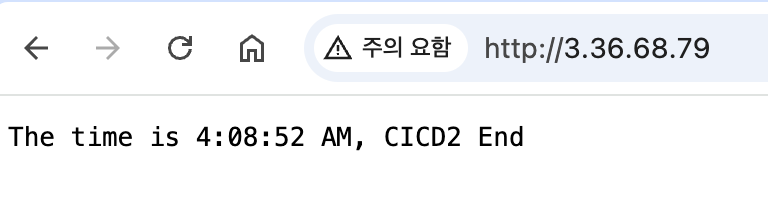
-
4. GitHub Actions with Ansible
-
Github Action으로 위의 배운 내용을 종합적으로 활용하여 Ansible 설치 자동화
name: Run Ansible
on:
  workflow_dispatch:
  push:
    branches:
      - main

jobs:
  run-playbooks:
    runs-on: ubuntu-latest
    steps:
      - name: Github Repository Checkout
        uses: actions/checkout@v4

      - name: Setup Python 3
        uses: actions/setup-python@v5
        with:
          python-version: "3.8"

      - name: Upgrade Pip & Install Ansible
        run: |
          python -m pip install --upgrade pip
          python -m pip install ansible

      - name: Implement the Private SSH Key
        run: |
          mkdir -p ~/.ssh/
          echo "${{ secrets.SSH_PRIVATE_KEY }}" > ~/.ssh/id_rsa
          chmod 600 ~/.ssh/id_rsa

      - name: Ansible Inventory File for Remote host
        run: |
          mkdir -p ./devops/ansible/
          export INVENTORY_FILE=./devops/ansible/inventory.ini
          echo "[my_host_group]" > $INVENTORY_FILE
          echo "${{ secrets.EC2_PIP }}" >> $INVENTORY_FILE

      - name: Ansible Default Configuration File
        run: |
          mkdir -p ./devops/ansible/
          cat <<EOF > ./devops/ansible/ansible.cfg
          [defaults]
          ansible_python_interpreter = '/usr/bin/python3'
          ansible_ssh_private_key_file = ~/.ssh/id_rsa
          remote_user = ubuntu
          inventory = ./inventory.ini
          host_key_checking = False
          EOF

      - name: Ping Ansible Hosts
        working-directory: ./devops/ansible/
        run: |
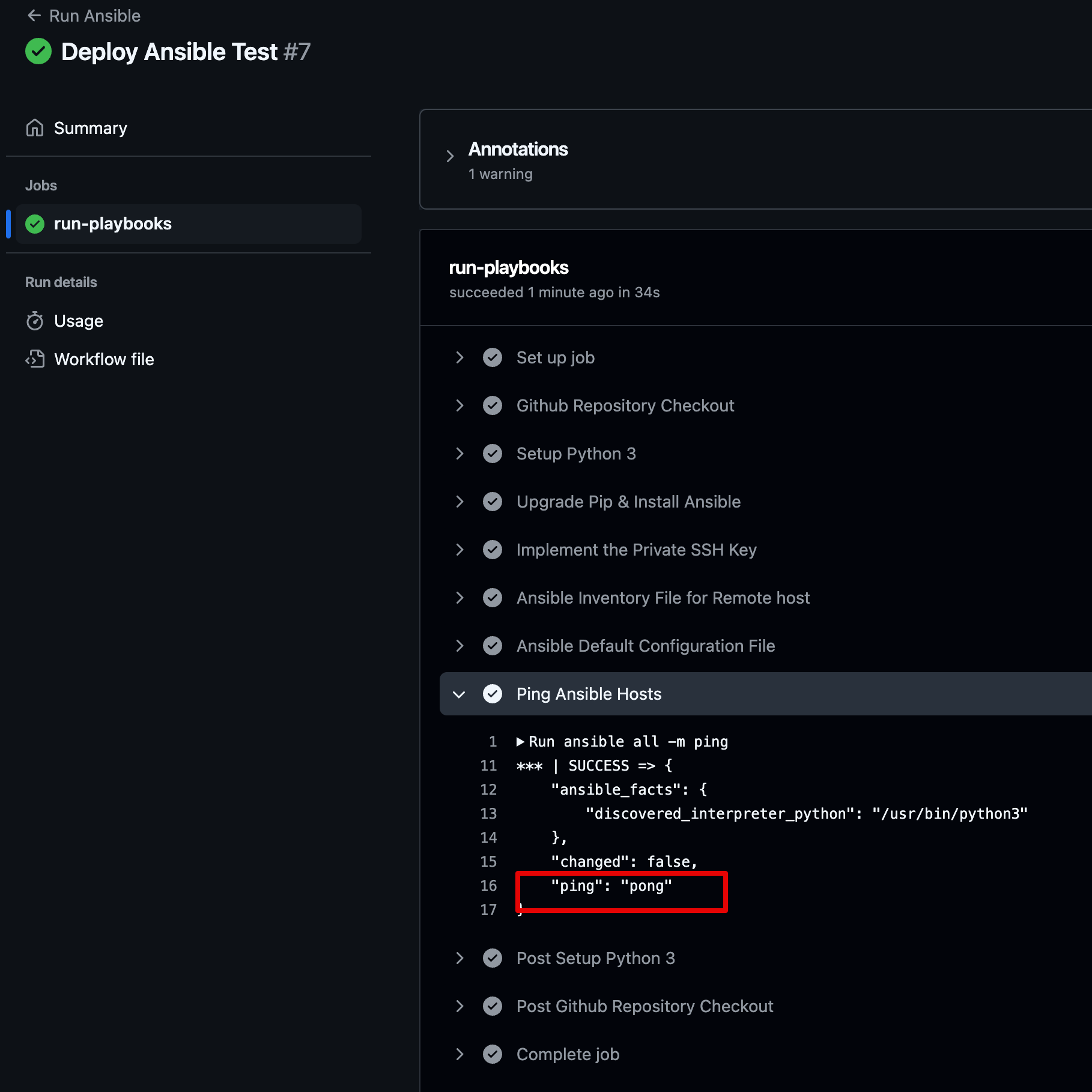
          ansible all -m ping

      # - name: Run Ansible Playbooks
      #   working-directory: ./devops/ansible/
      #   run: |
      #     ansible-playbook install-nginx.yaml

      # - name: Deploy Python via Ansible
      #   working-directory: ./devops/ansible/
      #   run: |
      #     ansible-playbook deploy-python.yaml
git add . && git commit -m "Deploy Ansible Test" && git push origin main -
배포 후 ping에 대해 pong으로 응답 됨
5. 실습 후 자원 삭제
- AWS CloudFormation Stack 삭제
- GitHub Repo 삭제
6. 학습 후기
❤️❤️❤️❤️❤️ 지난 주 Jenkins에 이어 Github Actions을 통한 CI/CD 자동화를 배울 수 있어서 매주 좋았다.
🎯🎯🎯🎯🎯 평소 잘아는 내용은 아녔지만 매우 궁금했었다. 새로운 내용 정리 보단 실습위주로 내용을 정리하였다.
🍇🍇🍇🍇🍇 Github Actoins의 필수/핵심적인 부분을 EC2로 실습해서 매우 유익한 시간이었다.
💎💎💎💎💎 3주차 과정도 매우 기대된다.

항상 심도 있는 정리 내용에 많은 도움을 받습니다~ 감사합니다. ^^