가시다(gasida) 님이 진행하는 AEWS(Amazon EKS Workshop Study) 3기 과정으로 학습한 내용을 정리 또는 실습한 내용을 정리한 게시글입니다.
9주차는 EKS Upgrade를 Study 하였습니다. Amazon EKS Upgrades Workshop 환경을 지원받아 내용을 정리하였습니다.
실무적인 실습환경도 함께 제공하였으나
시간 관계상 전체적으로 실습을 진행하지 못해 #4 이후 내용은 eksctl과 Velero로 이전에 Blue/Green 버전업 실습 정리한 자료로 대체하였습니다.
0. EKS 버전업 실습 환경
주요 실습도구 : AWS, EKS Terraform Blueprints, Karpenter, ArgoCD, VSCode
kubectl get nodes
NAME                                               STATUS   ROLES    AGE   VERSION
fargate-ip-10-0-15-65.us-west-2.compute.internal   Ready    <none>   31h   v1.25.16-eks-2d5f260
ip-10-0-0-217.us-west-2.compute.internal           Ready    <none>   97m   v1.25.16-eks-59bf375
ip-10-0-25-247.us-west-2.compute.internal          Ready    <none>   31h   v1.25.16-eks-59bf375
ip-10-0-27-141.us-west-2.compute.internal          Ready    <none>   31h   v1.25.16-eks-59bf375
ip-10-0-3-107.us-west-2.compute.internal           Ready    <none>   31h   v1.25.16-eks-59bf375
ip-10-0-46-212.us-west-2.compute.internal          Ready    <none>   31h   v1.25.16-eks-59bf375
ip-10-0-7-233.us-west-2.compute.internal           Ready    <none>   31h   v1.25.16-eks-59bf375

aws eks describe-cluster --name $EKS_CLUSTER_NAME
{
    "cluster": {
        "name": "eksworkshop-eksctl",
        "arn": "arn:aws:eks:us-west-2:7**********0:cluster/eksworkshop-eksctl",
        "createdAt": "2025-03-30T04:48:01.946000+00:00",
        "version": "1.25",
        "endpoint": "https://3A*******57CFAB52.sk1.us-west-2.eks.amazonaws.com",
...


kubectl get node -L eks.amazonaws.com/nodegroup,karpenter.sh/nodepool
NAME                                               STATUS   ROLES    AGE    VERSION                NODEGROUP                             NODEPOOL
fargate-ip-10-0-15-65.us-west-2.compute.internal   Ready    <none>   31h    v1.25.16-eks-2d5f260
ip-10-0-0-217.us-west-2.compute.internal           Ready    <none>   100m   v1.25.16-eks-59bf375                                         default
ip-10-0-25-247.us-west-2.compute.internal          Ready    <none>   31h    v1.25.16-eks-59bf375
ip-10-0-27-141.us-west-2.compute.internal          Ready    <none>   31h    v1.25.16-eks-59bf375   initial-2025033004574833720000002b
ip-10-0-3-107.us-west-2.compute.internal           Ready    <none>   31h    v1.25.16-eks-59bf375   blue-mng-20250330045748330600000029
ip-10-0-46-212.us-west-2.compute.internal          Ready    <none>   31h    v1.25.16-eks-59bf375   initial-2025033004574833720000002b
ip-10-0-7-233.us-west-2.compute.internal           Ready    <none>   31h    v1.25.16-eks-59bf375

helm list -A

ls -lrt terraform/

Code Repository
```bash
cd ~/environment
git clone codecommit::${REGION}://eks-gitops-repo
Login to ArgoCD
export ARGOCD_SERVER=$(kubectl get svc argo-cd-argocd-server -n argocd -o json | jq --raw-output '.status.loadBalancer.ingress[0].hostname')
echo "ArgoCD URL: http://${ARGOCD_SERVER}"
export ARGOCD_USER="admin"
export ARGOCD_PWD=$(kubectl -n argocd get secret argocd-initial-admin-secret -o jsonpath="{.data.password}" | base64 -d)
echo "Username: ${ARGOCD_USER}"
echo "Password: ${ARGOCD_PWD}"

ArgoCD URL: http://k8s-argocd-argocdar-84e1f35b86-5d491f5f011bd796.elb.us-west-2.amazonaws.com
Username: admin
Password: Lu9w21hn5kRg7PkD
argocd CLI 로그인
argocd login ${ARGOCD_SERVER} --username ${ARGOCD_USER} --password ${ARGOCD_PWD} --insecure --skip-test-tls --grpc-web
Context 'k8s-argocd-argocdar-84e1f35b86-5d491f5f011bd796.elb.us-west-2.amazonaws.com' updated

kubectl get pods -A
NAMESPACE     NAME                                                        READY   STATUS    RESTARTS      AGE
argocd        argo-cd-argocd-application-controller-0                     1/1     Running   0             31h
argocd        argo-cd-argocd-applicationset-controller-74d9c9c5c7-jf4hg   1/1     Running   0             31h
argocd        argo-cd-argocd-dex-server-6dbbd57479-mwfg4                  1/1     Running   0             31h
argocd        argo-cd-argocd-notifications-controller-fb4b954d5-pcgq6     1/1     Running   0             31h
argocd        argo-cd-argocd-redis-76b4c599dc-n4n6q                       1/1     Running   0             31h
argocd        argo-cd-argocd-repo-server-6b777b579d-dt9r4                 1/1     Running   0             31h
argocd        argo-cd-argocd-server-86bdbd7b89-jvgvg                      1/1     Running   0             31h
assets        assets-7ccc84cb4d-tqg74                                     1/1     Running   0             31h
carts         carts-7ddbc698d8-4t82t                                      1/1     Running   0             31h
carts         carts-dynamodb-6594f86bb9-mfnnm                             1/1     Running   0             31h
catalog       catalog-857f89d57d-9nm8v                                    1/1     Running   4 (31h ago)   31h
catalog       catalog-mysql-0                                             1/1     Running   0             31h
checkout      checkout-558f7777c-mttdm                                    1/1     Running   0             120m
checkout      checkout-redis-f54bf7cb5-62m84                              1/1     Running   0             120m
karpenter     karpenter-86db5c97db-6xpk9                                  1/1     Running   0             31h
karpenter     karpenter-86db5c97db-bvztz                                  1/1     Running   0             31h
kube-system   aws-load-balancer-controller-bd8f49ff9-5mwc6                1/1     Running   0             31h
kube-system   aws-load-balancer-controller-bd8f49ff9-7qmmn                1/1     Running   0             31h
kube-system   aws-node-4cb4v                                              2/2     Running   0             31h
kube-system   aws-node-kvgfm                                              2/2     Running   0             31h
kube-system   aws-node-lrsxf                                              2/2     Running   0             31h
kube-system   aws-node-rrkfw                                              2/2     Running   0             31h
kube-system   aws-node-sl55v                                              2/2     Running   0             119m
kube-system   aws-node-wxfw7                                              2/2     Running   0             31h
kube-system   coredns-98f76fbc4-g6wzq                                     1/1     Running   0             31h
kube-system   coredns-98f76fbc4-m5lth                                     1/1     Running   0             31h
kube-system   ebs-csi-controller-6b575b5f4d-6jrxv                         6/6     Running   0             31h
kube-system   ebs-csi-controller-6b575b5f4d-dpjz4                         6/6     Running   0             31h
kube-system   ebs-csi-node-44n68                                          3/3     Running   0             31h
kube-system   ebs-csi-node-7zh8f                                          3/3     Running   0             31h
kube-system   ebs-csi-node-kdvw8                                          3/3     Running   0             31h
kube-system   ebs-csi-node-whrrp                                          3/3     Running   0             119m
kube-system   ebs-csi-node-wrtst                                          3/3     Running   0             31h
kube-system   ebs-csi-node-zrldf                                          3/3     Running   0             31h
kube-system   efs-csi-controller-5d74ddd947-lrk7h                         3/3     Running   0             31h
kube-system   efs-csi-controller-5d74ddd947-msjcs                         3/3     Running   0             31h
kube-system   efs-csi-node-5zbcd                                          3/3     Running   0             31h
kube-system   efs-csi-node-hm25d                                          3/3     Running   0             31h
kube-system   efs-csi-node-sdskg                                          3/3     Running   0             31h
kube-system   efs-csi-node-tc5xz                                          3/3     Running   0             31h
kube-system   efs-csi-node-w9jz6                                          3/3     Running   0             31h
kube-system   efs-csi-node-wq548                                          3/3     Running   0             119m
kube-system   kube-proxy-2nrmt                                            1/1     Running   0             31h
kube-system   kube-proxy-bl8zt                                            1/1     Running   0             31h
kube-system   kube-proxy-ck28b                                            1/1     Running   0             31h
kube-system   kube-proxy-czlvz                                            1/1     Running   0             31h
kube-system   kube-proxy-drb6q                                            1/1     Running   0             31h
kube-system   kube-proxy-npl5r                                            1/1     Running   0             119m
kube-system   metrics-server-785cd745cd-k2lw7                             1/1     Running   0             31h
orders        orders-5b97745747-kwtzg                                     1/1     Running   2 (31h ago)   31h
orders        orders-mysql-b9b997d9d-w8lj8                                1/1     Running   0             31h
rabbitmq      rabbitmq-0                                                  1/1     Running   0             31h
ui ui-5dfb7d65fc-dgtgj 1/1 Running 0 31h- Namespace
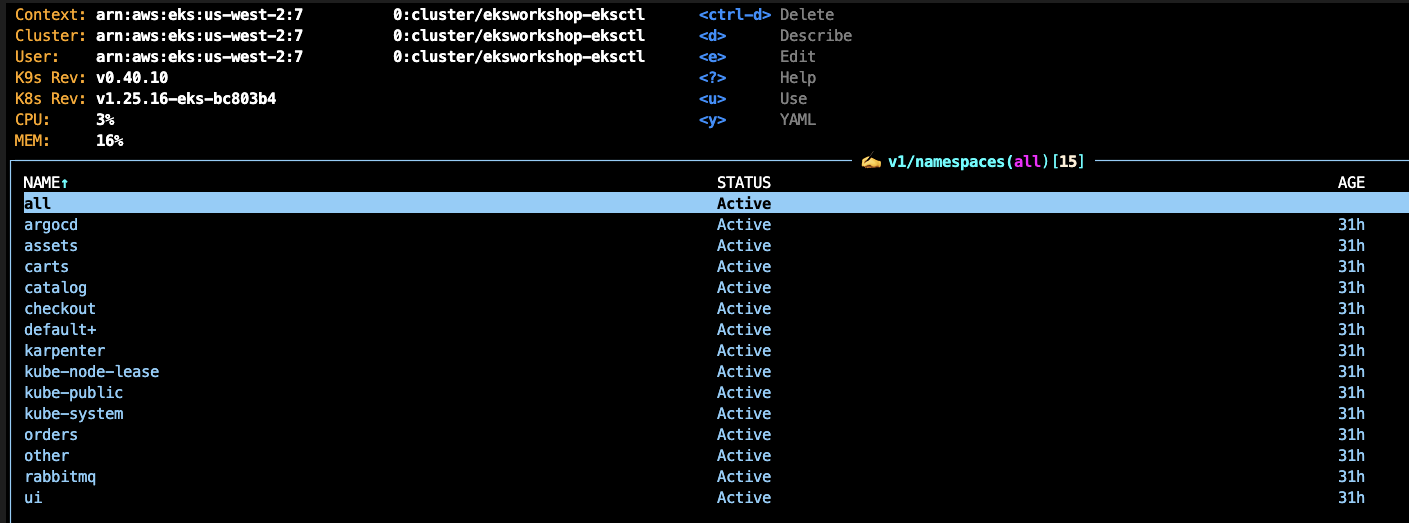
- Nodes

- Helm 배포 Package List

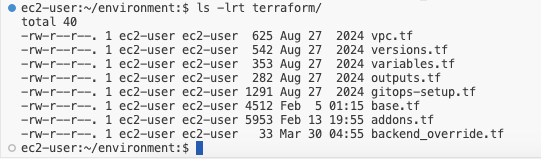
- Terraform 소스 목록
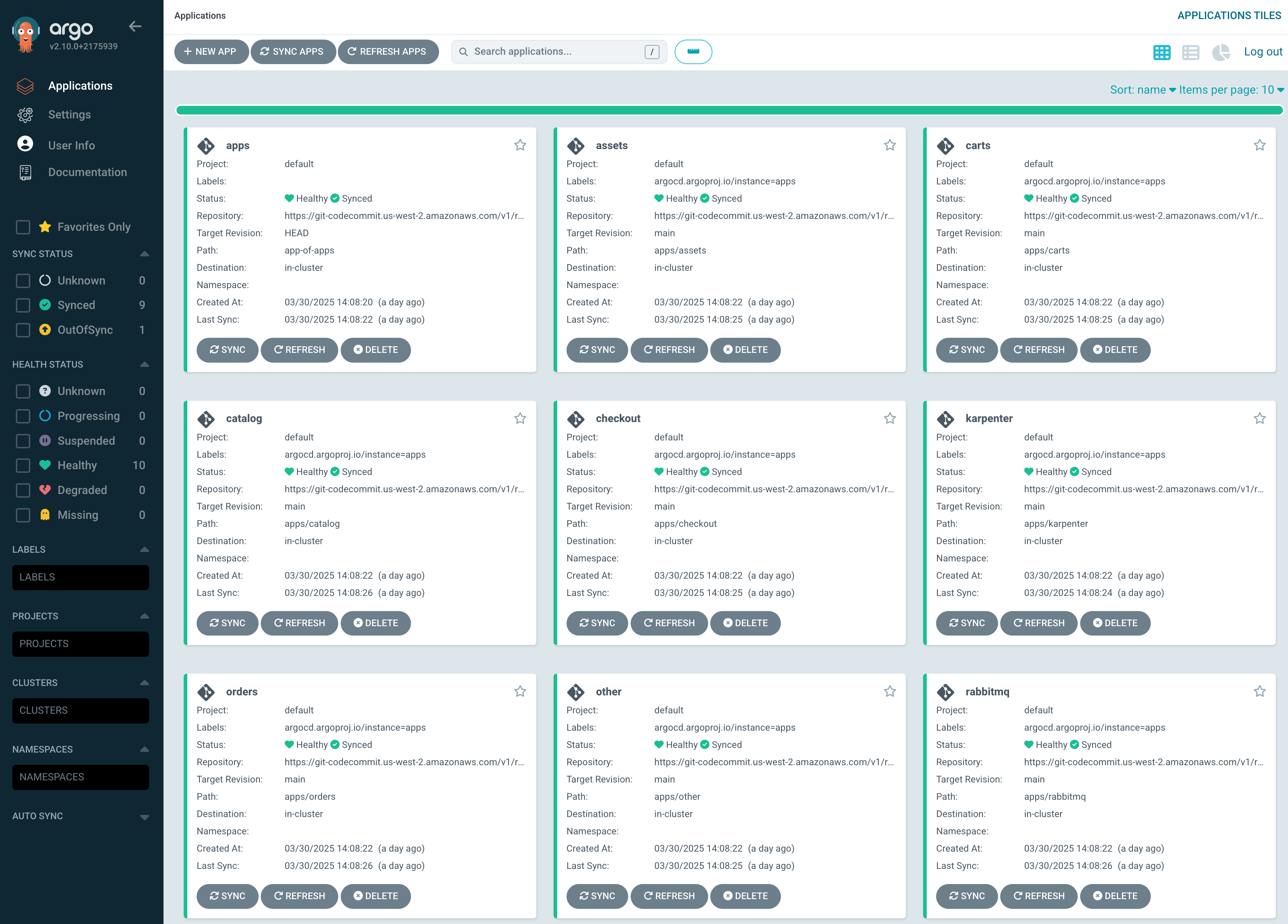
- argocd Application 배포 모록
1. EKS Upgrade 전략 및 모범 사례
컨테이너 관리 플랫폼으로 Amazon Elastic Kubernetes Service(EKS)를 선택한 사람들이 고려해야 할 핵심 사항 중 하나는
클러스터 업그레이드를 계획하는 것입니다.
Kubernetes 프로젝트는 새로운 기능, 디자인 업데이트, 버그 수정으로 지속적으로 업데이트되고 있으며,
새로운 마이너 버전은 평균 4개월마다 출시되고 출시 후 약 12개월 동안 지원됩니다.
1.1 K8S Release History
[출처] https://kubernetes.io/releases/
Release History
1.32
Latest Release:1.32.2 (released: 2025-02-11)
End of Life:2026-02-28
Patch Releases: 1.32.0, 1.32.1, 1.32.2
Complete 1.32 Schedule and Changelog

1.31
Latest Release:1.31.6 (released: 2025-02-11)
End of Life:2025-10-28
Patch Releases: 1.31.0, 1.31.1, 1.31.2, 1.31.3, 1.31.4, 1.31.5, 1.31.6
Complete 1.31 Schedule and Changelog

1.30
Latest Release:1.30.10 (released: 2025-02-11)
End of Life:2025-06-28
Patch Releases: 1.30.0, 1.30.1, 1.30.2, 1.30.3, 1.30.4, 1.30.5, 1.30.6, 1.30.7, 1.30.8, 1.30.9, 1.30.10
Complete 1.30 Schedule and Changelog
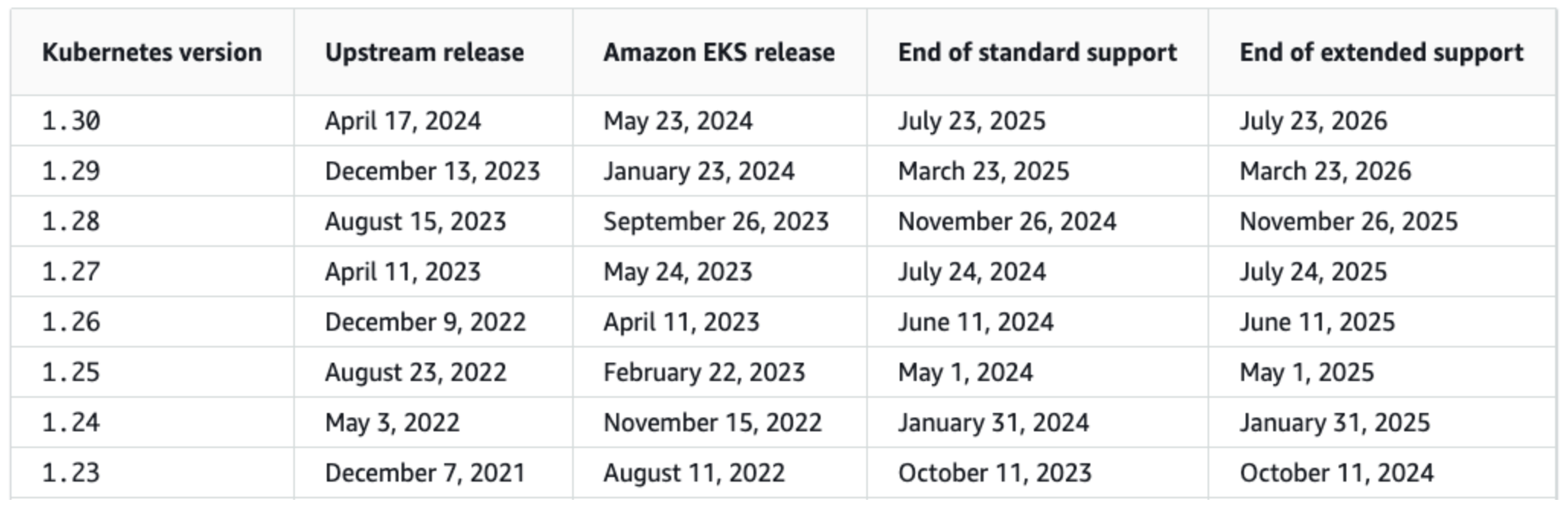
1.2 Amazon EKS 출시 일정 및 지원
-
표준 지원:
- EKS는 한 번에 4개의 마이너 버전을 14개월간 표준 지원합니다.
- 보안 패치는 백포트되며, 업스트림 Kubernetes의 지원 여부와 무관하게 유지됩니다.
- 새 Kubernetes 버전은 AWS 서비스와의 호환성 검증 후 릴리스되어 약간의 지연이 발생할 수 있습니다.
-
확장 지원 (Extended Support):
- 표준 지원 종료 후 자동 적용, 12개월간 추가 지원 제공 → 총 26개월 지원
- 2024년 4월 1일부터 시간당 $0.60/클러스터 비용 발생 (표준 지원은 $0.10)
- 확장 지원 종료 시, 가장 오래된 확장 버전으로 자동 업그레이드
-
버전 정책 제어 기능 (2024년 7월 23일 도입): 클러스터별로 아래 두 가지 중 선택 가능:
- STANDARD:
- 표준 지원 종료 시 자동 업그레이드
- 추가 요금 없음
- EXTENDED:
- 표준 지원 종료 후 확장 지원 유지, 시간당 $0.60 요금 발생
- 확장 지원 종료 시 자동 업그레이드
- STANDARD:
1.3 왜 Kubernetes/EKS 업그레이드가 중요한가?
- Amazon EKS를 사용할 때 정기적인 클러스터 업그레이드는 보안, 안정성, 성능, 최신 기능 활용을 위해 필수입니다.
- EKS에서 최신 마이너 버전을 유지하는 것은 보안 패치 적용, 성능 및 안정성 향상을 위한 핵심이며,
AWS와 고객 간의 공동 책임 모델을 따름. 이는 애플리케이션의 안정적인 서비스 제공을 위한 중요한 전략임.
-
공동 책임 모델 (Shared Responsibility Model)
- Control Plane: AWS가 관리 및 업그레이드
- Data Plane (노드): 사용자가 직접 업그레이드
- Self-Managed Node Group, Managed Node Group, Fargate, Karpenter 등 포함
- Karpenter 사용 시 자동 노드 갱신(Drift/Disruption Controller) 가능
- 업그레이드 중에도 서비스 무중단을 위해 PodDisruptionBudget 및 topologySpreadConstraints 설정 필수
-
플랫폼 버전 (Platform Version)
- 각 Kubernetes 마이너 버전(예: 1.30)은 하나 이상의 플랫폼 버전(예: eks.1, eks.2…)을 가짐
- EKS는 동일 마이너 버전에 대해 자동으로 최신 플랫폼 버전으로 업그레이드함 → 사용자 조치 불필요
1.4 Amazon EKS 클러스터 업그레이드 개요
- 인플레이스 업그레이드 주요 절차
- Kubernetes 및 EKS 릴리스 노트 검토
→ 업그레이드 전 필수 정책, 도구, 절차 확인 - 클러스터 백업 (선택 사항)
- 클러스터 제어 플레인(Control Plane) 업그레이드
→ AWS 콘솔 또는 CLI 사용 - Add-on 호환성 검토
- 데이터 플레인(Data Plane, 워커 노드) 업그레이드
- Kubernetes 및 EKS 릴리스 노트 검토
🍇 위 단계는 고수준의 순서이며, API 폐기 여부나 버전 차이 등 추가 점검이 필요할 수 있음.
2. 클러스터 업그레이드 준비
✅ 업그레이드 전 필수 요구사항
• 클러스터 생성 시 지정한 서브넷에서 최대 5개의 사용 가능한 IP 주소 필요
• 클러스터의 IAM 역할 및 보안 그룹이 AWS 계정 내에 존재해야 함
• Secrets Encryption을 활성화한 경우, IAM 역할에 AWS KMS 권한 필요
🔄 EKS 업그레이드 워크플로우 요약
1. Amazon EKS 및 Kubernetes 주요 업데이트 사항 확인
2. 폐기 정책(Deprecation Policy) 이해 및 Manifest 리팩토링
3. 적절한 업그레이드 전략으로 Control Plane 및 Data Plane 업그레이드
4. 종속 Add-on(추가 구성 요소) 업그레이드
📌 위 순서를 통해 클러스터 업그레이드가 완료됩니다.
2.1 EKS Upgrade Insights
🔍 EKS Upgrade Insights란?
• EKS Upgrade Insights는 클러스터 업그레이드 시 고려해야 할 Kubernetes API 폐기 여부 및 업그레이드 준비 상태를 자동으로 분석해주는 기능입니다.
• Amazon EKS는 모든 클러스터를 대상으로 정기적으로 자동 점검을 수행하며, 콘솔 또는 CLI/API를 통해 결과를 확인할 수 있습니다.
• 현재는 Kubernetes 버전 업그레이드 준비 상태(Upgrade Readiness) 관련 인사이트만 제공됩니다.
✅ 주요 기능
• 자동 감지: 감사 로그를 기반으로 폐기 예정 API 사용 여부를 매일 분석
• 콘솔/CLI/API로 결과 제공
• 수동 새로고침은 불가 → 문제가 해결되어도 일정 시간이 지나야 반영됨
• 각 인사이트에는 다음 정보가 포함됨:
- 문제 해결을 위한 추천 조치
- 관련 문서/블로그 링크
- 영향 받는 리소스 목록 및 상태 (PASSING, WARNING, ERROR, UNKNOWN)
- 클러스터 전반 상태 요약 (최고 심각도 기준)
⚠️ 상태 설명
• PASSING: 문제 없음
• WARNING: 향후 영향 가능성 있으나 긴급 조치 불필요
• ERROR: 다음 버전에서 API 제거 예정 → 업그레이드 시 실패 가능
• UNKNOWN: 분석 오류
🛠️ 실제 예시 (버전 1.26 업그레이드 준비 상태 확인)
- 명령어:
aws eks list-insights --filter kubernetesVersions=1.26 --cluster-name $CLUSTER_NAME | jq .
{
  "insights": [
    {
      "id": "001e8a15-2d2e-419c-b4ac-6d6b1e259148",
      "name": "kube-proxy version skew",
      "category": "UPGRADE_READINESS",
      "kubernetesVersion": "1.26",
      "lastRefreshTime": "2025-03-31T01:12:46+00:00",
      "lastTransitionTime": "2025-03-30T05:07:45+00:00",
      "description": "Checks version of kube-proxy in cluster to see if upgrade would cause non compliance with supported Kubernetes kube-proxy version skew policy.",
      "insightStatus": {
        "status": "PASSING",
        "reason": "kube-proxy versions match the cluster control plane version."
      }
    },
    {
      "id": "29964fc7-d9e6-4575-9286-92a3e9010dde",
      "name": "Cluster health issues",
      "category": "UPGRADE_READINESS",
      "kubernetesVersion": "1.26",
      "lastRefreshTime": "2025-03-31T01:12:59+00:00",
      "lastTransitionTime": "2025-03-30T05:07:45+00:00",
      "description": "Checks for any cluster health issues that prevent successful upgrade to the next Kubernetes version on EKS.",
      "insightStatus": {
        "status": "PASSING",
        "reason": "No cluster health issues detected."
      }
    },
    {
      "id": "785b071b-f3df-49d7-9ec6-3a415c2a7ebb",
      "name": "EKS add-on version compatibility",
      "category": "UPGRADE_READINESS",
      "kubernetesVersion": "1.26",
      "lastRefreshTime": "2025-03-31T01:12:59+00:00",
      "lastTransitionTime": "2025-03-30T05:07:45+00:00",
      "description": "Checks version of installed EKS add-ons to ensure they are compatible with the next version of Kubernetes. ",
      "insightStatus": {
        "status": "PASSING",
        "reason": "All installed EKS add-on versions are compatible with next Kubernetes version."
      }
    },
    {
      "id": "116db9b8-226a-4aed-afbe-92762288092c",
      "name": "Kubelet version skew",
      "category": "UPGRADE_READINESS",
      "kubernetesVersion": "1.26",
      "lastRefreshTime": "2025-03-31T01:12:46+00:00",
      "lastTransitionTime": "2025-03-30T05:07:45+00:00",
      "description": "Checks for kubelet versions of worker nodes in the cluster to see if upgrade would cause non compliance with supported Kubernetes kubelet version skew policy.",
      "insightStatus": {
        "status": "PASSING",
        "reason": "Node kubelet versions match the cluster control plane version."
      }
    },
    {
      "id": "ef3c4329-dc88-4a3d-bdf4-0da58bc590c4",
      "name": "Deprecated APIs removed in Kubernetes v1.26",
      "category": "UPGRADE_READINESS",
      "kubernetesVersion": "1.26",
      "lastRefreshTime": "2025-03-31T01:13:03+00:00",
      "lastTransitionTime": "2025-03-31T01:12:46+00:00",
      "description": "Checks for usage of deprecated APIs that are scheduled for removal in Kubernetes v1.26. Upgrading your cluster before migrating to the updated APIs supported by v1.26 could cause application impact.",
      "insightStatus": {
        "status": "ERROR",
        "reason": "Deprecated API usage detected within last 30 days and your cluster is on Kubernetes v1.25."
      }
    }
  ]
}- 상세 정보 조회 명령어:
aws eks describe-insight --region $AWS_REGION --id <INSIGHT_ID> --cluster-name $CLUSTER_NAME

aws eks describe-insight --region $AWS_REGION --id 001e8a15-2d2e-419c-b4ac-6d6b1e259148 --cluster-name $CLUSTER_NAME
{
    "insight": {
        "id": "001e8a15-2d2e-419c-b4ac-6d6b1e259148",
        "name": "kube-proxy version skew",
        "category": "UPGRADE_READINESS",
        "kubernetesVersion": "1.26",
        "lastRefreshTime": "2025-03-31T01:12:46+00:00",
        "lastTransitionTime": "2025-03-30T05:07:45+00:00",
        "description": "Checks version of kube-proxy in cluster to see if upgrade would cause non compliance with supported Kubernetes kube-proxy version skew policy.",
        "insightStatus": {
            "status": "PASSING",
            "reason": "kube-proxy versions match the cluster control plane version."
        },
        "recommendation": "Upgrade your kube-proxy version to match the Kubernetes version of your cluster control plane.",
        "additionalInfo": {
            "kube-proxy version skew policy": "https://kubernetes.io/releases/version-skew-policy/#kube-proxy",
            "Updating an EKS add-on": "https://docs.aws.amazon.com/eks/latest/userguide/managing-add-ons.html#updating-an-add-on"
        },
        "resources": [],
        "categorySpecificSummary": {
            "deprecationDetails": [],
            "addonCompatibilityDetails": []
        }
🌐 EKS 콘솔에서 확인하는 방법
1. EKS 콘솔 접속
2. 클러스터 선택
3. Upgrade Insights 탭 클릭
4. 폐기 API 사용 여부 및 대응 필요 여부 확인 가능
2.2 시나리오 예시
🔎 시나리오 예시: Upgrade Insights의 ERROR 상태
• EKS 콘솔의 Upgrade Insights 탭에서 특정 API가 ERROR로 표시되면, 해당 API는 v1.25에서 폐기 예정이라는 뜻입니다.
• 인사이트 이름을 클릭하면 해당 API에 대한 자세한 폐기 정보를 확인할 수 있습니다.
• 클러스터 내에서 어떤 리소스가 폐기 예정 API를 사용하는지 파악 가능 → 사전 대응 필수
🔧 kubectl-convert: Manifest 마이그레이션 도구
• kubectl-convert는 기존 매니페스트 파일을 최신 API 버전으로 자동 변환해주는 도구입니다.
• 예: extensions/v1beta1 → networking.k8s.io/v1로 자동 변경
주요 기능:
• API 버전 자동 업데이트
• 업그레이드 후 호환성 유지
• 애플리케이션 중단 방지
⚙️ 사용 방법
먼저 kubectl-convert 플러그인을 설치해야 합니다.
설치 방법: 공식 문서 링크
kubectl convert -f <매니페스트 파일> --output-version <api_group>/<version>

📌 예시:
kubectl convert -f deployment.yaml --output-version apps/v1
• 위 명령은 deployment.yaml 파일을 apps/v1 버전으로 변환합니다.
✅ 주의사항
• 변환 전 원본 매니페스트 백업 권장
• 변환 후에는 kubectl apply로 클러스터에 재적용해야 적용됨
📌 결론
kubectl-convert를 활용하면 Kubernetes 업그레이드 전 API 폐기 이슈에 효과적으로 대응할 수 있으며, 애플리케이션 중단 없는 안정적인 업그레이드를 지원합니다.
2.3 EKS Upgrade전 체크리스트
- 사전 요구사항 확인
- IP 주소 확보:
- 서브넷당 최소 5개 이상의 사용 가능한 IP 주소 필요
- 명령어로 서브넷 확인:
aws ec2 describe-subnets --subnet-ids $(aws eks describe-cluster --name ${CLUSTER_NAME} --query 'cluster.resourcesVpcConfig.subnetIds' --output text) --query 'Subnets[*].[SubnetId,AvailabilityZone,AvailableIpAddressCount]' --output table- IAM 역할 확인:
- 클러스터에 연결된 IAM 역할이 존재하고, eks.amazonaws.com에 대한 AssumeRole 정책이 있어야 함
- 확인 명령:
aws iam get-role --role-name ${ROLE_NAME} --query 'Role.AssumeRolePolicyDocument'- 보안 그룹 확인:
- 기본 보안 그룹은 클러스터와 노드 간 모든 트래픽 허용
- 사용자 정의 보안 그룹 사용 가능하지만 노드 그룹에는 별도 설정 필요
- 보안 강화 팁:
- 불필요한 아웃바운드 트래픽 제거
- 필요한 포트만 허용
- ECR/DockerHub 등 레지스트리 접속 허용
- IPv4/IPv6 별도 규칙 필요
- 업그레이드 전략 및 단계
🧭 업그레이드 순서:
1. Kubernetes & EKS 릴리스 노트 검토
2. API 폐기 항목 및 리소스 점검
3. Control Plane 업그레이드
4. Data Plane 업그레이드 (노드)
5. 애드온 및 서드파티 도구 업그레이드
🔍 핵심 리소스 점검:
kubectl get ns | grep -e '-system'- CoreDNS, kube-proxy, VPC CNI, Load Balancer Controller, CSI 드라이버 등 포함
- 주요 애드온별 업그레이드 참고 링크:
- VPC CNI: 마이너 버전 하나씩만 업그레이드 가능
- CoreDNS: 업데이트 가이드
- kube-proxy: 업데이트 가이드
- Load Balancer Controller: 설치 가이드
- EBS/EFS CSI: EBS 가이드, EFS 가이드
- Cluster Autoscaler: GitHub 릴리스 참고
- Karpenter: 공식 문서 참고
- 백업 및 테스트
- 백업 도구 예시: Velero 사용 가능
- 프로덕션 적용 전 충분한 테스트 필수
- Kubernetes 버전별 주요 변경사항
- EKS 1.30~1.27 각각의 릴리스 노트 참고하여 API 변경사항 및 폐기 내용 확인 필요
→ EKS 릴리스 노트 링크
이 체크리스트를 기반으로 하면, EKS 클러스터 업그레이드를 안전하고 체계적으로 수행할 수 있습니다.
2.4 EKS Cluster Upgrade 고가용성 전략
🔄 블루/그린(Blue/Green) 클러스터 전략
블루/그린 업그레이드란?
새로운 버전의 EKS 클러스터(그린)를 생성하고, 기존 클러스터(블루)에서 워크로드를 점진적으로 마이그레이션하는 방식입니다.
✅ 장점
• 여러 버전 건너뛰기 가능 (예: 1.23 → 1.25)
• 문제가 발생하면 기존 클러스터로 롤백 가능
• 최신 인프라 관리 도구(예: Terraform)로 새로운 클러스터 구성 가능
• 워크로드 개별 마이그레이션 가능
⚠️ 단점
• API 엔드포인트 및 OIDC 변경 → kubectl, CI/CD 도구 업데이트 필요
• 동시 2개의 클러스터 운영 → 비용 증가 및 리전 용량 소모
• 의존 관계가 있는 워크로드는 동시 마이그레이션 필요
• Load Balancer 및 외부 DNS는 클러스터 간 공유 어려움
❗ 블루/그린 전략은 고비용/고복잡도이나, 자동화 수준이 높은 조직에서는 GitOps 기반 배포 시스템과 함께 효과적으로 운영 가능
특히 상태 저장 워크로드의 경우 데이터 백업 및 마이그레이션 주의 필요
📦 애플리케이션 배포 도구
✅ 옵션 1: Helm Charts
• Kubernetes 리소스를 표준화된 패키지 형태(Chart)로 관리
• 로컬/공용/사설 저장소를 통해 배포 가능
• 구성 요소가 분산되어 있는 Kubernetes 앱을 간편하게 설치/관리 가능
✅ 옵션 2: GitOps (예: Argo CD)
• Git을 단일 소스(Single Source of Truth)로 활용
• Git에서 애플리케이션 상태를 선언적으로 정의하고, 클러스터와 자동 동기화
• Argo CD는 GitOps 기반의 CD 도구로 애플리케이션 배포 및 상태 동기화를 담당
이 워크숍에서는 ArgoCD를 활용해 업그레이드 중 무중단 롤아웃을 구현합니다.
🔧 PodDisruptionBudget(PDB) & TopologySpreadConstraints 구성
목적: 데이터 플레인 업그레이드 중에도 중요한 서비스의 가용성 유지
• PDB: 최소한의 파드 수가 항상 유지되도록 설정
• TopologySpreadConstraints: 파드를 AZ 및 노드에 고르게 분산하여 자동 마이그레이션 신뢰성 향상
📌 PDB 예제: orders 서비스용
apiVersion: policy/v1
kind: PodDisruptionBudget
metadata:
  name: orders-pdb
  namespace: orders
spec:
  minAvailable: 1
  selector:
    matchLabels:
      app.kubernetes.io/component: service
      app.kubernetes.io/instance: orders
      app.kubernetes.io/name: orders
GitOps로 배포
echo "  - pdb.yaml" >> ~/environment/eks-gitops-repo/apps/orders/kustomization.yaml
cd ~/environment/eks-gitops-repo/
git add apps/orders/kustomization.yaml
git add apps/orders/pdb.yaml
git commit -m "Add PDB to orders"
git push
ArgoCD로 동기화
argocd app sync orders🧪 PDB 동작 테스트
1. PDB 상태 확인
kubectl get pdb orders-pdb -n orders- PDB가 제어하는 파드 확인
kubectl get pods -l app.kubernetes.io/component=service,app.kubernetes.io/instance=orders,app.kubernetes.io/name=orders -n orders- 파드가 실행 중인 노드 추출
nodeName=$(kubectl get pods -l app.kubernetes.io/component=service,app.kubernetes.io/instance=orders,app.kubernetes.io/name=orders -n orders -o jsonpath="{range .items[*]}{.spec.nodeName}{'\n'}{end}") && echo "$nodeName"-
해당 노드 drain 시도 (중단 테스트)
kubectl drain "$nodeName" --ignore-daemonsets --force --delete-emptydir-data📛 PDB 위반 시, 해당 파드는 퇴출되지 않으며 아래와 같은 에러가 발생
Cannot evict pod as it would violate the pod's disruption budget. -
노드 상태 복구
kubectl uncordon "$nodeName" -
서비스 및 파드 상태 재확인
kubectl get pods -l app.kubernetes.io/component=service,app.kubernetes.io/instance=orders,app.kubernetes.io/name=orders -n orders -o wide
3. Upgrade 전략 선택
✅ EKS 업그레이드 전략 선택 가이드
Amazon EKS는 컨테이너 기반 애플리케이션을 배포, 관리, 확장하기 위한 완전관리형 Kubernetes 서비스입니다.
최신 기능, 보안 패치, 성능 향상을 활용하려면 정기적인 클러스터 업그레이드가 필수입니다.
⚠️ 업그레이드 전략이 없을 경우 발생할 수 있는 문제
• 예기치 않은 다운타임
• 호환성 문제 (애플리케이션, 애드온, 도구 등)
• 롤백 어려움
• 보안 취약점 노출
• 신기능 및 최적화 누락
🔄 주요 업그레이드 전략 두 가지
-
In-Place 업그레이드
• 기존 클러스터에서 직접 제어 플레인과 데이터 플레인을 업그레이드
• 리소스 효율적이며 빠르게 적용 가능
• 비교적 단순하지만, 업그레이드 실패 시 복구 복잡성 존재 -
Blue-Green 업그레이드
• 새 클러스터(그린)를 생성하고 기존 클러스터(블루)에서 워크로드를 점진적으로 이전
• 롤백 용이, 여러 버전 건너뛰기 가능, 최신 관리 방식 도입에 유리
• 비용 증가, 복잡한 마이그레이션 작업 필요
🎯 전략 선택 시 고려사항
• 서비스 무중단 요구 여부
• 애플리케이션 복잡도 및 의존성 구조
• 예산 및 자원 여유
• GitOps, Helm 등의 자동화 도구 활용 여부
3.1 In-Place Upgrade 전략
In-Place 업그레이드는 기존 EKS 클러스터 내에서 제어 플레인(Control Plane)과 데이터 플레인(Worker Node)을 직접 업그레이드하는 방식입니다.
새로운 클러스터를 만들지 않고 기존 환경을 유지하면서 업그레이드를 수행합니다.
📋 일반적인 절차
1. EKS 제어 플레인을 목표 Kubernetes 버전으로 업그레이드
2. 워커 노드의 AMI 업데이트
3. 노드를 하나씩 또는 소규모로 Drain & 교체 (무중단 고려)
4. 매니페스트, 애드온, 구성 파일 등 버전 호환성 업데이트
5. 애플리케이션 테스트 및 검증
✅ 장점
• 기존 VPC, 서브넷, 보안 그룹 등 리소스 유지
• 동일한 API 엔드포인트 유지 → 외부 시스템 수정 최소화
• 클러스터 1개만 운영 → 인프라 오버헤드 감소
• 상태 저장 앱 및 데이터 이전 불필요
⚠️ 단점
• 중단 최소화를 위한 신중한 계획 및 조정 필수
• 여러 버전을 건너뛰려면 순차 업그레이드 필요 → 시간 소요
• 업그레이드 중 문제가 생기면 롤백 어려움 (Control Plane은 롤백 불가)
• 모든 구성 요소의 호환성 검증 및 테스트 필요
In-Place 전략은 리소스 절약과 간편함이 장점이지만, 사전 준비와 세심한 관리가 매우 중요합니다.
3.2 🔵/🟢 Upgrade 전략
Blue-Green 업그레이드는 새 EKS 클러스터(Green)를 생성하여 애플리케이션과 애드온을 배포한 뒤, 기존 클러스터(Blue)에서 점진적으로 트래픽을 전환하는 방식입니다.
업그레이드가 완료되면 기존 클러스터는 종료됩니다. 다운타임 최소화와 안정성 향상에 효과적입니다.
Blue-Green 전략은 높은 안정성과 유연성을 제공하지만, 비용과 복잡성 증가 요소도 존재합니다. 특히 상태 저장 애플리케이션에 대해서는 신중한 설계가 필요합니다.
📋 업그레이드 절차
1. 새로운 EKS 클러스터(Green) 생성 (목표 Kubernetes 버전 사용)
2. 애플리케이션, 애드온, 설정 등을 새 클러스터에 배포
3. 새 클러스터에 대한 테스트 및 검증 수행
4. DNS 변경, Load Balancer 설정, 서비스 메시 등을 이용해 트래픽 전환
5. 새 클러스터의 상태를 모니터링하며 안정성 확인
6. 모든 트래픽 전환 후 기존 클러스터(Blue) 종료
✅ 장점
• 새 클러스터에서 충분한 테스트 후 트래픽 전환 → 안정성↑
• 여러 버전 건너뛰기 가능 → 업그레이드 시간 단축
• 문제가 생기면 기존 클러스터로 롤백 용이
• 트래픽 전환 전까지 무중단 운영 가능
⚠️ 단점
• 두 개의 클러스터를 동시에 운영해야 하므로 비용 및 리소스 증가
• 트래픽 전환 작업 및 클러스터 간 관리가 복잡
• CI/CD, 모니터링, 인증 등 외부 연동 시스템 재구성 필요
• 상태 저장 워크로드의 경우 데이터 마이그레이션이 필요
📦 상태 저장 워크로드 고려사항
• 데이터 마이그레이션 및 동기화 계획 필수
• Velero와 같은 도구로 백업 및 복원, 데이터 동기화 수행
• 스토리지 클래스 및 프로비저너 일치 필요
• 애플리케이션 특성에 따른 데이터 이관 절차 확인 및 검증 중요
• 철저한 사전 계획과 도구 활용이 위험 최소화의 핵심
3.3 EKS Upgrade 전략 선택
EKS 클러스터 업그레이드 시, 조직의 요구사항과 제약 조건에 따라 적절한 전략을 선택하는 것이 중요합니다.
🧩 전략 선택 시 고려해야 할 요소
1. 다운타임 허용 수준 : 애플리케이션이 얼마나 중단을 허용할 수 있는지 평가
2. 애플리케이션 복잡도 : 아키텍처, 서비스 간 의존성, 상태 저장 구성 여부 등 고려
3. Kubernetes 버전 차이 : 현재 버전과 목표 버전 간 갭(차이) 크기, 애드온/애플리케이션 호환성 여부 확인
4. 인프라 자원 및 예산 : 클러스터를 동시에 2개 운영할 수 있는 자원/예산이 있는지
• 참고: Blue-Green과 유사하지만 점진적으로 이전하는 Canary 방식도 고려 가능
5. 팀의 역량 :멀티 클러스터 운영 경험, 트래픽 전환 전략(CI/CD, DNS 등)에 대한 숙련도
이러한 요소들을 종합적으로 판단하여, 조직에 가장 적합한 업그레이드 전략을 선택하는 것이 중요합니다.
Decision Flow Chart
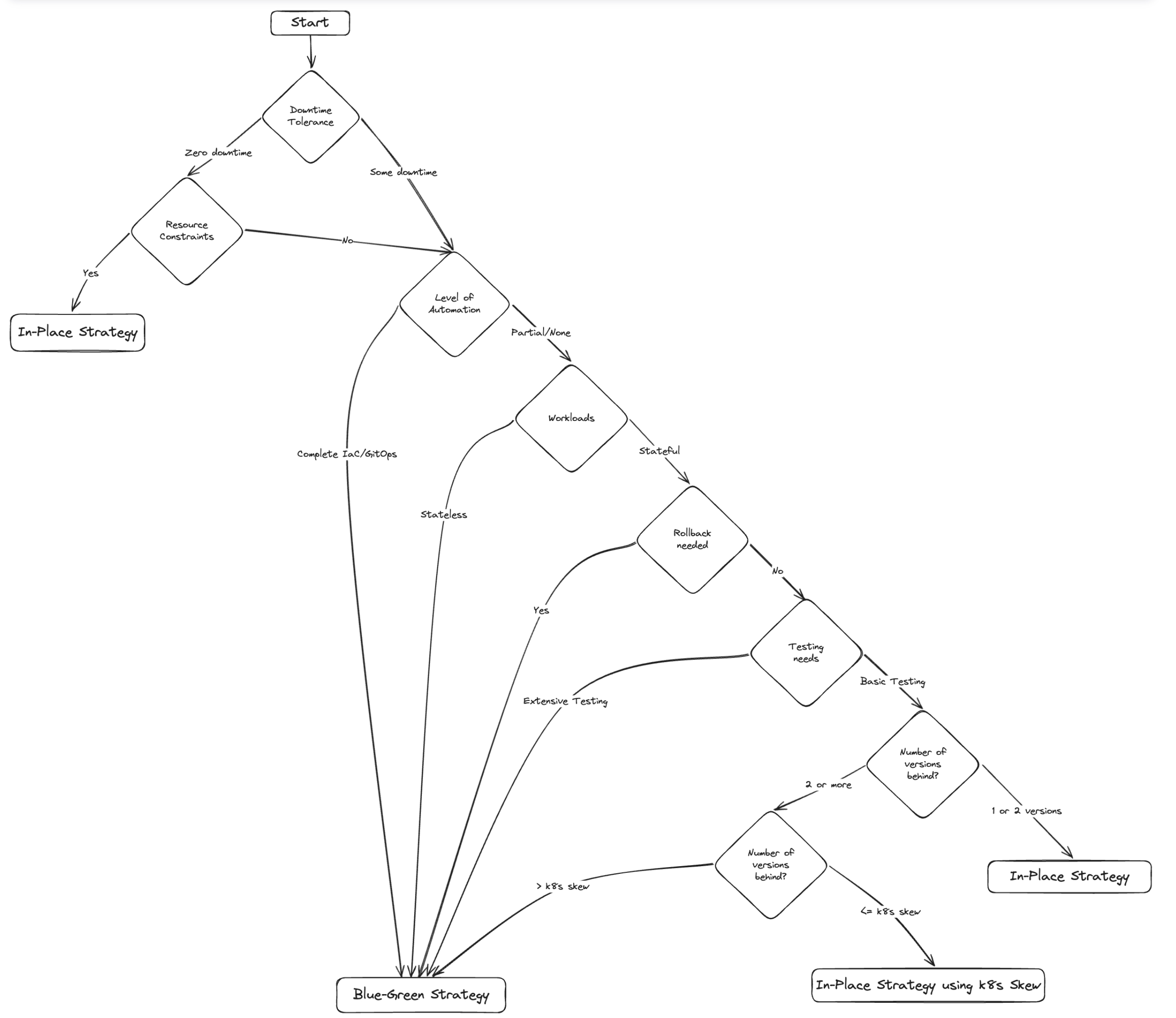
3.5 Kubernetes Version Skew를 활용한 EKS Incremental In-Place Upgrade 전략
📌 개요
Kubernetes 버전이 최신보다 여러 버전 뒤처진 고객의 경우, Version Skew 지원을 활용해
제어 플레인(Control Plane)을 먼저 업그레이드하고, 워크 노드(Worker Node) 업그레이드는 지연시킬 수 있습니다.
이를 통해 단계적으로 업그레이드를 수행하며 다운타임이나 리스크를 줄일 수 있습니다.
🔄 업그레이드 절차
1. 제어 플레인 업그레이드:
• 한 번에 한 단계씩 마이너 버전을 업그레이드합니다.
• Kubernetes는 기본적으로 워커 노드보다 최대 2개(1.28 이상에서는 3개) 버전 앞선 제어 플레인을 지원합니다.
2. 워크 노드 유지:
• 제어 플레인을 업그레이드하면서 워커 노드는 기존 버전에 유지합니다.
• 예: 제어 플레인 1.21 → 1.22 → 1.23 → 1.24, 워커 노드는 여전히 1.21.
3. 최대 Skew 초과 시 워커 노드 업그레이드:
• 제어 플레인과 워커 노드 버전 차이가 최대 허용 범위를 넘기면, 워커 노드를 업그레이드합니다.
• 예: 제어 플레인 1.24, 워커 노드 1.21 → 워커 노드를 1.22 또는 1.23으로 업그레이드.
4. 반복:
• 위 과정을 반복해 제어 플레인과 워커 노드를 원하는 버전까지 끌어올립니다.
✅ 적합한 경우
• 최신 버전과 여러 버전 차이가 나는 경우
• 상태를 가진 워크로드(Stateful workload)가 많아 워커 노드 업그레이드에 시간이 걸리는 경우
• 워커 노드 변경 없이도 제어 플레인 기능을 활용하고 싶은 경우
⚠️ 고려 사항
• 워커 노드 업그레이드 전까지 일부 기능이나 성능 개선이 제한될 수 있음
• 여러 버전을 건너뛴 워커 노드 업그레이드 시 철저한 사전 테스트 필요
• 제어 플레인과 워커 노드 버전 차이는 최소화하는 것이 안정성에 유리함
• 반드시 테스트 환경에서 사전 검증 필수
• 업그레이드 전후 모니터링 및 로깅 체계 확보 필요
📌 결론
Version Skew를 활용하면 구버전에서 시작해 점진적으로 업그레이드하면서도 안정성을 확보할 수 있습니다.
클러스터 특성과 조직의 요구사항, 리스크 수용 정도를 종합적으로 고려해 전략을 선택하고, 지속적으로 전략을 개선해 나가는 것이 중요합니다.
3.6 본 실습을 통해 얻는 것
EKS 클러스터 업그레이드는 필수적인 과정으로,
최신 Kubernetes 기능, 보안 패치, 성능 개선을 활용할 수 있게 해줍니다.
올바른 업그레이드 전략을 선택하면 다운타임을 최소화하고 리스크를 줄이며, 원활한 전환을 이끌어낼 수 있습니다.
📌 이 모듈에서 다룬 핵심 내용
- 두 가지 주요 업그레이드 전략:
- 인플레이스(In-Place) 업그레이드
- 블루-그린(Blue-Green) 업그레이드
- 각 전략의 장단점 비교 및 다운타임 허용 수준, 워크로드 복잡성, 자원 제약, 규제 요건 등을 기준으로 한 추천 시나리오 제공
💡 핵심 요점 정리
-
In-Place 업그레이드:
- 소규모 마이너 버전 업그레이드에 적합
- 다운타임 허용 수준이 낮은 경우 유리
-
Blue-Green 업그레이드:
- 상태 정보가 많은 복잡한 워크로드나 메이저 업그레이드 시에 권장
- 업그레이드 성공을 위한 계획, 테스트, 검증이 필수
- 모니터링, 로깅, 롤백 계획 마련이 중요
- 업그레이드 후에는 전략을 지속적으로 개선해야 함
📋 업그레이드 시 Best Practice
1. 클러스터 특성과 조직의 요구사항을 면밀히 분석
2. 포괄적인 테스트 및 검증 계획 수립
3. 앱 담당자, 컴플라이언스, 사용자 등 이해관계자 협업
4. IaC(Infrastructure as Code) 및 자동화 도구 활용
5. 업그레이드 후 전략 지속 개선 및 피드백 반영
📚 추가 자료
• Amazon EKS 공식 문서
• Kubernetes 공식 문서
• AWS Kubernetes 블로그
• EKS Best Practices 가이드
• EKS Workshop
4. 실습용 Blue/Green용 EKS Cluster 생성
4.1 작업절차
-
Tool (eksctl, kubectl) 설치
-
EKS 1.25 생성(Cluster Name: blue)
-
EKS 1.29 생성(Cluster Name: green)
-
VPC 와 Subnet는 신규 생성하지 않고 기존 정보 참조
-
Node Group 생성됨, SG의 경우 자동 생성 된 후 필요 시 Blue 환경 참조하여 정책 추가(예, CI/CD, Host-IPS 정책 등)
-
-
Velero 설치
- 기존 환경을 Velero 이용하여 백업
- 신규 환경에 Velero 이용하여 복구
-
트래픽 전환
- Carnary: ELB Target Group에 등록된 Instance ID 점진적으로 추가(Green)/삭제(Blue)
- Blue/Green: Route 53에 등록된 ELB CName 또는 ELB Target Group에 등록된 Instance ID 일괄 교체
4.2 Tool 설치
-
eksctl은 Amazon의 EC2용 관리형 Kubernetes 서비스인 EKS에서 클러스터를 생성하고 관리하기 위한 간단한 CLI 도구입니다.
https://docs.aws.amazon.com/ko_kr/emr/latest/EMR-on-EKS-DevelopmentGuide/setting-up-eksctl.html
# Linux (Amd64) ❯ curl --silent --location "https://github.com/weaveworks/eksctl/releases/latest/download/eksctl_$(uname -s)_amd64.tar.gz" | tar xz -C /tmp ❯ sudo mv /tmp/eksctl /usr/local/bin ❯ eksctl version 0.175.0 -
kubectl, https://docs.aws.amazon.com/ko_kr/eks/latest/userguide/install-kubectl.html
# Linux (Amd64)
❯ curl -O https://s3.us-west-2.amazonaws.com/amazon-eks/1.29.0/2024-01-04/bin/linux/amd64/kubectl
❯ chmod +x ./kubectl
❯ mkdir -p $HOME/bin && cp ./kubectl $HOME/bin/kubectl && export PATH=$HOME/bin:$PATH
❯ echo 'export PATH=$HOME/bin:$PATH' >> ~/.bashrc
❯ kubectl version --client
4.3 EKS 클러스터 생성
- EKS Blue/Green Cluster 생성 된 후 모습

Blue EKS 1.25
cluster-managed-blue-1-25.yaml
-
VPC 정보를 설정하지 않으면 신규로 생성 함.
-
본 실습 환경에서는 ap-northeast-2a와 2c AZ에 172.16.0.0/22 CIDR 대역으로 VPC와 Subnet을 자동으로 신규 생성 함
# EKS Blue 환경을 위한 eksctl용 manifests 생성 ❯ cat > cluster-managed-blue-1-25.yaml << EOF apiVersion: eksctl.io/v1alpha5 kind: ClusterConfig metadata: name: blue region: ap-northeast-2 version: '1.25' tags: Environment: dev availabilityZones: ["ap-northeast-2a", "ap-northeast-2c"] vpc: nat: gateway: Single # other options: HighlyAvailable, Disable, Single (default) cidr: 172.16.0.0/22 autoAllocateIPv6: false clusterEndpoints: publicAccess: true privateAccess: true managedNodeGroups: - name: ng1 instanceType: t3.medium minSize: 2 maxSize: 4 desiredCapacity: 2 labels: {role: biz} amiFamily: AmazonLinux2 volumeSize: 25 volumeType: gp3 volumeEncrypted: true privateNetworking: true availabilityZones: ["ap-northeast-2a", "ap-northeast-2c"] ssh: publicKeyName: martha tags: # EC2 tags required for cluster-autoscaler auto-discovery k8s.io/cluster-autoscaler/enabled: "true" k8s.io/cluster-autoscaler/blue: "owned" iam: withAddonPolicies: albIngress: true autoScaler: true # imageBuilder: true # cloudWatch: true addons: - name: vpc-cni - name: coredns - name: kube-proxy iam: withOIDC: true serviceAccounts: - metadata: name: aws-load-balancer-controller namespace: kube-system wellKnownPolicies: awsLoadBalancerController: true - metadata: name: cluster-autoscaler namespace: kube-system labels: {aws-usage: "cluster-ops"} wellKnownPolicies: autoScaler: true - metadata: name: ebs-csi-controller-sa namespace: kube-system wellKnownPolicies: ebsCSIController: true - metadata: name: efs-csi-controller-sa namespace: kube-system wellKnownPolicies: efsCSIController: true #cloudWatch: # clusterLogging: # enableTypes: ["audit", "authenticator", "controllerManager"] # # all supported types: "api", "audit", "authenticator", "controllerManager", "scheduler" # logRetentionInDays: 7 EOF -
eksctl로 Blue(v1.25)용 EKS Cluster 생성
❯ eksctl create cluster -f cluster-managed-blue-1-25.yaml 2024-03-30 17:47:40 [ℹ] eksctl version 0.175.0 2024-03-30 17:47:40 [ℹ] using region ap-northeast-2 2024-03-30 17:47:40 [ℹ] subnets for ap-northeast-2a - public:172.16.0.0/25 private:172.16.1.0/25 2024-03-30 17:47:40 [ℹ] subnets for ap-northeast-2c - public:172.16.0.128/25 private:172.16.1.128/25 2024-03-30 17:47:40 [ℹ] nodegroup "ng1" will use "" [AmazonLinux2/1.25] 2024-03-30 17:47:40 [ℹ] using EC2 key pair "martha" 2024-03-30 17:47:40 [ℹ] using Kubernetes version 1.25 2024-03-30 17:47:40 [ℹ] creating EKS cluster "blue" in "ap-northeast-2" region with managed nodes 2024-03-30 17:47:40 [ℹ] 1 nodegroup (ng1) was included (based on the include/exclude rules) 2024-03-30 17:47:40 [ℹ] will create a CloudFormation stack for cluster itself and 0 nodegroup stack(s) 2024-03-30 17:47:40 [ℹ] will create a CloudFormation stack for cluster itself and 1 managed nodegroup stack(s) 2024-03-30 17:47:40 [ℹ] if you encounter any issues, check CloudFormation console or try 'eksctl utils describe-stacks --region=ap-northeast-2 --cluster=blue' 2024-03-30 17:47:40 [ℹ] Kubernetes API endpoint access will use provided values {publicAccess=true, privateAccess=true} for cluster "blue" in "ap-northeast-2" 2024-03-30 17:47:40 [ℹ] CloudWatch logging will not be enabled for cluster "blue" in "ap-northeast-2" 2024-03-30 17:47:40 [ℹ] you can enable it with 'eksctl utils update-cluster-logging --enable-types={SPECIFY-YOUR-LOG-TYPES-HERE (e.g. all)} --region=ap-northeast-2 --cluster=blue' 2024-03-30 17:47:40 [ℹ] 2 sequential tasks: { create cluster control plane "blue", 2 sequential sub-tasks: { 5 sequential sub-tasks: { wait for control plane to become ready, associate IAM OIDC provider, 4 parallel sub-tasks: { 2 sequential sub-tasks: { create IAM role for serviceaccount "kube-system/aws-load-balancer-controller", create serviceaccount "kube-system/aws-load-balancer-controller", }, 2 sequential sub-tasks: { create IAM role for serviceaccount "kube-system/cluster-autoscaler", create serviceaccount "kube-system/cluster-autoscaler", }, 2 sequential sub-tasks: { create IAM role for serviceaccount "kube-system/ebs-csi-controller-sa", create serviceaccount "kube-system/ebs-csi-controller-sa", }, 2 sequential sub-tasks: { create IAM role for serviceaccount "kube-system/efs-csi-controller-sa", create serviceaccount "kube-system/efs-csi-controller-sa", }, }, restart daemonset "kube-system/aws-node", 1 task: { create addons }, }, create managed nodegroup "ng1", } } 2024-03-30 17:47:40 [ℹ] building cluster stack "eksctl-blue-cluster" 2024-03-30 17:47:40 [ℹ] deploying stack "eksctl-blue-cluster" 2024-03-30 17:48:10 [ℹ] waiting for CloudFormation stack "eksctl-blue-cluster" 2024-03-30 17:48:40 [ℹ] waiting for CloudFormation stack "eksctl-blue-cluster" 2024-03-30 17:49:40 [ℹ] waiting for CloudFormation stack "eksctl-blue-cluster" 2024-03-30 17:50:41 [ℹ] waiting for CloudFormation stack "eksctl-blue-cluster" 2024-03-30 17:51:41 [ℹ] waiting for CloudFormation stack "eksctl-blue-cluster" 2024-03-30 17:52:41 [ℹ] waiting for CloudFormation stack "eksctl-blue-cluster" 2024-03-30 17:53:41 [ℹ] waiting for CloudFormation stack "eksctl-blue-cluster" 2024-03-30 17:54:41 [ℹ] waiting for CloudFormation stack "eksctl-blue-cluster" 2024-03-30 17:55:46 [ℹ] waiting for CloudFormation stack "eksctl-blue-cluster" 2024-03-30 17:56:46 [ℹ] waiting for CloudFormation stack "eksctl-blue-cluster" 2024-03-30 17:58:48 [ℹ] building iamserviceaccount stack "eksctl-blue-addon-iamserviceaccount-kube-system-ebs-csi-controller-sa" 2024-03-30 17:58:48 [ℹ] building iamserviceaccount stack "eksctl-blue-addon-iamserviceaccount-kube-system-aws-load-balancer-controller" 2024-03-30 17:58:48 [ℹ] building iamserviceaccount stack "eksctl-blue-addon-iamserviceaccount-kube-system-cluster-autoscaler" 2024-03-30 17:58:48 [ℹ] building iamserviceaccount stack "eksctl-blue-addon-iamserviceaccount-kube-system-efs-csi-controller-sa" 2024-03-30 17:58:49 [ℹ] deploying stack "eksctl-blue-addon-iamserviceaccount-kube-system-efs-csi-controller-sa" 2024-03-30 17:58:49 [ℹ] deploying stack "eksctl-blue-addon-iamserviceaccount-kube-system-ebs-csi-controller-sa" 2024-03-30 17:58:49 [ℹ] deploying stack "eksctl-blue-addon-iamserviceaccount-kube-system-aws-load-balancer-controller" 2024-03-30 17:58:49 [ℹ] deploying stack "eksctl-blue-addon-iamserviceaccount-kube-system-cluster-autoscaler" 2024-03-30 17:58:49 [ℹ] waiting for CloudFormation stack "eksctl-blue-addon-iamserviceaccount-kube-system-efs-csi-controller-sa" 2024-03-30 17:58:49 [ℹ] waiting for CloudFormation stack "eksctl-blue-addon-iamserviceaccount-kube-system-aws-load-balancer-controller" 2024-03-30 17:58:49 [ℹ] waiting for CloudFormation stack "eksctl-blue-addon-iamserviceaccount-kube-system-cluster-autoscaler" 2024-03-30 17:58:49 [ℹ] waiting for CloudFormation stack "eksctl-blue-addon-iamserviceaccount-kube-system-ebs-csi-controller-sa" 2024-03-30 17:59:19 [ℹ] waiting for CloudFormation stack "eksctl-blue-addon-iamserviceaccount-kube-system-ebs-csi-controller-sa" 2024-03-30 17:59:19 [ℹ] waiting for CloudFormation stack "eksctl-blue-addon-iamserviceaccount-kube-system-efs-csi-controller-sa" 2024-03-30 17:59:19 [ℹ] waiting for CloudFormation stack "eksctl-blue-addon-iamserviceaccount-kube-system-aws-load-balancer-controller" 2024-03-30 17:59:19 [ℹ] waiting for CloudFormation stack "eksctl-blue-addon-iamserviceaccount-kube-system-cluster-autoscaler" 2024-03-30 17:59:58 [ℹ] waiting for CloudFormation stack "eksctl-blue-addon-iamserviceaccount-kube-system-aws-load-balancer-controller" 2024-03-30 17:59:58 [ℹ] created serviceaccount "kube-system/aws-load-balancer-controller" 2024-03-30 18:00:02 [ℹ] waiting for CloudFormation stack "eksctl-blue-addon-iamserviceaccount-kube-system-ebs-csi-controller-sa" 2024-03-30 18:00:02 [ℹ] created serviceaccount "kube-system/ebs-csi-controller-sa" 2024-03-30 18:00:11 [ℹ] waiting for CloudFormation stack "eksctl-blue-addon-iamserviceaccount-kube-system-efs-csi-controller-sa" 2024-03-30 18:00:11 [ℹ] created serviceaccount "kube-system/efs-csi-controller-sa" 2024-03-30 18:00:19 [ℹ] waiting for CloudFormation stack "eksctl-blue-addon-iamserviceaccount-kube-system-cluster-autoscaler" 2024-03-30 18:00:19 [ℹ] created serviceaccount "kube-system/cluster-autoscaler" 2024-03-30 18:00:19 [ℹ] daemonset "kube-system/aws-node" restarted 2024-03-30 18:00:20 [ℹ] creating role using recommended policies 2024-03-30 18:00:20 [ℹ] deploying stack "eksctl-blue-addon-vpc-cni" 2024-03-30 18:00:20 [ℹ] waiting for CloudFormation stack "eksctl-blue-addon-vpc-cni" 2024-03-30 18:00:51 [ℹ] waiting for CloudFormation stack "eksctl-blue-addon-vpc-cni" 2024-03-30 18:00:51 [ℹ] creating addon 2024-03-30 18:01:01 [ℹ] addon "vpc-cni" active 2024-03-30 18:01:02 [ℹ] building managed nodegroup stack "eksctl-blue-nodegroup-ng1" 2024-03-30 18:01:02 [ℹ] deploying stack "eksctl-blue-nodegroup-ng1" 2024-03-30 18:01:03 [ℹ] waiting for CloudFormation stack "eksctl-blue-nodegroup-ng1" 2024-03-30 18:01:33 [ℹ] waiting for CloudFormation stack "eksctl-blue-nodegroup-ng1" 2024-03-30 18:02:19 [ℹ] waiting for CloudFormation stack "eksctl-blue-nodegroup-ng1" 2024-03-30 18:03:01 [ℹ] waiting for CloudFormation stack "eksctl-blue-nodegroup-ng1" 2024-03-30 18:04:48 [ℹ] waiting for CloudFormation stack "eksctl-blue-nodegroup-ng1" 2024-03-30 18:04:48 [ℹ] waiting for the control plane to become ready 2024-03-30 18:04:49 [✔] saved kubeconfig as "/Users/sjkim/.kube/config" 2024-03-30 18:04:49 [ℹ] no tasks 2024-03-30 18:04:49 [✔] all EKS cluster resources for "blue" have been created 2024-03-30 18:04:49 [ℹ] nodegroup "ng1" has 2 node(s) 2024-03-30 18:04:49 [ℹ] node "ip-172-16-1-245.ap-northeast-2.compute.internal" is ready 2024-03-30 18:04:49 [ℹ] node "ip-172-16-1-7.ap-northeast-2.compute.internal" is ready 2024-03-30 18:04:49 [ℹ] waiting for at least 2 node(s) to become ready in "ng1" 2024-03-30 18:04:49 [ℹ] nodegroup "ng1" has 2 node(s) 2024-03-30 18:04:49 [ℹ] node "ip-172-16-1-245.ap-northeast-2.compute.internal" is ready 2024-03-30 18:04:49 [ℹ] node "ip-172-16-1-7.ap-northeast-2.compute.internal" is ready 2024-03-30 18:04:51 [ℹ] no recommended policies found, proceeding without any IAM 2024-03-30 18:04:51 [ℹ] creating addon 2024-03-30 18:05:01 [ℹ] addon "coredns" active 2024-03-30 18:05:01 [ℹ] no recommended policies found, proceeding without any IAM 2024-03-30 18:05:01 [ℹ] creating addon 2024-03-30 18:05:12 [ℹ] addon "kube-proxy" active 2024-03-30 18:05:12 [ℹ] kubectl command should work with "/Users/sjkim/.kube/config", try 'kubectl get nodes' 2024-03-30 18:05:12 [✔] EKS cluster "blue" in "ap-northeast-2" region is ready -
Blue EKS Cluster 생성 결과 확인
❯ eksctl get clusters NAME REGION EKSCTL CREATED blue ap-northeast-2 True ❯ eksctl get nodegroup --cluster blue CLUSTER NODEGROUP STATUS CREATED MIN SIZE MAX SIZE DESIRED CAPACITY INSTANCE TYPE IMAGE ID ASG NAME TYPE blue ng1 ACTIVE 2024-03-30T09:01:30Z 2 4 2 t3.medium AL2_x86_64 eks-ng1-56c7474b-d293-36e4-9a29-d3941cb4b3f7 managed ❯ kubectl get node NAME STATUS ROLES AGE VERSION ip-172-16-1-245.ap-northeast-2.compute.internal Ready <none> 18m v1.25.16-eks-5e0fdde ip-172-16-1-7.ap-northeast-2.compute.internal Ready <none> 18m v1.25.16-eks-5e0fdde ❯ kubectl get pod -A NAMESPACE NAME READY STATUS RESTARTS AGE kube-system aws-node-46t6x 2/2 Running 0 19m kube-system aws-node-bhjsx 2/2 Running 0 19m kube-system coredns-5f6db7fbbb-qt45q 1/1 Running 0 27m kube-system coredns-5f6db7fbbb-wlmlz 1/1 Running 0 27m kube-system kube-proxy-cntrx 1/1 Running 0 19m kube-system kube-proxy-m2vcb 1/1 Running 0 19m -
EBS-CSI-Driver 설치, https://docs.aws.amazon.com/ko_kr/eks/latest/userguide/managing-ebs-csi.html
- 본 실습환경에서 Velero 이용하여 EBS용 pv 볼륨도 백업/복구 됨을 시연하기 위해 EBS-CSI-Driver도 추가 설치 하였음
# aws-ebs-csi-driver 지원되는 버전 확인
❯ aws eks describe-addon-versions --addon-name aws-ebs-csi-driver

# role-arn은 위 eksctl로 cluster 생성 시 자동적으로 생성된 Blue의 Role을 IAM > Roles에서 확인 후 지정하였음
❯ eksctl create addon --name aws-ebs-csi-driver --cluster blue --service-account-role-arn arn:aws:iam::123456789012:role/eksctl-blue-addon-iamserviceaccount-kube-syst-Role1-HLEGpNUN8lPV --force

2024-03-31 00:00:16 [ℹ]  Kubernetes version "1.25" in use by cluster "blue"
2024-03-31 00:00:16 [ℹ]  using provided ServiceAccountRoleARN "arn:aws:iam::123456789012:role/eksctl-blue-addon-iamserviceaccount-kube-syst-Role1-HLEGpNUN8lPV"
2024-03-31 00:00:16 [ℹ]  creating addon

❯ eksctl get addon --name aws-ebs-csi-driver --cluster blue
eksctl get addon --name aws-ebs-csi-driver --cluster blue
2024-03-31 00:01:40 [ℹ]  Kubernetes version "1.25" in use by cluster "blue"
2024-03-31 00:01:40 [ℹ]  to see issues for an addon run `eksctl get addon --name <addon-name> --cluster <cluster-name>`
NAME                 VERSION                 STATUS  ISSUES  IAMROLE                                                                                         UPDATE AVAILABLE        CONFIGURATION VALUES
aws-ebs-csi-driver      v1.29.1-eksbuild.1      ACTIVE  0       arn:aws:iam::123456789012:role/eksctl-blue-addon-iamserviceaccount-kube-syst-Role1-HLEGpNUN8lPV

# gp3용 StorageClass 생성
❯ cat > storageclass.yaml << EOF
apiVersion: storage.k8s.io/v1
kind: StorageClass
metadata:
  annotations:
    storageclass.kubernetes.io/is-default-class: "true"
  name: ebs-sc
provisioner: ebs.csi.aws.com
volumeBindingMode: WaitForFirstConsumer
parameters:
  csi.storage.k8s.io/fstype: xfs
  type: gp3
  encrypted: "true"
allowedTopologies:
- matchLabelExpressions:
  - key: topology.ebs.csi.aws.com/zone
    values:
    - ap-northeast-2a
    - ap-northeast-2c
EOF

❯ kubectl apply -f storageclass.yaml
❯ kubectl get sc
NAME               PROVISIONER       RECLAIMPOLICY   VOLUMEBINDINGMODE      ALLOWVOLUMEEXPANSION   AGE
ebs-sc (default)   ebs.csi.aws.com   Delete          WaitForFirstConsumer   false                  10m
Green EKS 1.29
cluster-managed-green-1-29.yaml
-
Green의 경우 VPC를 신규 생성하지 않고, 위 Blue에서 기 생성된 Subnet인 Private WorkerNode가 생성될 Subnet만 지정 함
❯ cat > cluster-managed-green-1-29.yaml << EOF apiVersion: eksctl.io/v1alpha5 kind: ClusterConfig metadata: name: green region: ap-northeast-2 version: '1.29' tags: Environment: dev #availabilityZones: ["ap-northeast-2a", "ap-northeast-2c"] vpc: subnets: private: ap-northeast-2a: {id: subnet-07ba6321c6e2c894d} ap-northeast-2c: {id: subnet-0af465d4840638973} clusterEndpoints: publicAccess: true privateAccess: true managedNodeGroups: - name: ng1 instanceType: t3.medium minSize: 2 maxSize: 4 desiredCapacity: 2 labels: {role: biz} amiFamily: AmazonLinux2 volumeSize: 25 volumeType: gp3 volumeEncrypted: true privateNetworking: true availabilityZones: ["ap-northeast-2a", "ap-northeast-2c"] ssh: publicKeyName: martha tags: # EC2 tags required for cluster-autoscaler auto-discovery k8s.io/cluster-autoscaler/enabled: "true" k8s.io/cluster-autoscaler/green: "owned" iam: withAddonPolicies: albIngress: true autoScaler: true # imageBuilder: true # cloudWatch: true addons: - name: vpc-cni - name: coredns - name: kube-proxy iam: withOIDC: true serviceAccounts: - metadata: name: aws-load-balancer-controller namespace: kube-system wellKnownPolicies: awsLoadBalancerController: true - metadata: name: cluster-autoscaler namespace: kube-system labels: {aws-usage: "cluster-ops"} wellKnownPolicies: autoScaler: true - metadata: name: ebs-csi-controller-sa namespace: kube-system wellKnownPolicies: ebsCSIController: true - metadata: name: efs-csi-controller-sa namespace: kube-system wellKnownPolicies: efsCSIController: true #cloudWatch: # clusterLogging: # enableTypes: ["audit", "authenticator", "controllerManager"] # # all supported types: "api", "audit", "authenticator", "controllerManager", "scheduler" # logRetentionInDays: 7 EOF -
eksctl로 Green(v1.29)용 EKS Cluster 생성
❯ eksctl create cluster -f cluster-managed-green-1-29.yaml 2024-03-30 18:34:05 [ℹ] eksctl version 0.175.0 2024-03-30 18:34:05 [ℹ] using region ap-northeast-2 2024-03-30 18:34:05 [✔] using existing VPC (vpc-0013f445005821fb3) and subnets (private:map[ap-northeast-2a:{subnet-07ba6321c6e2c894d ap-northeast-2a 172.16.1.0/25 0 } ap-northeast-2c:{subnet-0af465d4840638973 ap-northeast-2c 172.16.1.128/25 0 }] public:map[]) 2024-03-30 18:34:05 [!] custom VPC/subnets will be used; if resulting cluster doesn't function as expected, make sure to review the configuration of VPC/subnets 2024-03-30 18:34:05 [ℹ] nodegroup "ng1" will use "" [AmazonLinux2/1.29] 2024-03-30 18:34:05 [ℹ] using EC2 key pair "martha" 2024-03-30 18:34:05 [ℹ] using Kubernetes version 1.29 2024-03-30 18:34:05 [ℹ] creating EKS cluster "green" in "ap-northeast-2" region with managed nodes 2024-03-30 18:34:05 [ℹ] 1 nodegroup (ng1) was included (based on the include/exclude rules) 2024-03-30 18:34:05 [ℹ] will create a CloudFormation stack for cluster itself and 0 nodegroup stack(s) 2024-03-30 18:34:05 [ℹ] will create a CloudFormation stack for cluster itself and 1 managed nodegroup stack(s) 2024-03-30 18:34:05 [ℹ] if you encounter any issues, check CloudFormation console or try 'eksctl utils describe-stacks --region=ap-northeast-2 --cluster=green' 2024-03-30 18:34:05 [ℹ] Kubernetes API endpoint access will use provided values {publicAccess=true, privateAccess=true} for cluster "green" in "ap-northeast-2" 2024-03-30 18:34:05 [ℹ] CloudWatch logging will not be enabled for cluster "green" in "ap-northeast-2" 2024-03-30 18:34:05 [ℹ] you can enable it with 'eksctl utils update-cluster-logging --enable-types={SPECIFY-YOUR-LOG-TYPES-HERE (e.g. all)} --region=ap-northeast-2 --cluster=green' 2024-03-30 18:34:05 [ℹ] 2 sequential tasks: { create cluster control plane "green", 2 sequential sub-tasks: { 5 sequential sub-tasks: { wait for control plane to become ready, associate IAM OIDC provider, 4 parallel sub-tasks: { 2 sequential sub-tasks: { create IAM role for serviceaccount "kube-system/aws-load-balancer-controller", create serviceaccount "kube-system/aws-load-balancer-controller", }, 2 sequential sub-tasks: { create IAM role for serviceaccount "kube-system/cluster-autoscaler", create serviceaccount "kube-system/cluster-autoscaler", }, 2 sequential sub-tasks: { create IAM role for serviceaccount "kube-system/ebs-csi-controller-sa", create serviceaccount "kube-system/ebs-csi-controller-sa", }, 2 sequential sub-tasks: { create IAM role for serviceaccount "kube-system/efs-csi-controller-sa", create serviceaccount "kube-system/efs-csi-controller-sa", }, }, restart daemonset "kube-system/aws-node", 1 task: { create addons }, }, create managed nodegroup "ng1", } } 2024-03-30 18:34:05 [ℹ] building cluster stack "eksctl-green-cluster" 2024-03-30 18:34:06 [ℹ] deploying stack "eksctl-green-cluster" 2024-03-30 18:34:36 [ℹ] waiting for CloudFormation stack "eksctl-green-cluster" 2024-03-30 18:35:06 [ℹ] waiting for CloudFormation stack "eksctl-green-cluster" 2024-03-30 18:36:06 [ℹ] waiting for CloudFormation stack "eksctl-green-cluster" 2024-03-30 18:37:06 [ℹ] waiting for CloudFormation stack "eksctl-green-cluster" 2024-03-30 18:38:06 [ℹ] waiting for CloudFormation stack "eksctl-green-cluster" 2024-03-30 18:39:07 [ℹ] waiting for CloudFormation stack "eksctl-green-cluster" 2024-03-30 18:40:07 [ℹ] waiting for CloudFormation stack "eksctl-green-cluster" 2024-03-30 18:41:07 [ℹ] waiting for CloudFormation stack "eksctl-green-cluster" 2024-03-30 18:42:07 [ℹ] waiting for CloudFormation stack "eksctl-green-cluster" 2024-03-30 18:43:07 [ℹ] waiting for CloudFormation stack "eksctl-green-cluster" 2024-03-30 18:45:09 [ℹ] building iamserviceaccount stack "eksctl-green-addon-iamserviceaccount-kube-system-cluster-autoscaler" 2024-03-30 18:45:09 [ℹ] building iamserviceaccount stack "eksctl-green-addon-iamserviceaccount-kube-system-ebs-csi-controller-sa" 2024-03-30 18:45:09 [ℹ] building iamserviceaccount stack "eksctl-green-addon-iamserviceaccount-kube-system-efs-csi-controller-sa" 2024-03-30 18:45:09 [ℹ] building iamserviceaccount stack "eksctl-green-addon-iamserviceaccount-kube-system-aws-load-balancer-controller" 2024-03-30 18:45:09 [ℹ] deploying stack "eksctl-green-addon-iamserviceaccount-kube-system-cluster-autoscaler" 2024-03-30 18:45:09 [ℹ] deploying stack "eksctl-green-addon-iamserviceaccount-kube-system-ebs-csi-controller-sa" 2024-03-30 18:45:09 [ℹ] deploying stack "eksctl-green-addon-iamserviceaccount-kube-system-efs-csi-controller-sa" 2024-03-30 18:45:09 [ℹ] waiting for CloudFormation stack "eksctl-green-addon-iamserviceaccount-kube-system-cluster-autoscaler" 2024-03-30 18:45:09 [ℹ] waiting for CloudFormation stack "eksctl-green-addon-iamserviceaccount-kube-system-ebs-csi-controller-sa" 2024-03-30 18:45:09 [ℹ] waiting for CloudFormation stack "eksctl-green-addon-iamserviceaccount-kube-system-efs-csi-controller-sa" 2024-03-30 18:45:09 [ℹ] deploying stack "eksctl-green-addon-iamserviceaccount-kube-system-aws-load-balancer-controller" 2024-03-30 18:45:09 [ℹ] waiting for CloudFormation stack "eksctl-green-addon-iamserviceaccount-kube-system-aws-load-balancer-controller" 2024-03-30 18:45:39 [ℹ] waiting for CloudFormation stack "eksctl-green-addon-iamserviceaccount-kube-system-cluster-autoscaler" 2024-03-30 18:45:39 [ℹ] waiting for CloudFormation stack "eksctl-green-addon-iamserviceaccount-kube-system-ebs-csi-controller-sa" 2024-03-30 18:45:39 [ℹ] waiting for CloudFormation stack "eksctl-green-addon-iamserviceaccount-kube-system-efs-csi-controller-sa" 2024-03-30 18:45:40 [ℹ] waiting for CloudFormation stack "eksctl-green-addon-iamserviceaccount-kube-system-aws-load-balancer-controller" 2024-03-30 18:46:10 [ℹ] waiting for CloudFormation stack "eksctl-green-addon-iamserviceaccount-kube-system-ebs-csi-controller-sa" 2024-03-30 18:46:10 [ℹ] created serviceaccount "kube-system/ebs-csi-controller-sa" 2024-03-30 18:46:11 [ℹ] waiting for CloudFormation stack "eksctl-green-addon-iamserviceaccount-kube-system-aws-load-balancer-controller" 2024-03-30 18:46:11 [ℹ] created serviceaccount "kube-system/aws-load-balancer-controller" 2024-03-30 18:46:19 [ℹ] waiting for CloudFormation stack "eksctl-green-addon-iamserviceaccount-kube-system-cluster-autoscaler" 2024-03-30 18:46:19 [ℹ] created serviceaccount "kube-system/cluster-autoscaler" 2024-03-30 18:46:29 [ℹ] waiting for CloudFormation stack "eksctl-green-addon-iamserviceaccount-kube-system-efs-csi-controller-sa" 2024-03-30 18:46:29 [ℹ] created serviceaccount "kube-system/efs-csi-controller-sa" 2024-03-30 18:46:29 [ℹ] daemonset "kube-system/aws-node" restarted 2024-03-30 18:46:30 [ℹ] creating role using recommended policies 2024-03-30 18:46:30 [ℹ] deploying stack "eksctl-green-addon-vpc-cni" 2024-03-30 18:46:30 [ℹ] waiting for CloudFormation stack "eksctl-green-addon-vpc-cni" 2024-03-30 18:47:00 [ℹ] waiting for CloudFormation stack "eksctl-green-addon-vpc-cni" 2024-03-30 18:47:00 [ℹ] creating addon 2024-03-30 18:47:11 [ℹ] addon "vpc-cni" active 2024-03-30 18:47:12 [ℹ] building managed nodegroup stack "eksctl-green-nodegroup-ng1" 2024-03-30 18:47:12 [ℹ] deploying stack "eksctl-green-nodegroup-ng1" 2024-03-30 18:47:12 [ℹ] waiting for CloudFormation stack "eksctl-green-nodegroup-ng1" 2024-03-30 18:47:42 [ℹ] waiting for CloudFormation stack "eksctl-green-nodegroup-ng1" 2024-03-30 18:48:43 [ℹ] waiting for CloudFormation stack "eksctl-green-nodegroup-ng1" 2024-03-30 18:49:43 [ℹ] waiting for CloudFormation stack "eksctl-green-nodegroup-ng1" 2024-03-30 18:51:26 [ℹ] waiting for CloudFormation stack "eksctl-green-nodegroup-ng1" 2024-03-30 18:51:26 [ℹ] waiting for the control plane to become ready 2024-03-30 18:51:26 [✔] saved kubeconfig as "/Users/sjkim/.kube/config" 2024-03-30 18:51:26 [ℹ] no tasks 2024-03-30 18:51:26 [✔] all EKS cluster resources for "green" have been created 2024-03-30 18:51:26 [ℹ] nodegroup "ng1" has 2 node(s) 2024-03-30 18:51:26 [ℹ] node "ip-172-16-1-116.ap-northeast-2.compute.internal" is ready 2024-03-30 18:51:26 [ℹ] node "ip-172-16-1-138.ap-northeast-2.compute.internal" is ready 2024-03-30 18:51:26 [ℹ] waiting for at least 2 node(s) to become ready in "ng1" 2024-03-30 18:51:26 [ℹ] nodegroup "ng1" has 2 node(s) 2024-03-30 18:51:26 [ℹ] node "ip-172-16-1-116.ap-northeast-2.compute.internal" is ready 2024-03-30 18:51:26 [ℹ] node "ip-172-16-1-138.ap-northeast-2.compute.internal" is ready 2024-03-30 18:51:28 [ℹ] no recommended policies found, proceeding without any IAM 2024-03-30 18:51:28 [ℹ] creating addon 2024-03-30 18:51:38 [ℹ] addon "coredns" active 2024-03-30 18:51:38 [ℹ] no recommended policies found, proceeding without any IAM 2024-03-30 18:51:38 [ℹ] creating addon 2024-03-30 18:51:49 [ℹ] addon "kube-proxy" active 2024-03-30 18:51:50 [ℹ] kubectl command should work with "/Users/sjkim/.kube/config", try 'kubectl get nodes' 2024-03-30 18:51:50 [✔] EKS cluster "green" in "ap-northeast-2" region is ready -
Green EKS Cluster 생성 결과 확인
❯ eksctl get clusters NAME REGION EKSCTL CREATED blue ap-northeast-2 True green ap-northeast-2 True ❯ eksctl get nodegroup --cluster green CLUSTER NODEGROUP STATUS CREATED MIN SIZE MAX SIZE DESIRED CAPACITY INSTANCE TYPE IMAGE ID ASG NAME TYPE green ng1 ACTIVE 2024-03-30T09:47:41Z 2 4 2 t3.medium AL2_x86_64 eks-ng1-bec74760-f313-55d5-4e61-c91ffbb7a283 managed ❯ kubectl get node NAME STATUS ROLES AGE VERSION ip-172-16-1-116.ap-northeast-2.compute.internal Ready <none> 11m v1.29.0-eks-5e0fdde ip-172-16-1-138.ap-northeast-2.compute.internal Ready <none> 11m v1.29.0-eks-5e0fdde ❯ kubectl get pod -A NAMESPACE NAME READY STATUS RESTARTS AGE kube-system aws-node-pjpqc 2/2 Running 0 11m kube-system aws-node-tnqjv 2/2 Running 0 11m kube-system coredns-f94fb47d9-x46vl 1/1 Running 0 19m kube-system coredns-f94fb47d9-x6jmz 1/1 Running 0 19m kube-system kube-proxy-4wtwx 1/1 Running 0 11m kube-system kube-proxy-psgx5 1/1 Running 0 11m -
EBS-CSI-Driver 설치, https://docs.aws.amazon.com/ko_kr/eks/latest/userguide/managing-ebs-csi.html
❯ aws eks describe-addon-versions --addon-name aws-ebs-csi-driver

❯ eksctl create addon --name aws-ebs-csi-driver --cluster green --service-account-role-arn arn:aws:iam::123456789012:role/eksctl-green-addon-iamserviceaccount-kube-sys-Role1-c2xT1GoBM4KR --force

eksctl create addon --name aws-ebs-csi-driver --cluster green --service-account-role-arn arn:aws:iam::123456789012:role/eksctl-green-addon-iamserviceaccount-kube-sys-Role1-c2xT1GoBM4KR --force
2024-03-31 00:11:01 [ℹ]  Kubernetes version "1.29" in use by cluster "green"
2024-03-31 00:11:02 [ℹ]  using provided ServiceAccountRoleARN "arn:aws:iam::123456789012:role/eksctl-green-addon-iamserviceaccount-kube-sys-Role1-c2xT1GoBM4KR"
2024-03-31 00:11:02 [ℹ]  creating addon

❯ eksctl get addon --name aws-ebs-csi-driver --cluster green
2024-03-31 00:11:38 [ℹ]  Kubernetes version "1.29" in use by cluster "green"
2024-03-31 00:11:38 [ℹ]  to see issues for an addon run `eksctl get addon --name <addon-name> --cluster <cluster-name>`
NAME                 VERSION                 STATUS          ISSUES  IAMROLE                                                                                         UPDATE AVAILABLE        CONFIGURATION VALUES
aws-ebs-csi-driver      v1.29.1-eksbuild.1      CREATING        0       arn:aws:iam::123456789012:role/eksctl-green-addon-iamserviceaccount-kube-sys-Role1-c2xT1GoBM4KR

❯ cat > storageclass.yaml << EOF
apiVersion: storage.k8s.io/v1
kind: StorageClass
metadata:
  annotations:
    storageclass.kubernetes.io/is-default-class: "true"
  name: ebs-sc
provisioner: ebs.csi.aws.com
volumeBindingMode: WaitForFirstConsumer
parameters:
  csi.storage.k8s.io/fstype: xfs
  type: gp3
  encrypted: "true"
allowedTopologies:
- matchLabelExpressions:
  - key: topology.ebs.csi.aws.com/zone
    values:
    - ap-northeast-2a
    - ap-northeast-2c
EOF

❯ kubectl apply -f storageclass.yaml

❯ kubectl get sc
NAME               PROVISIONER       RECLAIMPOLICY   VOLUMEBINDINGMODE      ALLOWVOLUMEEXPANSION   AGE
ebs-sc (default)   ebs.csi.aws.com   Delete          WaitForFirstConsumer   false                  10m
Blue와 Green Cluster 전환을 용이하기 위한 Alias 설정
kubeconfig 파일 생성 & Context 전환 방법
-
kubeconfig 파일 생성(업데이트)
## Blue ❯ aws eks update-kubeconfig --name blue --region ap-northeast-2 Added new context arn:aws:eks:ap-northeast-2:123456789012:cluster/blue to /Users/sjkim/.kube/config ❯ kubectl config current-context arn:aws:eks:ap-northeast-2:123456789012:cluster/blue ❯ cp ~/.kube/config ~/.kube/config-blue-1-25 ## Green ❯ aws eks update-kubeconfig --name green --region ap-northeast-2 Added new context arn:aws:eks:ap-northeast-2:123456789012:cluster/green to /Users/sjkim/.kube/config ❯ kubectl config current-context arn:aws:eks:ap-northeast-2:123456789012:cluster/green ❯ cp ~/.kube/config ~/.kube/config-green-1-29 -
kubeconfig 파일 업데이트 후 내용
❯ cat ~/.kube/config apiVersion: v1 clusters: - cluster: certificate-authority-data: LS0tLS1CRUdJTiBDRVJUSUZJQ0FURS0tLS0tCk1JSURCVENDQWUyZ0F3SUJBZ0lJQ0xjL2tNVzFjdk13RFFZSktvWklodmNOQVFFTEJRQXdGVEVUTUJFR0ExVUUKQXhNS2EzVmlaWEp1WlhSbGN6QWVGdzB5TkRBek16QXdPRFEzTXpKYUZ3MHpOREF6TWpnd09EVXlNekphTUJVeApFekFSQmdOVkJBTVRDbXQxWW1WeWJtVjBaWE13Z2dFaU1BMEdDU3FHU0liM0RRRUJBUVVBQTRJQkR3QXdnZ0VLCkFvSUJBUURPRXhsaDY3ZDJJemtweFI3WWdhekErakE1S0VKTjN2Y3orNkNyZ09TYmFLV0Q2YW5iUDFCT2dnZngKb1JFZERBNy9ueWhKS3pabnI3WjFSUXE2NWlLc2k4V3dRbU84SjFQeWlyZzJFTTlLZVdJNHRnNWRPdWtoMWFEdwpQc0xlbzB6bmt3Z2xXQldxalRCSUVqUXYvN05SejZ3RDQrVFpWdTVtaHU1U2pLb3RVUzdqcCsrTTZCV2F1eG9oCkI5UFpTeVg5VGVBV2xxQ1RvSzFUMUhWMmZmRndUWWdLeUJhQU5adU5wUTcvMDRONU1XcHlGbHVWc3hkTGNlMUEKaWNZdTdja0E4ZHIrNDBreW1QdklFcXBScGxBNVc2MU1oNHA2bUNQSjVBQXBUa0pNNzhWUVlkV3RrRWJkc0dCUQpXbllCL08wV1ZMejl6bVo2d0RqdXRWN0cyMnYxQWdNQkFBR2pXVEJYTUE0R0ExVWREd0VCL3dRRUF3SUNwREFQCkJnTlZIUk1CQWY4RUJUQURBUUgvTUIwR0ExVWREZ1FXQkJRQ0ZLSWZGYmJWS21ILzV5MmRUUXRjK2pXZjF6QVYKQmdOVkhSRUVEakFNZ2dwcmRXSmxjbTVsZEdWek1BMEdDU3FHU0liM0RRRUJDd1VBQTRJQkFRQjBsOURXNVQyZwpGd0dqeVdsekV6MzhETUlJNEhIM0F6K29IVGhjTnE4dGM3M2h2VjJXbmplcHFxNTFnQm1INFJQM05rZ0U2bDJGCmlIZjMwRVBrdzhTZkZWUE5abHhUaEQvTFQ3Y3grYkhkekpmd1d2L0VOV3QwWUMwb2UwbDUwanI0MGlmM0piWUQKOGFPR2V0R3JVaTBvTXRRM2ZiSmRlRzIzd2wyZ3k2ZWFSUWlHdFRiZnZ1NklhOGdUZnYrbUFYVFZaekQzYzM5VwpMTFN5bTZHK1ZicDRScEtubFl5SkhRR1o1NFFxSURvSk9BSmZJWnFaU0NPZGJ5T1VDcG9MVm5WajRhdDFNNUw4Ck83alhFaUp6ZDBnYk1MSGJtL2d2QVplK2JVUzhzM1hMNm52TmJLRnJURTVXcUVySDVVelFQWUxhVWN4RUlQMlYKdWJxRUJNaVFhK2RQCi0tLS0tRU5EIENFUlRJRklDQVRFLS0tLS0K server: https://7B124B2C11BFC71D6C9D79284B90CFC3.gr7.ap-northeast-2.eks.amazonaws.com name: blue.ap-northeast-2.eksctl.io - cluster: certificate-authority-data: LS0tLS1CRUdJTiBDRVJUSUZJQ0FURS0tLS0tCk1JSURCVENDQWUyZ0F3SUJBZ0lJUU14OC83Nk80Y013RFFZSktvWklodmNOQVFFTEJRQXdGVEVUTUJFR0ExVUUKQXhNS2EzVmlaWEp1WlhSbGN6QWVGdzB5TkRBek16QXdPVE16TXpOYUZ3MHpOREF6TWpnd09UTTRNek5hTUJVeApFekFSQmdOVkJBTVRDbXQxWW1WeWJtVjBaWE13Z2dFaU1BMEdDU3FHU0liM0RRRUJBUVVBQTRJQkR3QXdnZ0VLCkFvSUJBUURUdTdGMDVTNUs0aGJ4UGx6U1VSVTZ3aWJtQ1RCek9vREwxWTd6akFTa3g2RCtUU2tDUHVXWHEvVEIKSzZFR1dEVWFMc3ppd0xsL2o2VkpzV3FTSjV6TDR0OWxSbXcva29ZbzNHOUlSa0NabjAyUlhTbWxQUEh3bXkzRwpMRThuaGh2c09TclBxY2lYQUthME5rWnFkR2lSK1RKaGNmSzFNVGMremtkc1RMT3VXcTBKc2ZrMERtK3ZycVVNCmlteGZXN1pSUHdaeWZzckN0TnpVbE5iZmVQcHM5U1VNSWUwaENvWGdQbGZtRzhRTDZIN2pnWDZvQklibHgrdW4KT0ZIdzVXeU5iYWQzUkNoR296U3N5WE9MQytSMWUxemplQS9HZGRqZXQxRVhuMzJIZGtyNG8zWXFjZ1BUQkFISgpZV1c3UzRKS1JVeG5MUnp0ZjFZejM1czZOazZ4QWdNQkFBR2pXVEJYTUE0R0ExVWREd0VCL3dRRUF3SUNwREFQCkJnTlZIUk1CQWY4RUJUQURBUUgvTUIwR0ExVWREZ1FXQkJSS1E0OFoxeXJQMThwMWgwUVJvL0VoSHp0aUlEQVYKQmdOVkhSRUVEakFNZ2dwcmRXSmxjbTVsZEdWek1BMEdDU3FHU0liM0RRRUJDd1VBQTRJQkFRQnFzSC9FNmNsWgpramlGNFJsWlBkeHBBWFY1QVFDbUJ2Q29LQkYrZFp6VWFYekJrRVpvbHpRZ21takh1SDNNakdieFdaNFM5eVFYCnA1Ym9kT0tUT0FSWUZDZmE2UGRnNVNKTFhIanExYTl0d1ZCR3h0WnB0b0wvRXpvdW9PMEU3TmhWd3kxaFd4dUYKRFI0NFo0QTMxVVBYaGYwZVhLR21vZmZRd2tnV3VnaXZyaGlYakJ0SVkwbVVuMFoybnRkWkZBYnE2WlFsWERBYgpoc0hrOFZkaVkwbnM1ZEt0T09tOGF5RFowRXIxdU1WdE9YYWRzVUsreHlINGw0SlI4VVM4aExwaFc3ZUw2d0prCjhjS29WOXFYTGwzTXQ5azhVMVJ3UVFaVHBrcm5GUWlwS09BT29nYlp0Q1ZFd09HemlwazRmTExnWmp2clNHU1IKak1yTithTk5jY1VLCi0tLS0tRU5EIENFUlRJRklDQVRFLS0tLS0K server: https://320DAAA6B93AC94F9E4A9A9CE2CE7F0A.gr7.ap-northeast-2.eks.amazonaws.com name: green.ap-northeast-2.eksctl.io - cluster: certificate-authority-data: LS0tLS1CRUdJTiBDRVJUSUZJQ0FURS0tLS0tCk1JSURCVENDQWUyZ0F3SUJBZ0lJQ0xjL2tNVzFjdk13RFFZSktvWklodmNOQVFFTEJRQXdGVEVUTUJFR0ExVUUKQXhNS2EzVmlaWEp1WlhSbGN6QWVGdzB5TkRBek16QXdPRFEzTXpKYUZ3MHpOREF6TWpnd09EVXlNekphTUJVeApFekFSQmdOVkJBTVRDbXQxWW1WeWJtVjBaWE13Z2dFaU1BMEdDU3FHU0liM0RRRUJBUVVBQTRJQkR3QXdnZ0VLCkFvSUJBUURPRXhsaDY3ZDJJemtweFI3WWdhekErakE1S0VKTjN2Y3orNkNyZ09TYmFLV0Q2YW5iUDFCT2dnZngKb1JFZERBNy9ueWhKS3pabnI3WjFSUXE2NWlLc2k4V3dRbU84SjFQeWlyZzJFTTlLZVdJNHRnNWRPdWtoMWFEdwpQc0xlbzB6bmt3Z2xXQldxalRCSUVqUXYvN05SejZ3RDQrVFpWdTVtaHU1U2pLb3RVUzdqcCsrTTZCV2F1eG9oCkI5UFpTeVg5VGVBV2xxQ1RvSzFUMUhWMmZmRndUWWdLeUJhQU5adU5wUTcvMDRONU1XcHlGbHVWc3hkTGNlMUEKaWNZdTdja0E4ZHIrNDBreW1QdklFcXBScGxBNVc2MU1oNHA2bUNQSjVBQXBUa0pNNzhWUVlkV3RrRWJkc0dCUQpXbllCL08wV1ZMejl6bVo2d0RqdXRWN0cyMnYxQWdNQkFBR2pXVEJYTUE0R0ExVWREd0VCL3dRRUF3SUNwREFQCkJnTlZIUk1CQWY4RUJUQURBUUgvTUIwR0ExVWREZ1FXQkJRQ0ZLSWZGYmJWS21ILzV5MmRUUXRjK2pXZjF6QVYKQmdOVkhSRUVEakFNZ2dwcmRXSmxjbTVsZEdWek1BMEdDU3FHU0liM0RRRUJDd1VBQTRJQkFRQjBsOURXNVQyZwpGd0dqeVdsekV6MzhETUlJNEhIM0F6K29IVGhjTnE4dGM3M2h2VjJXbmplcHFxNTFnQm1INFJQM05rZ0U2bDJGCmlIZjMwRVBrdzhTZkZWUE5abHhUaEQvTFQ3Y3grYkhkekpmd1d2L0VOV3QwWUMwb2UwbDUwanI0MGlmM0piWUQKOGFPR2V0R3JVaTBvTXRRM2ZiSmRlRzIzd2wyZ3k2ZWFSUWlHdFRiZnZ1NklhOGdUZnYrbUFYVFZaekQzYzM5VwpMTFN5bTZHK1ZicDRScEtubFl5SkhRR1o1NFFxSURvSk9BSmZJWnFaU0NPZGJ5T1VDcG9MVm5WajRhdDFNNUw4Ck83alhFaUp6ZDBnYk1MSGJtL2d2QVplK2JVUzhzM1hMNm52TmJLRnJURTVXcUVySDVVelFQWUxhVWN4RUlQMlYKdWJxRUJNaVFhK2RQCi0tLS0tRU5EIENFUlRJRklDQVRFLS0tLS0K server: https://7B124B2C11BFC71D6C9D79284B90CFC3.gr7.ap-northeast-2.eks.amazonaws.com name: arn:aws:eks:ap-northeast-2:123456789012:cluster/blue - cluster: certificate-authority-data: LS0tLS1CRUdJTiBDRVJUSUZJQ0FURS0tLS0tCk1JSURCVENDQWUyZ0F3SUJBZ0lJUU14OC83Nk80Y013RFFZSktvWklodmNOQVFFTEJRQXdGVEVUTUJFR0ExVUUKQXhNS2EzVmlaWEp1WlhSbGN6QWVGdzB5TkRBek16QXdPVE16TXpOYUZ3MHpOREF6TWpnd09UTTRNek5hTUJVeApFekFSQmdOVkJBTVRDbXQxWW1WeWJtVjBaWE13Z2dFaU1BMEdDU3FHU0liM0RRRUJBUVVBQTRJQkR3QXdnZ0VLCkFvSUJBUURUdTdGMDVTNUs0aGJ4UGx6U1VSVTZ3aWJtQ1RCek9vREwxWTd6akFTa3g2RCtUU2tDUHVXWHEvVEIKSzZFR1dEVWFMc3ppd0xsL2o2VkpzV3FTSjV6TDR0OWxSbXcva29ZbzNHOUlSa0NabjAyUlhTbWxQUEh3bXkzRwpMRThuaGh2c09TclBxY2lYQUthME5rWnFkR2lSK1RKaGNmSzFNVGMremtkc1RMT3VXcTBKc2ZrMERtK3ZycVVNCmlteGZXN1pSUHdaeWZzckN0TnpVbE5iZmVQcHM5U1VNSWUwaENvWGdQbGZtRzhRTDZIN2pnWDZvQklibHgrdW4KT0ZIdzVXeU5iYWQzUkNoR296U3N5WE9MQytSMWUxemplQS9HZGRqZXQxRVhuMzJIZGtyNG8zWXFjZ1BUQkFISgpZV1c3UzRKS1JVeG5MUnp0ZjFZejM1czZOazZ4QWdNQkFBR2pXVEJYTUE0R0ExVWREd0VCL3dRRUF3SUNwREFQCkJnTlZIUk1CQWY4RUJUQURBUUgvTUIwR0ExVWREZ1FXQkJSS1E0OFoxeXJQMThwMWgwUVJvL0VoSHp0aUlEQVYKQmdOVkhSRUVEakFNZ2dwcmRXSmxjbTVsZEdWek1BMEdDU3FHU0liM0RRRUJDd1VBQTRJQkFRQnFzSC9FNmNsWgpramlGNFJsWlBkeHBBWFY1QVFDbUJ2Q29LQkYrZFp6VWFYekJrRVpvbHpRZ21takh1SDNNakdieFdaNFM5eVFYCnA1Ym9kT0tUT0FSWUZDZmE2UGRnNVNKTFhIanExYTl0d1ZCR3h0WnB0b0wvRXpvdW9PMEU3TmhWd3kxaFd4dUYKRFI0NFo0QTMxVVBYaGYwZVhLR21vZmZRd2tnV3VnaXZyaGlYakJ0SVkwbVVuMFoybnRkWkZBYnE2WlFsWERBYgpoc0hrOFZkaVkwbnM1ZEt0T09tOGF5RFowRXIxdU1WdE9YYWRzVUsreHlINGw0SlI4VVM4aExwaFc3ZUw2d0prCjhjS29WOXFYTGwzTXQ5azhVMVJ3UVFaVHBrcm5GUWlwS09BT29nYlp0Q1ZFd09HemlwazRmTExnWmp2clNHU1IKak1yTithTk5jY1VLCi0tLS0tRU5EIENFUlRJRklDQVRFLS0tLS0K server: https://320DAAA6B93AC94F9E4A9A9CE2CE7F0A.gr7.ap-northeast-2.eks.amazonaws.com name: arn:aws:eks:ap-northeast-2:123456789012:cluster/green contexts: - context: cluster: blue.ap-northeast-2.eksctl.io user: devops@blue.ap-northeast-2.eksctl.io name: devops@blue.ap-northeast-2.eksctl.io - context: cluster: green.ap-northeast-2.eksctl.io user: devops@green.ap-northeast-2.eksctl.io name: devops@green.ap-northeast-2.eksctl.io - context: cluster: arn:aws:eks:ap-northeast-2:123456789012:cluster/blue user: arn:aws:eks:ap-northeast-2:123456789012:cluster/blue name: arn:aws:eks:ap-northeast-2:123456789012:cluster/blue - context: cluster: arn:aws:eks:ap-northeast-2:123456789012:cluster/green user: arn:aws:eks:ap-northeast-2:123456789012:cluster/green name: arn:aws:eks:ap-northeast-2:123456789012:cluster/green current-context: arn:aws:eks:ap-northeast-2:123456789012:cluster/green kind: Config preferences: {} users: - name: devops@blue.ap-northeast-2.eksctl.io user: exec: apiVersion: client.authentication.k8s.io/v1beta1 args: - token - -i - blue command: aws-iam-authenticator env: - name: AWS_STS_REGIONAL_ENDPOINTS value: regional - name: AWS_DEFAULT_REGION value: ap-northeast-2 interactiveMode: IfAvailable provideClusterInfo: false - name: devops@green.ap-northeast-2.eksctl.io user: exec: apiVersion: client.authentication.k8s.io/v1beta1 args: - token - -i - green command: aws-iam-authenticator env: - name: AWS_STS_REGIONAL_ENDPOINTS value: regional - name: AWS_DEFAULT_REGION value: ap-northeast-2 provideClusterInfo: false - name: arn:aws:eks:ap-northeast-2:123456789012:cluster/blue user: exec: apiVersion: client.authentication.k8s.io/v1beta1 args: - --region - ap-northeast-2 - eks - get-token - --cluster-name - blue - --output - json command: aws - name: arn:aws:eks:ap-northeast-2:123456789012:cluster/green user: exec: apiVersion: client.authentication.k8s.io/v1beta1 args: - --region - ap-northeast-2 - eks - get-token - --cluster-name - green - --output - json command: aws -
Blue를 기본 context 전환
❯ kubectl config get-contexts CURRENT NAME CLUSTER AUTHINFO NAMESPACE arn:aws:eks:ap-northeast-2:123456789012:cluster/blue arn:aws:eks:ap-northeast-2:123456789012:cluster/blue arn:aws:eks:ap-northeast-2:123456789012:cluster/blue * arn:aws:eks:ap-northeast-2:123456789012:cluster/green arn:aws:eks:ap-northeast-2:123456789012:cluster/green arn:aws:eks:ap-northeast-2:123456789012:cluster/green devops@blue.ap-northeast-2.eksctl.io blue.ap-northeast-2.eksctl.io devops@blue.ap-northeast-2.eksctl.io devops@green.ap-northeast-2.eksctl.io green.ap-northeast-2.eksctl.io devops@green.ap-northeast-2.eksctl.io ❯ kubectl config use-context arn:aws:eks:ap-northeast-2:123456789012:cluster/blue Switched to context "arn:aws:eks:ap-northeast-2:123456789012:cluster/blue". ❯ kubectl config current-context arn:aws:eks:ap-northeast-2:123456789012:cluster/blue ❯ kubectl get nodes NAME STATUS ROLES AGE VERSION ip-172-16-1-245.ap-northeast-2.compute.internal Ready <none> 93m v1.25.16-eks-5e0fdde ip-172-16-1-7.ap-northeast-2.compute.internal Ready <none> 93m v1.25.16-eks-5e0fdde -
Green을 기본 context 전환
❯ kubectl config use-context arn:aws:eks:ap-northeast-2:123456789012:cluster/green
Switched to context "arn:aws:eks:ap-northeast-2:123456789012:cluster/green".

❯ kubectl config current-context
arn:aws:eks:ap-northeast-2:123456789012:cluster/green

❯ kubectl get nodes
NAME                                              STATUS   ROLES    AGE   VERSION
ip-172-16-1-116.ap-northeast-2.compute.internal   Ready    <none>   46m   v1.29.0-eks-5e0fdde
ip-172-16-1-138.ap-northeast-2.compute.internal   Ready    <none>   46m   v1.29.0-eks-5e0fdde
Blue/Green용 kubectl Alias 등록
-
Alias 등록
# bash를 사용하면 .zshrc 대신 .bashrc로 변경 ❯ echo "alias kb='kubectl --kubeconfig ~/.kube/config-blue-1-25'" >> ~/.zshrc ❯ echo "alias kg='kubectl --kubeconfig ~/.kube/config-green-1-29'" >> ~/.zshrc ❯ echo "alias vb='velero --kubeconfig ~/.kube/config-blue-1-25'" >> ~/.zshrc ❯ echo "alias vg='velero --kubeconfig ~/.kube/config-green-1-29'" >> ~/.zshrc ❯ source ~/.zshrc ❯ alias | grep kubeconfig kb='kubectl --kubeconfig ~/.kube/config-blue-1-25' kg='kubectl --kubeconfig ~/.kube/config-green-1-29' vb='velero --kubeconfig ~/.kube/config-blue-1-25' vg='velero --kubeconfig ~/.kube/config-green-1-29' -
Test
❯ kb get nodes
NAME                                              STATUS   ROLES    AGE    VERSION
ip-172-16-1-245.ap-northeast-2.compute.internal   Ready    <none>   103m   v1.25.16-eks-5e0fdde
ip-172-16-1-7.ap-northeast-2.compute.internal     Ready    <none>   103m   v1.25.16-eks-5e0fdde

❯ kg get nodes
NAME                                              STATUS   ROLES    AGE   VERSION
ip-172-16-1-116.ap-northeast-2.compute.internal   Ready    <none>   57m   v1.29.0-eks-5e0fdde
ip-172-16-1-138.ap-northeast-2.compute.internal   Ready    <none>   57m   v1.29.0-eks-5e0fdde
5. Velero 설치 & Blue 백업하여 Green 복원
5.1 Velero는 ?
-
사이트 : https://velero.io/
Velero is an open source tool to safely backup and restore, perform disaster recovery, and migrate Kubernetes cluster resources and persistent volumes.

Velero는 안전하게 백업 및 복원하고, 재해 복구를 수행하고, Kubernetes 클러스터 리소스와 영구 볼륨을 마이그레이션하는 오픈 소스 도구입니다.
5.2 Velero 설치
-
Velero Client Tool 다운로드
❯ wget https://github.com/vmware-tanzu/velero/releases/download/v1.13.1/velero-v1.13.1-linux-amd64.tar.gz
❯ tar xvzf velero-v1.13.1-linux-amd64.tar.gz
❯ sudo mv velero-v1.13.1-linux-amd64/velero /usr/local/bin
❯ velero --version

Client:
        Version: v1.13.1
        Git commit: -
<error getting server version: no matches for kind "ServerStatusRequest" in version "velero.io/v1">
-
Velero 백업결과 저장소(S3) 생성
❯ BUCKET=devops2024-velero-backup
❯ REGION=ap-northeast-2
❯ aws s3api create-bucket \
  --bucket $BUCKET \
  --region $REGION \
  --create-bucket-configuration LocationConstraint=$REGION

{
    "Location": "http://devops2024-velero-backup.s3.amazonaws.com/"
}
-
Velero의 경우도 EKS Cluster 접속을 위한 IAM User 또는 Role 권한이 필요하며,
IAM 계정 생성방식은 다음과 같다. 본 실습에서는 사용하지 않음. 아래 내용은 실행 안해도 됨❯ aws iam create-user --user-name velero { "User": { "Path": "/", "UserName": "velero", "UserId": "AIDAX2ZEYLDW7UTCTLR33", "Arn": "arn:aws:iam::123456789012:user/velero", "CreateDate": "2024-03-30T11:54:42+00:00" } } ❯ cat > velero-policy.json <<EOF { "Version": "2012-10-17", "Statement": [ { "Effect": "Allow", "Action": [ "ec2:DescribeVolumes", "ec2:DescribeSnapshots", "ec2:CreateTags", "ec2:CreateVolume", "ec2:CreateSnapshot", "ec2:DeleteSnapshot" ], "Resource": "*" }, { "Effect": "Allow", "Action": [ "s3:GetObject", "s3:DeleteObject", "s3:PutObject", "s3:AbortMultipartUpload", "s3:ListMultipartUploadParts" ], "Resource": [ "arn:aws:s3:::${BUCKET}/*" ] }, { "Effect": "Allow", "Action": [ "s3:ListBucket" ], "Resource": [ "arn:aws:s3:::${BUCKET}" ] } ] } EOF ❯ aws iam put-user-policy \ --user-name velero \ --policy-name velero \ --policy-document file://velero-policy.json ❯ aws iam create-access-key --user-name velero { "AccessKey": { "UserName": "velero", "Status": "Active", "CreateDate": "2017-07-31T22:24:41.576Z", "SecretAccessKey": <AWS_SECRET_ACCESS_KEY>, "AccessKeyId": <AWS_ACCESS_KEY_ID> } } ❯ vim ~/.aws/credentials-velero [default] aws_access_key_id=<AWS_ACCESS_KEY_ID> aws_secret_access_key=<AWS_SECRET_ACCESS_KEY> ❯ velero install \ --kubeconfig ~/.kube/config-blue-1-25 \ --provider aws \ --plugins velero/velero-plugin-for-aws:v1.9.1 \ --bucket $BUCKET \ --backup-location-config region=$REGION \ --snapshot-location-config region=$REGION \ --secret-file ~/.aws/credentials-velero
-
IAM Role for Service Account (IRSA) 생성 (blue) 방식은 다음과 같다.
보안측면(AccessKey 불필요)에서 본 방식을 추천 함# Create the OIDC provider for the cluster # Once created, this is listed under IAM > Identity Providers ❯ AWS_ACCOUNT_ID=123456789012 ❯ REGION=ap-northeast-2 ❯ CLUSTERNAME=blue ❯ PROFILE=default ❯ eksctl utils associate-iam-oidc-provider \ --cluster $CLUSTERNAME \ --approve \ --profile $PROFILE 2024-03-30 21:12:46 [ℹ] IAM Open ID Connect provider is already associated with cluster "blue" in "ap-northeast-2" # Set the OIDC Provider ❯ OIDC_PROVIDER=$(aws eks describe-cluster --name $CLUSTERNAME --query "cluster.identity.oidc.issuer" --profile $PROFILE --output text | sed -e "s/^https:\/\///") ❯ echo $OIDC_PROVIDER oidc.eks.ap-northeast-2.amazonaws.com/id/7B124B2C11BFC71D6C9D79284B90CFC3 ❯ cat > trust-blue.json <<EOF { "Version": "2012-10-17", "Statement": [ { "Effect": "Allow", "Principal": { "Federated": "arn:aws:iam::${AWS_ACCOUNT_ID}:oidc-provider/${OIDC_PROVIDER}" }, "Action": "sts:AssumeRoleWithWebIdentity", "Condition": { "StringEquals": { "${OIDC_PROVIDER}:sub": "system:serviceaccount:velero:velero" } } } ] } EOF ❯ cat trust-blue.json { "Version": "2012-10-17", "Statement": [ { "Effect": "Allow", "Principal": { "Federated": "arn:aws:iam::123456789012:oidc-provider/oidc.eks.ap-northeast-2.amazonaws.com/id/7B124B2C11BFC71D6C9D79284B90CFC3" }, "Action": "sts:AssumeRoleWithWebIdentity", "Condition": { "StringEquals": { "oidc.eks.ap-northeast-2.amazonaws.com/id/7B124B2C11BFC71D6C9D79284B90CFC3:sub": "system:serviceaccount:velero:velero" } } } ] } ❯ cat > velero-policy.json <<EOF { "Version": "2012-10-17", "Statement": [ { "Effect": "Allow", "Action": [ "ec2:DescribeVolumes", "ec2:DescribeSnapshots", "ec2:CreateTags", "ec2:CreateVolume", "ec2:CreateSnapshot", "ec2:DeleteSnapshot" ], "Resource": "*" }, { "Effect": "Allow", "Action": [ "s3:GetObject", "s3:DeleteObject", "s3:PutObject", "s3:AbortMultipartUpload", "s3:ListMultipartUploadParts" ], "Resource": [ "arn:aws:s3:::${BUCKET}/*" ] }, { "Effect": "Allow", "Action": [ "s3:ListBucket" ], "Resource": [ "arn:aws:s3:::${BUCKET}" ] } ] } EOF ❯ aws iam create-policy \ --policy-name VeleroBackupPolicy \ --policy-document file://velero-policy.json \ --profile $PROFILE { "Policy": { "PolicyName": "VeleroBackupPolicy", "PolicyId": "ANPAX2ZEYLDWYDPLFSKCH", "Arn": "arn:aws:iam::123456789012:policy/VeleroBackupPolicy", "Path": "/", "DefaultVersionId": "v1", "AttachmentCount": 0, "PermissionsBoundaryUsageCount": 0, "IsAttachable": true, "CreateDate": "2024-03-30T12:16:24+00:00", "UpdateDate": "2024-03-30T12:16:24+00:00" } } # Create the role and attach the trust relationship ❯ aws iam create-role --role-name ServiceAccount-Velero-Blue \ --assume-role-policy-document file://trust-blue.json \ --description "Service Account to give Velero the necessary permissions to operate." \ --profile $PROFILE { "Role": { "Path": "/", "RoleName": "ServiceAccount-Velero-Blue", "RoleId": "AROAX2ZEYLDWWUV7LALN5", "Arn": "arn:aws:iam::123456789012:role/ServiceAccount-Velero-Blue", "CreateDate": "2024-03-30T12:17:06+00:00", "AssumeRolePolicyDocument": { "Version": "2012-10-17", "Statement": [ { "Effect": "Allow", "Principal": { "Federated": "arn:aws:iam::123456789012:oidc-provider/oidc.eks.ap-northeast-2.amazonaws.com/id/7B124B2C11BFC71D6C9D79284B90CFC3" }, "Action": "sts:AssumeRoleWithWebIdentity", "Condition": { "StringEquals": { "oidc.eks.ap-northeast-2.amazonaws.com/id/7B124B2C11BFC71D6C9D79284B90CFC3:sub": "system:serviceaccount:velero:velero" } } } ] } } } # Attach the Velero policy to the role. ❯ aws iam attach-role-policy \ --role-name ServiceAccount-Velero-Blue \ --policy-arn arn:aws:iam::$AWS_ACCOUNT_ID:policy/VeleroBackupPolicy \ --profile $PROFILE
-
Velero Client Tool 설치
❯ wget https://github.com/vmware-tanzu/velero/releases/download/v1.13.1/velero-v1.13.1-linux-amd64.tar.gz
❯ tar -xvf velero-v1.13.1-linux-amd64.tar.gz
❯ sudo mv velero-v1.13.1-linux-amd64/velero /usr/local/bin
-
Velero 서버 설치 - blue
❯ VELERO_ROLE_NAME=ServiceAccount-Velero-Blue
❯ velero install \
    --kubeconfig ~/.kube/config-blue-1-25 \
    --provider aws \
    --plugins velero/velero-plugin-for-aws:v1.9.1 \
    --bucket $BUCKET \
    --backup-location-config region=$REGION \
    --snapshot-location-config region=$REGION \
    --pod-annotations iam.amazonaws.com/role=arn:aws:iam::$AWS_ACCOUNT_ID:role/$VELERO_ROLE_NAME \
    --no-secret

CustomResourceDefinition/backuprepositories.velero.io: attempting to create resource
CustomResourceDefinition/backuprepositories.velero.io: attempting to create resource client
CustomResourceDefinition/backuprepositories.velero.io: created
CustomResourceDefinition/backups.velero.io: attempting to create resource
CustomResourceDefinition/backups.velero.io: attempting to create resource client
CustomResourceDefinition/backups.velero.io: created
CustomResourceDefinition/backupstoragelocations.velero.io: attempting to create resource
CustomResourceDefinition/backupstoragelocations.velero.io: attempting to create resource client
CustomResourceDefinition/backupstoragelocations.velero.io: created
CustomResourceDefinition/deletebackuprequests.velero.io: attempting to create resource
CustomResourceDefinition/deletebackuprequests.velero.io: attempting to create resource client
CustomResourceDefinition/deletebackuprequests.velero.io: created
CustomResourceDefinition/downloadrequests.velero.io: attempting to create resource
CustomResourceDefinition/downloadrequests.velero.io: attempting to create resource client
CustomResourceDefinition/downloadrequests.velero.io: created
CustomResourceDefinition/podvolumebackups.velero.io: attempting to create resource
CustomResourceDefinition/podvolumebackups.velero.io: attempting to create resource client
CustomResourceDefinition/podvolumebackups.velero.io: created
CustomResourceDefinition/podvolumerestores.velero.io: attempting to create resource
CustomResourceDefinition/podvolumerestores.velero.io: attempting to create resource client
CustomResourceDefinition/podvolumerestores.velero.io: created
CustomResourceDefinition/restores.velero.io: attempting to create resource
CustomResourceDefinition/restores.velero.io: attempting to create resource client
CustomResourceDefinition/restores.velero.io: created
CustomResourceDefinition/schedules.velero.io: attempting to create resource
CustomResourceDefinition/schedules.velero.io: attempting to create resource client
CustomResourceDefinition/schedules.velero.io: created
CustomResourceDefinition/serverstatusrequests.velero.io: attempting to create resource
CustomResourceDefinition/serverstatusrequests.velero.io: attempting to create resource client
CustomResourceDefinition/serverstatusrequests.velero.io: created
CustomResourceDefinition/volumesnapshotlocations.velero.io: attempting to create resource
CustomResourceDefinition/volumesnapshotlocations.velero.io: attempting to create resource client
CustomResourceDefinition/volumesnapshotlocations.velero.io: created
CustomResourceDefinition/datadownloads.velero.io: attempting to create resource
CustomResourceDefinition/datadownloads.velero.io: attempting to create resource client
CustomResourceDefinition/datadownloads.velero.io: created
CustomResourceDefinition/datauploads.velero.io: attempting to create resource
CustomResourceDefinition/datauploads.velero.io: attempting to create resource client
CustomResourceDefinition/datauploads.velero.io: created
Waiting for resources to be ready in cluster...
Namespace/velero: attempting to create resource
Namespace/velero: attempting to create resource client
Namespace/velero: created
ClusterRoleBinding/velero: attempting to create resource
ClusterRoleBinding/velero: attempting to create resource client
ClusterRoleBinding/velero: created
ServiceAccount/velero: attempting to create resource
ServiceAccount/velero: attempting to create resource client
ServiceAccount/velero: created
BackupStorageLocation/default: attempting to create resource
BackupStorageLocation/default: attempting to create resource client
BackupStorageLocation/default: created
VolumeSnapshotLocation/default: attempting to create resource
VolumeSnapshotLocation/default: attempting to create resource client
VolumeSnapshotLocation/default: created
Deployment/velero: attempting to create resource
Deployment/velero: attempting to create resource client
Deployment/velero: created

No secret file was specified, no Secret created.

Velero is installed! ⛵ Use 'kubectl logs deployment/velero -n velero' to view the status.
-
velero service account 수정 - blue
❯ kb apply -f - <<EOF
apiVersion: v1
kind: ServiceAccount
metadata:
  annotations:
    eks.amazonaws.com/role-arn: arn:aws:iam::123456789012:role/ServiceAccount-Velero-Blue
  labels:
    component: velero
  name: velero
  namespace: velero
EOF

❯ kb -n velero rollout restart deployment velero
deployment.apps/velero restarted
-
IAM Role for Service Account (IRSA) 생성
# Create the OIDC provider for the cluster
# Once created, this is listed under IAM > Identity Providers
❯ AWS_ACCOUNT_ID=123456789012
❯ REGION=ap-northeast-2
❯ CLUSTERNAME=green
❯ PROFILE=default
❯ eksctl utils associate-iam-oidc-provider \
  --cluster $CLUSTERNAME \
  --approve \
  --profile $PROFILE

2024-03-30 21:24:56 [ℹ]  IAM Open ID Connect provider is already associated with cluster "green" in "ap-northeast-2"

# Set the OIDC Provider
❯ OIDC_PROVIDER=$(aws eks describe-cluster --name $CLUSTERNAME --query "cluster.identity.oidc.issuer" --profile $PROFILE --output text | sed -e "s/^https:\/\///")

❯ echo $OIDC_PROVIDER
oidc.eks.ap-northeast-2.amazonaws.com/id/320DAAA6B93AC94F9E4A9A9CE2CE7F0A

❯ cat > trust-green.json <<EOF
{
  "Version": "2012-10-17",
  "Statement": [
    {
      "Effect": "Allow",
      "Principal": {
        "Federated": "arn:aws:iam::${AWS_ACCOUNT_ID}:oidc-provider/${OIDC_PROVIDER}"
      },
      "Action": "sts:AssumeRoleWithWebIdentity",
      "Condition": {
        "StringEquals": {
          "${OIDC_PROVIDER}:sub": "system:serviceaccount:velero:velero"
        }
      }
    }
  ]
}
EOF

❯ cat trust-green.json
{
  "Version": "2012-10-17",
  "Statement": [
    {
      "Effect": "Allow",
      "Principal": {
        "Federated": "arn:aws:iam::123456789012:oidc-provider/oidc.eks.ap-northeast-2.amazonaws.com/id/320DAAA6B93AC94F9E4A9A9CE2CE7F0A"
      },
      "Action": "sts:AssumeRoleWithWebIdentity",
      "Condition": {
        "StringEquals": {
          "oidc.eks.ap-northeast-2.amazonaws.com/id/320DAAA6B93AC94F9E4A9A9CE2CE7F0A:sub": "system:serviceaccount:velero:velero"
        }
      }
    }
  ]
}

# 다음은 생략... blue 하고 동일 하여
❯ cat > velero-policy.json <<EOF
{
    "Version": "2012-10-17",
    "Statement": [
        {
            "Effect": "Allow",
            "Action": [
                "ec2:DescribeVolumes",
                "ec2:DescribeSnapshots",
                "ec2:CreateTags",
                "ec2:CreateVolume",
                "ec2:CreateSnapshot",
                "ec2:DeleteSnapshot"
            ],
            "Resource": "*"
        },
        {
            "Effect": "Allow",
            "Action": [
                "s3:GetObject",
                "s3:DeleteObject",
                "s3:PutObject",
                "s3:AbortMultipartUpload",
                "s3:ListMultipartUploadParts"
            ],
            "Resource": [
                "arn:aws:s3:::${BUCKET}/*"
            ]
        },
        {
            "Effect": "Allow",
            "Action": [
                "s3:ListBucket"
            ],
            "Resource": [
                "arn:aws:s3:::${BUCKET}"
            ]
        }
    ]
}
EOF

# 다음은 생략... blue 하고 동일 하여
❯ aws iam create-policy \
  --policy-name VeleroBackupPolicy \
  --policy-document file://velero-policy.json \
  --profile $PROFILE

An error occurred (EntityAlreadyExists) when calling the CreatePolicy operation: A policy called VeleroBackupPolicy already exists. Duplicate names are not allowed.

# Create the role and attach the trust relationship
❯ aws iam create-role --role-name ServiceAccount-Velero-Green \
  --assume-role-policy-document file://trust-green.json \
  --description "Service Account to give Velero the necessary permissions to operate." \
  --profile $PROFILE

{
    "Role": {
        "Path": "/",
        "RoleName": "ServiceAccount-Velero-Green",
        "RoleId": "AROAX2ZEYLDW23OVL7CBN",
        "Arn": "arn:aws:iam::123456789012:role/ServiceAccount-Velero-Green",
        "CreateDate": "2024-03-30T12:32:46+00:00",
        "AssumeRolePolicyDocument": {
            "Version": "2012-10-17",
            "Statement": [
                {
                    "Effect": "Allow",
                    "Principal": {
                        "Federated": "arn:aws:iam::123456789012:oidc-provider/oidc.eks.ap-northeast-2.amazonaws.com/id/320DAAA6B93AC94F9E4A9A9CE2CE7F0A"
                    },
                    "Action": "sts:AssumeRoleWithWebIdentity",
                    "Condition": {
                        "StringEquals": {
                            "oidc.eks.ap-northeast-2.amazonaws.com/id/320DAAA6B93AC94F9E4A9A9CE2CE7F0A:sub": "system:serviceaccount:velero:velero"
                        }
                    }
                }
            ]
        }
    }
}

# Attach the Velero policy to the role.
❯ aws iam attach-role-policy \
  --role-name ServiceAccount-Velero-Green \
  --policy-arn arn:aws:iam::$AWS_ACCOUNT_ID:policy/VeleroBackupPolicy \
  --profile $PROFILE
-
Velero 서버 설치 - green
❯ kubectl config use-context arn:aws:eks:ap-northeast-2:123456789012:cluster/green
❯ VELERO_ROLE_NAME=ServiceAccount-Velero-Green
❯ velero install \
    --kubeconfig ~/.kube/config-green-1-29 \
    --provider aws \
    --plugins velero/velero-plugin-for-aws:v1.9.1 \
    --bucket $BUCKET \
    --backup-location-config region=$REGION \
    --snapshot-location-config region=$REGION \
    --pod-annotations iam.amazonaws.com/role=arn:aws:iam::$AWS_ACCOUNT_ID:role/$VELERO_ROLE_NAME \
    --no-secret

CustomResourceDefinition/backuprepositories.velero.io: attempting to create resource
CustomResourceDefinition/backuprepositories.velero.io: attempting to create resource client
CustomResourceDefinition/backuprepositories.velero.io: already exists, proceeding
CustomResourceDefinition/backuprepositories.velero.io: created
CustomResourceDefinition/backups.velero.io: attempting to create resource
CustomResourceDefinition/backups.velero.io: attempting to create resource client
CustomResourceDefinition/backups.velero.io: already exists, proceeding
CustomResourceDefinition/backups.velero.io: created
CustomResourceDefinition/backupstoragelocations.velero.io: attempting to create resource
CustomResourceDefinition/backupstoragelocations.velero.io: attempting to create resource client
CustomResourceDefinition/backupstoragelocations.velero.io: already exists, proceeding
CustomResourceDefinition/backupstoragelocations.velero.io: created
CustomResourceDefinition/deletebackuprequests.velero.io: attempting to create resource
CustomResourceDefinition/deletebackuprequests.velero.io: attempting to create resource client
CustomResourceDefinition/deletebackuprequests.velero.io: already exists, proceeding
CustomResourceDefinition/deletebackuprequests.velero.io: created
CustomResourceDefinition/downloadrequests.velero.io: attempting to create resource
CustomResourceDefinition/downloadrequests.velero.io: attempting to create resource client
CustomResourceDefinition/downloadrequests.velero.io: already exists, proceeding
CustomResourceDefinition/downloadrequests.velero.io: created
CustomResourceDefinition/podvolumebackups.velero.io: attempting to create resource
CustomResourceDefinition/podvolumebackups.velero.io: attempting to create resource client
CustomResourceDefinition/podvolumebackups.velero.io: already exists, proceeding
CustomResourceDefinition/podvolumebackups.velero.io: created
CustomResourceDefinition/podvolumerestores.velero.io: attempting to create resource
CustomResourceDefinition/podvolumerestores.velero.io: attempting to create resource client
CustomResourceDefinition/podvolumerestores.velero.io: already exists, proceeding
CustomResourceDefinition/podvolumerestores.velero.io: created
CustomResourceDefinition/restores.velero.io: attempting to create resource
CustomResourceDefinition/restores.velero.io: attempting to create resource client
CustomResourceDefinition/restores.velero.io: already exists, proceeding
CustomResourceDefinition/restores.velero.io: created
CustomResourceDefinition/schedules.velero.io: attempting to create resource
CustomResourceDefinition/schedules.velero.io: attempting to create resource client
CustomResourceDefinition/schedules.velero.io: already exists, proceeding
CustomResourceDefinition/schedules.velero.io: created
CustomResourceDefinition/serverstatusrequests.velero.io: attempting to create resource
CustomResourceDefinition/serverstatusrequests.velero.io: attempting to create resource client
CustomResourceDefinition/serverstatusrequests.velero.io: already exists, proceeding
CustomResourceDefinition/serverstatusrequests.velero.io: created
CustomResourceDefinition/volumesnapshotlocations.velero.io: attempting to create resource
CustomResourceDefinition/volumesnapshotlocations.velero.io: attempting to create resource client
CustomResourceDefinition/volumesnapshotlocations.velero.io: already exists, proceeding
CustomResourceDefinition/volumesnapshotlocations.velero.io: created
CustomResourceDefinition/datadownloads.velero.io: attempting to create resource
CustomResourceDefinition/datadownloads.velero.io: attempting to create resource client
CustomResourceDefinition/datadownloads.velero.io: already exists, proceeding
CustomResourceDefinition/datadownloads.velero.io: created
CustomResourceDefinition/datauploads.velero.io: attempting to create resource
CustomResourceDefinition/datauploads.velero.io: attempting to create resource client
CustomResourceDefinition/datauploads.velero.io: already exists, proceeding
CustomResourceDefinition/datauploads.velero.io: created
Waiting for resources to be ready in cluster...
Namespace/velero: attempting to create resource
Namespace/velero: attempting to create resource client
Namespace/velero: already exists, proceeding
Namespace/velero: created
ClusterRoleBinding/velero: attempting to create resource
ClusterRoleBinding/velero: attempting to create resource client
ClusterRoleBinding/velero: already exists, proceeding
ClusterRoleBinding/velero: created
ServiceAccount/velero: attempting to create resource
ServiceAccount/velero: attempting to create resource client
ServiceAccount/velero: already exists, proceeding
ServiceAccount/velero: created
BackupStorageLocation/default: attempting to create resource
BackupStorageLocation/default: attempting to create resource client
BackupStorageLocation/default: already exists, proceeding
BackupStorageLocation/default: created
VolumeSnapshotLocation/default: attempting to create resource
VolumeSnapshotLocation/default: attempting to create resource client
VolumeSnapshotLocation/default: already exists, proceeding
VolumeSnapshotLocation/default: created
Deployment/velero: attempting to create resource
Deployment/velero: attempting to create resource client
Deployment/velero: already exists, proceeding
Deployment/velero: created

No secret file was specified, no Secret created.

Velero is installed! ⛵ Use 'kubectl logs deployment/velero -n velero' to view the status.
-
velero service account 수정 - green
❯ kg apply -f - <<EOF
apiVersion: v1
kind: ServiceAccount
metadata:
  annotations:
    eks.amazonaws.com/role-arn: arn:aws:iam::123456789012:role/ServiceAccount-Velero-Green
  labels:
    component: velero
  name: velero
  namespace: velero
EOF

❯ kg -n velero rollout restart deployment velero
deployment.apps/velero restarted
-
설치 확인
❯ kb get all -n velero
NAME                          READY   STATUS    RESTARTS   AGE
pod/velero-85b6c48ddc-sc5cx   1/1     Running   0          22s

NAME                     READY   UP-TO-DATE   AVAILABLE   AGE
deployment.apps/velero   1/1     1            1           30m

NAME                                DESIRED   CURRENT   READY   AGE
replicaset.apps/velero-5db68bf6dc   0         0         0       30m
replicaset.apps/velero-6fff8d9749   0         0         0       27m
replicaset.apps/velero-85b6c48ddc   1         1         1       22s

❯ kb logs deployment/velero -n velero
Defaulted container "velero" out of: velero, velero-velero-plugin-for-aws (init)
time="2024-03-30T12:50:52Z" level=info msg="setting log-level to INFO" logSource="pkg/cmd/server/server.go:191"
time="2024-03-30T12:50:52Z" level=info msg="Starting Velero server v1.13.1 (ea5a89f83b89b2cb7a27f54148683c1ee8d57a37-dirty)" logSource="pkg/cmd/server/server.go:193"
time="2024-03-30T12:50:52Z" level=info msg="1 feature flags enabled []" logSource="pkg/cmd/server/server.go:195"
time="2024-03-30T12:50:52Z" level=info msg="registering plugin" command=/velero kind=BackupItemAction logSource="pkg/plugin/clientmgmt/process/registry.go:104" name=velero.io/crd-remap-version
time="2024-03-30T12:50:52Z" level=info msg="registering plugin" command=/velero kind=BackupItemAction logSource="pkg/plugin/clientmgmt/process/registry.go:104" name=velero.io/pod
time="2024-03-30T12:50:52Z" level=info msg="registering plugin" command=/velero kind=BackupItemAction logSource="pkg/plugin/clientmgmt/process/registry.go:104" name=velero.io/pv
time="2024-03-30T12:50:52Z" level=info msg="registering plugin" command=/velero kind=BackupItemAction logSource="pkg/plugin/clientmgmt/process/registry.go:104" name=velero.io/service-account
time="2024-03-30T12:50:52Z" level=info msg="registering plugin" command=/velero kind=RestoreItemAction logSource="pkg/plugin/clientmgmt/process/registry.go:104" name=velero.io/add-pv-from-pvc
time="2024-03-30T12:50:52Z" level=info msg="registering plugin" command=/velero kind=RestoreItemAction logSource="pkg/plugin/clientmgmt/process/registry.go:104" name=velero.io/add-pvc-from-pod
time="2024-03-30T12:50:52Z" level=info msg="registering plugin" command=/velero kind=RestoreItemAction logSource="pkg/plugin/clientmgmt/process/registry.go:104" name=velero.io/admission-webhook-configuration
time="2024-03-30T12:50:52Z" level=info msg="registering plugin" command=/velero kind=RestoreItemAction logSource="pkg/plugin/clientmgmt/process/registry.go:104" name=velero.io/apiservice
time="2024-03-30T12:50:52Z" level=info msg="registering plugin" command=/velero kind=RestoreItemAction logSource="pkg/plugin/clientmgmt/process/registry.go:104" name=velero.io/change-image-name
time="2024-03-30T12:50:52Z" level=info msg="registering plugin" command=/velero kind=RestoreItemAction logSource="pkg/plugin/clientmgmt/process/registry.go:104" name=velero.io/change-pvc-node-selector
time="2024-03-30T12:50:52Z" level=info msg="registering plugin" command=/velero kind=RestoreItemAction logSource="pkg/plugin/clientmgmt/process/registry.go:104" name=velero.io/change-storage-class
time="2024-03-30T12:50:52Z" level=info msg="registering plugin" command=/velero kind=RestoreItemAction logSource="pkg/plugin/clientmgmt/process/registry.go:104" name=velero.io/cluster-role-bindings
time="2024-03-30T12:50:52Z" level=info msg="registering plugin" command=/velero kind=RestoreItemAction logSource="pkg/plugin/clientmgmt/process/registry.go:104" name=velero.io/crd-preserve-fields
time="2024-03-30T12:50:52Z" level=info msg="registering plugin" command=/velero kind=RestoreItemAction logSource="pkg/plugin/clientmgmt/process/registry.go:104" name=velero.io/dataupload
time="2024-03-30T12:50:52Z" level=info msg="registering plugin" command=/velero kind=RestoreItemAction logSource="pkg/plugin/clientmgmt/process/registry.go:104" name=velero.io/init-restore-hook
time="2024-03-30T12:50:52Z" level=info msg="registering plugin" command=/velero kind=RestoreItemAction logSource="pkg/plugin/clientmgmt/process/registry.go:104" name=velero.io/job
time="2024-03-30T12:50:52Z" level=info msg="registering plugin" command=/velero kind=RestoreItemAction logSource="pkg/plugin/clientmgmt/process/registry.go:104" name=velero.io/pod
time="2024-03-30T12:50:52Z" level=info msg="registering plugin" command=/velero kind=RestoreItemAction logSource="pkg/plugin/clientmgmt/process/registry.go:104" name=velero.io/pod-volume-restore
time="2024-03-30T12:50:52Z" level=info msg="registering plugin" command=/velero kind=RestoreItemAction logSource="pkg/plugin/clientmgmt/process/registry.go:104" name=velero.io/role-bindings
time="2024-03-30T12:50:52Z" level=info msg="registering plugin" command=/velero kind=RestoreItemAction logSource="pkg/plugin/clientmgmt/process/registry.go:104" name=velero.io/secret
time="2024-03-30T12:50:52Z" level=info msg="registering plugin" command=/velero kind=RestoreItemAction logSource="pkg/plugin/clientmgmt/process/registry.go:104" name=velero.io/service
time="2024-03-30T12:50:52Z" level=info msg="registering plugin" command=/velero kind=RestoreItemAction logSource="pkg/plugin/clientmgmt/process/registry.go:104" name=velero.io/service-account
time="2024-03-30T12:50:52Z" level=info msg="registering plugin" command=/velero kind=DeleteItemAction logSource="pkg/plugin/clientmgmt/process/registry.go:104" name=velero.io/dataupload-delete
time="2024-03-30T12:50:52Z" level=info msg="registering plugin" command=/plugins/velero-plugin-for-aws kind=VolumeSnapshotter logSource="pkg/plugin/clientmgmt/process/registry.go:104" name=velero.io/aws
time="2024-03-30T12:50:52Z" level=info msg="registering plugin" command=/plugins/velero-plugin-for-aws kind=ObjectStore logSource="pkg/plugin/clientmgmt/process/registry.go:104" name=velero.io/aws
time="2024-03-30T12:50:52Z" level=info msg="Metrics server is starting to listen" addr=":8080" logSource="/go/pkg/mod/github.com/bombsimon/logrusr/v3@v3.0.0/logrusr.go:108" logger=controller-runtime.metrics
time="2024-03-30T12:50:52Z" level=info msg="Checking existence of namespace." logSource="pkg/cmd/server/server.go:494" namespace=velero
time="2024-03-30T12:50:52Z" level=info msg="Namespace exists" logSource="pkg/cmd/server/server.go:500" namespace=velero
I0330 12:50:53.650015       1 request.go:690] Waited for 1.047535795s due to client-side throttling, not priority and fairness, request: GET:https://10.100.0.1:443/apis/storage.k8s.io/v1beta1?timeout=32s
time="2024-03-30T12:50:54Z" level=info msg="Checking existence of Velero custom resource definitions" logSource="pkg/cmd/server/server.go:529"
time="2024-03-30T12:50:54Z" level=info msg="Found custom resource" kind=Backup logSource="pkg/cmd/server/server.go:540"
time="2024-03-30T12:50:54Z" level=info msg="Found custom resource" kind=VolumeSnapshotLocation logSource="pkg/cmd/server/server.go:540"
time="2024-03-30T12:50:54Z" level=info msg="Found custom resource" kind=Restore logSource="pkg/cmd/server/server.go:540"
time="2024-03-30T12:50:54Z" level=info msg="Found custom resource" kind=ServerStatusRequest logSource="pkg/cmd/server/server.go:540"
time="2024-03-30T12:50:54Z" level=info msg="Found custom resource" kind=BackupRepository logSource="pkg/cmd/server/server.go:540"
time="2024-03-30T12:50:54Z" level=info msg="Found custom resource" kind=BackupStorageLocation logSource="pkg/cmd/server/server.go:540"
time="2024-03-30T12:50:54Z" level=info msg="Found custom resource" kind=Schedule logSource="pkg/cmd/server/server.go:540"
time="2024-03-30T12:50:54Z" level=info msg="Found custom resource" kind=DownloadRequest logSource="pkg/cmd/server/server.go:540"
time="2024-03-30T12:50:54Z" level=info msg="Found custom resource" kind=DeleteBackupRequest logSource="pkg/cmd/server/server.go:540"
time="2024-03-30T12:50:54Z" level=info msg="Found custom resource" kind=PodVolumeRestore logSource="pkg/cmd/server/server.go:540"
time="2024-03-30T12:50:54Z" level=info msg="Found custom resource" kind=PodVolumeBackup logSource="pkg/cmd/server/server.go:540"
time="2024-03-30T12:50:54Z" level=info msg="Found custom resource" kind=DataUpload logSource="pkg/cmd/server/server.go:540"
time="2024-03-30T12:50:54Z" level=info msg="Found custom resource" kind=DataDownload logSource="pkg/cmd/server/server.go:540"
time="2024-03-30T12:50:54Z" level=info msg="All Velero custom resource definitions exist" logSource="pkg/cmd/server/server.go:558"
time="2024-03-30T12:50:54Z" level=warning msg="Velero node agent not found; pod volume backups/restores will not work until it's created" logSource="pkg/cmd/server/server.go:630"
time="2024-03-30T12:50:54Z" level=info msg="Starting controllers" logSource="pkg/cmd/server/server.go:651"
time="2024-03-30T12:50:54Z" level=info msg="Starting metric server at address [:8085]" logSource="pkg/cmd/server/server.go:656"
time="2024-03-30T12:50:54Z" level=info msg="Server starting..." logSource="pkg/cmd/server/server.go:986"
time="2024-03-30T12:50:54Z" level=info msg="Starting server" addr="{\"IP\":\"::\",\"Port\":8080,\"Zone\":\"\"}" kind=metrics logSource="/go/pkg/mod/github.com/bombsimon/logrusr/v3@v3.0.0/logrusr.go:108" path=/metrics
time="2024-03-30T12:50:54Z" level=info msg="Starting EventSource" controller=backup controllerGroup=velero.io controllerKind=Backup logSource="/go/pkg/mod/github.com/bombsimon/logrusr/v3@v3.0.0/logrusr.go:108" source="kind source: *v1.Backup"
time="2024-03-30T12:50:54Z" level=info msg="Starting Controller" controller=backup controllerGroup=velero.io controllerKind=Backup logSource="/go/pkg/mod/github.com/bombsimon/logrusr/v3@v3.0.0/logrusr.go:108"
time="2024-03-30T12:50:54Z" level=info msg="Starting EventSource" controller=deletebackuprequest controllerGroup=velero.io controllerKind=DeleteBackupRequest logSource="/go/pkg/mod/github.com/bombsimon/logrusr/v3@v3.0.0/logrusr.go:108" source="kind source: *v1.DeleteBackupRequest"
time="2024-03-30T12:50:54Z" level=info msg="Starting EventSource" controller=deletebackuprequest controllerGroup=velero.io controllerKind=DeleteBackupRequest logSource="/go/pkg/mod/github.com/bombsimon/logrusr/v3@v3.0.0/logrusr.go:108" source="kind source: *v1.DeleteBackupRequestList"
time="2024-03-30T12:50:54Z" level=info msg="Starting Controller" controller=deletebackuprequest controllerGroup=velero.io controllerKind=DeleteBackupRequest logSource="/go/pkg/mod/github.com/bombsimon/logrusr/v3@v3.0.0/logrusr.go:108"
time="2024-03-30T12:50:54Z" level=info msg="Starting EventSource" controller=backup controllerGroup=velero.io controllerKind=Backup logSource="/go/pkg/mod/github.com/bombsimon/logrusr/v3@v3.0.0/logrusr.go:108" source="kind source: *v1.Backup"
time="2024-03-30T12:50:54Z" level=info msg="Starting EventSource" controller=backup controllerGroup=velero.io controllerKind=Backup logSource="/go/pkg/mod/github.com/bombsimon/logrusr/v3@v3.0.0/logrusr.go:108" source="kind source: *v1.BackupList"
time="2024-03-30T12:50:54Z" level=info msg="Starting Controller" controller=backup controllerGroup=velero.io controllerKind=Backup logSource="/go/pkg/mod/github.com/bombsimon/logrusr/v3@v3.0.0/logrusr.go:108"
time="2024-03-30T12:50:54Z" level=info msg="Starting EventSource" controller=backuprepository controllerGroup=velero.io controllerKind=BackupRepository logSource="/go/pkg/mod/github.com/bombsimon/logrusr/v3@v3.0.0/logrusr.go:108" source="kind source: *v1.BackupRepository"
time="2024-03-30T12:50:54Z" level=info msg="Starting EventSource" controller=backuprepository controllerGroup=velero.io controllerKind=BackupRepository logSource="/go/pkg/mod/github.com/bombsimon/logrusr/v3@v3.0.0/logrusr.go:108" source="kind source: *v1.BackupRepositoryList"
time="2024-03-30T12:50:54Z" level=info msg="Starting EventSource" controller=backuprepository controllerGroup=velero.io controllerKind=BackupRepository logSource="/go/pkg/mod/github.com/bombsimon/logrusr/v3@v3.0.0/logrusr.go:108" source="kind source: *v1.BackupStorageLocation"
time="2024-03-30T12:50:54Z" level=info msg="Starting Controller" controller=backuprepository controllerGroup=velero.io controllerKind=BackupRepository logSource="/go/pkg/mod/github.com/bombsimon/logrusr/v3@v3.0.0/logrusr.go:108"
time="2024-03-30T12:50:54Z" level=info msg="Starting EventSource" controller=backup controllerGroup=velero.io controllerKind=Backup logSource="/go/pkg/mod/github.com/bombsimon/logrusr/v3@v3.0.0/logrusr.go:108" source="kind source: *v1.Backup"
time="2024-03-30T12:50:54Z" level=info msg="Starting Controller" controller=backup controllerGroup=velero.io controllerKind=Backup logSource="/go/pkg/mod/github.com/bombsimon/logrusr/v3@v3.0.0/logrusr.go:108"
time="2024-03-30T12:50:54Z" level=info msg="Starting EventSource" controller=backup controllerGroup=velero.io controllerKind=Backup logSource="/go/pkg/mod/github.com/bombsimon/logrusr/v3@v3.0.0/logrusr.go:108" source="kind source: *v1.Backup"
time="2024-03-30T12:50:54Z" level=info msg="Starting EventSource" controller=backup controllerGroup=velero.io controllerKind=Backup logSource="/go/pkg/mod/github.com/bombsimon/logrusr/v3@v3.0.0/logrusr.go:108" source="kind source: *v1.BackupList"
time="2024-03-30T12:50:54Z" level=info msg="Starting Controller" controller=backup controllerGroup=velero.io controllerKind=Backup logSource="/go/pkg/mod/github.com/bombsimon/logrusr/v3@v3.0.0/logrusr.go:108"
time="2024-03-30T12:50:54Z" level=info msg="Starting EventSource" controller=serverstatusrequest controllerGroup=velero.io controllerKind=ServerStatusRequest logSource="/go/pkg/mod/github.com/bombsimon/logrusr/v3@v3.0.0/logrusr.go:108" source="kind source: *v1.ServerStatusRequest"
time="2024-03-30T12:50:54Z" level=info msg="Starting Controller" controller=serverstatusrequest controllerGroup=velero.io controllerKind=ServerStatusRequest logSource="/go/pkg/mod/github.com/bombsimon/logrusr/v3@v3.0.0/logrusr.go:108"
time="2024-03-30T12:50:54Z" level=info msg="Starting EventSource" controller=backupstoragelocation controllerGroup=velero.io controllerKind=BackupStorageLocation logSource="/go/pkg/mod/github.com/bombsimon/logrusr/v3@v3.0.0/logrusr.go:108" source="kind source: *v1.BackupStorageLocation"
time="2024-03-30T12:50:54Z" level=info msg="Starting EventSource" controller=backupstoragelocation controllerGroup=velero.io controllerKind=BackupStorageLocation logSource="/go/pkg/mod/github.com/bombsimon/logrusr/v3@v3.0.0/logrusr.go:108" source="kind source: *v1.BackupStorageLocationList"
time="2024-03-30T12:50:54Z" level=info msg="Starting Controller" controller=backupstoragelocation controllerGroup=velero.io controllerKind=BackupStorageLocation logSource="/go/pkg/mod/github.com/bombsimon/logrusr/v3@v3.0.0/logrusr.go:108"
time="2024-03-30T12:50:54Z" level=info msg="Starting EventSource" controller=restore controllerGroup=velero.io controllerKind=Restore logSource="/go/pkg/mod/github.com/bombsimon/logrusr/v3@v3.0.0/logrusr.go:108" source="kind source: *v1.Restore"
time="2024-03-30T12:50:54Z" level=info msg="Starting EventSource" controller=restore controllerGroup=velero.io controllerKind=Restore logSource="/go/pkg/mod/github.com/bombsimon/logrusr/v3@v3.0.0/logrusr.go:108" source="kind source: *v1.RestoreList"
time="2024-03-30T12:50:54Z" level=info msg="Starting Controller" controller=restore controllerGroup=velero.io controllerKind=Restore logSource="/go/pkg/mod/github.com/bombsimon/logrusr/v3@v3.0.0/logrusr.go:108"
time="2024-03-30T12:50:54Z" level=info msg="Starting EventSource" controller=backupstoragelocation controllerGroup=velero.io controllerKind=BackupStorageLocation logSource="/go/pkg/mod/github.com/bombsimon/logrusr/v3@v3.0.0/logrusr.go:108" source="kind source: *v1.BackupStorageLocation"
time="2024-03-30T12:50:54Z" level=info msg="Starting EventSource" controller=backupstoragelocation controllerGroup=velero.io controllerKind=BackupStorageLocation logSource="/go/pkg/mod/github.com/bombsimon/logrusr/v3@v3.0.0/logrusr.go:108" source="kind source: *v1.BackupStorageLocationList"
time="2024-03-30T12:50:54Z" level=info msg="Starting Controller" controller=backupstoragelocation controllerGroup=velero.io controllerKind=BackupStorageLocation logSource="/go/pkg/mod/github.com/bombsimon/logrusr/v3@v3.0.0/logrusr.go:108"
time="2024-03-30T12:50:54Z" level=info msg="Starting EventSource" controller=downloadrequest controllerGroup=velero.io controllerKind=DownloadRequest logSource="/go/pkg/mod/github.com/bombsimon/logrusr/v3@v3.0.0/logrusr.go:108" source="kind source: *v1.DownloadRequest"
time="2024-03-30T12:50:54Z" level=info msg="Starting EventSource" controller=downloadrequest controllerGroup=velero.io controllerKind=DownloadRequest logSource="/go/pkg/mod/github.com/bombsimon/logrusr/v3@v3.0.0/logrusr.go:108" source="kind source: *v1.DownloadRequestList"
time="2024-03-30T12:50:54Z" level=info msg="Starting Controller" controller=downloadrequest controllerGroup=velero.io controllerKind=DownloadRequest logSource="/go/pkg/mod/github.com/bombsimon/logrusr/v3@v3.0.0/logrusr.go:108"
time="2024-03-30T12:50:54Z" level=info msg="Starting EventSource" controller=schedule controllerGroup=velero.io controllerKind=Schedule logSource="/go/pkg/mod/github.com/bombsimon/logrusr/v3@v3.0.0/logrusr.go:108" source="kind source: *v1.Schedule"
time="2024-03-30T12:50:54Z" level=info msg="Starting EventSource" controller=schedule controllerGroup=velero.io controllerKind=Schedule logSource="/go/pkg/mod/github.com/bombsimon/logrusr/v3@v3.0.0/logrusr.go:108" source="kind source: *v1.ScheduleList"
time="2024-03-30T12:50:54Z" level=info msg="Starting Controller" controller=schedule controllerGroup=velero.io controllerKind=Schedule logSource="/go/pkg/mod/github.com/bombsimon/logrusr/v3@v3.0.0/logrusr.go:108"
time="2024-03-30T12:50:54Z" level=info msg="Starting EventSource" controller=restore controllerGroup=velero.io controllerKind=Restore logSource="/go/pkg/mod/github.com/bombsimon/logrusr/v3@v3.0.0/logrusr.go:108" source="kind source: *v1.Restore"
time="2024-03-30T12:50:54Z" level=info msg="Starting Controller" controller=restore controllerGroup=velero.io controllerKind=Restore logSource="/go/pkg/mod/github.com/bombsimon/logrusr/v3@v3.0.0/logrusr.go:108"
time="2024-03-30T12:50:54Z" level=info msg="Starting workers" controller=backup controllerGroup=velero.io controllerKind=Backup logSource="/go/pkg/mod/github.com/bombsimon/logrusr/v3@v3.0.0/logrusr.go:108" worker count=1
time="2024-03-30T12:50:54Z" level=info msg="Starting workers" controller=deletebackuprequest controllerGroup=velero.io controllerKind=DeleteBackupRequest logSource="/go/pkg/mod/github.com/bombsimon/logrusr/v3@v3.0.0/logrusr.go:108" worker count=1
time="2024-03-30T12:50:54Z" level=info msg="Starting workers" controller=backup controllerGroup=velero.io controllerKind=Backup logSource="/go/pkg/mod/github.com/bombsimon/logrusr/v3@v3.0.0/logrusr.go:108" worker count=1
time="2024-03-30T12:50:54Z" level=info msg="Starting workers" controller=backuprepository controllerGroup=velero.io controllerKind=BackupRepository logSource="/go/pkg/mod/github.com/bombsimon/logrusr/v3@v3.0.0/logrusr.go:108" worker count=1
time="2024-03-30T12:50:54Z" level=info msg="Starting workers" controller=backup controllerGroup=velero.io controllerKind=Backup logSource="/go/pkg/mod/github.com/bombsimon/logrusr/v3@v3.0.0/logrusr.go:108" worker count=1
time="2024-03-30T12:50:54Z" level=info msg="Starting workers" controller=serverstatusrequest controllerGroup=velero.io controllerKind=ServerStatusRequest logSource="/go/pkg/mod/github.com/bombsimon/logrusr/v3@v3.0.0/logrusr.go:108" worker count=10
time="2024-03-30T12:50:54Z" level=info msg="Starting workers" controller=backup controllerGroup=velero.io controllerKind=Backup logSource="/go/pkg/mod/github.com/bombsimon/logrusr/v3@v3.0.0/logrusr.go:108" worker count=1
time="2024-03-30T12:50:54Z" level=info msg="Starting workers" controller=restore controllerGroup=velero.io controllerKind=Restore logSource="/go/pkg/mod/github.com/bombsimon/logrusr/v3@v3.0.0/logrusr.go:108" worker count=1
time="2024-03-30T12:50:54Z" level=info msg="Starting workers" controller=restore controllerGroup=velero.io controllerKind=Restore logSource="/go/pkg/mod/github.com/bombsimon/logrusr/v3@v3.0.0/logrusr.go:108" worker count=1
time="2024-03-30T12:50:54Z" level=info msg="Starting workers" controller=backupstoragelocation controllerGroup=velero.io controllerKind=BackupStorageLocation logSource="/go/pkg/mod/github.com/bombsimon/logrusr/v3@v3.0.0/logrusr.go:108" worker count=1
time="2024-03-30T12:50:54Z" level=info msg="Starting workers" controller=backupstoragelocation controllerGroup=velero.io controllerKind=BackupStorageLocation logSource="/go/pkg/mod/github.com/bombsimon/logrusr/v3@v3.0.0/logrusr.go:108" worker count=1
time="2024-03-30T12:50:54Z" level=info msg="Starting workers" controller=schedule controllerGroup=velero.io controllerKind=Schedule logSource="/go/pkg/mod/github.com/bombsimon/logrusr/v3@v3.0.0/logrusr.go:108" worker count=1
time="2024-03-30T12:50:54Z" level=info msg="Starting workers" controller=downloadrequest controllerGroup=velero.io controllerKind=DownloadRequest logSource="/go/pkg/mod/github.com/bombsimon/logrusr/v3@v3.0.0/logrusr.go:108" worker count=1
time="2024-03-30T12:50:54Z" level=info msg="Validating BackupStorageLocation" backup-storage-location=velero/default controller=backup-storage-location logSource="pkg/controller/backup_storage_location_controller.go:141"
time="2024-03-30T12:50:54Z" level=info msg="BackupStorageLocations is valid, marking as available" backup-storage-location=velero/default controller=backup-storage-location logSource="pkg/controller/backup_storage_location_controller.go:126"
time="2024-03-30T12:51:54Z" level=info msg="Validating BackupStorageLocation" backup-storage-location=velero/default controller=backup-storage-location logSource="pkg/controller/backup_storage_location_controller.go:141"
time="2024-03-30T12:51:54Z" level=info msg="BackupStorageLocations is valid, marking as available" backup-storage-location=velero/default controller=backup-storage-location logSource="pkg/controller/backup_storage_location_controller.go:126"
-
Backup Location
❯ vb backup-location get
NAME      PROVIDER   BUCKET/PREFIX              PHASE       LAST VALIDATED                  ACCESS MODE   DEFAULT
default   aws        devops2024-velero-backup   Available   2024-03-30 21:55:54 +0900 KST   ReadWrite     true

❯ vg backup-location get
NAME      PROVIDER   BUCKET/PREFIX              PHASE       LAST VALIDATED                  ACCESS MODE   DEFAULT
default   aws        devops2024-velero-backup   Available   2024-03-30 21:56:21 +0900 KST   ReadWrite     true

[추가 구성하고자 할 경우]
❯ kubectl create secret generic -n velero bsl-credentials --from-file=aws=./credentials-velero
❯ velero backup-location create bsl-blue \
	--provider aws \
	--bucket $BUCKET \
	--config region=$REGION \
	--credential=bsl-credentials=aws
5.3 테스트용 Nginx 설치(PV EBS에 로그 파일 저장되도록 구성 함)
❯ vi with-pv.yaml
# Copyright 2017 the Velero contributors.
#
# Licensed under the Apache License, Version 2.0 (the "License");
# you may not use this file except in compliance with the License.
# You may obtain a copy of the License at
#
#     http://www.apache.org/licenses/LICENSE-2.0
#
# Unless required by applicable law or agreed to in writing, software
# distributed under the License is distributed on an "AS IS" BASIS,
# WITHOUT WARRANTIES OR CONDITIONS OF ANY KIND, either express or implied.
# See the License for the specific language governing permissions and
# limitations under the License.

---
apiVersion: v1
kind: Namespace
metadata:
  name: nginx-example
  labels:
    app: nginx

---
kind: PersistentVolumeClaim
apiVersion: v1
metadata:
  name: nginx-logs
  namespace: nginx-example
  labels:
    app: nginx
spec:
  # Optional:
  storageClassName: ebs-sc
  accessModes:
    - ReadWriteOnce
  resources:
    requests:
      storage: 50Mi

---
apiVersion: apps/v1
kind: Deployment
metadata:
  name: nginx-deployment
  namespace: nginx-example
spec:
  replicas: 1
  selector:
    matchLabels:
      app: nginx
  template:
    metadata:
      labels:
        app: nginx
      annotations:
        pre.hook.backup.velero.io/container: fsfreeze
        pre.hook.backup.velero.io/command: '["/sbin/fsfreeze", "--freeze", "/var/log/nginx"]'
        post.hook.backup.velero.io/container: fsfreeze
        post.hook.backup.velero.io/command: '["/sbin/fsfreeze", "--unfreeze", "/var/log/nginx"]'
    spec:
      volumes:
        - name: nginx-logs
          persistentVolumeClaim:
           claimName: nginx-logs
      containers:
      - image: nginx:1.17.6
        name: nginx
        ports:
        - containerPort: 80
        volumeMounts:
          - mountPath: "/var/log/nginx"
            name: nginx-logs
            readOnly: false
      - image: ubuntu:bionic
        name: fsfreeze
        securityContext:
          privileged: true
        volumeMounts:
          - mountPath: "/var/log/nginx"
            name: nginx-logs
            readOnly: false
        command:
          - "/bin/bash"
          - "-c"
          - "sleep infinity"


---
apiVersion: v1
kind: Service
metadata:
  labels:
    app: nginx
  name: my-nginx
  namespace: nginx-example
spec:
  ports:
  - port: 80
    targetPort: 80
  selector:
    app: nginx
  type: LoadBalancer


❯ kb apply -f with-pv.yaml
namespace/nginx-example created
persistentvolumeclaim/nginx-logs created
deployment.apps/nginx-deployment created
service/my-nginx created

❯ kb -n nginx-example get all
NAME                                    READY   STATUS    RESTARTS   AGE
pod/nginx-deployment-79bcd4b657-r869r   2/2     Running   0          9m34s

NAME               TYPE           CLUSTER-IP      EXTERNAL-IP                                                                   PORT(S)        AGE
service/my-nginx   LoadBalancer   10.100.137.60   a7ad53cf8abe14631ad816c3faca074a-186707691.ap-northeast-2.elb.amazonaws.com   80:30241/TCP   9m34s

NAME                               READY   UP-TO-DATE   AVAILABLE   AGE
deployment.apps/nginx-deployment   1/1     1            1           9m34s

NAME                                          DESIRED   CURRENT   READY   AGE
replicaset.apps/nginx-deployment-79bcd4b657   1         1         1       9m34s

❯ kubectl -n nginx-example get pv,pvc
NAME                                                        CAPACITY   ACCESS MODES   RECLAIM POLICY   STATUS   CLAIM                      STORAGECLASS   REASON   AGE
persistentvolume/pvc-b8f8eda8-6adb-40e9-ba63-cd0691e105f7   1Gi        RWO            Delete           Bound    nginx-example/nginx-logs   ebs-sc                  10m

NAME                               STATUS   VOLUME                                     CAPACITY   ACCESS MODES   STORAGECLASS   AGE
persistentvolumeclaim/nginx-logs   Bound    pvc-b8f8eda8-6adb-40e9-ba63-cd0691e105f7   1Gi        RWO            ebs-sc         10m

❯ curl http://a7ad53cf8abe14631ad816c3faca074a-186707691.ap-northeast-2.elb.amazonaws.com
<!DOCTYPE html>
<html>
<head>
<title>Welcome to nginx!</title>
<style>
    body {
        width: 35em;
        margin: 0 auto;
        font-family: Tahoma, Verdana, Arial, sans-serif;
    }
</style>
</head>
<body>
<h1>Welcome to nginx!</h1>
<p>If you see this page, the nginx web server is successfully installed and
working. Further configuration is required.</p>

<p>For online documentation and support please refer to
<a href="http://nginx.org/">nginx.org</a>.<br/>
Commercial support is available at
<a href="http://nginx.com/">nginx.com</a>.</p>

<p><em>Thank you for using nginx.</em></p>
</body>
</html>

❯ kubectl -n nginx-example get pods
NAME                                READY   STATUS    RESTARTS   AGE
nginx-deployment-79bcd4b657-r869r   2/2     Running   0          12m

❯ kb -n nginx-example exec -it nginx-deployment-79bcd4b657-r869r -c nginx -- cat /var/log/nginx/access.log
172.16.1.245 - - [30/Mar/2024:15:18:05 +0000] "GET / HTTP/1.1" 200 612 "-" "curl/8.4.0" "-"
172.16.1.7 - - [30/Mar/2024:15:22:36 +0000] "GET / HTTP/1.1" 200 612 "-" "curl/8.4.0" "-"
172.16.1.7 - - [30/Mar/2024:15:22:37 +0000] "GET / HTTP/1.1" 200 612 "-" "curl/8.4.0" "-"
172.16.1.7 - - [30/Mar/2024:15:22:38 +0000] "GET / HTTP/1.1" 200 612 "-" "curl/8.4.0" "-"
172.16.1.7 - - [30/Mar/2024:15:22:39 +0000] "GET / HTTP/1.1" 200 612 "-" "curl/8.4.0" "-"
172.16.1.7 - - [30/Mar/2024:15:22:40 +0000] "GET / HTTP/1.1" 200 612 "-" "curl/8.4.0" "-"
172.16.1.7 - - [30/Mar/2024:15:22:40 +0000] "GET / HTTP/1.1" 200 612 "-" "curl/8.4.0" "-"
172.16.1.7 - - [30/Mar/2024:15:22:41 +0000] "GET / HTTP/1.1" 200 612 "-" "curl/8.4.0" "-"
5.4 Velero로 백업 (/w Blue)
# kube-system과 velero는 백업에서 제외
❯ vb backup create backup-eks --exclude-namespaces kube-system,velero --wait
Backup request "backup-eks" submitted successfully.
Waiting for backup to complete. You may safely press ctrl-c to stop waiting - your backup will continue in the background.
...
Backup completed with status: Completed. You may check for more information using the commands `velero backup describe backup-eks` and `velero backup logs backup-eks`.

❯ velero backup get
NAME         STATUS      ERRORS   WARNINGS   CREATED                         EXPIRES   STORAGE LOCATION   SELECTOR
backup-eks   Completed   0        0          2024-03-31 00:23:52 +0900 KST   29d       default            <none>

# 백업된 내용 확인
❯ velero backup describe backup-eks --details
Name:         backup-eks
Namespace:    velero
Labels:       velero.io/storage-location=default
Annotations:  velero.io/resource-timeout=10m0s
              velero.io/source-cluster-k8s-gitversion=v1.25.16-eks-b9c9ed7
              velero.io/source-cluster-k8s-major-version=1
              velero.io/source-cluster-k8s-minor-version=25+

Phase:  Completed


Namespaces:
  Included:  *
  Excluded:  kube-system, velero

Resources:
  Included:        *
  Excluded:        <none>
  Cluster-scoped:  auto

Label selector:  <none>

Or label selector:  <none>

Storage Location:  default

Velero-Native Snapshot PVs:  auto
Snapshot Move Data:          false
Data Mover:                  velero

TTL:  720h0m0s

CSISnapshotTimeout:    10m0s
ItemOperationTimeout:  4h0m0s

Hooks:  <none>

Backup Format Version:  1.1.0

Started:    2024-03-31 00:23:52 +0900 KST
Completed:  2024-03-31 00:23:55 +0900 KST

Expiration:  2024-04-30 00:23:52 +0900 KST

Total items to be backed up:  57
Items backed up:              57

Resource List:
  apps/v1/Deployment:
    - nginx-example/nginx-deployment
  apps/v1/ReplicaSet:
    - nginx-example/nginx-deployment-79bcd4b657
  coordination.k8s.io/v1/Lease:
    - kube-node-lease/ip-172-16-1-245.ap-northeast-2.compute.internal
    - kube-node-lease/ip-172-16-1-7.ap-northeast-2.compute.internal
  discovery.k8s.io/v1/EndpointSlice:
    - default/kubernetes
    - nginx-example/my-nginx-lv2mf
  rbac.authorization.k8s.io/v1/Role:
    - kube-public/system:controller:bootstrap-signer
  rbac.authorization.k8s.io/v1/RoleBinding:
    - kube-public/system:controller:bootstrap-signer
  v1/ConfigMap:
    - default/kube-root-ca.crt
    - kube-node-lease/kube-root-ca.crt
    - kube-public/kube-root-ca.crt
    - nginx-example/kube-root-ca.crt
  v1/Endpoints:
    - default/kubernetes
    - nginx-example/my-nginx
  v1/Event:
    - default/app.17c191c2efdd304d
    - default/app.17c191c39fc28d44
    - default/app.17c191c42c62e501
    - default/app.17c191c62b680696
    - default/app.17c191c62d016953
    - default/app.17c191c6317528d5
    - default/app.17c192922ed54c34
    - default/ebs-claim.17c191854aaa06ec
    - default/ebs-claim.17c191ad53d13aa6
    - default/ebs-claim.17c191c1c5f4a25d
    - default/ebs-claim.17c191c1c5f60bb9
    - default/ebs-claim.17c191c2cc246d24
    - default/my-nginx.17c18ce602ff78b7
    - default/pvc-e742bcf1-b198-4a1a-b872-a0a9cf0bf1f3.17c1931e64b0286a
    - nginx-example/my-nginx.17c1933c17f41236
    - nginx-example/my-nginx.17c1933ccea346d8
    - nginx-example/nginx-deployment-79bcd4b657-r869r.17c1933d45afa377
    - nginx-example/nginx-deployment-79bcd4b657-r869r.17c1933e454591e8
    - nginx-example/nginx-deployment-79bcd4b657-r869r.17c1933f230128ff
    - nginx-example/nginx-deployment-79bcd4b657-r869r.17c1933f23f60a9e
    - nginx-example/nginx-deployment-79bcd4b657-r869r.17c1933f2799f8a9
    - nginx-example/nginx-deployment-79bcd4b657-r869r.17c1933f27aa4ba6
    - nginx-example/nginx-deployment-79bcd4b657-r869r.17c1933f28e5fe74
    - nginx-example/nginx-deployment-79bcd4b657-r869r.17c1933f2ccc13a2
    - nginx-example/nginx-deployment-79bcd4b657.17c1933c19034043
    - nginx-example/nginx-deployment.17c1933c157eec57
    - nginx-example/nginx-logs.17c1933c128c9b02
    - nginx-example/nginx-logs.17c1933c1b7657d4
    - nginx-example/nginx-logs.17c1933c1b92700f
    - nginx-example/nginx-logs.17c1933d237f95b2
  v1/Namespace:
    - default
    - kube-node-lease
    - kube-public
    - nginx-example
  v1/PersistentVolume:
    - pvc-b8f8eda8-6adb-40e9-ba63-cd0691e105f7
  v1/PersistentVolumeClaim:
    - nginx-example/nginx-logs
  v1/Pod:
    - nginx-example/nginx-deployment-79bcd4b657-r869r
  v1/Service:
    - default/kubernetes
    - nginx-example/my-nginx
  v1/ServiceAccount:
    - default/default
    - kube-node-lease/default
    - kube-public/default
    - nginx-example/default

Backup Volumes:
  Velero-Native Snapshots:
    pvc-b8f8eda8-6adb-40e9-ba63-cd0691e105f7:
      Snapshot ID:        snap-0c18d41a956123be7
      Type:               gp3
      Availability Zone:  ap-northeast-2a
      IOPS:               0

  CSI Snapshots: <none included>

  Pod Volume Backups: <none included>

HooksAttempted:  2
HooksFailed:     0
5.5 Velero로 복구 (/w Green)
# green으로 context 전환
❯ kubectl config use-context arn:aws:eks:ap-northeast-2:123456789012:cluster/green
Switched to context "arn:aws:eks:ap-northeast-2:123456789012:cluster/green".

❯ kubectl get ns   ## nginx-example namespace 없음
NAME              STATUS   AGE
default           Active   5h49m
kube-node-lease   Active   5h49m
kube-public       Active   5h49m
kube-system       Active   5h49m
velero            Active   168m

❯ vg backup get
NAME         STATUS      ERRORS   WARNINGS   CREATED                         EXPIRES   STORAGE LOCATION   SELECTOR
backup-eks   Completed   0        0          2024-03-31 00:23:52 +0900 KST   29d       default            <none>

❯ vg restore create --from-backup backup-eks --wait
Restore request "backup-eks-20240331002956" submitted successfully.
Waiting for restore to complete. You may safely press ctrl-c to stop waiting - your restore will continue in the background.
..
Restore completed with status: Completed. You may check for more information using the commands `velero restore describe backup-eks-20240331002956` and `velero restore logs backup-eks-20240331002956`.

# restore된 내용 확인
❯ vg restore describe  backup-eks-20240331002956
Name:         backup-eks-20240331002956
Namespace:    velero
Labels:       <none>
Annotations:  <none>

Phase:                       Completed
Total items to be restored:  24
Items restored:              24

Started:    2024-03-31 00:29:56 +0900 KST
Completed:  2024-03-31 00:29:58 +0900 KST

Warnings:
  Velero:     <none>
  Cluster:    <none>
  Namespaces:
    default:          could not restore, ConfigMap "kube-root-ca.crt" already exists. Warning: the in-cluster version is different than the backed-up version
                      could not restore, Endpoints "kubernetes" already exists. Warning: the in-cluster version is different than the backed-up version
                      could not restore, Service "kubernetes" already exists. Warning: the in-cluster version is different than the backed-up version
                      could not restore, EndpointSlice "kubernetes" already exists. Warning: the in-cluster version is different than the backed-up version
    kube-node-lease:  could not restore, ConfigMap "kube-root-ca.crt" already exists. Warning: the in-cluster version is different than the backed-up version
    kube-public:      could not restore, ConfigMap "kube-root-ca.crt" already exists. Warning: the in-cluster version is different than the backed-up version
                      could not restore, RoleBinding "system:controller:bootstrap-signer" already exists. Warning: the in-cluster version is different than the backed-up version
                      could not restore, Role "system:controller:bootstrap-signer" already exists. Warning: the in-cluster version is different than the backed-up version
    nginx-example:    could not restore, ConfigMap "kube-root-ca.crt" already exists. Warning: the in-cluster version is different than the backed-up version

Backup:  backup-eks

Namespaces:
  Included:  all namespaces found in the backup
  Excluded:  <none>

Resources:
  Included:        *
  Excluded:        nodes, events, events.events.k8s.io, backups.velero.io, restores.velero.io, resticrepositories.velero.io, csinodes.storage.k8s.io, volumeattachments.storage.k8s.io, backuprepositories.velero.io
  Cluster-scoped:  auto

Namespace mappings:  <none>

Label selector:  <none>

Or label selector:  <none>

Restore PVs:  auto

Existing Resource Policy:   <none>
ItemOperationTimeout:       4h0m0s

Preserve Service NodePorts:  auto


HooksAttempted:   0
HooksFailed:      0

❯ vg restore logs backup-eks-20240331002956
time="2024-03-30T15:29:56Z" level=info msg="starting restore" logSource="pkg/controller/restore_controller.go:535" restore=velero/backup-eks-20240331002956
time="2024-03-30T15:29:57Z" level=info msg="Starting restore of backup velero/backup-eks" logSource="pkg/restore/restore.go:430" restore=velero/backup-eks-20240331002956
time="2024-03-30T15:29:57Z" level=info msg="Resource 'namespaces' will be restored at cluster scope" logSource="pkg/restore/restore.go:2266" restore=velero/backup-eks-20240331002956
time="2024-03-30T15:29:57Z" level=info msg="Skipping restore of resource because it cannot be resolved via discovery" logSource="pkg/restore/restore.go:2185" resource=volumesnapshotclass.snapshot.storage.k8s.io restore=velero/backup-eks-20240331002956
time="2024-03-30T15:29:57Z" level=info msg="Skipping restore of resource because it cannot be resolved via discovery" logSource="pkg/restore/restore.go:2185" resource=volumesnapshotcontents.snapshot.storage.k8s.io restore=velero/backup-eks-20240331002956
time="2024-03-30T15:29:57Z" level=info msg="Skipping restore of resource because it cannot be resolved via discovery" logSource="pkg/restore/restore.go:2185" resource=volumesnapshots.snapshot.storage.k8s.io restore=velero/backup-eks-20240331002956
time="2024-03-30T15:29:57Z" level=info msg="Resource 'persistentvolumes' will be restored at cluster scope" logSource="pkg/restore/restore.go:2266" restore=velero/backup-eks-20240331002956
time="2024-03-30T15:29:57Z" level=info msg="Resource 'persistentvolumeclaims' will be restored into namespace 'nginx-example'" logSource="pkg/restore/restore.go:2264" restore=velero/backup-eks-20240331002956
time="2024-03-30T15:29:57Z" level=info msg="Resource 'serviceaccounts' will be restored into namespace 'kube-node-lease'" logSource="pkg/restore/restore.go:2264" restore=velero/backup-eks-20240331002956
time="2024-03-30T15:29:57Z" level=info msg="Resource 'serviceaccounts' will be restored into namespace 'kube-public'" logSource="pkg/restore/restore.go:2264" restore=velero/backup-eks-20240331002956
time="2024-03-30T15:29:57Z" level=info msg="Resource 'serviceaccounts' will be restored into namespace 'nginx-example'" logSource="pkg/restore/restore.go:2264" restore=velero/backup-eks-20240331002956
time="2024-03-30T15:29:57Z" level=info msg="Resource 'serviceaccounts' will be restored into namespace 'default'" logSource="pkg/restore/restore.go:2264" restore=velero/backup-eks-20240331002956
time="2024-03-30T15:29:57Z" level=info msg="Resource 'configmaps' will be restored into namespace 'nginx-example'" logSource="pkg/restore/restore.go:2264" restore=velero/backup-eks-20240331002956
time="2024-03-30T15:29:57Z" level=info msg="Resource 'configmaps' will be restored into namespace 'default'" logSource="pkg/restore/restore.go:2264" restore=velero/backup-eks-20240331002956
time="2024-03-30T15:29:57Z" level=info msg="Resource 'configmaps' will be restored into namespace 'kube-node-lease'" logSource="pkg/restore/restore.go:2264" restore=velero/backup-eks-20240331002956
time="2024-03-30T15:29:57Z" level=info msg="Resource 'configmaps' will be restored into namespace 'kube-public'" logSource="pkg/restore/restore.go:2264" restore=velero/backup-eks-20240331002956
time="2024-03-30T15:29:57Z" level=info msg="Resource 'pods' will be restored into namespace 'nginx-example'" logSource="pkg/restore/restore.go:2264" restore=velero/backup-eks-20240331002956
time="2024-03-30T15:29:57Z" level=info msg="Resource 'replicasets.apps' will be restored into namespace 'nginx-example'" logSource="pkg/restore/restore.go:2264" restore=velero/backup-eks-20240331002956
time="2024-03-30T15:29:57Z" level=info msg="Skipping restore of resource because it cannot be resolved via discovery" logSource="pkg/restore/restore.go:2185" resource=clusterclasses.cluster.x-k8s.io restore=velero/backup-eks-20240331002956
time="2024-03-30T15:29:57Z" level=info msg="Resource 'endpoints' will be restored into namespace 'default'" logSource="pkg/restore/restore.go:2264" restore=velero/backup-eks-20240331002956
time="2024-03-30T15:29:57Z" level=info msg="Resource 'endpoints' will be restored into namespace 'nginx-example'" logSource="pkg/restore/restore.go:2264" restore=velero/backup-eks-20240331002956
time="2024-03-30T15:29:57Z" level=info msg="Resource 'services' will be restored into namespace 'default'" logSource="pkg/restore/restore.go:2264" restore=velero/backup-eks-20240331002956
time="2024-03-30T15:29:57Z" level=info msg="Resource 'services' will be restored into namespace 'nginx-example'" logSource="pkg/restore/restore.go:2264" restore=velero/backup-eks-20240331002956
time="2024-03-30T15:29:57Z" level=info msg="Resource 'deployments.apps' will be restored into namespace 'nginx-example'" logSource="pkg/restore/restore.go:2264" restore=velero/backup-eks-20240331002956
time="2024-03-30T15:29:57Z" level=info msg="Resource 'endpointslices.discovery.k8s.io' will be restored into namespace 'default'" logSource="pkg/restore/restore.go:2264" restore=velero/backup-eks-20240331002956
time="2024-03-30T15:29:57Z" level=info msg="Resource 'endpointslices.discovery.k8s.io' will be restored into namespace 'nginx-example'" logSource="pkg/restore/restore.go:2264" restore=velero/backup-eks-20240331002956
time="2024-03-30T15:29:57Z" level=info msg="Skipping restore of resource because the restore spec excludes it" logSource="pkg/restore/restore.go:2202" resource=events restore=velero/backup-eks-20240331002956
time="2024-03-30T15:29:57Z" level=info msg="Resource 'leases.coordination.k8s.io' will be restored into namespace 'kube-node-lease'" logSource="pkg/restore/restore.go:2264" restore=velero/backup-eks-20240331002956
time="2024-03-30T15:29:57Z" level=info msg="Resource 'rolebindings.rbac.authorization.k8s.io' will be restored into namespace 'kube-public'" logSource="pkg/restore/restore.go:2264" restore=velero/backup-eks-20240331002956
time="2024-03-30T15:29:57Z" level=info msg="Resource 'roles.rbac.authorization.k8s.io' will be restored into namespace 'kube-public'" logSource="pkg/restore/restore.go:2264" restore=velero/backup-eks-20240331002956
time="2024-03-30T15:29:57Z" level=info msg="Skipping restore of resource because it cannot be resolved via discovery" logSource="pkg/restore/restore.go:2185" resource=clusterbootstraps.run.tanzu.vmware.com restore=velero/backup-eks-20240331002956
time="2024-03-30T15:29:57Z" level=info msg="Skipping restore of resource because it cannot be resolved via discovery" logSource="pkg/restore/restore.go:2185" resource=clusters.cluster.x-k8s.io restore=velero/backup-eks-20240331002956
time="2024-03-30T15:29:57Z" level=info msg="Skipping restore of resource because it cannot be resolved via discovery" logSource="pkg/restore/restore.go:2185" resource=clusterresourcesets.addons.cluster.x-k8s.io restore=velero/backup-eks-20240331002956
time="2024-03-30T15:29:57Z" level=info msg="waiting informer cache sync ..." logSource="pkg/restore/restore.go:604" restore=velero/backup-eks-20240331002956
time="2024-03-30T15:29:57Z" level=info msg="Getting client for /v1, Kind=PersistentVolume" logSource="pkg/restore/restore.go:1050" restore=velero/backup-eks-20240331002956
time="2024-03-30T15:29:57Z" level=info msg="Find VolumeInfo for PV pvc-b8f8eda8-6adb-40e9-ba63-cd0691e105f7." logSource="pkg/restore/restore.go:1228" restore=velero/backup-eks-20240331002956
time="2024-03-30T15:29:57Z" level=info msg="Restoring persistent volume from snapshot." logSource="pkg/restore/restore.go:2453" restore=velero/backup-eks-20240331002956
time="2024-03-30T15:29:57Z" level=info msg="successfully restored persistent volume from snapshot" logSource="pkg/restore/pv_restorer.go:91" persistentVolume=pvc-b8f8eda8-6adb-40e9-ba63-cd0691e105f7 providerSnapshotID=snap-0c18d41a956123be7 restore=velero/backup-eks-20240331002956
time="2024-03-30T15:29:57Z" level=info msg="restore status includes excludes: <nil>" logSource="pkg/restore/restore.go:1342" restore=velero/backup-eks-20240331002956
time="2024-03-30T15:29:57Z" level=info msg="Executing item action for persistentvolumes" logSource="pkg/restore/restore.go:1356" restore=velero/backup-eks-20240331002956
time="2024-03-30T15:29:57Z" level=info msg="Executing ChangeStorageClassAction" cmd=/velero logSource="pkg/restore/change_storageclass_action.go:68" pluginName=velero restore=velero/backup-eks-20240331002956
time="2024-03-30T15:29:57Z" level=info msg="Done executing ChangeStorageClassAction" cmd=/velero logSource="pkg/restore/change_storageclass_action.go:79" pluginName=velero restore=velero/backup-eks-20240331002956
time="2024-03-30T15:29:57Z" level=info msg="Attempting to restore PersistentVolume: pvc-b8f8eda8-6adb-40e9-ba63-cd0691e105f7" logSource="pkg/restore/restore.go:1513" restore=velero/backup-eks-20240331002956
time="2024-03-30T15:29:57Z" level=info msg="the managed fields for pvc-b8f8eda8-6adb-40e9-ba63-cd0691e105f7 is patched" logSource="pkg/restore/restore.go:1714" restore=velero/backup-eks-20240331002956
time="2024-03-30T15:29:57Z" level=info msg="Restored 2 items out of an estimated total of 28 (estimate will change throughout the restore)" logSource="pkg/restore/restore.go:807" name=pvc-b8f8eda8-6adb-40e9-ba63-cd0691e105f7 namespace= progress= resource=persistentvolumes restore=velero/backup-eks-20240331002956
time="2024-03-30T15:29:57Z" level=info msg="Getting client for /v1, Kind=PersistentVolumeClaim" logSource="pkg/restore/restore.go:1050" restore=velero/backup-eks-20240331002956
time="2024-03-30T15:29:57Z" level=info msg="restore status includes excludes: <nil>" logSource="pkg/restore/restore.go:1342" restore=velero/backup-eks-20240331002956
time="2024-03-30T15:29:57Z" level=info msg="Executing item action for persistentvolumeclaims" logSource="pkg/restore/restore.go:1356" restore=velero/backup-eks-20240331002956
time="2024-03-30T15:29:57Z" level=info msg="Executing AddPVFromPVCAction" cmd=/velero logSource="pkg/restore/add_pv_from_pvc_action.go:44" pluginName=velero restore=velero/backup-eks-20240331002956
time="2024-03-30T15:29:57Z" level=info msg="Adding PV pvc-b8f8eda8-6adb-40e9-ba63-cd0691e105f7 as an additional item to restore" cmd=/velero logSource="pkg/restore/add_pv_from_pvc_action.go:66" pluginName=velero restore=velero/backup-eks-20240331002956
time="2024-03-30T15:29:57Z" level=info msg="Skipping persistentvolumes/pvc-b8f8eda8-6adb-40e9-ba63-cd0691e105f7 because it's already been restored." logSource="pkg/restore/restore.go:1191" restore=velero/backup-eks-20240331002956
time="2024-03-30T15:29:57Z" level=info msg="Executing item action for persistentvolumeclaims" logSource="pkg/restore/restore.go:1356" restore=velero/backup-eks-20240331002956
time="2024-03-30T15:29:57Z" level=info msg="Executing ChangePVCNodeSelectorAction" cmd=/velero logSource="pkg/restore/change_pvc_node_selector.go:66" pluginName=velero restore=velero/backup-eks-20240331002956
time="2024-03-30T15:29:57Z" level=info msg="Clearing selected-node because node named ip-172-16-1-7.ap-northeast-2.compute.internal does not exist" cmd=/velero kind=PersistentVolumeClaim logSource="pkg/restore/change_pvc_node_selector.go:129" name=nginx-logs namespace=nginx-example pluginName=velero restore=velero/backup-eks-20240331002956
time="2024-03-30T15:29:57Z" level=info msg="Done executing ChangePVCNodeSelectorAction" cmd=/velero logSource="pkg/restore/change_pvc_node_selector.go:138" pluginName=velero restore=velero/backup-eks-20240331002956
time="2024-03-30T15:29:57Z" level=info msg="Executing item action for persistentvolumeclaims" logSource="pkg/restore/restore.go:1356" restore=velero/backup-eks-20240331002956
time="2024-03-30T15:29:57Z" level=info msg="Executing ChangeStorageClassAction" cmd=/velero logSource="pkg/restore/change_storageclass_action.go:68" pluginName=velero restore=velero/backup-eks-20240331002956
time="2024-03-30T15:29:57Z" level=info msg="Done executing ChangeStorageClassAction" cmd=/velero logSource="pkg/restore/change_storageclass_action.go:79" pluginName=velero restore=velero/backup-eks-20240331002956
time="2024-03-30T15:29:57Z" level=info msg="Attempting to restore PersistentVolumeClaim: nginx-logs" logSource="pkg/restore/restore.go:1513" restore=velero/backup-eks-20240331002956
time="2024-03-30T15:29:57Z" level=info msg="the managed fields for nginx-example/nginx-logs is patched" logSource="pkg/restore/restore.go:1714" restore=velero/backup-eks-20240331002956
time="2024-03-30T15:29:57Z" level=info msg="Restored 3 items out of an estimated total of 28 (estimate will change throughout the restore)" logSource="pkg/restore/restore.go:807" name=nginx-logs namespace=nginx-example progress= resource=persistentvolumeclaims restore=velero/backup-eks-20240331002956
time="2024-03-30T15:29:57Z" level=info msg="Getting client for /v1, Kind=ServiceAccount" logSource="pkg/restore/restore.go:1050" restore=velero/backup-eks-20240331002956
time="2024-03-30T15:29:57Z" level=info msg="restore status includes excludes: <nil>" logSource="pkg/restore/restore.go:1342" restore=velero/backup-eks-20240331002956
time="2024-03-30T15:29:57Z" level=info msg="Executing item action for serviceaccounts" logSource="pkg/restore/restore.go:1356" restore=velero/backup-eks-20240331002956
time="2024-03-30T15:29:57Z" level=info msg="Executing ServiceAccountAction" cmd=/velero logSource="pkg/restore/service_account_action.go:47" pluginName=velero restore=velero/backup-eks-20240331002956
time="2024-03-30T15:29:57Z" level=info msg="Done executing ServiceAccountAction" cmd=/velero logSource="pkg/restore/service_account_action.go:78" pluginName=velero restore=velero/backup-eks-20240331002956
time="2024-03-30T15:29:57Z" level=info msg="Attempting to restore ServiceAccount: default" logSource="pkg/restore/restore.go:1513" restore=velero/backup-eks-20240331002956
time="2024-03-30T15:29:57Z" level=info msg="Restored 4 items out of an estimated total of 28 (estimate will change throughout the restore)" logSource="pkg/restore/restore.go:807" name=default namespace=kube-node-lease progress= resource=serviceaccounts restore=velero/backup-eks-20240331002956
time="2024-03-30T15:29:57Z" level=info msg="Getting client for /v1, Kind=ServiceAccount" logSource="pkg/restore/restore.go:1050" restore=velero/backup-eks-20240331002956
time="2024-03-30T15:29:57Z" level=info msg="restore status includes excludes: <nil>" logSource="pkg/restore/restore.go:1342" restore=velero/backup-eks-20240331002956
time="2024-03-30T15:29:57Z" level=info msg="Executing item action for serviceaccounts" logSource="pkg/restore/restore.go:1356" restore=velero/backup-eks-20240331002956
time="2024-03-30T15:29:57Z" level=info msg="Executing ServiceAccountAction" cmd=/velero logSource="pkg/restore/service_account_action.go:47" pluginName=velero restore=velero/backup-eks-20240331002956
time="2024-03-30T15:29:57Z" level=info msg="Done executing ServiceAccountAction" cmd=/velero logSource="pkg/restore/service_account_action.go:78" pluginName=velero restore=velero/backup-eks-20240331002956
time="2024-03-30T15:29:57Z" level=info msg="Attempting to restore ServiceAccount: default" logSource="pkg/restore/restore.go:1513" restore=velero/backup-eks-20240331002956
time="2024-03-30T15:29:57Z" level=info msg="Restored 5 items out of an estimated total of 28 (estimate will change throughout the restore)" logSource="pkg/restore/restore.go:807" name=default namespace=kube-public progress= resource=serviceaccounts restore=velero/backup-eks-20240331002956
time="2024-03-30T15:29:57Z" level=info msg="Getting client for /v1, Kind=ServiceAccount" logSource="pkg/restore/restore.go:1050" restore=velero/backup-eks-20240331002956
time="2024-03-30T15:29:57Z" level=info msg="restore status includes excludes: <nil>" logSource="pkg/restore/restore.go:1342" restore=velero/backup-eks-20240331002956
time="2024-03-30T15:29:57Z" level=info msg="Executing item action for serviceaccounts" logSource="pkg/restore/restore.go:1356" restore=velero/backup-eks-20240331002956
time="2024-03-30T15:29:57Z" level=info msg="Executing ServiceAccountAction" cmd=/velero logSource="pkg/restore/service_account_action.go:47" pluginName=velero restore=velero/backup-eks-20240331002956
time="2024-03-30T15:29:57Z" level=info msg="Done executing ServiceAccountAction" cmd=/velero logSource="pkg/restore/service_account_action.go:78" pluginName=velero restore=velero/backup-eks-20240331002956
time="2024-03-30T15:29:57Z" level=info msg="Attempting to restore ServiceAccount: default" logSource="pkg/restore/restore.go:1513" restore=velero/backup-eks-20240331002956
time="2024-03-30T15:29:57Z" level=info msg="Restored 6 items out of an estimated total of 28 (estimate will change throughout the restore)" logSource="pkg/restore/restore.go:807" name=default namespace=nginx-example progress= resource=serviceaccounts restore=velero/backup-eks-20240331002956
time="2024-03-30T15:29:57Z" level=info msg="Getting client for /v1, Kind=ServiceAccount" logSource="pkg/restore/restore.go:1050" restore=velero/backup-eks-20240331002956
time="2024-03-30T15:29:57Z" level=info msg="restore status includes excludes: <nil>" logSource="pkg/restore/restore.go:1342" restore=velero/backup-eks-20240331002956
time="2024-03-30T15:29:57Z" level=info msg="Executing item action for serviceaccounts" logSource="pkg/restore/restore.go:1356" restore=velero/backup-eks-20240331002956
time="2024-03-30T15:29:57Z" level=info msg="Executing ServiceAccountAction" cmd=/velero logSource="pkg/restore/service_account_action.go:47" pluginName=velero restore=velero/backup-eks-20240331002956
time="2024-03-30T15:29:57Z" level=info msg="Done executing ServiceAccountAction" cmd=/velero logSource="pkg/restore/service_account_action.go:78" pluginName=velero restore=velero/backup-eks-20240331002956
time="2024-03-30T15:29:57Z" level=info msg="Attempting to restore ServiceAccount: default" logSource="pkg/restore/restore.go:1513" restore=velero/backup-eks-20240331002956
time="2024-03-30T15:29:57Z" level=info msg="Restored 7 items out of an estimated total of 28 (estimate will change throughout the restore)" logSource="pkg/restore/restore.go:807" name=default namespace=default progress= resource=serviceaccounts restore=velero/backup-eks-20240331002956
time="2024-03-30T15:29:57Z" level=info msg="Getting client for /v1, Kind=ConfigMap" logSource="pkg/restore/restore.go:1050" restore=velero/backup-eks-20240331002956
time="2024-03-30T15:29:57Z" level=info msg="restore status includes excludes: <nil>" logSource="pkg/restore/restore.go:1342" restore=velero/backup-eks-20240331002956
time="2024-03-30T15:29:57Z" level=info msg="Attempting to restore ConfigMap: kube-root-ca.crt" logSource="pkg/restore/restore.go:1513" restore=velero/backup-eks-20240331002956
time="2024-03-30T15:29:57Z" level=info msg="Restored 8 items out of an estimated total of 28 (estimate will change throughout the restore)" logSource="pkg/restore/restore.go:807" name=kube-root-ca.crt namespace=nginx-example progress= resource=configmaps restore=velero/backup-eks-20240331002956
time="2024-03-30T15:29:57Z" level=info msg="Getting client for /v1, Kind=ConfigMap" logSource="pkg/restore/restore.go:1050" restore=velero/backup-eks-20240331002956
time="2024-03-30T15:29:57Z" level=info msg="restore status includes excludes: <nil>" logSource="pkg/restore/restore.go:1342" restore=velero/backup-eks-20240331002956
time="2024-03-30T15:29:57Z" level=info msg="Attempting to restore ConfigMap: kube-root-ca.crt" logSource="pkg/restore/restore.go:1513" restore=velero/backup-eks-20240331002956
time="2024-03-30T15:29:57Z" level=info msg="Restored 9 items out of an estimated total of 28 (estimate will change throughout the restore)" logSource="pkg/restore/restore.go:807" name=kube-root-ca.crt namespace=default progress= resource=configmaps restore=velero/backup-eks-20240331002956
time="2024-03-30T15:29:57Z" level=info msg="Getting client for /v1, Kind=ConfigMap" logSource="pkg/restore/restore.go:1050" restore=velero/backup-eks-20240331002956
time="2024-03-30T15:29:57Z" level=info msg="restore status includes excludes: <nil>" logSource="pkg/restore/restore.go:1342" restore=velero/backup-eks-20240331002956
time="2024-03-30T15:29:57Z" level=info msg="Attempting to restore ConfigMap: kube-root-ca.crt" logSource="pkg/restore/restore.go:1513" restore=velero/backup-eks-20240331002956
time="2024-03-30T15:29:57Z" level=info msg="Restored 10 items out of an estimated total of 28 (estimate will change throughout the restore)" logSource="pkg/restore/restore.go:807" name=kube-root-ca.crt namespace=kube-node-lease progress= resource=configmaps restore=velero/backup-eks-20240331002956
time="2024-03-30T15:29:57Z" level=info msg="Getting client for /v1, Kind=ConfigMap" logSource="pkg/restore/restore.go:1050" restore=velero/backup-eks-20240331002956
time="2024-03-30T15:29:57Z" level=info msg="restore status includes excludes: <nil>" logSource="pkg/restore/restore.go:1342" restore=velero/backup-eks-20240331002956
time="2024-03-30T15:29:57Z" level=info msg="Attempting to restore ConfigMap: kube-root-ca.crt" logSource="pkg/restore/restore.go:1513" restore=velero/backup-eks-20240331002956
time="2024-03-30T15:29:57Z" level=info msg="Restored 11 items out of an estimated total of 28 (estimate will change throughout the restore)" logSource="pkg/restore/restore.go:807" name=kube-root-ca.crt namespace=kube-public progress= resource=configmaps restore=velero/backup-eks-20240331002956
time="2024-03-30T15:29:57Z" level=info msg="Getting client for /v1, Kind=Pod" logSource="pkg/restore/restore.go:1050" restore=velero/backup-eks-20240331002956
time="2024-03-30T15:29:57Z" level=info msg="restore status includes excludes: <nil>" logSource="pkg/restore/restore.go:1342" restore=velero/backup-eks-20240331002956
time="2024-03-30T15:29:57Z" level=info msg="Executing item action for pods" logSource="pkg/restore/restore.go:1356" restore=velero/backup-eks-20240331002956
time="2024-03-30T15:29:57Z" level=info msg="Executing AddPVCFromPodAction" cmd=/velero logSource="pkg/restore/add_pvc_from_pod_action.go:44" pluginName=velero restore=velero/backup-eks-20240331002956
time="2024-03-30T15:29:57Z" level=info msg="Adding PVC nginx-example/nginx-logs as an additional item to restore" cmd=/velero logSource="pkg/restore/add_pvc_from_pod_action.go:58" pluginName=velero restore=velero/backup-eks-20240331002956
time="2024-03-30T15:29:57Z" level=info msg="Skipping persistentvolumeclaims/nginx-example/nginx-logs because it's already been restored." logSource="pkg/restore/restore.go:1191" restore=velero/backup-eks-20240331002956
time="2024-03-30T15:29:57Z" level=info msg="Executing item action for pods" logSource="pkg/restore/restore.go:1356" restore=velero/backup-eks-20240331002956
time="2024-03-30T15:29:57Z" level=info msg="Executing ChangeImageNameAction" cmd=/velero logSource="pkg/restore/change_image_name_action.go:68" pluginName=velero restore=velero/backup-eks-20240331002956
time="2024-03-30T15:29:57Z" level=info msg="Done executing ChangeImageNameAction" cmd=/velero logSource="pkg/restore/change_image_name_action.go:81" pluginName=velero restore=velero/backup-eks-20240331002956
time="2024-03-30T15:29:57Z" level=info msg="Executing item action for pods" logSource="pkg/restore/restore.go:1356" restore=velero/backup-eks-20240331002956
time="2024-03-30T15:29:57Z" level=info msg="Executing InitRestoreHookPodAction" cmd=/velero logSource="pkg/restore/init_restorehook_pod_action.go:49" pluginName=velero restore=velero/backup-eks-20240331002956
time="2024-03-30T15:29:57Z" level=info msg="Pod nginx-example/nginx-deployment-79bcd4b657-r869r has no init.hook.restore.velero.io/container-image annotation, no initRestoreHook in annotation" cmd=/velero logSource="internal/hook/item_hook_handler.go:418" pluginName=velero restore=velero/backup-eks-20240331002956
time="2024-03-30T15:29:57Z" level=info msg="Handling InitRestoreHooks from RestoreSpec" cmd=/velero logSource="internal/hook/item_hook_handler.go:143" pluginName=velero restore=velero/backup-eks-20240331002956
time="2024-03-30T15:29:57Z" level=info msg="Returning pod nginx-example/nginx-deployment-79bcd4b657-r869r with 0 init container(s)" cmd=/velero logSource="internal/hook/item_hook_handler.go:184" pluginName=velero restore=velero/backup-eks-20240331002956
time="2024-03-30T15:29:57Z" level=info msg="Returning from InitRestoreHookPodAction" cmd=/velero logSource="pkg/restore/init_restorehook_pod_action.go:61" pluginName=velero restore=velero/backup-eks-20240331002956
time="2024-03-30T15:29:57Z" level=info msg="Executing item action for pods" logSource="pkg/restore/restore.go:1356" restore=velero/backup-eks-20240331002956
time="2024-03-30T15:29:57Z" level=info msg="Executing item action for pods" logSource="pkg/restore/restore.go:1356" restore=velero/backup-eks-20240331002956
time="2024-03-30T15:29:57Z" level=info msg="Executing PodVolumeRestoreAction" cmd=/velero logSource="pkg/restore/pod_volume_restore_action.go:70" pluginName=velero restore=velero/backup-eks-20240331002956
time="2024-03-30T15:29:57Z" level=info msg="Done executing PodVolumeRestoreAction" cmd=/velero logSource="pkg/restore/pod_volume_restore_action.go:104" pluginName=velero restore=velero/backup-eks-20240331002956
time="2024-03-30T15:29:57Z" level=info msg="Attempting to restore Pod: nginx-deployment-79bcd4b657-r869r" logSource="pkg/restore/restore.go:1513" restore=velero/backup-eks-20240331002956
time="2024-03-30T15:29:58Z" level=info msg="the managed fields for nginx-example/nginx-deployment-79bcd4b657-r869r is patched" logSource="pkg/restore/restore.go:1714" restore=velero/backup-eks-20240331002956
time="2024-03-30T15:29:58Z" level=info msg="Restored 12 items out of an estimated total of 28 (estimate will change throughout the restore)" logSource="pkg/restore/restore.go:807" name=nginx-deployment-79bcd4b657-r869r namespace=nginx-example progress= resource=pods restore=velero/backup-eks-20240331002956
time="2024-03-30T15:29:58Z" level=info msg="Getting client for apps/v1, Kind=ReplicaSet" logSource="pkg/restore/restore.go:1050" restore=velero/backup-eks-20240331002956
time="2024-03-30T15:29:58Z" level=info msg="restore status includes excludes: <nil>" logSource="pkg/restore/restore.go:1342" restore=velero/backup-eks-20240331002956
time="2024-03-30T15:29:58Z" level=info msg="Executing item action for replicasets.apps" logSource="pkg/restore/restore.go:1356" restore=velero/backup-eks-20240331002956
time="2024-03-30T15:29:58Z" level=info msg="Executing ChangeImageNameAction" cmd=/velero logSource="pkg/restore/change_image_name_action.go:68" pluginName=velero restore=velero/backup-eks-20240331002956
time="2024-03-30T15:29:58Z" level=info msg="Done executing ChangeImageNameAction" cmd=/velero logSource="pkg/restore/change_image_name_action.go:81" pluginName=velero restore=velero/backup-eks-20240331002956
time="2024-03-30T15:29:58Z" level=info msg="Attempting to restore ReplicaSet: nginx-deployment-79bcd4b657" logSource="pkg/restore/restore.go:1513" restore=velero/backup-eks-20240331002956
time="2024-03-30T15:29:58Z" level=info msg="the managed fields for nginx-example/nginx-deployment-79bcd4b657 is patched" logSource="pkg/restore/restore.go:1714" restore=velero/backup-eks-20240331002956
time="2024-03-30T15:29:58Z" level=info msg="Restored 13 items out of an estimated total of 28 (estimate will change throughout the restore)" logSource="pkg/restore/restore.go:807" name=nginx-deployment-79bcd4b657 namespace=nginx-example progress= resource=replicasets.apps restore=velero/backup-eks-20240331002956
time="2024-03-30T15:29:58Z" level=info msg="Getting client for /v1, Kind=Endpoints" logSource="pkg/restore/restore.go:1050" restore=velero/backup-eks-20240331002956
time="2024-03-30T15:29:58Z" level=info msg="restore status includes excludes: <nil>" logSource="pkg/restore/restore.go:1342" restore=velero/backup-eks-20240331002956
time="2024-03-30T15:29:58Z" level=info msg="Attempting to restore Endpoints: kubernetes" logSource="pkg/restore/restore.go:1513" restore=velero/backup-eks-20240331002956
time="2024-03-30T15:29:58Z" level=info msg="Restored 14 items out of an estimated total of 28 (estimate will change throughout the restore)" logSource="pkg/restore/restore.go:807" name=kubernetes namespace=default progress= resource=endpoints restore=velero/backup-eks-20240331002956
time="2024-03-30T15:29:58Z" level=info msg="Getting client for /v1, Kind=Endpoints" logSource="pkg/restore/restore.go:1050" restore=velero/backup-eks-20240331002956
time="2024-03-30T15:29:58Z" level=info msg="restore status includes excludes: <nil>" logSource="pkg/restore/restore.go:1342" restore=velero/backup-eks-20240331002956
time="2024-03-30T15:29:58Z" level=info msg="Attempting to restore Endpoints: my-nginx" logSource="pkg/restore/restore.go:1513" restore=velero/backup-eks-20240331002956
time="2024-03-30T15:29:58Z" level=info msg="the managed fields for nginx-example/my-nginx is patched" logSource="pkg/restore/restore.go:1714" restore=velero/backup-eks-20240331002956
time="2024-03-30T15:29:58Z" level=info msg="Restored 15 items out of an estimated total of 28 (estimate will change throughout the restore)" logSource="pkg/restore/restore.go:807" name=my-nginx namespace=nginx-example progress= resource=endpoints restore=velero/backup-eks-20240331002956
time="2024-03-30T15:29:58Z" level=info msg="Getting client for /v1, Kind=Service" logSource="pkg/restore/restore.go:1050" restore=velero/backup-eks-20240331002956
time="2024-03-30T15:29:58Z" level=info msg="restore status includes excludes: <nil>" logSource="pkg/restore/restore.go:1342" restore=velero/backup-eks-20240331002956
time="2024-03-30T15:29:58Z" level=info msg="Executing item action for services" logSource="pkg/restore/restore.go:1356" restore=velero/backup-eks-20240331002956
time="2024-03-30T15:29:58Z" level=info msg="Attempting to restore Service: kubernetes" logSource="pkg/restore/restore.go:1513" restore=velero/backup-eks-20240331002956
time="2024-03-30T15:29:58Z" level=info msg="Restored 16 items out of an estimated total of 28 (estimate will change throughout the restore)" logSource="pkg/restore/restore.go:807" name=kubernetes namespace=default progress= resource=services restore=velero/backup-eks-20240331002956
time="2024-03-30T15:29:58Z" level=info msg="Getting client for /v1, Kind=Service" logSource="pkg/restore/restore.go:1050" restore=velero/backup-eks-20240331002956
time="2024-03-30T15:29:58Z" level=info msg="restore status includes excludes: <nil>" logSource="pkg/restore/restore.go:1342" restore=velero/backup-eks-20240331002956
time="2024-03-30T15:29:58Z" level=info msg="Executing item action for services" logSource="pkg/restore/restore.go:1356" restore=velero/backup-eks-20240331002956
time="2024-03-30T15:29:58Z" level=info msg="Attempting to restore Service: my-nginx" logSource="pkg/restore/restore.go:1513" restore=velero/backup-eks-20240331002956
time="2024-03-30T15:29:58Z" level=info msg="the managed fields for nginx-example/my-nginx is patched" logSource="pkg/restore/restore.go:1714" restore=velero/backup-eks-20240331002956
time="2024-03-30T15:29:58Z" level=info msg="Restored 17 items out of an estimated total of 28 (estimate will change throughout the restore)" logSource="pkg/restore/restore.go:807" name=my-nginx namespace=nginx-example progress= resource=services restore=velero/backup-eks-20240331002956
time="2024-03-30T15:29:58Z" level=info msg="Getting client for apps/v1, Kind=Deployment" logSource="pkg/restore/restore.go:1050" restore=velero/backup-eks-20240331002956
time="2024-03-30T15:29:58Z" level=info msg="restore status includes excludes: <nil>" logSource="pkg/restore/restore.go:1342" restore=velero/backup-eks-20240331002956
time="2024-03-30T15:29:58Z" level=info msg="Executing item action for deployments.apps" logSource="pkg/restore/restore.go:1356" restore=velero/backup-eks-20240331002956
time="2024-03-30T15:29:58Z" level=info msg="Executing ChangeImageNameAction" cmd=/velero logSource="pkg/restore/change_image_name_action.go:68" pluginName=velero restore=velero/backup-eks-20240331002956
time="2024-03-30T15:29:58Z" level=info msg="Done executing ChangeImageNameAction" cmd=/velero logSource="pkg/restore/change_image_name_action.go:81" pluginName=velero restore=velero/backup-eks-20240331002956
time="2024-03-30T15:29:58Z" level=info msg="Attempting to restore Deployment: nginx-deployment" logSource="pkg/restore/restore.go:1513" restore=velero/backup-eks-20240331002956
time="2024-03-30T15:29:58Z" level=info msg="the managed fields for nginx-example/nginx-deployment is patched" logSource="pkg/restore/restore.go:1714" restore=velero/backup-eks-20240331002956
time="2024-03-30T15:29:58Z" level=info msg="Restored 18 items out of an estimated total of 28 (estimate will change throughout the restore)" logSource="pkg/restore/restore.go:807" name=nginx-deployment namespace=nginx-example progress= resource=deployments.apps restore=velero/backup-eks-20240331002956
time="2024-03-30T15:29:58Z" level=info msg="Getting client for discovery.k8s.io/v1, Kind=EndpointSlice" logSource="pkg/restore/restore.go:1050" restore=velero/backup-eks-20240331002956
time="2024-03-30T15:29:58Z" level=info msg="restore status includes excludes: <nil>" logSource="pkg/restore/restore.go:1342" restore=velero/backup-eks-20240331002956
time="2024-03-30T15:29:58Z" level=info msg="Attempting to restore EndpointSlice: kubernetes" logSource="pkg/restore/restore.go:1513" restore=velero/backup-eks-20240331002956
time="2024-03-30T15:29:58Z" level=info msg="Restored 19 items out of an estimated total of 28 (estimate will change throughout the restore)" logSource="pkg/restore/restore.go:807" name=kubernetes namespace=default progress= resource=endpointslices.discovery.k8s.io restore=velero/backup-eks-20240331002956
time="2024-03-30T15:29:58Z" level=info msg="Getting client for discovery.k8s.io/v1, Kind=EndpointSlice" logSource="pkg/restore/restore.go:1050" restore=velero/backup-eks-20240331002956
time="2024-03-30T15:29:58Z" level=info msg="restore status includes excludes: <nil>" logSource="pkg/restore/restore.go:1342" restore=velero/backup-eks-20240331002956
time="2024-03-30T15:29:58Z" level=info msg="Attempting to restore EndpointSlice: my-nginx-lv2mf" logSource="pkg/restore/restore.go:1513" restore=velero/backup-eks-20240331002956
time="2024-03-30T15:29:58Z" level=info msg="the managed fields for nginx-example/my-nginx-lv2mf is patched" logSource="pkg/restore/restore.go:1714" restore=velero/backup-eks-20240331002956
time="2024-03-30T15:29:58Z" level=info msg="Restored 20 items out of an estimated total of 28 (estimate will change throughout the restore)" logSource="pkg/restore/restore.go:807" name=my-nginx-lv2mf namespace=nginx-example progress= resource=endpointslices.discovery.k8s.io restore=velero/backup-eks-20240331002956
time="2024-03-30T15:29:58Z" level=info msg="Getting client for coordination.k8s.io/v1, Kind=Lease" logSource="pkg/restore/restore.go:1050" restore=velero/backup-eks-20240331002956
time="2024-03-30T15:29:58Z" level=info msg="restore status includes excludes: <nil>" logSource="pkg/restore/restore.go:1342" restore=velero/backup-eks-20240331002956
time="2024-03-30T15:29:58Z" level=info msg="Attempting to restore Lease: ip-172-16-1-245.ap-northeast-2.compute.internal" logSource="pkg/restore/restore.go:1513" restore=velero/backup-eks-20240331002956
time="2024-03-30T15:29:58Z" level=info msg="the managed fields for kube-node-lease/ip-172-16-1-245.ap-northeast-2.compute.internal is patched" logSource="pkg/restore/restore.go:1714" restore=velero/backup-eks-20240331002956
time="2024-03-30T15:29:58Z" level=info msg="Restored 21 items out of an estimated total of 28 (estimate will change throughout the restore)" logSource="pkg/restore/restore.go:807" name=ip-172-16-1-245.ap-northeast-2.compute.internal namespace=kube-node-lease progress= resource=leases.coordination.k8s.io restore=velero/backup-eks-20240331002956
time="2024-03-30T15:29:58Z" level=info msg="restore status includes excludes: <nil>" logSource="pkg/restore/restore.go:1342" restore=velero/backup-eks-20240331002956
time="2024-03-30T15:29:58Z" level=info msg="Attempting to restore Lease: ip-172-16-1-7.ap-northeast-2.compute.internal" logSource="pkg/restore/restore.go:1513" restore=velero/backup-eks-20240331002956
time="2024-03-30T15:29:58Z" level=info msg="the managed fields for kube-node-lease/ip-172-16-1-7.ap-northeast-2.compute.internal is patched" logSource="pkg/restore/restore.go:1714" restore=velero/backup-eks-20240331002956
time="2024-03-30T15:29:58Z" level=info msg="Restored 22 items out of an estimated total of 28 (estimate will change throughout the restore)" logSource="pkg/restore/restore.go:807" name=ip-172-16-1-7.ap-northeast-2.compute.internal namespace=kube-node-lease progress= resource=leases.coordination.k8s.io restore=velero/backup-eks-20240331002956
time="2024-03-30T15:29:58Z" level=info msg="Getting client for rbac.authorization.k8s.io/v1, Kind=RoleBinding" logSource="pkg/restore/restore.go:1050" restore=velero/backup-eks-20240331002956
time="2024-03-30T15:29:58Z" level=info msg="restore status includes excludes: <nil>" logSource="pkg/restore/restore.go:1342" restore=velero/backup-eks-20240331002956
time="2024-03-30T15:29:58Z" level=info msg="Executing item action for rolebindings.rbac.authorization.k8s.io" logSource="pkg/restore/restore.go:1356" restore=velero/backup-eks-20240331002956
time="2024-03-30T15:29:58Z" level=info msg="Attempting to restore RoleBinding: system:controller:bootstrap-signer" logSource="pkg/restore/restore.go:1513" restore=velero/backup-eks-20240331002956
time="2024-03-30T15:29:58Z" level=info msg="Restored 23 items out of an estimated total of 28 (estimate will change throughout the restore)" logSource="pkg/restore/restore.go:807" name="system:controller:bootstrap-signer" namespace=kube-public progress= resource=rolebindings.rbac.authorization.k8s.io restore=velero/backup-eks-20240331002956
time="2024-03-30T15:29:58Z" level=info msg="Getting client for rbac.authorization.k8s.io/v1, Kind=Role" logSource="pkg/restore/restore.go:1050" restore=velero/backup-eks-20240331002956
time="2024-03-30T15:29:58Z" level=info msg="restore status includes excludes: <nil>" logSource="pkg/restore/restore.go:1342" restore=velero/backup-eks-20240331002956
time="2024-03-30T15:29:58Z" level=info msg="Attempting to restore Role: system:controller:bootstrap-signer" logSource="pkg/restore/restore.go:1513" restore=velero/backup-eks-20240331002956
time="2024-03-30T15:29:58Z" level=info msg="Restored 24 items out of an estimated total of 28 (estimate will change throughout the restore)" logSource="pkg/restore/restore.go:807" name="system:controller:bootstrap-signer" namespace=kube-public progress= resource=roles.rbac.authorization.k8s.io restore=velero/backup-eks-20240331002956
time="2024-03-30T15:29:58Z" level=info msg="Waiting for all pod volume restores to complete" logSource="pkg/restore/restore.go:660" restore=velero/backup-eks-20240331002956
time="2024-03-30T15:29:58Z" level=info msg="Done waiting for all pod volume restores to complete" logSource="pkg/restore/restore.go:676" restore=velero/backup-eks-20240331002956
time="2024-03-30T15:29:58Z" level=info msg="Waiting for all post-restore-exec hooks to complete" logSource="pkg/restore/restore.go:680" restore=velero/backup-eks-20240331002956
time="2024-03-30T15:29:58Z" level=info msg="Done waiting for all post-restore exec hooks to complete" logSource="pkg/restore/restore.go:688" restore=velero/backup-eks-20240331002956
time="2024-03-30T15:29:58Z" level=info msg="hookTracker: map[], hookAttempted: 0, hookFailed: 0" logSource="pkg/restore/restore.go:695" restore=velero/backup-eks-20240331002956
time="2024-03-30T15:29:58Z" level=warning msg="Namespace nginx-example, resource restore warning: could not restore, ConfigMap \"kube-root-ca.crt\" already exists. Warning: the in-cluster version is different than the backed-up version" logSource="pkg/controller/restore_controller.go:591" restore=velero/backup-eks-20240331002956
time="2024-03-30T15:29:58Z" level=warning msg="Namespace default, resource restore warning: could not restore, ConfigMap \"kube-root-ca.crt\" already exists. Warning: the in-cluster version is different than the backed-up version" logSource="pkg/controller/restore_controller.go:591" restore=velero/backup-eks-20240331002956
time="2024-03-30T15:29:58Z" level=warning msg="Namespace default, resource restore warning: could not restore, Endpoints \"kubernetes\" already exists. Warning: the in-cluster version is different than the backed-up version" logSource="pkg/controller/restore_controller.go:591" restore=velero/backup-eks-20240331002956
time="2024-03-30T15:29:58Z" level=warning msg="Namespace default, resource restore warning: could not restore, Service \"kubernetes\" already exists. Warning: the in-cluster version is different than the backed-up version" logSource="pkg/controller/restore_controller.go:591" restore=velero/backup-eks-20240331002956
time="2024-03-30T15:29:58Z" level=warning msg="Namespace default, resource restore warning: could not restore, EndpointSlice \"kubernetes\" already exists. Warning: the in-cluster version is different than the backed-up version" logSource="pkg/controller/restore_controller.go:591" restore=velero/backup-eks-20240331002956
time="2024-03-30T15:29:58Z" level=warning msg="Namespace kube-node-lease, resource restore warning: could not restore, ConfigMap \"kube-root-ca.crt\" already exists. Warning: the in-cluster version is different than the backed-up version" logSource="pkg/controller/restore_controller.go:591" restore=velero/backup-eks-20240331002956
time="2024-03-30T15:29:58Z" level=warning msg="Namespace kube-public, resource restore warning: could not restore, ConfigMap \"kube-root-ca.crt\" already exists. Warning: the in-cluster version is different than the backed-up version" logSource="pkg/controller/restore_controller.go:591" restore=velero/backup-eks-20240331002956
time="2024-03-30T15:29:58Z" level=warning msg="Namespace kube-public, resource restore warning: could not restore, RoleBinding \"system:controller:bootstrap-signer\" already exists. Warning: the in-cluster version is different than the backed-up version" logSource="pkg/controller/restore_controller.go:591" restore=velero/backup-eks-20240331002956
time="2024-03-30T15:29:58Z" level=warning msg="Namespace kube-public, resource restore warning: could not restore, Role \"system:controller:bootstrap-signer\" already exists. Warning: the in-cluster version is different than the backed-up version" logSource="pkg/controller/restore_controller.go:591" restore=velero/backup-eks-20240331002956
time="2024-03-30T15:29:58Z" level=info msg="restore completed" logSource="pkg/controller/restore_controller.go:594" restore=velero/backup-eks-20240331002956

❯ kg get ns       # nginx-example namespace 조회 됨
NAME              STATUS   AGE
default           Active   5h55m
kube-node-lease   Active   5h55m
kube-public       Active   5h55m
kube-system       Active   5h55m
nginx-example     Active   4m26s
velero            Active   174m

❯ kg -n nginx-example get all # svc, deployment 복원 됨, elb의 경우 신규로 생성 됨
NAME                                    READY   STATUS    RESTARTS   AGE
pod/nginx-deployment-79bcd4b657-r869r   2/2     Running   0          4m40s

NAME               TYPE           CLUSTER-IP       EXTERNAL-IP                                                                    PORT(S)        AGE
service/my-nginx   LoadBalancer   10.100.144.245   a5e87ecd33fd44ae4afd4c814cfd36f5-1876249026.ap-northeast-2.elb.amazonaws.com   80:32635/TCP   4m40s

NAME                               READY   UP-TO-DATE   AVAILABLE   AGE
deployment.apps/nginx-deployment   1/1     1            1           4m40s

NAME                                          DESIRED   CURRENT   READY   AGE
replicaset.apps/nginx-deployment-79bcd4b657   1         1         1       4m40s

❯ kg -n nginx-example get pv,pvc # pv, pvc 복원 됨
NAME                                                        CAPACITY   ACCESS MODES   RECLAIM POLICY   STATUS   CLAIM                      STORAGECLASS   VOLUMEATTRIBUTESCLASS   REASON   AGE
persistentvolume/pvc-b8f8eda8-6adb-40e9-ba63-cd0691e105f7   1Gi        RWO            Delete           Bound    nginx-example/nginx-logs   ebs-sc         <unset>                          5m52s

NAME                               STATUS   VOLUME                                     CAPACITY   ACCESS MODES   STORAGECLASS   VOLUMEATTRIBUTESCLASS   AGE
persistentvolumeclaim/nginx-logs   Bound    pvc-b8f8eda8-6adb-40e9-ba63-cd0691e105f7   1Gi        RWO            ebs-sc         <unset>                 5m52s

❯ kg -n nginx-example get pod
NAME                                READY   STATUS    RESTARTS   AGE
nginx-deployment-79bcd4b657-r869r   2/2     Running   0          7m26s

# Blue 환경의 EBS 볼륨 데이터(pv)가 정상적으로 복원되어 있음 확인
❯ kg -n nginx-example exec -it nginx-deployment-79bcd4b657-r869r -c nginx -- cat /var/log/nginx/access.log
172.16.1.245 - - [30/Mar/2024:15:18:05 +0000] "GET / HTTP/1.1" 200 612 "-" "curl/8.4.0" "-"
172.16.1.7 - - [30/Mar/2024:15:22:36 +0000] "GET / HTTP/1.1" 200 612 "-" "curl/8.4.0" "-"
172.16.1.7 - - [30/Mar/2024:15:22:37 +0000] "GET / HTTP/1.1" 200 612 "-" "curl/8.4.0" "-"
172.16.1.7 - - [30/Mar/2024:15:22:38 +0000] "GET / HTTP/1.1" 200 612 "-" "curl/8.4.0" "-"
172.16.1.7 - - [30/Mar/2024:15:22:39 +0000] "GET / HTTP/1.1" 200 612 "-" "curl/8.4.0" "-"
172.16.1.7 - - [30/Mar/2024:15:22:40 +0000] "GET / HTTP/1.1" 200 612 "-" "curl/8.4.0" "-"
172.16.1.7 - - [30/Mar/2024:15:22:40 +0000] "GET / HTTP/1.1" 200 612 "-" "curl/8.4.0" "-"
172.16.1.7 - - [30/Mar/2024:15:22:41 +0000] "GET / HTTP/1.1" 200 612 "-" "curl/8.4.0" "-"
172.16.1.138 - - [30/Mar/2024:15:31:46 +0000] "GET / HTTP/1.1" 200 612 "-" "Mozilla/5.0 (compatible; CensysInspect/1.1; +https://about.censys.io/)" "-"
172.16.1.138 - - [30/Mar/2024:15:31:57 +0000] "PRI * HTTP/2.0" 400 157 "-" "-" "-"
172.16.1.138 - - [30/Mar/2024:15:31:57 +0000] "GET /favicon.ico HTTP/1.1" 404 153 "-" "Mozilla/5.0 (compatible; CensysInspect/1.1; +https://about.censys.io/)" "-"

❯ kg -n nginx-example get svc
NAME       TYPE           CLUSTER-IP       EXTERNAL-IP                                                                    PORT(S)        AGE
my-nginx   LoadBalancer   10.100.144.245   a5e87ecd33fd44ae4afd4c814cfd36f5-1876249026.ap-northeast-2.elb.amazonaws.com   80:32635/TCP   9m53s

# 정상적으로 서비스 복구 됨
❯ curl http://a5e87ecd33fd44ae4afd4c814cfd36f5-1876249026.ap-northeast-2.elb.amazonaws.com
<!DOCTYPE html>
<html>
<head>
<title>Welcome to nginx!</title>
<style>
    body {
        width: 35em;
        margin: 0 auto;
        font-family: Tahoma, Verdana, Arial, sans-serif;
    }
</style>
</head>
<body>
<h1>Welcome to nginx!</h1>
<p>If you see this page, the nginx web server is successfully installed and
working. Further configuration is required.</p>

<p>For online documentation and support please refer to
<a href="http://nginx.org/">nginx.org</a>.<br/>
Commercial support is available at
<a href="http://nginx.com/">nginx.com</a>.</p>

<p><em>Thank you for using nginx.</em></p>
</body>
</html>
5.5 Velero Schedule Backup
❯ velero schedule create nginx-crontab --include-namespaces nginx-example --schedule="*/10 * * * *"
Schedule "nginx-crontab" created successfully.

Schedule "nginx-crontab" created successfully.

❯ velero schedule get
NAME            STATUS    CREATED                         SCHEDULE       BACKUP TTL   LAST BACKUP   SELECTOR   PAUSED
nginx-crontab   Enabled   2024-03-31 00:41:53 +0900 KST   */10 * * * *   0s           n/a           <none>     false

❯ velero schedule describe
Name:         nginx-crontab
Namespace:    velero
Labels:       <none>
Annotations:  <none>

Phase:  Enabled

Paused:  false

Schedule:  */10 * * * *

Backup Template:
  Namespaces:
    Included:  nginx-example
    Excluded:  <none>

  Resources:
    Included:        *
    Excluded:        <none>
    Cluster-scoped:  auto

  Label selector:  <none>

  Or label selector:  <none>

  Storage Location:

  Velero-Native Snapshot PVs:  auto
  Snapshot Move Data:          auto
  Data Mover:                  velero

  TTL:  0s

  CSISnapshotTimeout:    0s
  ItemOperationTimeout:  0s

  Hooks:  <none>

Last Backup:  <never>

❯ velero backup get
NAME         STATUS      ERRORS   WARNINGS   CREATED                         EXPIRES   STORAGE LOCATION   SELECTOR
backup-eks   Completed   0        0          2024-03-31 00:23:52 +0900 KST   29d       default            <none>

❯ velero schedule get
NAME            STATUS    CREATED                         SCHEDULE       BACKUP TTL   LAST BACKUP   SELECTOR   PAUSED
nginx-crontab   Enabled   2024-03-31 00:41:53 +0900 KST   */10 * * * *   0s           n/a           <none>     false

# velero schedule 삭제
❯ velero schedule delete nginx-crontab
Are you sure you want to continue (Y/N)? y
Schedule deleted: nginx-crontab