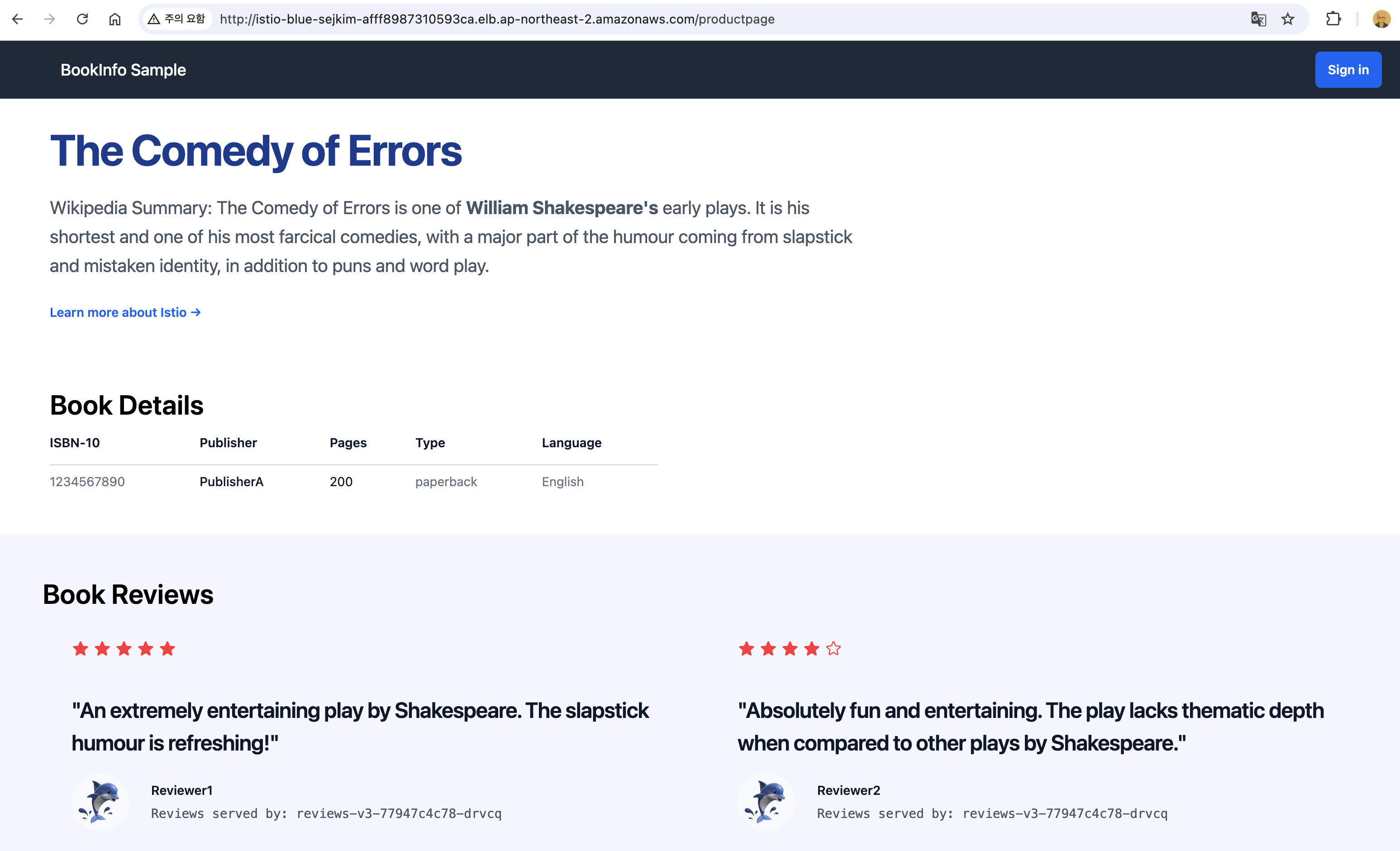
가시다(gasida) 님이 진행하는 Istio Hands-on Study 1기 과정을 참여하여 정리한 글입니다. 1주차는 Istio 소개 및 첫걸음 이라는 주제로 학습을 진행하였습니다.
1주차 과제는 개인적으로 준비한 과제로 제출하고자 합니다.
준비한 내용은
EKS 1.31 Cluster 구성 후
Istio Operator로 Istio를 설치하고자 하였으나 1.23 이후 미지원되어,
대신에 Sail Operator로 Istio 설치 및 Blue/Gren 버전업 테스트 진행하였습니다.
NLB로 Istio Ingress 배포하고, bookinfo 배포하는 과정을 정리하고자 하였으나
ELB는 자동 생성되었으나 외부에서 통신이 원활이 되지 않은 문제점이 발생되는 현상이 있고, 추후 해결할 예정입니다. 실습한 환경은 macOS 입니다.
1. EKS 배포
1.1 tool 설치
# Install awscli
brew install awscli
aws --version

# Install eksctl
brew install eksctl
eksctl version

# Install kubectl
brew install kubernetes-cli
kubectl version --client=true

# Install Helm
brew install helm
helm version

# krew 툴 및 플러그인 설치
brew install krew
kubectl krew version

kubectl krew install neat get-all df-pv stern
kubectl krew list

# 편리성 툴 설치
brew install kube-ps1
brew install kubectx
1.2 eksctl로 EKS 설치
aws api 호출을 위한 자격증명 설정과정은 생략합니다.
# default profile 설정
export AWS_DEFAULT_PROFILE=devops

# eksctl로 실습환경 생성
eksctl create cluster -f - <<EOF
apiVersion: eksctl.io/v1alpha5
kind: ClusterConfig
metadata:
  name: blue-sejkim
  region: ap-northeast-2
  version: '1.31'
  tags:
    Environment: dev

availabilityZones: ["ap-northeast-2a", "ap-northeast-2c"]

vpc:
  clusterEndpoints:
    publicAccess: true
    privateAccess: true

managedNodeGroups:
- name: ng1
  instanceType: t3.medium
  minSize: 2
  maxSize: 4
  desiredCapacity: 2
  labels: {role: svc}
  amiFamily: AmazonLinux2023
  volumeSize: 25
  volumeType: gp3
  volumeEncrypted: true
  privateNetworking: true
  availabilityZones: ["ap-northeast-2a", "ap-northeast-2c"]
  ssh:
    publicKeyName: kp-sejkim
  tags:
    # EC2 tags required for cluster-autoscaler auto-discovery
    k8s.io/cluster-autoscaler/enabled: "true"
    k8s.io/cluster-autoscaler/blue-sejkim: "owned"
  iam:
    withAddonPolicies:
      albIngress: true
      autoScaler: true

addons:
- name: vpc-cni
- name: coredns
- name: kube-proxy

iam:
  withOIDC: true
  serviceAccounts:
  - metadata:
      name: aws-load-balancer-controller
      namespace: kube-system
    wellKnownPolicies:
      awsLoadBalancerController: true
  - metadata:
      name: cluster-autoscaler
      namespace: kube-system
    wellKnownPolicies:
      autoScaler: true
 EOF

2025-04-11 18:57:57 [ℹ]  eksctl version 0.207.0-dev+87e1d6e6e.2025-04-03T01:12:37Z
2025-04-11 18:57:57 [ℹ]  using region ap-northeast-2
2025-04-11 18:57:57 [ℹ]  subnets for ap-northeast-2a - public:192.168.0.0/19 private:192.168.64.0/19
2025-04-11 18:57:57 [ℹ]  subnets for ap-northeast-2c - public:192.168.32.0/19 private:192.168.96.0/19
2025-04-11 18:57:57 [ℹ]  nodegroup "ng1" will use "" [AmazonLinux2023/1.31]
2025-04-11 18:57:57 [ℹ]  using EC2 key pair "kp-sejkim"
2025-04-11 18:57:57 [ℹ]  using Kubernetes version 1.31
2025-04-11 18:57:57 [ℹ]  creating EKS cluster "blue-sejkim" in "ap-northeast-2" region with managed nodes
2025-04-11 18:57:57 [ℹ]  1 nodegroup (ng1) was included (based on the include/exclude rules)
2025-04-11 18:57:57 [ℹ]  will create a CloudFormation stack for cluster itself and 1 managed nodegroup stack(s)
2025-04-11 18:57:57 [ℹ]  if you encounter any issues, check CloudFormation console or try 'eksctl utils describe-stacks --region=ap-northeast-2 --cluster=blue-sejkim'
2025-04-11 18:57:57 [ℹ]  Kubernetes API endpoint access will use provided values {publicAccess=true, privateAccess=true} for cluster "blue-sejkim" in "ap-northeast-2"
2025-04-11 18:57:57 [ℹ]  CloudWatch logging will not be enabled for cluster "blue-sejkim" in "ap-northeast-2"
2025-04-11 18:57:57 [ℹ]  you can enable it with 'eksctl utils update-cluster-logging --enable-types={SPECIFY-YOUR-LOG-TYPES-HERE (e.g. all)} --region=ap-northeast-2 --cluster=blue-sejkim'
2025-04-11 18:57:57 [ℹ]  default addons metrics-server were not specified, will install them as EKS addons
2025-04-11 18:57:57 [ℹ]
2 sequential tasks: { create cluster control plane "blue-sejkim",
    2 sequential sub-tasks: {
        5 sequential sub-tasks: {
            1 task: { create addons },
            wait for control plane to become ready,
            associate IAM OIDC provider,
            2 parallel sub-tasks: {
                2 sequential sub-tasks: {
                    create IAM role for serviceaccount "kube-system/aws-load-balancer-controller",
                    create serviceaccount "kube-system/aws-load-balancer-controller",
                },
                2 sequential sub-tasks: {
                    create IAM role for serviceaccount "kube-system/cluster-autoscaler",
                    create serviceaccount "kube-system/cluster-autoscaler",
                },
            },
            update VPC CNI to use IRSA if required,
        },
        create managed nodegroup "ng1",
    }
}
2025-04-11 18:57:57 [ℹ]  building cluster stack "eksctl-blue-sejkim-cluster"
2025-04-11 18:57:58 [ℹ]  deploying stack "eksctl-blue-sejkim-cluster"
2025-04-11 18:58:28 [ℹ]  waiting for CloudFormation stack "eksctl-blue-sejkim-cluster"
2025-04-11 18:58:58 [ℹ]  waiting for CloudFormation stack "eksctl-blue-sejkim-cluster"
2025-04-11 18:59:58 [ℹ]  waiting for CloudFormation stack "eksctl-blue-sejkim-cluster"
2025-04-11 19:00:58 [ℹ]  waiting for CloudFormation stack "eksctl-blue-sejkim-cluster"
2025-04-11 19:01:58 [ℹ]  waiting for CloudFormation stack "eksctl-blue-sejkim-cluster"
2025-04-11 19:02:58 [ℹ]  waiting for CloudFormation stack "eksctl-blue-sejkim-cluster"
2025-04-11 19:03:59 [ℹ]  waiting for CloudFormation stack "eksctl-blue-sejkim-cluster"
2025-04-11 19:04:59 [ℹ]  waiting for CloudFormation stack "eksctl-blue-sejkim-cluster"
2025-04-11 19:05:59 [ℹ]  waiting for CloudFormation stack "eksctl-blue-sejkim-cluster"
2025-04-11 19:06:59 [ℹ]  waiting for CloudFormation stack "eksctl-blue-sejkim-cluster"
2025-04-11 19:07:02 [!]  recommended policies were found for "vpc-cni" addon, but since OIDC is disabled on the cluster, eksctl cannot configure the requested permissions; the recommended way to provide IAM permissions for "vpc-cni" addon is via pod identity associations; after addon creation is completed, add all recommended policies to the config file, under `addon.PodIdentityAssociations`, and run `eksctl update addon`
2025-04-11 19:07:02 [ℹ]  creating addon: vpc-cni
2025-04-11 19:07:03 [ℹ]  successfully created addon: vpc-cni
2025-04-11 19:07:03 [ℹ]  creating addon: coredns
2025-04-11 19:07:03 [ℹ]  successfully created addon: coredns
2025-04-11 19:07:03 [ℹ]  creating addon: kube-proxy
2025-04-11 19:07:04 [ℹ]  successfully created addon: kube-proxy
2025-04-11 19:07:04 [ℹ]  creating addon: metrics-server
2025-04-11 19:07:04 [ℹ]  successfully created addon: metrics-server
2025-04-11 19:09:06 [ℹ]  building iamserviceaccount stack "eksctl-blue-sejkim-addon-iamserviceaccount-kube-system-cluster-autoscaler"
2025-04-11 19:09:06 [ℹ]  building iamserviceaccount stack "eksctl-blue-sejkim-addon-iamserviceaccount-kube-system-aws-load-balancer-controller"
2025-04-11 19:09:07 [ℹ]  deploying stack "eksctl-blue-sejkim-addon-iamserviceaccount-kube-system-cluster-autoscaler"
2025-04-11 19:09:07 [ℹ]  deploying stack "eksctl-blue-sejkim-addon-iamserviceaccount-kube-system-aws-load-balancer-controller"
2025-04-11 19:09:07 [ℹ]  waiting for CloudFormation stack "eksctl-blue-sejkim-addon-iamserviceaccount-kube-system-cluster-autoscaler"
2025-04-11 19:09:07 [ℹ]  waiting for CloudFormation stack "eksctl-blue-sejkim-addon-iamserviceaccount-kube-system-aws-load-balancer-controller"
2025-04-11 19:09:37 [ℹ]  waiting for CloudFormation stack "eksctl-blue-sejkim-addon-iamserviceaccount-kube-system-cluster-autoscaler"
2025-04-11 19:09:37 [ℹ]  waiting for CloudFormation stack "eksctl-blue-sejkim-addon-iamserviceaccount-kube-system-aws-load-balancer-controller"
2025-04-11 19:10:12 [ℹ]  waiting for CloudFormation stack "eksctl-blue-sejkim-addon-iamserviceaccount-kube-system-aws-load-balancer-controller"
2025-04-11 19:10:13 [ℹ]  created serviceaccount "kube-system/aws-load-balancer-controller"
2025-04-11 19:10:26 [ℹ]  waiting for CloudFormation stack "eksctl-blue-sejkim-addon-iamserviceaccount-kube-system-cluster-autoscaler"
2025-04-11 19:10:26 [ℹ]  created serviceaccount "kube-system/cluster-autoscaler"
2025-04-11 19:10:27 [ℹ]  addon "vpc-cni" active
2025-04-11 19:10:28 [ℹ]  deploying stack "eksctl-blue-sejkim-addon-vpc-cni"
2025-04-11 19:10:28 [ℹ]  waiting for CloudFormation stack "eksctl-blue-sejkim-addon-vpc-cni"
2025-04-11 19:10:58 [ℹ]  waiting for CloudFormation stack "eksctl-blue-sejkim-addon-vpc-cni"
2025-04-11 19:10:58 [ℹ]  updating addon
2025-04-11 19:11:09 [ℹ]  addon "vpc-cni" active
2025-04-11 19:11:09 [ℹ]  building managed nodegroup stack "eksctl-blue-sejkim-nodegroup-ng1"
2025-04-11 19:11:09 [ℹ]  deploying stack "eksctl-blue-sejkim-nodegroup-ng1"
2025-04-11 19:11:09 [ℹ]  waiting for CloudFormation stack "eksctl-blue-sejkim-nodegroup-ng1"
2025-04-11 19:11:40 [ℹ]  waiting for CloudFormation stack "eksctl-blue-sejkim-nodegroup-ng1"
2025-04-11 19:12:35 [ℹ]  waiting for CloudFormation stack "eksctl-blue-sejkim-nodegroup-ng1"
2025-04-11 19:14:01 [ℹ]  waiting for CloudFormation stack "eksctl-blue-sejkim-nodegroup-ng1"
2025-04-11 19:14:01 [ℹ]  waiting for the control plane to become ready
2025-04-11 19:14:01 [✔]  saved kubeconfig as "/Users/sjkim/.kube/config"
2025-04-11 19:14:01 [ℹ]  no tasks
2025-04-11 19:14:01 [✔]  all EKS cluster resources for "blue-sejkim" have been created
2025-04-11 19:14:02 [ℹ]  nodegroup "ng1" has 2 node(s)
2025-04-11 19:14:02 [ℹ]  node "ip-192-168-111-42.ap-northeast-2.compute.internal" is ready
2025-04-11 19:14:02 [ℹ]  node "ip-192-168-91-54.ap-northeast-2.compute.internal" is ready
2025-04-11 19:14:02 [ℹ]  waiting for at least 2 node(s) to become ready in "ng1"
2025-04-11 19:14:02 [ℹ]  nodegroup "ng1" has 2 node(s)
2025-04-11 19:14:02 [ℹ]  node "ip-192-168-111-42.ap-northeast-2.compute.internal" is ready
2025-04-11 19:14:02 [ℹ]  node "ip-192-168-91-54.ap-northeast-2.compute.internal" is ready
2025-04-11 19:14:02 [✔]  created 1 managed nodegroup(s) in cluster "blue-sejkim"
2025-04-11 19:14:02 [ℹ]  kubectl command should work with "/Users/sjkim/.kube/config", try 'kubectl get nodes'
2025-04-11 19:14:02 [✔]  EKS cluster "blue-sejkim" in "ap-northeast-2" region is ready
1.3 EKS 생성 후 확인
-
VPC 생성
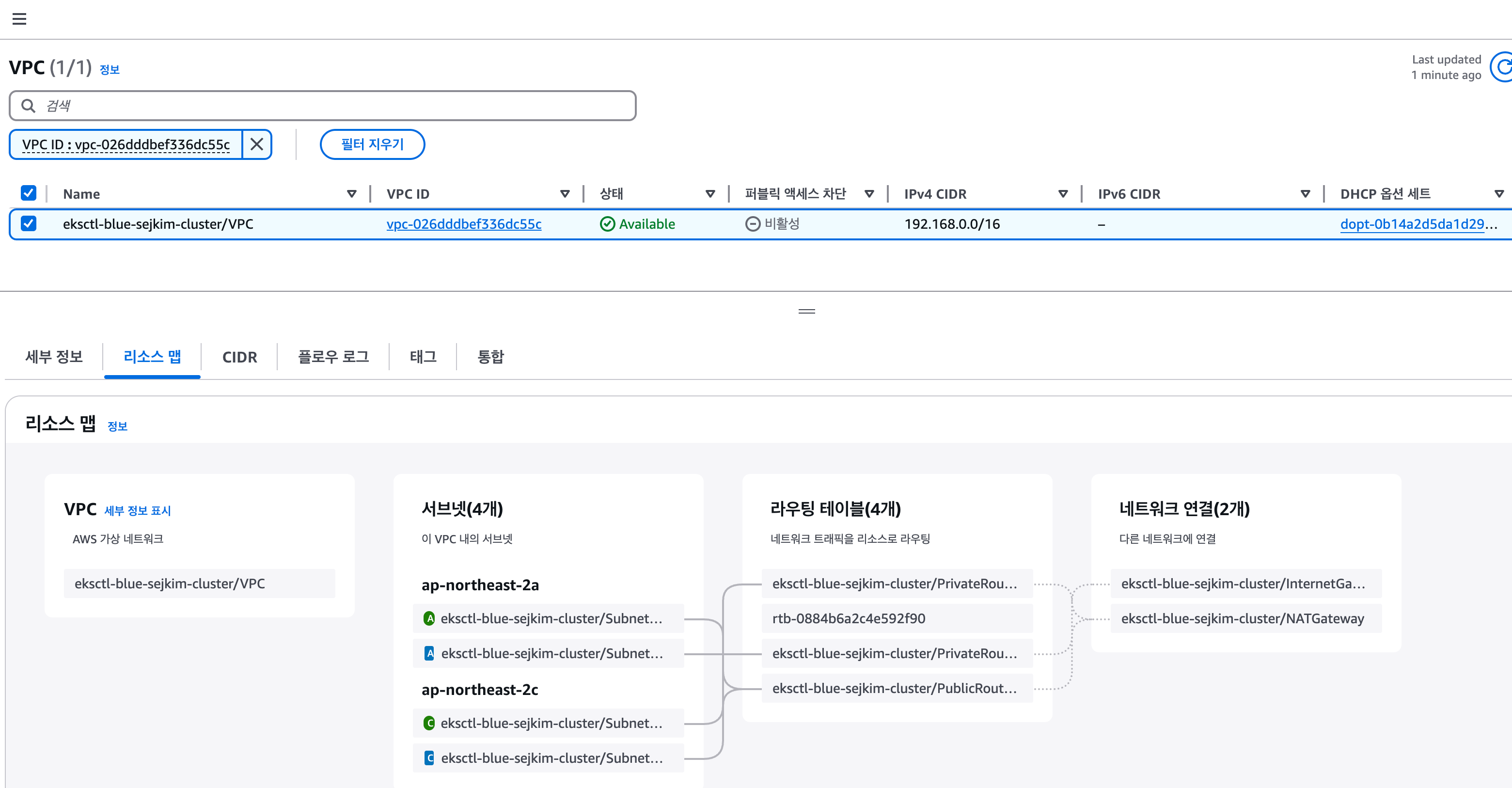
-
EKS Control Plane
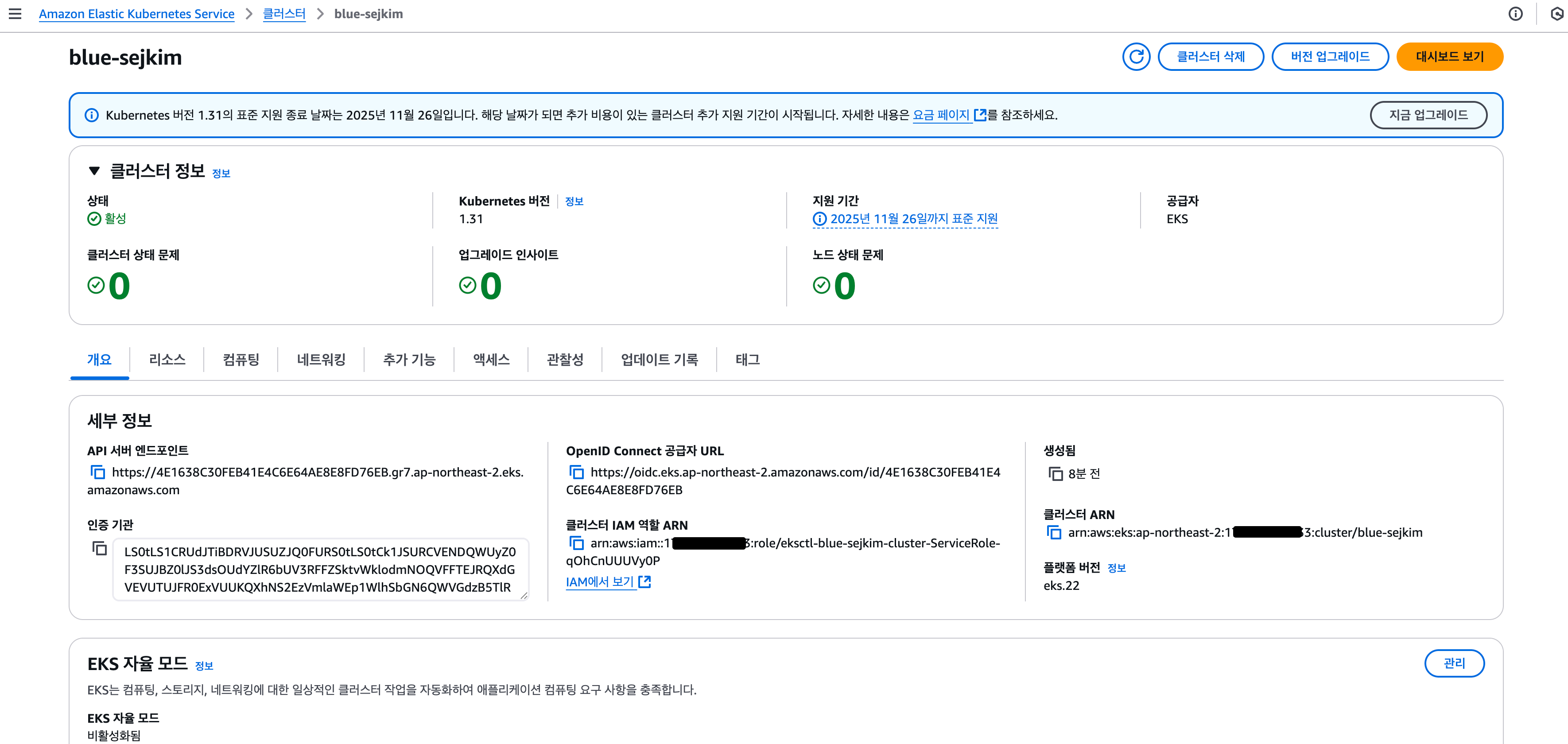
-
EKS Worker Node
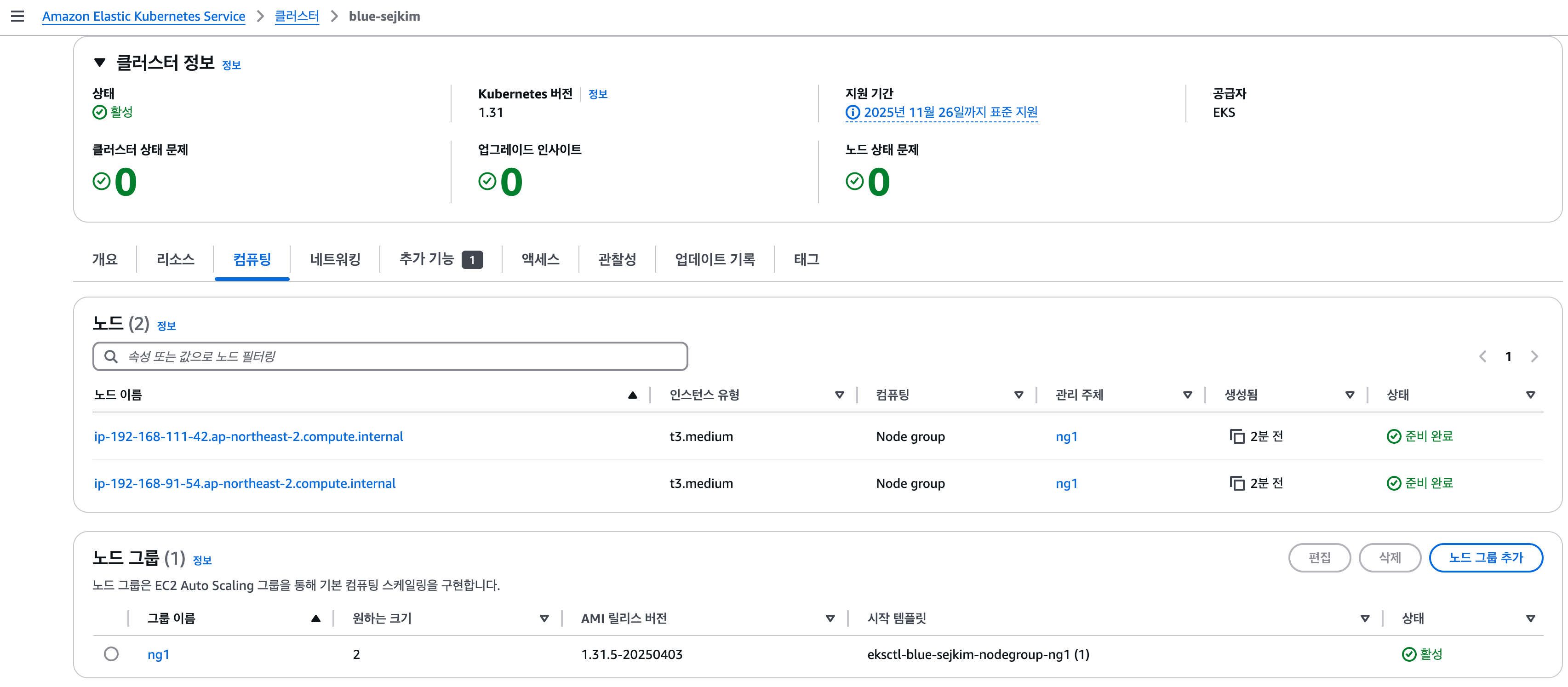
-
EKS 접속 & 상태 확인
# cluster 조회
eksctl get cluster
NAME            REGION          EKSCTL CREATED
blue-sejkim     ap-northeast-2  True

# nodegroup 조회
eksctl get nodegroup --cluster blue-sejkim
CLUSTER         NODEGROUP       STATUS  CREATED                 MIN SIZE        MAX SIZE        DESIRED CAPACITY        INSTANCE TYPE   IMAGE ID                ASG NAME                                      TYPE
blue-sejkim     ng1             ACTIVE  2025-04-11T10:11:36Z    2               4               2                       t3.medium       AL2023_x86_64_STANDARD  eks-ng1-72cb122a-a852-4def-b988-fea70fdcf31b  managed

# kubeconfig 인증파일 생성
aws eks update-kubeconfig --name blue-sejkim --region ap-no
rtheast-2
Added new context arn:aws:eks:ap-northeast-2:1**********3:cluster/blue-sejkim to /Users/sjkim/.kube/config

# Pod 확인
kubectl get pod -A
NAMESPACE     NAME                              READY   STATUS    RESTARTS   AGE
kube-system   aws-node-l29h4                    2/2     Running   0          6m7s
kube-system   aws-node-vsrwh                    2/2     Running   0          6m6s
kube-system   coredns-9b5bc9468-6jp6q           1/1     Running   0          11m
kube-system   coredns-9b5bc9468-c96x4           1/1     Running   0          11m
kube-system   kube-proxy-n2cqx                  1/1     Running   0          6m6s
kube-system   kube-proxy-zjs2n                  1/1     Running   0          6m7s
kube-system   metrics-server-6bf5998d9c-97d9p   1/1     Running   0          11m
kube-system   metrics-server-6bf5998d9c-9vf5v   1/1     Running   0          11m
1.4 ALB Loadbalancer Controller 설치
# helm 으로 설치
helm repo add eks https://aws.github.io/eks-charts

helm repo update
Hang tight while we grab the latest from your chart repositories...
...Successfully got an update from the "cluster-proportional-autoscaler" chart repository

helm install aws-load-balancer-controller eks/aws-load-balancer-controller \
  -n kube-system \
  --set clusterName=blue-sejkim \
  --set serviceAccount.create=false \
  --set serviceAccount.name=aws-load-balancer-controller
NAME: aws-load-balancer-controller
LAST DEPLOYED: Fri Apr 11 19:42:30 2025
NAMESPACE: kube-system
STATUS: deployed
REVISION: 1
TEST SUITE: None
NOTES:
AWS Load Balancer controller installed!

kubectl get pod -n kube-system
NAME                                            READY   STATUS    RESTARTS   AGE
aws-load-balancer-controller-568d6bd896-nzqkt   1/1     Running   0          45s
aws-load-balancer-controller-568d6bd896-x4g7g   1/1     Running   0          45s
aws-node-l29h4                                  2/2     Running   0          30m
aws-node-vsrwh                                  2/2     Running   0          30m
coredns-9b5bc9468-6jp6q                         1/1     Running   0          36m
coredns-9b5bc9468-c96x4                         1/1     Running   0          36m
kube-proxy-n2cqx                                1/1     Running   0          30m
kube-proxy-zjs2n                                1/1     Running   0          30m
metrics-server-6bf5998d9c-97d9p                 1/1     Running   0          36m
metrics-server-6bf5998d9c-9vf5v                 1/1     Running   0          36m
2. Istio Operator로 Istio 설치
2.1 Istio 지원 매트릭스
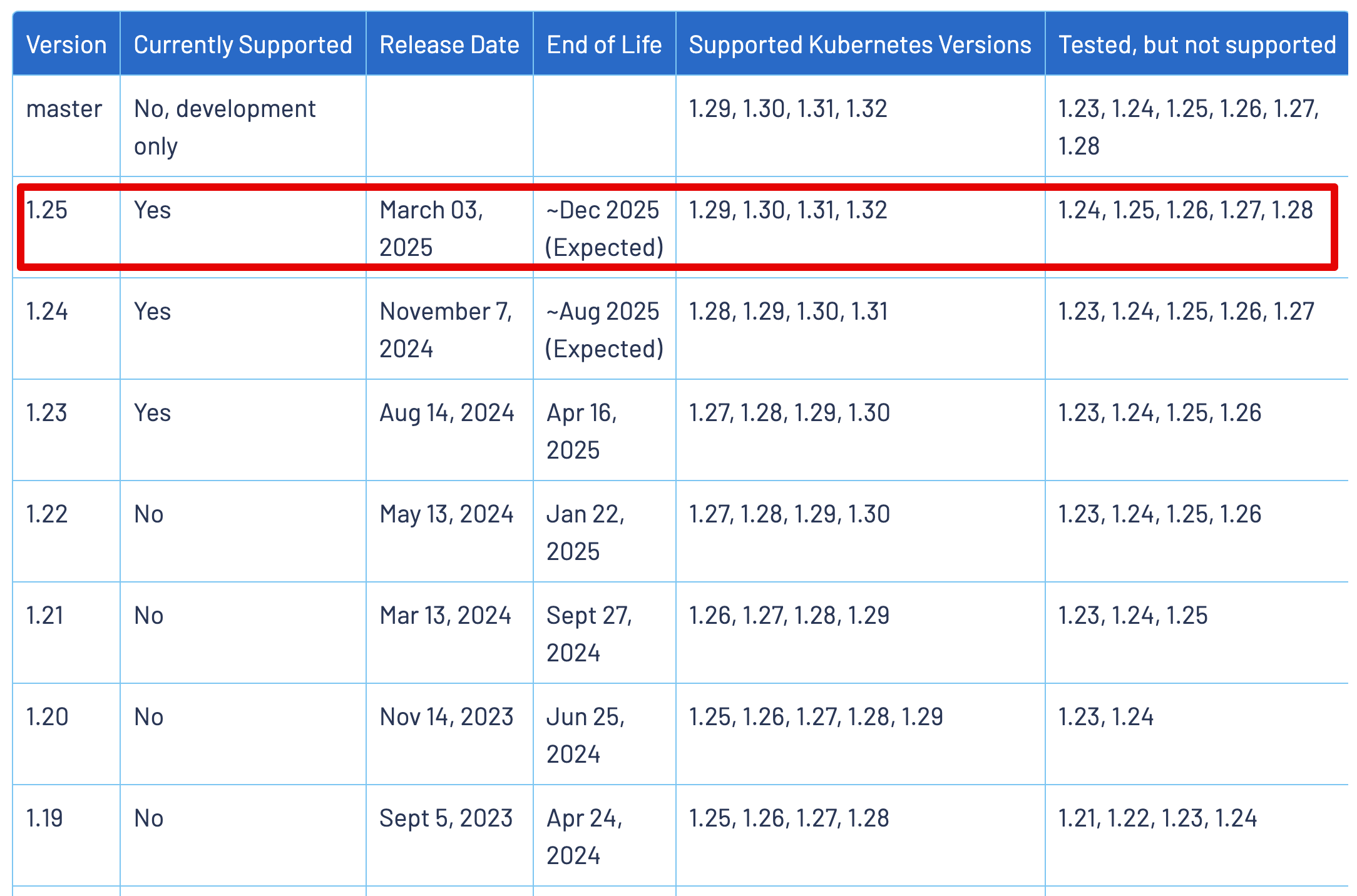
2.2 Istio Download
# 최신 Istio Download (v1.25.1)
curl -L https://istio.io/downloadIstio | sh -
  % Total    % Received % Xferd  Average Speed   Time    Time     Time  Current
                                 Dload  Upload   Total   Spent    Left  Speed
100   102  100   102    0     0    173      0 --:--:-- --:--:-- --:--:--   173
100  5124  100  5124    0     0   5591      0 --:--:-- --:--:-- --:--:--  5591

Downloading istio-1.25.1 from https://github.com/istio/istio/releases/download/1.25.1/istio-1.25.1-osx-arm64.tar.gz ...

Istio 1.25.1 download complete!

The Istio release archive has been downloaded to the istio-1.25.1 directory.

To configure the istioctl client tool for your workstation,
add the /Users/sjkim/Labs/CloudNeta/istio/1w/istio-1.25.1/bin directory to your environment path variable with:
         export PATH="$HOME/Labs/CloudNeta/istio/1w/istio-1.25.1/bin:$PATH"

Begin the Istio pre-installation check by running:
         istioctl x precheck

Try Istio in ambient mode
        https://istio.io/latest/docs/ambient/getting-started/
Try Istio in sidecar mode
        https://istio.io/latest/docs/setup/getting-started/
Install guides for ambient mode
        https://istio.io/latest/docs/ambient/install/
Install guides for sidecar mode
        https://istio.io/latest/docs/setup/install/

Need more information? Visit https://istio.io/latest/docs/

export PATH="$PATH:/Users/sjkim/Labs/CloudNeta/istio/1w/istio-1.25.1/bin"

# Pre-Installation Check
istioctl x precheck
✔ No issues found when checking the cluster. Istio is safe to install or upgrade!
  To get started, check out https://istio.io/latest/docs/setup/getting-started/
2.3 Install Operator with Istioctl - 실패
- Istio operator가 1.23 에서 지원 중단되었습니다. 아래 명령어가 실행되지 않네요 ㅠㅠ
istioctl version
Istio is not present in the cluster: no running Istio pods in namespace "istio-system"
client version: 1.25.1

# Istio Operator 설치, 추후 Blue/Green 버전업 용이하도록 revision 옵션 사용
istioctl operator init --revision 1-25-1

--> operator 명령어가 더 이상 지원 안됨
2.4 Helm 으로 Migration 시도
- 기존 Istio Operator 설치된 것이 없어서 Migration 실패
cat <<EOF > nlb-istio-operator.yaml
apiVersion: install.istio.io/v1alpha1
kind: IstioOperator
metadata:
  name: istiocontrolplane-1-25-1
  namespace: istio-system
spec:
  revision: 1-25-1
  profile: default
  components:
    base:
      enabled: true
    pilot:
      enabled: true
    egressGateways:
      - name: istio-egressgateway
        enabled: false
    ingressGateways:
      # NLB
      - name: istio-ingressgateway
        enabled: true
        label:
          istio: ingressgateway
        k8s:
          resources:
            requests:
              cpu: 100m
              memory: 128Mi
            limits:
              cpu: 2000m
              memory: 1024Mi
          hpaSpec:
            minReplicas: 2
          service:
            externalTrafficPolicy: Cluster
            type: LoadBalancer
            ports:
              # Status Port
              - port: 15021
                targetPort: 15021
                name: status-port
                protocol: TCP
              # HTTP Port
              - port: 80
                targetPort: 8080
                name: http2
                protocol: TCP
              # HTTPS Port
              - port: 443
                targetPort: 8443
                name: https
                protocol: TCP
          serviceAnnotations:  # NLB
            service.beta.kubernetes.io/aws-load-balancer-name: istio-blue-sejkim
            service.beta.kubernetes.io/aws-load-balancer-type: "external"
            service.beta.kubernetes.io/aws-load-balancer-internal: "false"
            service.beta.kubernetes.io/aws-load-balancer-nlb-target-type: "ip"
            service.beta.kubernetes.io/load-balancer-source-ranges: "192.168.0.0/19, 192.168.32.0/19"
            service.beta.kubernetes.io/aws-load-balancer-ssl-ports: "443"
            service.beta.kubernetes.io/aws-load-balancer-ssl-negotiation-policy: ELBSecurityPolicy-TLS-1-2-Ext-2018-06
            service.beta.kubernetes.io/aws-load-balancer-ssl-cert: arn:aws:acm:ap-northeast-2:1**********3:certificate/415404eb-e2e2-4744-b2e4-1108735b5903
            service.beta.kubernetes.io/aws-load-balancer-healthcheck-path: /healthz/ready
            service.beta.kubernetes.io/aws-load-balancer-healthcheck-port: "15021"
            service.beta.kubernetes.io/aws-load-balancer-attributes: load_balancing.cross_zone.enabled=true
EOF- Helm 마이그레이션에는 YAML을 Helm 값으로 변환해야 합니다 IstioOperator. Istio 1.24 이상에는 manifest translate이 작업을 수행하는 명령이 포함되어 있습니다. 출력은 values.yaml파일과 해당 Helm 차트를 설치하는 셸 스크립트입니다.
istioctl manifest translate -f nlb-istio-operator.yaml
Output written to /var/folders/7r/k37w336504d01lg8qbmg2kxw0000gn/T/istioctl-migrate-1932261393! See the README.md for next steps

ls -al /var/folders/7r/k37w336504d01lg8qbmg2kxw0000gn/T/istioctl-migrate-1932261393
total 56
drwx------    7 sjkim  staff    224 Apr 11 20:57 .
drwx------@ 314 sjkim  staff  10048 Apr 11 20:57 ..
-rw-r--r--    1 sjkim  staff    283 Apr 11 20:57 base-values.yaml
-rwxr-xr-x    1 sjkim  staff   4209 Apr 11 20:57 install-base.sh
-rwxr-xr-x    1 sjkim  staff   5502 Apr 11 20:57 install-pilot.sh
-rw-r--r--    1 sjkim  staff    283 Apr 11 20:57 pilot-values.yaml
-rw-r--r-- 1 sjkim staff 804 Apr 11 20:57 README.md- README.md
IstioOperator to Helm Migration
This folder contains auto-generated output from the istioctl manifest translate command. Note the manifest translate command only outputs this folders contents, and does not modify the cluster state.

Follow the instructions below for each component to complete the migration.

Components
✅ Component base: migration is supported!

The translated values have been written to base-values.yaml. You may use these directly, or follow the guided install-base.sh script.

✅ Component pilot: migration is supported!

The translated values have been written to pilot-values.yaml. You may use these directly, or follow the guided install-pilot.sh script.

❌ Component istio-ingressgateway: migration is NOT directly supported!- install-base.sh
cat install-base.sh
#!/usr/bin/env bash

# Label/Annotate resources to mark them a part of the Helm release.
kubectl annotate CustomResourceDefinition.apiextensions.k8s.io wasmplugins.extensions.istio.io meta.helm.sh/release-name=base
kubectl label CustomResourceDefinition.apiextensions.k8s.io wasmplugins.extensions.istio.io app.kubernetes.io/managed-by=Helm
kubectl annotate CustomResourceDefinition.apiextensions.k8s.io destinationrules.networking.istio.io meta.helm.sh/release-name=base
kubectl label CustomResourceDefinition.apiextensions.k8s.io destinationrules.networking.istio.io app.kubernetes.io/managed-by=Helm
kubectl annotate CustomResourceDefinition.apiextensions.k8s.io envoyfilters.networking.istio.io meta.helm.sh/release-name=base
kubectl label CustomResourceDefinition.apiextensions.k8s.io envoyfilters.networking.istio.io app.kubernetes.io/managed-by=Helm
kubectl annotate CustomResourceDefinition.apiextensions.k8s.io gateways.networking.istio.io meta.helm.sh/release-name=base
kubectl label CustomResourceDefinition.apiextensions.k8s.io gateways.networking.istio.io app.kubernetes.io/managed-by=Helm
kubectl annotate CustomResourceDefinition.apiextensions.k8s.io proxyconfigs.networking.istio.io meta.helm.sh/release-name=base
kubectl label CustomResourceDefinition.apiextensions.k8s.io proxyconfigs.networking.istio.io app.kubernetes.io/managed-by=Helm
kubectl annotate CustomResourceDefinition.apiextensions.k8s.io serviceentries.networking.istio.io meta.helm.sh/release-name=base
kubectl label CustomResourceDefinition.apiextensions.k8s.io serviceentries.networking.istio.io app.kubernetes.io/managed-by=Helm
kubectl annotate CustomResourceDefinition.apiextensions.k8s.io sidecars.networking.istio.io meta.helm.sh/release-name=base
kubectl label CustomResourceDefinition.apiextensions.k8s.io sidecars.networking.istio.io app.kubernetes.io/managed-by=Helm
kubectl annotate CustomResourceDefinition.apiextensions.k8s.io virtualservices.networking.istio.io meta.helm.sh/release-name=base
kubectl label CustomResourceDefinition.apiextensions.k8s.io virtualservices.networking.istio.io app.kubernetes.io/managed-by=Helm
kubectl annotate CustomResourceDefinition.apiextensions.k8s.io workloadentries.networking.istio.io meta.helm.sh/release-name=base
kubectl label CustomResourceDefinition.apiextensions.k8s.io workloadentries.networking.istio.io app.kubernetes.io/managed-by=Helm
kubectl annotate CustomResourceDefinition.apiextensions.k8s.io workloadgroups.networking.istio.io meta.helm.sh/release-name=base
kubectl label CustomResourceDefinition.apiextensions.k8s.io workloadgroups.networking.istio.io app.kubernetes.io/managed-by=Helm
kubectl annotate CustomResourceDefinition.apiextensions.k8s.io authorizationpolicies.security.istio.io meta.helm.sh/release-name=base
kubectl label CustomResourceDefinition.apiextensions.k8s.io authorizationpolicies.security.istio.io app.kubernetes.io/managed-by=Helm
kubectl annotate CustomResourceDefinition.apiextensions.k8s.io peerauthentications.security.istio.io meta.helm.sh/release-name=base
kubectl label CustomResourceDefinition.apiextensions.k8s.io peerauthentications.security.istio.io app.kubernetes.io/managed-by=Helm
kubectl annotate CustomResourceDefinition.apiextensions.k8s.io requestauthentications.security.istio.io meta.helm.sh/release-name=base
kubectl label CustomResourceDefinition.apiextensions.k8s.io requestauthentications.security.istio.io app.kubernetes.io/managed-by=Helm
kubectl annotate CustomResourceDefinition.apiextensions.k8s.io telemetries.telemetry.istio.io meta.helm.sh/release-name=base
kubectl label CustomResourceDefinition.apiextensions.k8s.io telemetries.telemetry.istio.io app.kubernetes.io/managed-by=Helm
kubectl annotate ServiceAccount --namespace=istio-system istio-reader-service-account meta.helm.sh/release-name=base
kubectl annotate ServiceAccount --namespace=istio-system istio-reader-service-account meta.helm.sh/release-namespace=istio-system
kubectl label ServiceAccount --namespace=istio-system istio-reader-service-account app.kubernetes.io/managed-by=Helm


# Run the actual Helm install operation
helm upgrade --install base --namespace istio-system -f base-values.yaml oci://gcr.io/istio-release/charts/base- base-values.yaml
cat base-values.yaml
defaultRevision: ""
gateways:
  istio-egressgateway: {}
  istio-ingressgateway: {}
global:
  configValidation: true
  hub: docker.io/istio
  istioNamespace: istio-system
  tag: 1.25.1
pilot:
  cni:
    enabled: false
  enabled: true
revision: 1-25-1
ztunnel:
resourceName: ztunnel- install-base.sh 실행
kubectl create ns istio-system

sh install-base.sh
Error from server (NotFound): customresourcedefinitions.apiextensions.k8s.io "wasmplugins.extensions.istio.io" not found
Error from server (NotFound): customresourcedefinitions.apiextensions.k8s.io "wasmplugins.extensions.istio.io" not found
Error from server (NotFound): customresourcedefinitions.apiextensions.k8s.io "destinationrules.networking.istio.io" not found
Error from server (NotFound): customresourcedefinitions.apiextensions.k8s.io "destinationrules.networking.istio.io" not found
Error from server (NotFound): customresourcedefinitions.apiextensions.k8s.io "envoyfilters.networking.istio.io" not found
Error from server (NotFound): customresourcedefinitions.apiextensions.k8s.io "envoyfilters.networking.istio.io" not found
Error from server (NotFound): customresourcedefinitions.apiextensions.k8s.io "gateways.networking.istio.io" not found
Error from server (NotFound): customresourcedefinitions.apiextensions.k8s.io "gateways.networking.istio.io" not found
Error from server (NotFound): customresourcedefinitions.apiextensions.k8s.io "proxyconfigs.networking.istio.io" not found
Error from server (NotFound): customresourcedefinitions.apiextensions.k8s.io "proxyconfigs.networking.istio.io" not found
Error from server (NotFound): customresourcedefinitions.apiextensions.k8s.io "serviceentries.networking.istio.io" not found
Error from server (NotFound): customresourcedefinitions.apiextensions.k8s.io "serviceentries.networking.istio.io" not found
Error from server (NotFound): customresourcedefinitions.apiextensions.k8s.io "sidecars.networking.istio.io" not found
Error from server (NotFound): customresourcedefinitions.apiextensions.k8s.io "sidecars.networking.istio.io" not found
Error from server (NotFound): customresourcedefinitions.apiextensions.k8s.io "virtualservices.networking.istio.io" not found
Error from server (NotFound): customresourcedefinitions.apiextensions.k8s.io "virtualservices.networking.istio.io" not found
Error from server (NotFound): customresourcedefinitions.apiextensions.k8s.io "workloadentries.networking.istio.io" not found
Error from server (NotFound): customresourcedefinitions.apiextensions.k8s.io "workloadentries.networking.istio.io" not found
Error from server (NotFound): customresourcedefinitions.apiextensions.k8s.io "workloadgroups.networking.istio.io" not found
Error from server (NotFound): customresourcedefinitions.apiextensions.k8s.io "workloadgroups.networking.istio.io" not found
Error from server (NotFound): customresourcedefinitions.apiextensions.k8s.io "authorizationpolicies.security.istio.io" not found
Error from server (NotFound): customresourcedefinitions.apiextensions.k8s.io "authorizationpolicies.security.istio.io" not found
Error from server (NotFound): customresourcedefinitions.apiextensions.k8s.io "peerauthentications.security.istio.io" not found
Error from server (NotFound): customresourcedefinitions.apiextensions.k8s.io "peerauthentications.security.istio.io" not found
Error from server (NotFound): customresourcedefinitions.apiextensions.k8s.io "requestauthentications.security.istio.io" not found
Error from server (NotFound): customresourcedefinitions.apiextensions.k8s.io "requestauthentications.security.istio.io" not found
Error from server (NotFound): customresourcedefinitions.apiextensions.k8s.io "telemetries.telemetry.istio.io" not found
Error from server (NotFound): customresourcedefinitions.apiextensions.k8s.io "telemetries.telemetry.istio.io" not found
Error from server (NotFound): serviceaccounts "istio-reader-service-account" not found
Error from server (NotFound): serviceaccounts "istio-reader-service-account" not found
Error from server (NotFound): serviceaccounts "istio-reader-service-account" not found
Release "base" does not exist. Installing it now.
Pulled: gcr.io/istio-release/charts/base:1.25.1
Digest: sha256:83dd972b5387d0db51a45d176bc180eb936ce813e5610cd3721c28a67b6279d6
NAME: base
LAST DEPLOYED: Fri Apr 11 21:12:28 2025
NAMESPACE: istio-system
STATUS: deployed
REVISION: 1
TEST SUITE: None
NOTES:
Istio base successfully installed!

To learn more about the release, try:
  $ helm status base -n istio-system
  $ helm get all base -n istio-system
- 😭 기존에 설치된 것은 없어서 별로 소용이 없어서 Sail Operator로 신규 설치방식으로 전환
3. Sail Operator 설치
# Download
git clone https://github.com/istio-ecosystem/sail-operator.git
cd sail-operator

# Convert Istio Operator manifest > Sail Operator manifest
./tools/configuration-converter.sh ../nlb-istio-operator.yaml
Only values in the format spec.components.<component>.enabled: true/false are supported for conversion. For more details, refer to the documentation: https://github.com/istio-ecosystem/sail-operator/tree/main/docs#components-field
Sail configuration file created with name: /Users/sjkim/Labs/CloudNeta/istio/1w/nlb-istio-operator-sail.yaml
3.1 Install the Sail Operator using Helm
- Sail Operator 설치
helm repo add sail-operator https://istio-ecosystem.github.io/sail-operator
"sail-operator" has been added to your repositories

helm repo update
Hang tight while we grab the latest from your chart repositories...
...Successfully got an update from the "sail-operator" chart repository

kubectl create namespace sail-operator
namespace/sail-operator created

helm install sail-operator sail-operator/sail-operator --version 1.0.0 -n sail-operator
NAME: sail-operator
LAST DEPLOYED: Fri Apr 11 21:56:03 2025
NAMESPACE: sail-operator
STATUS: deployed
REVISION: 1
TEST SUITE: None- Check the operator pod is running:
NAME                             READY   STATUS    RESTARTS   AGE
sail-operator-56bf994f49-z2hdn 1/1 Running 0 65s- Create an Istio resource with the version v1.24.2 and an IstioRevisionTag:
kubectl create ns istio-system
cat <<EOF | kubectl apply -f-
apiVersion: sailoperator.io/v1
kind: Istio
metadata:
  name: default
  namespace: istio-system
spec:
  profile: default
  namespace: istio-system
  updateStrategy:
    type: RevisionBased
    inactiveRevisionDeletionGracePeriodSeconds: 30
  version: v1.24.2
---
apiVersion: sailoperator.io/v1
kind: IstioRevisionTag
metadata:
  name: default
spec:
  targetRef:
    kind: Istio
    name: default
EOF

istio.sailoperator.io/default created
istiorevisiontag.sailoperator.io/default unchanged- Check the state of the resources created
# istiod pods are running
kubectl get pods -n istio-system
NAME                                    READY   STATUS    RESTARTS   AGE
istiod-default-v1-24-2-bd8458c4-qtr6w   1/1     Running   0          108s

# Istio resource created
kubectl get istio  -A
NAME      REVISIONS   READY   IN USE   ACTIVE REVISION   STATUS    VERSION   AGE
default   1           1       1        default-v1-24-2   Healthy   v1.24.2   3m34s

# IstioRevisionTag resource created
kubectl get istiorevisiontag
NAME      STATUS                    IN USE   REVISION          AGE
default   NotReferencedByAnything   False    default-v1-24-2   8m15s
3.2 sample application 배포
- Create a namespace and label it to enable Istio injection
kubectl create namespace sample
namespace/sample created

kubectl label namespace sample istio-injection=enabled
namespace/sample labeled

# After labeling the namespace you will see that the IstioRevisionTag resource status will change to ‘In Use: True’, because there is now a resource using the revision default-v1-24-2:

kubectl get istiorevisiontag
NAME      STATUS    IN USE   REVISION          AGE
default   Healthy   True     default-v1-24-2   13m

# Deploy the sample application:
kubectl apply -f https://raw.githubusercontent.com/istio/istio/release-1.25/samples/sleep/sleep.yaml -n sample
serviceaccount/sleep created
service/sleep created
deployment.apps/sleep created

# Confirm the proxy version of the sample app matches the control plane version:
istioctl proxy-status
NAME                              CLUSTER        CDS              LDS              EDS              RDS              ECDS        ISTIOD                                    VERSION
sleep-5fcd8fd6c8-smfxt.sample     Kubernetes     SYNCED (35s)     SYNCED (35s)     SYNCED (35s)     SYNCED (35s)     IGNORED     istiod-default-v1-24-2-bd8458c4-qtr6w     1.24.2
Upgrade the Istio control plane 1.24.2 to version 1.24.3
- Update the Istio resource with the new version:
kubectl patch istio default -n istio-system --type='merge' -p '{"spec":{"version":"v1.24.3"}}'- Check the Istio resource. You will see that there are two revisions and they are both ‘ready’:
kubectl get istio
NAME      REVISIONS   READY   IN USE   ACTIVE REVISION   STATUS    VERSION   AGE
default 2 2 2 default-v1-24-3 Healthy v1.24.3 14m- The IstioRevisiontag now references the new revision:
NAME      STATUS    IN USE   REVISION          AGE
default Healthy True default-v1-24-3 18m- There are two IstioRevisions, one for each Istio version:
kubectl get istiorevision
NAME              TYPE   READY   STATUS    IN USE   VERSION   AGE
default-v1-24-2          True    Healthy   True     v1.24.2   16m
default-v1-24-3 True Healthy True v1.24.3 2m45s-
Sail Operator는 주어진 Istio 컨트롤 플레인이 사용 중인지 자동으로 감지하며, 위에서 볼 수 있는 "In Use" 상태 조건에 이 정보를 기록합니다. 현재는 모든 IstioRevision과 IstioRevisionTag가 "사용 중(In Use)"으로 간주되고 있습니다:
- 이전 리비전인 default-v1-24-2는 샘플 애플리케이션의 사이드카에서 참조하고 있기 때문에 사용 중으로 간주됩니다.
- 새로운 리비전인 default-v1-24-3은 태그에서 참조되고 있기 때문에 사용 중으로 간주됩니다.
- 해당 태그는 샘플 네임스페이스에서 참조되므로 사용 중으로 간주됩니다.
-
각 리비전에 대해 컨트롤 플레인 Pod가 하나씩 실행 중인지 확인하세요. (즉, 총 두 개의 컨트롤 플레인 Pod가 실행 중이어야 합니다.)
kubectl get pods -n istio-system
NAME                                      READY   STATUS    RESTARTS   AGE
istiod-default-v1-24-2-bd8458c4-qtr6w     1/1     Running   0          25m
istiod-default-v1-24-3-68df97dfbb-kf9zh 1/1 Running 0 11m- Confirm the proxy sidecar version remains the same:
istioctl proxy-status
NAME                              CLUSTER        CDS              LDS              EDS              RDS              ECDS        ISTIOD                                    VERSION
sleep-5fcd8fd6c8-smfxt.sample Kubernetes SYNCED (12m) SYNCED (12m) SYNCED (12m) SYNCED (12m) IGNORED istiod-default-v1-24-2-bd8458c4-qtr6w 1.24.2- Restart the sample pod:
kubectl rollout restart deployment -n sample
deployment.apps/sleep restarted- Confirm the proxy sidecar version is updated:
istioctl proxy-status
NAME                              CLUSTER        CDS              LDS              EDS              RDS              ECDS        ISTIOD                                      VERSION
sleep-86968584b7-kbvqd.sample     Kubernetes     SYNCED (29s)     SYNCED (29s)     SYNCED (29s)     SYNCED (29s)     IGNORED     istiod-default-v1-24-3-68df97dfbb-kf9zh     1.24.3
💎 IstioRevision이 더 이상 사용되지 않고 Istio 리소스의 활성 리비전이 아닌 경우(예: spec.version 필드에 설정된 버전이 아닌 경우), Sail Operator는 유예 기간(grace period) 후에 해당 리비전을 삭제합니다. 이 유예 기간은 기본적으로 30초입니다.
이전 컨트롤 플레인과 IstioRevision이 삭제되었는지 확인합니다.
- The old control plane pod is deleted
NAME                                      READY   STATUS    RESTARTS   AGE
istiod-default-v1-24-3-68df97dfbb-kf9zh 1/1 Running 0 18m- The old IstioRevision is deleted
kubectl get istiorevision
NAME              TYPE   READY   STATUS    IN USE   VERSION   AGE
default-v1-24-3 True Healthy True v1.24.3 20m- The Istio resource now only has one revision
kubectl get istio  -A
NAME      REVISIONS   READY   IN USE   ACTIVE REVISION   STATUS    VERSION   AGE
default   1           1       1        default-v1-24-3   Healthy   v1.24.3   34m
🎉 Congratulations! You have successfully updated your Istio control plane using the revision-based upgrade strategy.
4. 서비스 배포
4.1 BookInfo 배포/테스트 (Gateway API 방식)
-
서비스 흐름도
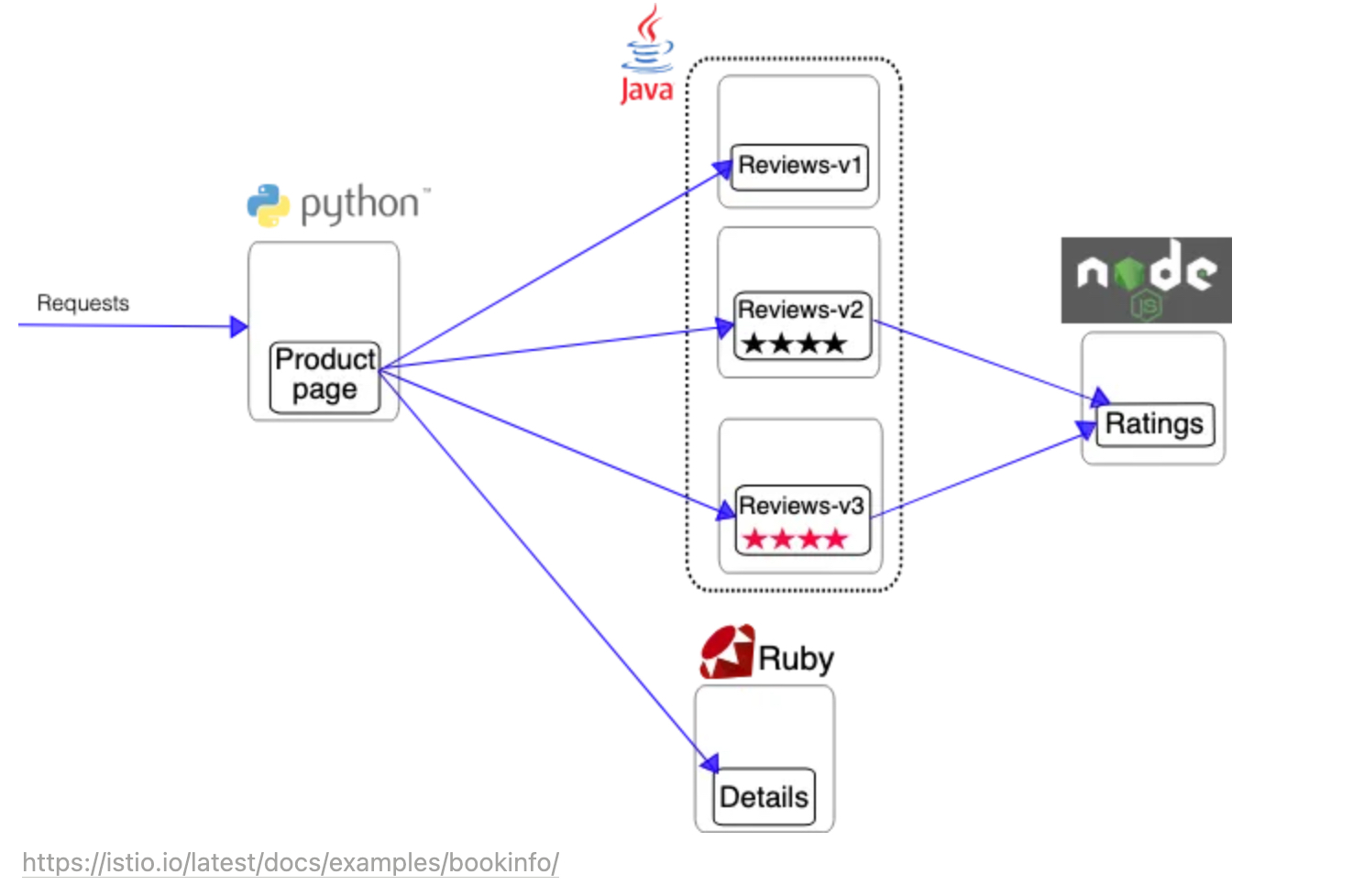
-
Kubernetes Gateway API CRDs 설치
kubectl get crd gateways.gateway.networking.k8s.io &> /dev/null || \
  kubectl apply -f https://github.com/kubernetes-sigs/gateway-api/releases/download/v1.2.1/standard-install.yaml
customresourcedefinition.apiextensions.k8s.io/gatewayclasses.gateway.networking.k8s.io created
customresourcedefinition.apiextensions.k8s.io/gateways.gateway.networking.k8s.io created
customresourcedefinition.apiextensions.k8s.io/grpcroutes.gateway.networking.k8s.io created
customresourcedefinition.apiextensions.k8s.io/httproutes.gateway.networking.k8s.io created
customresourcedefinition.apiextensions.k8s.io/referencegrants.gateway.networking.k8s.io created - Create default namespace and label it to mark it for injection.
kubectl create namespace default
namespace/default created

kubectl label namespace default istio-injection=enabled
namespace/default labeled- Deploy bookinfo application.
kubectl apply -f https://raw.githubusercontent.com/istio/istio/release-1.23/samples/bookinfo/platform/kube/bookinfo.yaml

service/details created
serviceaccount/bookinfo-details created
deployment.apps/details-v1 created
service/ratings created
serviceaccount/bookinfo-ratings created
deployment.apps/ratings-v1 created
service/reviews created
serviceaccount/bookinfo-reviews created
deployment.apps/reviews-v1 created
deployment.apps/reviews-v2 created
deployment.apps/reviews-v3 created
service/productpage created
serviceaccount/bookinfo-productpage created
deployment.apps/productpage-v1 created- Review the IstioRevisionTag resource after application deployment.
kubectl get istiorevisiontag
NAME      STATUS    IN USE   REVISION          AGE
default   Healthy   True     default-v1-24-3   46m

Note: IN USE field shows 'True', as the tag is now referenced by both active workloads and the bookinfo namespace.- Confirm that the proxy version matches the control plane version
istioctl proxy-status
NAME                                        CLUSTER        CDS               LDS               EDS               RDS               ECDS        ISTIOD                                      VERSION
details-v1-7d775cb4f6-xk8wf.bookinfo        Kubernetes     SYNCED (119s)     SYNCED (119s)     SYNCED (116s)     SYNCED (119s)     IGNORED     istiod-default-v1-24-3-68df97dfbb-kf9zh     1.24.3
productpage-v1-7c4b6b857-z75qg.bookinfo     Kubernetes     SYNCED (118s)     SYNCED (118s)     SYNCED (116s)     SYNCED (118s)     IGNORED     istiod-default-v1-24-3-68df97dfbb-kf9zh     1.24.3
ratings-v1-5b896f8544-vcjcw.bookinfo        Kubernetes     SYNCED (117s)     SYNCED (117s)     SYNCED (116s)     SYNCED (117s)     IGNORED     istiod-default-v1-24-3-68df97dfbb-kf9zh     1.24.3
reviews-v1-746f96c9d4-b8pvd.bookinfo        Kubernetes     SYNCED (116s)     SYNCED (116s)     SYNCED (116s)     SYNCED (116s)     IGNORED     istiod-default-v1-24-3-68df97dfbb-kf9zh     1.24.3
reviews-v2-97bdf5876-rbdff.bookinfo         Kubernetes     SYNCED (116s)     SYNCED (116s)     SYNCED (116s)     SYNCED (116s)     IGNORED     istiod-default-v1-24-3-68df97dfbb-kf9zh     1.24.3
reviews-v3-77d9db6844-2xdpc.bookinfo        Kubernetes     SYNCED (116s)     SYNCED (116s)     SYNCED (116s)     SYNCED (116s)     IGNORED     istiod-default-v1-24-3-68df97dfbb-kf9zh     1.24.3
sleep-86968584b7-kbvqd.sample Kubernetes SYNCED (2m8s) SYNCED (2m8s) SYNCED (116s) SYNCED (2m8s) IGNORED istiod-default-v1-24-3-68df97dfbb-kf9zh 1.24.3- bookinfo 앱 배포 후 pod,service,deployment 확인
 kubectl get all
NAME                                 READY   STATUS    RESTARTS   AGE
pod/details-v1-7d775cb4f6-xk8wf      2/2     Running   0          7m45s
pod/productpage-v1-7c4b6b857-z75qg   2/2     Running   0          7m44s
pod/ratings-v1-5b896f8544-vcjcw      2/2     Running   0          7m45s
pod/reviews-v1-746f96c9d4-b8pvd      2/2     Running   0          7m45s
pod/reviews-v2-97bdf5876-rbdff       2/2     Running   0          7m44s
pod/reviews-v3-77d9db6844-2xdpc      2/2     Running   0          7m44s

NAME                  TYPE        CLUSTER-IP       EXTERNAL-IP   PORT(S)    AGE
service/details       ClusterIP   10.100.131.213   <none>        9080/TCP   7m45s
service/productpage   ClusterIP   10.100.48.141    <none>        9080/TCP   7m44s
service/ratings       ClusterIP   10.100.154.139   <none>        9080/TCP   7m45s
service/reviews       ClusterIP   10.100.7.215     <none>        9080/TCP   7m45s

NAME                             READY   UP-TO-DATE   AVAILABLE   AGE
deployment.apps/details-v1       1/1     1            1           7m45s
deployment.apps/productpage-v1   1/1     1            1           7m44s
deployment.apps/ratings-v1       1/1     1            1           7m45s
deployment.apps/reviews-v1       1/1     1            1           7m45s
deployment.apps/reviews-v2       1/1     1            1           7m45s
deployment.apps/reviews-v3       1/1     1            1           7m44s

NAME                                       DESIRED   CURRENT   READY   AGE
replicaset.apps/details-v1-7d775cb4f6      1         1         1       7m45s
replicaset.apps/productpage-v1-7c4b6b857   1         1         1       7m44s
replicaset.apps/ratings-v1-5b896f8544      1         1         1       7m45s
replicaset.apps/reviews-v1-746f96c9d4      1         1         1       7m45s
replicaset.apps/reviews-v2-97bdf5876       1         1         1       7m45s
replicaset.apps/reviews-v3-77d9db6844 1 1 1 7m44s- Kubernetes Gateway 배포(Gateway, HttpRoute)
kubectl apply -f samples/bookinfo/gateway-api/bookinfo-gateway.yaml
gateway.gateway.networking.k8s.io/bookinfo-gateway created
httproute.gateway.networking.k8s.io/bookinfo created - gateway 생성될 때가지 대기
kubectl wait --for=condition=programmed gtw bookinfo-gateway
gateway.gateway.networking.k8s.io/bookinfo-gateway condition met- Get the gateway address and port from the bookinfo gateway resource
internal로 생성 됨. internet-facing 으로 변경 필요 함
export INGRESS_HOST=$(kubectl get gtw bookinfo-gateway -o jsonpath='{.status.addresses[0].value}')
export INGRESS_PORT=$(kubectl get gtw bookinfo-gateway -o jsonpath='{.spec.listeners[?(@.name=="http")].port}')- External ALB로 생성되도록 manifests 수정
- samples/bookinfo/gateway-api/bookinfo-gateway.yaml에 아래 내용 추가
  annotations:
    service.beta.kubernetes.io/aws-load-balancer-scheme: internet-facing
service.beta.kubernetes.io/aws-load-balancer-attributes: "load_balancing.cross_zone.enabled=true"- Set GATEWAY_URL
export GATEWAY_URL=$INGRESS_HOST:$INGRESS_PORT

curl -s "http://${GATEWAY_URL}/productpage" | grep -o "<title>.*</title>"
<title>Simple Bookstore App</title>- bookinfo 점검
# product 웹 접속 확인
kubectl exec "$(kubectl get pod -l app=ratings -o jsonpath='{.items[0].metadata.name}')" -c ratings -- curl -sS productpage:9080/productpage | grep -o "<title>.*</title>"
<title>Simple Bookstore App</title>

# productpage 파드 로그
kubectl logs -l app=productpage -c istio-proxy --tail=-1
025-04-11T16:23:52.791987Z     info    FLAG: --concurrency="0"
2025-04-11T16:23:52.792025Z     info    FLAG: --domain="default.svc.cluster.local"
2025-04-11T16:23:52.792031Z     info    FLAG: --help="false"
2025-04-11T16:23:52.792035Z     info    FLAG: --log_as_json="false"
2025-04-11T16:23:52.792038Z     info    FLAG: --log_caller=""
2025-04-11T16:23:52.792041Z     info    FLAG: --log_output_level="default:info"
2025-04-11T16:23:52.792044Z     info    FLAG: --log_stacktrace_level="default:none"
2025-04-11T16:23:52.792054Z     info    FLAG: --log_target="[stdout]"
2025-04-11T16:23:52.792057Z     info    FLAG: --meshConfig="./etc/istio/config/mesh"
2025-04-11T16:23:52.792060Z     info    FLAG: --outlierLogPath=""
2025-04-11T16:23:52.792063Z     info    FLAG: --profiling="true"
2025-04-11T16:23:52.792066Z     info    FLAG: --proxyComponentLogLevel="misc:error"
2025-04-11T16:23:52.792069Z     info    FLAG: --proxyLogLevel="warning"
2025-04-11T16:23:52.792072Z     info    FLAG: --serviceCluster="istio-proxy"
2025-04-11T16:23:52.792076Z     info    FLAG: --stsPort="0"
2025-04-11T16:23:52.792079Z     info    FLAG: --templateFile=""
2025-04-11T16:23:52.792082Z     info    FLAG: --tokenManagerPlugin=""
2025-04-11T16:23:52.792086Z     info    FLAG: --vklog="0"
2025-04-11T16:23:52.792090Z     info    Version 1.24.3-44d0e58e49d0dc89e27fc4f8679c68132d46b887-Clean
2025-04-11T16:23:52.792098Z     info    Set max file descriptors (ulimit -n) to: 1048576
2025-04-11T16:23:52.792395Z     info    Proxy role      ips=[192.168.65.16] type=sidecar id=productpage-v1-dffc47f64-rxcq5.default domain=default.svc.cluster.local
2025-04-11T16:23:52.792468Z     info    Apply proxy config from env {"discoveryAddress":"istiod-default-v1-24-3.istio-system.svc:15012"}

2025-04-11T16:23:52.802899Z     info    cpu limit detected as 2, setting concurrency
2025-04-11T16:23:52.803352Z     info    Effective config: binaryPath: /usr/local/bin/envoy
concurrency: 2
configPath: ./etc/istio/proxy
controlPlaneAuthPolicy: MUTUAL_TLS
discoveryAddress: istiod-default-v1-24-3.istio-system.svc:15012
drainDuration: 45s
proxyAdminPort: 15000
serviceCluster: istio-proxy
statNameLength: 189
statusPort: 15020
terminationDrainDuration: 5s

2025-04-11T16:23:52.803434Z     info    JWT policy is third-party-jwt
2025-04-11T16:23:52.803459Z     info    using credential fetcher of JWT type in cluster.local trust domain
2025-04-11T16:23:52.807023Z     info    platform detected is AWS
2025-04-11T16:23:52.812964Z     info    Prometheus scraping configuration: {true /metrics 9080}
2025-04-11T16:23:52.813191Z     info    Starting default Istio SDS Server
2025-04-11T16:23:52.813339Z     info    CA Endpoint istiod-default-v1-24-3.istio-system.svc:15012, provider Citadel
2025-04-11T16:23:52.813539Z     info    Using CA istiod-default-v1-24-3.istio-system.svc:15012 cert with certs: var/run/secrets/istio/root-cert.pem
2025-04-11T16:23:52.813920Z     info    Opening status port 15020
2025-04-11T16:23:52.815170Z     info    xdsproxy        Initializing with upstream address "istiod-default-v1-24-3.istio-system.svc:15012" and cluster "Kubernetes"
2025-04-11T16:23:52.817819Z     info    Pilot SAN: [istiod-default-v1-24-3.istio-system.svc]
2025-04-11T16:23:52.822067Z     info    sds     Starting SDS grpc server
2025-04-11T16:23:52.822289Z     info    sds     Starting SDS server for workload certificates, will listen on "var/run/secrets/workload-spiffe-uds/socket"
2025-04-11T16:23:52.822345Z     info    starting Http service at 127.0.0.1:15004
2025-04-11T16:23:52.822158Z     info    Starting proxy agent
2025-04-11T16:23:52.823460Z     info    Envoy command: [-c etc/istio/proxy/envoy-rev.json --drain-time-s 45 --drain-strategy immediate --local-address-ip-version v4 --file-flush-interval-msec 1000 --disable-hot-restart --allow-unknown-static-fields -l warning --component-log-level misc:error --concurrency 2]
2025-04-11T16:23:53.123080Z     warning envoy main external/envoy/source/server/server.cc:852   Usage of the deprecated runtime key overload.global_downstream_max_connections, consider switching to `envoy.resource_monitors.global_downstream_max_connections` instead.This runtime key will be removed in future.  thread=13
2025-04-11T16:23:53.139914Z     warning envoy main external/envoy/source/server/server.cc:948   There is no configured limit to the number of allowed active downstream connections. Configure a limit in `envoy.resource_monitors.global_downstream_max_connections` resource monitor.        thread=13
2025-04-11T16:23:53.187060Z     info    xdsproxy        connected to delta upstream XDS server: istiod-default-v1-24-3.istio-system.svc:15012   id=1
2025-04-11T16:23:53.304968Z     info    ads     ADS: new connection for node:1
2025-04-11T16:23:53.308632Z     info    ads     ADS: new connection for node:2
2025-04-11T16:23:53.331702Z     info    cache   generated new workload certificate      resourceName=default latency=508.581553ms ttl=23h59m59.668304403s
2025-04-11T16:23:53.331770Z     info    cache   Root cert has changed, start rotating root cert
2025-04-11T16:23:53.331827Z     info    cache   returned workload trust anchor from cache       ttl=23h59m59.668174491s
2025-04-11T16:23:53.331854Z     info    cache   returned workload certificate from cache        ttl=23h59m59.668146496s
2025-04-11T16:23:53.332442Z     info    cache   returned workload trust anchor from cache       ttl=23h59m59.667560073s
2025-04-11T16:23:53.332642Z     info    cache   returned workload trust anchor from cache       ttl=23h59m59.667360105s
2025-04-11T16:23:53.935878Z     info    Readiness succeeded in 1.156294762s
2025-04-11T16:23:53.936601Z     info    Envoy proxy is ready
2025-04-11T16:56:22.359731Z     info    xdsproxy        connected to delta upstream XDS server: istiod-default-v1-24-3.istio-system.svc:15012   id=2

kubectl logs -l app=productpage -c productpage -f
[2025-04-11 16:23:52 +0000] [1] [INFO] Listening at: http://[::]:9080 (1)
[2025-04-11 16:23:52 +0000] [1] [INFO] Using worker: gevent
[2025-04-11 16:23:52 +0000] [7] [INFO] Booting worker with pid: 7
[2025-04-11 16:23:52 +0000] [8] [INFO] Booting worker with pid: 8
[2025-04-11 16:23:52 +0000] [9] [INFO] Booting worker with pid: 9
[2025-04-11 16:23:52 +0000] [10] [INFO] Booting worker with pid: 10
[2025-04-11 16:23:53 +0000] [11] [INFO] Booting worker with pid: 11
[2025-04-11 16:23:53 +0000] [12] [INFO] Booting worker with pid: 12
[2025-04-11 16:23:53 +0000] [13] [INFO] Booting worker with pid: 13
[2025-04-11 16:23:53 +0000] [14] [INFO] Booting worker with pid: 14
4.2 Deploy Prometheus and Jaeger addons 배포
kubectl apply -f https://raw.githubusercontent.com/istio/istio/master/samples/addons/prometheus.yaml
serviceaccount/prometheus created
configmap/prometheus created
clusterrole.rbac.authorization.k8s.io/prometheus created
clusterrolebinding.rbac.authorization.k8s.io/prometheus created
service/prometheus created
deployment.apps/prometheus created

kubectl apply -f https://raw.githubusercontent.com/istio/istio/master/samples/addons/jaeger.yaml
deployment.apps/jaeger created
service/tracing created
service/zipkin created
service/jaeger-collector created
4.3 Deploy Kiali addon
kubectl create namespace kiali-operator
helm repo add kiali https://kiali.org/helm-charts
"kiali" has been added to your repositories

helm install kiali-operator kiali/kiali-operator \
  --namespace kiali-operator
NAME: kiali-operator
LAST DEPLOYED: Fri Apr 11 23:11:58 2025
NAMESPACE: kiali-operator
STATUS: deployed
REVISION: 1
TEST SUITE: None
NOTES:
Welcome to Kiali! For more details on Kiali, see: https://kiali.io

The Kiali Operator [v2.8.0] has been installed in namespace [kiali-operator]. It will be ready soon.
You have elected not to install a Kiali CR. You must first install a Kiali CR before you can access Kiali. The operator is watching all namespaces, so you can create the Kiali CR anywhere.

If you ever want to uninstall the Kiali Operator, remember to delete the Kiali CR first before uninstalling the operator to give the operator a chance to uninstall and remove all the Kiali Server resources.

(Helm: Chart=[kiali-operator], Release=[kiali-operator], Version=[2.8.0])

# Kiali CR (KialiInstance) 배포
cat <<EOF > kiali.yaml
apiVersion: kiali.io/v1alpha1
kind: Kiali
metadata:
  name: kiali
  namespace: kiali-operator
spec:
  istio_namespace: istio-system
  auth:
    strategy: anonymous  # 인증 없이 바로 접근 (테스트용)
  deployment:
    accessible_namespaces: ["**"]  # 모든 네임스페이스 보기
EOF

kubectl apply -f kiali.yaml

# Kiali 접속
ubectl get svc -n kiali-operator
NAME    TYPE        CLUSTER-IP    EXTERNAL-IP   PORT(S)              AGE
kiali   ClusterIP   10.100.94.4   <none>        20001/TCP,9090/TCP   62s

kubectl port-forward svc/kiali -n kiali-operator 20001:20001
Forwarding from 127.0.0.1:20001 -> 20001
Forwarding from [::1]:20001 -> 20001- Kiali UI
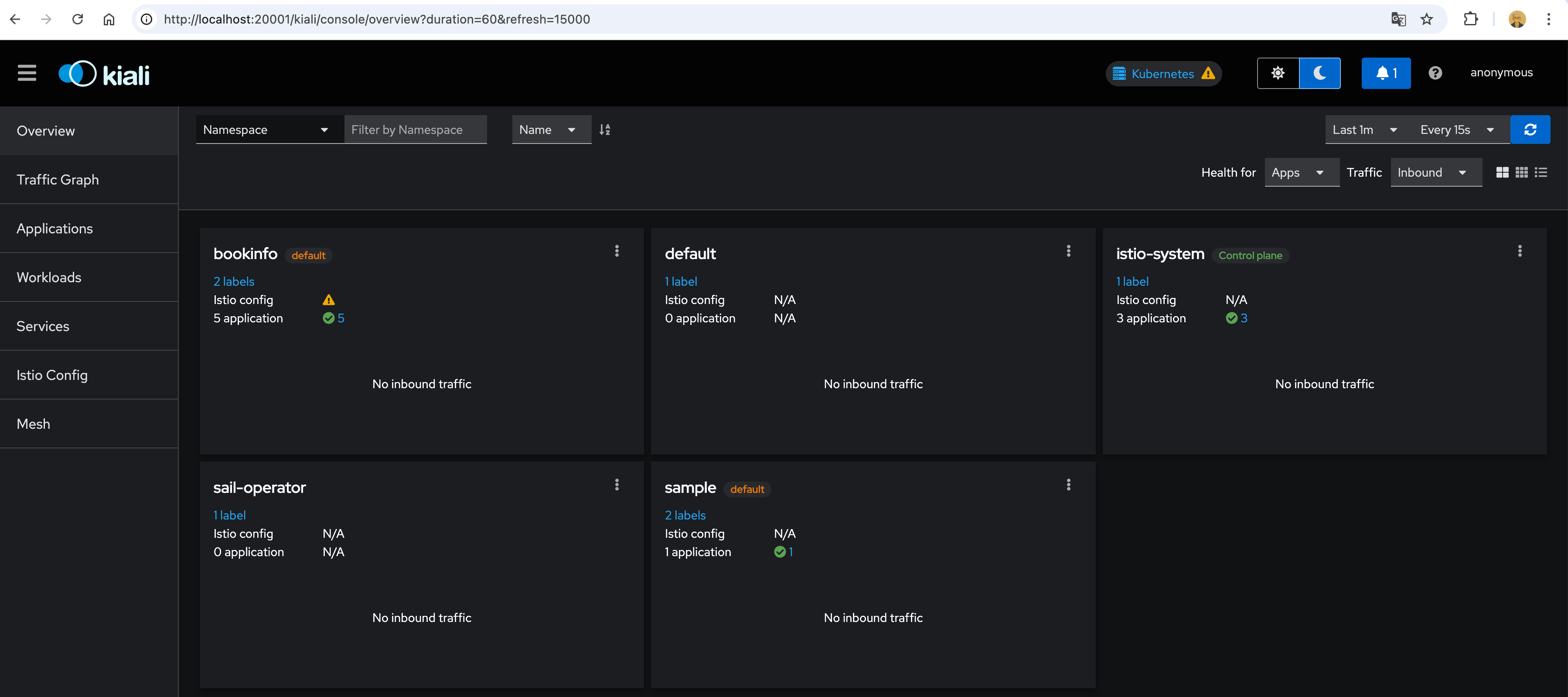
4.4 API Gateway
-
트래픽 Flow, 서비스 계층
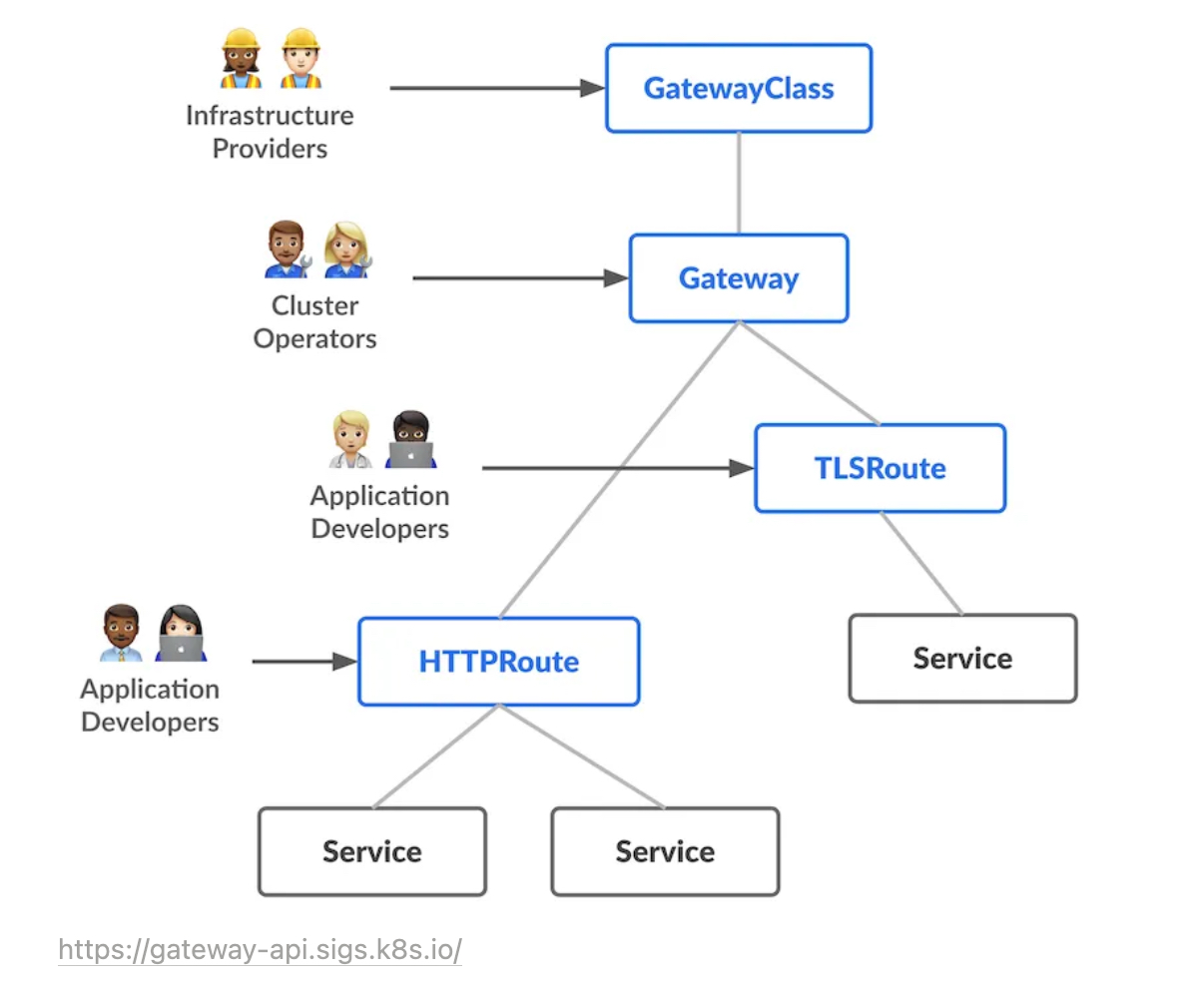
-
Create a Kubernetes Gateway using the following command:
kubectl apply -f samples/bookinfo/gateway-api/bookinfo-gateway.yaml
gateway.gateway.networking.k8s.io/bookinfo-gateway created
httproute.gateway.networking.k8s.io/bookinfo created

Because creating a Kubernetes Gateway resource will also deploy an associated proxy service, run the following command to wait for the gateway to be ready:

kubectl wait --for=condition=programmed gtw bookinfo-gateway
gateway.gateway.networking.k8s.io/bookinfo-gateway condition met

Get the gateway address and port from the bookinfo gateway resource:

export INGRESS_HOST=$(kubectl get gtw bookinfo-gateway -o jsonpath='{.status.addresses[0].value}')

export INGRESS_PORT=$(kubectl get gtw bookinfo-gateway -o jsonpath='{.spec.listeners[?(@.name=="http")].port}') - Set GATEWAY_URL:
export GATEWAY_URL=$INGRESS_HOST:$INGRESS_PORT
echo $GATEWAY_URL
k8s-default-bookinfo-143ee79479-b3270c89195813e2.elb.ap-northeast-2.amazonaws.com:80- Confirm the app is accessible from outside the cluster
curl -s "http://${GATEWAY_URL}/productpage" | grep -o "<title>.*</title>"

kubectl port-forward svc/bookinfo-gateway-istio 8080:80
Forwarding from 127.0.0.1:8080 -> 80
Forwarding from [::1]:8080 -> 80
Handling connection for 8080
Handling connection for 8080