
레이아웃을 사용하는 이유
header와 footer가 고정적으로 들어가는 웹에서 반복되는 HTML 코드를 줄이기 위해서
layout을 사용하게 됩니다.
dependencie 추가
build.gradle
dependencies{
	implementation group: 'nz.net.ultraq.thymeleaf', name: 'thymeleaf-layout-dialect', version: '2.4.1'
}
프로젝트 구조
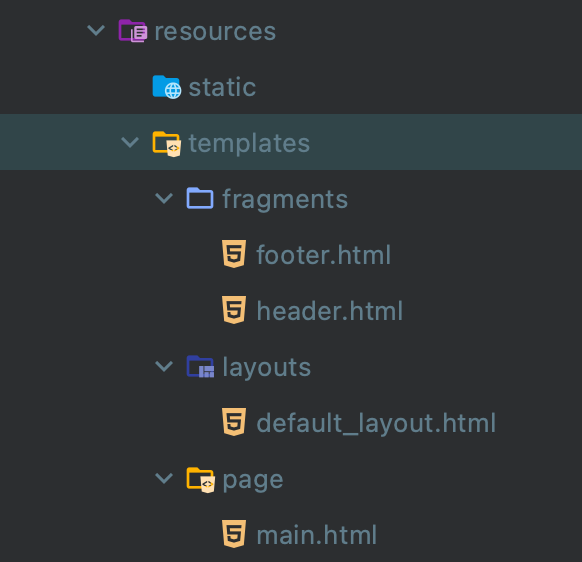
fragments directory: 레이아웃에서 공통적으로 사용할 htmllayouts directory의 default_layout.html: 전체 layout 구조 세팅page directory: 각각 다른 페이지
fragments
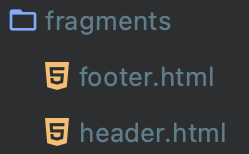
<!-- header.html -->
<!doctype html>
<html lagn="en" xmlns:th="http://www.thymeleaf.org">
<head>
    <meta charset="UTF-8">
    <meta content="width=device-width, user-scalable=no, initial-scale=1.0, maximum-scale=1.0, minimum-scale=1.0"
          name="viewport">
    <meta content="ie=edge" http-equiv="X-UA-Compatible">
    <title>Document</title>
</head>
<body>
<!-- 헤더 -->
<div th:fragment="header">
    <h1>Header Section</h1>
</div>
</body>
</html>
<!-- footer.html -->
<!doctype html>
<html lagn="en" xmlns:th="http://www.thymeleaf.org">
<head>
<meta charset="UTF-8">
<meta content="width=device-width, user-scalable=no, initial-scale=1.0, maximum-scale=1.0, minimum-scale=1.0"
name="viewport">
<meta content="ie=edge" http-equiv="X-UA-Compatible">
<title>Document</title>
</head>
<body>
<!--푸터-->
<div th:fragment="footer">
<h1>footer Section</h1>
</div>
</body>
</html>xmlns:th="http://www.thymeleaf.org"
: Thymeleaf를 사용한다는 선언으로 html 태그에 xmlns:th="http://www.thymeleaf.org"를 추가th:fragment="fragment명"
: 해당 부분을 fragment로 선언
layouts

<!-- default_layout.html -->
<!DOCTYPE html>
<html lagn="en"
      xmlns:layout="http://www.ultraq.net.nz/thymeleaf/layout"
      xmlns:th="http://www.thymeleaf.org">
<head>
    <meta charset="UTF-8"/>
    <title>thymeleaf layout</title>
    <meta content="width=device-width, maximum-scale=1.0, minimum-scale=1, user-scalable=yes,initial-scale=1.0"
          name="viewport"/>
    <!-- content script -->
    <th:block layout:fragment="css"></th:block>
    <!-- content script -->
    <th:block layout:fragment="script"></th:block>
</head>
<body>
<!-- header fragment 사용 -->
<th:block th:replace="fragments/header :: header"></th:block>
<!-- content fragment 사용 -->
<th:block layout:fragment="content"></th:block>
<!-- footer fragment 사용 -->
<th:block th:replace="fragments/footer :: footer"></th:block>
</body>
</html>- html 태그에
xmlns:layout="http://www.ultraq.net.nz/thymeleaf/layout"를 추가 <th:block layout:fragment="css"></th:block>
<th:block layout:fragment="script"></th:block>
: 각각의 content에서만 적용되는 css, js가 이 부분에서 적용되며,
<th:block th:replace="fragments/header :: header"></th:block>
<th:block th:replace="fragments/footer :: footer"></th:block>
: th:replace="fragment 위치 :: fragment명"을 호출하여 fragment를 불러오기
(th:replace는 해당 태그 부분을 fragment로 선언한 코드로 바꾼다는 의미)
page
<!DOCTYPE html>
<html lang="en" layout:decorate="~{layouts/default_layout}"
      xmlns="http://www.w3.org/1999/xhtml"
      xmlns:layout="http://www.ultraq.net.nz/thymeleaf/layout">
<head>
    <meta charset="UTF-8">
    <title>Title</title>
    <!-- 고유 CSS 추가 -->
    <th:block layout:fragment="css">
        <!--    <link rel="stylesheet" th:href="@{/css/page/home.css}" >-->
    </th:block>
    <!-- 고유 스크립트 추가 -->
    <th:block layout:fragment="script">
        <!--    <script th:src="@{/js/page/home.js}"></script>-->
    </th:block>
</head>
<body>
<div layout:fragment="content">
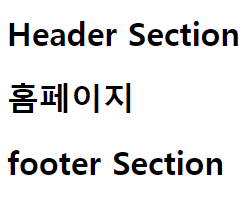
    <h1>홈페이지</h1>
</div>
</body>
</html>- 각각의 content의 html 태그에
layout:decorate="~{layouts/default_layout}"를 추가 <th:block layout:fragment="css">
<th:block layout:fragment="script">
: 각각의 페이지에서 적용되는 css, js<div layout:fragment="content">
: 페이지의 content를 적용

코딩공부