JPA 페이징
- 데이터베이스에서 수많은 데이터 중 필요한 일부만 골라 페이지 단위로 나누어 보여주는 기술
페이징 기본 개념
page: 페이지 번호, default 0size: 한 페이지에 반환할 데이터의 개수, default 20sort: 가져올 데이터를 어떻게 정렬할 지 설정
JPA 페이징 기본 구조
Pageable: 페이지 요청 정보 (page, size, sort)Page<T>: 페이징된 결과와 데이터(총 페이지 totalCount 등 더 알 수 있음)Slice<T>: 다음 페이지 있는지 정도만 알고 싶을 때, 총 totalCountList<T>: 단순히 데이터만 필요할 때
Page 사용법
Pagealbe 생성 구조
Sort sort = Sort.by("modifiedAt").descending(); // 정렬 설정

//페이지 번호와 페이지 크기 및 정렬 설정
Pageable pageable = PageRequest.of(pageNumber, pageSize, sort);
Repository에서 사용법
Page<Schedule> findAll(Pageable pageable); // 기본 페이징


Page<Schedule> findAllByUserId(Long id, Pageable pageable); // 조건 넣는 페이징
페이징 동작 방식
Hibernate:
    select
        s1_0.id,
        s1_0.content,
        s1_0.created_at,
        s1_0.modified_at,
        s1_0.title,
        s1_0.user_id
    from
        schedule s1_0
    order by
        s1_0.modified_at desc
    limit
        ?, ?
Hibernate:
    select
        count(s1_0.id)
    from
schedule s1_0- 실제 데이터 조회 쿼리 후 count 쿼리를 해서 1번 더 함
- 성능이 좋지 않으면 countQuery 분리 → 복잡한 조인할 때 count 쿼리가 느림
적용 실험
Pageable 설정
Sort sort = Sort.by("modified_at").descending();

Pageable pageable = PageRequest.of(pageNumber, pageSize, sort);

//결과
Method method using Pageable parameter must not define Limit nor Sort
No property 'modified' found for type 'Schedule'; Did you mean 'modifiedAt’
Could not create query for public abstract org.springframework.data.domain.Page com.schedule.repository.ScheduleRepository.findAll- Sort설정을 “
modified_at”으로 해서 나온 문제 modifiedAt으로 수정해야함
//올바른 설정
Sort sort = Sort.by("modifiedAt").descending();
Pageable pageable = PageRequest.of(pageNumber, pageSize, sort);

//또 다른 설정
Pageable pageable = PageRequest.of(pageNumber, pageSize, Sort.by(Sort.Direction.DESC, "modifiedAt"));
Page<DTO> 로 만들어서 사용
Console 창
2025-11-15T23:43:04.918+09:00  WARN 40632 --- [schedule] [nio-8080-exec-6] ration$PageModule$WarningLoggingModifier : Serializing PageImpl instances as-is is not supported, meaning that there is no guarantee about the stability of the resulting JSON structure!
	For a stable JSON structure, please use Spring Data's PagedModel (globally via @EnableSpringDataWebSupport(pageSerializationMode = VIA_DTO))
	or Spring HATEOAS and Spring Data's PagedResourcesAssembler as documented in https://docs.spring.io/spring-data/commons/reference/repositories/core-extensions.html#core.web.pageables.
POSTMAN
{
  "content": [
    {
      "id": 6,
      "userId": 1,
      "title": "일정 제목 테스트",
      "content": "일정 내용 테스트",
      "commentCount": 1,
      "createdAt": "2025-11-15T01:46:12.498513",
      "modifiedAt": "2025-11-15T01:46:12.498513"
    },
    {
      "id": 5,
      "userId": 1,
      "title": "일정 제목 테스트",
      "content": "일정 내용 테스트",
      "commentCount": 2,
      "createdAt": "2025-11-15T01:46:11.839611",
      "modifiedAt": "2025-11-15T01:46:11.839611"
    },
    {
      "id": 4,
      "userId": 1,
      "title": "일정 제목 테스트",
      "content": "일정 내용 테스트",
      "commentCount": 10,
      "createdAt": "2025-11-15T01:46:11.075691",
      "modifiedAt": "2025-11-15T01:46:11.075691"
    },
    {
      "id": 3,
      "userId": 1,
      "title": "일정 제목 테스트",
      "content": "일정 내용 테스트",
      "commentCount": 3,
      "createdAt": "2025-11-15T01:46:10.503555",
      "modifiedAt": "2025-11-15T01:46:10.503555"
    },
    {
      "id": 2,
      "userId": 1,
      "title": "일정 제목 테스트",
      "content": "일정 내용 테스트",
      "commentCount": 4,
      "createdAt": "2025-11-15T01:46:09.729659",
      "modifiedAt": "2025-11-15T01:46:09.729659"
    },
    {
      "id": 1,
      "userId": 1,
      "title": "일정 제목 테스트",
      "content": "일정 내용 테스트",
      "commentCount": 2,
      "createdAt": "2025-11-15T01:46:09.051855",
      "modifiedAt": "2025-11-15T01:46:09.051855"
    }
  ],
  "pageable": {
    "pageNumber": 0,
    "pageSize": 10,
    "sort": {
      "empty": false,
      "sorted": true,
      "unsorted": false
    },
    "offset": 0,
    "paged": true,
    "unpaged": false
  },
  "last": true,
  "totalPages": 1,
  "totalElements": 6,
  "first": true,
  "size": 10,
  "number": 0,
  "sort": {
    "empty": false,
    "sorted": true,
    "unsorted": false
  },
  "numberOfElements": 6,
  "empty": false
}
-> PageImpl을 JSON으로 직렬화하면 구조가 버전에 따라 달라질 수 있으니 안정적인 JSON 구조를 원하면PagedModel또는 DTO 방식으로 감싸서 내보내라
PagedModel 확인
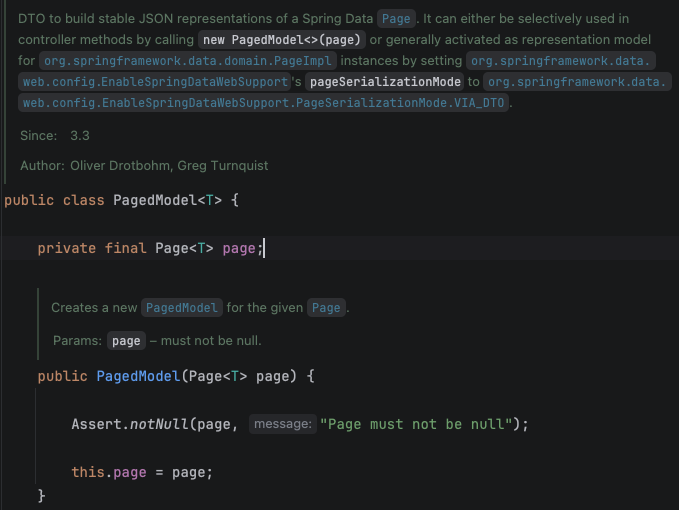
- 생성자
PageModel<T> pageModel = new PageModel(Page<T>)하면 되는 것 같음
해결된 코드
PagedModel로 반환하는 Service 부분
Page<GetSchedulePageResponse> responsePage = schedulePage.map(s -> {

	Long count = ScheduleIdCommentCount.stream()
			.filter(dto -> Objects.equals(dto.getScheduleId(), s.getId()))
			.map(ScheduleCommentDTO::getCount)
			.findFirst().orElse(0L);

	return new GetSchedulePageResponse(
                    s.getId(),
                    s.getUser().getId(),
                    s.getTitle(),
                    s.getContent(),
                    count,
                    s.getCreatedAt(),
                    s.getModifiedAt());

	});

return new PagedModel<>(responsePage);
POSTMAN
{
  "content": [
    {
      "id": 13,
      "userId": 1,
      "title": "일정 제목 테스트",
      "content": "일정 내용 테스트",
      "commentCount": 3,
      "createdAt": "2025-11-15T02:03:32.092638",
      "modifiedAt": "2025-11-15T02:03:32.092638"
    },
    {
      "id": 12,
      "userId": 1,
      "title": "일정 제목 테스트",
      "content": "일정 내용 테스트",
      "commentCount": 1,
      "createdAt": "2025-11-15T02:03:31.602737",
      "modifiedAt": "2025-11-15T02:03:31.602737"
    },
    {
      "id": 11,
      "userId": 1,
      "title": "일정 제목 테스트",
      "content": "일정 내용 테스트",
      "commentCount": 1,
      "createdAt": "2025-11-15T02:03:31.190685",
      "modifiedAt": "2025-11-15T02:03:31.190685"
    },
    {
      "id": 10,
      "userId": 1,
      "title": "일정 제목 테스트",
      "content": "일정 내용 테스트",
      "commentCount": 6,
      "createdAt": "2025-11-15T02:03:30.658399",
      "modifiedAt": "2025-11-15T02:03:30.658399"
    },
    {
      "id": 9,
      "userId": 1,
      "title": "일정 제목 테스트",
      "content": "일정 내용 테스트",
      "commentCount": 0,
      "createdAt": "2025-11-15T02:03:30.193462",
      "modifiedAt": "2025-11-15T02:03:30.193462"
    },
    {
      "id": 8,
      "userId": 1,
      "title": "일정 제목 테스트",
      "content": "일정 내용 테스트",
      "commentCount": 0,
      "createdAt": "2025-11-15T02:03:29.741711",
      "modifiedAt": "2025-11-15T02:03:29.741711"
    },
    {
      "id": 7,
      "userId": 1,
      "title": "일정 제목 테스트",
      "content": "일정 내용 테스트",
      "commentCount": 0,
      "createdAt": "2025-11-15T02:03:29.259031",
      "modifiedAt": "2025-11-15T02:03:29.259031"
    },
    {
      "id": 6,
      "userId": 1,
      "title": "일정 제목 테스트",
      "content": "일정 내용 테스트",
      "commentCount": 0,
      "createdAt": "2025-11-15T02:03:28.790619",
      "modifiedAt": "2025-11-15T02:03:28.790619"
    },
    {
      "id": 5,
      "userId": 1,
      "title": "일정 제목 테스트",
      "content": "일정 내용 테스트",
      "commentCount": 0,
      "createdAt": "2025-11-15T02:03:28.32678",
      "modifiedAt": "2025-11-15T02:03:28.32678"
    },
    {
      "id": 4,
      "userId": 1,
      "title": "일정 제목 테스트",
      "content": "일정 내용 테스트",
      "commentCount": 0,
      "createdAt": "2025-11-15T02:03:27.781584",
      "modifiedAt": "2025-11-15T02:03:27.781584"
    }
  ],
  "page": {
    "size": 10,
    "number": 0,
    "totalElements": 13,
    "totalPages": 2
  }
}- Console 로그에 오류도 없이 깔끔하게 출력 성공

Allons-y