Scheduler (스케줄러)
| 구분 | Batch | Scheduler |
|---|
| 실행 방식 | 명령이 있을 떄 실행 (대량 처리, 일괄 처리) | 정해진 시간/주기 자동 실행 |
| 대표 기술 | Spring Batch | Quartz, Spring Scheduler |
| 목적 | 대용량 데이터 처리, 안정성, 트랜잭션 | 자동화/주기적 실행 |
Quartz
- Java 기반의 대표 오픈 소스 스케줄러
- 특정 시점 혹은 간격에 따른 작업 스케줄링 지원
- 대규모 서비스 / 다중 서버 환경에서 주로 사용
장점
- DB 기반으로 클러스터링 지원
- In-Memory / JDBC 저장소 모두 가능
- 정교한 스케줄링 기능 제공
단점
- 클러스터링은 제공되지만 로드밸런싱까지 완전하진 않음
- 클러스터링 : 여러 개체를 묶는 것 혹은 비슷한 개체끼리 묶는 것
- 단순 Scheduler에 비해 구성이 복잡
- History 저장은 직접 구현 필요
Spring Scheduler (Spring Framework 내장 스케줄러)
- Quartz보다 구현이 매우 간단
- 어노테이션 기반으로 쉽게 스케줄링
사용방법
@EnableScheduling
@SpringBootApplication
public class Application() {...}
@Component
public class Printer1 {
private final Counter counter;
public Printer1(Counter counter) {
this.counter = counter;
}
@Scheduled(cron = "0/1 * * * * *")
public void printerHello() {
int v = counter.incrementAndGet();
System.out.println("Hello cnt : " + v);
}
}
스케줄링 옵션
| 속성 | 설명 |
|---|
cron | Cron 표현식 기반 실행 |
fixedDelay | 이전 작업 종료 시점 기준 다음 작업 실행 |
fixedRate | 이전 작업 시작 시점 기준 다음 작업 실행 |
비동기 Scheduler (@Async)
- 기본 @Scheduled는 동기 실행 → 작업 시간이 길면 다음 작업 실행이 지연될 수 있음
@EnableAsync
@EnableScheduling
@SpringBootApplication
public class Application() {...}
@Component
public class Printer2 {
private final Counter counter;
public Printer2(Counter counter) {
this.counter = counter;
}
@Async
@Scheduled(cron = "0/1 * * * * *")
public void printerHi() {
System.out.println("Hi cnt : " + counter.incrementAndGet());
}
}
ThreadPoolTaskExecutor 설정
@EnableAsync
@Configuration
public class TaskExecutorConfig {
@Bean("taskExecutor")
public ThreadPoolTaskExecutor taskExecutor() {
ThreadPoolTaskExecutor executor = new ThreadPoolTaskExecutor();
executor.setCorePoolSize(5);
executor.setMaxPoolSize(50);
executor.setQueueCapacity(100);
executor.setThreadNamePrefix("my-");
executor.initialize();
return executor;
}
}
동작 원리
- CorePoolSize 까지 Thread 생성
- 넘치면 Queue에 적재
- Queue까지 꽉 차면 MaxPoolSize까지 Thread 확장
- 그래도 못 받으면
TaskRejectedException 발생
Cron 표현식
| 필드 | 허용 값(일반) | 주요 특수문자 | 예 (필드 값) | 설명 |
|---|
| 초 (Seconds) | 0–59 | * , - / | 0 | 매 분의 0초(정각) |
| 분 (Minutes) | 0–59 | * , - / | 0/5 | 5분마다 (0,5,10,...) |
| 시 (Hours) | 0–23 | * , - / | 9-17 | 09:00 ~ 17:59 사이 매시간 |
| 일 (Day-of-month) | 1–31 | * , - / L W ? | 1 | 매달 1일 |
| 월 (Month) | 1–12 또는 JAN–DEC | * , - / | JAN,APR,DEC | 1월, 4월, 12월 |
| 요일 (Day-of-week) | 0–6 또는 SUN–SAT (0=SUN) | * , - / L # ? | MON-FRI | 월~금(평일) |
| 년 (Year) | 1970–2099 등 | * , - / | 2025 | 2025년에만 실행 |
- : 범위 지정
, : 여러 값을 지정
/ : 증가하는 값을 지정
L : 마지막 값 지정
W : 가장 가까운 평일
# : 몇번 째 무슨 요일인지 지정
? : 일 또는 요일 중 하나에 사용(특정값 필요 없을 때) — Quartz에서 사용
FixedRate 와 FixedDelay
| 구분 | fixedRate | fixedDelay |
|---|
| 다음 작업 시작 시점 | 작업 시작 시간 | 이전 작업 완료 후 설정된 시간 |
| 주요 특징 | 작업이 겹칠 가능성 있음 (Spring에서는 한 번에 하나의 작업만 실행) | 작업이 겹치지 않음 |
| 적합한 경우 | 정확한 주기 유지가 필요할 때 | 이전 작업 완료 후 지연 시간이 필요할 때 |
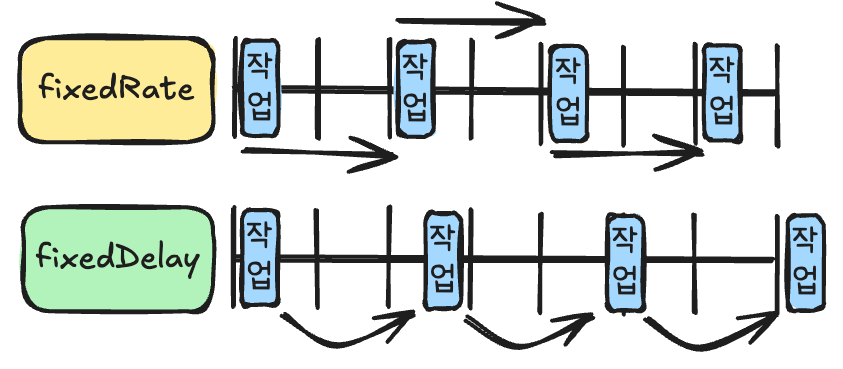
예시
@Component
public class FixedDelayExample {
@Scheduled(fixedDelay = 5000)
public void runWithFixedDelay() throws InterruptedException {...}
@Scheduled(fixedRate = 5000)
public void runWithFixedRate() throws InterruptedException {...}
}
fixedDelay & fixedRate + initialDelay 예시
@Scheduled(initialDelay = 2000, fixedDelay = 5000)
public void delayedStartTask() {
    System.out.println("2초 후 처음 실행되고, 이후 매 실행 종료 후 5초 뒤 재실행");
}
- 특정 시간 후에 최초 실행을 지연시키고 싶으면
initialDelay 병행 가능