🗂️ Day71 프로젝트: 블로그 배포
🗂️ Day69 프로젝트: 블로그에 사용자 추가에서 완성한 블로그를 인터넷에 실시간으로 호스팅하기
1. 프로젝트에 .gitignore 파일 추가
🔍 유의 사항
- requirements.txt 파일 수정
- 패키지 버전은 강의에서 제공한 대로 맞춰서 오류 발생 방지하기
(최신 Flask 버전에서는 render.com 사용 안 됨)- gunicorn, psycopg2-binary 패키지 추가
- posts.db 파일, venv 폴더, 숨겨진 PyCharm .idea 폴더 등은 업로드되면 안 됨
2. Git을 사용해 프로젝트 버전 관리
🔍 유의 사항
- PyCharm의 Version Control Integration 활성화 (git init과 동일하나 터미널 대신 GUI 사용)
- 메뉴 바의
VCS→Enable Version Control Integration- 사용할 버전 관리 시스템을 선택하는 창에서
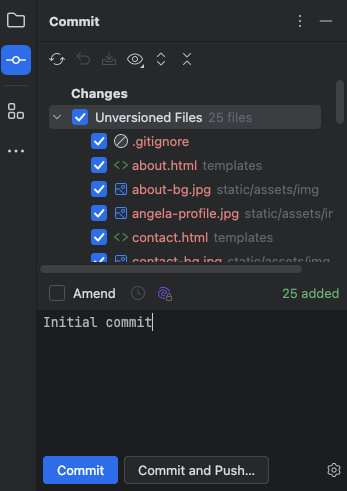
Git선택- 버전 관리를 활성화하면 스테이징 영역에 추가되지 않은 파일들이 빨간색으로 표시됨
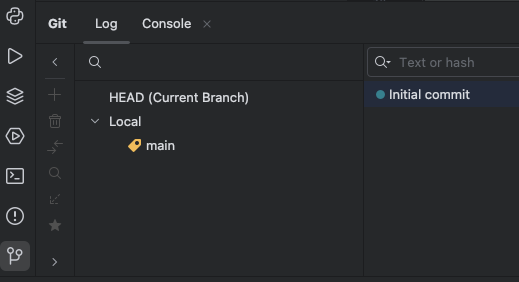
- 측면에 새로 나타난 Commit Tool로 커밋
- 추적된 파일은 더 이상 빨간색으로 표시되지 않음
- ignored 된 파일은 노란색으로 표시됨
3. 환경 변수를 사용해 민감한 정보 저장
🔍 유의 사항
- Day 35 - API 키&인증, 환경변수, SMS 보내기 참조
- os 모듈 import 하고 main.py의 민감한 정보를 환경 변수로 대체하기
- main.py 파일에서 코드만 변경하고 키는 6번째 단계에서 입력
- Flask 설정 코드
- SQLAlchemy 설정 코드
(실제 운영환경에서 기본 SQLite대신 다른 데이터베이스를 사용하기 위해)- 이메일 문의 양식을 사용하는 경우 이메일 주소와 비밀번호도 환경 변수로 받기
app.run(debug=False)로 설정하기- 변경사항 커밋
4. gunicorn으로 WSGI 서버 설정
🔍 유의 사항
- 개발자 서버가 아닌 웹 서버에서 Flask 앱을 실행하기 위해 특별한 유형의 서버(WSGI) 필요
- 파이썬 Flask 애플리케이션과 호스트 서버 간의 언어와 프로토콜을 표준화
- gunicorn은 가장 널리 사용되는 패키지
- 프로젝트 최상위 폴더에
Procfile.파일을 생성
- PyCharm에서 새 파일을 Git 버전 관리로 추적할지 물으면 '추가'하기
web: gunicorn (main 등 서버를 열 파이썬 파일의 이름):app을 파일에 입력
- 호스팅 제공자가 HTTP 요청을 수신할 수 있는 web m작업자를 생성
- 웹 앱이 gunicorn을 사용하도록 명시
- 해당 파이썬 파일이 app 오브젝트라는 것을 명시
- 변경사항 커밋
5. Github에 원격 저장소 푸시
🔍 유의 사항
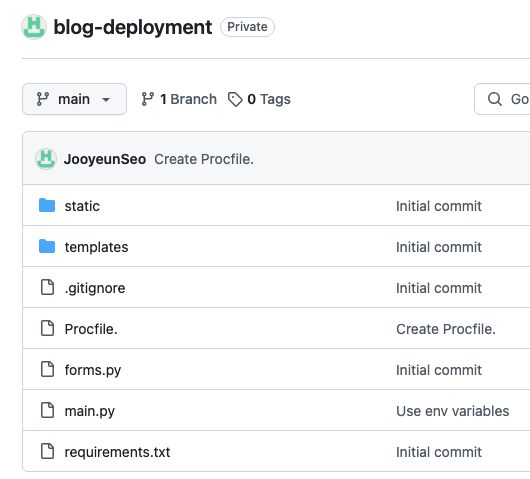
Settings→Version Control→GitHub→Add account으로 계정 연동- 메뉴 바의
Git→GitHub→Share project on Github으로 코드 push
- VCS가 Git으로 변경됨
- 원하는 레포지토리 이름을 입력하고 Share 하기 (원격에 레포지토리 생성까지 됨)
6. 호스팅 제공 서비스에 회원가입하고 웹 서비스 생성
🔍 유의 사항
- render.com에서 호스팅하기 (GitHub 계정으로 로그인)
- 무료 요금제로 새 웹 서비스 생성하기
Service type→New Web Service→ 블로그 앱 선택 →Connect- Start Command 를 gunicorn app:app 에서
gunicorn main:app으로 수정
(나머지 설정은 기본 그대로 유지해도 됨)- Environment Variables 에 Flask 앱의 환경 변수 추가 (DB_URI는 7번째 단계에서 입력)
Deploy web service로 배포
7. SQLite 데이터베이스를 PostgreSQL로 업그레이드
🔍 유의 사항
SQLite: 파일 기반 데이터베이스이기 때문에 배포 후에는 파일 경로가 주기적으로 변동되어 불편함
PosgreSQL: 호스팅 제공자를 통해 배포할 경우 적합- psycopg 패키지로 SQLite를 Postgres로 전환 가능
- 새 Postgres 데이터베이스 생성
- render.com →
New PostgreSQL생성Name→ 데이터베이스의 이름 입력- 무료 요금제 선택하고 생성 (1년 기한)
- SQLALCHEMY_DATABASE_URI 환경 변수 설정
- 데이터베이스 생성 후
Info에서Internal Database URL복사- 웹 서비스의
Environment설정으로 돌아가서 DB_URI의 키값으로 복사한 URL 붙여넣기
(만약 시작부분이 postgres 이라면 postgresql으로 변경)
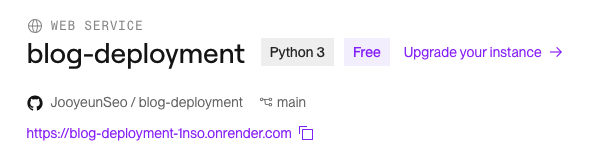
- 해당 링크를 누르면 블로그가 운영되는 것을 확인 가능
- admin 사용자로 로그인해서 게시물 작성하기
- Admin 계정 이메일 주소: admin@email.com
- Admin 계정 비밀번호: asdf
📄 requirements.txt
Bootstrap_Flask==2.3.3
Flask_CKEditor==0.5.1
Flask_Login==0.6.3
Flask-Gravatar==0.5.0
Flask_WTF==1.2.1
WTForms==3.0.1
Werkzeug==3.0.0
Flask==2.3.2
flask_sqlalchemy==3.1.1
SQLAlchemy==2.0.25
gunicorn==21.2.0
psycopg2-binary==2.9.9
📄 Procfile.
web: gunicorn main:app🚫 .gitignore
# This is a gitignore file. Folders and file types in here will not
# be added to version control and will not be uploaded to Github.
# For example we ignore the hidden files from Pycharm and VS Code.
.idea/
.vscode

### Also any macOS specific files
.DS_Store
.AppleDouble
.LSOverride
Icon
# and thumbnails
._*

# People have already very handy .gitignore templates for Python projects.
# Below is this one here: https://github.com/github/gitignore/blob/main/Python.gitignore
# Byte-compiled / optimized / DLL files
__pycache__/
*.py[cod]
*$py.class

# C extensions
*.so

# Distribution / packaging
.Python
build/
develop-eggs/
dist/
downloads/
eggs/
.eggs/
lib/
lib64/
parts/
sdist/
var/
wheels/
share/python-wheels/
*.egg-info/
.installed.cfg
*.egg
MANIFEST

# PyInstaller
#  Usually these files are written by a python script from a template
#  before PyInstaller builds the exe, so as to inject date/other infos into it.
*.manifest
*.spec

# Installer logs
pip-log.txt
pip-delete-this-directory.txt

# Unit test / coverage reports
htmlcov/
.tox/
.nox/
.coverage
.coverage.*
.cache
nosetests.xml
coverage.xml
*.cover
*.py,cover
.hypothesis/
.pytest_cache/
cover/

# Translations
*.mo
*.pot

# Django stuff:
*.log
local_settings.py
db.sqlite3
db.sqlite3-journal

# Flask stuff:
instance/
.webassets-cache

# Scrapy stuff:
.scrapy

# Sphinx documentation
docs/_build/

# PyBuilder
.pybuilder/
target/

# Jupyter Notebook
.ipynb_checkpoints

# IPython
profile_default/
ipython_config.py

# pyenv
#   For a library or package, you might want to ignore these files since the code is
#   intended to run in multiple environments; otherwise, check them in:
# .python-version

# pipenv
#   According to pypa/pipenv#598, it is recommended to include Pipfile.lock in version control.
#   However, in case of collaboration, if having platform-specific dependencies or dependencies
#   having no cross-platform support, pipenv may install dependencies that don't work, or not
#   install all needed dependencies.
#Pipfile.lock

# poetry
#   Similar to Pipfile.lock, it is generally recommended to include poetry.lock in version control.
#   This is especially recommended for binary packages to ensure reproducibility, and is more
#   commonly ignored for libraries.
#   https://python-poetry.org/docs/basic-usage/#commit-your-poetrylock-file-to-version-control
#poetry.lock

# pdm
#   Similar to Pipfile.lock, it is generally recommended to include pdm.lock in version control.
#pdm.lock
#   pdm stores project-wide configurations in .pdm.toml, but it is recommended to not include it
#   in version control.
#   https://pdm.fming.dev/#use-with-ide
.pdm.toml

# PEP 582; used by e.g. github.com/David-OConnor/pyflow and github.com/pdm-project/pdm
__pypackages__/

# Celery stuff
celerybeat-schedule
celerybeat.pid

# SageMath parsed files
*.sage.py

# Environments
.env
.venv
env/
venv/
ENV/
env.bak/
venv.bak/

# Spyder project settings
.spyderproject
.spyproject

# Rope project settings
.ropeproject

# mkdocs documentation
/site

# mypy
.mypy_cache/
.dmypy.json
dmypy.json

# Pyre type checker
.pyre/

# pytype static type analyzer
.pytype/

# Cython debug symbols
cython_debug/
⌨️ main.py
import os
from datetime import date
from flask import Flask, abort, render_template, redirect, url_for, flash, request
from flask_bootstrap import Bootstrap5
from flask_ckeditor import CKEditor
from flask_gravatar import Gravatar
from flask_login import UserMixin, login_user, LoginManager, current_user, logout_user
from flask_sqlalchemy import SQLAlchemy
from sqlalchemy.orm import relationship, DeclarativeBase, Mapped, mapped_column
from sqlalchemy import Integer, String, Text
from functools import wraps
from werkzeug.security import generate_password_hash, check_password_hash
from forms import CreatePostForm, RegisterForm, LoginForm, CommentForm
# Optional: add contact me email functionality (Day 60)
# import smtplib

app = Flask(__name__)
app.config['SECRET_KEY'] = os.environ.get('FLASK_KEY')
ckeditor = CKEditor(app)
Bootstrap5(app)

# Configure Flask-Login
login_manager = LoginManager()
login_manager.init_app(app)


@login_manager.user_loader
def load_user(user_id):
    return db.get_or_404(User, user_id)


# For adding profile images to the comment section
gravatar = Gravatar(app,
                    size=100,
                    rating='g',
                    default='retro',
                    force_default=False,
                    force_lower=False,
                    use_ssl=False,
                    base_url=None)

# CREATE DATABASE
class Base(DeclarativeBase):
    pass
app.config['SQLALCHEMY_DATABASE_URI'] = os.environ.get("DB_URI", "sqlite:///posts.db")
db = SQLAlchemy(model_class=Base)
db.init_app(app)


# CONFIGURE TABLES
class BlogPost(db.Model):
    __tablename__ = "blog_posts"
    id: Mapped[int] = mapped_column(Integer, primary_key=True)
    # Create Foreign Key, "users.id" the users refers to the tablename of User.
    author_id: Mapped[int] = mapped_column(Integer, db.ForeignKey("users.id"))
    # Create reference to the User object. The "posts" refers to the posts property in the User class.
    author = relationship("User", back_populates="posts")
    title: Mapped[str] = mapped_column(String(250), unique=True, nullable=False)
    subtitle: Mapped[str] = mapped_column(String(250), nullable=False)
    date: Mapped[str] = mapped_column(String(250), nullable=False)
    body: Mapped[str] = mapped_column(Text, nullable=False)
    img_url: Mapped[str] = mapped_column(String(250), nullable=False)
    # Parent relationship to the comments
    comments = relationship("Comment", back_populates="parent_post")


# Create a User table for all your registered users
class User(UserMixin, db.Model):
    __tablename__ = "users"
    id: Mapped[int] = mapped_column(Integer, primary_key=True)
    email: Mapped[str] = mapped_column(String(100), unique=True)
    password: Mapped[str] = mapped_column(String(100))
    name: Mapped[str] = mapped_column(String(100))
    # This will act like a list of BlogPost objects attached to each User.
    # The "author" refers to the author property in the BlogPost class.
    posts = relationship("BlogPost", back_populates="author")
    # Parent relationship: "comment_author" refers to the comment_author property in the Comment class.
    comments = relationship("Comment", back_populates="comment_author")


# Create a table for the comments on the blog posts
class Comment(db.Model):
    __tablename__ = "comments"
    id: Mapped[int] = mapped_column(Integer, primary_key=True)
    text: Mapped[str] = mapped_column(Text, nullable=False)
    # Child relationship:"users.id" The users refers to the tablename of the User class.
    # "comments" refers to the comments property in the User class.
    author_id: Mapped[int] = mapped_column(Integer, db.ForeignKey("users.id"))
    comment_author = relationship("User", back_populates="comments")
    # Child Relationship to the BlogPosts
    post_id: Mapped[str] = mapped_column(Integer, db.ForeignKey("blog_posts.id"))
    parent_post = relationship("BlogPost", back_populates="comments")


with app.app_context():
    db.create_all()


# Create an admin-only decorator
def admin_only(f):
    @wraps(f)
    def decorated_function(*args, **kwargs):
        # If id is not 1 then return abort with 403 error
        if current_user.id != 1:
            return abort(403)
        # Otherwise continue with the route function
        return f(*args, **kwargs)

    return decorated_function


# Register new users into the User database
@app.route('/register', methods=["GET", "POST"])
def register():
    form = RegisterForm()
    if form.validate_on_submit():

        # Check if user email is already present in the database.
        result = db.session.execute(db.select(User).where(User.email == form.email.data))
        user = result.scalar()
        if user:
            # User already exists
            flash("You've already signed up with that email, log in instead!")
            return redirect(url_for('login'))

        hash_and_salted_password = generate_password_hash(
            form.password.data,
            method='pbkdf2:sha256',
            salt_length=8
        )
        new_user = User(
            email=form.email.data,
            name=form.name.data,
            password=hash_and_salted_password,
        )
        db.session.add(new_user)
        db.session.commit()
        # This line will authenticate the user with Flask-Login
        login_user(new_user)
        return redirect(url_for("get_all_posts"))
    return render_template("register.html", form=form, current_user=current_user)


@app.route('/login', methods=["GET", "POST"])
def login():
    form = LoginForm()
    if form.validate_on_submit():
        password = form.password.data
        result = db.session.execute(db.select(User).where(User.email == form.email.data))
        # Note, email in db is unique so will only have one result.
        user = result.scalar()
        # Email doesn't exist
        if not user:
            flash("That email does not exist, please try again.")
            return redirect(url_for('login'))
        # Password incorrect
        elif not check_password_hash(user.password, password):
            flash('Password incorrect, please try again.')
            return redirect(url_for('login'))
        else:
            login_user(user)
            return redirect(url_for('get_all_posts'))

    return render_template("login.html", form=form, current_user=current_user)


@app.route('/logout')
def logout():
    logout_user()
    return redirect(url_for('get_all_posts'))


@app.route('/')
def get_all_posts():
    result = db.session.execute(db.select(BlogPost))
    posts = result.scalars().all()
    return render_template("index.html", all_posts=posts, current_user=current_user)


# Add a POST method to be able to post comments
@app.route("/post/<int:post_id>", methods=["GET", "POST"])
def show_post(post_id):
    requested_post = db.get_or_404(BlogPost, post_id)
    # Add the CommentForm to the route
    comment_form = CommentForm()
    # Only allow logged-in users to comment on posts
    if comment_form.validate_on_submit():
        if not current_user.is_authenticated:
            flash("You need to login or register to comment.")
            return redirect(url_for("login"))

        new_comment = Comment(
            text=comment_form.comment_text.data,
            comment_author=current_user,
            parent_post=requested_post
        )
        db.session.add(new_comment)
        db.session.commit()
    return render_template("post.html", post=requested_post, current_user=current_user, form=comment_form)


# Use a decorator so only an admin user can create new posts
@app.route("/new-post", methods=["GET", "POST"])
@admin_only
def add_new_post():
    form = CreatePostForm()
    if form.validate_on_submit():
        new_post = BlogPost(
            title=form.title.data,
            subtitle=form.subtitle.data,
            body=form.body.data,
            img_url=form.img_url.data,
            author=current_user,
            date=date.today().strftime("%B %d, %Y")
        )
        db.session.add(new_post)
        db.session.commit()
        return redirect(url_for("get_all_posts"))
    return render_template("make-post.html", form=form, current_user=current_user)


# Use a decorator so only an admin user can edit a post
@app.route("/edit-post/<int:post_id>", methods=["GET", "POST"])
def edit_post(post_id):
    post = db.get_or_404(BlogPost, post_id)
    edit_form = CreatePostForm(
        title=post.title,
        subtitle=post.subtitle,
        img_url=post.img_url,
        author=post.author,
        body=post.body
    )
    if edit_form.validate_on_submit():
        post.title = edit_form.title.data
        post.subtitle = edit_form.subtitle.data
        post.img_url = edit_form.img_url.data
        post.author = current_user
        post.body = edit_form.body.data
        db.session.commit()
        return redirect(url_for("show_post", post_id=post.id))
    return render_template("make-post.html", form=edit_form, is_edit=True, current_user=current_user)


# Use a decorator so only an admin user can delete a post
@app.route("/delete/<int:post_id>")
@admin_only
def delete_post(post_id):
    post_to_delete = db.get_or_404(BlogPost, post_id)
    db.session.delete(post_to_delete)
    db.session.commit()
    return redirect(url_for('get_all_posts'))


@app.route("/about")
def about():
    return render_template("about.html", current_user=current_user)


@app.route("/contact", methods=["GET", "POST"])
def contact():
    return render_template("contact.html", current_user=current_user)

# Optional: You can include the email sending code from Day 60:
# DON'T put your email and password here directly! The code will be visible when you upload to Github.
# Use environment variables instead (Day 35)

# MAIL_ADDRESS = os.environ.get("EMAIL_KEY")
# MAIL_APP_PW = os.environ.get("PASSWORD_KEY")

# @app.route("/contact", methods=["GET", "POST"])
# def contact():
#     if request.method == "POST":
#         data = request.form
#         send_email(data["name"], data["email"], data["phone"], data["message"])
#         return render_template("contact.html", msg_sent=True)
#     return render_template("contact.html", msg_sent=False)
#
#
# def send_email(name, email, phone, message):
#     email_message = f"Subject:New Message\n\nName: {name}\nEmail: {email}\nPhone: {phone}\nMessage:{message}"
#     with smtplib.SMTP("smtp.gmail.com") as connection:
#         connection.starttls()
#         connection.login(MAIL_ADDRESS, MAIL_APP_PW)
#         connection.sendmail(MAIL_ADDRESS, MAIL_APP_PW, email_message)


if __name__ == "__main__":
    app.run(debug=False)