StringBuilder를 왜 쓸까?
Java 코딩테스트에서 StringBuilder는 굉장히 많이 쓰입니다.
그 이유는 한마디로:
문자열을 여러 번 이어 붙일 때, +보다 훨씬 빠르기 때문입니다.
+를 쓰면 느린 이유
String s = "a";
s += "b"; // 실제로는 "ab"라는 새로운 문자열이 생성됨!+연산을 많이 하면 매번 새 문자열을 만들기 때문에 느려요.- 특히 큰 루프에서 문자열을 누적하면 시간 초과 가능성이 있습니다.
StringBuilder는 가변
StringBuilder sb = new StringBuilder();
sb.append("a");
sb.append("b");
System.out.println(sb.toString()); // ab- 내부에서 한 개의 문자열 버퍼에 계속 붙이기 때문에 효율적
- 문자열 누적 시 시간복잡도 O(1) 수준
예시 - 옷 정보 출력
<문제 설명>
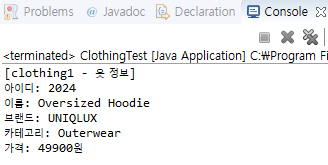
다음 옷 정보를 출력하시오.[clothing1 - 옷 정보] 아이디: 2024 이름: Oversized Hoodie 브랜드: UNIQLUX 카테고리: Outerwear 가격: 49900원
자바 코드 예제
class Clothing {
	int id;
    String name;
    String brand;
    String category;
    int price;

    public Clothing(int id, String name, String brand, String category, int price) {
    	this.id = id;
        this.name = name;
        this.brand = brand;
        this.category = category;
        this.price = price;
     }
}

public class ClothingTest {
	public static void main(String[] args) {
    	Clothing clothing1 = new Clothing(2024, "Oversized Hoodie", "UNIQLUX", "Outerwear", 49900);

        StringBuilder builder = new StringBuilder("[clothing1 - 옷 정보]\n");
        builder.append(String.format("아이디: %d\n", clothing1.id))
               .append(String.format("이름: %s\n", clothing1.name))
               .append(String.format("브랜드: %s\n", clothing1.brand))
               .append(String.format("카테고리: %s\n", clothing1.category))
               .append(String.format("가격: %d원\n", clothing1.price));

          System.out.println(builder);
     }
}
만약에 StringBuilder를 안썼다면?
public class ClothingTest {
    public static void main(String[] args) {
        Clothing clothing1 = new Clothing(2024, "Oversized Hoodie", "UNIQLUX", "Outerwear", 49900);

        String result = "[clothing1 - 옷 정보]\n"
                + String.format("아이디: %d\n", clothing1.id)
                + String.format("이름: %s\n", clothing1.name)
                + String.format("브랜드: %s\n", clothing1.brand)
                + String.format("카테고리: %s\n", clothing1.category)
                + String.format("가격: %d원\n", clothing1.price);

        System.out.println(result);
    }
}
할 수 있다!!!
대략 119배의 차이
실행환경에 따라 다르겠지만 해당 글 글쓴이의 환경에서는 대략 119배의 차이가 났다고 한다.
멀티스레드 환경이라면 이야기가 달라지겠지만 코딩테스트에선 그럴일이 없으므로 코딩테스트에선 무조건 StringBuilder를 쓰는 것이 좋겠다고 말하셨다.