1. Kubernetes Architecture
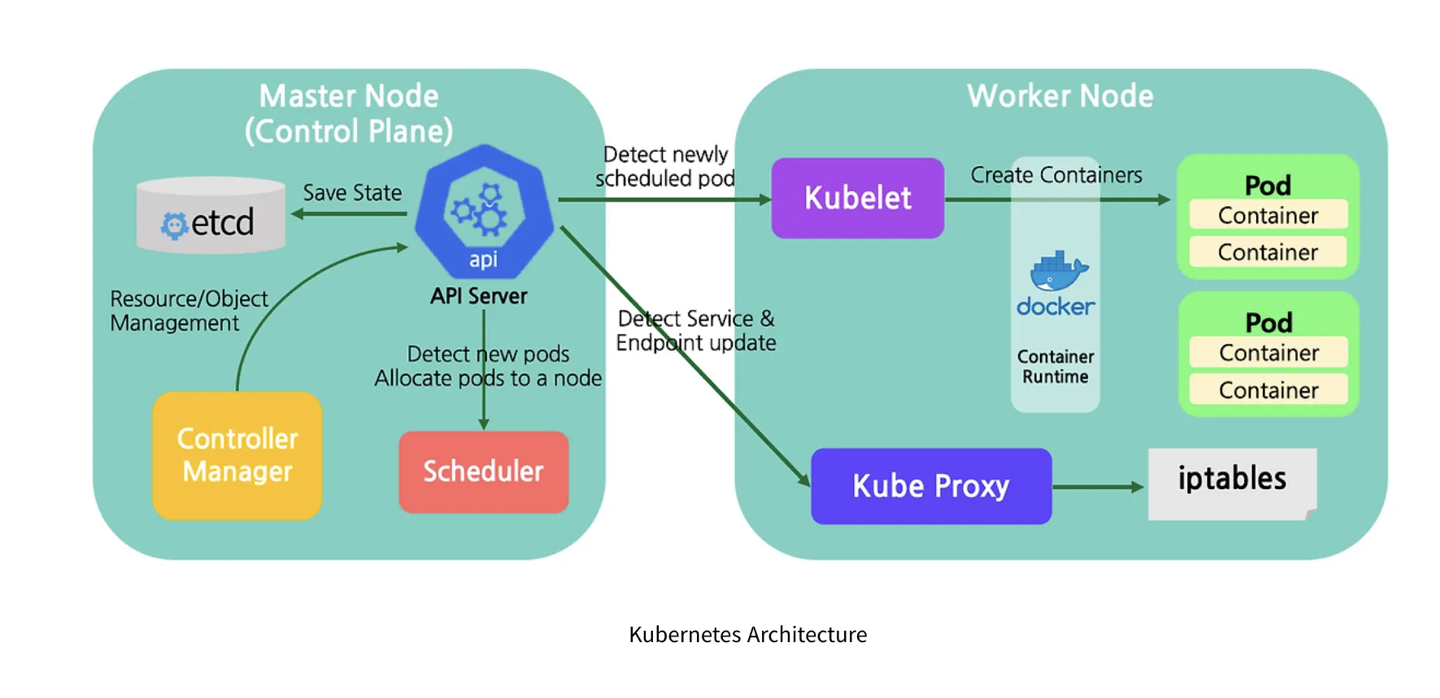
구성요소
1. Node : worker machine, minions
- need more than one mode.(if one failed, others are accessible)
2. Cluster : set of nodes.
- if one node fail, still accessible
- group nodes sharing loads
3. Master : watch worker nodes
- orchestration nodes
쿠버네티스를 설치하면, 실제로 구성되어있는 요소들
[1] API server
front end of Kubernetes
[2] etcd
keystore for all data used to manage the cluster
- etcd stores all info on all the nodes in the cluster in a distributed manner.
- is responsible for implementing locks within the cluster to ensure no conflict with master
[3] kubelet
the agent that runs on each node in the cluster.
- agent : 예상된 노드에 컨테이너가 잘 돌아가는지 확인/수행.
[4] Container Runtime
use to run containers = docker.
[5] Controller
brain
- noticing and responding when nodes, containers or endpoints goes down.
- decide to bring up new containers
[6] Scheduler
distributing work or containers across mutliple nodes.
look for new created containers and assign them to nodes.
어떻게 master, worker는 다르게 이루어져있는가?
Docker vs ContainerD 차이
-
히스토리
쿠버네티스 - 도커 런타임만 호환됬었음.
이후, 쿠베 인기급상승.
타 런타임과의 호환을 위해, CRI도입 (OCI 표준으로 구현 시 CRI 를 사용해서 쿠버네티스와 호환해서 사용할수있게됨)
dockershim 으로 계속 도커를 CRI없이도 지원가능하도록 함.(deprecated)dockershim이 deprecated 되면서 containerD가 나옴.
도커의 구성요소
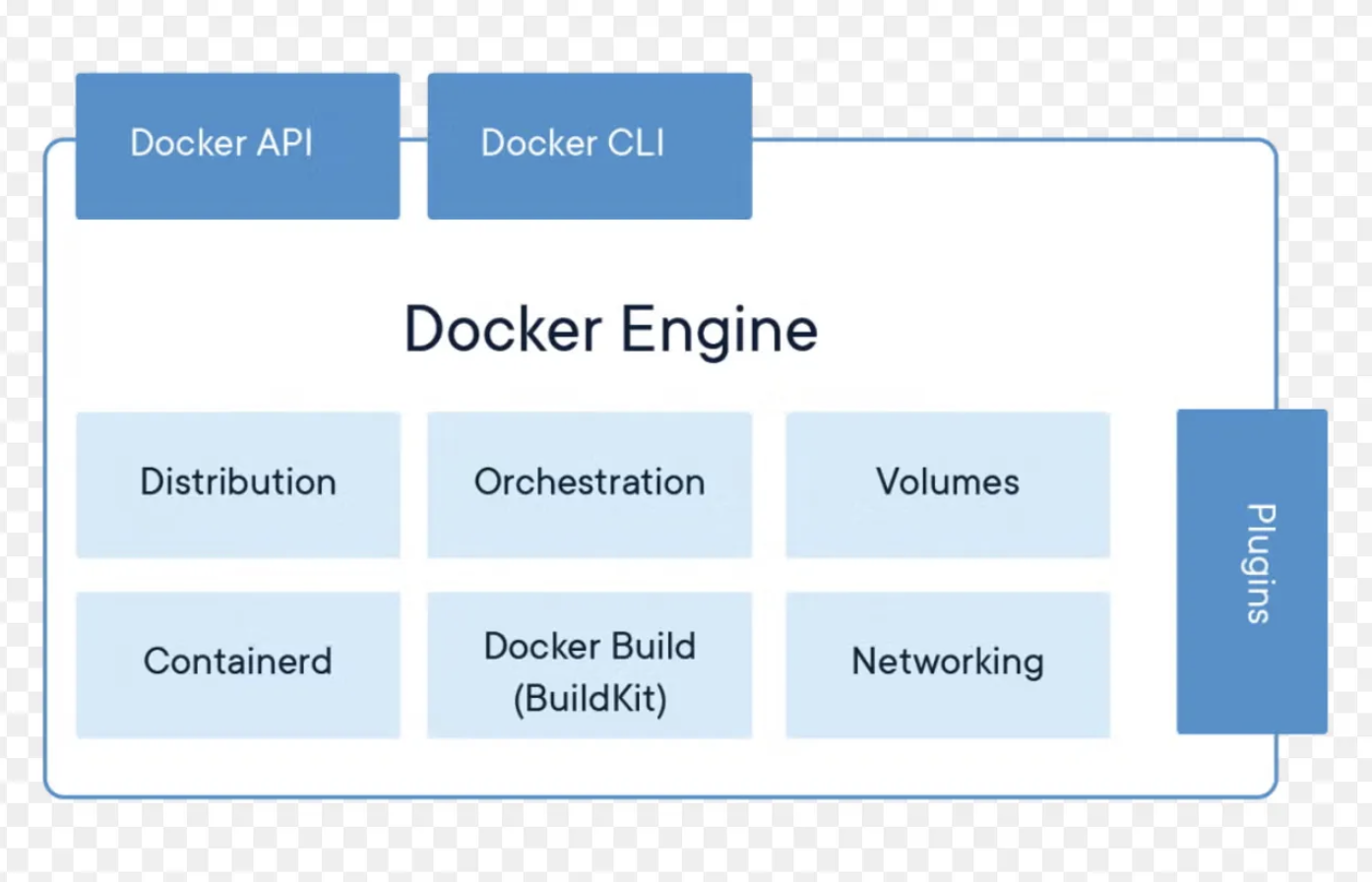
Run C : Container Run time.
Container D : daemon managing run C. / can working directly with Kubernetes 도커외의 런타임과 직접 사용가능 / CRI Compatible.
dockershim 이제 지원 X
- 도커의 다른 기능이 필요없는 경우, containerD만 설치가능
- ctr : cmd tools, not user friendly
- nerdctr : docker-like cli for containerD / new feature not in docker
- crictr : not for create container , for debug. (pull image, list images, list containers, view logs, also can aware of pods)
| ctr | nerdctl | crictl | |
|---|---|---|---|
| purpose | Debugging | General Purpose | Debugging |
| community | ContainerD | ContainerD | Kubernetes |
| Works With | ContainerD | ContainerD | All CRI Compatible Runtimes |
2. Pods
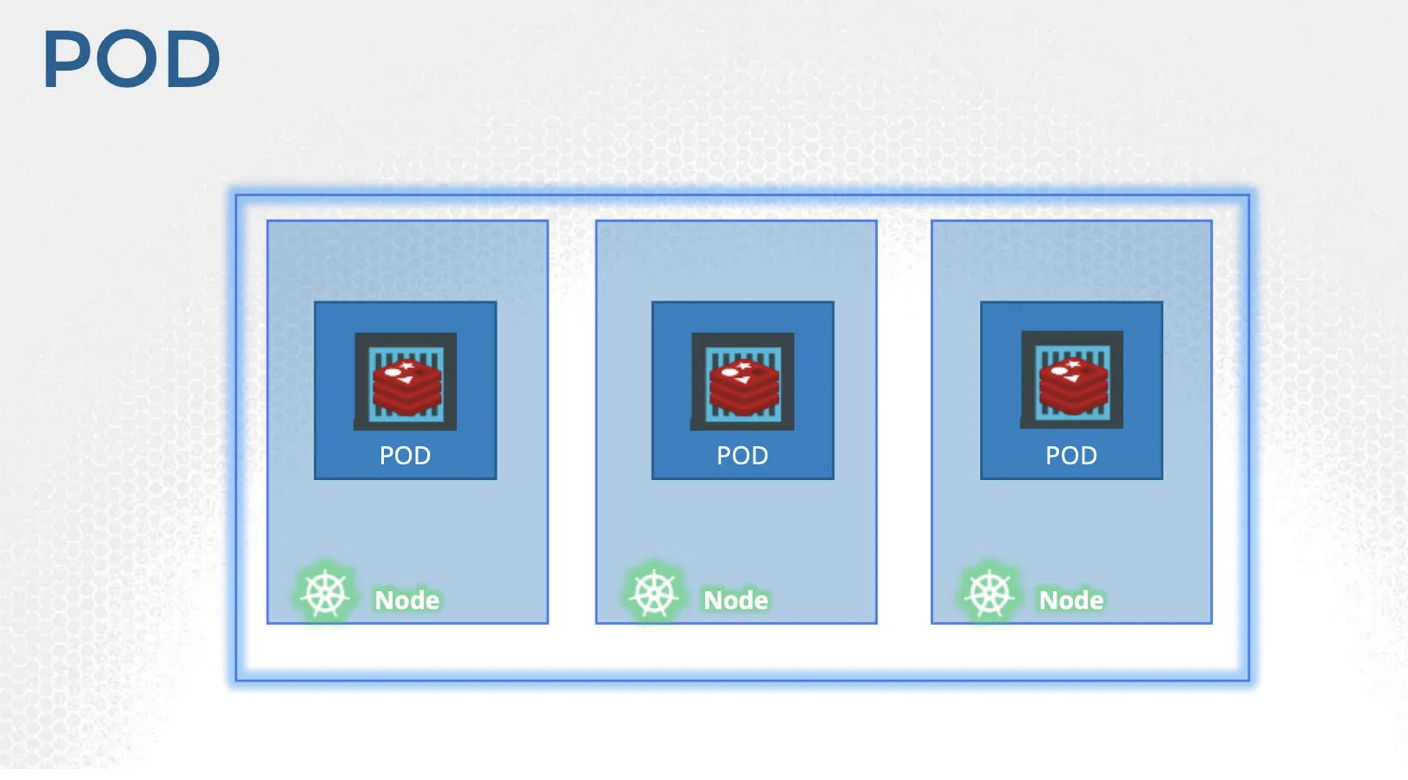
일반적인 파드와 컨테이너, 노드의 관계
- 파드: 컨테이너는 1:1이 일반적임.
- 유저 증가로 인해, scale해야할때, 컨테이너를 추가하지 않는다.
- 대신, 노드안에 Pod를 추가한다 → 더 증가 시, 노드 전체를 추가하기도함.
- scale up : 파드를 추가 / scale down : 파드를 제거
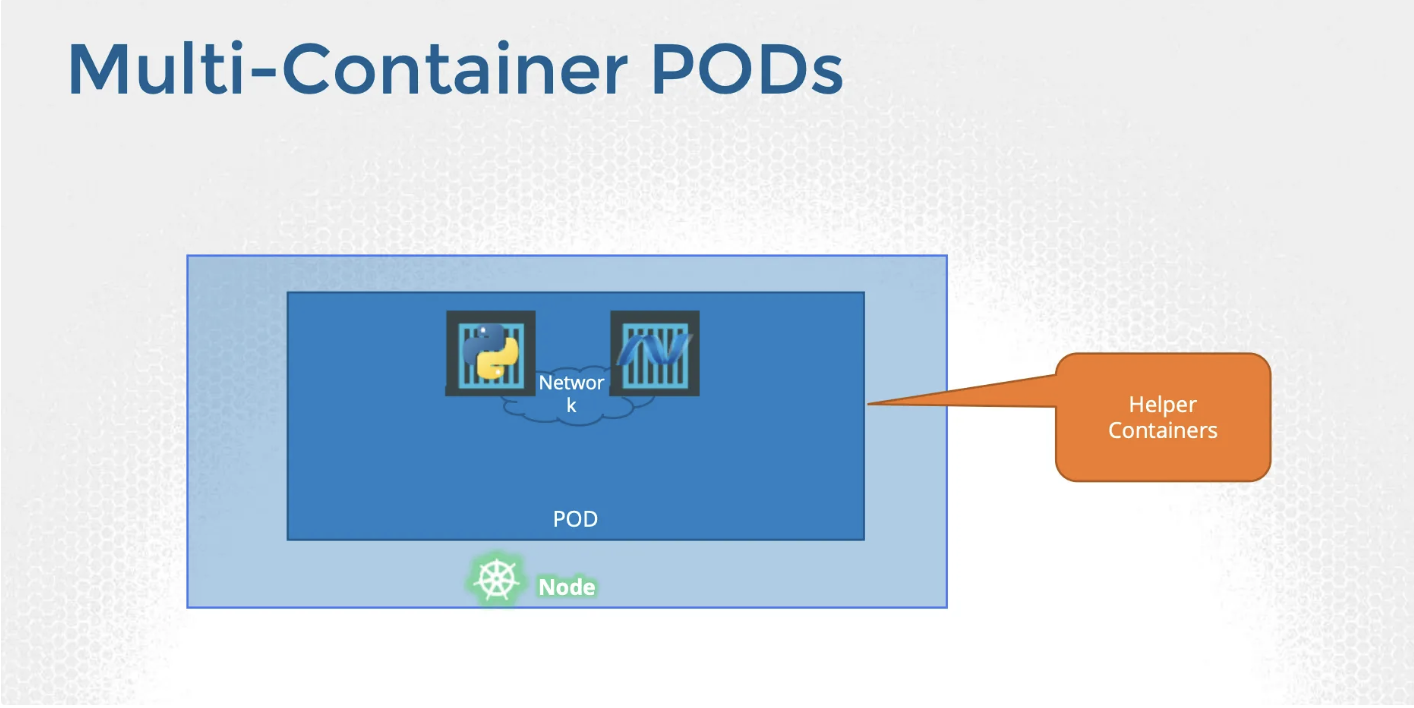
파드안에 두 개의 컨테이너가 있는 경우
- Helper Containers 이다.
- helper container는 application container가 생성되면 같이 생성/ 제거 시 같이 제거 된다. (같은 파드이기 때문)
- 같은 network, storage를 공유한다.
Kubernetes 에서의 pods.
pod가 없고 도커만으로 컨테이너를 런하는경우, 연관된 helper container 관리, scale한 전체 컨테이너의 관리를 직접해줘야한다.
- pod를 통해, 컨테이너 상태 모니터링 할 수 있고, 그에 따른 조치가 가능함.
- 같은 pod에 대해서 같은 네트워크와 스토리지, 생명주기를 부여할수있음.
kubectl run nginx --image [image-name] → pods를 우선 생성하고 nginx image 를 deploy 한다.
kubectl get podsYAML
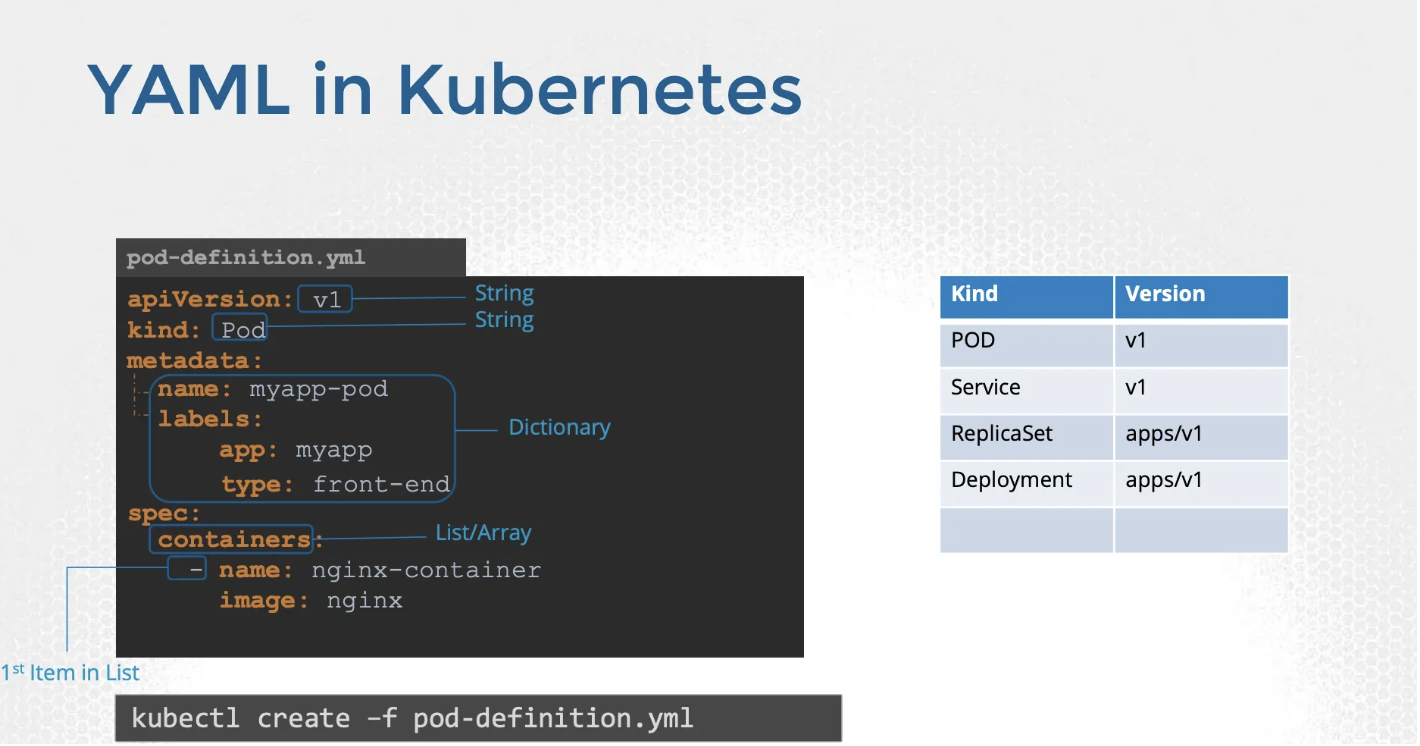
기본 yaml.
- apiVersion
- kind
- metadata
- spec