다시 Flutter.. 제발 Flutter 잘하고 싶은데.. 사실 안잘하고 싶은걸까?
Widgets
everything is a widget
Widgets are the building blocks of a Flutter app's user interface, and each widget is an immutable declaration of part of the user interface.
Widgets from a hierarchy based on composition.
Each widget nests inside its parent and can receive context from the parent.
- 각 위젯은 nested 구조로 사용되며 parent로부터 context를 전달받음.
import 'package:flutter/material.dart';
import 'package:flutter/services.dart';
void main() => runApp(const MyApp());
class MyApp extends StatelessWidget {
const MyApp({super.key});
Widget build(BuildContext context) {
return MaterialApp( // Root widget
home: Scaffold(
appBar: AppBar(
title: const Text('My Home Page'),
),
body: Center(
child: Builder(
builder: (context) {
return Column(
children: [
const Text('Hello, World!'),
const SizedBox(height: 20),
ElevatedButton(
onPressed: () {
print('Click!');
},
child: const Text('A button'),
),
],
);
},
),
),
),
);
}
}Widget composition
widgets as a unit of composition
layout widget에는 Padding, Alignment, Row, Column, Grid가 있다. 레이아웃 위젯은 visual representation을 갖지 않는다. 대신 layout widget의 목적은 control some aspect of another widget's layout 이다.
위 샘플 코드를 예로 들어보자면,
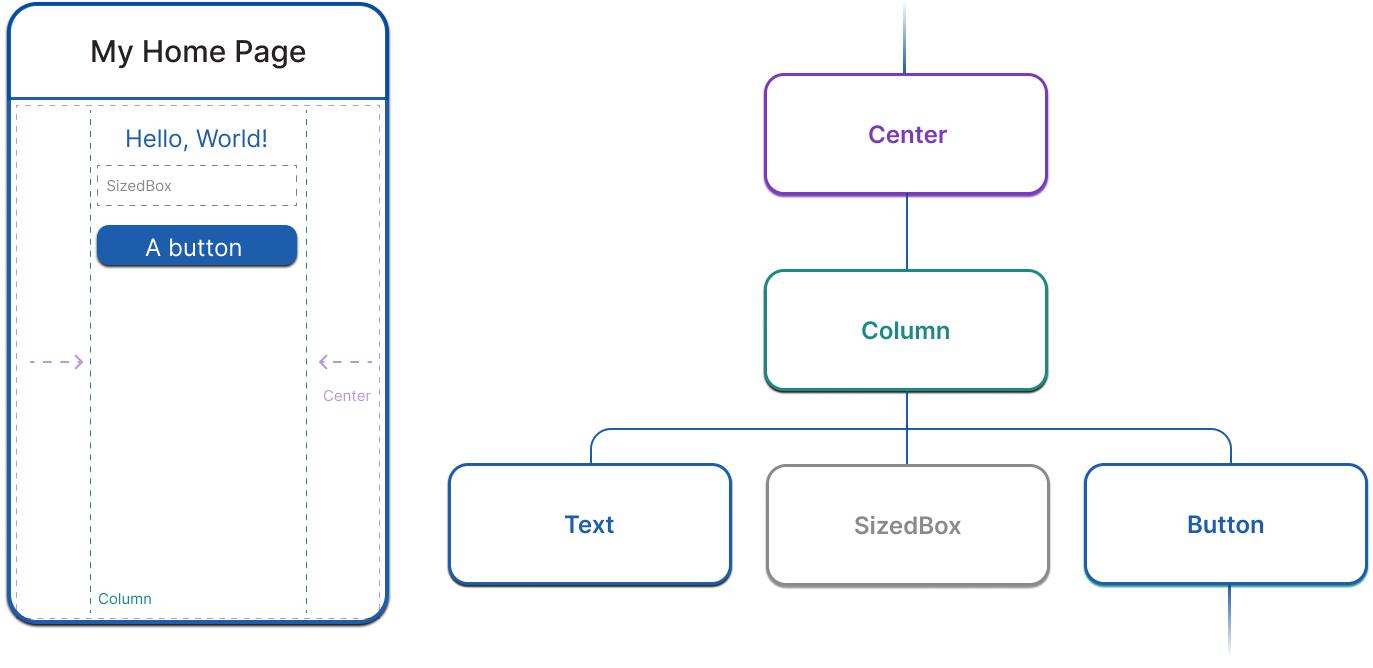
- Center는 하위 모든 요소를 중앙 정렬하는데 영향을 미치고
- Column은 vertical하게 놓이도록 영향을 준다.
Widget state
two major classes of widget: stateful and stateless widgets
user interaction이나 다른 요인들에 의해 위젯의 특징이 변경되어야하면, StatefulWidget을 사용해야한다. 예를 들어 counter를 담은 위젯이 있을 때 유저가 버튼을 탭할 때마다 counter의 값을 증가시켜 보여주기 위해 사용할 수 있다.
StatefulWidget은 state를 분리된 클래스에 저장하고 build 메서드가 존재하지 않는다.
class CounterWidget extends StatefulWidget {
State<CounterWidget> createState() => _CounterWidgetState();
}
class _CounterWidgetState extends State<CounterWidget> {
int _counter = 0;
void _incrementCounter() {
setState(() {
_counter++;
});
}
Widget build(BuildContext context) {
return Text('$_counter');
}
}
Whenever you mutate a State object, you must call setState to signal the framework to update the user interface.