Spring MVC
Spring MVC란 무엇일까?
MVC 디자인 패턴이란?
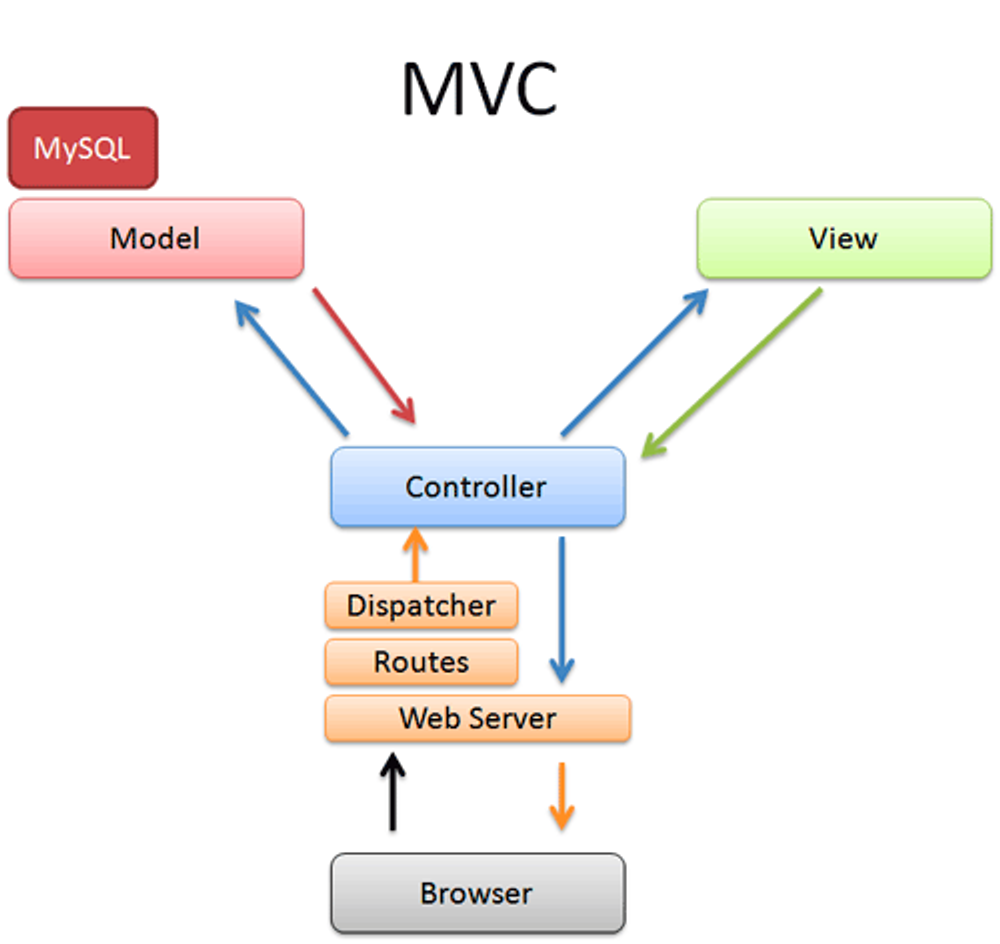
Model-View-Controller의 약자로, 소프트웨어 디자인 패턴 중 하나이다.
소프트 웨어를 구성하는 요소들을 Model-View-Controller 로 구분하여 각각의 역할을 분리한다.
Model
- 데이터와 비즈니스 로직을 담당
- DB와 연동하여 데이터를 저장하고 불러오는 등의 작업을 수행
View
- 사용자 인터페이스 담당
- 사용자가 보는 화면과 버튼, 폼 등을 디장니하고 구현
Controller
- Model과 View 사이의 상호작용을 조정하고 제어
- 사용자의 입력을 받아 Model에 전달하고, Model의 결과를 바탕으로 View를 업데이트
MVC패턴을 사용하여 코드의 재사용성과 유지보수성을 높이고, 개발자들간의 협업을 용이하게 하므로, 이 패턴을 적용하여 구조를 잘 설계하는 것이 중요하다.
Spring MVC란?
Servlet API를 기반으로 구축된 독창적인 웹 프레임워크이다.
Spring MVC는 중앙에 있는 DispatcherServlet이 요청을 처리하기 위한 공유 알고리즘을 제공하는 Front Controller 패턴을 중심으로 설계되어 있으며 이 모델은 유연하고 다양한 워크 플로우를 지원한다.
(Spring에서 MVC 디자인 패턴을 적용하여 HTTP요청을 효율적으로 처리하고 있다~)
여기서 잠깐!
Servlet이란?
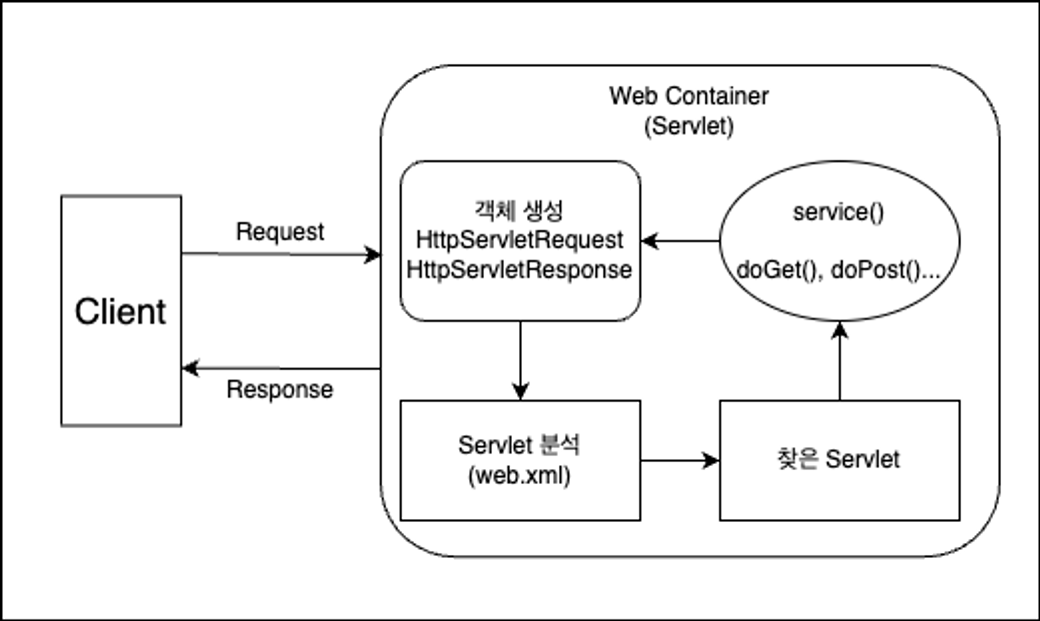
자바를 사용하여 웹페이지를 동적으로 생성하는 서버 측 프로그램 혹은 그 사양을 말한다.
- 사용자 client가 서버에 request를 하면 요청받은 servlet 컨테이너는 HttpServletRequest, HttpServletResponse 객체를 생성한다.
- 이후 설정된 정보를 통해 어떠한 servlet에 대한 요청인지 찾는다.
- servlet에서 service 메서드를 호출할 뒤 브라우저의 요청 메소드에 따라 doGet혹은 doPost등의 메서드를 호출
- 호출한 메서드들의 결과를 그대로 반환하거나 동적페이지를 생성한 뒤 HttpServletResponse 객체에 응답을 담아 Client에 반환
- 응답이 완료되면 생성한 HttpServletRequest, HttpServletResponse 객체를 소멸
Front Controller
- 모든 API 요청을 앞서 살펴본 서블릿의 동작 방식에 맞춰 코드를 구현한다면 무수히 많은 Servlet 클래스를 구현해야한다.
- 따라서 Spring은 DispatcherServlet을 사용하여 Front Controller 패턴 방식으로 API 요청을 효율적으로 처리한다.
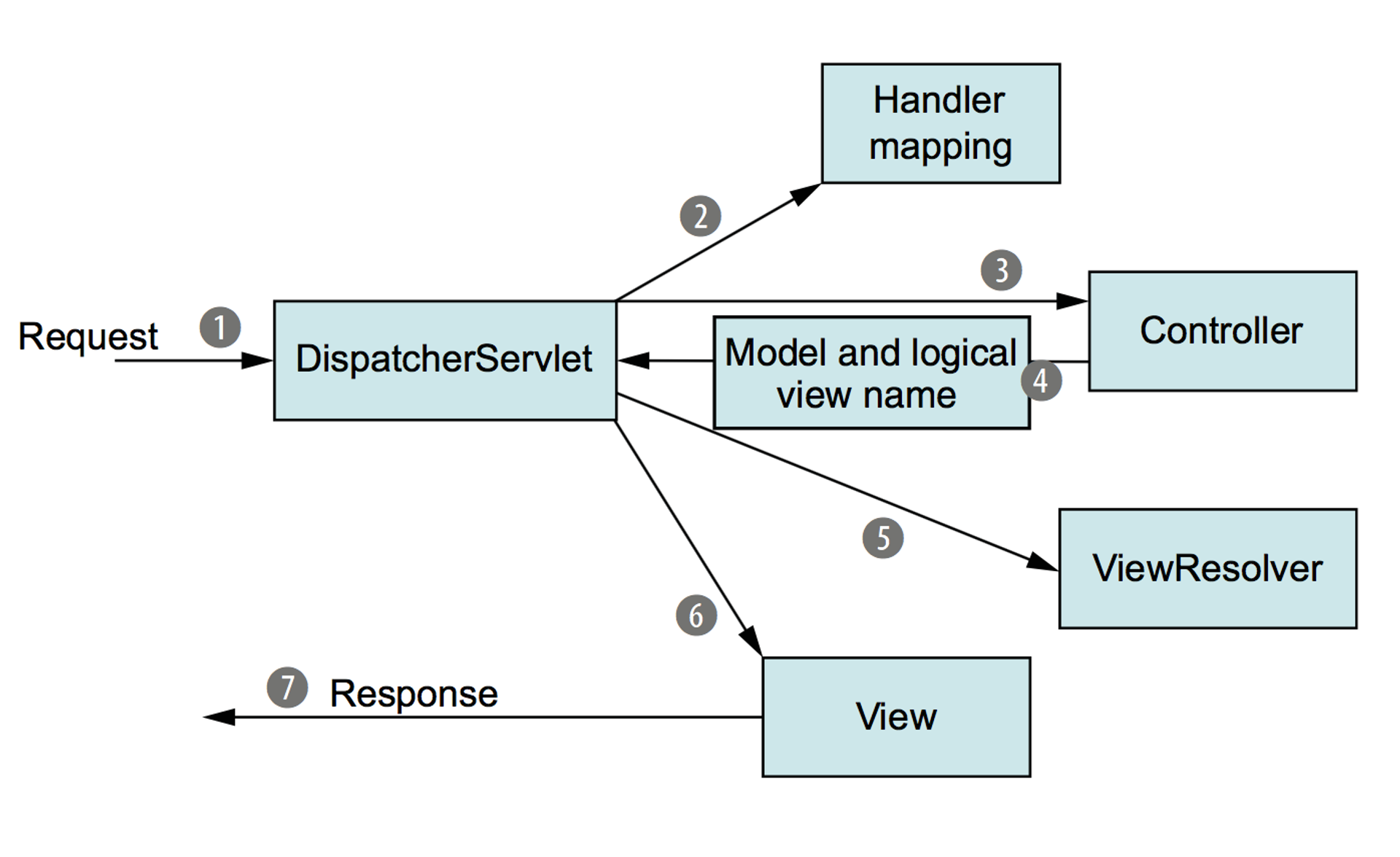
- Client(브라우저)에서 HTTP 요청이 들어오면 DispatcherServlet 객체가 요청을 분석한다.
- DispatcherServlet 객체는 분석한 데이터를 토대로 Handler mapping을 통해 Controller를 찾아 요청을 전달한다.
@RestController
public class HelloController {
    @GetMapping("/api/hello")
    public String hello() {
        return "Hello World!";
    }
}
API path 즉, URL을 Controller에 작성하는 방법은 @Controller 애너테이션이 달려있는 클래스를 생성한 뒤 @GetMappring처럼 요청한 HTTP Method와 일치하는 애너테이션을 추가한 메서드를 구현한다.
이를 통해 직접 Servlet을 구현하지 않아도 DispatcherServlet에 의해 간편하게 HTTP 요청처리가 가능하다.
- Controller → DispathcerServlet
- 해당 Controller는 요청에 대한 처리를 완료 후 처리에 대한 결과 즉, 데이터('Model')와 'View' 정보를 전달
- DispatcherServlet → Client
- ViewResolver 통해 View에 Model을 적용하여 View를 Client에게 응답으로 전달
Controller이해하기
만약 로그인, 로그아웃, 회원가입 3가지의 기능이 있다고 했을 때 만약 Front Controller 패턴이 적용되어있지않는다고 한다면, 각각의 기능별로 클래스를 만들어야할테지만 우리는 효율적인 API 처리를 위해 Front Controller 패턴을 만들었기 때문에 유사한 성격의 API를 하나의 Controller 클래스로 관리할 수 있게 된다!
@Controller
@RequestMapping("/user")
public class UserController {
	@GetMapping("/login")
	public String login() {
	    // ...
	}

  @GetMapping("/logout")
  public String logout() {
      // ...
  }

	@GetMapping("/signup")
	public String signup() {
		// ...
	}

	@PostMapping("/signup")
  public String registerUser(SignupRequestDto requestDto) {
		// ...
	}
}
위 예제에서 쓴 애너테이션 @Controller 를 통해 해당 클래스가 Controller의 역할을 수행하는지를 표시할 수 있다.
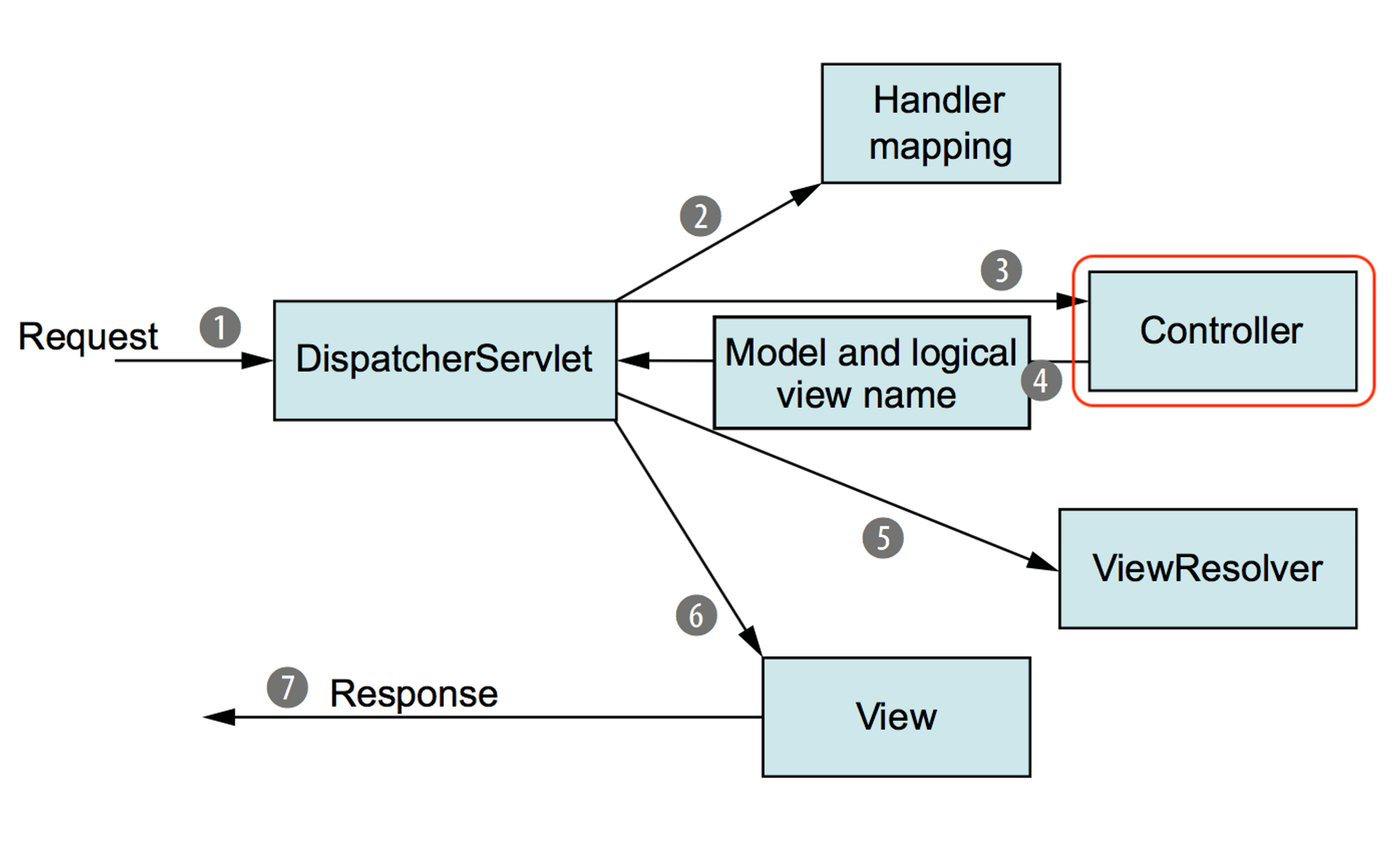
위 사진처럼 요청이 들어오는 것부터 마지막 응답되는 순서를 확인할 수 있다.
또한, 위 예시에서 들었던것처럼 HTTP Method에 매칭되는 애너테이션은 크게 4가지가 있다.
@GET, @POST, @PUT, @DELETE 순서대로 얻고, 보내고, 수정하고, 삭제하는거라고 단순하게 이해하고 넘어가보자!
또한, Mapping이 중복이 된다면 단축시켜줄수 있는 방법이 있는데 바로 @RequestMapping 애너테이션을 사용하는 것이다.
클래스 위에 붙여 중복되는 mapping url을 미리 작성하여 아래 method mapping url의 길이를 줄여주거나 생략할 수 있다.
@Controller
@RequestMapping("/api")
public class HelloController {
    @GetMapping("/hello")
    @ResponseBody
    public String hello() {
        return "Hello World!";
    }

    @GetMapping("/get")
    @ResponseBody
    public String get() {
        return "GET Method 요청";
    }

    @PostMapping("/post")
    @ResponseBody
    public String post() {
        return "POST Method 요청";
    }

    @PutMapping("/put")
    @ResponseBody
    public String put() {
        return "PUT Method 요청";
    }

    @DeleteMapping("/delete")
    @ResponseBody
    public String delete() {
        return "DELETE Method 요청";
    }
}
정적 페이지와 동적 페이지
정적 페이지
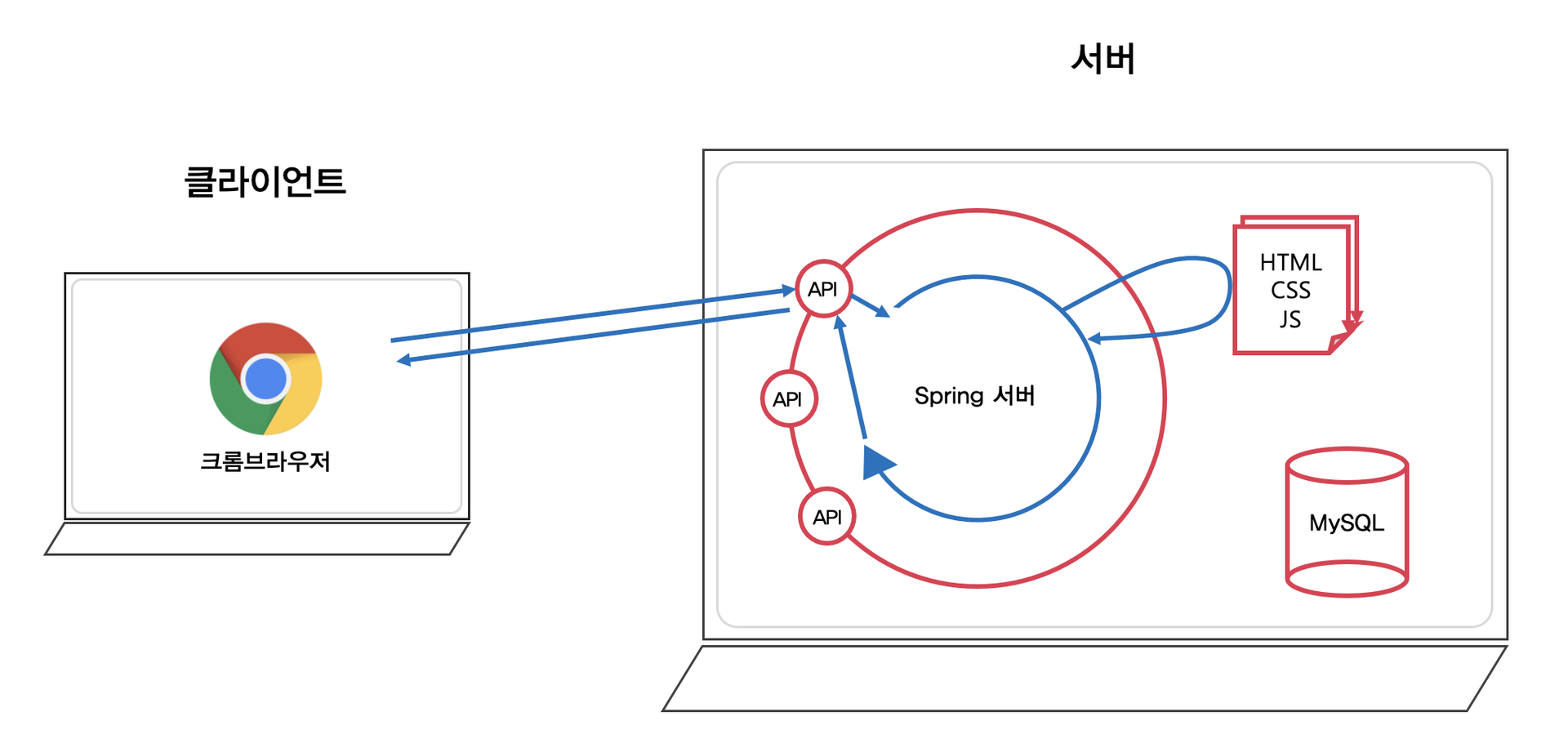
static 폴더
SpringBoot 서버에 html파일을 바로 요청하면 해당 html 파일을 static 폴더에서 찾아서 반환해준다.
이는 변화가 없는 정적인 html 파일이라고 보면된다.
Controller에서도 html을 반환할 수 있지만 thymeleaf를 주석처리한 다음에 실행해보는 것이 정확하며(해당 dependecy는 동적인 페이지 처리를 위한 템플릿 엔진임), thymeleaf설정이 되어있게 되면 Controller에서 html파일을 찾는 경로는 static 폴더가 아닌 templates 폴더이다.
해당 의존성을 주석처리한 후 문자열로 반환하게되면 정적인 페이지 static 폴더의 해당 html파일을 반환할 수 있다.
Redirect
템플릿 엔진을 적용한 상태에서 static 폴더의 html파일을 Controller를 통해서 처리하고 싶다면 redirect:/hello.html과 같이 redirect 요청을 문자열로 반환하면 http://localhost:8080/hello.html 요청이 재 수행되면서 static 폴더의 파일을 반환할 수 있다.
Template engine에 View 전달
static 폴더에 있는 html 파일을 바로 호출하는 방법이 가장 간단하지만 외부 즉, 브라우저에서 바로 접근하지 못하게 하고 싶거나 특정 상황에 Controller를 통해서 제어하고 싶다면 아래와 같이 templates 폴더에 해당 정적 html 파일을 추가하고 해당 html 파일명인 "hello" 문자열을 반환하여 처리할 수 있다. (.html은 생략가능!)
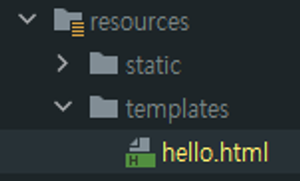
//예시>
//1. static 폴더 html
@GetMapping("/static-hello")
public String hello() {
    return "hello.html";
}

//2. redirect
@GetMapping("/html/redirect")
public String htmlStatic() {
    return "redirect:/hello.html";
}

//3. template engine에 view전달
@GetMapping("/html/redirect")
public String htmlStatic() {
    return "redirect:/hello.html";
}
동적 페이지
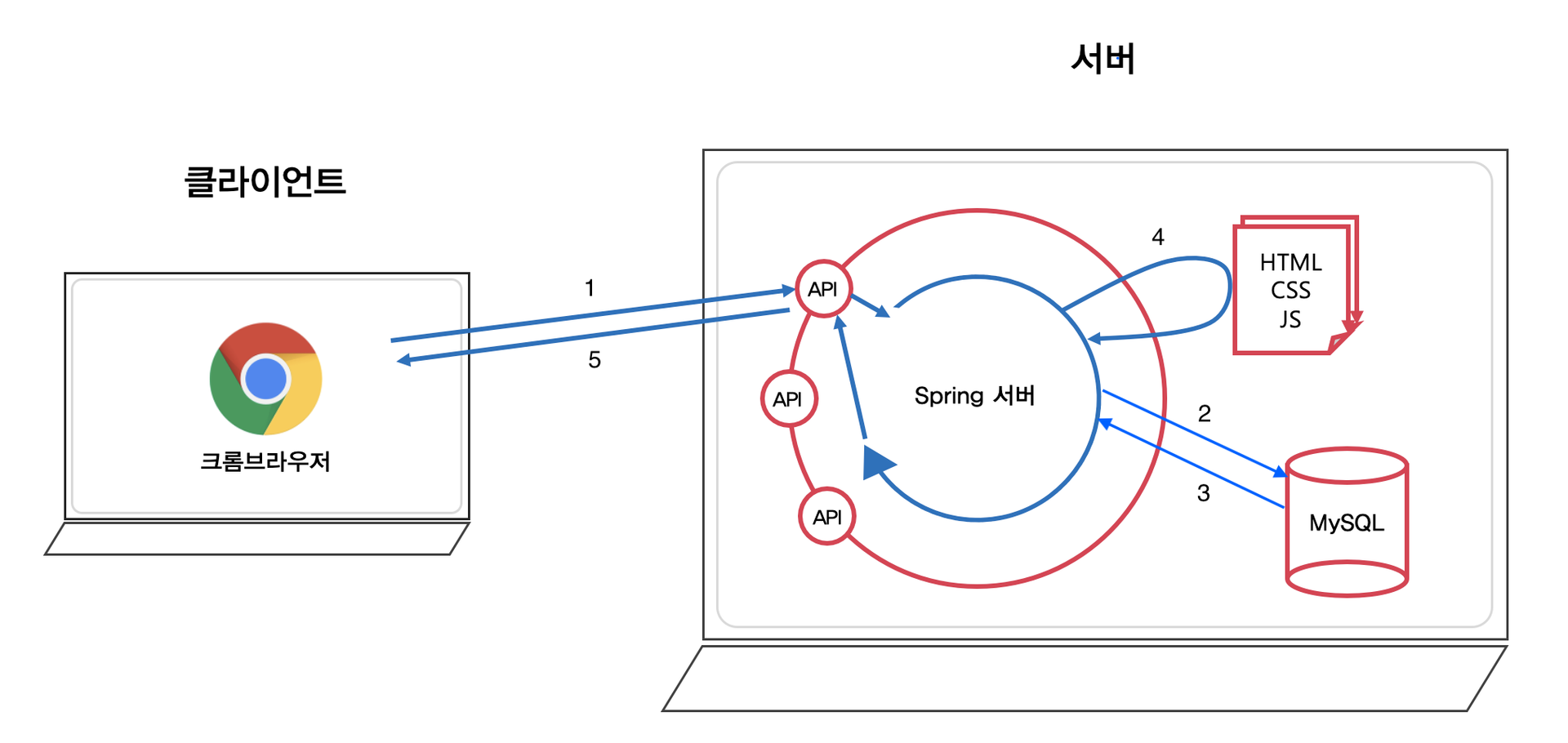
private static long visitCount = 0;

...

@GetMapping("/html/dynamic")
public String htmlDynamic(Model model) {
    visitCount++;
    model.addAttribute("visits", visitCount);
    return "hello-visit";
}- Client의 요청을 Controller에서 Model로 처리한다.
(이때 DB조회가 필요하다면 DB작업 후 처리한 데이터를 Model에 저장한다.) - Template engine(Thymeleaf) 에게 View, Model 전달한다.
- View: 동적 HTML 파일
- Model: View 에 적용할 정보들
- Template engine
- View에 Model을 적용 → 동적 웹페이지 생성
- 예) 로그인 성공 시, "로그인된 사용자의 Nickname"을 페이지에 추가
- Template engine 종류: 타임리프(Thymeleaf), Groovy, FreeMarker, Jade, JSP 등
- View에 Model을 적용 → 동적 웹페이지 생성
- Client(브라우저)에게 View(동적 웹 페이지, HTML)를 전달한다.
-
Thymeleaf
- View 정보
- "hello-visit" → resources/templates/hello-visit.html<div> (방문자 수: <span th:text="${visits}"></span>) </div>
- View 정보
-
Model 정보
- visits: 방문 횟수 (visitCount)
- 예) 방문 횟수: 1,000,000 번<div> (방문자 수: <span>1000000</span>) </div>
- visits: 방문 횟수 (visitCount)
데이터를 Client에 반환하는 방법
요즘은 프론트와 백엔드가 각각 따로 발전하게 되며, 느슨하게 결합하는 방식을 많이 채택하게 되어, 서버가 직접 뷰(html/css/js)를 반환하기 보다는 요청에 맞는 특정한 정보만 반환하는 것을 조금 더 선호하게 되었다고한다!
그래서 요즘에는 주로 서버에서는 데이터 교환 포맷 중 JSON 형태로 데이터를 반환하기도 한다.
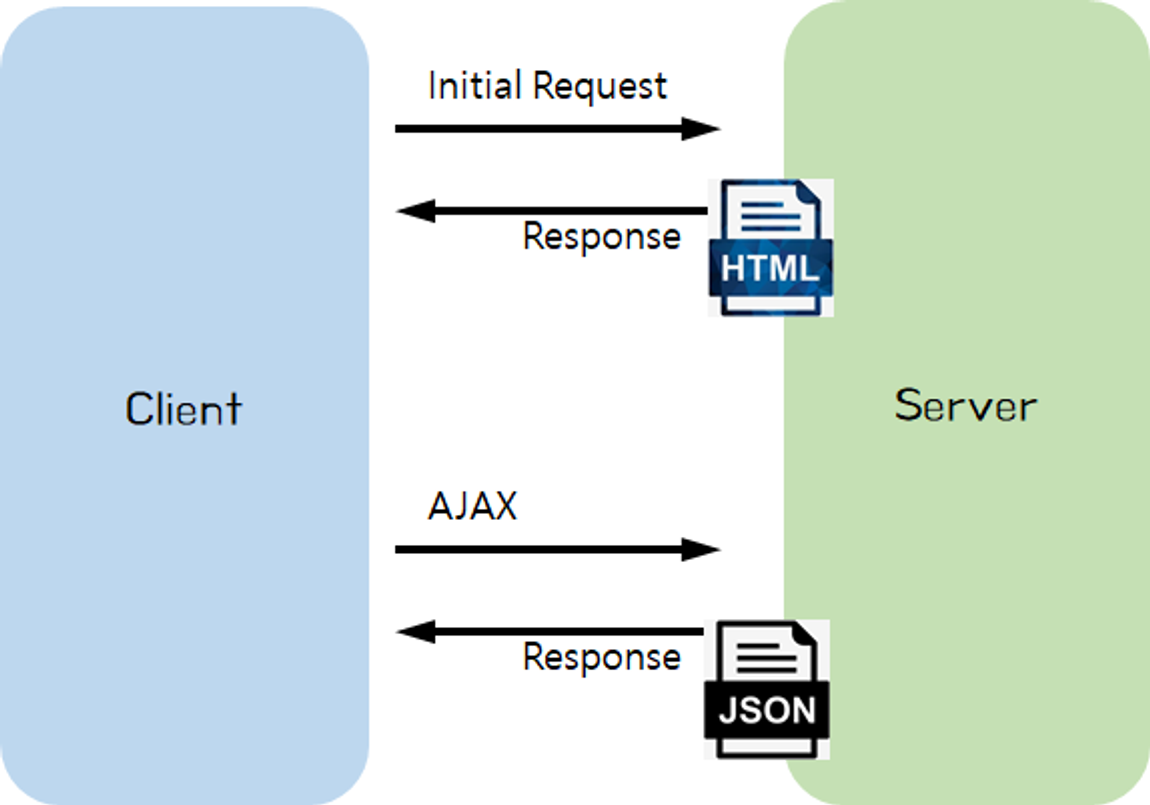
JSON 데이터 반환하는 방법
- 템플릿 엔진이 적용된 SpringBoot에서는 Controller에서 문자열을 반환하면 templates 폴더에서 해당 문자열의
.html파일을 찾아서 반환해준다. - 따라서 html 파일이 아닌 JSON 데이터를 브라우저에 반환하고 싶다면 해당 메서드에 @ResponseBody 애너테이션을 추가해줘야한다.
- 반환값 : String
@GetMapping("/response/json/string")
@ResponseBody
public String helloStringJson() {
    return "{\"name\":\"Robbie\",\"age\":95}";
}- 반환값 : String 외 자바 클래스
@GetMapping("/response/json/class")
@ResponseBody
public Star helloClassJson() {
    return new Star("Robbie", 95);
}- 자바 객체 -> JSON으로 변환
- Spring에서는 자동으로 Java의 객체를 JSON으로 변환해준다.
위처럼 매번 메서드위에 ResponseBody 애너테이션을 붙이기 번거로우니까 이를 해결하는 방법이 있는데 controller를 그냥 사용하는 것이 아닌 RestController를 사용하여 해당 클래스의 모든 메서드에 @ResponseBody 애너테이션이 추가되는 효과를 부여할 수 있다.
@RestController
@RequestMapping("/response/rest")
public class ResponseRestController {

    @GetMapping("/json/string")
    public String helloStringJson() {
        return "{\"name\":\"Robbie\",\"age\":95}";
    }

    @GetMapping("/json/class")
    public Star helloClassJson() {
        return new Star("Robbie", 95);
    }
 }
Jackson이란 무엇일까?
Jackson은 JSON 데이터 구조를 처리해주는 라이브러리이다.
Object를 JSON 타입의 String으로 변환해줄수 있으며, JSON 타입의 String을 Object로 변환해줄수도 있다.
Spring은 3.0버전 이후로 Jackson과 관련된 API를 제공함으로써, 우리가 직접 소스 코드를 작성하여 JSON 데이터를 처리하지 않아도 자동으로 처리해주고 있다.
-
따라서 SpringBoot의 starter-web에서는 default로 Jackson 관련 라이브러리들을 제공하고 있으므로, 직접 JSON 데이터를 처리해야할 때는 Jackson 라이브러리의 ObjectMapper를 사용할 수 있다.
Object To JSON
@Test @DisplayName("Object To JSON : get Method 필요") void test1() throws JsonProcessingException { Star star = new Star("Robbie", 95); ObjectMapper objectMapper = new ObjectMapper(); // Jackson 라이브러리의 ObjectMapper String json = objectMapper.writeValueAsString(star); System.out.println("json = " + json); } -
objectMapper의 writeValueAsString 메서드를 사용하여 변환할 수 있다.
- 파라미터에
JSON으로 변환시킬 Object의 객체를 주면된다.
- 파라미터에
-
Object를
JSON타입의 String으로 변환하기 위해서는 해당 Object에 get Method가 필요하다.
JSON To Object
@Test
@DisplayName("JSON To Object : 기본 생성자 & (get OR set) Method 필요")
void test2() throws JsonProcessingException {
    String json = "{\"name\":\"Robbie\",\"age\":95}"; // JSON 타입의 String

    ObjectMapper objectMapper = new ObjectMapper(); // Jackson 라이브러리의 ObjectMapper

    Star star = objectMapper.readValue(json, Star.class);
    System.out.println("star.getName() = " + star.getName());
}- objectMapper의 readValue 메서드를 사용하여 변환할 수 있다.
- 첫 번째 파라미터는
JSON타입의 String, 두 번째 파라미터에는 변환할 Object의 class 타입을 주면된다.
- 첫 번째 파라미터는
JSON타입의 String을 Object로 변환하기 위해서는 해당 Object에 기본 생성자와 get 혹은 set 메서드가 필요하다.
Path Variable과 Request Param
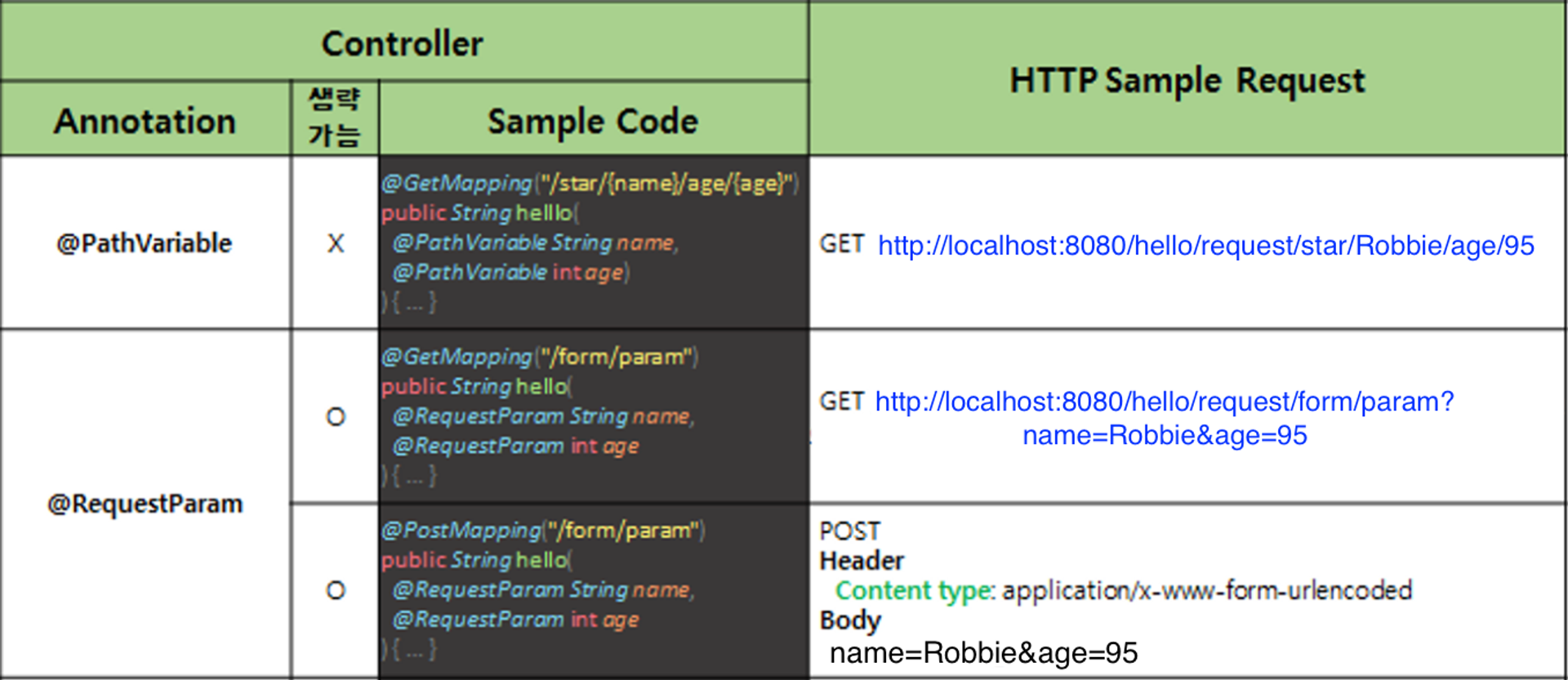
####1. Path Variable
- Path Variable 방식
서버에 보내려는 데이터를 URL 경로에 추가할 수 있다.
// [Request sample]
// GET http://localhost:8080/hello/request/star/Robbie/age/95
@GetMapping("/star/{name}/age/{age}")
@ResponseBody
public String helloRequestPath(@PathVariable String name, @PathVariable int age)
{
    return String.format("Hello, @PathVariable.<br> name = %s, age = %d", name, age);
}
위 예제에서 주석처리된 url을 보게되면 이름은 Robbie, 나이는 95인 사람의 값을 보여주는 것을 요청하고 있다.
이처럼 URL 경로에서 데이터를 받고자하는 위치의 경로에 {data} 중괄호를 사용하여 요청한다.
또, 파라미터를 보면 (@PathVariable String name, @PathVariable int age) 이처럼 해당 @PathVariable 애너테이션과 함께 중괄호에 선안한 변수명과 변수타입을 선언하면 해당 경로의 데이터를 받아올 수 있다.
2. Request Param
- Request Param 방식
서버에 보내려는 데이터를 URL 경로 마지막에 ?와 &를 사용하여 추가할 수 있다.
// [Request sample]
// GET http://localhost:8080/hello/request/form/param?name=Robbie&age=95
@GetMapping("/form/param")
@ResponseBody
public String helloGetRequestParam(@RequestParam String name, @RequestParam int age) {
    return String.format("Hello, @RequestParam.<br> name = %s, age = %d", name, age);
}-
데이터를 받기 위해서는
?name=Robbie&age=95에서 key 부분에 선언한 name과 age를 사용하여 value에 선언된 Robbie, 95 데이터를 받아올 수 있다. -
(@RequestParam String name, @RequestParam int age)- 해당 요청 메서드 파라미터에 @RequestParam 애너테이션과 함께 key 부분에 선언한 변수명과 변수타입을 선언하면 데이터를 받아올 수 있다.
-
form 태그 POST
<form method="POST" action="/hello/request/form/model">
  <div>
    이름: <input name="name" type="text">
  </div>
  <div>
    나이: <input name="age" type="text">
  </div>
  <button>전송</button>
</form>
이처럼 HTML의 form태그를 사용하여 POST방식으로 HTTP요청을 보낼 수 있다.
해당 데이터는 HTTP Body에 name=Robbie&age=95 형태로 담겨져서 서버로 전달된다.
// [Request sample]
// POST http://localhost:8080/hello/request/form/param
// Header
//  Content type: application/x-www-form-urlencoded
// Body
//  name=Robbie&age=95
@PostMapping("/form/param")
@ResponseBody
public String helloPostRequestParam(@RequestParam String name, @RequestParam int age) {
    return String.format("Hello, @RequestParam.<br> name = %s, age = %d", name, age);
}
위 코드처럼 Controller에서는 해당 방법으로 Post를 날릴 수 있으며, 해당 데이터를 받는 방법은 위에서 본것처럼 @RequestParam 애너테이션을 사용하여 받아올 수 있다.
// [Request sample]
// GET http://localhost:8080/hello/request/form/param?name=Robbie&age=95
@GetMapping("/form/param")
@ResponseBody
public String helloGetRequestParam(@RequestParam(required = false) String name, int age) {
    return String.format("Hello, @RequestParam.<br> name = %s, age = %d", name, age);
}- @RequestParam은 생략이 가능하다.
@RequestParam(required = false)- 이렇게 required 옵션을 false로 설정하면 Client에서 전달받은 값들에서 해당 값이 포함되어있지 않아도 오류가 발생하지 않는다.(default값은 true이다.)
@PathVariable(required = false)도 해당 옵션이 존재한다.- Client로 부터 값을 전달 받지 못한 해당 변수는 null로 초기화된다.
HTTP 데이터를 객체로 처리하는 방법
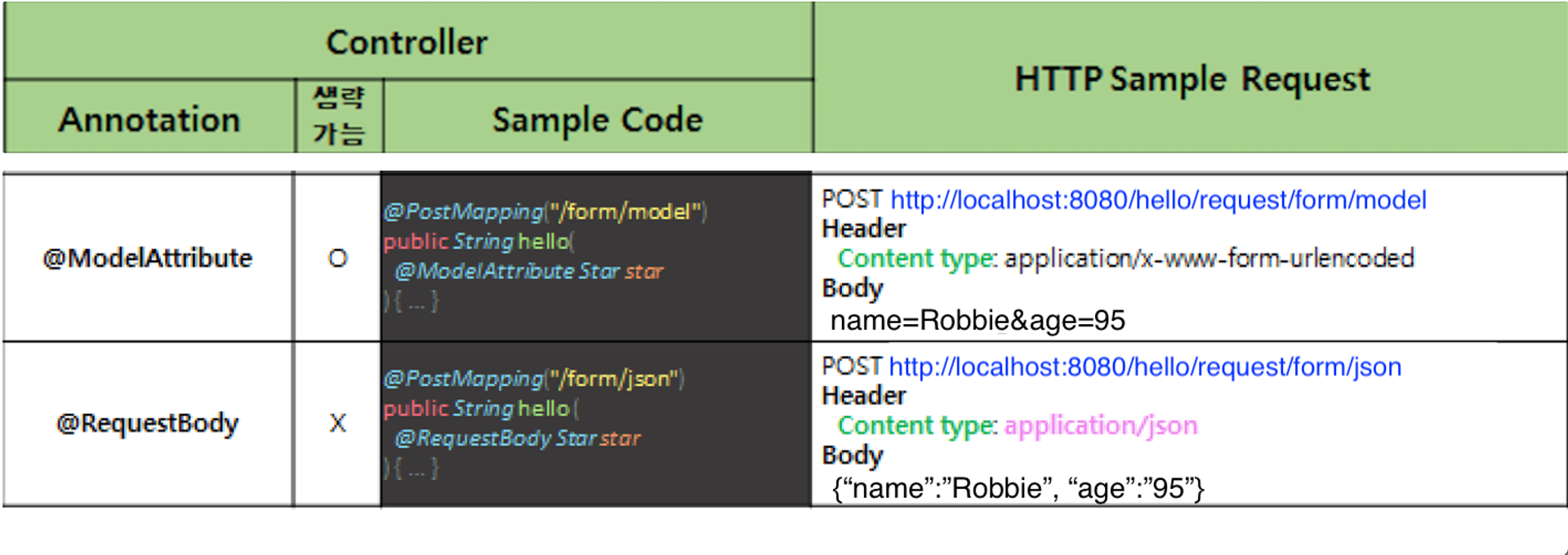
1. @ModelAttribute
- form 태그 POST
// [Request sample]
// POST http://localhost:8080/hello/request/form/model
// Header
//  Content type: application/x-www-form-urlencoded
// Body
//  name=Robbie&age=95
@PostMapping("/form/model")
@ResponseBody
public String helloRequestBodyForm(@ModelAttribute Star star) {
    return String.format("Hello, @ModelAttribute.<br> (name = %s, age = %d) ", star.name, star.age);
}-
HTML의 form 태그를 사용하여 POST방식으로 HTTP요청을 보낼 수 있다.
이때 해당 데이터는 HTTP Body에name=Robbie&age=95형태로 담겨져서 서버로 전달된다. -
해당 데이터를 Java의 객체 형태로 받는 방법은 @ModelAttribute 애너테이션을 사용한 후 Body 데이터를
Star star받아올 객체를 선언하면 된다. -
Query String방식
// [Request sample]
// GET http://localhost:8080/hello/request/form/param/model?name=Robbie&age=95
@GetMapping("/form/param/model")
@ResponseBody
public String helloRequestParam(@ModelAttribute Star star) {
    return String.format("Hello, @ModelAttribute.<br> (name = %s, age = %d) ", star.name, star.age);
}?name=Robbie&age=95처럼 데이터가 두 개만 있다면 괜찮지만 여러 개 있다면 @RequestParam 애너테이션으로 하나 씩 받아오기 힘들 수 있다.- 이때 @ModelAttribute 애너테이션을 사용하면 Java의 객체로 데이터를 받아올 수 있다.
- 파라미터에 선언한
Star객체가 생성되고, 오버로딩된 생성자 혹은 Setter 메서드를 통해 요청된name & age의 값이 담겨진다.
- 파라미터에 선언한
여기서 잠깐!
아까 보니 RequestParam이 생략이 되던데, 그리고 @ModelAttribute도 생략이 가능한데! 어떻게 Spring은 해당 매개변수를 구분할 수 있는걸까?!
Spring은 해당 파라미터(매개변수)가 SimpleValueType이라면 @RequestParam으로 간주하고 아니라면 @ModelAttribute가 생략되어있다 판단한다.
(SimpleValueType은 원시타입(int), Wrapper타입(Integer), Date등의 타입을 의미한다.)
2. @RequestBody
HTTP Body에 JSON 데이터를 담아 서버에 전달할 때 해당 Body 데이터를 Java의 객체로 전달 받을 수 있다.
// [Request sample]
// POST http://localhost:8080/hello/request/form/json
// Header
//  Content type: application/json
// Body
//  {"name":"Robbie","age":"95"}
@PostMapping("/form/json")
@ResponseBody
public String helloPostRequestJson(@RequestBody Star star) {
   return String.format("Hello, @RequestBody.<br> (name = %s, age = %d) ", star.name, star.age);
}
HTTP Body에 {"name":"Robbie","age":"95"} JSON 형태로 데이터가 서버에 전달되었을 때 @RequestBody 애너테이션을 사용해 데이터를 객체 형태로 받을 수 있다.
이때는 주의사항이 있는데
해당 객체의 필드에 데이터를 넣어주기 위해 set or get메서드 또는 오버로딩된 생성자가 필요하다.
예를 들어 - @ModelAttribute 사용하여 데이터를 받아올 때 해당 객체에 set 메서드 혹은 오버로딩된 생성자가 없다면 받아온 데이터를 해당 객체의 필드에 담을 수 없다.
이처럼 객체로 데이터를 받아올 때 데이터가 제대로 들어오지 않는다면 우선 해당 객체의 set or get 메서드 또는 오버로딩된 생성자의 유무를 확인하면 좋다.