git push 입력했는데
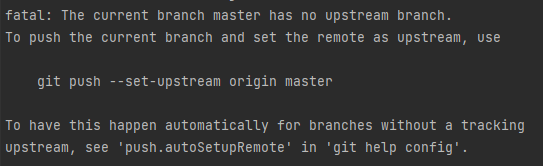
해서 저 명령어 입력했더니
remote: The project you were looking for could not be found or you don't have permission to view it.
fatal: repository 'https://깃랩주소/사용자 이름/daily_hw.git/' not found
요런 에러가 뜨나요?
...git clone을 먼저 해줘야 한다는 사실을 알아둬라
그리고 자격 증명 관리자 > windows 자격 증명을 들어가보면
일반 자격 증명에 깃랩 계정이 들어가있을 확률이 높다
그거 삭제해줘라
삭제해주니까 드디어 git clone 주소 입력했을 때
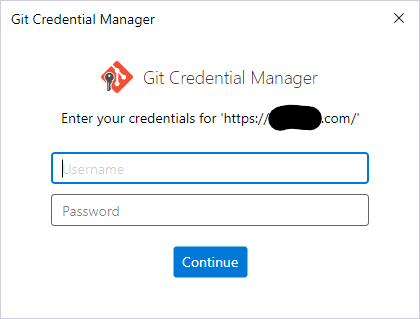
이런 화면이 나와준다.
Username 이라 한다고 진짜 이름 적거나 닉네임? 그거 적는 순간
remote: HTTP Basic: Access denied. The provided password or token is incorrect or your account has 2FA enabled and you must use a personal access token instead of a password.
See https://lab.ssafy.com/help/topics/git/troubleshooting_git#error-on-git-fetch-http-basic-access-denied
fatal: Authentication failed for https://깃랩주소/아이디/daily_hw.git/'
철퇴를 맞게 된다. 꼭 이메일 적어라.
자격 증명 삭제 안 하고 하려면
clone 주소 추출했을 때 나오는 그거 고대로 복사해서 쓰지말고
https://아이디@gitlab.com/아이디/저장소이름.git
이렇게 하면 ID 인증을 다시 받아준다는데 안 해봤다.
git remote add 해주거나 할 때

이런 에러 뜨면 git init 안 한거다
이게 다시 뜬다
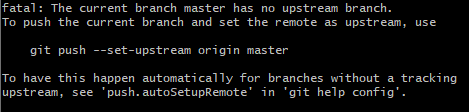
원격 저장소의 브랜치를 설정을 안 해줘서 나오는 에러다
시키는대로 저 명령어 입력해주자.