aws ec2 public bastion을 통해서 private ec2에 접속할 때
Permission denied (publickey,gssapi-keyex,gssapi-with-mic).
위와 같은 에러가 발생했다.
에러메시지로 원인을 다 찾아봤고 다해봤는데 안됐다.
심지어 동일한 키 페어로 기존에 만들어 뒀던 ec2는 접속이 됐음.
-> 도대체 뭐가 문제일까.... 권한문제도 아니고 키페어 문제도 아니고 알 수가 없었다.
시도 해본 것
- chmod 400 private-pem-key (777, 600, 644 그 외 다해봄)
- .ssh 폴더 권한도 변경 (700)
- AMI user (Amazon Linux여서 ec2-user 였고, ec2_user 도 안됐고 오타난 것도 아님)
- private, public pem키 내용이 문제있는 것도 아니였음.
- authorized_keys, known_hosts 문제도 아님.
5-1. authorized_keys에 다른 pub 키가 존재했지만 그게 문제가 되는 건 아니였음
5-2. known_hosts에 접속이 성공적으로 이루어진 ec2 ip는ssh-ed25519,ecdsa-sha2-nistp256가 있었지만
해당 접속이 안되는 ip에는ssh-ed25519가 있는데ecdsa-sha2-nistp256가 없어서 이걸 어떤식으로 넣어줘야 접속이 되는건가 했는데,
이건 접속이 정상적으로 성공할 때 known_hosts 에 등록되는거라서 문제 없었음. (ssh-keygen -R ip로 ip 지우고 fingerPrint yes 다시 해도 안됨.) sudo vi /etc/ssh/sshd_config해서
PasswordAuthentication, PermitEmptyPassword 를 no -> yes 로 바꿔주는 것도 문제 해결 안됨. (+ sshd_config를 바꿔준 경우sudo service sshd restart명령어로 재시작도 해줘야함)sudo su로 root 계정으로 접속해도 안됨.- ip 대신 private ip dns로 접속했는데 안됨.
- 경로 설정해서 /home/ec2-user/ 넣어줘도 안됨.
결국 해결은
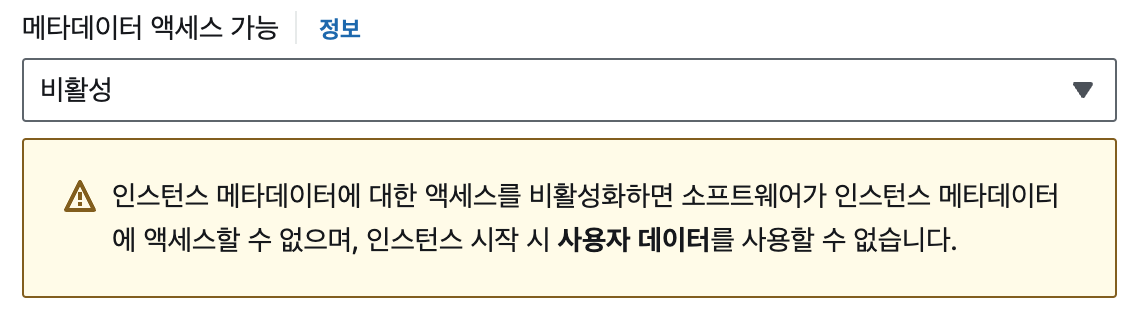
ec2 생성 시 고급 세부 정보에서
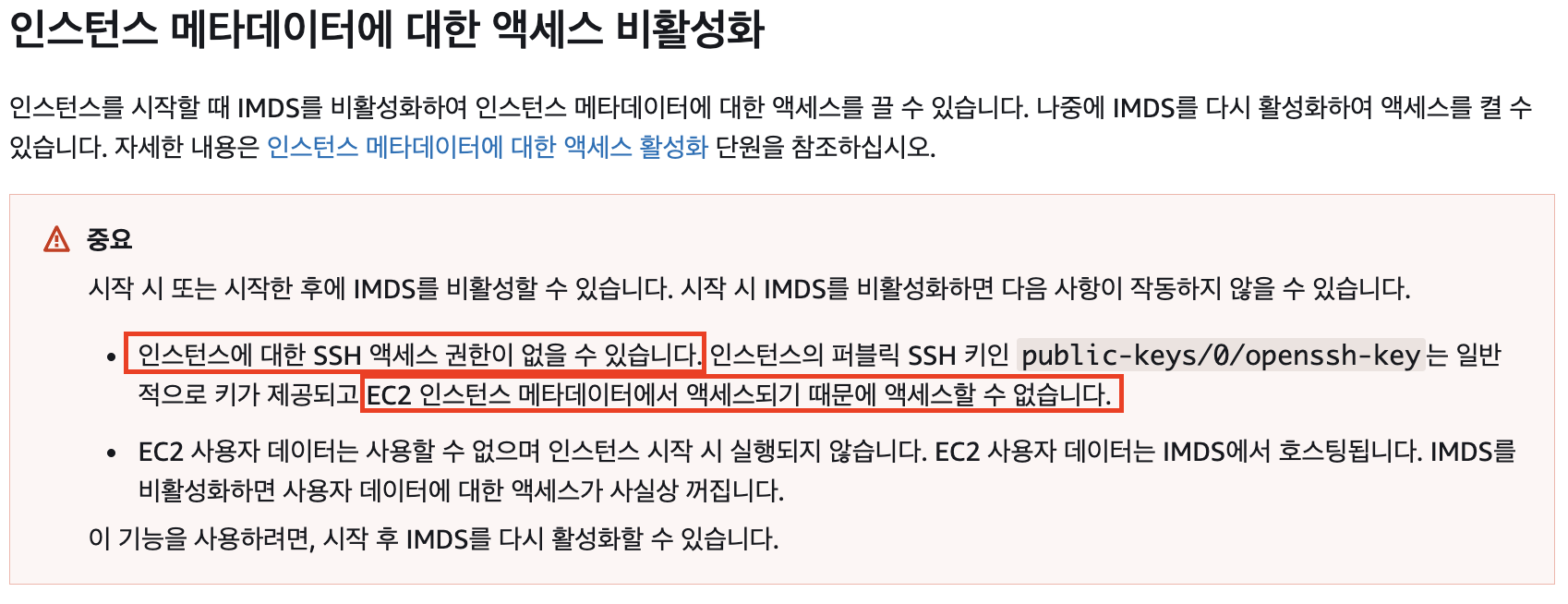
메타데이터 액세스 가능을 비활성으로 뒀기 때문이였다...
- 기본적으로 ec2의 public ssh key가 제공되는데, 이는 메타데이터에서 액세스가 된다. 근데 내가 메타데이터 액세스를 못하도록 비활성화시켜놔서 ssh permission denied 됐던 것.....
-->
인스턴스 작업 -> 인스턴스 설정 -> 인스턴스 메타데이터 옵션 수정 -> 인스턴스 메타데이터 서비스 활성화- 위에 설정 바꾸고 인스턴스 중지하고 다시 시작해야 적용됨
문제 있을 때
OpenSSH_8.7p1, OpenSSL 3.0.8 7 Feb 2023
debug1: Reading configuration data /etc/ssh/ssh_config
debug1: Reading configuration data /etc/ssh/ssh_config.d/50-redhat.conf
debug1: Reading configuration data /etc/crypto-policies/back-ends/openssh.config
debug1: configuration requests final Match pass
debug1: re-parsing configuration
debug1: Reading configuration data /etc/ssh/ssh_config
debug1: Reading configuration data /etc/ssh/ssh_config.d/50-redhat.conf
debug1: Reading configuration data /etc/crypto-policies/back-ends/openssh.config
debug1: Connecting to 10.1.2.96 [10.1.2.96] port 22.
debug1: Connection established.
debug1: identity file 프라이빗키.pem type -1
debug1: identity file 프라이빗키.pem-cert type -1
debug1: Local version string SSH-2.0-OpenSSH_8.7
debug1: Remote protocol version 2.0, remote software version OpenSSH_8.7
debug1: compat_banner: match: OpenSSH_8.7 pat OpenSSH* compat 0x04000000
debug1: Authenticating to 10.1.2.96:22 as 'ec2-user'
debug1: load_hostkeys: fopen /home/ec2-user/.ssh/known_hosts2: No such file or directory
debug1: load_hostkeys: fopen /etc/ssh/ssh_known_hosts: No such file or directory
debug1: load_hostkeys: fopen /etc/ssh/ssh_known_hosts2: No such file or directory
debug1: SSH2_MSG_KEXINIT sent
debug1: SSH2_MSG_KEXINIT received
debug1: kex: algorithm: curve25519-sha256
debug1: kex: host key algorithm: ssh-ed25519
debug1: kex: server->client cipher: aes256-gcm@openssh.com MAC: <implicit> compression: none
debug1: kex: client->server cipher: aes256-gcm@openssh.com MAC: <implicit> compression: none
debug1: kex: curve25519-sha256 need=32 dh_need=32
debug1: kex: curve25519-sha256 need=32 dh_need=32
debug1: expecting SSH2_MSG_KEX_ECDH_REPLY
debug1: SSH2_MSG_KEX_ECDH_REPLY received
'''debug1: Server host key: ssh-ed25519 SHA256:JBTYX33mSrwl+PwpQnEG5Ft/zrMqDB06PKzrW435D8o
debug1: load_hostkeys: fopen /home/ec2-user/.ssh/known_hosts2: No such file or directory
debug1: load_hostkeys: fopen /etc/ssh/ssh_known_hosts: No such file or directory
debug1: load_hostkeys: fopen /etc/ssh/ssh_known_hosts2: No such file or directory
debug1: Host '10.1.2.96' is known and matches the ED25519 host key.
'''debug1: Found key in /home/ec2-user/.ssh/known_hosts:3
debug1: ssh_packet_send2_wrapped: resetting send seqnr 3
debug1: rekey out after 4294967296 blocks
debug1: SSH2_MSG_NEWKEYS sent
debug1: expecting SSH2_MSG_NEWKEYS
debug1: ssh_packet_read_poll2: resetting read seqnr 3
debug1: SSH2_MSG_NEWKEYS received
debug1: rekey in after 4294967296 blocks
debug1: Will attempt key: 프라이빗키.pem  explicit
debug1: SSH2_MSG_EXT_INFO received
debug1: kex_input_ext_info: server-sig-algs=<ssh-ed25519,sk-ssh-ed25519@openssh.com,ssh-rsa,rsa-sha2-256,rsa-sha2-512,ssh-dss,ecdsa-sha2-nistp256,ecdsa-sha2-nistp384,ecdsa-sha2-nistp521,sk-ecdsa-sha2-nistp256@openssh.com,webauthn-sk-ecdsa-sha2-nistp256@openssh.com>
debug1: SSH2_MSG_SERVICE_ACCEPT received
debug1: Authentications that can continue: publickey,gssapi-keyex,gssapi-with-mic
debug1: Next authentication method: gssapi-with-mic
debug1: No credentials were supplied, or the credentials were unavailable or inaccessible
No Kerberos credentials available (default cache: KCM:)


debug1: No credentials were supplied, or the credentials were unavailable or inaccessible
No Kerberos credentials available (default cache: KCM:)


debug1: Next authentication method: publickey
debug1: Trying private key: 프라이빗키.pem
'''debug1: Authentications that can continue: publickey,gssapi-keyex,gssapi-with-mic
debug1: No more authentication methods to try.
ec2-user@10.1.2.96: Permission denied (publickey,gssapi-keyex,gssapi-with-mic).
문제 없을 때
OpenSSH_8.7p1, OpenSSL 3.0.8 7 Feb 2023
debug1: Reading configuration data /etc/ssh/ssh_config
debug1: Reading configuration data /etc/ssh/ssh_config.d/50-redhat.conf
debug1: Reading configuration data /etc/crypto-policies/back-ends/openssh.config
debug1: configuration requests final Match pass
debug1: re-parsing configuration
debug1: Reading configuration data /etc/ssh/ssh_config
debug1: Reading configuration data /etc/ssh/ssh_config.d/50-redhat.conf
debug1: Reading configuration data /etc/crypto-policies/back-ends/openssh.config
debug1: Connecting to 10.1.1.140 [10.1.1.140] port 22.
debug1: Connection established.
debug1: identity file 프라이빗키.pem type -1
debug1: identity file 프라이빗키.pem-cert type -1
debug1: Local version string SSH-2.0-OpenSSH_8.7
debug1: Remote protocol version 2.0, remote software version OpenSSH_8.7
debug1: compat_banner: match: OpenSSH_8.7 pat OpenSSH* compat 0x04000000
debug1: Authenticating to 10.1.1.140:22 as 'ec2-user'
debug1: load_hostkeys: fopen /home/ec2-user/.ssh/known_hosts2: No such file or directory
debug1: load_hostkeys: fopen /etc/ssh/ssh_known_hosts: No such file or directory
debug1: load_hostkeys: fopen /etc/ssh/ssh_known_hosts2: No such file or directory
debug1: SSH2_MSG_KEXINIT sent
debug1: SSH2_MSG_KEXINIT received
debug1: kex: algorithm: curve25519-sha256
debug1: kex: host key algorithm: ssh-ed25519
debug1: kex: server->client cipher: aes256-gcm@openssh.com MAC: <implicit> compression: none
debug1: kex: client->server cipher: aes256-gcm@openssh.com MAC: <implicit> compression: none
debug1: kex: curve25519-sha256 need=32 dh_need=32
debug1: kex: curve25519-sha256 need=32 dh_need=32
debug1: expecting SSH2_MSG_KEX_ECDH_REPLY
debug1: SSH2_MSG_KEX_ECDH_REPLY received
debug1: Server host key: ssh-ed25519 SHA256:3CPaSWdxLELhsscSKMGt+CAM4/YpTEGk8ZGYJ3B89v8
debug1: load_hostkeys: fopen /home/ec2-user/.ssh/known_hosts2: No such file or directory
debug1: load_hostkeys: fopen /etc/ssh/ssh_known_hosts: No such file or directory
debug1: load_hostkeys: fopen /etc/ssh/ssh_known_hosts2: No such file or directory
debug1: Host '10.1.1.140' is known and matches the ED25519 host key.
debug1: Found key in /home/ec2-user/.ssh/known_hosts:1
debug1: ssh_packet_send2_wrapped: resetting send seqnr 3
debug1: rekey out after 4294967296 blocks
debug1: SSH2_MSG_NEWKEYS sent
debug1: expecting SSH2_MSG_NEWKEYS
debug1: ssh_packet_read_poll2: resetting read seqnr 3
debug1: SSH2_MSG_NEWKEYS received
debug1: rekey in after 4294967296 blocks
debug1: Will attempt key: 프라이빗키.pem  explicit
debug1: SSH2_MSG_EXT_INFO received
debug1: kex_input_ext_info: server-sig-algs=<ssh-ed25519,sk-ssh-ed25519@openssh.com,ssh-rsa,rsa-sha2-256,rsa-sha2-512,ssh-dss,ecdsa-sha2-nistp256,ecdsa-sha2-nistp384,ecdsa-sha2-nistp521,sk-ecdsa-sha2-nistp256@openssh.com,webauthn-sk-ecdsa-sha2-nistp256@openssh.com>
debug1: SSH2_MSG_SERVICE_ACCEPT received
debug1: Authentications that can continue: publickey,gssapi-keyex,gssapi-with-mic
debug1: Next authentication method: gssapi-with-mic
debug1: No credentials were supplied, or the credentials were unavailable or inaccessible
No Kerberos credentials available (default cache: KCM:)


debug1: No credentials were supplied, or the credentials were unavailable or inaccessible
No Kerberos credentials available (default cache: KCM:)


debug1: Next authentication method: publickey
debug1: Trying private key: 프라이빗키.pem
Authenticated to 10.1.1.140 ([10.1.1.140]:22) using "publickey".
debug1: pkcs11_del_provider: called, provider_id = (null)
debug1: channel 0: new [client-session]
debug1: Requesting no-more-sessions@openssh.com
debug1: Entering interactive session.
debug1: pledge: filesystem full
debug1: client_input_global_request: rtype hostkeys-00@openssh.com want_reply 0
debug1: client_input_hostkeys: searching /home/ec2-user/.ssh/known_hosts for 10.1.1.140 / (none)
debug1: client_input_hostkeys: searching /home/ec2-user/.ssh/known_hosts2 for 10.1.1.140 / (none)
debug1: client_input_hostkeys: hostkeys file /home/ec2-user/.ssh/known_hosts2 does not exist
debug1: client_input_hostkeys: no new or deprecated keys from server
debug1: Remote: /home/ec2-user/.ssh/authorized_keys:1: key options: agent-forwarding port-forwarding pty user-rc x11-forwarding
맨 아래 문단의 3번째 줄부터 차이가남.
문제있을 때
debug1: Next authentication method: publickey
debug1: Trying private key: 프라이빗키.pem
debug1: Authentications that can continue: publickey,gssapi-keyex,gssapi-with-mic
debug1: No more authentication methods to try.
ec2-user@10.1.2.96: Permission denied (publickey,gssapi-keyex,gssapi-with-mic).
없을 때
debug1: Next authentication method: publickey
debug1: Trying private key: 프라이빗키.pem
Authenticated to 10.1.1.140 ([10.1.1.140]:22) using "publickey".
debug1: pkcs11_del_provider: called, provider_id = (null)
debug1: channel 0: new [client-session]
debug1: Requesting no-more-sessions@openssh.com
debug1: Entering interactive session.
debug1: pledge: filesystem full
debug1: client_input_global_request: rtype hostkeys-00@openssh.com want_reply 0
debug1: client_input_hostkeys: searching /home/ec2-user/.ssh/known_hosts for 10.1.1.140 / (none)
debug1: client_input_hostkeys: searching /home/ec2-user/.ssh/known_hosts2 for 10.1.1.140 / (none)
debug1: client_input_hostkeys: hostkeys file /home/ec2-user/.ssh/known_hosts2 does not exist
debug1: client_input_hostkeys: no new or deprecated keys from server
debug1: Remote: /home/ec2-user/.ssh/authorized_keys:1: key options: agent-forwarding port-forwarding pty user-rc x11-forwarding
백엔드를 공부하고 있습니다.