Intro
섹션 13을 공부하면서 배우는 목록이다.
1. Vector Assets로 Dark Mode 만들기
2. UITextField 다루기
3. Protocol이란?
4. Delegate Design Pattern 배우기
1. Vector Assets로 Dark Mode 만들기
SF Symbols
SF symbols는 iOS13 이상인 Apple 개발에서 사용할 수 있는 아이콘, 심볼들이다. 자세한 정보는 아래 문서를 참고한다.
SF Symbols
Dark Mode Assets 설정
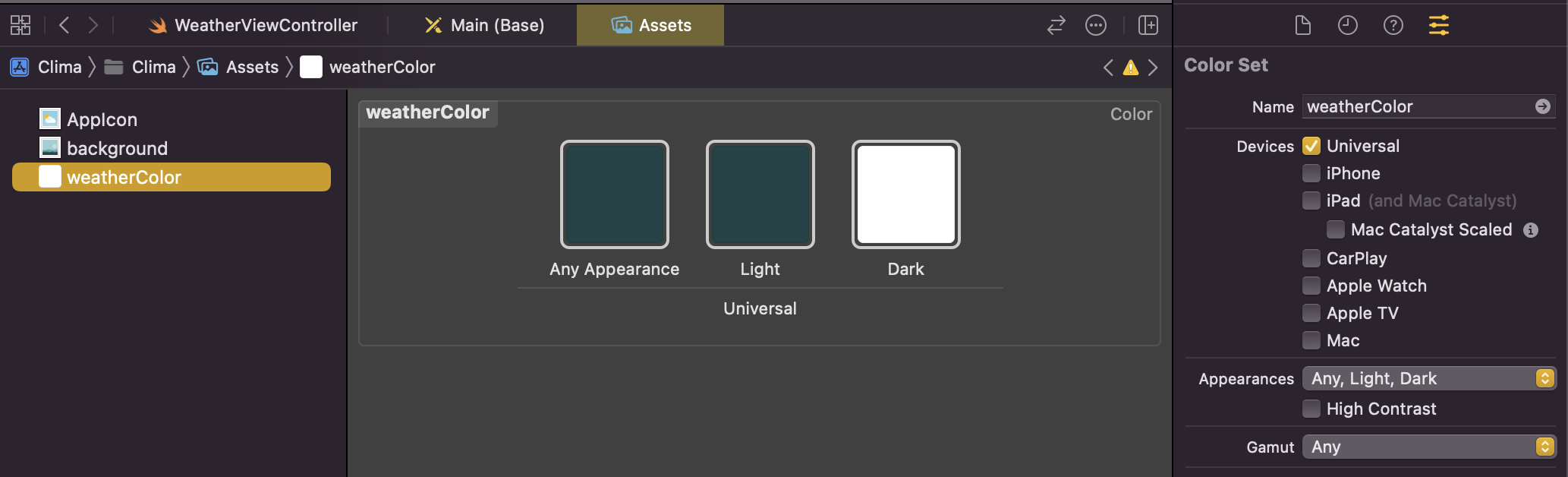
Assets에서 원하는 Custom Color를 설정한다. Appearance를 Any, White, Dark로 설정하면 상황에 맞는 색깔을 선택할 수 있다.
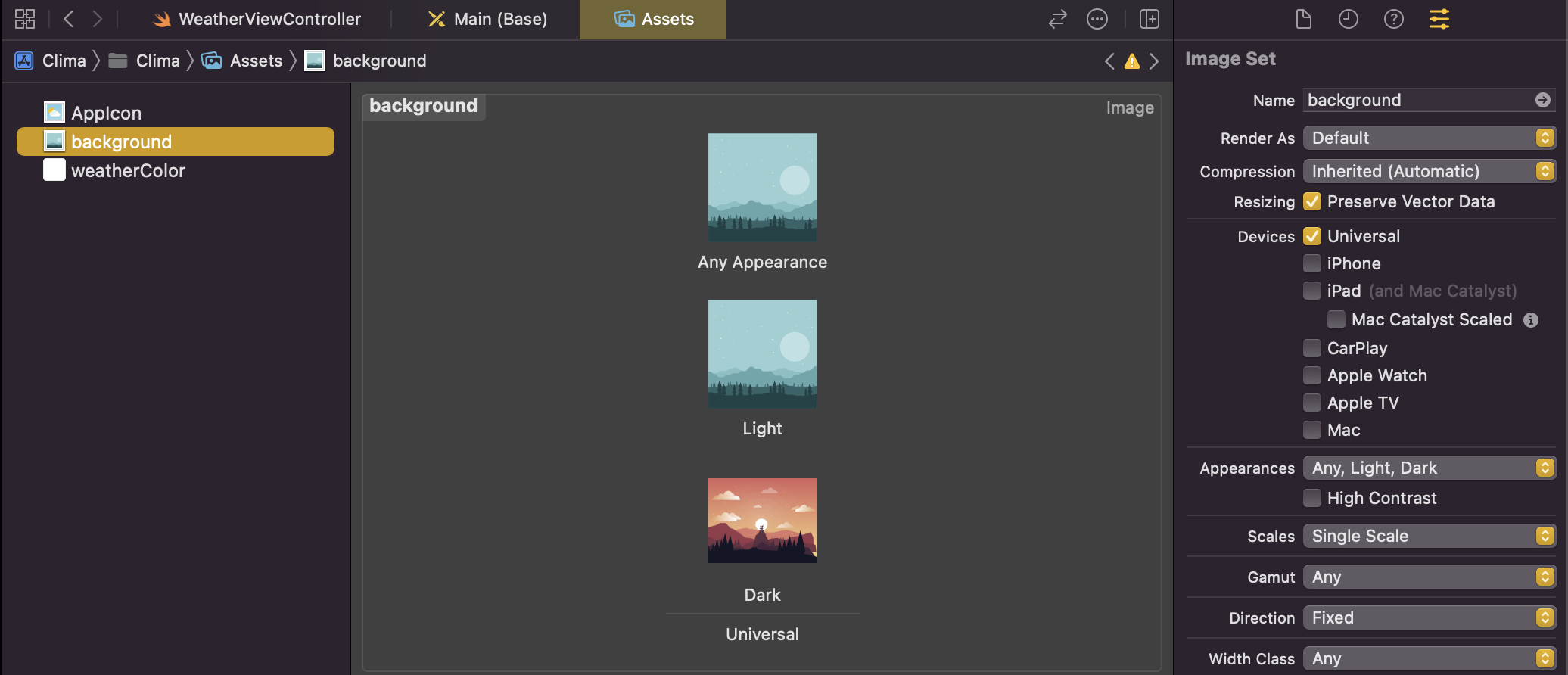
배경 또한 상황에 맞게 설정해준다. 원래 png로 설정하면 1x, 2x, 3x 별로 다른 사진을 설정하여 픽셀이 깨지는 것을 방지해야하지만 pdf파일로 설정하면 다음과 같이 벡터가 깨지지 않도록 Resizing을 선택해줄 수 있다.
2. UITextField
UITextField는 Attributes inspector에서 다음과 같이 설정해줄 수 있다.
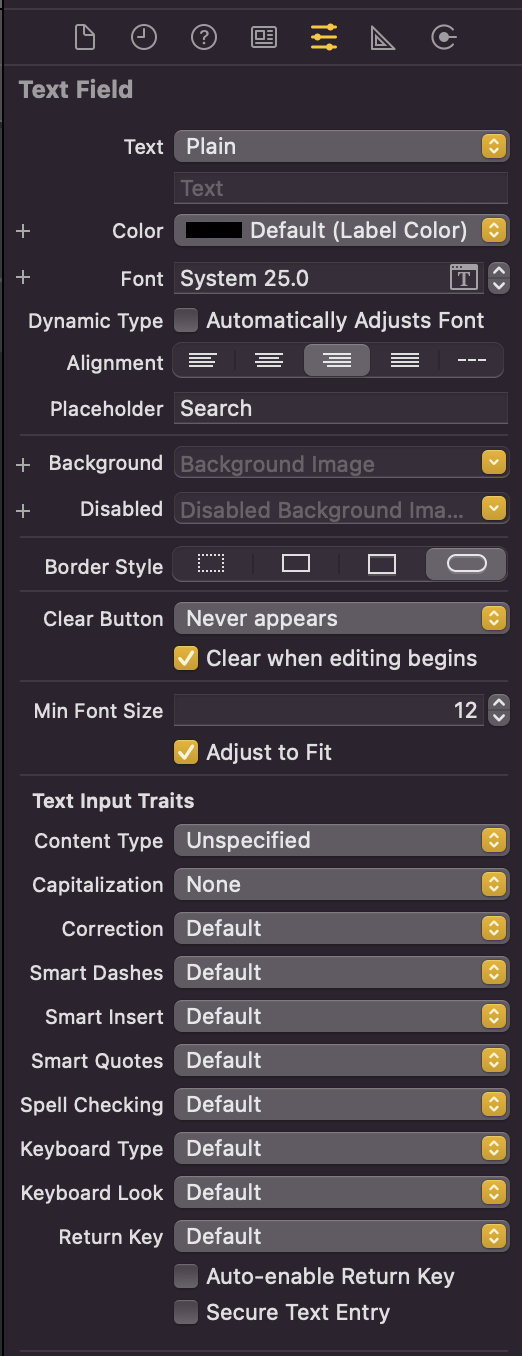
Input의 타입, 보안 여부 등을 선택할 수 있다.
TextField의 유효성을 검사하거나 수정하는 것을 관리하고 싶다면 UITextFieldDelegate를 사용해준다. (textFieldShouldReturn 함수 등을 사용할 수 있게 해준다.)
class WeatherViewController: UIViewController, UITextFieldDelegate {
	...
    override func viewDidLoad() {
        super.viewDidLoad()

        searchTextField.delegate = self
    }

    @IBAction func searchPressed(_ sender: UIButton) {
        searchTextField.endEditing(true) // 검색 아이콘을 누르면 수정이 끝남!
        print(searchTextField.text!)
    }

    func textFieldShouldReturn(_ textField: UITextField) -> Bool {
        searchTextField.endEditing(true) // Return 키를 누르면 수정이 끝남!
        print(searchTextField.text!)
        return true
    }
}
위의 코드 작성을 통해 검색 아이콘 / Return 키 중 하나만 눌러도 수정이 끝나도록 설정해줄 수 있다.
textFieldShouldEndEditing 함수는 TextField안에 들어있는 값이 유효한지 검사해주는 메서드로, Bool타입으로 반환된다.
class WeatherViewController: UIViewController, UITextFieldDelegate {
	...

	func textFieldShouldEndEditing(_ textField: UITextField) -> Bool {
        if textField.text != "" {
            return true
        } else {
            textField.placeholder = "Type something here"
            return false
        }
    }
}
이 UITextFieldDelegate 메서드들은 여러 개의 UITextField가 있을 경우에도 동일하게 수행된다. 파라미터를 textField로 받기 때문이다..!
3. Protocols?
Protocols은 class나 struct와 다르게 정의와 제시만 할 뿐 실제로 메서드를 구현하지 않는 청사진을 일컫는다.
예를 들어 Bird라는 class가 있고 fly()메서드를 할당해주고 있는데, 해당 Bird 클래스에 상속되는 클래스 모두 fly()가 가능하지만 펭귄의 경우 불가능하다. 이 때 Bird 클래스에서 fly()를 제거하고 다른 프로토콜을 만들어 각각의 Bird마다 이 프로토콜을 할당해주면 문제 해결이 가능하다.
protocol CanFly {
    func fly()
}

class Bird {
    var isFemale = true

    func layEgg(){
        if isFemale {
            print("The bird makes a new bird in a shell.")
        }
    }
}

// Bird를 부모 클래스로 두고 있는 Eagle 생성, CanFly 프로토콜 할당
class Eagle: Bird, CanFly {
	// 따로 fly 메서드를 설정해줄 수 있음
    func fly() {
        print("The bird flaps its wings and lifts off into the sky")
    }

    func soar() {
        print("The eagle glides in the air using air currents.")
    }
}

// CanFly 프로토콜 할당하지 않음
class Penguin: Bird {
    func swim() {
        print("The penguin paddles through the water.")
    }
}
위와 같이 Superclass를 지정해주고 Protocol 또한 필요하다면 지정하여 Custom Class를 제작하는 것이 가능하다. 형식은 다음과 같다.
class MyClass: Superclass, FirstProtocol, AnotherProtocols {
	code..
}
프로토콜은 메서드의 파라미터 객체로 받는 것도 가능하다.
struct FlyingMuseum {
    func flyingDemo(flyingObject: CanFly) {
        flyingObject.fly()
    }
}
4. Delegate Design Pattern?
Design Pattern은 공통된 문제에 대해 증명된 해결 방법을 찾아가는 과정이다.