
프론트 서버를 따로 둘 예정이라
Cors 설정을 위해 Spring Security를 추가한다.
후에 로그인 기능 추가 혹은 사용자에게 여러 권한을 줄 때도 사용할 예정이다.
우선 의존성 추가부터
implementation 'org.springframework.boot:spring-boot-starter-security'SecurityConfig 클래스로 설정을 해줘야겠다.
@Value("${custom.front}")
    private String frontUrl;

    @Bean
    CorsConfigurationSource corsConfigurationSource() {
        CorsConfiguration config = new CorsConfiguration();
        // 허용할 Origin (Postman 테스트도 고려하여 null 포함)
        config.setAllowedOrigins(List.of(frontUrl));
        config.setAllowedMethods(List.of("GET","POST","PUT","DELETE","OPTIONS"));
        config.setAllowedHeaders(List.of("*"));
        config.setAllowCredentials(true);

        UrlBasedCorsConfigurationSource source = new UrlBasedCorsConfigurationSource();
        source.registerCorsConfiguration("/**", config);
        return source;
}application.properties에 frontUrl을 설정해준다.
config.setAllowedOrigins(List.of(frontUrl)); 함수에서 도메인을 계속 추가해 줄 수 있다.
나 같은 경우 Postman으로 API 서버 검증 중에 있기에 프론트 서버를 개설한 후 해당 서버 도메인으로 수정 할 예정이다.
코드를 추가하고 Postman으로 요청을 보냈더니
401 에러가 났다.
Security에 뭔가 문제가 있어 내가 놓친 것이 있는지 확인해보니 ..
Spring Security가 모든 요청에 대해 인증을 요구하고 있기 때문이었고. 어리석게도 CORS 필터만 추가했다고 해서 보안을 비활성화하거나, 특정 경로를 허용하게 해 주는 건 아닌 것 이었다.
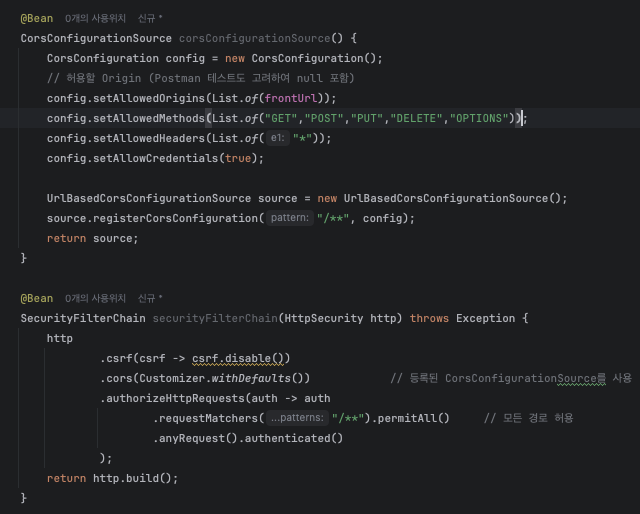
하단의 securityFilterChain 필터 체인을 추가하며
cors()를 호출해 CorsFilter가 실제로 Spring Security 체인에 끼어들 수 있게 한다.
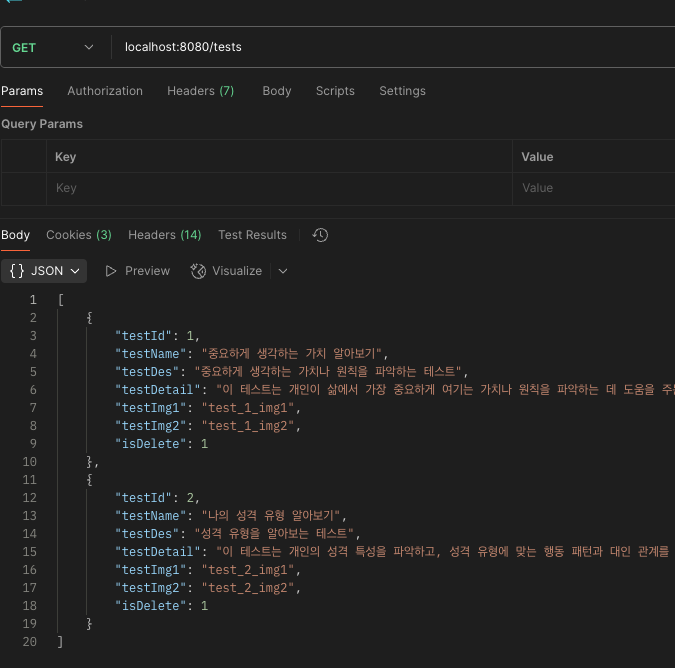
요청/응답 이 잘 나오는 모습을 볼 수 있다.

정진 또 정진