
Python 설치
Windows
- www.python.org에서 다운로드 메뉴 - Python 3.5이상 선택해서 다운로드
- 설치 과정에서 "Add Python 3.5 to Path" 반드시 체크
- 설치 확인
- 윈도우키 + R을 눌러서 나오는 창에 powershell이라고 치고, 확인을 눌러서 powershell실행
- powershell화면에서 python이라고 입력해서 오류가 나오지 않으면 설치 성공
OS X
보통 맥에는 python 2.x버전이 자동으로 설치되어 있지만 강의는 python3을 기준으로 작성되었기 때문에 별도로 python3을 설치해야 됩니다.
- www.python.org에서 다운로드 메뉴 - Python 3.5이상 선택해서 다운로드
- 다운로드 받은 폴더에서 .pkg파일을 실행.
- "확인되지 않은 개발자가 배포했기 때문에 열 수 없습니다"라는 메세지가 뜨면 승인을 누르고 다시 한번 파일을 실행
- 계속/동의/설치 버튼을 눌려주면서 설치
- 설치 확인
- command + space를 눌러서 나오는 창에
터미널을 치고, 엔터를 눌러서 터미널실행 - 터미널화면에서 python3이라고 입력해서 Python 3.5.1 (v3.5.1:37a07cee5969, Dec 5 2015, 21:12:44)와 비슷한 글이 뜨면 성공
- command + space를 눌러서 나오는 창에
에디터 설치
- Notepad++: 다운로드
- 메뉴-파일-다른이름으로 저장-test.py라는 이름으로 파일을 내 문서에 저장
test.py에 테스트 코드 작성
print("Hello!")
Windows - Powershell에서
- 실행: 윈도우키+R 후, powershell입력
- ls명령: 파일 목록을 확인하는 명령어
- 저장한 코드 실행방법
- python test.py
OS X - 터미널에서
- 실행 : spotlight 검색(단축키 : command+space바)에서
터미널 - ls명령 : 파일 목록을 확인하는 명령어
- 저장한 코드 실행방법
- python3을 설치하지 않으신 분들은 먼저 파이선 입문 - 파이썬 설치 하단 강의노트를 보고 python3를 설치해 주세요
- OS X에서는
python test.py가 아니라python3 test.py와 같이 꼭 3을 붙여서 파이썬 버전을 명시해주시기 바랍니다.(모든 파이썬 강의에서 python3 으로 실행)
Hello World!
powershell명령
- ls: 현재 디렉토리(폴더)의 내용을 확인하는 명령
- cd: powershell에서 현재 디렉토리(폴더)를 바꾸는 명령
print() 함수
- 괄호 안에 있는 내용을 화면에 출력하는 명령
- 화면에 표시하고 싶은 글은 따옴표(')로 묶어서 표현
- 예.
print('hello, world')
함수란?
- 파이썬이 특정한 기능(예. 화면에 출력)을 수행하도록 하는 명령
변수 사용하기
변수의 선언
identity = '지구인'- 변수의 이름
- 가장 왼쪽에 identity라고 쓰인 부분
- = (등호)
- 변수에 값을 저장하라는 의미
- 값
- '지구인'이라고 쓰인 값
- 변수의 이름
- 즉, identity라는 변수에 '지구인'이라는 값을 저장하라는 명령
변수의 사용
identity = '지구인'이라고 변수를 선언하고 나면, 변수의 이름을 가지고 그 값을 불러와서 사용할 수 있다.- 다음 두 코드는 같은 결과를 출력
print('안녕 나는','지구인','이야')print('안녕 나는',identity,'이야')
- 변수에 새로운 값을 입력하는 방법은 변수를 선언하는 것과 같다.
identity = '외계인'이라고 쓰면 이후부터 identity라는 변수의 값은 '외계인'이라는 값을 가지게 된다.
주석
- 코드를 설명하기 위해 코드에 적어 놓은 프로그래밍 언어가 무시하는 문자
- 코드를 임시로 작동하도록 꺼 두기 위해서도 사용
- #을 쓰고 그 오른쪽에 주석을 입력
- 여러줄을 주석으로 처리하고 싶을때는 따옴표 """로 그 내용을 둘러싼다.
            #정체와 다리의 수를 출력하는 코드입니다.
            identity = '지구인' #정체1
            number_of_legs  #다리의 수

            print('안녕!')

            #이 아래 줄은 주석처리 되었기 때문에 실행되지 않습니다.
            #print('너는 누구니?')

            """
            여러줄을
            한 번에
            주석처리할때는 이렇게 따옴표 3개로
            내용을 감싸주세요.
            """
숫자와 문자열
숫자
- 변수에 숫자를 넣는 예
my_age = 25
- 숫자는 계산이 가능
- 더하기 +
my_next_age = my_age + 1
- 곱하기 *
multiply = 9 * 9
- 나누기 /
divide = 30 / 5
- 거듭제곱 ** (예. 2의 10승)
power = 2 ** 10
- 나머지 %
remainder = 15 % 4- 15를 4로 나눈 다음의 나머지 = 3
- 더하기 +
문자열
- 따옴표로 감싸진 글
- 변수에 문자열을 넣는 예
my_name = 'Python'
- 텍스트 두개를 더하면 문자열이 이어붙여짐
text = '2015' + '1991'하고 나면 text에는'20151991'이라는 값이 저장
- 텍스트는 더하기만 가능하고, 빼기(-)등 다른 계산은 불가능
REPL
REPL
- Powershell에서 파일 이름 없이 python이라고만 입력하면 나오는 창
- 파이썬 코드를 한 줄씩 입력해 가면서 테스트 해 볼 수 있는 입력창
- REPL창을 종료하려면 exit()라고 입력
Shell 사용법
Shell 명령어
- pwd: 현재 폴더 경로 출력
- ls: 현재 폴더 내용물 출력
- cd
<폴더명>: 다른 폴더로 이동- cd
..: 상위 폴더로 이동
- cd
- cp: 파일을 다른 이름으로 복사
- rm: 파일을 삭제
파일이름 자동완성
- 파일 이름을 입력할때는 앞 1~2글자만 입력하고 tab키를 누르면 자동 완성되는 기능
if문
조건문
- 특정 조건에 따라 다른 동작을 할 수 있도록 해 주는 구문
        if people > apple:
print('사람이 너무 많아! 몇 명은 못먹겠네') -
구조
- if 예약어 : 조건문의 시작을 알림
- 조건:
people > apple와 같이 참/거짓을 판단할 수 있는 조건 - : 조건이 끝났다는걸 표현한하는 명령
- 실행하고자 하는 코드. 코드는 탭키를 이용해서 들여서 쓴다.
- 예.
print('사람이 너무 많아! 몇 명은 못먹겠네')
- 예.
조건식
조건
- 숫자 비교
- 크다
- 0 < 10
- 10 > 11
- 크거나 같다, 작거나 같다
- 3 <= 10
- 15 >= 10
- 같다
- 5 == 5
- 같지 않다
- 5 != 10
- 크다
- 비교의 결과는 True 또는 False
boolean연산
-
and연산
- 두 조건이 모두 참인지를 체크
-
or
- 두 조건 중 하나라도 참이다
-
not
- true/false를 뒤집기 위해 사용
-
예. a는 20대이다.
20 <= a and a < 30
-
예시. a는 18세 미만 또는 60세 이상이다.
a < 18 or 60 <= a
블럭
블럭
- 함께 실행 되는 하나의 코드 덩어리
- 들여쓰기로 블럭을 구분한다.
- 들여쓰기가 어긋나면 오류가 발생한다.
- 블럭 안에 다른 블럭이 들어갈 수 있다.
- 내부의 블럭은 외부의 블럭에 종속적
- 파이썬 코드 전체를 하나의 블럭으로 볼 수 있다.
if else
else
- if의 조건이 맞지 않는 경우 항상 실행
- 반드시 if뒤에 나와야 한다.
            if mine == yours:
                result = DRAW
            else:
                result = '이기거나 지거나'
elif
- else 와 if의 결합으로 조건이 맞지 않는 경우 다른 경우를 검사
- 기능의 차이가 아닌 보이는 것의 차이
            if mine == SCISSOR:
                result = '가위'   # 조건이 참일 때 실행
            elif mine == ROCK:
                result = '바위'   # 다른 조건이 참일 때 실행
            else:
                result = '나머지'    # 조건이 거짓일 때 실행
함수 만들기
함수
- 함수는 코드의 덩어리에 이름을 붙인 것이다.
- 새 함수를 정의할 수 있다.
- print는 미리 만들어진 함수이다.
- 함수를 한번 만들고 나면, 그 안은 잊어버려도 좋다.
            def function():         # 함수의 정의
                print('안녕, 함수!')

            print('첫줄 실행')
            function()          # 함수의 호출
            print('끝줄 실행')
매개변수
매개변수
- 함수를 정의할 때 사용하는 이름
실행 인자
- 함수를 실행할 때 넘기는 변수, 값
매개변수와 실행 인자
- 매개변수와 실행 인자의 개수는 동일해야 한다.
- 여러 개일 경우 쉼표로 구분
    def print_round(number):    # 함수의 정의
        rounded = round(number)
        print(rounded)

    print_round(4.6)        # 함수의 호출
    print_round(2.2)
함수의 값
함수
- return을 이용해 값을 돌려줄 수있다.
            def add_10(value):
                result = value + 10
                return result

            n = add_10(5)
print(n)-
여러 값 반환
- return 뒤에 여러 값을 쉼표로 구분해서 값을 보내고, 받을때도 쉼표로 구분하여 받는다.
format
문자열.format()
- 문자열의 대괄호 자리에 format 뒤의 괄호안에 들어있는 값을 하나씩 넣는다
- 문자열에 포함된 대괄호 개수 보다 format안에 들어 있는 값의 수가 많으면 정상 동작
print('{} 번 손님'.format(number,greeting))
- 문자열에 포함된 대괄호 개수 보다 format안에 들어 있는 값의 수가 적으면 에러
print('{} 번 손님 {}'.format(number))
    number = 20
    welcome = '환영합니다'
    base = '{} 번 손님 {}'

    #아래 3개의 print는 같은 값을 출력
    print(number,'번 손님',welcome)
    print(base.format(number,welcome))
    print('{} 번 손님 {}'.format(number,welcome))
    #=>20 번 손님 환영합니다
문자열
' 또는 "로 문자열 만들기
- ' 또는 "로 글의 양쪽을 감싸면 문자열로 인식
- '로 감싼 문자열 안에는 "를 쓸 수 있다.
- "로 감싼 문자열 안에는 '를 쓸 수 있다.
        string1 = '따옴표로 싼 문자열 안에는 큰따옴표(")를 사용할 수 있다.'
        string2 = "큰따옴표로 싼 문자열 안에는 따옴표(')를 사용할 수 있다."
따옴표/큰따옴표 3개로 문자열 만들기
- 줄 바꿈도 인식 가능
- 따옴표와 큰따옴표를 섞어 쓸 수 있다.
        string3="""줄도 바꾸고
        큰따옴표"와 따옴표'를 마음대로 쓸 수 있음"""
정수와 실수
정수
- 영어로 integer, 줄여서 파이썬에서는 int라고 표현
- 정수끼리 더하거나 곱하거나 빼면 정수
- 정수끼리 나누면 실수가 나올 수 있으나, 나눗샘의 몫만을 구하려면 //연산자를 이용
a = 5//3 #계산결과 a=1-
실수를 정수로 바꾸려면 int를 이용
a=int(5.4)라고 하면 a는 5를 값으로 가지게 된다.
실수
- 부동소수점이라는 표현법을 이용해 소숫점을 표시할 수 있는 숫자
- 어느정도의 계산 정확도는 가지지만, 계산에 있어서 완벽한 정확성은 가지지 않는다.
0.1+0.1+0.1 == 0.3 #FALSE
-
정수를 실수로 바꾸려면 float를 사용
a=float(5)라고 하면 a는 5.0을 값으로 가지게 된다.
사용자 입력 받기
프로그래밍의 3단계
- 사용자 입력
- 자료 처리
- 결과 출력
input()
- 사용자의 키보드 입력을 return
        print('가위 바위 보 중 하나를 내주세요> ', end = ' ')
        mine = input()
print('mine:', mine)- 간단한 print기능을 내장
        mine = input('가위 바위 보 중 하나를 내주세요> ')
        print('mine:', mine)
Ctrl + c
프로그램 즉시 종료
리스트 사용
안내
강의에서 []를 중괄호라고 말하는 부분이 있어, 정정합니다. []는 중괄호가 아니라 대괄호입니다.
List
- 여러개의 값을 담을 수 있는 변수
list1 = [1,2,3,4,5]
-
값 읽어오기
- 리스트를 사용할때는 0번째가 첫번째
- 첫번째 값
list1[0] - 두번째 값
list1[1] - 뒤에서 첫번째 값
list1[-1] - 뒤에서 두번째 값
list1[-2] - 리스트에 들어있는 값 보다 큰 값을 읽어오려고 하면 에러
- 예. 위의 list1에서
list1[5]또는list1[-6]은 에러
- 예. 위의 list1에서
-
값 쓰기
- 변수와 같이
list1[0]=10이라고 하면 list의 첫번째 값이 10으로 변경
- 변수와 같이
리스트 수정
리스트에 새로운 값을 추가하는 방법
list1=[1,2,3]이라고 할 때- append를 이용
list1.append(4)- append를 이용하면 리스트에 새로운 값이 추가된다.
- 뒤에 새로운 리스트를 더하기
list2=list1+[4]- list1은 그대로 두고, 새로운 리스트를 만들어 낸다.
리스트에 값이 들어있는지 확인하는 방법
- in 연산을 이용
        #12라는 값이 리스트에 들어있는지 확인하는 코드
        n=12
        if n in list1:
            print('{}가 리스트에 있다.'.format(n))
리스트에서 필요 없는 값을 지우는 방법
- del을 이용해서 특정 위치의 값을 지우기
del list1[10]리스트의 10번째 값을 지워라
- remove를 이용해서 특정 값을 지우기
list1.remove(40)을 하면 리스트에 40이라는 값이 있는경우 삭제- 여러개의 값이 있는 경우 가장 앞에 있는 하나만 지워짐
for in list
for in 반복문
- 코드를 필요한만큼 반복해서 실행
        for pattern in patterns:
print (pattern)- 리스트 patterns의 값을 하나씩 꺼내 pattern으로 전달
- 리스트의 길이만큼 print (pattern) 실행
for in range
range 함수
- 필요한 만큼의 숫자를 만들어내는 유용한 기능
    for i in range(5):
        print(i)
enumerate
- 리스트가 있는 경우 순서와 리스트의 값을 전달하는 기능
    names = ['철수', '영희', '영수']
    for i, name in enumerate(names):
        print('{}번: {}'.format(i + 1, name))
모듈 사용하기
모듈
- 미리 만들어진 코드를 가져와 쓰는 방법
- import 모듈이름
- 사용 방법: 모듈이름.모듈안의 구성요소
        math.pi
        random.choice()
모듈의 예
-
import math
- 수학과 관련된 기능
-
import random
- 무작위와 관련된 기능
-
import urllib.request
- 인터넷의 내용을 가져오는 기능
모듈 만들기
모듈 만들기
- 사용할 함수, 메소드 코드를 작성한 모듈 파일을 생성
- 모듈이 쓰일 파일에 import를 사용하여 모듈을 호출
- 사용 방법은 기존의 모듈과 동일
- 주의할 점은 사용자가 만든 모듈과 모듈을 쓸 파일이 같은 폴더에 있어야 한다.
### my_module.py

def random_rsp():
      import random
      return random.choice(['가위', '바위', '보'])

PAPER = '보'
SCISSOR = '가위'
ROCK = '바위'

      ---
### use_module.py

import my_module

selected = my_module.random_rsp()
print(selected)
print('가위?', my_module.SCISSOR == selected)
검색하기
프로그래밍 검색 요령
- 검색은 구글
- 키워드에 파이썬3 또는 python3을 포함하라
- 코드를 포함한 글을 찾도록 하라
- 간단한 예제는 REPL을 사용하여 예제를 테스트 해보라
- 영어를 못해도 영어로 검색하라
문서찾기
공식문서
- 필요한 내용을 둘러보고 싶을때
- 파이썬 내장 모듈과 함수의 정보가 필요할 때
구글 또는 stackoverflow.com
- 문제의 구체적인 해결 방법이 알고 싶을 때
- 구글 검색시 사이트 제한 기능 활용 site:stackoverflow.com
딕셔너리 만들기
딕셔너리
- 여러 값을 저장해 두고 필요한 값을 꺼내 쓰는 기능
- 이름표를 이용하여 값을 꺼내 사용
- 사용할 때는 리스트와 비슷한 방식
    wintable = {
        '가위' : '보',
        '바위' : '가위',
        '보' : '바위',
    }

    print(wintable['가위'])
딕셔너리 수정하기
- 추가
dict['three'] = 3- 수정
dict['one'] = 11- 삭제
        del(dict['one'])
        dict.pop('two')
딕셔너리와 반복문
딕셔너리 반복문 활용
- 경우에 따라 가져올 값을 정할 수있다.
        for key in ages.keys(): # keys() 생략 가능
            print(key)
for value in ages.values():
print(value)- key와 value 둘다 가져올 수 있다.
        for key, value in ages.items():
print('{}의 나이는 {} 입니다'.format(key, value))- 딕셔너리는 값의 순서를 지키지 않는다.
리스트와 비교
공통점
| List | Dictionary | |
|---|---|---|
| 생성 | list = [ 1, 2 ,3 ] | dict = { 'one':1, 'two':2 } |
| 호출 | list[ 0 ] | dict[ 'one' ] |
| 삭제 | del( list[ 0 ] ) | del( dict[ 'one' ] ) |
| 개수 확인 | len( list ) | len( dict ) |
| 값 확인 | 2 in list | 'two' in dict.keys( ) |
| 전부 삭제 | list.clear( ) | dict.clear( ) |
차이점
| List | Dictionary | |
|---|---|---|
| 순서 | 삭제 시 순서가 바뀌기 때문에 인덱스에 대한 값이 바뀐다 | key로 값을 가져오기 때문에 삭제 여부와 상관없다 |
| 결합 | list1 + list2 | dict1.update( dict2 ) |
튜플 만들기
튜플
- 한번 정해진 순서를 바꿀 수 없다.
- 튜플 선언
        tuple1 = (1, 2, 3, 4)

        tuple2 = 1, 2, 3, 4

        mylist = [1,2,3,4]
tuple3 = tuple(mylist)- 튜플은 값의 변경과 삭제가 불가능
packing, unpacking
packing
- 하나의 변수에 여러개의 값을 넣는 것
unpacking
- 패킹된 변수에서 여러개의 값을 꺼내오는 것
    c = (3, 4)
    d, e = c    # c의 값을 언패킹하여 d, e에 값을 넣었다
    f = d, e    # 변수 d와 e를 f에 패킹
튜플의 활용
- 두 변수의 값을 바꿀 때 임시변수가 필요 없다.
- 함수의 리턴 값으로 여러 값을 전달할 수 있다.
튜플을 이용한 함수의 리턴값
튜플 리스트 활용
    for a in enumerate(list):
        print('{}번째 값: {}'.format(a[0], a[1]))

    for a in enumerate(list):
        print('{}번째 값: {}'.format(*a))
튜플 딕셔너리 활용
    for a in dict.items():
        print('{}의 나이는:{}'.format(a[0], a[1]))

    for a in dict.items():
        print('{}의 나이는:{}'.format(*a))
while문 쓰기
while문
- 조건이 참인 경우 계속 실행하는 반복문
        while selected not in ['가위', '바위', '보']:
selected = input('가위, 바위, 보 중에 선택하세요>')- for 반복문으로 작성한 코드는 while 반복문으로 작성 할 수 있다.
break, continue
break
- 반복문을 종료시키는 기능
continue
- 반복문의 나머지 부분을 보지 않고, 반복문의 처음으로 돌아가는 기능
try except
예외 처리
    try:
        # 에러가 발생할 가능성이 있는 코드
    except Exception: # 에러 종류
#에러가 발생 했을 경우 처리할 코드- 경우에 따라 예외 처리 대신 if else를 사용 할 수 있다.
예외의 이름을 모를 때
예외 이름을 모르는 경우 처리 방법
    try:
        # 에러가 발생할 가능성이 있는 코드
    except Exception as ex: # 에러 종류
        print('에러가 발생 했습니다', ex)
  # ex는 발생한 에러의 이름을 받아오는 변수
raise
예외 발생
- 사용자가 직접 에러를 발생시키는 기능
raise Exception # 에러 종류- 많이 사용하면 코드를 읽기 어려워진다.
def rsp(mine,yours):
      allowed = ['가위','바위','보']
      if mine not in allowed:
          raise ValueError
      if yours not in allowed:
          raise ValueError
try:
      rsp('가이', '바이')
except ValueError:
      print('잘못된 값을 넣었습니다.')
중첩된 for문에서 종료시키는 방법
school = {'1반'= [172,185,198,177,165,199], '2반' = [165,177,167,180,191]}
try:
      for class_number, students in school.items():
          for student in students:
              if student>90:
                  print(class_number,'반에 190넘는 학생이 있음')
                  raise StopIteration
except StopIteration:
      print('정상종료')
논리연산 더 알아보기
단락평가
- 논리연산에서 코드의 앞만 보고 값을 정할 수 있는 경우 뒤는 보지 않고 값을 결정
- 복잡한 코드를 단순하게 하는 방식
bool 값과 논리연산
true, false
- 숫자 0을 제외한 모든 수 - true
- 빈 딕셔너리, 빈 리스트를 제외한 모든 딕셔너리, 리스트 - true
- 아무 값도 없다는 의미인 None - false
- 빈문자열을 제외한 모든 문자열 - true
List의 다양한 기능
List의 기능
list.index( value ): 값을 이용하여 위치를 찾는 기능list.extend( [value1, value2] ): 리스트 뒤에 값을 추가list.insert( index, value ): 원하는 위치에 값을 추가list.sort( ): 값을 순서대로 정렬list.reverse( ): 값을 역순으로 정렬
List와 문자열
List와 String
- 리스트와 문자열은 유사하다.
- 서로 변환이 가능하다.
list = str.split( ): 문자열에서 리스트로str.split("{자르는 기준}")
" ".join( list ): 리스트에서 문자열으로"{붙일기준}".join(list)
- split은 문자열 자르기, join은 문자열 합치기
str = "오늘은 날씨가 흐림"

# split()을 이용해서 str을 공백으로 나눈 문자열을 words에 저장하세요
words = str.split()

# index()를 이용해서 "흐림"이 words의 몇번째에 있는지 찾고,
# position에 저장하세요.
position = words.index("흐림")

words[position] = "맑음"

# join()을 이용해서 words를 다시 문자열로 바꿔 new_str에 저장하세요.
# words를 문자열로 바꿀때는 공백 한 칸을 기준으로 붙이면 됩니다.
new_str = ' '.join(words)

print(new_str)
Slice
slicing
- 리스트나 문자열에서 값을 여러개 가져오는 기능
    text = "hello world"
    text = text[ 1:5 ]

    list = [ 0, 1, 2, 3, 4, 5 ]
list = list[ 1:3 ]-
slice를 하면 해당하는 부분의 리스트나 문자열을 새로 만들어 준다.
-
시작과 끝부분을 얻어 오는 방법
list[ 2: ]: 2번째부터 끝까지 반환list[ : 2 ]: 처음부터 2번째 까지 반환list[ : ]: 처음부터 끝까지 전부 반환
Slice의 step
step
- slice한 값의 범위에서 step 값을 주어 그 값만큼 건너뛰어 가져오는 기능
- list[ 시작값:끝값:step ]
list(range(20)): [ 0, 1, 2, ⋯, 18, 19 ]
Slice로 리스트 수정하기
slice 활용
- 삭제
del list[ :5 ]: 처음부터 5번째까지 삭제
- 수정
list[ 1:3 ] = [ 77, 88 ]list[ 1:3 ] = [ 77, 88 ,99 ]: 더 많은 개수로 변환list[ 1:4 ] = [ 8 ]: 더 적은 개수로 변환
자료형 다루기
자료형
type( a ) # type( 변수명 ): 자료형isinstance( 42, int ) # isinstance( 값, 자료형 ): 자료형 검사- 결과에 따라 True나 False를 리턴
인스턴스 이해
클래스
- 함수나 변수들을 모아 놓은 집합체
인스턴스
- 클래스에 의해 생성된 객체
- 인스턴스 각자 자신의 값을 가지고 있다.
클래스 만들기
클래스 선언
    class Human( ):
        '''사람'''
인스턴스 생성
    person1 = Human( )
person2 = Human( )- 클래스와 인스턴스를 이용하면 데이터와 코드를 사람이 이해하기 쉽게 포장할 수 있다.
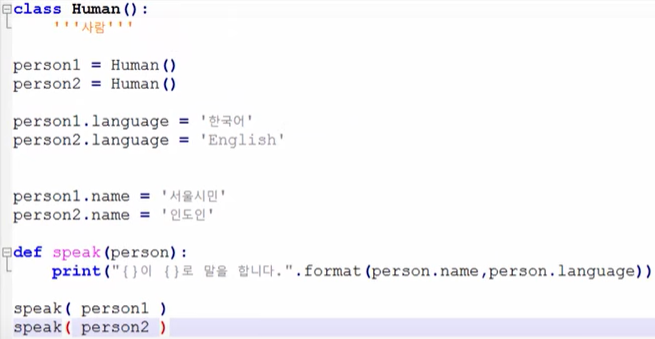
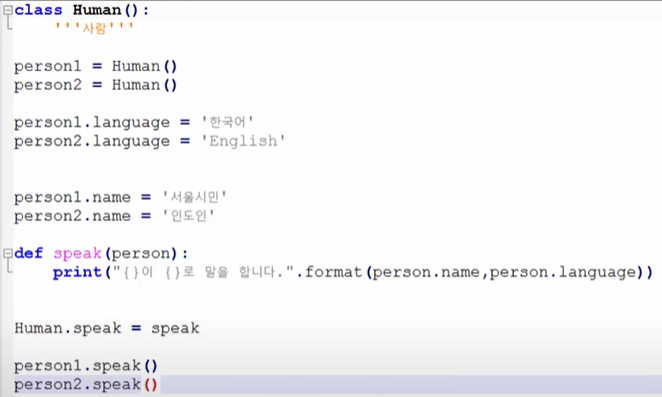
바로 위 그림에서 Human.speak는 새로운 함수를 의미하고 = speak는 원래만들어 두었던 speak함수를 의미한다.
그리고 위 두 그림의 결과는 동일하다.
의미적으로는 첫번째 그림은 두 인간이 말을 할 수 있나? 하는 것이고, 두번째 그림은 인간이 이미 말할 수 있다는 것을 내포시켜 준 것이다.
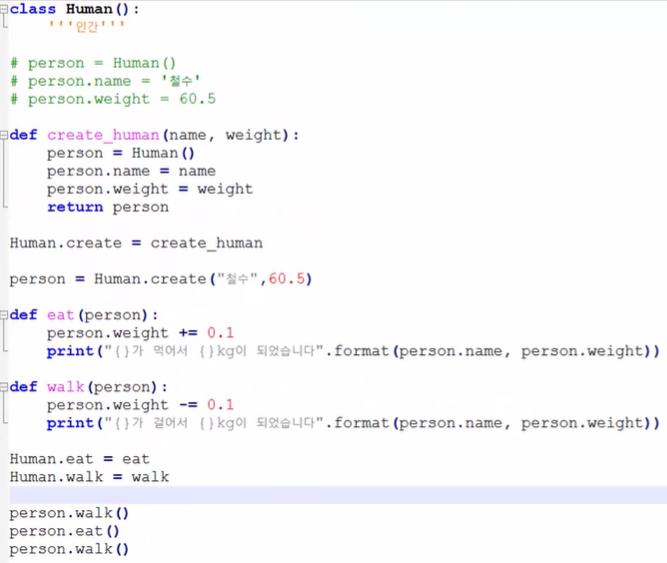
모델링
모델링(modeling)
- 클래스로 현실의 개념을 표현하는 것
메소드 이해하기
메소드(Method)
- 메소드는 함수와 비슷하다.
- 클래스에 묶여서 클래스의 인스턴스와 관계되는 일을 하는 함수
클래스 내부에 함수를 포함시킨 예 (위 모델링 코드와 완전히 동일)
    class Human( ):
        '''인간'''
        def create( name, weight ): # 다음 강의에서 자세히 설명
            person = Human()
            person.name = name
            person.weight = weight
            return person

        def eat( self ):
            self.weight += 0.1
            print("{}가 {}kg이 되었습니다".format(self.name, self.weight))

        def walk( self ):
            self.weight -= 0.1
            print("{}가 {}kg이 되었습니다".format(self.name, self.weight))

    person = Human.create("철수", 60.5)
    person.eat()
self
- 메소드의 첫번째 인자
- 인스턴스의 매개변수를 전달 할 때는 self 매개변수는 생략하고 전달
- 이 self에 인스턴스 매개변수가 자동으로 입력된다.
* 인스턴스? 그럼 클래스가 실변수화가 되어있어야 함
특수한 메소드
초기화 함수
__init__: 인스턴스를 만들 때 자동으로 호출되는 함수
문자열화 함수
__str__: 인스턴스 자체를 출력 할 때의 형식을 지정해주는 함수
    class Human( ):
        '''인간'''
        def __init__( self, name, weight ):
            '''초기화 함수'''
            self.name = name
            self.weight = weight

        def __str__( self )
            '''문자열화 함수'''
            return "{} ( 몸무게 {}kg )".format( self.name, self.weight )

    person = Human( "사람", 60.5 ) # 초기화 함수 사용
    print( person ) # 문자열화 함수 사용
상속
상속(Inheritance)
- 상속하는 클래스를 부모 클래스
- 상속받는 클래스를 자식 클래스
- 자식 클래스가 부모 클래스의 내용을 가져다 쓸 수 있는 것
    class Animal( ):
        def walk( self ):
            print( "걷는다" )

        def eat( self ):
            print( "먹는다" )

    class Human( Animal ):
        def wave( self ):
            print( "손을 흔든다" )

    class Dog( Animal ):
        def wag( self ):
            print( "꼬리를 흔든다" )
단순 오버라이드
오버라이드(Override)
- 같은 이름을 가진 메소드를 덮어 쓴다는 의미
    class Animal( ):
        def greet( self ):
            print( "인사한다" )

    class Human( Animal ):
        def greet( self ):
            print( "손을 흔든다" )

    class Dog( Animal ):
        def greet( self ):
            print( "꼬리를 흔든다" )
super()
super()
- 자식클래스에서 부모클래스의 내용을 사용하고 싶은 경우
- super().부모클래스내용
    class Animal( ):
        def __init__( self, name ):
            self.name = name

    class Human( Animal ):
        def __init__( self, name, hand ):
            super().__init__( name ) # 부모클래스의 __init__ 메소드 호출
            self.hand = hand

    person = Human( "사람", "오른손" )
내 예외 만들기
예외 정의
- 사용자가 직접 예외처리를 하면 코드의 직관성을 높일 수 있다.
- 파일을 하나 만들어 예외를 정의
- Exception 클래스를 상속받아 만든다
    try:
        sign_up( )
    except BadUserName:
        print( "이름으로 사용할 수 없는 입력" )
    except PasswordNotMatched:
        print( "입력한 패스워드 불일치")
List
List Comprehension
- 파이썬의 유용한 도구
- 예1
  [ i*i for i in range(1,11) ]
# [ 계산식 for문 ]- 예2
  [ i*i for i in range(1,11) if i % 2 == 0 ]
# [ 계산식 for문 조건문 ]- 예3
[ ( x, y ) for x in range(15) for y in range(15) ]
  # [ 계산식 for문 for문 ]
Dictionary
Dictionary Comprehension
- 파이썬의 유용한 도구
- 예시
# [ 형식 for문 ]

{ "{}번".format(number):name for number, name in enumerate(students) }
{student:score for student, score in zip(students, scores)}
datetime
datetime 모듈
- 날짜와 시간을 사용하게 해주는 라이브러리
   import datetime

   start_time = datetime.datetime.now() # 현재 시간
   start_time = start_time.replace(year=2017, month=2, day=1) # 시간변경
   start_time = datetime.datetime(2016,3,4) # 초기 시간 설정
### datetime클래스는 (-) 연산 지원
   how_long = start_time - datetime.datetime.now() # 현재시간과 시작시간 차이
   how_long.days
   how_long.seconds
timedelta
timedelta 클래스
- 시간의 연산을 가능하게 해주는 클래스
- 연산을 위한 시간 지정
- 100일, 2년, 7384초 등 구체적인 시간 지정
- 연산을 위한 시간 지정
   import datetime

   after_hundred = datetime.timedelta(days = 100)
   before_hundred = datetime.timedelta(days = -100)

   hundred_before = datetime.datetime.now() + before_hundred # 100일 이전
   # hundred_before = datetime.datetime.now() - after_hundred와 동일

   tomorrow = datetime.datetime.now().replace(hour=9, minute=0, second=0)
      + datetime.timedelta(days=1)

hello world :)