Pandas 데이터 관리
import pandas as pd
df = pd.read_csv("/Users/사용자이름/myenv/scv/lol_users.csv")
df
데이터 조회
df.head(3)
# 위에서 부터 행 3개만큼 조회
df2.tail()
- url을 통한 자료 조회(예시 자료 = titanic)
url = "https://raw.githubusercontent.com/datasciencedojo/datasets/master/titanic.csv"
df2 = pd.read_csv(url)
data = {
  "이름" : ["Xavi", "Iniesta", "Busquets"],
  "출생" : [80, 84, 88],
  "포지션" : ["CM", "AM", "DM"]
}
studydataframe = pd.DataFrame(data)
studydataframe
df2.sample(5)
- 기본 정보 확인
non-null count 결측치(측정이 되지 않는 값)
df2.info()
<class 'pandas.core.frame.DataFrame'>
RangeIndex: 891 entries, 0 to 890
Data columns (total 12 columns):
 #   Column       Non-Null Count  Dtype
---  ------       --------------  -----
 0   PassengerId  891 non-null    int64
 1   Survived     891 non-null    int64
 2   Pclass       891 non-null    int64
 3   Name         891 non-null    object
 4   Sex          891 non-null    object
 5   Age          714 non-null    float64
 6   SibSp        891 non-null    int64
 7   Parch        891 non-null    int64
 8   Ticket       891 non-null    object
 9   Fare         891 non-null    float64
 10  Cabin        204 non-null    object
 11  Embarked     889 non-null    object
dtypes: float64(2), int64(5), object(5)
memory usage: 83.7+ KB
df2.describe()
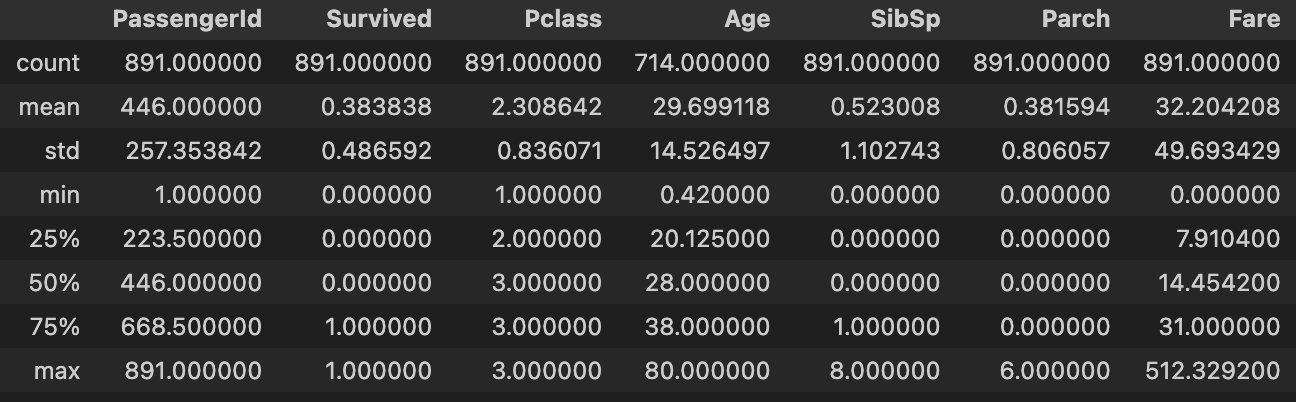
df2.shape
(891, 12)
df2.columns
Index(['PassengerId', 'Survived', 'Pclass', 'Name', 'Sex', 'Age', 'SibSp',
'Parch', 'Ticket', 'Fare', 'Cabin', 'Embarked'],
dtype='object')
for i in df2.columns:
print(df2[i])
for i in df2.columns:
print(df2[i].describe)
print(df2.iloc[0, 1])
df2.loc[0, 'Name']
print(df2['Name'])
0                                Braund, Mr. Owen Harris
1      Cumings, Mrs. John Bradley (Florence Briggs Th...
                             ...# 생략
889                                Behr, Mr. Karl Howell
890                                  Dooley, Mr. Patrick
Name: Name, Length: 891, dtype: object
print(df2[['Name', 'Ticket']])
                                                        Name  \
Ticket
A/5 21171                                   Braund, Mr. Owen Harris
PC 17599          Cumings, Mrs. John Bradley (Florence Briggs Th...
STON/O2. 3101282                             Heikkinen, Miss. Laina
113803                 Futrelle, Mrs. Jacques Heath (Lily May Peel)
373450                                     Allen, Mr. William Henry
...                                                             ...
211536                                        Montvila, Rev. Juozas
112053                                 Graham, Miss. Margaret Edith
W./C. 6607                 Johnston, Miss. Catherine Helen "Carrie"
111369                                        Behr, Mr. Karl Howell
370376                                          Dooley, Mr. Patrick

[891 rows x 2 columns] # 2개 열
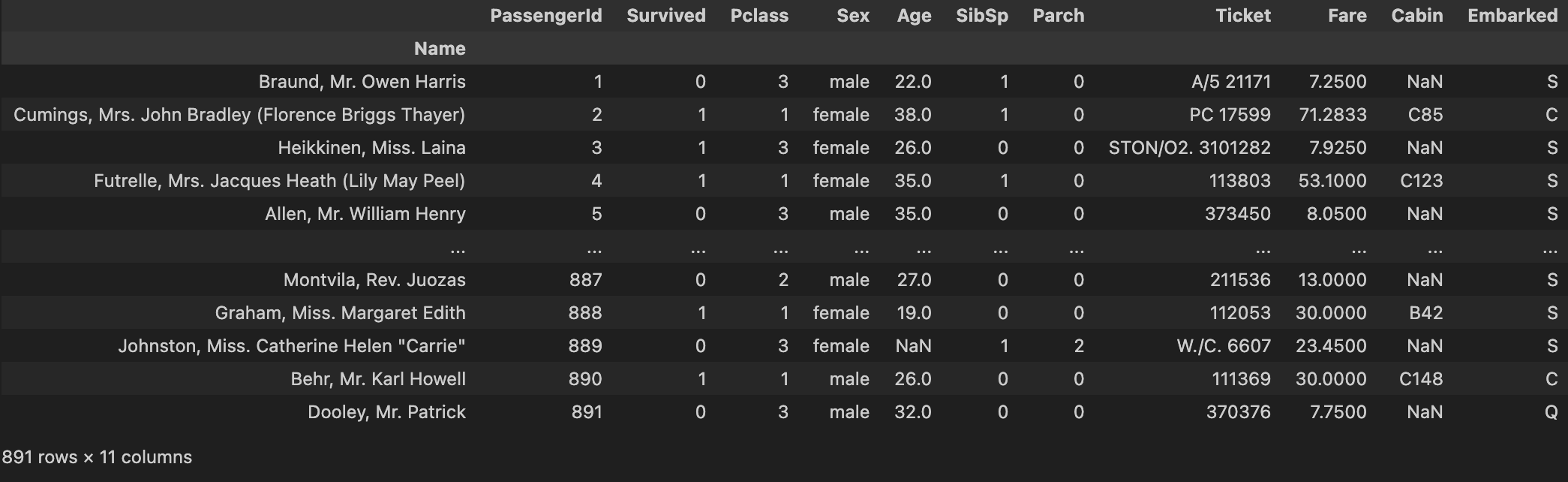
index 설정
- 선택한 열-column-을 기준으로 데이터 정리
df2.set_index('Name')
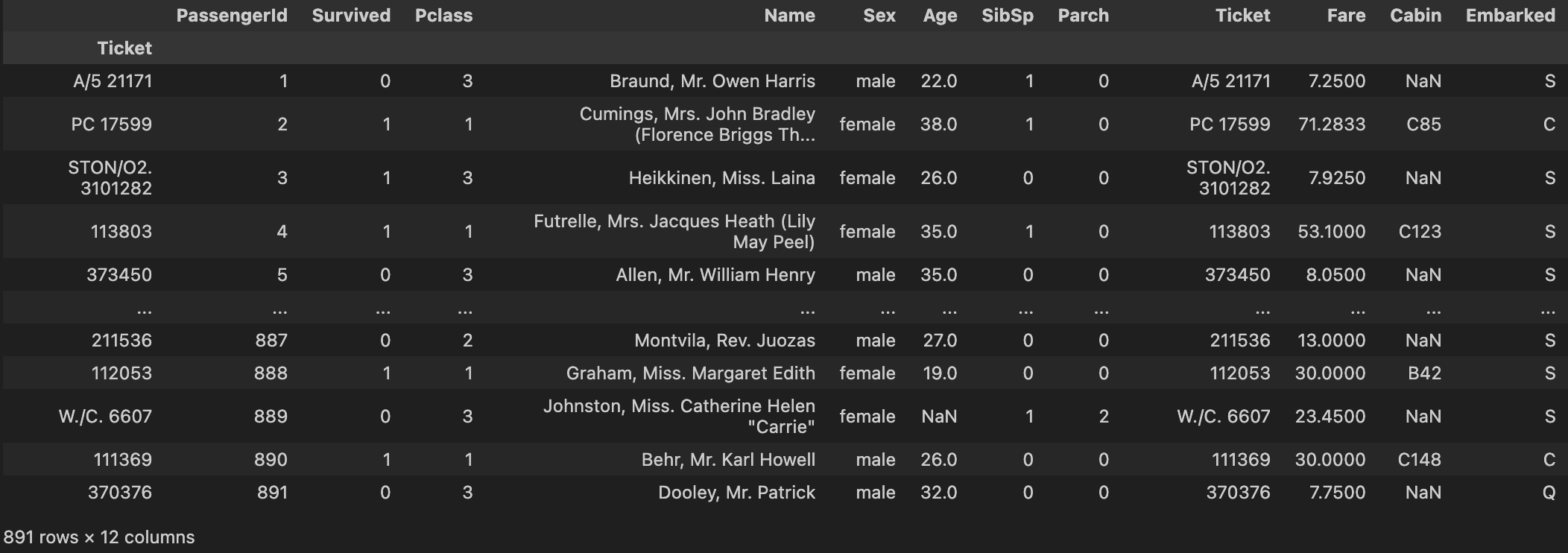
df2.set_index('Ticket', inplace = True, drop = False)
df2.loc['A/5 21171':'373450', 'Name']
Ticket
A/5 21171                                     Braund, Mr. Owen Harris
PC 17599            Cumings, Mrs. John Bradley (Florence Briggs Th...
STON/O2. 3101282                               Heikkinen, Miss. Laina
113803                   Futrelle, Mrs. Jacques Heath (Lily May Peel)
373450                                       Allen, Mr. William Henry
Name: Name, dtype: object
df2.iloc[0:4, 3]
Ticket
A/5 21171                                     Braund, Mr. Owen Harris
PC 17599            Cumings, Mrs. John Bradley (Florence Briggs Th...
STON/O2. 3101282                               Heikkinen, Miss. Laina
113803                   Futrelle, Mrs. Jacques Heath (Lily May Peel)
Name: Name, dtype: object
df2.loc["A/5 21171"]
PassengerId                          1
Survived                             0
Pclass                               3
Name           Braund, Mr. Owen Harris
Sex                               male
Age                               22.0
SibSp                                1
Parch                                0
Ticket                       A/5 21171
Fare                              7.25
Cabin                              NaN
Embarked                             S
Name: A/5 21171, dtype: object
df2.loc['A/5 21171':'373450']
df2[0:5]

데이터 필터링
titanic[
(titanic["Age"] >= 25) &
(titanic["Age"] <= 60) &
(titanic["Survived"])
].loc[:,"Age"]
1      38.0
2      26.0
3      35.0
8      27.0
11     58.0
       ...
871    47.0
874    28.0
879    56.0
880    25.0
889    26.0
Name: Age, Length: 167, dtype: float64
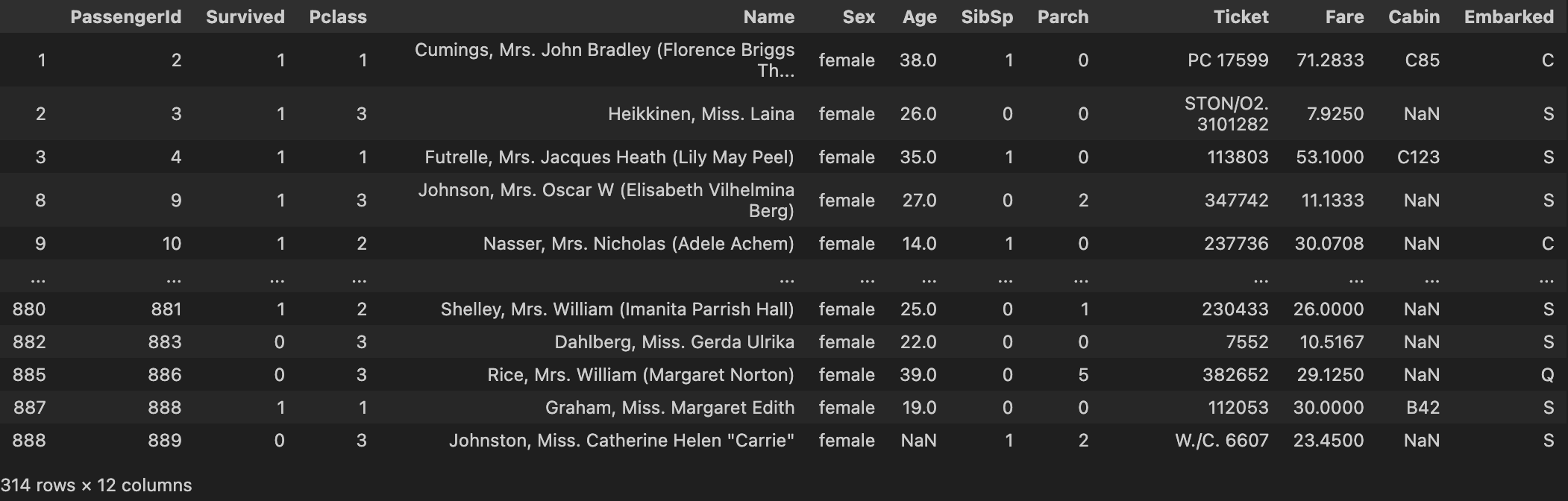
titanic[~titanic["Sex"].isin(["male"])]
데이터 타입 변환
1. 데이터의 정제 및 일관화
2. 메모리 절약
3. 데이터 처리를 위한 사전 작업
titanic.dtypes
PassengerId      int64
Survived         int64
Pclass           int64
Name            object
Sex             object
Age            float64
SibSp            int64
Parch            int64
Ticket          object
Fare           float64
Cabin           object
Embarked        object
dtype: object
titanic["Age"] = titanic["Age"].astype(int)
titanic["Embarked"] = titanic["Embarked"].astype("category")
결측치 해결
titanic["Age"].fillna(titanic["Age"].mean(), inplace = True)