Flask로 기초적인 웹페이지 제작
Flask로 웹페이지 제작
기초적인 html 작성
scrape 기능 모듈화 및 적용
csv 파일 작성 및 저장 기능 모듈화 및 적용
html 요소 추가
- 모듈화는 모든 기능이 keyword 기준으로 작동하게 진행
Flask
flask 설치
source myenv/bin/activate
pip install flask- flask 모듈 적용
- flask는 많은 모듈과 함께 사용하기에 용이
- 충돌 방지를 위해 가상환경에서 제작 추천
from flask import Flask, # app 객체 생성
		render_template, # html 페이지 렌더링 # html 파일 필요
				request, # 요청에 대한 정보
			   redirect, # url로 이동(정적) # url_for(변동 가능)
			   send_file # file 다운로드
flask 기본 구조 작성
__name__개념:
	직접 실행된 모듈 = __main__
	import된 모듈 = __파일명__
	처음 실행한 스크립트 파일의 __name__은 __main__
    어떤 스크립트든 main으로도 모듈로도 쓰일 수 있기 떄문에 중요
app = Flask(__name__) # app 생성
@app.route('/')
# / 는 홈페이지를 뜻함
# 데코레이터 = 홈페이지에서 실행 할 함수를 보여줌
def home():
return render_template('home.html')
if __name__== '__main__':
# flask 실행되는 스크립트가 시작점(main)인지 모듈로 사용되는지 판단
app.run(debug=True)
# debug=Ture =코드를 갱신할 때마다 서버 갱신html 작성
- meta 데이터 설정이 많이 복잡함
- html 설정은 버전에 따라 지원하는 기능이 다를 수 있음
<!DOCTYPE html>
<html lang = "en"> # 언어 설정
<head>
  <meta charset="UTF-8"> # 문자 인코딩 설정
  <meta http-equiv="X-UA-Compatible" content="IE=edge"> # http 언어 설정
  <meta name="viewport" content="width=devic-width,initial-scale=1.0"> # 화면 설정 # 창의공간
  <title>Jobscrapper</title> # 제목
</head>
<body> # 주된 내용이 들어갈 공간
</body>
</html>
scrap 모듈화
- 기능을 keyword 중심으로 통합
- .find()의 None type 에러 예외처리
탐색 결과가 None 일 때 no result를 출력하도록 설정
import requests
from requests import get
from bs4 import BeautifulSoup
# 여러개의 함수로 기능했던 것을 하나의 함수로 정리
def b_scrap(keyword):
  url = f'https://berlinstartupjobs.com/skill-areas/{keyword}/'
  response = requests.get(url, headers={"User-Agent": "Mozilla/5.0"})
  soup = BeautifulSoup(response.content, 'html.parser')

  all_jobs = []
  search_result = soup.find('ul', class_ = 'jobs-list-items')
  # 검색 과정에서 Attribut Error 가 발생하던 것 예외처리
  if search_result is not None:
     jobs = soup.find('ul', class_ = 'jobs-list-items').find_all('li')

     for job in jobs:
      position = job.find('h4', class_ = 'bjs-jlid__h').text,
      company = job.find('a', class_ = 'bjs-jlid__b').text,
      location = job.find('div', class_ = 'bjs-jlid__description').text,
      link = job.find('div', class_ = 'links-box').text
      job_data = {'position' : position, 'company' : company, 'location' : location, 'link' : link}
      all_jobs.append(job_data)

	# 잘못된 탐색이나 탐색 결과값이 없어서 None type Error를 발생시키는 경우
	# '결과없음' 결과값으로 유도하여 예외처리
  else:
    job_data = {
      'position' : 'Brl has no result',
      'company' : 'Brl has no result',
      'location' : 'Brl has no result',
      'link' : 'Brl has no result'
      }
    all_jobs.append(job_data)

  return all_jobs
  # keyword를 입력하면 탐색된 직업들의 리스트를 반환
csv 파일 작성 및 저장 모듈화
- keyword를 파일명으로 keyword에 따라 탐색된 jobs를 내용으로 작성
- 반드시 file.close()로 닫아줘야 한다
def save_to_file(file_name, jobs):
  file = open(f'/Users/사용자이름/myenv/JobScrapper/{file_name}.csv', 'w')
  file.write('Position,Company,Location,URL\n')

  for job in jobs:
    file.write(
      f"{job['position']}, {job['company']}, {job['location']}, {job['link']}\n"
      )
  file.close()
html 요소 추가
 # pico css 사이트접속
 # usage from cdn
 # link 복사 <link rel="stylesheet" href="https://cdn.jsdelivr.net/npm/@picocss/pico@2/css/pico.min.css">
 # home.html <head>에 붙여 넣기
검색기능 추가
- main, container 사용하여 컨텐츠가 중앙에 맞춰 공간을 사용하도록 설정
- 검색 버튼과 텍스트를 받는 input 추가
- action을 통해 검색결과로 이동
<body>
  <main class="container">
    <h1>Job Scrapper</h1>
    <h4>What job do you want</h4>
    <form action="/search">
      <input type= "text" name="keyword" placeholder="Write keyword" />
      <button>Search</button>
    </form>
  </main>
</body>
Job Scrapper
What job do you want
Searchdb 설정 & 검색 결과 기능 작성
- 검색 결과를 저장할 db설정(같은 내용 호출 시 빠르게 반응)
db = {}
# cache data
# 한번 추출한 데이터를 보관하여 다른 사용자가 왔을 때 제공
# 사이트를 새로고침 할때마다 다시 불러오지 않도록
# function들 밖에 위치시킴- 사용자가 입력한 keyword를 request 로 받아옴
- keyword를 통해 jobs 탐색(db에 있으면 바로 호출)
@app.route('/search')
def search():
  keyword = request.args.get("keyword")
  # python으로 검색할 경우 request.args로 keyword  python 두가지 인자를 얻음
  # keyword를 get으로 가져옴 keyword = python
  if keyword == None:
    return redirect("/")
    # search 입력값이 없을 경우 홈페이지로 이동

  if keyword in db:
    jobs = db[keyword]
  # db에 이미 정보가 있는 경우 그대로 사용
  else:
    berlin = b_scrap(keyword)
    wwr = wwr_scrap(keyword)
    web3 = w3_scrap(keyword)
  # 이전에 제작한 스크래퍼를 모듈로 가져옴
    jobs = berlin + wwr + web3
  # {%_______%} 안에 코드를 넣어서 html 에 넣을 수 있음
  # {% end %}로 종료
    db[keyword] = jobs
  return render_template('search.html', keyword = keyword, jobs = jobs)
  # keyword를 html로 보냄
  # jobs를 보냄
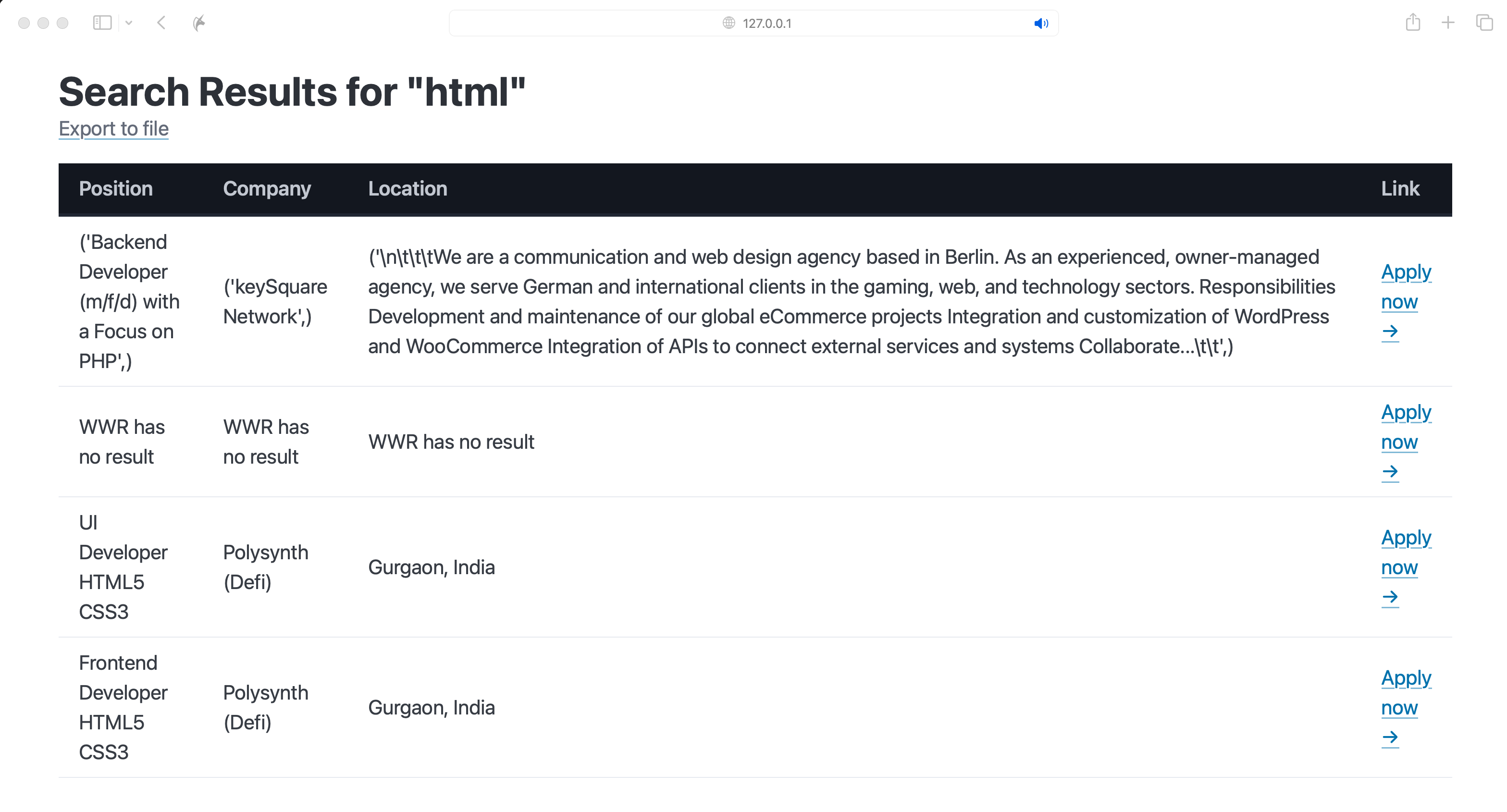
검색결과 html 작성
- table 기능추가- thead tbody tfoot 구조
- figure 안에 table을 넣으면 크기 반응형(모바일 환경)에 대응 가능
- {%___%} 안에 사용하고자 하는 파이썬 코드 삽입
<body>
<main class="container">
<hgroup>
<h1>Search Results for "{{keyword}}"</h1>
# 파이썬에서 받아올 데이터는 {{___}} 사용
<a target='_blank' href="/export?keyword={{keyword}}">Export to file</a>
</hgroup>
<figure><table>
<thead data-theme="dark"> # table head
<tr> # table row
<th>Position</th> table head
<th>Company</th>
<th>Location</th>
<th>Link</th>
</tr>
</thead>
<tbody>
{% for job in jobs %} # for-loop
<tr>
<td>{{job.position}}</td>
<td>{{job.company}}</td>
<td>{{job.location}}</td>
<td><a href = "{{job.link}}" target="_blank">Apply now →</a></td>
# href - url 사용
</tr>
{% endfor %} # for-loop 종료
</tbody>
</table></figure>
</main>Search Results for "{{keyword}}"
Export to file {% for job in jobs %} {% endfor %}| Position | Company | Location | Link |
|---|---|---|---|
| {{job.position}} | {{job.company}} | {{job.location}} | Apply now → |
csv 파일 추출
- 파일을 추출하려면 탐색과정을 거쳐야 함
- 검색 과정 없이 추출 페이지로 가는 것을 막는 처리가 필요
- keyword를 입력하지 않으면 홈페이지로 이동하도록 설정
- 의 export 버튼을 누르면 파일이 추출되고 다운로드됨
@app.route('/export')
def export():
  keyword = request.args.get("keyword")
  if keyword == None:
    return redirect("/")
  if keyword not in db:
    return redirect(f'/search?keyword={keyword}')
  # db에 해당 데이터가 없을 경우 검색결과 화면으로 이동

  save_to_file(keyword, db[keyword])
  return send_file(f'{keyword}.csv', as_attachment = True)
결과