Overview
- Raspberry Pi 3 B+에서 Raspberry Pi OS Lite(64-bit)를 사용
- PN532를 이용한 NFC RFID 보드를 연동
- NFC TAG 인지하는 MP3 플레이어 구현
- 구동에 필요한 라이브러리 및 파이썬 설치
- 기본적인 전력 소비량과 디스크 사용량을 측정
- 전력 소비량은 USB 전력 측정기로 간단히 확인
- 디스크 사용량은 df 명령어로 확인
- 부팅 시간은 systemd-analyze 명령어로 확인
Test Environment
Hardware
| Item | Value |
|---|
| Board | Raspberry Pi 3 Model B V1.2 |
| NFC Module | PN532 NFC RFID Module |
| Audio | 3.5mm Speaker |
Operating System
| Item | Value |
|---|
| Image | RASPBERRY PI OS LITE (64-BIT) |
| Kernel | Linux pi3 6.6.51+rpt-rpi-v8 #1 SMP PREEMPT Debian 1:6.6.51-1+rpt3 (2024-10-08) aarch64 GNU/Linux |
Software / Library
| Item | Version |
|---|
| Python | 3.11.2 |
| pip | 23.0.1 |
| adafruit-circuitpython-pn532 | 2.4.3 |
| pygame | 2.6.1 |
Connecting wires
Connection Overview
| Raspberry Pi GPIO Pin | PN532 Pin | Cable Color |
|---|
| 6 (GND) | 1 (GND) | Black |
| 4 (5V) | 2 (5V) | Red |
| 3 (GPIO2, SDA) | 3 (SDA) | White |
| 5 (GPIO3, SCL) | 4 (SCL) | Brown |
Actual Wiring Photo
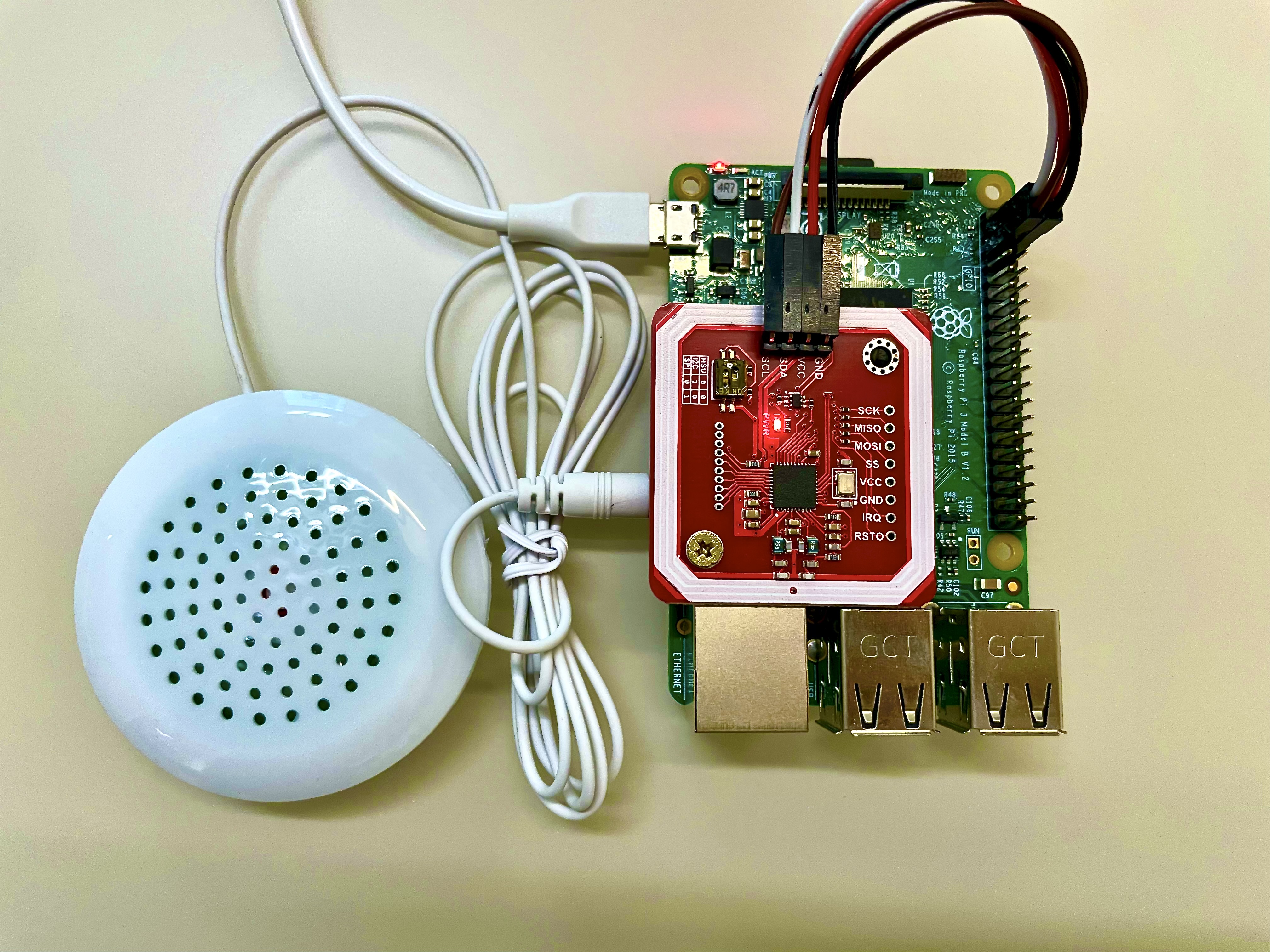
I2C Setting
- 터미널 실행
sudo raspi-config 명령어 입력- 3. Interface Options 선택
- I5 I2C 선택
- “Would you like the ARM I2C interface to be enabled?”
- 설정이 끝나면 Finish 후 라즈베리 파이 재부팅
Install Python Library
- 패키지 목록 업데이트 & pip 설치
sudo apt-get update
sudo apt-get install -y python3-pip
- 가상 환경 생성 및 활성화
python3 -m venv .venv
source .venv/bin/activate
- 라이브러리 설치
pip3 install adafruit-circuitpython-pn532
pip3 install pygame
Sample Code
import time
import board
import busio
from adafruit_pn532.i2c import PN532_I2C
import pygame

# 1) Initialize PN532
i2c = busio.I2C(board.SCL, board.SDA)
pn532 = PN532_I2C(i2c, debug=False)
pn532.SAM_configuration()

# 2) Initialize pygame sound
pygame.mixer.init()

track_path = "/home/user/sample.mp3"  # Path to your audio file
card_present = False  # Whether a card is currently detected

print("Please place and remove the card repeatedly.")

try:
    while True:
        # Read card UID (0.5 second timeout)
        uid = pn532.read_passive_target(timeout=0.5)

        if uid is not None:
            if not card_present:
                print(f"Card detected! UID: {uid}")
                # Play the audio file
                pygame.mixer.music.load(track_path)
                pygame.mixer.music.play()
                card_present = True
        else:
            if card_present:
                # If the card was present and is now removed, stop playback
                print("Card removed.")
                pygame.mixer.music.stop()
                card_present = False

        time.sleep(0.1)

except KeyboardInterrupt:
    print("Terminated by user.")
    pygame.mixer.music.stop()
Booting Time
- 기본 세팅과 PN532 장비 및 라이브러리 설치했을때와 오차 범위 내로 큰 차이 없음
$ systemd-analyze
Startup finished in 5.852s (kernel) + 18.954s (userspace) = 24.807s
multi-user.target reached after 12.796s in userspace.
Disk Usage
| Filesystem | Used | Mounted on |
|---|
| /dev/mmcblk0p1 | 65M | /boot/firmware |
| /dev/mmcblk0p2 | 2.6G | / |
Power Consumption
| State | Voltage | Ampere (Max) | Watt (Max) |
|---|
| Booting | 5V | 0.6A | 3W |
| Idle | 5V | 0.28A | 1.4W |
| Polling | 5V | 0.5A | 2.5W |
| Playing | 5V | 0.5A | 2.5W |
Conclusion
- 부팅 시간은 약 25초로 큰 차이 없음
- 소비 전력은 부팅시 약 3W, 유휴시 약 1.4W 소모로 부팅시 전력 소모가 조금 더 있음
- NFC 카드를 Polling시 전력 소모 발생
Next Steps
- 라즈베리 파이 Zero 모델에 대한 부팅 시간 및 전력 사용량 확인
