속성, 클래스, 스타일에 데이터 바인딩
속성에 데이터 바인딩
<template>
  <div>
    <!-- <img v-bind:src="url" /> -->
    <input type="text" v-model="textValue" />
    <button type="button" v-bind:disabled="textValue=''">Click</button>
    //텍스트 값이 비어 있으면 true가 반환
  </div>
</template>
<script>
export default {
  name: "",
  components: {},
  data() {
    return {
      url: "https://cdn.discuss.boardinfinity.com/original/1X/02db010d84e56b007f40215cc5928567aaf77629.png",
      textValue: "",
    };
  },
  setup() {},
  created() {},
  mounted() {},
  unmounted() {},
  methods: {},
};
</script>

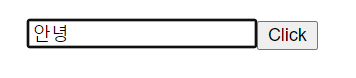
v-bind를 사용하여 속성을 제어할 수 있다.
disabled를 사용해서 텍스트 값이 비어 있으면 true가 반환 값이 있으면 false를 반환하게 해주었다.
클래스와 스타일에 데이터 바인딩
<template>
  <div
    class="container"
    v-bind:class="[{ active: isActive, 'text-red': isRed }]"
  >
    Class Binding
  </div>
</template>
<script>
export default {
  data() {
    return {
      isActive: true,
      isRed: true,
    };
  },
};
</script>
<style scoped>
.container {
  width: 100%;
  height: 200px;
}

.active {
  background-color: yellow;
  font-weight: bold;
}

.text-red {
  color: red;
}
</style>
배열로 데이터 바인딩
<template>
  <div class="container" v-bind:class="[activeClass, redClass]">
    Class Binding
  </div>
</template>
<script>
export default {
  data() {
    return {
      activeClass: "active",
      redClass: "text-red",
    };
  },
};
</script>
<style scoped>
.container {
  width: 100%;
  height: 200px;
}

.active {
  background-color: yellow;
  font-weight: bold;
}

.text-red {
  color: red;
}
</style>
인라인 스타일 바인딩
<template>
  <div v-bind:style="styleObject">인라인 스타일 Binding</div>
</template>
<script>
export default {
  data() {
    return {
      styleObject: {
        backgroundColor: "yellow",
        color: "red",
        fontWeight: "bold",
      },
    };
  },
};
</script>
<style scoped>
.container {
  width: 100%;
  height: 200px;
}

.active {
  background-color: yellow;
  font-weight: bold;
}

.text-red {
  color: red;
}
</style>
인라인 스타일 배열로 바인딩
<template>
  <div v-bind:style="[baseStyle, addStyle]">인라인 스타일 Binding</div>
</template>
<script>
export default {
  data() {
    return {
      styleObject: {
        backgroundColor: "yellow",
        color: "red",
        fontWeight: "bold",
      },
      baseStyle: "background-color:yellow; width:100%; height:200px;",
      addStyle: "color:red;font-weight:bold;",
    };
  },
};
</script>
<style scoped>
.container {
  width: 100%;
  height: 200px;
}

.active {
  background-color: yellow;
  font-weight: bold;
}

.text-red {
  color: red;
}
</style>

프론트엔드 개발자