Next.js에서 Styled-components 깜빡임 현상 해결하기
오늘은 Next.js 프로젝트에서 styled-components를 사용할 때 발생하는 스타일이 풀렸다가 다시 적용되는 깜빡임 현상 해결과정을 작성해보겠습니다.
프로젝트 구성
- Next.js 15.3.3 (최신 버전)
- Styled-components 6.1.18
발생한 문제
페이지를 새로고침하거나 처음 방문할 때 스타일이 잠깐 사라졌다가 다시 나타나는 현상이 발생. 특히 버튼, 카드, 입력 필드 등의 스타일이 적용되지 않은 상태로 잠깐 보였다가 styled-components가 로드된 후에 스타일이 적용되는 문제였습니다.
사전 지식
Next.js 렌더링 과정
Next.js는 다음과 같은 순서로 페이지를 렌더링합니다:
- 서버에서 HTML 생성 (SSR)
- HTML을 브라우저로 전송
- 브라우저에서 HTML 파싱
- React 하이드레이션 (JavaScript 실행)
브라우저 렌더링 파이프라인 이해하기
깜빡임 현상의 근본 원인을 이해하기 위해 브라우저의 렌더링 과정을 살펴보겠습니다.
Critical Rendering Path (중요 렌더링 경로)
브라우저는 다음과 같은 순서로 페이지를 렌더링합니다:
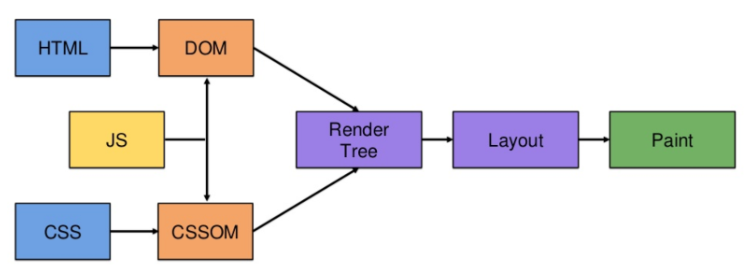
1단계: HTML 파싱
- HTML 파일을 읽어들이면서 div, img, h1 등 여러가지 태그들을 읽어들이며 마크업 단위로 만들어낸다. 파싱순서는 위에서 아래로 그리고 우에서 좌측으로 진행된다.
- 브라우저가 HTML을 파싱하여 DOM 트리를 구축
2단계: CSS 파싱
- CSS 규칙들이 어떻게 적용될지 계산
3단계: DOM, CSSOM 트리 생성
- 앞서 파싱된 HTML과 CSS를 바탕으로 DOM 트리, CSSOM 트리를 만들어낸다.
- 어떤 요소들과 부모 자식 관계를 가져내는지를 트리 구조로 나타내는 과정이다.
4단계: 렌더 트리 생성
- DOM 트리와 CSSOM 트리를 결합하여 렌더 트리 생성
- 화면에 표시될 요소들만 포함 (
display: none요소는 제외) - 아직 실제 화면이 그려지는게 아니라 객체의 형태로만 나타난다.
5단계: 레이아웃 (Reflow)
- 형성된 렌터 트리 내 각 요소들이 어느 위치에 그려지는지를 연산하는 과정이다.
- 뷰포트 크기에 따른 레이아웃 조정
6단계: 페인팅
- 실제 픽셀을 화면에 그리는 과정이다.
- 배경색, 텍스트, 이미지 등을 렌더링
문제분석
왜 스타일 깜빡임이 발생했을까?
-
서버사이드 렌더링 (SSR) 시 스타일 누락
- 서버에서는 styled-components 스타일이 HTML에 포함되지 않음
- 클라이언트에서 JavaScript가 로드된 후에야 스타일이 주입됨
-
하이드레이션 과정에서의 스타일 불일치
- 서버에서 렌더링된 HTML에는 스타일이 없음
- 클라이언트에서 React가 마운트되면서 스타일이 적용됨
- 이 과정에서 잠깐 스타일이 없는 상태가 노출됨
🛠️ 해결 과정
1단계: Next.js 설정 확인
먼저 next.config.js에서 styled-components 컴파일러 설정을 확인했습니다:
/** @type {import('next').NextConfig} */
const nextConfig = {
  compiler: {
    styledComponents: true,  // 이 설정이 중요!
  },
  // ... 기타 설정
};

module.exports = nextConfig;
next.config.js의 역할:
- Next.js의 빌드 설정을 관리하는 파일
compiler.styledComponents: true는 Next.js에게 styled-components를 최적화하도록 지시- 이 설정이 없으면 styled-components가 SSR에서 제대로 작동하지 않음
2단계: _document.js 파일 생성
가장 중요한 해결책은 src/pages/_document.js 파일을 생성하는 것이었습니다:
/* eslint-disable no-unused-vars */
import Document, { Html, Head, Main, NextScript } from 'next/document'
import { ServerStyleSheet } from 'styled-components'

export default class MyDocument extends Document {
  static async getInitialProps(ctx) {
    const sheet = new ServerStyleSheet()
    const originalRenderPage = ctx.renderPage

    try {
      ctx.renderPage = () =>
        originalRenderPage({
          enhanceApp: (App) => (props) => {
            return sheet.collectStyles(<App {...props} />)
          },
        })

      const initialProps = await Document.getInitialProps(ctx)
      return {
        ...initialProps,
        styles: [
          <>
            {initialProps.styles}
            {sheet.getStyleElement()}  // 여기가 핵심!
          </>,
        ],
      }
    } finally {
      sheet.seal()
    }
  }

  render() {
    return (
      <Html>
        <Head />
        <body>
          <Main />
          <NextScript />
        </body>
      </Html>
    )
  }
}
_document.js의 역할:
- Next.js에서 HTML 문서의 기본 구조를 정의하는 특별한 파일
- 서버사이드 렌더링 시에만 실행됨
<html>,<head>,<body>태그를 커스터마이징 가능- 모든 페이지에서 공통으로 사용되는 HTML 구조를 정의
ServerStyleSheet의 동작 원리:
1.sheet.collectStyles(): 서버에서 렌더링할 때 styled-components 스타일을 수집
2.sheet.getStyleElement(): 수집된 스타일을 HTML<head>에 주입할 수 있는 요소로 변환
3.sheet.seal(): 스타일 수집을 완료하고 더 이상 수정할 수 없도록 봉인
💡 배운 점
1. SSR과 CSR의 차이점 이해
- SSR: 서버에서 HTML을 미리 생성
- CSR: 클라이언트에서 JavaScript로 동적 렌더링
- 이 둘 사이의 일관성이 중요!
2. Styled-components의 특성
- CSS-in-JS 라이브러리
- 런타임에 스타일 생성
- SSR 시 별도 처리가 필요
3. Next.js의 _document.js 역할
- HTML 문서의 기본 구조 정의
- 서버사이드 렌더링 시 추가 설정 가능
<head>에 스타일이나 메타데이터 주입