📢 Java
Build 란?
- 빌드를 하기위해서는 빌드 도구를 사용합니다.
소스 코드를 컴파일하여 JVM 이나 WAS가 인식할수 있게 패키징 하는 과정
- 빌드 도구
Maven과 Gradle이 있으며 이전 블로그를 참고하면 될 것 같습니다.
(Maven과 Gradle의 차이)
GSON 란 ?
강사님 께서 간단하게 알려주셨다.
JSON 데이터를 자바 객체로 변환하는 기능을 제공하는 라이브러리입니다.
( JSON 추후 뒤에서 다룰 예정입니다 )
🚩 Entry Point (엔트리 포인트)
- 프로그램이 시작되는 시작점을 의미합니다.
- Java에서는 main 함수라고 생각하면 편할것 같습니다.
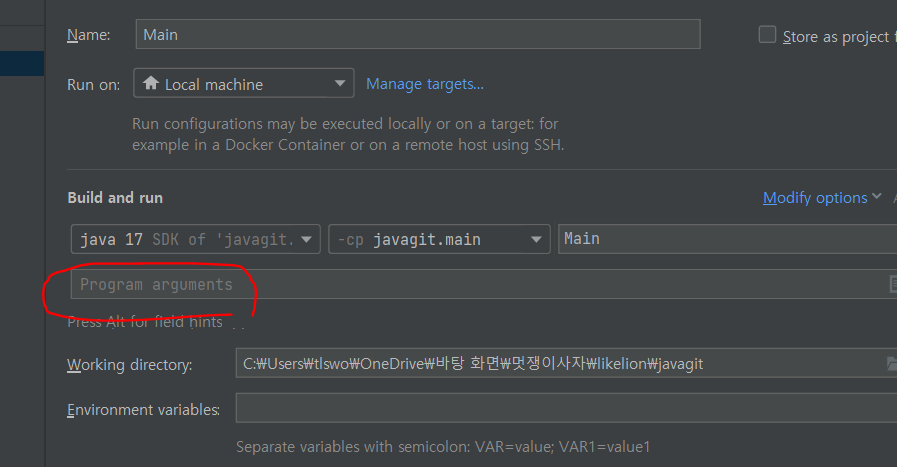
- argument 수정
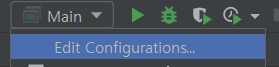
- argument를 입력하여 프로그램이 시작할때 데이터를 넣어줄수 있습니다.
public class Main {
    public static void main(String[] args) {
    	for (String arg : args) {
        	System.out.println(arg); // 설정한 arguments 반환
        }
    }
}
🧩 Spring
@SpringBootApplication 구성
@SpringBootConfiguration
애플리케이션을 구성을 제공하는 어노테이션 입니다.
@EnableAutoConfiguration
base package로 정의된 경로의 모든 Bean을 자동으로 구성합니다.
(패키지 경로에서 제외하여 구성을 제거할수 있음)
- 가장 최상위 패키지에 선언됨.
@ComponentScan
@Component어노테이션으로 등록한 클래스를 Bean으로 등록합니다.
( Controller, Service 어노테이션 등 경로를 타고 보게 되면
@Component를 포함 함)
📣 MVC 패턴의 Model은 추후에 Service 로직과 Repository 로직이 대표적입니다.
🙋♂️ View
예전에는 JSP를 많이 사용했지만 지원이 끊기게 되었고,
Spring 공식 문서에서 Thymeleaf 를 권장합니다.
View의 분리
thymeLeaf 사용 예시
- ❗❗
th:text
${값}이 model.addAttribute ("key 값", "value 값"); 의 value 값으로 대체됩니다. ${값} 은 key 값이랑 동일 해야합니다.
- Controller
@RequestMapping("/")
    public String home(Model model) {
        model.addAttribute("message", "Hello. ThymeLeaf");
        return "home";
    }
- View
<h1 th:text="${message}">여기에 글을 대체할 예정입니다.</h1>
- ❗❗
th:if,th:unless
위의 th:text 랑 작성 방식은 비슷하다
👀 조건부 렌더링
th:if 일 때 model 의 value 값이 true 일 경우 일때 <p> 값 반환
th:unless model 의 value 값이 false 일 경우 일때 <p> 값 반환
- Controller
@RequestMapping("/is-logged-in")
    public String isLoggedIn(Model model){
        model.addAttribute(
                "isLoggedIn",
//                true
                false
        );
        return "if-unless";
    }
- View
<!-- 로그인 되었을때 보여줘야 하는 것 -->
<div th:if="${isLoggedIn}">
  <p>You are logged in.</p>
</div>
<!-- 로그인 안됐을때 보여줘야 하는 것 -->
<div th:unless="${isLoggedIn}">
  <p>Please log in.</p>
</div>
- ❗❗
th:each
반복문 기능 제공
th:each="명칭 : ${key 값}"> [[${명칭}]] 똑같은 명칭을 작성해야 됩니다.
- Controller
@RequestMapping("/lotto")
    public String lotto(Model model){
        List<Integer> lottoList = new ArrayList<>();
        Random random = new Random();
        while(lottoList.size() < 6){
        	// bound 값은 포함하지 않음으로 0 ~ 44가 된다. 그래서 + 1
            int randomNumber = random.nextInt(45) + 1;
            if(!lottoList.contains(randomNumber)){
                lottoList.add(randomNumber);
            }
        }
        model.addAttribute("lotto", lottoList);
        return "lotto";
    }
- View
<div>
    <p th:each="lotto : ${lotto}">[[${lotto}]]-</p>
</div>