📣 Java
깊이우선탐색 (DFS)
✔ 코딩테스트에서 필수적으로 나오는 문제
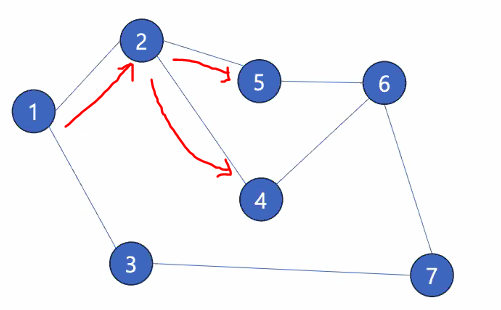
- 사진에 예시는 1번 노드부터 시작해서
1번 ➡ 2번 ➡ 5번 ...
1번 ➡ 2번 ➡ 4번 ...- 거의 대부분의 문제는 재귀호출 하여 풀이합니다.
(탈출 조건을 작성하지않으면, 무한루프에 빠지게됩니다.)
(재귀는 머릿속으로 그려지지 않습니다....)
(많은 문제풀이를 통해 연습이 필요합니다.)
📢 Spring
🐱🐉 Mybatis
JDBC를 활용해서 커넥션을 작성후 DB에 접근할수 있지만,JDBC는 활용이 어렵고, 준비해야 되는 내용이 많습니다.
Mybatis 프레임워크를 활용해 데이터베이스 사용을 좀더 편리하게 해볼 예정입니다.
✔ Mybatis란? 참조 하면 될것같습니다.
Mybatis 사용
build.gradle에서
의존성 주입후 build 리프레시 해줍니다.
(버전은 시간의 지남에따라 바뀔수 있습니다)

properties, yml 이란?
-
Spring Boot의 외부 구성을 사용하여 속성을 정의하는 것 입니다.
( DB 설정 등) -
yml예시 (강사님 추천)- properties에 비해 구조와 계층이 가독성이 좋습니다.
- mybatis의 xml 파일을 사용하기위해 설정
spring :
  datasource:
    url: jdbc:sqlite:db.sqlite
    driver-class-name: org.sqlite.JDBC
#    username: sa
#    password: password
mybatis:
  mapper-locations: "classpath:mybatis/mappers/*.xml"
  type-aliases-package: "com.example.mybatis.model"
  configuration:
    map-underscore-to-camel-case: true
💬 DTO 클래스
private Long id;
private String name;
private Integer age;
private String phone;
private String email;- 참조타입으로 선언하는 이유?
DB 관계에서 Null값을 허용하는 쿼리문이 있을수 있음으로 참조타입으로 선언합니다.
🧲 Mybatis에서 DB를 매핑하는 방법이 크게 2가지 있습니다.
📍 @Mapper 어노테이션 사용
@Mapper : MyBatis 가 Mapper가 붙은 클래스를 데이터베이스 통신에 사용할 준비
- 인터페이스 프로젝트 생성후 쿼리문을 인터페이스에 작성합니다.
@Mapper
public interface StudentMapper {
    // SELECT * FROM students; 를 실행할 메소드를 만드는데
    // 복수개의 Students를 반환하게 하는 return 타입 -> List<Student>
    @Select("SELECT * FROM students")
    List<StudentDto> selectStudentAll();
}- DAO 클래스
@Repository : 생성된 데이터베이스 테이블에 접근하는 메소드를 작성하기위한 어노테이션 입니다. (Model 객체 중 일부)
@RequiredArgsConstructor : final 키워드로 등록된 인스턴스만 의존성 주입을 합니다.
@Repository
@RequiredArgsConstructor
public class StudentDao {
	// SqlSessionFactory 객체를 사용해 커넥션 등의 객체를 사용하지않고
    // DB를 매핑 할수있습니다.
    private final SqlSessionFactory sessionFactory;

    public List<StudentDto> readStudentsAll() {
        try (SqlSession session = sessionFactory.openSession()) {
            StudentMapper studentMapper =
            		session.getMapper(StudentMapper.class);
            return studentMapper.selectStudentAll();
        }
    }
}
📍 XML 파일 사용
(XML 파일을 사용한다는것은 SQL 쿼리문을 따로 관리 한다는 뜻입니다)
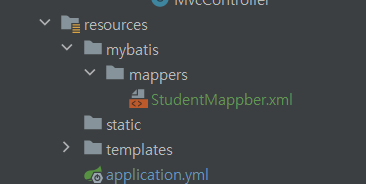
- resources 폴더에서 xml 파일을 생성합니다.
✔ 틀 작성은 구글링 하여 입력하면 되고,
namespace : 매핑 인터페이스 경로를 입력
id : 매핑한 인터페이스의 메소드 명
resultType : 매핑한 DB 클래스명<?xml version="1.0" encoding="UTF-8" ?> <!DOCTYPE mapper PUBLIC "-//mybatis.org//DTD Mapper 3.0//EN" "http://mybatis.org/dtd/mybatis-3-mapper.dtd"> <mapper namespace="com.example.likelion.mapper.StudentXmlMapper"> <select id="selectStudentAll" resultType="StudentDto"> SELECT * FROM students; </select> </mapper>
Mapper어노테이션 사용 없이 인터페이스를 생성후 메소드를 구현합니다.
public interface StudentXmlMapper {
    List<StudentDto> selectStudentAll();
}
- DAO 클래스는 위의
Mapper어노테이션 사용할때의 로직과 동일합니다.