🐱👓 Java
🎈 type (타입) 캐스팅 (형 변환)
👀 클래스의 타입 캐스팅은 뒤에서 다룰 예정입니다.
업캐스팅, 다운캐스팅
Casting (형 변환) 이란?
- 상대적으로 작은 크기의 타입에 큰 크기의 타입의 데이터를 저장하기 위해 사용한다.
- 타입을 변환하는 것이다.
public class Main {
    public static void main(String[] args) {
        char aInput = 'a';
        System.out.println((char) (aInput + 1)); // (char)을 통해 강제 형 변환
    }
}
b
- 위 코드와 같이
char타입의 정수를 더하게 되면int값으로 반환됩니다.
(타입명)을 하여 강제로 형 변환을 할수있습니다.
 public class Main {
    public static void main(String[] args) {
        int number1 = 1234;
        long longValue1 = number1; // 가능

        long longValue2 = 1234;
        int number2 = longValue2; // 불가능
    }
}
int number1 = 1234;
long longValue1 = number1; // 가능
🎯 가능한 이유는int타입이long타입의 비해 저장용량이 작기 때문에 형 변환이 가능합니다.
long longValue2 = 1234;
int number2 = longValue2; // 불가능
🎯 불가능한 이유는long타입이int타입의 비해 저장용량이 크기 때문에 형 변환이 불가능 합니다..
🥽 클래스 (Class)란?
⭕ 클래스 란 ?
- 변수 (Variable) 와 메서드 (행위)를 가지고 있는 집합이라고 생각하면 될것같습니다.
- 객체를 생성하는 틀 입니다.
- 클래스에서 객체를 생성(꺼내다)는 과정을 인스턴스화 라고하며, 생성된 객체를 인스턴스라고 합니다.
- 모든 클래스는 타입일수 있지만, 모든 타입은 클래스가 아닙니다.
- !!! 원시타입은 클래스가 아니다.
- 클래스를 멤버변수로 사용할수있습니다. ( 추후에 배울 예정)
- Student 클래스
✔ 멤버 변수로 name, age를 선언하였고 메소드를 정의 하였으며,
파라미터를 통해 넘어온 값을 받는 메소드를 정의하였습니다.
- 파라미터 : 메소드 수행에 필요한 입력값을 저장하는 변수임
public void print (String name){}"String name" 이 파라미터 입니다.
public class Student {
    String name;
    int age;

    // 이름을 출력해주는 메소드
    public void printName(){
        System.out.println(name);
    }
    // 나이를 출력해주는 메서드 (파라미터 사용)
    public void printAge(int age){
        System.out.println(age);
    }
}- Main 클래스
✔ Student 클래스를 인스턴스화 하여 인스턴스를 생성후 Student에서 정의한 메서드를 사용했습니다.
public class School {
    public static void main(String[] args) {
        Student student = new Student();

        student.name = "신재원";
        student.age = 30;
        int age = 25;


        student.printName(); // 신재원
        student.printAge(student.age); // 30
        student.printAge(age); // 25
    }
}
⭕ 참조 타입의 배열선언
-
처음에 글쓴이도 듣고 많이 어색했던 문장이였습니다.
코드를 통해 설명하겠습니다. -
Student 클래스
멤버 변수로 name, age를 선언해주었습니다.
public class Student {
    String name;
    int age;
}- Main 클래스
Student[] students = new Student[2];
✔ Student란 참조 타입을 배열을 선언해주었습니다.
✔ 배열을 만든것임으로 배열에 대한 인스턴스화를 해야됩니다.
public class School {
    public static void main(String[] args) {
        Student[] students = new Student[2];

		// 초기화를 꼭 해줘야된다 그렇지 않으면 null 값이 나옴
        students[0] = new Student();
        students[0].name = "신재원";
        students[0].age = 25;

        System.out.println(students[0].name); // 신재원
    }
}
🍕 2차원 배열
- 1차원 배열은 앞에서 배운바 있습니다.
🍙 2차원 배열은 행과 열로 이루어진 테이블이라 할수있습니다.
코드를 통해 설명하겠습니다.
import java.util.Arrays;

public class Main {
    public static void main(String[] args) {

        int[][] arr = new int[3][3];

        for (int i = 0; i < arr.length; i++) {
            System.out.println(Arrays.toString(arr[i]));
        }
    }
}
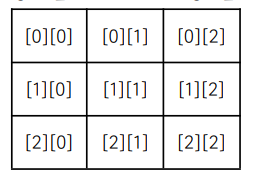
- 이러한 출력값을 가지며
- 출력값의 위치는 아래의 사진 처럼
Index위치로 저장되게됩니다.

- 2차원 배일 값 할당
( 1차원 배열과 똑같이 배열에 값을 할당 할수있습니다. )
import java.util.Arrays;

public class Main {
    public static void main(String[] args) {

        int[][] arr = new int[3][3];
        arr[0][1] = 1; // 0행 1열
        arr[1][2] = 1; // 1행 2열


        System.out.println("arr");
        for (int i = 0; i < arr.length; i++) {
            System.out.println(Arrays.toString(arr[i]));
        }

        System.out.println("---------------");

        int[][] iArr = {
                {1, 2, 3}, {4, 5, 6}
        }; // 2 * 3인 테이블

        System.out.println("iArr");
        for (int i = 0; i < iArr.length; i++) {
            System.out.println(Arrays.toString(iArr[i]));
        }
    }
}
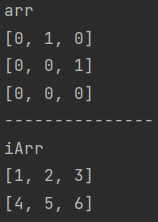
- 실행 결과
- Index 위치에 따라 값이 저장되는것을 볼수있습니다.
👌 배열의 Index 간에 값 바꾸기
public class Main {
    public static void main(String[] args) {

        int[] arr = {1,2,5,4,3};

        // 향상된 for문 뒤에서 다룰 예정
        for (int i : arr) {
            System.out.print(i+ " ");
        }
        System.out.println();

        int temp = arr[2]; // 임시로 arr[2]값을 담아준다.
        arr[2] = arr[3];
        arr[3] = temp;

        for (int i : arr) {
            System.out.print(i+ " ");
        }
    }
}
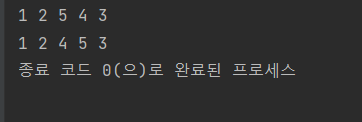
- 실행결과
arr[3]값과arr[2]값이 바뀐것을 볼수있습니다.
중요한점 : 값을 바꿀때는 변수에 임시로 값을 담아줘야됩니다.
✔int temp = arr[2];와 같이 사용