1️⃣ 현 상황
권한 부여 서버는 토큰을 발행하고 검증한다. 이때, RSA 알고리즘을 사용한 Private Key, Public Key를 사용한다.
Private Key는 토큰 생성 시, Public Key는 토큰 검증 시 사용하는 키이다.
일반적으로 Key는 다음 방식들로 관리한다.
- Cloud KMS : AMS, Google Cloud 등에서 사용하는데 파일을 저장하는 것이 아니라 파일을 암호화하는 키를 저장한다.
- 직접관리 : keywhiz, valut 등을 사용하는데, 보안적으로 안전하지만 구축과 관리가 쉽지 않다.
- 환경변수
하지만 지금 프로젝트에서 사용하는 목적이고, 실무에서 바로 사용할 인증/인가 서버 시스템을 만드는 것이 목표가 아니기 때문에, 아래 코드로 우선 작성을 해두었었다.
- JWKSource 구성
@Bean
public JWKSource<SecurityContext> jwkSource() {
   KeyPair keyPair = generateRsaKey();
   RSAPublicKey publicKey = (RSAPublicKey) keyPair.getPublic();
   RSAPrivateKey privateKey = (RSAPrivateKey) keyPair.getPrivate();
   RSAKey rsaKey = new Builder(publicKey)
                .privateKey(privateKey)
                .keyID(UUID.randomUUID().toString())
                .build();
   RSAKey rsaKey = createRSAKey();
   JWKSet jwkSet = new JWKSet(rsaKey);
   return new ImmutableJWKSet<>(jwkSet);
}- RSA Key 생성
private static KeyPair generateRsaKey() {
    KeyPair keyPair;
    try {
        KeyPairGenerator keyPairGenerator = KeyPairGenerator.getInstance("RSA");
        keyPairGenerator.initialize(2048);
        keyPair = keyPairGenerator.generateKeyPair();
  } catch (Exception ex) {
        throw new IllegalStateException(ex);
  }
    return keyPair;
}
❌ 하지만 이 방식은 치명적인 문제가 있다. ❌
권한 인증 서버가 내려갔다가 재시작할 때, 새로운 키가 발행된다는 것이다.
이것이 왜 문제냐면, 재시작 전 사용자가 서버로부터 발급받은 토큰은 더이상 검증이 불가능하게 된다는 것이다.
2️⃣ 해결 방식
우선 해결 방식은 다음과 같다.
1. 고정 키 값을 발행한다.
2. 안전한 곳에 보관한다.
이 글에서는 1번의 문제만 해결한 과정을 작성하고, 2번의 경우는 추후 고려해서 진행해보려 한다.
JDK Keytool
🌟 JDK Keytool이란?
- Oracle JDK에서 제공하는 keytool 커맨드는 키와 인증서 관리 유틸리티이다. 이는 디지털 서명을 사용해서 사용자들이 public, private key pairs를 직접 만들고 인증 서비스 등에 활용할 수 있도록 도와준다.
- 인증서는 개인, 회사 등으로부터 디지털 서명된 문서이다. 인증서를 통해 데이터의 정확성과 데이터가 소유자로부터 인증된 점을 보증한다. 또한 keytool 커맨드를 통해 secret key와 passphrases들을 DES 방식으로 관리할 수 있다.
- 이 키와 인증서는 keystore에 저장한다.
Step 1. Private Key 생성
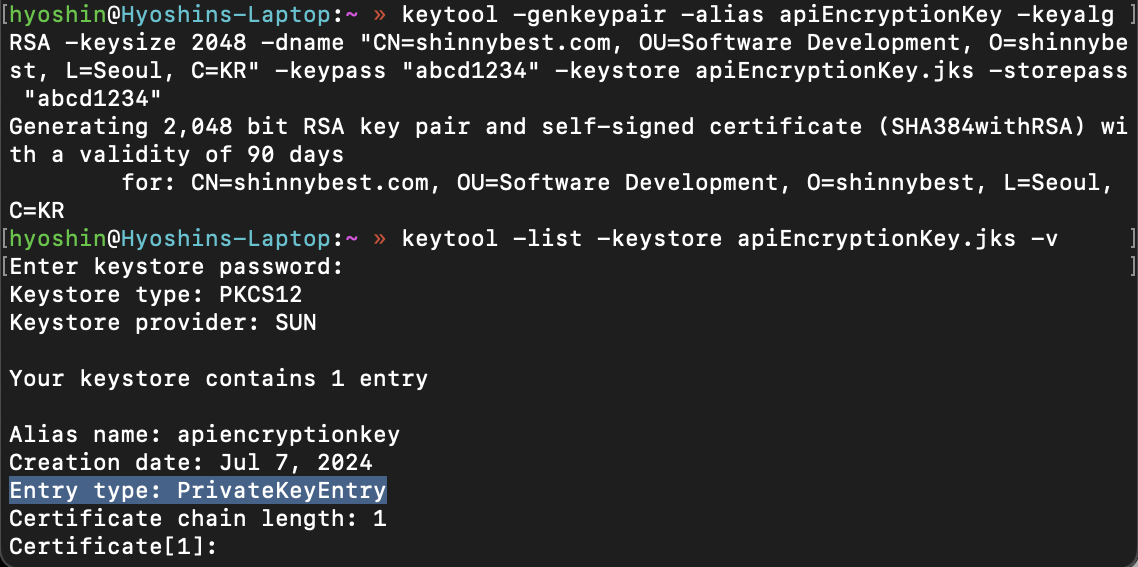
- 2048 bit RSA 알고리즘의 키페어를 생성
keytool -genkeypair -alias apiEncryptionKey -keyalg RSA -keysize 2048 -dname "CN=shinnybest.com, OU=SW, O=shinnybest, L=Seoul, C=KR" -keypass "abcd1234" -keystore apiEncryptionKey.jks -storepass "abcd1234"- Entry type은 PrivateKeyEntry인 것을 확인
keytool -list -keystore apiEncryptionKey.jks -vStep 2. public key 생성
- 생성된 키페어에서 공개 키 추출
keytool -export -alias apiEncryptionKey -keystore apiEncryptionKey.jks -rfc -file apiEncryptionKey.cer -storepass "abcd1234"Step 3. RSA Key 생성 코드 변경
- 파일로 저장한 PrivateKey를 통해 토큰 발행
private RSAKey createRSAKey() {
        try (InputStream keyStoreStream = new FileInputStream(keyStorePath)) {
            KeyStore keyStore = KeyStore.getInstance("JKS");
            keyStore.load(keyStoreStream, keyStorePassword.toCharArray());
            var privateKey = (RSAPrivateKey) keyStore.getKey(keyAlias, keyPassword.toCharArray());
            var cert = keyStore.getCertificate(keyAlias);
            var publicKey = (RSAPublicKey) cert.getPublicKey();
            return new Builder(publicKey)
                    .privateKey(privateKey)
                    .keyID(UUID.randomUUID().toString())
                    .build();
        } catch (Exception e) {
            throw new IllegalStateException("Private Key를 Key Store에서 찾을 수 없습니다.", e);
        }
    }
Step 4. JWKSource
- 저장한 PublicKey값으로 토큰 검증
@Bean
    public JWKSource<SecurityContext> jwkSource() {
        RSAKey rsaKey = createRSAKey();
        JWKSet jwkSet = new JWKSet(rsaKey);
        return new ImmutableJWKSet<>(jwkSet);
    }
Step 5. Jwk-Set-Uri 체크
/oauth2/jwks 경로의 jwk-set-uri로 들어가서, n을 key로 가지는 값이 서버 재시작 후에도 변경되지 않음을 확인
Reference

꾸준히, 성실하게, 탁월하게 매일 한다