Join : 두 테이블의 공통된 정보(key값)를 기분으로 테이블을 연결해서 한 테이블처럼 보는 것
- 종류
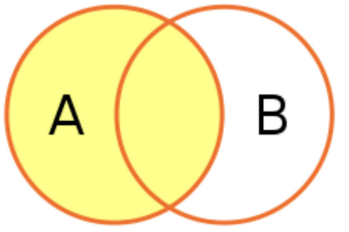
- Left Join
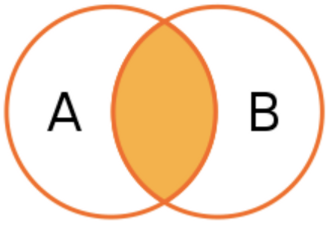
- Inner Join
- Left Join
- SQL 쿼리 실행되는 순서
from -> join -> where -> group by -> select - from의 테이블이 기준이 되는 테이블이고 join의 테이블이 기준 테이블에 합쳐진다라고 이해했다.
// inner join
결제 수단 별 유저 포인트의 평균값 구해보기
select o.payment_method, round(AVG(p.point)) from point_users p
inner join orders o
on p.user_id = o.user_id
group by o.payment_method

웹개발, 앱개발 종합반의 week 별 체크인 수를 세어볼까요?
select c1.title, c2.week, count(*) as cnt from checkins c2
inner join courses c1 on c2.course_id = c1.course_id
group by c1.title, c2.week
order by c1.title, c2.week

// left join
7월10일 ~ 7월19일에 가입한 고객 중,
포인트를 가진 고객의 숫자, 그리고 전체 숫자, 그리고 비율
select count(point_user_id) as pnt_user_cnt,
       count(*) as tot_user_cnt,
       round(count(point_user_id)/count(*),2) as ratio
  from users u
  left join point_users pu on u.user_id = pu.user_id
 where u.created_at between '2020-07-10' and '2020-07-20'
✏️ null 값 조건은 컬럼 is null null을 제외하고 뽑으려면 컬럼 in not null을 해준다.
Union : 결과물 합치기
- 조건
- 두 테이블의 필드 개수와 필드명이 같아야 한다
(
	select '7월' as month, c.title, c2.week, count(*) as cnt from checkins c2
	inner join courses c on c2.course_id = c.course_id
	inner join orders o on o.user_id = c2.user_id
	where o.created_at < '2020-08-01'
	group by c2.course_id, c2.week
  order by c2.course_id, c2.week
)
union all
(
	select '8월' as month, c.title, c2.week, count(*) as cnt from checkins c2
	inner join courses c on c2.course_id = c.course_id
	inner join orders o on o.user_id = c2.user_id
	where o.created_at > '2020-08-01'
	group by c2.course_id, c2.week
  order by c2.course_id, c2.week
)
Subquery : 쿼리 안의 쿼리
- where, select, from 절에서 유용하게 사용
- where 절 - where 필드명 in (subquery)
포인트가 평균보다 많은 사람들 select * from point_users pu1 where pu1.point > (select avg(pu2.point) from point_users pu2); - select 절 - select 필드명, 필드명, (subquery) from ..
course_id별 평균 like수 붙여보기 select c1.checkin_id, c1.course_id, c1.user_id, c1.likes, (select avg(c2.likes) from checkins c2 where c1.course_id = c2.course_id) from checkins c1; - from 절 - Select와 이미 있는 테이블을 Join하고 싶을 때 사용
course_id별 like 개수에 전체 인원붙이기
select a.course_id, b.cnt_checkins, a.cnt_total from
(
	select course_id, count(*) as cnt_total from orders
	group by course_id
) a
inner join (
	select course_id, count(distinct(user_id)) as cnt_checkins from checkins
	group by course_id
) b
on a.course_id = b.course_id
- where 절 - where 필드명 in (subquery)
kakaopay로 결제한 유저들의 정보 보기
select u.user_id, u.name, u.email from users u
where u.user_id in (
	select user_id from orders
	where payment_method = 'kakaopay'
)
With : 더 깔끔하게 쿼리문을 정리
with table1 as (
	select course_id, count(distinct(user_id)) as cnt_checkins from checkins
	group by course_id
), table2 as (
	select course_id, count(*) as cnt_total from orders
	group by course_id
)

select c.title,
       a.cnt_checkins,
       b.cnt_total,
       (a.cnt_checkins/b.cnt_total) as ratio
from table1 a
inner join table2 b on a.course_id = b.course_id
inner join courses c on a.course_id = c.course_id
Substring : 문자열 자르기
// 1번째 인수 : 컬럼명, 2번째 인수: 기준문자, 구분 문자, 3번째 인수 : 보여질 위치, 음수(-)는 뒷부분 부터.
select user_id, email, SUBSTRING_INDEX(email, '@', 1) from users
select user_id, email, SUBSTRING_INDEX(email, '@', -1) from users
// 1번째 인수 : 컬럼명, 출력하고 싶은 첫 글자 위치, 첫 글자부터 출력하고 싶은 글자 갯수)
select order_no, created_at, substring(created_at,1,10) as date from orders
Case When ~ else End : 경우에 따라 원하는 값(조건)
SELECT a.lv, count(*) as cnt from (
	select pu.point_user_id, pu.point,
			(case when pu.point > 10000 then '1만 이상'
			  	  when pu.point > 5000 then '5천 이상'
				  else '5천 미만' END) as lv
		from point_users pu
) a
group by a.lv
✏️ with절을 이용한 case문
with table1 as (
	select pu.point_user_id, pu.point,
			(case when pu.point > 10000 then '1만 이상'
			  	  when pu.point > 5000 then '5천 이상'
				  else '5천 미만' END) as lv
		from point_users pu
)

SELECT a.lv, count(*) as cnt from table1 a
group by a.lv
[퀴즈] 배웠던 것을 사용해보는 예제
1. 수강등록정보(enrolled_id)별 전체 강의 수와 들은 강의의 수 출력해보기
with table1 as (
	select ed2.enrolled_id , count(ed2.done) as done_cnt
	FROM  enrolleds_detail ed2
	where done = 1
	group by ed2.enrolled_id
), table2 as (
	select ed.enrolled_id , count(*) as total_cnt FROM enrolleds_detail ed
	group by ed.enrolled_id
)

select a.enrolled_id, a.done_cnt, b.total_cnt FROM table1 a
inner join table2 b on a.enrolled_id = b.enrolled_id

2. 수강등록정보(enrolled_id)별 전체 강의 수와 들은 강의의 수, 그리고 진도율 출력해보기

// 위 코드의 with절은 똑같아서 생략. select에서 round((a.done_cnt/b.total_cnt), 2) as ratio
컬럼만 만들어주었다.
select a.enrolled_id,
 	   a.done_cnt,
  	   b.total_cnt,
	   round((a.done_cnt/b.total_cnt), 2) as ratio
	FROM table1 a
	inner join table2 b on a.enrolled_id = b.enrolled_id
💡Subquery가 실무에서 매우 중요하고 잘 쓰인다는 걸 알고 얼핏 들은 거 같다. 그런데 막상 해보니까 쉽지않고 생각할 것도 많다는 게 느껴졌다. 아직 부족한 게 많다고 느껴지니 반복 숙달로 채워나가야겠다.

개발자가 되고 싶은 취준생