📌 목표
- 로컬, 테스트, 운영 환경을 나눠서 각각의 DB 설정, AWS 설정, 보안 값을 관리하기 위함
- 설정 충돌 없이 profile에 따라 필요한 설정만 자동으로 불러오도록 구성하고자 했음
🏗️ 설정 구조
src/
└── main/
    └── resources/
        ├── application.yml
        ├── application-local.yml
        ├── application-test.yml
        ├── application-prod.yml
        └── application-secret.yml
📁 각 파일 설명
✅ application.yml
- 공통 설정 (JPA, Redis, AWS 리전, 파일 업로드 설정 등)을 여기에 작성.
profiles.include: secret로 secret 설정은 모든 프로필에 자동 포함되도록 함.- 추가로 devtools, graceful shutdown, Redis, multipart 설정까지 여기에 정리.
server:
  shutdown: graceful

spring:
  lifecycle:
    timeout-per-shutdown-phase: 10s
  profiles:
    include: secret

  devtools:
    livereload:
      enabled: true

  jpa:
    properties:
      hibernate:
        show_sql: true
        format_sql: true

  servlet:
    multipart:
      enabled: true
      max-file-size: 10MB
      max-request-size: 20MB

  data:
    redis:
      host: localhost
      port: 6379

cloud:
  aws:
    stack:
      auto: false
    region:
      static: ap-northeast-2
application-*.yml
- 환경별 DB 설정만 따로 뺌 (ddl-auto, datasource.url, username 등).
application-test.yml에는spring.config.activate.on-profile: test설정으로 test 시 자동 적용되게 함.
# application-test
spring:
  config:
    activate:
      on-profile: test

  datasource:
    driver-class-name: com.mysql.cj.jdbc.Driver
    url: jdbc:mysql://43.200.193.73:3306/coupang_clone_test?allowPublicKeyRetrieval=true&useSSL=false&serverTimezone=Asia/Seoul&characterEncoding=UTF-8
    username: song

  jpa:
    hibernate:
      ddl-auto: create
    show-sql: true
    properties:
      hibernate:
        format_sql: true
application-secret.yml
-
비밀번호, JWT secret, AWS 키 등 민감한 값들을 여기에 작성.
-
---문법으로 profile 별로 구분하고 spring.config.activate.on-profile을 통해 각 환경에서 자동 매핑되게 처리
spring:
  config:
    activate:
      on-profile: local

  datasource:
    password: ...

---

spring:
  config:
    activate:
      on-profile: test

  datasource:
    password: ...

---

spring:
  config:
    activate:
      on-profile: prod

  datasource:
    password: ...

---

cloud:
  aws:
    s3:
      bucket: ...
    credentials:
      access-key: ...
      secret-key: ...

jwt:
  secret: ...
📝 배운점
Spring Boot는 기본적으로 resources/ 하위의 application.yml과 application-{profile}.yml 구조를 자동으로 인식하는 걸 알 수 있었다. 그리고 spring.config.activate.on-profile 설정과 profiles.include를 조합하면 깔끔하고 유연한 멀티 프로파일 구성이 가능하다.
단점은 모든 설정 파일이 resources/ 루트에 모여 있어 다소 산만할 수 있다. 하지만 구조적으로 단순하고 자동 인식된다는 장점 덕분에 개발/테스트 환경 구성에 매우 유리했다.
그래서 resources/yaml/ 폴더 안에 넣어서 해보고 있다.
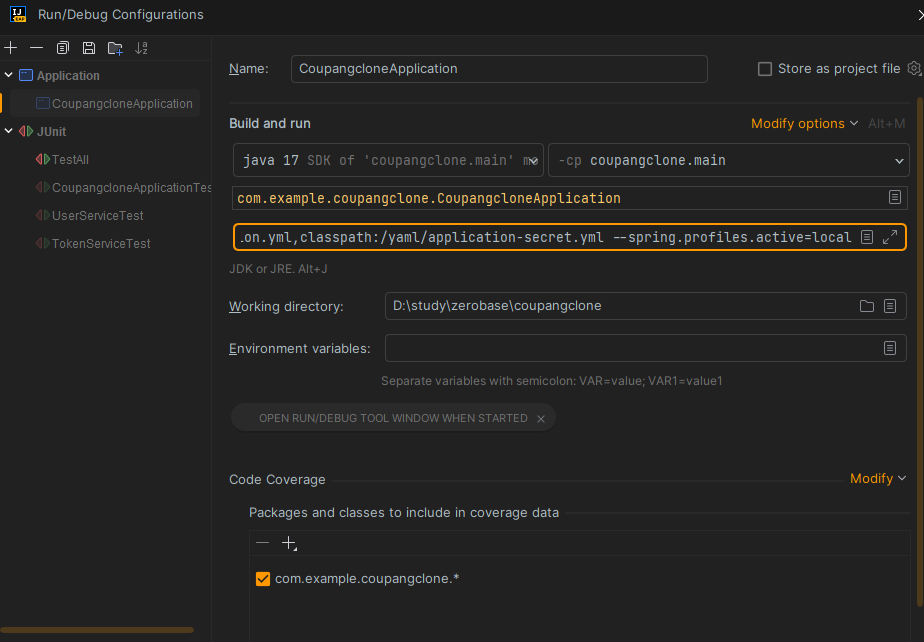
지금 로컬에서는 상단의 Run / edit Configurations 로 들어가 아래 주황색 테두리 부분에 --spring.config.location=classpath:/yaml/application.yml,classpath:/yaml/application-secret.yml --spring.profiles.active=프로필 로 실행시켜주면 잘 실행된다. 하지만 CI 테스트 중 application-test.yml을 제대로 못 가져오는 모양이다. 그래서 여러가지 시도하며 수정 중에 있지만 해결하고 추가로 더 작성할 예정이다.