!! sudo certbot renew (불가)
보통 Letsencrypt 인증서는 "sudo certbot renew"를 실행하면 간단히 갱신된다. 하지만 와일드카드(*.xxxxx.co.kr)가 적용된 서버에는 다음과 같은 에러가 발생한다. 구글에 찾아본 결과, 와일드카드 도메인은 수동으로 갱신해야 한다. 갱신 과정은 최초 도메인을 등록할 때와 유사하다.
Failed to renew certificate xxxxx.kr with error: The manual plugin is not working; there may be problems with your existing configuration. The error was: PluginError('An authentication script must be provided with --manual-auth-hook when using the manual plugin non-interactively.')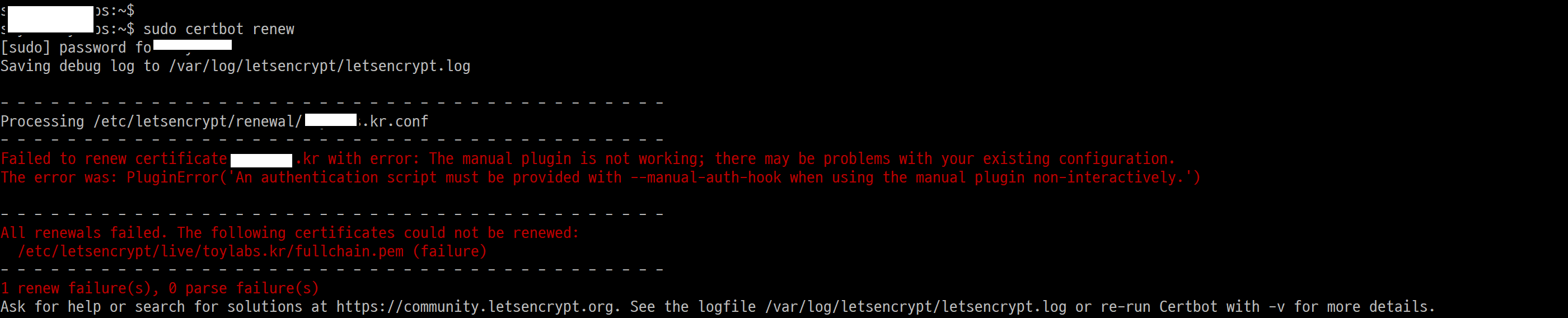
1. 방화벽 해외접속 허용 + http -> https 자동전환 해제
<In firewall>
allow connection from abroad. (HTTPS 443, 80에 대한 규칙에 대해서 한국->ALL)


<https 리다이렉트 전부 주석 처리>
$ sudo vi ~/nginx/sites-available/default

💥 아이피와 도에인 관련 80포트 관련해서 아래 4가지 항목 나누고 전부 주석처리

  server {
          listen                  80;
          server_name             www.xxxxx.kr;
          root                    /var/www/html;  # renew cert
          index                   index.html;     # renew cert
  }
  server {
          listen                  80;
          server_name             000.000.000.00;
          root                    /var/www/html;
          index                   index.html;
  }
2. sudo certbot certificates (현정보 확인)
putty 하나 더 띄우고, 마우스 오른쪽 버튼으로 복사할 것 (컨트롤+C 중단되므로 귀 찮음)
먼저 현재 등록된 Letsencrypt 인증서 정보를 확인해 보자. 등록한 도메인 명칭, 생성된 키파일 위치, 인증서 유효기간 등을 확인할 수 있다.
yourid@xxxxx:~$ sudo certbot certificates
Saving debug log to /var/log/letsencrypt/letsencrypt.log

- - - - - - - - - - - - - - - - - - - - - - - - - - - - - - - - - - - - - - - -
Found the following certs:
  Certificate Name: xxxxx.kr
    Serial Number: 3cae5504cfb8d7b93a155
    Key Type: RSA
    Domains: *.xxxxx.kr xxxx.kr
    Expiry Date: 2023-11-22 23:59:26+00:00 (VALID: 19 days)
    Certificate Path: /etc/letsencrypt/////xxxxx.kr/fullchain.pem
    Private Key Path: /etc/letsencrypt////xxxxx.kr/privkey.pem
- - - - - - - - - - - - - - - - - - - - - - - - - - - - - - - - - - - - - - - -
3. sudo certbot certonly -a manual -i nginx -d *.xxxxx.kr -d xxxxx.kr (갱신명령어)
3.1 콘솔에 위 명령어를 입력하면, 최초 등록할 때처럼, 다음과 같이 DNS 인증을 요구한다.
Saving debug log to /var/log/letsencrypt/letsencrypt.log
Renewing an existing certificate for *.xxxxx.kr and xxxxx.kr

- - - - - - - - - - - - - - - - - - - - - - - - - - - -
Please deploy a DNS TXT record under the name:
_acme-challenge.xxxxx.kr.

with the following value:
lxxxxxxxxxxxxxxxxxxxxxxxxxxxxxxxxxxxxxg

Before continuing, verify the TXT record has been deployed.
Depending on the DNS provider, this may take some time,
from a few seconds to multiple minutes.
You can check if it has finished deploying
with aid of online tools, such as the Google Admin Toolbox:
https://toolbox.googleapps.com/apps/dig/#TXT/_acme-challenge.xxxxx.kr.
Look for one or more bolded line(s) below the line ';ANSWER'.
It should show the value(s) you've just added.
- - - - - - - - - - - - - - - - - - - - - - - - - - - -
Press Enter to Continue
도메인을 구입한 사이트로 접속해서 "DNS 레코드 관리"로 들어간다. "새 레코드 추가하기"를 누르고, 위 following value에 나오는 키를 다음과 같이 도메인 레코드에 입력한다.
- 유형:TXT,
- 이름:_acme-challenge,
- 값:lxxxxxxxxxxxxxxxxxxxxxxxxxxxxxxxxxxxxxg
3.2 계속하기를 누르면 다음과 같이 Nginx html 루트 폴더에 파일을 만들고, 그 파일에 특정값을 저장하도록 안내한다.
/var/www/html/.well-known/acme-challenge
Create a file containing just this data:
uxxxxxxxxxxxxxxxxxxxxu.pyyyyyyyyyyyyyyyyyyyyyyp
And make it available on your web server at this URL:
http://xxxxx.kr/.well-known/acme-challenge/uxxxxxxxxxxxxxxxxxxxxu
challenges; do not remove,
replace, or undo the previous challenge tasks yet.)
- - - - - - - - - - - - - - - - - - - - - - - - - - - - - - - - - - - - - - - -
Press Enter to Continue
즉, 도메인으로 연결되는 html root 디렉토리에 .well-known/acme-challenge 디렉토리를 만들고, 그 밑에 uxxxxxxxxxxxxxxxxxxxxu를 파일명으로 생성하고, 이 파일 내용에는 uxxxxxxxxxxxxxxxxxxxxu.pyyyyyyyyyyyyyyyyyyyyyyp을 입력한다.
4. 시간초과(timeout) 오류 및 해결
Letsencrypt는 신청인이 갱신하려는 도메인이 정상적인지 확인하기 위해 신청인의 웹서버에 접속을 시도한다. Letsencrypt가 해외 서버인 만큼, 하드웨어 및 소프트웨어 방화벽이 해외 트래픽을 차단한 경우 시간초과 에러가 발생한다. (http://~~~/.well-known/acme-challenge/@#!@#)
Certbot failed to authenticate some domains (authenticator: manual).
The Certificate Authority reported these problems:
 - Domain: xxxxx.kr
 - Type:   connection
 - Detail: 123.123.12.12: Fetching http://xxxxx.kr/.well-known/acme-challenge/uxxxxxxxxxxxxxxxxxxxxu:
 Timeout during connect (likely firewall problem)
4.1. 하드웨어 방화벽(cisco, fortigate) 규칙과, 소프트웨어 방화벽(ufw, selinux) 규칙이 모두 해외접근이 가능한지 확인하고, 허용으로 임시 변경한다.
4.2. nginx의 sites-available/default 파일에서 http를 https로 강제하는 경우 강제하지 않도록 설정을 변경한다. (systemctl reload nginx 명령어 필수)
4.3. There were too many requests 에러는 1시간 뒤 쯤 다시 시도한다.
An unexpected error occurred:
There were too many requests of a given type :: Error creating new order :: too many failed authorizations recently: see https://letsencrypt.org/docs/failed-validation-limit/
Ask for help or search for solutions at https://community.letsencrypt.org. See the logfile /var/log/letsencrypt/letsencrypt.log or re-run Certbot with -v for more details.
5. 성공화면
| 참 조 |
https://xrabcde.github.io/renew-ssl-certificate/
https://blog.lunapiece.net/posts/Wildcard-SSL-With-Certbot-Renew/