Flutter를 사용하여 Firebase를 이용한 앱 충돌 관리를 설정하는 방법을 순서대로 정리해 보겠습니다.
0. Firebase 프로젝트 설정 순서
-
Firebase 프로젝트 생성:
- Firebase 콘솔에서 새 프로젝트를 생성하거나 기존 프로젝트를 선택합니다.
-
앱 등록:
- Firebase 콘솔에서 "프로젝트 설정"으로 이동하여 "앱 추가"를 클릭합니다.
- Flutter 앱의 패키지 이름(
applicationId)을 입력합니다. - Flutter 앱의 패키지 이름(SHA1 지문받기)을 입력합니다.
-
SHA-1 인증서 지문 얻기:
- 안드로이드 스튜디오에서 콘솔창에
$ ./gradlew signingReport -
google-services.json다운로드:google-services.json파일을 다운로드 받습니다.- 파일을 Flutter 프로젝트의
android/app디렉토리에 복사합니다.
1. firebase cli 설치 및 설정
firebase_options.dart 만들어줍니다. 나중에 aipkey 관련및 여러 initializeApp 오류가 해결됩니다.
$ curl -sL https://firebase.tools | bash

$ firebase login

$ firebase projects:list

$ dart pub global activate flutterfire_cli

=================================================================
.zshrc or .bashrc 추가 후 flutterfire 실행
export PATH="$PATH":"$HOME/.pub-cache/bin"
==================================================================
$ flutterfire configure
2. Flutter 프로젝트 설정
-
pubspec.yaml파일 수정:- Firebase 관련 패키지들을
pubspec.yaml파일에 추가합니다.
dependencies: flutter: sdk: flutter firebase_core: ^3.1.1 # Firebase 초기화 패키지 firebase_crashlytics: ^4.0.2 # Crashlytics 패키지firebase_core는 Firebase 서비스 초기화를 담당하고,
firebase_crashlytics는 앱 충돌 관리를 위해 필요합니다.
- Firebase 관련 패키지들을
-
Android 프로젝트 설정:
- Flutter 프로젝트의
android/build.gradle파일을 열고,
buildscript블록과 Firebase와 관련된 플러그인의 클래스 패스를 추가합니다.
buildscript { repositories { google() mavenCentral() } dependencies { classpath 'com.google.gms:google-services:4.4.2' classpath 'com.google.firebase:firebase-crashlytics-gradle:2.7.1' } } allprojects { repositories { google() mavenCentral() } } rootProject.buildDir = "../build" subprojects { project.buildDir = "${rootProject.buildDir}/${project.name}" } subprojects { project.evaluationDependsOn(":app") } tasks.register("clean", Delete) { delete rootProject.buildDir }- Google Services 플러그인의 버전(
com.google.gms:google-services) - Firebase Crashlytics 플러그인의 버전
(com.google.firebase:firebase-crashlytics-gradle)을 설정합니다.
- Flutter 프로젝트의
-
앱 레벨
build.gradle수정:
- Flutter 프로젝트의android/app/build.gradle파일을 열고,
Firebase Crashlytics 플러그인을 추가합니다.``` plugins { id "com.android.application" id "kotlin-android" // The Flutter Gradle Plugin must be applied after the Android and Kotlin Gradle plugins. id "dev.flutter.flutter-gradle-plugin" // firbase Crashlytics id "'com.google.gms.google-services'" id "com.google.firebase.crashlytics" } dependencies { // Firbase Crashlytics implementation(platform("com.google.firebase:firebase-bom:33.1.1")) // implementation 'com.google.firebase:firebase-analytics-ktx' implementation 'com.google.firebase:firebase-crashlytics-ktx' } ```"com.google.gms.google-services"와"com.google.firebase.crashlytics"그리고
"com.google.firebase:firebase-bom:33.1.1"(종속성 관리)
추가하여 Firebase 서비스와 Crashlytics를 활성화합니다.
마무리(테스트)
- “크래시 발생” 버튼 눌러서 실시간으로 잘 들어가는지 확인
import 'dart:async';
import 'package:firebase_core/firebase_core.dart';
import 'package:firebase_crashlytics/firebase_crashlytics.dart';
import 'package:flutter/foundation.dart';
import 'package:flutter/material.dart';
import 'package:flutter/foundation.dart';
// The entry point of the application
Future<void> main() async {
//-----------------------
await Firebase.initializeApp();
FlutterError.onError = (errorDetails) {
FirebaseCrashlytics.instance.recordFlutterFatalError(errorDetails);
};
// Pass all uncaught asynchronous errors that aren't handled by the Flutter framework to Crashlytics
PlatformDispatcher.instance.onError = (error, stack) {
FirebaseCrashlytics.instance.recordError(error, stack, fatal: true);
return true;
};
//------------------------
// Runs the main application widget
runApp(const WhereIsKaaba());
}
// Main application widget
class WhereIsKaaba extends StatelessWidget {
const WhereIsKaaba({super.key});
// This widget is the root of your application.
Widget build(BuildContext context) {
// Define the light text theme based on Material3
final TextTheme lightTextTheme =
ThemeData.light(useMaterial3: true).textTheme;
// Define the dark text theme based on Material3
final TextTheme darkTextTheme =
ThemeData.dark(useMaterial3: true).textTheme;
// Create a custom material theme for the light theme
final CustomMaterialTheme lightCustomMaterialTheme =
CustomMaterialTheme(lightTextTheme);
// Create a custom material theme for the dark theme
final CustomMaterialTheme darkCustomMaterialTheme =
CustomMaterialTheme(darkTextTheme);
return MaterialApp(
debugShowCheckedModeBanner: false,
// Localization delegates for internationalization support
localizationsDelegates: const [
S.delegate,
GlobalMaterialLocalizations.delegate,
GlobalWidgetsLocalizations.delegate,
GlobalCupertinoLocalizations.delegate,
],
// Supported locales for the application
supportedLocales: S.delegate.supportedLocales,
//////////////////////////////////////////////////
// Title of the application
title: 'Where is Kaaba.?',
// Light theme configuration
theme: lightCustomMaterialTheme.light(),
// Dark theme configuration
darkTheme: darkCustomMaterialTheme.dark(),
// Home widget of the application
home: Semantics(
label: 'Main Screen with navigation tabs',
child: Center(
child: ElevatedButton(
onPressed: () {
// 강제로 예외를 발생시켜 Crashlytics 로그를 테스트합니다.
throw Exception("테스트 예외");
},
child: const Text("크래시 발생"),
),
),
),
);
}
}
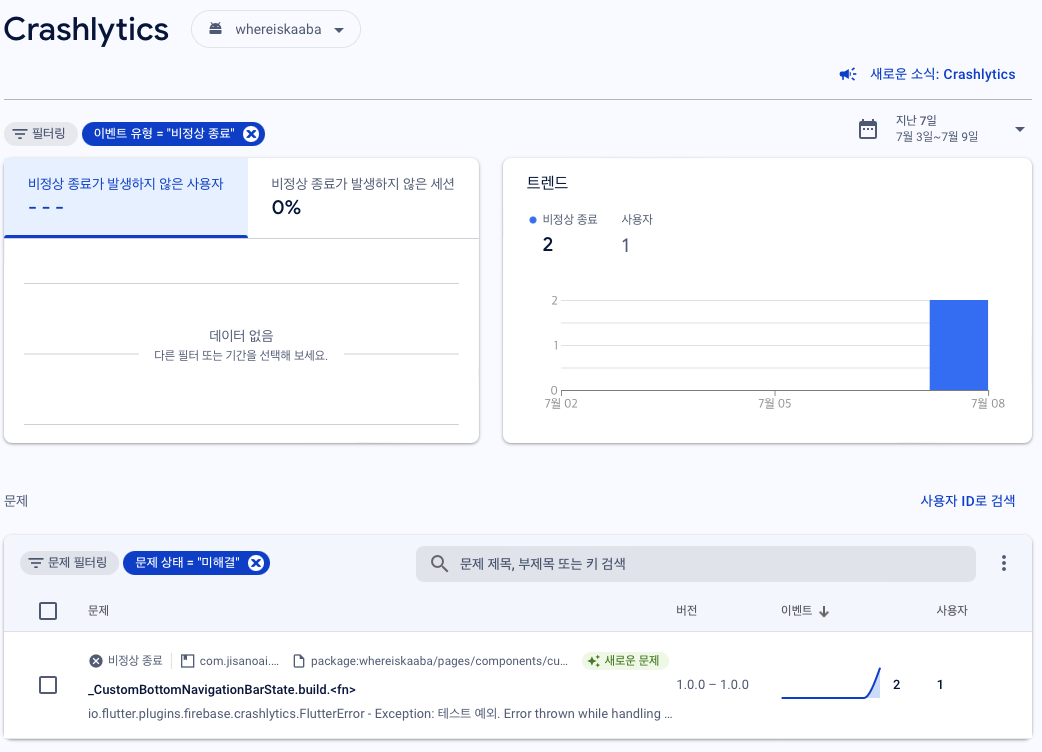

I will do, what i want!!