▶ Firestore란?
- Firestore란?
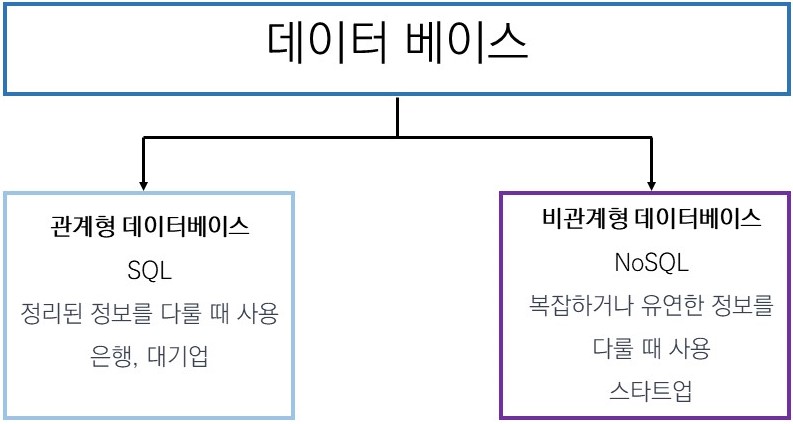
- 파이어스토어(Firestore)는 구글의 클라우드 기반 NoSQL 데이터베이스이다.
- 파이어스토어(Firestore)는 구글의 클라우드 기반 NoSQL 데이터베이스이다.
- NoSQL DB란?
- 자유도가 높고 정형화되어있지 않은 앞으로 바뀔 base가 많을 때 사용한다. (정해진 규칙 x)
- 따라서 우리는 관계형 DB보다는 비관계형 DB를 주로 사용하게 될 것이다.
▶ Firestore DB 시작하기
▷ 파이어스토어 시작하기
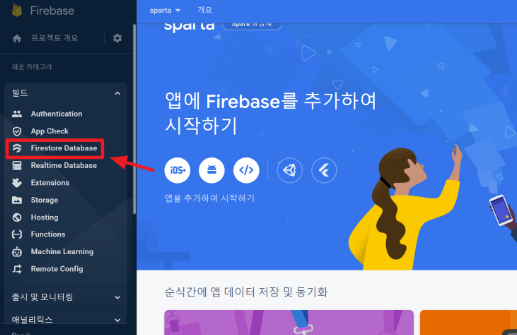
- 빌드에서 Firestore Database 클릭
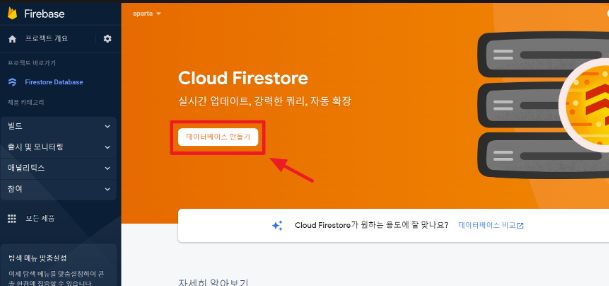
- DB 만들기 클릭
- 프로덕션 모드에서 시작하기 클릭
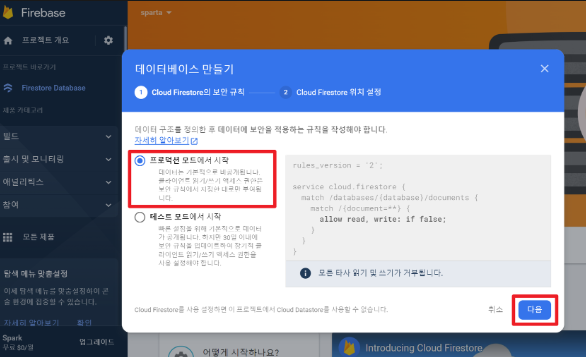
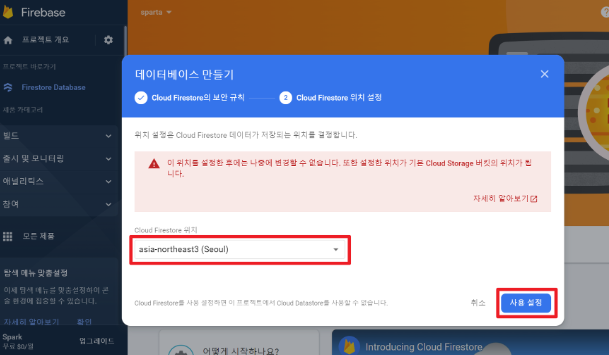
- Cloud Firestore위치는 Seoul로 설정하고, 사용 설정 클릭
▷ 파이어스토어 규칙 수정하기
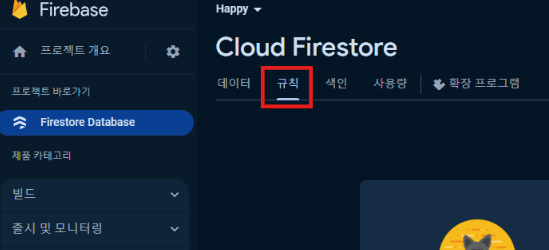
- 규칙 클릭
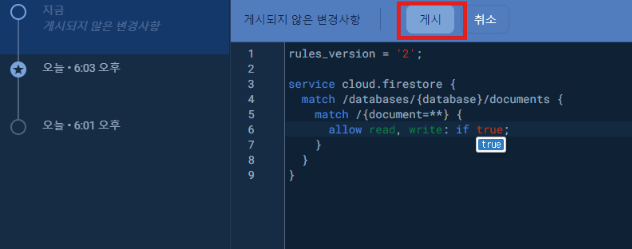
- false → true 변경 후, 게시 클릭
▷ 파이어스토어 세팅 코드 넣기📌
추후 프로젝트 진행시, 이 코드 그냥 복사하면 됨!
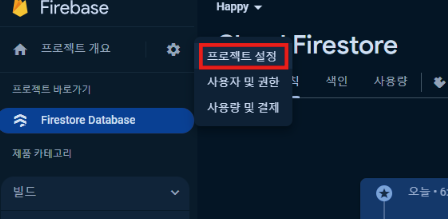
- 프로젝트 설정 클릭
- 구성 클릭후 코드 복사
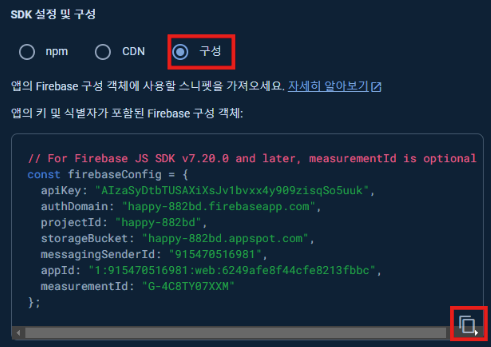
- VS를 킨 다음, 파이어스토어 세팅 코드 넣기 (DB가 필요한 프로젝트에 넣으면 된다.)
➡️ 저장하지 않았거나 잊어버린 경우 프로젝트 설정 누르면 나와있다.
// Firebase SDK 라이브러리 가져오기
import { initializeApp } from "https://www.gstatic.com/firebasejs/9.22.0/firebase-app.js";
import { getFirestore } from "https://www.gstatic.com/firebasejs/9.22.0/firebase-firestore.js";
import { collection, addDoc } from "https://www.gstatic.com/firebasejs/9.22.0/firebase-firestore.js";
import { getDocs } from "https://www.gstatic.com/firebasejs/9.22.0/firebase-firestore.js";


// Firebase 구성 정보 설정
const firebaseConfig = {
	본인 설정 내용 채우기
};


// Firebase 인스턴스 초기화
const app = initializeApp(firebaseConfig);
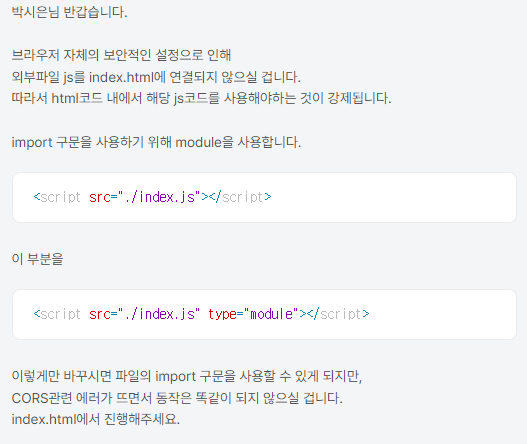
const db = getFirestore(app);- 그 후, script의 type을 module로 바꿔주자.
⚠️ type을 module로 바꾸면 script가 맨 마지막에 호출되고,
onclick 이런거 안되기 때문에, click을 동적으로 만들어줘야한다! (아래에서 다시 설명)
<script type="module">⚠️ 브라우저 자체의 보안적인 설정으로 인해 외부파일 js가 index.html에 연결되지 않아 html코드 내에서 해당 js코드를 사용해야하는 것이 강제된다고 한다!
- 따라서 index.html에서 진행해주자.
▶ addDoc : DB에 데이터 넣기
▷ Firestore DB에 데이터 넣기
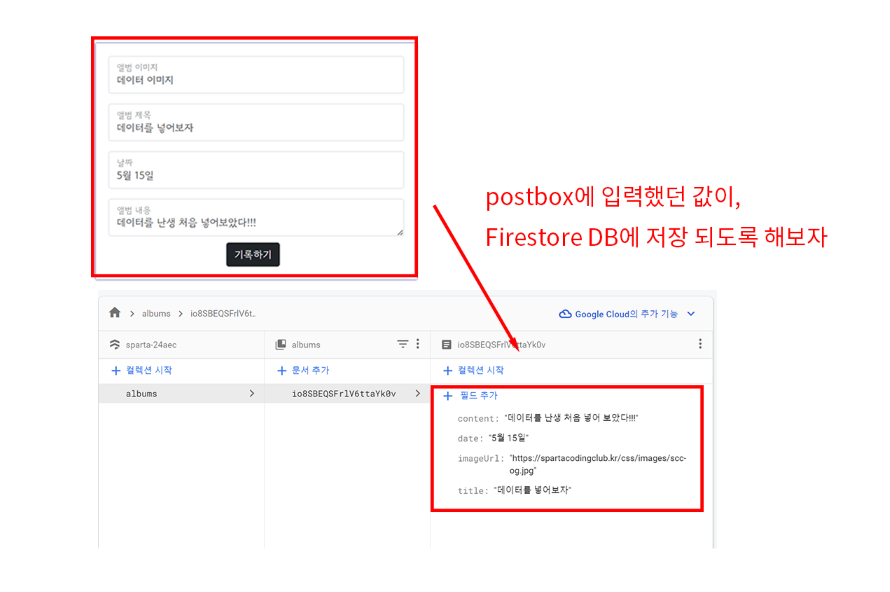
- 버튼에다가 id값을 줘보자
<button id="postingBtn" type="button" class="btn btn-primary">
	기록하기
</button>- 데이터를 Firestore DB에 저장하기 위해 아래 코드를 사용하면 된다.
즉, postingBtn에다가 click을 할 시 아래의 메서드가 실행되도록 할 것이다.
$("#postingBtn").click(async function () {
    let doc = {};
    await addDoc(collection(db, "콜렉션이름"), doc);
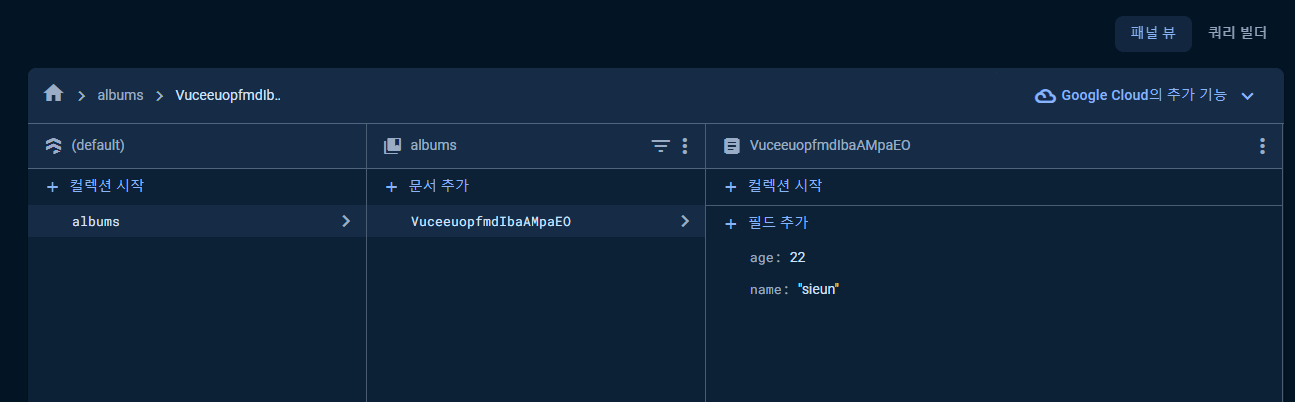
})- 잘 저장되는지 확인하기 위해 let doc에 아래와 같은 데이터를 넣어주자
$("#postingBtn").click(async function () {
  let doc = { name: "sieun", age: "22" };
  await addDoc(collection(db, "albums"), doc);
});- 짜잔!🎇 (신기해서 절로 감탄사가 나왔다.. 너무 신기해..)
- 이제, name과 age가 아닌 이미지, 제목, 내용 날짜의 데이터를 넣어주자
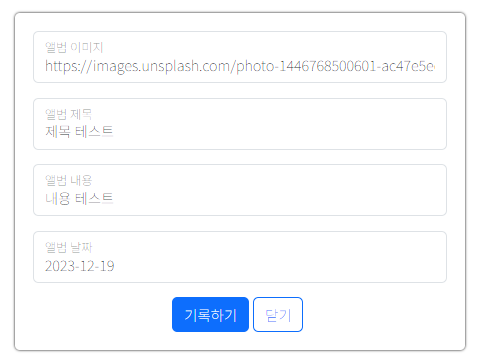
      $("#postingBtn").click(async function () {
        let image = $("#image").val();
        let title = $("#title").val();
        let content = $("#content").val();
        let date = $("#date").val();

        let doc = {
          image: image,
          title: title,
          content: content,
          date: date,
        };
        await addDoc(collection(db, "albums"), doc);
});- 짜잔!🎇
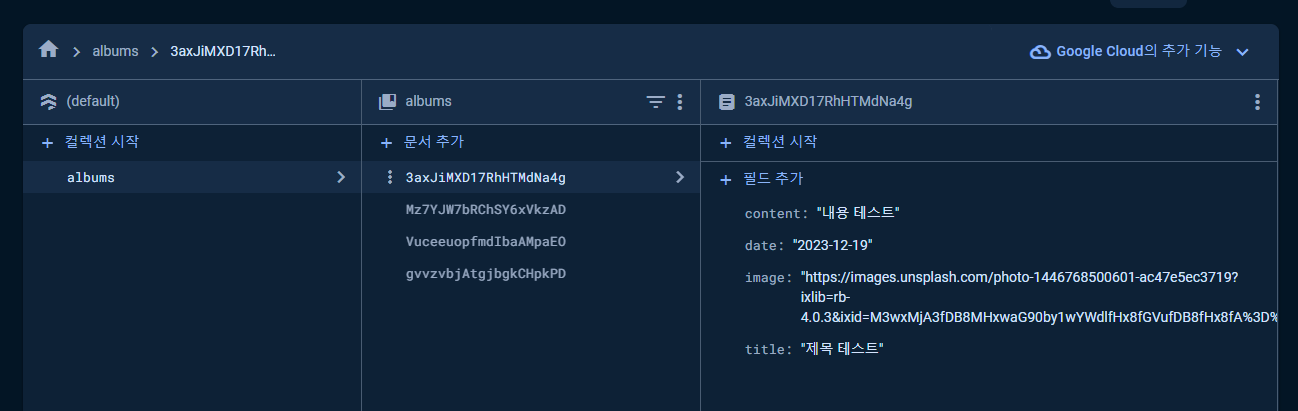
▷ 데이터 넣고, 화면 새로고침 하기(location, alert)
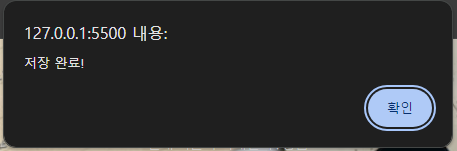
- 데이터 넣고, 버튼을 누르면 저장완료 알림이 나오고 화면 새로고침을 해보자!
초간단! 아래 두 줄만 추가하면 된다.
alert("저장 완료!"); // 기록하기 버튼을 눌렀을 때 알림띄우기
window.location.reload(); // 화면 새로고침 하기 $("#postingBtn").click(async function () {
let image = $("#image").val();
let title = $("#title").val();
let content = $("#content").val();
let date = $("#date").val();
let doc = {
image: image,
title: title,
content: content,
date: date,
};
await addDoc(collection(db, "albums"), doc);
alert("저장 완료!");
window.location.reload();
});
- 짜잔!🎇
우린 파이어스토어를 사용하기 위해
<script type="module">를 해 주었다!
🥹 하지만 type에 module이 붙는 순간,<button>을 수행할 수 없다!!
💡 따라서 직접 button에다가 click을$("#postingBtn").click이런식으로 해주면 된다!
- 먼저, 아래 코드를
<button onclick="openClose()">추억 저장하기</button>- onclick이 아닌 id값으로 변경하자.
<button id="saveBtn">추억 저장하기</button>- 그 다음, openClose 메서드가 하는 역할을 괄호 안에 추가하자.
$("#saveBtn").click(async function () {
$("#postingBox").toggle();
});- openClose 메서드 (삭제해도됨)
function openClose() {
$("#postingBox").toggle();
}
➡️ 이렇게 해주면 토글 기능이 정상적으로 작동되는 것을 확인할 수 있다!
▶ getDocs : DB에서 데이터 가져오기
▷ Firestore DB에서 데이터 가져오기
Firestore Database에서 데이터 가져와서 카드를 생성해보자
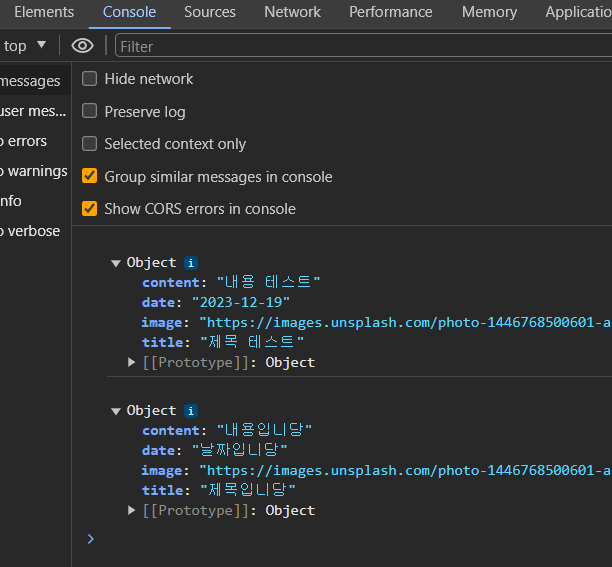
- 데이터 읽기 스켈레톤 코드 (데이터 가져오기 : getDocs)
let docs = await getDocs(collection(db, "콜렉션이름"));
docs.forEach((doc) => {
let row = doc.data();
console.log(row);
}); - 짜잔!🎇
- 데이터를 가져왔으니 카드를 붙여주자
아래의 카드 코드를 가져와서 (가져온 후, makeCard 삭제하기)
function makeCard() {
let image = $("#image").val();
let title = $("#title").val();
let content = $("#content").val();
let date = $("#date").val();
let temp_html = `
<div class="col">
<div class="card">
<img
src="${image}"
class="card-img-top"
alt="..."
/>
<div class="card-body">
<h5 class="card-title">${title}</h5>
<p class="card-text">${date}</p>
<p class="card-text">${content}</p>
</div>
</div>
</div>`;
$("#card").append(temp_html);
}여기에 붙여주자!
let docs = await getDocs(collection(db, "albums"));
docs.forEach((doc) => {
let row = doc.data();
console.log(row);
let image = $("#image").val();
let title = $("#title").val();
let content = $("#content").val();
let date = $("#date").val();
let temp_html = `
<div class="col">
<div class="card">
<img
src="${image}"
class="card-img-top"
alt="..."
/>
<div class="card-body">
<h5 class="card-title">${title}</h5>
<p class="card-text">${date}</p>
<p class="card-text">${content}</p>
</div>
</div>
</div>`;
$("#card").append(temp_html);
});그 후, row의 값이 들어가게 코드를 수정해주자
let image = row["image"];
let title = row["title"];
let content = row["content"];
let date = row["date"];- 짜잔!🎇
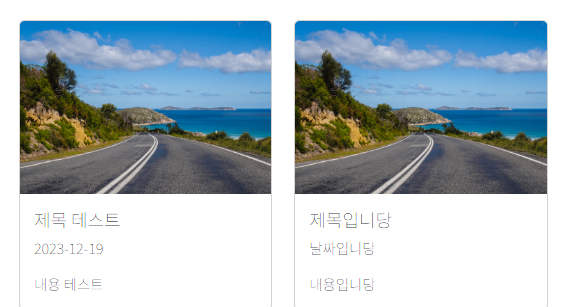
새로고침하면 아래와 같이 생성된 것을 확인할 수 있다.
▶ 전체 코드
<!DOCTYPE html>
<html lang="en">
<head>
<meta charset="UTF-8" />
<meta name="viewport" content="width=device-width, initial-scale=1.0" />
<title>나만의 추억앨범</title>
<script src="https://ajax.googleapis.com/ajax/libs/jquery/3.5.1/jquery.min.js"></script>
<link
href="https://cdn.jsdelivr.net/npm/bootstrap@5.3.2/dist/css/bootstrap.min.css"
rel="stylesheet"
integrity="sha384-T3c6CoIi6uLrA9TneNEoa7RxnatzjcDSCmG1MXxSR1GAsXEV/Dwwykc2MPK8M2HN"
crossorigin="anonymous"
/>
<link rel="stylesheet" href="./style.css" />
<script type="module">
// Firebase SDK 라이브러리 가져오기
import { initializeApp } from "https://www.gstatic.com/firebasejs/9.22.0/firebase-app.js";
import { getFirestore } from "https://www.gstatic.com/firebasejs/9.22.0/firebase-firestore.js";
import {
collection,
addDoc,
} from "https://www.gstatic.com/firebasejs/9.22.0/firebase-firestore.js";
import { getDocs } from "https://www.gstatic.com/firebasejs/9.22.0/firebase-firestore.js";
// Firebase 구성 정보 설정
// For Firebase JS SDK v7.20.0 and later, measurementId is optional
const firebaseConfig = {
apiKey: "AIzaSyDtbTUSAXiXsJv1bvxx4y909zisqSo5uuk",
authDomain: "happy-882bd.firebaseapp.com",
projectId: "happy-882bd",
storageBucket: "happy-882bd.appspot.com",
messagingSenderId: "915470516981",
appId: "1:915470516981:web:6249afe8f44cfe8213fbbc",
measurementId: "G-4C8TY07XXM",
};
// Firebase 인스턴스 초기화
const app = initializeApp(firebaseConfig);
const db = getFirestore(app);
      $("#postingBtn").click(async function () {
        let image = $("#image").val();
        let title = $("#title").val();
        let content = $("#content").val();
        let date = $("#date").val();

        let doc = {
          image: image,
          title: title,
          content: content,
          date: date,
        };
        await addDoc(collection(db, "albums"), doc);
        alert("저장 완료!");
        window.location.reload();
      });
     $("#saveBtn").click(async function () {
        $("#postingBox").toggle();
      });
$(document).ready(function () {
let url = "http://spartacodingclub.shop/sparta_api/weather/seoul";
fetch(url)
.then((res) => res.json())
.then((data) => {
let temp = data["temp"];
if (temp > 20) {
$("#seoulWeather").text("더워요");
} else {
$("#seoulWeather").text("추워요");
}
});
});
let docs = await getDocs(collection(db, "albums"));
docs.forEach((doc) => {
let row = doc.data();
console.log(row);
        let image = row["image"];
        let title = row["title"];
        let content = row["content"];
        let date = row["date"];
let temp_html = `
<div class="col">
<div class="card">
<img
src="${image}"
class="card-img-top"
alt="..."
/>
<div class="card-body">
<h5 class="card-title">${title}</h5>
<p class="card-text">${date}</p>
<p class="card-text">${content}</p>
</div>
</div>
</div>`;
$("#card").append(temp_html);
});
</script>
</head>
<body>
<div class="mytitle">
<h1>나만의 추억 앨범</h1>
<p>현재 서울의 미세먼지 : <span id="msg"></span></p>
<button id="saveBtn">추억 저장하기</button>
</div>
<div class="mypostingBox" id="postingBox">
<div class="form-floating mb-3">
<input
type="email"
class="form-control"
id="image"
placeholder="앨범 이미지"
/>
<label for="floatingInput">앨범 이미지</label>
</div>
<div class="form-floating mb-3">
<input
type="email"
class="form-control"
id="title"
placeholder="앨범 제목"
/>
<label for="floatingInput">앨범 제목</label>
</div>
<div class="form-floating mb-3">
<input
type="email"
class="form-control"
id="content"
placeholder="앨범 내용"
/>
<label for="floatingInput">앨범 내용</label>
</div>
<div class="form-floating mb-3">
<input
type="email"
class="form-control"
id="date"
placeholder="앨범 날짜"
/>
<label for="floatingInput">앨범 날짜</label>
</div>
<div class="myBtn">
<button id="postingBtn" type="button" class="btn btn-primary">
기록하기
</button>
<button type="button" class="btn btn-outline-primary">닫기</button>
</div>
</div>
<div class="mycards">
<div id="card" class="row row-cols-1 row-cols-md-4 g-4">
</div>
</div>
</div>
<script src="./index.js"></script>
<script
src="https://cdn.jsdelivr.net/npm/bootstrap@5.3.2/dist/js/bootstrap.bundle.min.js"
integrity="sha384-C6RzsynM9kWDrMNeT87bh95OGNyZPhcTNXj1NW7RuBCsyN/o0jlpcV8Qyq46cDfL"
crossorigin="anonymous"
></script>
</body>
</html>
블로그 이전했습니다!