[연습문제] 모듈(04)
👇 순열(permutation) 구하기 (내 풀이)
def per():

    numN = int(input('numN 입력: '))
    numR = int(input('numR 입력: '))
    result = 1

    for i in range(numN, (numN-numR), -1):
        n = i
        result *= i
        print(f'n : {n}')
        continue

    print(f'{numN}P{numR} 개수: {result}')
import Permutation as pm
if __name__ == '__main__':
pm.per()👇 강의에서의 풀이 (모듈 안에서 input 안받고 값을 return만 함)
import Permutation as pm

numN = int(input('numN 입력: '))
numR = int(input('numR 입력: '))

result = pm.per(numN, numR, logPrint=False)

print(f'{numN}P{numR} 개수: {result}')
def per(n, r, logPrint = True):
result = 1
for n in range(n, (n-r), -1):
if logPrint : print(f'n: {n}')
result *= n
return result- logPrint 값을 이용해서, log를 출력할지 말지 결정할 수 있음
✨ 파이썬 내장 모듈 사용으로 리스트도 확인하기
from itertools import permutations

def getPermutations(ns, r):

    pList = list(permutations(ns, r))
    print(f'{len(ns)}P{r} 개수: {len(pList)}')

    for n in permutations(ns, r):
        print(n, end='')
import per as p
listVar = [1,2,3,4,5,6,7,8]
rVar = 3
p.getPermutations(listVar, rVar)[연습문제] 모듈(05)
👇 조합(combination) 구하기
def getCombination(n, r):

    resultP = 1
    resultR = 1
    resultC = 1

    for n in range(n, n-r, -1):
        resultP *= n

    for r in range(1, r+1):
        resultR *= r

    resultC = int(resultP / resultR)

    return resultC
import combination as cb
numN = int(input('numN 입력: '))
numR = int(input('numR 입력: '))
print(f'{numN}C{numR}: {cb.getCombination(numN, numR)}')✨ 파이썬 내장 모듈 사용
from itertools import combinations

def getCombinations(ns, r):
    cList = list(combinations(ns, r))
    print(f'{len(ns)}C{r}: {len(cList)}')

    for n in combinations(ns, r):
        print(n, end='')
import combination as cb
listVar = [1,2,3,4,5,6,7,8]
rVar = 3
cb.getCombinations(listVar, rVar)[연습문제] 모듈(06)
- setter와 getter 개념의 이해가 필요한 시점!
income = 0
waterPrice = 0; elecPrice = 0; gasPrice = 0

def setIncome(ic):
    global income
    income = ic

def getIncome():
    return income

def setWaterPrice(wp):
    global waterPrice
    waterPrice = wp

def getWaterPrice():
    return waterPrice

def setElecPrice(ep):
    global elecPrice
    elecPrice = ep

def getElecPrice():
    return elecPrice

def setGasPrice(gp):
    global gasPrice
    gasPrice = gp

def getGasPrice():
    return gasPrice

def getUtilityBill():
    result = waterPrice + elecPrice + gasPrice
    return result

def getUtilityBillRate():
    result = getUtilityBill() / income * 100
    return result

def formatedNum(n):
return format(n, ',')- 변수 초기화, setter에서 global + 변수, getter에서 값 return
- getter를 직접 사용하진 않고, 거기서 return된 변수를 사용해서 필요한 값을 계산함
import module as md

userIncome = int(input('수입 입력: '))
md.setIncome(userIncome)

userWaterPrice = int(input('수도요금 입력: '))
md.setWaterPrice(userWaterPrice)

userElecPrice = int(input('전기요금 입력: '))
md.setElecPrice(userElecPrice)

userGasPrice = int(input('가스요금 입력: '))
md.setGasPrice(userGasPrice)

print(f'공과금: {md.formatedNum(md.getUtilityBill())}원')
print(f'공과금 비율: {md.getUtilityBillRate():.2f}%')- input 값을 변수에 받아 setter에 넣어줌
😹
- 모듈 사용없이 풀려면 풀 수 있는 간단한 계산식인데,
모듈을 사용하려니 더 복잡해지는 느낌...이지만 배워야하는 방법이겠지!
[연습문제] 모듈(07)
- 패키지와 모듈 만들기
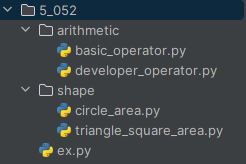
#basic_operator.py

def add(n1, n2):
    return round(n1 + n2, 2)

def sub(n1, n2):
    return round(n1 - n2, 2)

def mul(n1, n2):
    return round(n1 * n2, 2)

def div(n1, n2):
    return round(n1 / n2, 2)
#developer_operator.py
def mod(n1, n2):
return round(n1 % n2, 2)
def flo(n1, n2):
return round(n1 // n2, 2)
def exp(n1, n2):
return round(n1 ** n2, 2)#circle_area.py
def calCircleArea(r):
return round(r ** 2 * 3.14, 2)#trianle_square_area
def calTriangleArea(w, h):
return round(w * h * 0.5, 2)
def calSquareArea(w, h):
return round(w * h, 2)🔑 실행 파일
from arithmetic import basic_operator as bo
from arithmetic import developer_operator as do
from shape import circle_area as ca
from shape import triangle_square_area as tsa

userNum1 = float(input('숫자 1 입력: '))
userNum2 = float(input('숫자 2 입력: '))

print(f'{userNum1} + {userNum2} = {bo.add(userNum1, userNum2)}')
print(f'{userNum1} - {userNum2} = {bo.sub(userNum1, userNum2)}')
print(f'{userNum1} * {userNum2} = {bo.mul(userNum1, userNum2)}')
print(f'{userNum1} / {userNum2} = {bo.div(userNum1, userNum2)}')

print(f'{userNum1} % {userNum2} = {do.mod(userNum1, userNum2)}')
print(f'{userNum1} // {userNum2} = {do.flo(userNum1, userNum2)}')
print(f'{userNum1} ** {userNum2} = {do.exp(userNum1, userNum2)}')

userWidth = float(input('가로 길이 입력: '))
userHeight = float(input('세로 길이 입력: '))

print(f'삼각형 넓이: {tsa.calTriangleArea(userWidth, userHeight)}')
print(f'사각형 넓이: {tsa.calSquareArea(userWidth, userHeight)}')

userRadius = float(input('반지름 입력: '))
print(f'원 넓이: {ca.calCircleArea(userRadius)}')
문과이과예체능통합형인재