[Jenkins] GitLab 자동 배포(1) : 기본 설정

감쟈감쟈왕감쟈·2023년 11월 1일

배포

목록 보기
2/3

0. Docker로 Jenkins를 설치한다.

$ sudo apt update
$ docker pull jenkins/jenkins

1. Jenkins 실행

docker run \
--name jenkins \
-d \
-p 9090:9090 \
-p 50000:50000 \
-v /home/ubuntu/jenkins:/var/jenkins_home \
-v /var/run/docker.sock:/var/run/docker.sock \
-u root \
-d jenkins/jenkins:lts

2. Jenkins안에 Docker 설치하기

docker exec -it jenkins bash
apt update
apt install -y docker.io

3. 포트 열어주기

  1. ufw 상태 확인 : sudo ufw status
  2. 사용할 포트 허용하기 (ufw inactive 상태) : sudo ufw allow 9090
  3. 등록한 포트 조회하기 (ufw inactive 상태) : sudo ufw show added
  4. ufw 활성화 하기 : sudo ufw enable

4. Jenkins 접속하기

현재 9090 port로 열어두었기 때문에 도메인:9090으로 접속하면 된다!

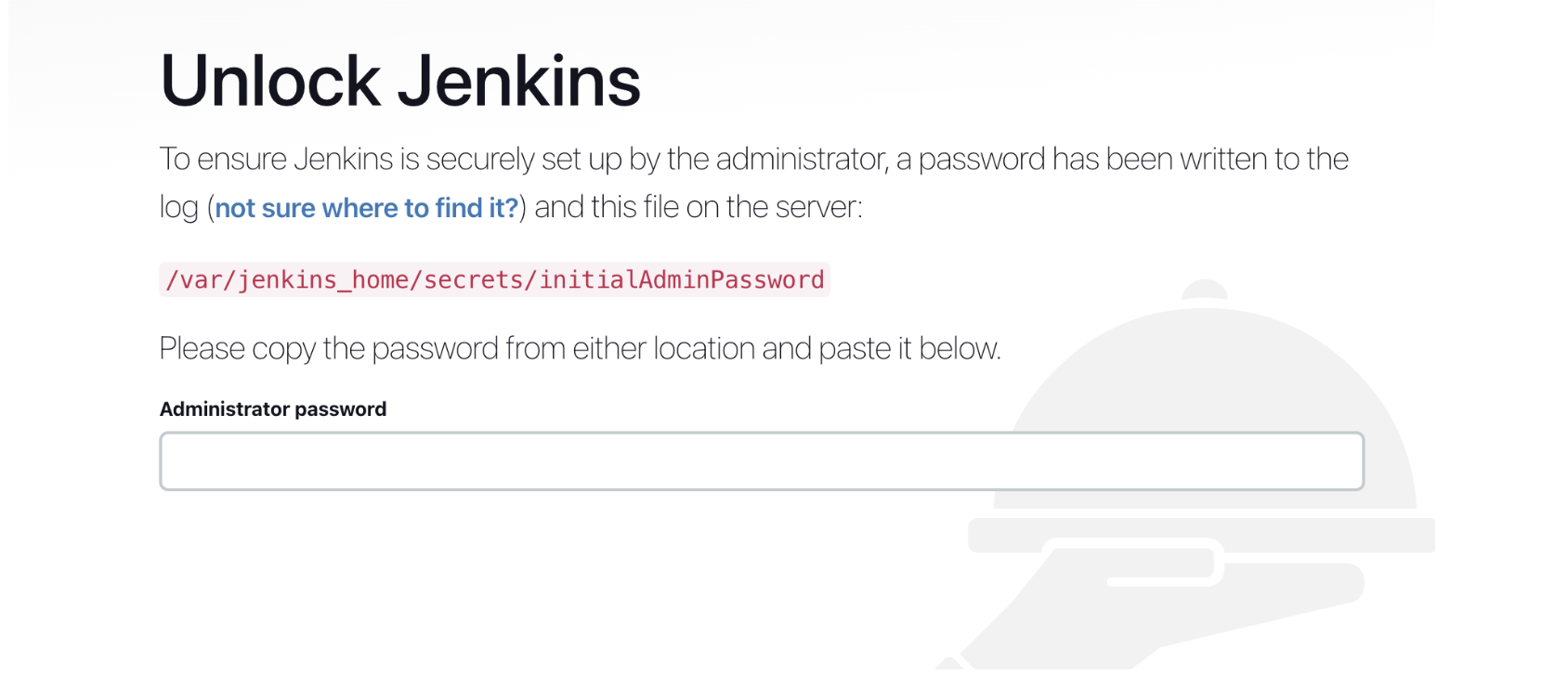
이런 화면이 나온다면 docker logs jekins혹은 해당 경로에서 key값을 확인해주면 된다!
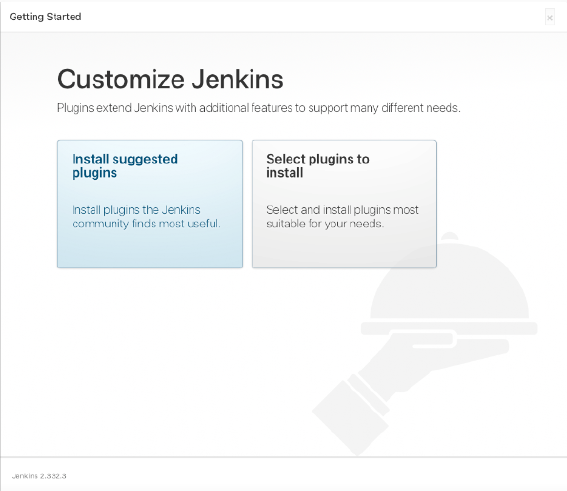
5. 기본 플러그인 설치하기
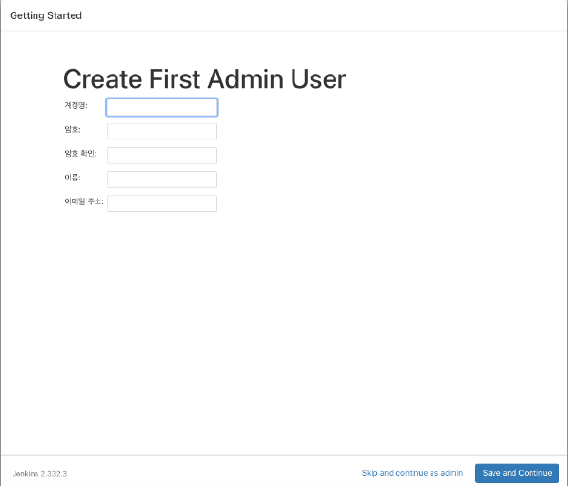
6. 계정 생성
7. 추가 플러그인 설치

gitlab을 사용할 것이기 때문에
plugins -> available plugins에서 gitlab과 ssh agent, docker를 설치를 추가로 해준다.

8. gitlab을 사용 시 gitlab을 연결하기 위한 토큰을 생성
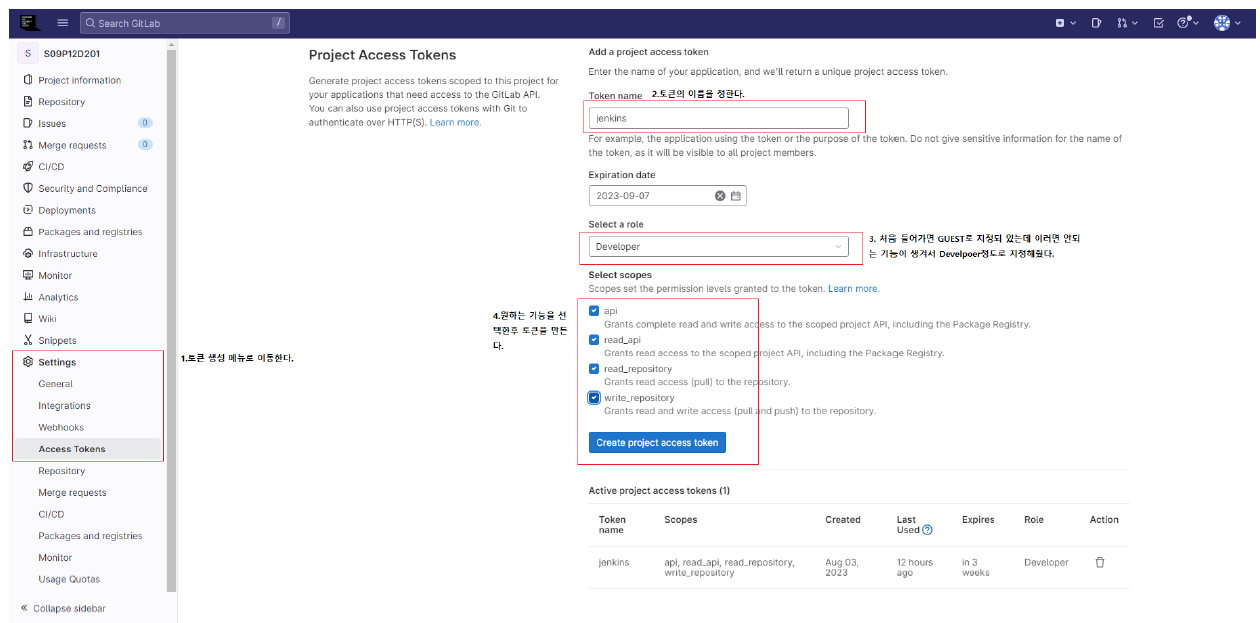
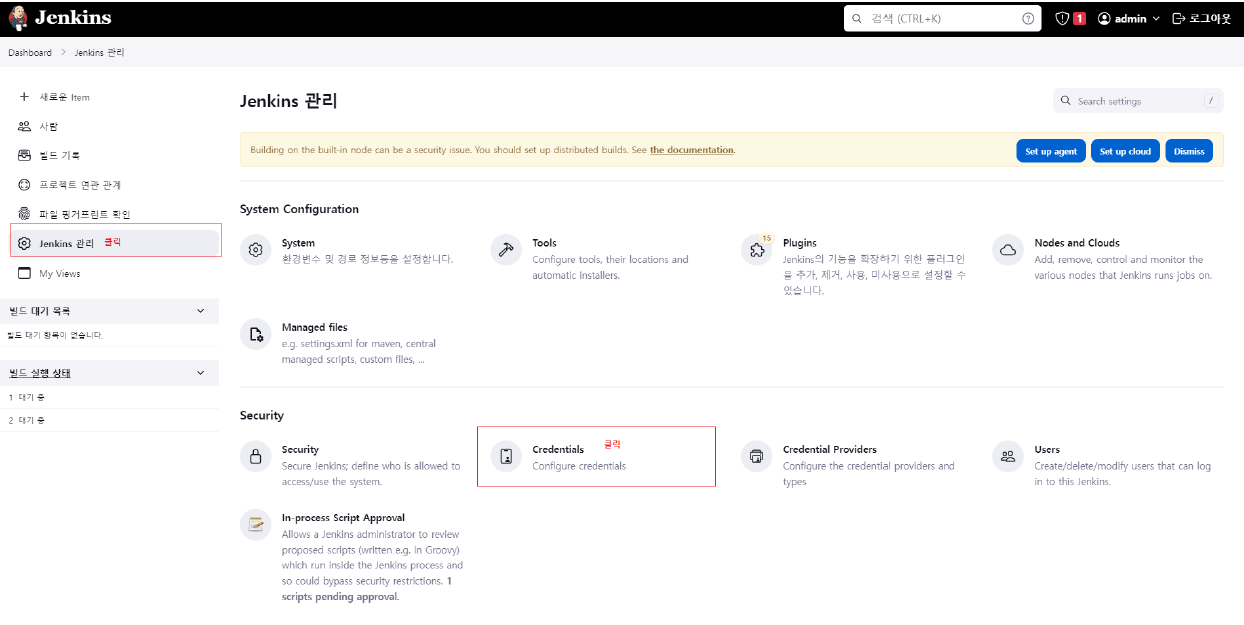
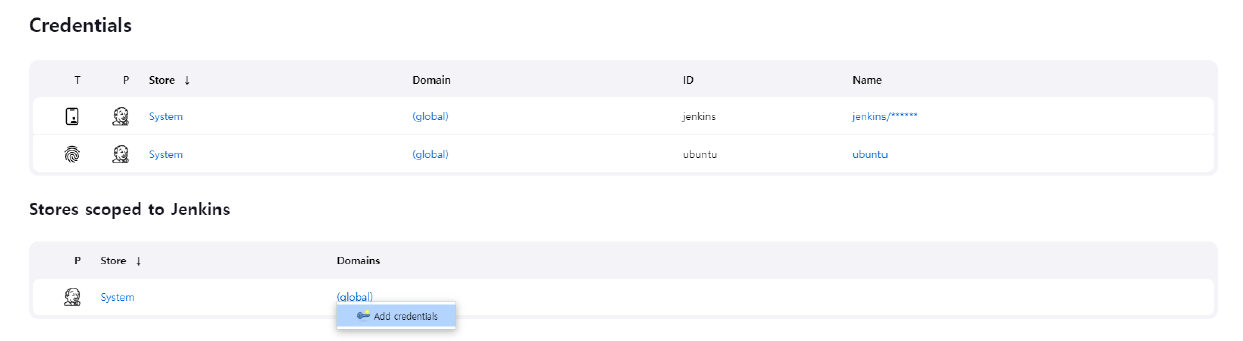
8. 인증 권한 등록하기


새로운 Credential을 생성해준다.

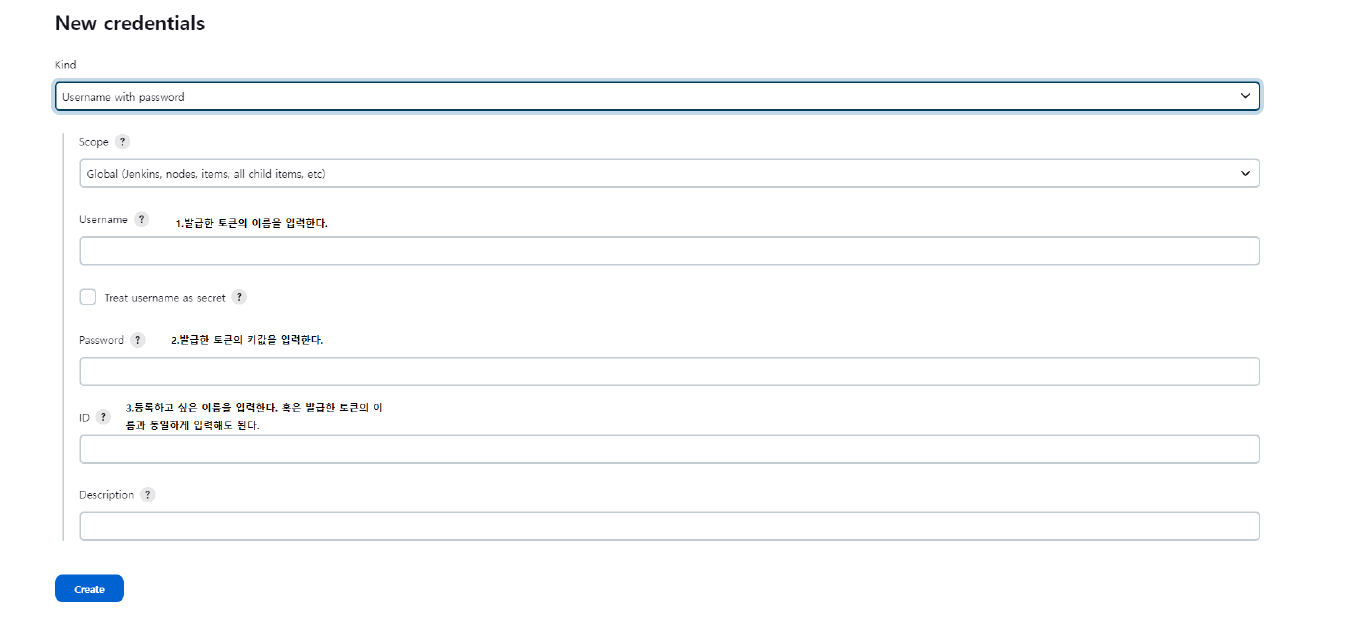
발급 받은 토큰을 jenkins에 등록해준다. 이때 Kind : GitLab API Token으로 설정해준다.

그리고 gitlab에서 개인 accesstoken을 발급받아 1개 추가로 더 증록해준다.
Kind=Username with password 이며, Username=Gitlab ID, Password : 토큰 으로 작성한다

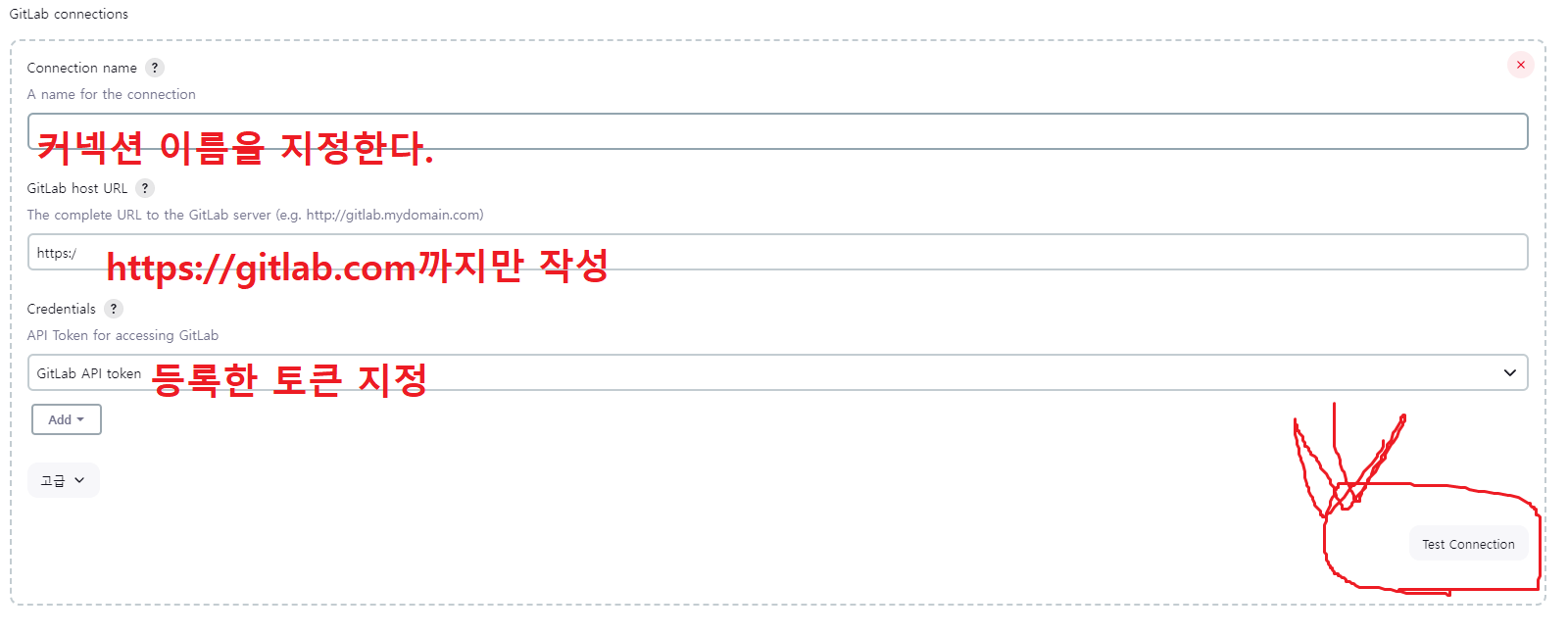
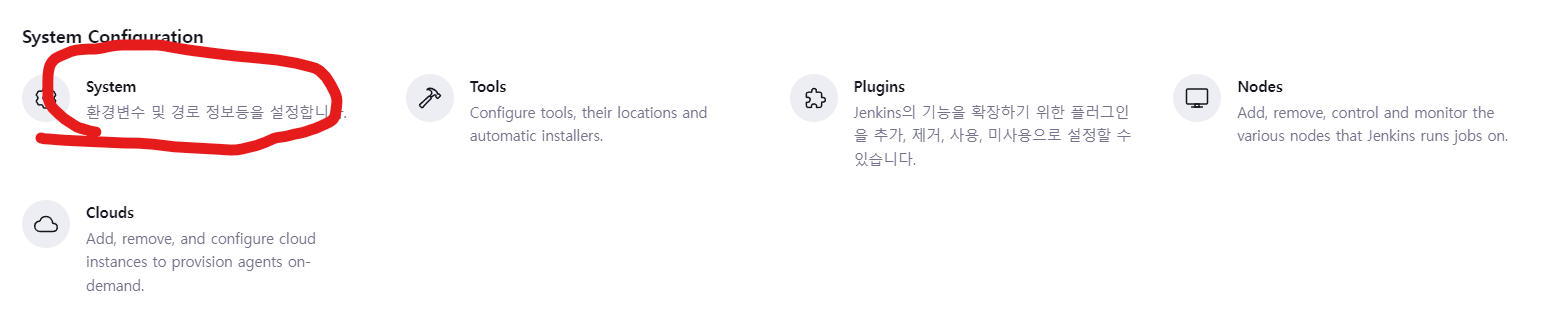
9. 깃랩 연결하기


아래의 작업을 진행하고 Test Connection으로 연결 확인을 진행한다.
profile
싹난 독든 감자의 성장일지

25개의 댓글

comment-user-thumbnail
2023년 11월 3일

잘보고 가요 ^^ 깔끔하게 작성 잘 됐네요

답글 달기
comment-user-thumbnail
2023년 11월 3일

잘보고 가요 ^^ 깔끔하게 작성 잘 됐네요

답글 달기
comment-user-thumbnail
2023년 11월 3일

잘보고 가요 ^^ 깔끔하게 작성 잘 됐네요

답글 달기
comment-user-thumbnail
2023년 11월 3일

잘보고 가요 ^^ 깔끔하게 작성 잘 됐네요

답글 달기
comment-user-thumbnail
2023년 11월 3일

잘보고 가요 ^^ 깔끔하게 작성 잘 됐네요

답글 달기
comment-user-thumbnail
2023년 11월 3일

잘보고 가요 ^^ 깔끔하게 작성 잘 됐네요

답글 달기
comment-user-thumbnail
2023년 11월 3일

잘보고 가요 ^^ 깔끔하게 작성 잘 됐네요

답글 달기
comment-user-thumbnail
2023년 11월 3일

잘보고 가요 ^^ 깔끔하게 작성 잘 됐네요

답글 달기
comment-user-thumbnail
2023년 11월 3일

잘보고 가요 ^^ 깔끔하게 작성 잘 됐네요

답글 달기
comment-user-thumbnail
2023년 11월 3일

잘보고 가요 ^^ 깔끔하게 작성 잘 됐네요

답글 달기
comment-user-thumbnail
2023년 11월 3일

잘보고 가요 ^^ 깔끔하게 작성 잘 됐네요

답글 달기
comment-user-thumbnail
2023년 11월 3일

잘보고 가요 ^^ 깔끔하게 작성 잘 됐네요

답글 달기
comment-user-thumbnail
2023년 11월 3일

잘보고 가요 ^^ 깔끔하게 작성 잘 됐네요

답글 달기
comment-user-thumbnail
2023년 11월 3일

잘보고 가요 ^^ 깔끔하게 작성 잘 됐네요

답글 달기
comment-user-thumbnail
2023년 11월 3일

잘보고 가요 ^^ 깔끔하게 작성 잘 됐네요

답글 달기
comment-user-thumbnail
2023년 11월 3일

잘보고 가요 ^^ 깔끔하게 작성 잘 됐네요

답글 달기
comment-user-thumbnail
2023년 11월 3일

잘보고 가요 ^^ 깔끔하게 작성 잘 됐네요

답글 달기
comment-user-thumbnail
2023년 11월 3일

잘보고 가요 ^^ 깔끔하게 작성 잘 됐네요

답글 달기
comment-user-thumbnail
2023년 11월 3일

잘보고 가요 ^^ 깔끔하게 작성 잘 됐네요

답글 달기
comment-user-thumbnail
2023년 11월 3일

잘보고 가요 ^^ 깔끔하게 작성 잘 됐네요

답글 달기
comment-user-thumbnail
2023년 11월 3일

잘보고 가요 ^^ 깔끔하게 작성 잘 됐네요

답글 달기
comment-user-thumbnail
2023년 11월 3일

잘보고 가요 ^^ 깔끔하게 작성 잘 됐네요

답글 달기
comment-user-thumbnail
2023년 11월 3일

잘보고 가요 ^^ 깔끔하게 작성 잘 됐네요

답글 달기
comment-user-thumbnail
2023년 11월 3일

잘보고가요^^ 깔끔하네요

답글 달기
comment-user-thumbnail
2023년 11월 3일

잘보고가요^^ 깔끔하네요

답글 달기