2021년 7월 16일 15일차
학습한 내용
html
<div class="box-model">
	Hello World
</div>
<!-- content : 열릴태그와 닫힌태그 사이에 있는 내용물
	ex) div 태그안의 hello world는 content, body태그 안에 div태그는 content-->
css
html, body {
margin: 0;
padding: 0;
/기본적으로 html에서 margin과 padding의 공백이 있다.
그래서 default로 0값을 주면 된다. -> 위에 태그처럼 쓰면 top,bottom,right,left 전부 공백이 0으로 설정이 된다./
}
.box-model {
box-sizing: border-box;
/내가 만든 공간의 크기 안쪽으로 border,와 padding이 세팅이 된다./
width:  200px;
height:  200px;
background-color: yellow;
border:  solid 10px red;


margin:  100px 0 0 100px;
padding:  100px 0 0 100px;
/*위 오른쪽 아래 왼쪽 순으로 공백 설정,
왜 한줄로 하냐 -> 밑에 태그처럼 여러개로 작성할 경우 웹사이트가 느려질 수 있다.(파일의 용량이 커질 수 있다.)*/

margin-left:  100px;
margin-top:  100px;

padding-left: 100px;
padding-top:  100px;
/*margin-left 빈공백으로 인해 타의적으로 노란색 박스가 움직임
padding-left 빈공백으로 인해 타의적으로 글자가 움직임
padding을 사용하면 원래 사용하던 공간의 크기가 달라질 수 있다.
(원래 박스사이즈 200X200 -> 300X300*/
}
.margin-one {
width: 100%;
height: 100px;
background-color: yellow;
margin-bottom: 100px;
}
.margin-two {
width: 100%;
height: 100px;
background-color: blue;
margin-top:50px;
/margin-one과 margin-two가 margin영역을 공유하게 된다.
둘이 더해서 150px가 되는게 아니라 margin-one의 margin이 더크므로 100px가 된다.
-> 형제지간에 발생하는 margin 병합 현상/}
.margin-parent {
width: 300px;
height: 300px;
background-color: yellow;
}
.margin-child {
width: 150px;
height: 150px;
background-color: blue;
margin-top: 200px;}
/ margin-child의 top을 바꿔도 parent와 같이 움직인다.
부모간의 생기는 margin 병합 현상/
h1 {
display: inline-block;
width: 100px;
height: 100px;
background-color: yellow;

margin-top: 100px;
/*display: inline 입력하면 block->inline으로 바뀐다.
그리고 두개의 성질을 다 가지고 싶다 -> inline-block을 써주면 됨.*/
}
span {
display: block;
width: 100px;
height: 100;
background-color: pink;

margin-top: 100px;
}
/ h1은 크기(상자)를 만들 수 있지만, span태그는 공간(상자)를 만들 수 없다. /
.inline-block {
display: inline-block;
width: 100px;
height: 100px;
background-color: yellow;
}
.inline, .inline-block, img {
vertical-align: middle;
/*가장 크기가 큰 img태그의 크기에 따라 배치가 달라짐
vertical-align top : 세개의태그가 img태그의 가장 위쪽에 위치에 맞춰 정렬
vertical-align bottom : 세개의 태그가 img태그의 가장 아래쪽 위치에 맞춰 정렬
verical-middle : 세개의 태그가 img태그의 가운데 위치에 맞춰 정렬
vertical-align은 block 태그에 영향을 받지않고, inline에만 해당된다.*/
}
.static-parent {
width: 300px;
background-color: yellow;
}
.static-child {
position: static;
width: 150px;
height: 150px;
background-color: blue;

margin-top:  100px;
top: 100px;/position: static 상태에서 만약 static-parent의 높이가 없고, static-child가 높이가 있을 때,
자식의 높이가 부모의 높이에 영향을 줄 수 있다., 2차원의 성격을 가지고 있다, top,left,right,bottom 사용 못한다.
모든 html은 position: static 상태이고, 2차원 상태이다.*/
}
.box1 {
width: 300px;
height: 200px;
background-color: gray;
}
.fixed-parent {
width: 300px;
height: 300px;
background-color: yellow;
}
.fixed-child {
position: fixed;
width: 100px;
height: 100px;
background-color: blue;

margin-top: 100;
top: 100px;
/* position:fixed : 스크롤을 내리거나 올릴 때 따라 다닌다. 사실은 따라 다니는게 아니라 화면에 고정된 것
마진 병합현상 일어나지 않음, top,right,botoom,left(브라우저 왼쪽 상단을 기준으로 움직임)
3차원 특성을 가지고 있음(margin-top을 사용해도 부모 마진 병합현상이 일어나지 않음, 부모가 높이 값이 없고 자식이 가지고 있어도 영향을 줄 수 없다.) */
}
.box2 {
width: 300px;
height: 2000px;
background-color: green;
}
.box1 {
width: 300px;
height: 200px;
background-color: gray;
}
.relative-parent {
width: 300px;
height: 300px;
background-color: yellow;
}
.relative-child {
position:relative;
width: 100px;
height: 100px;
background-color: blue;

margin-top: 100px;
top: 100px;
/*positio: relative : margin-top을 사용했을 시 마진 병합현상이 일어남,
top, right, left, bottom 사용가능하고 최초에 있었던 위치 기준으로 좌표가 형성, 부모가 높이값을 가지지 않았을 때 자식이 부모에게 영향을 줌
static과 fixed와 혼합형이라고 생각하면 된다.

top,left,bottom,right : 자기자신이 주체가 되서 움직임(margin,pedding과는 다름)*/
}
.box1 {
width: 300px;
height: 200px;
background-color: gray;
}
.absolute-parent {
width: 300px;
height: 300px;
background-color: yellow;
/*아무것도 position이 쓰여지지 않았을 때 기본적으로 static 상태(2차원)*/}
.absolute-child {
position: absolute;
width: 100px;
height: 100px;
background-color: blue;

margin-top: 100px;
top: 100px;
/ position: absolute : 브라우저를 중심으로 top,left,right,bottom이 움직임
자식의 높이값이 부모에게 영향을 줄 수 없다. 3차원의 특성을 가짐. fixed의 개념과 비슷/
/parent의 position에 따라서 child의 좌표 기준점이 달라진다./
}
결과물
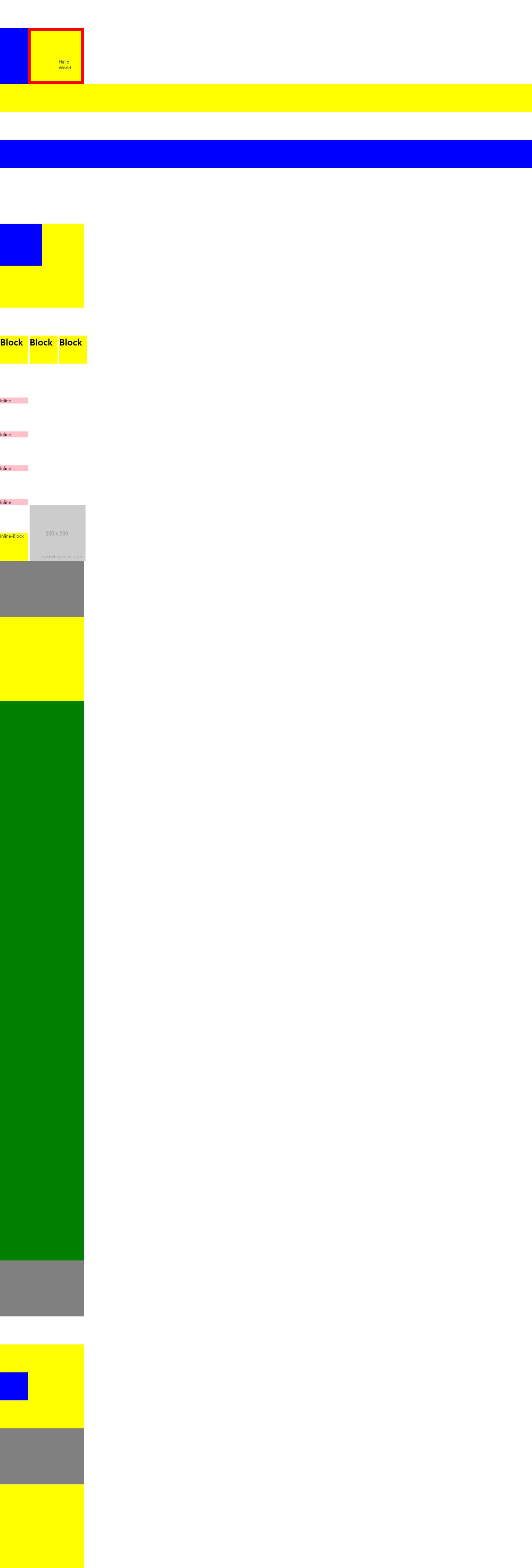
정리
-
마진 병합 현상 유무 (2차원 O, 3차원 X)
-
top, left, right, bottom (2차원 X, 3차원 O)
-
자식의 높이값이 부모의 높이값에 영향을 주는지 유무 ( 2차원 O, 3차원 X)
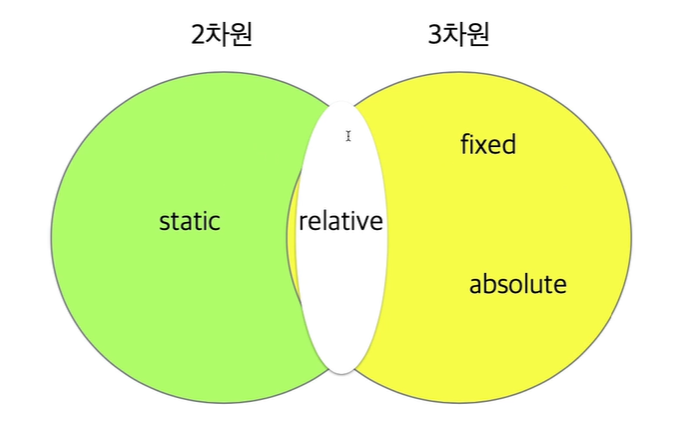
오늘 배운 내용들은 아주 중요한 내용이다. 그래서 혼자서 연습을 하라고 강사님이 말씀 하셨다. static은 고정자니 제외하고 relative, fixed, absolute를 box, parent, child의 27가지 관계를 하나씩 넣어서 생각해보라고 하셨다.
학습내용 중 어려웠던 점
아무래도 오늘 한 내용이 그림과 관련된 내용이라서 이해하기는 어려웠고, 내가 보는 화면과 컴퓨터가 이해하는 화면이 달라서 차이점을 구분하는데 힘들었다.
해결방법
강사님의 말씀대로 혼자서 연습을 하면서 오늘 배운 부분들에 대해 복습과 상관관계에 대해 고민을 해봐야 할 것 같다.
학습소감
오늘은 중요했지만 어려운 수업이기도 했다. 직관적으로 이해하기 힘든 부분이라서 생각하는데 오랜 시간이 걸렸다. 주말에 연습과 복습을 해봐야 할 것 같다.
