JS 모션을 CSS 모션(트랜지션)으로 리팩토링

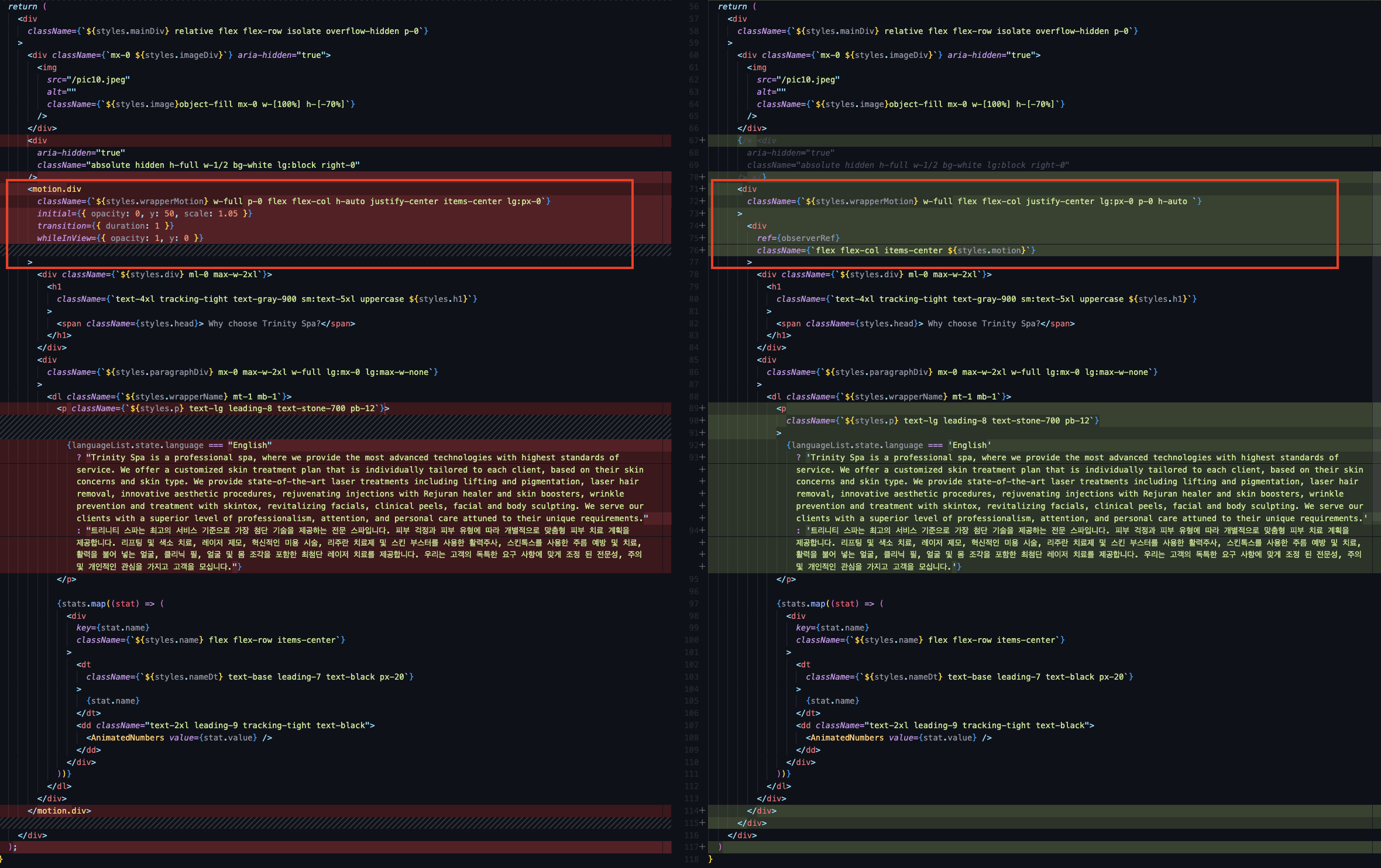
AS-IS (기존 코드):
import { motion } from "framer-motion";

return (
  <motion.div
        className={`${styles.wrapperMotion} w-full p-0 flex flex-col h-auto justify-center items-center lg:px-0`}
        initial={{ opacity: 0, y: 50, scale: 1.05 }}
        transition={{ duration: 1 }}
        whileInView={{ opacity: 1, y: 0 }}
      >
        <div className={`${styles.div} ml-0 max-w-2xl`}>
          <h1
            className={`text-4xl tracking-tight text-gray-900 sm:text-5xl uppercase ${styles.h1}`}
          >
            <span className={styles.head}> Why choose Trinity Spa?</span>
          </h1>
        </div>
        <div
          className={`${styles.paragraphDiv} mx-0 max-w-2xl w-full lg:mx-0 lg:max-w-none`}
        >
          <dl className={`${styles.wrapperName} mt-1 mb-1`}>
            <p className={`${styles.p} text-lg leading-8 text-stone-700 pb-12`}>
              {languageList.state.language === "English"
                ? "Trinity Spa is a professional spa, where we provide the most advanced technologies with highest standards of service. We offer a customized skin treatment plan that is individually tailored to each client, based on their skin concerns and skin type. We provide state-of-the-art laser treatments including lifting and pigmentation, laser hair removal, innovative aesthetic procedures, rejuvenating injections with Rejuran healer and skin boosters, wrinkle prevention and treatment with skintox, revitalizing facials, clinical peels, facial and body sculpting. We serve our clients with a superior level of professionalism, attention, and personal care attuned to their unique requirements."
                : "트리니티 스파는 최고의 서비스 기준으로 가장 첨단 기술을 제공하는 전문 스파입니다. 피부 걱정과 피부 유형에 따라 개별적으로 맞춤형 피부 치료 계획을 제공합니다. 리프팅 및 색소 치료, 레이저 제모, 혁신적인 미용 시술, 리주란 치료제 및 스킨 부스터를 사용한 활력주사, 스킨톡스를 사용한 주름 예방 및 치료, 활력을 불어 넣는 얼굴, 클리닉 필, 얼굴 및 몸 조각을 포함한 최첨단 레이저 치료를 제공합니다. 우리는 고객의 독특한 요구 사항에 맞게 조정 된 전문성, 주의 및 개인적인 관심을 가지고 고객을 모십니다."}
            </p>

            {stats.map((stat) => (
              <div
                key={stat.name}
                className={`${styles.name} flex flex-row items-center`}
              >
                <dt
                  className={`${styles.nameDt} text-base leading-7 text-black px-20`}
                >
                  {stat.name}
                </dt>
                <dd className="text-2xl leading-9 tracking-tight text-black">
                  <AnimatedNumbers value={stat.value} />
                </dd>
              </div>
            ))}
          </dl>
        </div>
      </motion.div>
    </div>
  );
}
TO-BE (개선된 코드):
export default function ThirdSection() {
  const observerRef = useRef(null)
  useEffect(() => {
    if (!observerRef) return

    let observer = new IntersectionObserver((entries, observer) => {
      if (entries[0].isIntersecting) {
        entries[0].target.style.opacity = '1'
        entries[0].target.style.transform = 'translateY(0)'
      } else {
        entries[0].target.style.opacity = '0'
        entries[0].target.style.transform = 'translateY(50px)'
      }
    })
    observer.observe(observerRef.current)

    return () => observer.disconnect()
  }, [observerRef])

return (
      <div
        className={`${styles.wrapperMotion} w-full flex flex-col justify-center lg:px-0 p-0 h-auto `}
      >
        <div
          ref={observerRef}
          className={`flex flex-col items-center ${styles.motion}`}
        >
          <div className={`${styles.div} ml-0 max-w-2xl`}>
            <h1
              className={`text-4xl tracking-tight text-gray-900 sm:text-5xl uppercase ${styles.h1}`}
            >
              <span className={styles.head}> Why choose Trinity Spa?</span>
            </h1>
          </div>
          <div
            className={`${styles.paragraphDiv} mx-0 max-w-2xl w-full lg:mx-0 lg:max-w-none`}
          >
            <dl className={`${styles.wrapperName} mt-1 mb-1`}>
              <p
                className={`${styles.p} text-lg leading-8 text-stone-700 pb-12`}
              >
                {languageList.state.language === 'English'
                  ? 'Trinity Spa is a professional spa, where we provide the most advanced technologies with highest standards of service. We offer a customized skin treatment plan that is individually tailored to each client, based on their skin concerns and skin type. We provide state-of-the-art laser treatments including lifting and pigmentation, laser hair removal, innovative aesthetic procedures, rejuvenating injections with Rejuran healer and skin boosters, wrinkle prevention and treatment with skintox, revitalizing facials, clinical peels, facial and body sculpting. We serve our clients with a superior level of professionalism, attention, and personal care attuned to their unique requirements.'
                  : '트리니티 스파는 최고의 서비스 기준으로 가장 첨단 기술을 제공하는 전문 스파입니다. 피부 걱정과 피부 유형에 따라 개별적으로 맞춤형 피부 치료 계획을 제공합니다. 리프팅 및 색소 치료, 레이저 제모, 혁신적인 미용 시술, 리주란 치료제 및 스킨 부스터를 사용한 활력주사, 스킨톡스를 사용한 주름 예방 및 치료, 활력을 불어 넣는 얼굴, 클리닉 필, 얼굴 및 몸 조각을 포함한 최첨단 레이저 치료를 제공합니다. 우리는 고객의 독특한 요구 사항에 맞게 조정 된 전문성, 주의 및 개인적인 관심을 가지고 고객을 모십니다.'}
              </p>

              {stats.map((stat) => (
                <div
                  key={stat.name}
                  className={`${styles.name} flex flex-row items-center`}
                >
                  <dt
                    className={`${styles.nameDt} text-base leading-7 text-black px-20`}
                  >
                    {stat.name}
                  </dt>
                  <dd className="text-2xl leading-9 tracking-tight text-black">
                    <AnimatedNumbers value={stat.value} />
                  </dd>
                </div>
              ))}
            </dl>
          </div>
        </div>
      </div>
    </div>
  )
}
AS-IS
기존 방식에서는 이미지를 위나 아래로 이동시키기 위해 JavaScript를 사용하여 transform 및 opacity를 조절했습니다.
이 때문에 이미지가 위 또는 아래로 이동할 때마다 transform 속성이 여러 번 변경되고, 동시에 opacity도 조절하여 노출과 비노출을 제어했습니다.이는 화면에 움직임을 만들기 위한 방식이었지만, 여러 요소를 동시에 조작하면서 성능에 부담을 주었습니다.
또한, 스크롤과 transform 변경이 동반되면 끊김이나 떨림이 생겨 사용자 경험이 저하될 수 있습니다. 이러한 문제를 해결하기 위해 스크롤 이벤트의 쓰로틀을 제거하고 추가로 requestAnimationFrame을 사용할 수 있겠지만, 마찬가지로 JS를 사용한 방법이므로 모션 성능상 한계가 있습니다. 따라서 이러한 문제들을 피하기 위해 더 효율적이고 성능이 우수한 방법을 찾는 것이 필요합니다.
requestAnimationFrame이란?
https://velog.io/@0715yk/HTML-requestAnimationFrame
TO-BE
레이어의 이동을 자연스럽게 만들기 위해 transform과 opacity에 transition을 적용했습니다. 이것은 화면에 움직임을 주기 위해 JavaScript로 직접 요소를 이동시키는 것보다 훨씬 자연스럽고 성능에 유리한 방법입니다. transition을 사용하면 요소의 변화가 부드럽게 일어나며, 사용자가 더 자연스러운 경험을 할 수 있습니다.
또한, 이러한 변경은 추가적인 돔(DOM) 연산이 한 번만 발생하므로 성능 부하가 최소화됩니다. 기존 방식에서는 JavaScript가 매번 이미지의 위치를 계산하고 변경했지만,
이제는CSS의 transition 속성이 이를 대신 처리합니다. 이로 인해 페이지가 더 부드럽게 작동하고 끊김 없이 이동하는 것을 확인할 수 있습니다.
또한, 이미지가 화면에 표시되는지 여부를 감지하기 위해 IntersectionObserver를 사용합니다.
이를 통해 브라우저가 요소의 가시성을 감지하고, 요소가 화면 안팎으로 이동할 때 적절한 애니메이션을 트리거합니다.
이렇게 함으로써사용자가 스크롤하는 동안 이미지가 자연스럽게 나타나고 사라지게 됩니다. 이것은 사용자 경험을 향상시키고 페이지의 성능을 최적화하는 데 도움이 됩니다.